



Running an ophthalmology clinic today requires more than excellent eye care. Clinics must also closely monitor patient visits, surgeries, revenue, discounts, insurance cases, and doctor performance. However, when data stays scattered across multiple Excel files or systems, visibility disappears—and decision-making becomes slow and reactive.
That is exactly where the Ophthalmology Services Dashboard in Excel becomes a powerful solution. 🚀
The Ophthalmology Services Dashboard in Excel is a ready-to-use, interactive analytics dashboard designed specifically for eye hospitals, ophthalmology clinics, diagnostic centers, and multi-specialty healthcare facilities. It converts raw clinical and billing data into clear KPIs, structured analysis pages, and visual insights—all inside Excel.
Instead of spending hours preparing manual MIS reports, clinic administrators and finance teams can instantly analyze OPD visits, surgeries, gross charges, net revenue, insurance impact, discounts, departments, doctors, and services with just a few clicks. Because it is built in Excel, the dashboard is cost-effective, flexible, and easy to use, without Power BI or complex software.
✅ Key Features of Ophthalmology Services Dashboard in Excel
👁️ Clinic Performance Overview – Instantly track visits, revenue, and charges
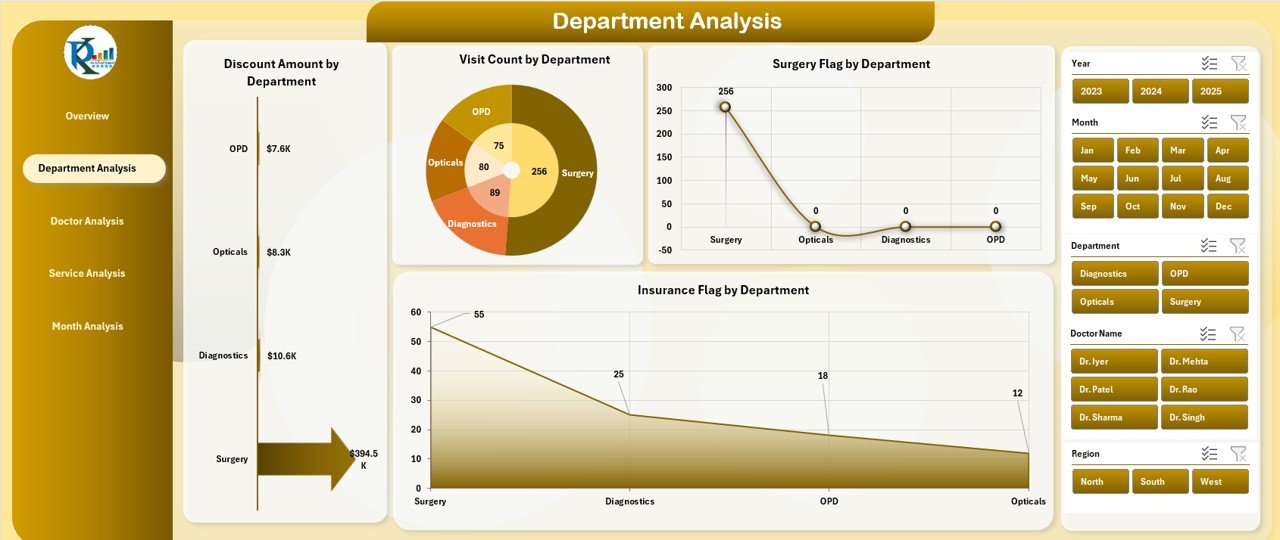
🏥 Department-Wise Analysis – Compare utilization, surgeries, and insurance cases
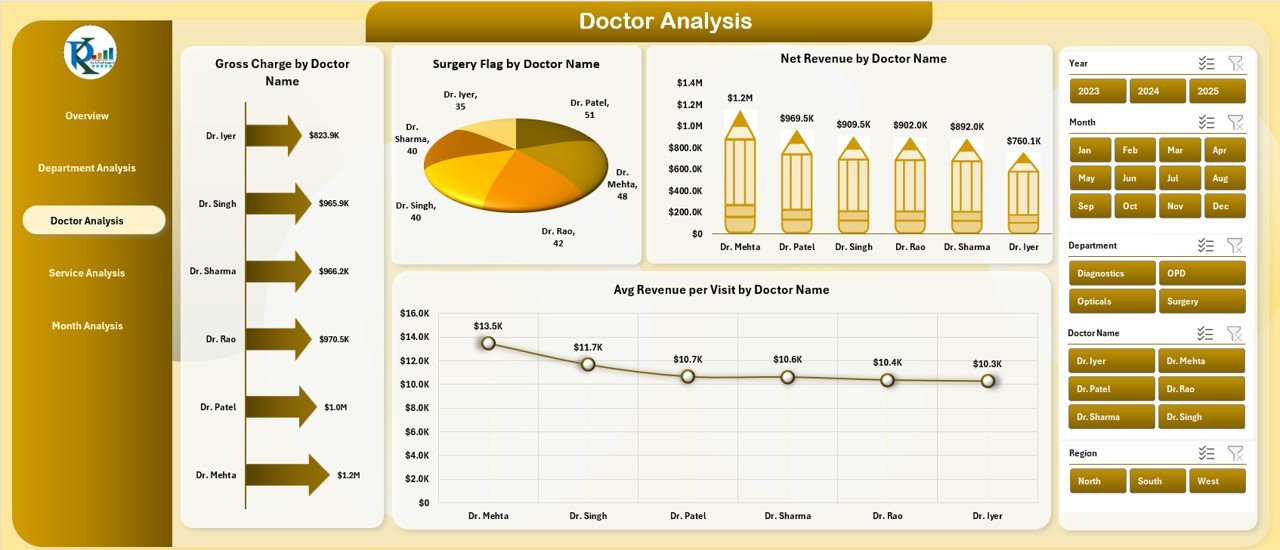
👨⚕️ Doctor Performance Tracking – Evaluate revenue, surgeries, and productivity
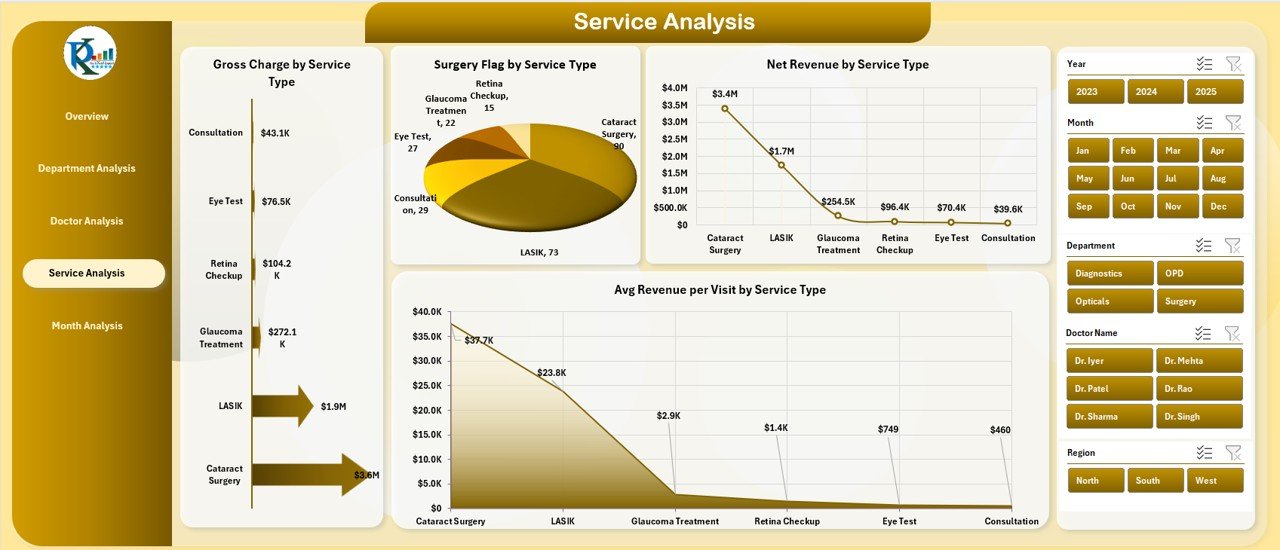
🧾 Service-Level Insights – Identify high-value and surgery-driven services
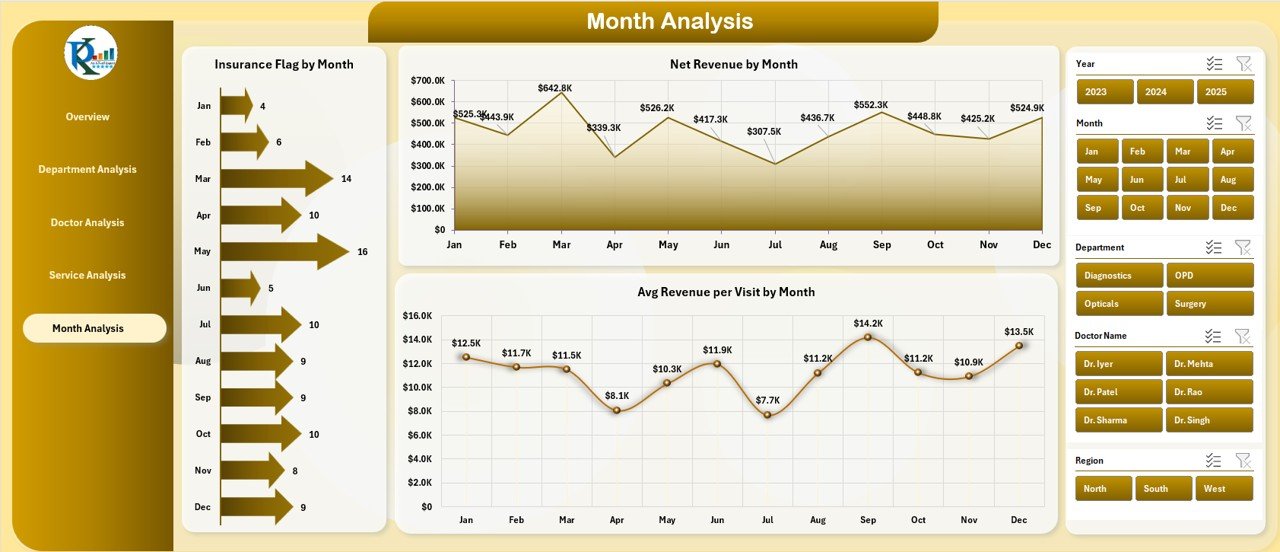
📅 Monthly Trend Analysis – Monitor revenue, insurance, and performance over time
🧭 Page Navigator – Easy left-side navigation across all pages
🎛️ Dynamic Slicers – Filter data by month, doctor, department, service, or region
This dashboard turns Excel into a complete healthcare performance monitoring tool.
📦 What’s Inside the Ophthalmology Services Dashboard in Excel
✅ Overview Page
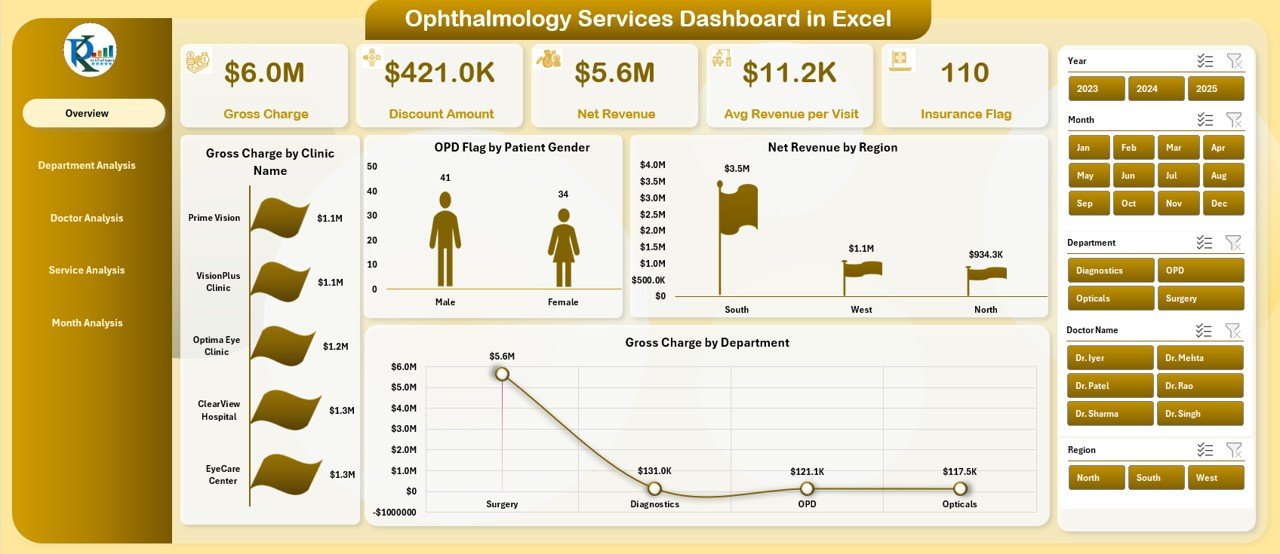
Five KPI Cards showing high-level clinic metrics
Four summary charts:
Gross Charge by Clinic Name
OPD Flag by Patient Gender
Net Revenue by Region
Gross Charge by Department
✅ Department Analysis Page
Discount Amount by Department
Visit Count by Department
Surgery Flag by Department
Insurance Flag by Department
✅ Doctor Analysis Page
Gross Charge by Doctor Name
Surgery Flag by Doctor Name
Net Revenue by Doctor Name
Average Revenue per Visit by Doctor
✅ Service Analysis Page
Gross Charge by Service Type
Surgery Flag by Service Type
Net Revenue by Service Type
Average Revenue per Visit by Service
✅ Month Analysis Page
Insurance Flag by Month
Net Revenue by Month
Average Revenue per Visit by Month
✅ Backend Sheets
Structured Data Sheet for raw records
Support Sheet for mappings and calculations
Pivot-ready architecture for instant refresh
🛠️ How to Use the Ophthalmology Services Dashboard in Excel
1️⃣ Enter or import clinic data into the Data Sheet
2️⃣ Refresh pivot tables (if needed)
3️⃣ Use slicers to filter by department, doctor, service, region, or month
4️⃣ Instantly analyze revenue, visits, surgeries, and insurance trends
5️⃣ Use insights for pricing, staffing, operational planning, and reviews
No VBA. No advanced Excel skills required ✅
👥 Who Can Benefit from This Dashboard
🏥 Ophthalmology Clinic Owners
👁️ Eye Hospitals & Diagnostic Centers
📊 Healthcare Administrators
💰 Medical Billing & Finance Teams
👨⚕️ Doctors & Department Heads
📈 Healthcare Analysts & Consultants
If you manage eye-care operations or revenue, this dashboard is built for you.
🚀 Why This Dashboard Creates Real Business Impact
✅ Eliminates manual MIS reporting
✅ Improves clinical and financial visibility
✅ Identifies high-performing doctors and services
✅ Tracks insurance dependency and revenue leakage
✅ Supports smarter pricing and resource allocation
✅ Works 100% inside Excel
✅ Easy to customize and scale
This dashboard helps clinics move from guesswork to data-driven healthcare management.
📘 Click here to read the Detailed blog post
🎥 Visit our YouTube channel to learn step-by-step video tutorials
👉 https://youtube.com/@PKAnExcelExpert
Watch the step-by-step video tutorial:
Compatibility and Requirements
- Works in Microsoft Excel desktop (Excel 2016 or later, or Microsoft 365).
- The pages filter with slicers. Microsoft explains slicers in Use slicers to filter data.
Frequently Asked Questions
Which pages does the dashboard include?
Overview, Department Analysis, Doctor Analysis, Service Analysis and Month Analysis, plus a Data sheet and a Support sheet in the back end.
How can I filter the data?
Slicers filter the pages by month, doctor, department, service or region, and a page navigator on the left moves between pages.
What does the Overview page show?
Five KPI cards and four charts: gross charge by clinic name, OPD flag by patient gender, net revenue by region and gross charge by department.
How do I add my own clinic data?
Enter or import your records into the Data sheet, refresh the pivot tables if needed, then use the slicers to analyze the results.
Is there a Power BI version?
Yes. The Ophthalmology Services Dashboard in Power BI covers the same topic in Power BI.
Related Ophthalmology and Eye Care Templates
- Ophthalmology Services Dashboard in Power BI: the same dashboard in Power BI
- Ophthalmology Services KPI Dashboard in Excel: KPI tracking with targets
- Ophthalmology Services KPI Dashboard in Power BI: KPI tracking in Power BI
- Eye Care Centers Dashboard in Excel: analysis for eye care centers
- Healthcare & Hospital Management Bundle: 8 healthcare templates in one download
Browse all Excel dashboards or the template bundles.































Reviews
There are no reviews yet.