



The Manufacturing Inventory Management KPI Dashboard in Excel is a comprehensive tool designed to help manufacturers and supply chain managers effectively monitor, track, and manage their inventory. This dashboard is specifically built to streamline the process of tracking inventory levels, reorder points, stock-outs, and other key performance indicators (KPIs) essential for maintaining optimal inventory levels and improving supply chain efficiency.
This Excel-based dashboard is equipped with powerful features to monitor stock levels, track order fulfillment, and forecast demand. Whether you’re managing raw materials, work-in-progress (WIP), or finished goods, this tool provides real-time insights that help you optimize your inventory processes, reduce waste, and avoid stockouts, all while improving the overall operational efficiency of your manufacturing processes.
Key Features of the Manufacturing Inventory Management KPI Dashboard in Excel
📊 Real-Time Inventory Tracking
Monitor your inventory levels in real time, including raw materials, WIP, and finished goods. Keep track of stock quantities, adjust for new orders, and ensure that you’re never overstocked or understocked.
📈 Inventory Turnover & Stock Movement
Track how frequently your inventory is used and replaced with turnover ratios. This helps ensure that stock is moving efficiently, and you’re not tying up capital in obsolete or slow-moving stock.
🔄 Reorder Point & Safety Stock Calculation
Calculate optimal reorder points and safety stock levels to prevent stockouts. Set alerts to reorder stock in time, ensuring that production can continue without interruptions.
📅 Order Fulfillment & Lead Time Tracking
Track the time it takes to fulfill orders, from receiving the order to delivery. This KPI helps in managing lead times and forecasting inventory needs, allowing for better planning and inventory control.
📉 Stock-Out Monitoring & Reporting
Monitor instances of stock-outs and track how often they occur. Use this data to understand the root causes and improve inventory forecasting to prevent future stock-outs.
⚙️ Customizable KPIs & Metrics
Tailor the dashboard to track the KPIs that are most important to your business. Whether it’s inventory turnover, order fulfillment time, or stock-outs, customize the dashboard to fit your manufacturing needs.
Why You’ll Love the Manufacturing Inventory Management KPI Dashboard in Excel
✅ Efficient Inventory Management
Gain complete visibility into your inventory, stock levels, and order fulfillment processes, allowing for better control and smoother operations.
✅ Improved Decision Making
Use real-time data to make informed decisions about ordering, stock management, and production planning, ultimately improving supply chain efficiency.
✅ Reduce Costs & Waste
Track turnover rates and identify slow-moving or obsolete stock, reducing costs associated with overstocking and minimizing waste.
✅ Prevent Stockouts & Delays
Ensure that your production line never faces delays due to stock-outs. Use reorder alerts to maintain the right stock levels and avoid disruptions.
✅ Customizable & Scalable
Adapt the dashboard to your manufacturing requirements. Track the KPIs that are most relevant to your operations and scale it as your business grows.
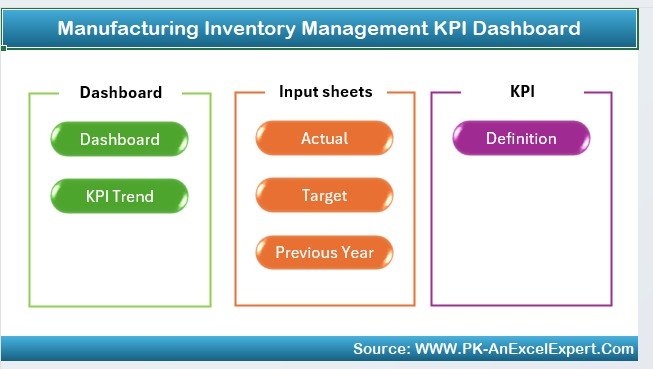
What’s Inside the Manufacturing Inventory Management KPI Dashboard in Excel?
Real-Time Inventory Tracking: Monitor stock levels in real time across all stages of the supply chain.
Inventory Turnover & Stock Movement: Track how efficiently inventory is moving.
Reorder Point & Safety Stock Calculation: Prevent stockouts with reorder point alerts.
Order Fulfillment Tracking: Track the time taken for order fulfillment and delivery.
Stock-Out Monitoring: Track occurrences of stock-outs and identify trends.
Customizable Features: Tailor the dashboard to suit your unique inventory management needs.
How to Use the Manufacturing Inventory Management KPI Dashboard in Excel
1️⃣ Download the Template: Access the Manufacturing Inventory Management KPI Dashboard in Excel instantly.
2️⃣ Input Your Inventory Data: Add your inventory levels, reorder points, and lead times.
3️⃣ Track KPIs & Performance: Monitor inventory turnover, stock levels, and order fulfillment times.
4️⃣ Set Alerts for Reordering: Set up alerts for low stock levels and reorder points.
5️⃣ Optimize Inventory & Forecasting: Use the data insights to optimize stock levels and production planning.
Who Can Benefit from the Manufacturing Inventory Management KPI Dashboard in Excel?
🔹 Supply Chain & Logistics Managers
🔹 Manufacturing Operations Managers
🔹 Warehouse & Inventory Managers
🔹 Production Planners
🔹 Procurement & Purchasing Teams
🔹 Small & Medium Manufacturing Enterprises (SMEs)
🔹 Large Manufacturing Enterprises with Complex Supply Chains
Ensure optimal inventory levels, reduce waste, and improve operational efficiency with the Manufacturing Inventory Management KPI Dashboard in Excel. Take control of your inventory and drive more informed decision-making to optimize your manufacturing operations.
Click here to read the Detailed blog post
Visit our YouTube channel to learn step-by-step video tutorials
Youtube.com/@PKAnExcelExpert































Reviews
There are no reviews yet.