



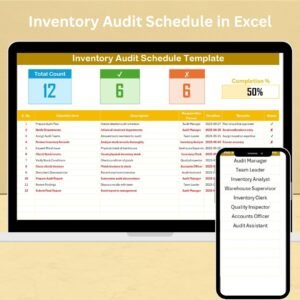
The Inventory Audit Schedule in Excel is a comprehensive and organized tool designed to help businesses efficiently schedule and track inventory audits. Whether you’re managing a warehouse, retail store, or e-commerce business, this Excel-based tool ensures that you never miss an audit, providing you with a clear, easy-to-use framework to manage your inventory and audit schedules.
Regular inventory audits are essential for maintaining accurate stock levels, preventing loss, and ensuring that your business operations are running smoothly. With this schedule, you can track audit dates, responsible personnel, and completion statuses, making your inventory management process more effective and less prone to errors.
Key Features of the Inventory Audit Schedule in Excel
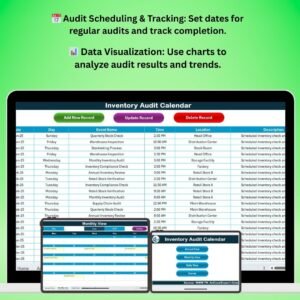
📅 Audit Scheduling
Plan and schedule regular inventory audits. The template allows you to set specific audit dates, ensuring that audits are performed on time and according to your company’s inventory management plan.
📝 Task & Responsibility Tracking
Assign specific tasks to employees or teams responsible for the audit. This feature helps ensure accountability and makes it easy to track which tasks have been completed.
⚙️ Audit Checklist Integration
Use the checklist section to track specific audit tasks that need to be completed during each audit. This checklist ensures that all aspects of the inventory audit process are covered.
📈 Inventory Adjustment Tracking
Keep track of inventory adjustments made during the audit, whether they are due to discrepancies, damaged goods, or other reasons. This helps maintain accurate records and improve inventory control.
📊 Audit Performance Monitoring
Monitor the performance of your audits, including the completion rate and any delays. Use this information to identify areas for improvement and streamline the auditing process.
📅 Customizable Template
The schedule is fully customizable, allowing you to adapt it to fit your business’s specific needs. You can modify the template to track additional details such as inventory categories, quantities, or departments.
Why You’ll Love the Inventory Audit Schedule in Excel

✅ Efficient Inventory Audits
Schedule and track all of your inventory audits in one place, ensuring that audits are completed on time and without missing any critical steps.
✅ Enhanced Accuracy & Accountability
Assign tasks to responsible employees and track the completion of audit-related activities. This ensures accountability and reduces errors during the audit process.
✅ Improved Inventory Management
Keep track of inventory discrepancies and make necessary adjustments. This improves overall inventory accuracy and helps prevent stock-outs or overstocking issues.
✅ Data-Driven Insights
Monitor audit performance and track metrics such as completion rates and delay reasons to continuously improve your auditing process and enhance operational efficiency.
✅ Customizable & Scalable
This schedule is highly customizable to suit the unique needs of your business. Whether you’re auditing a single warehouse or multiple locations, the template can be adapted to fit your requirements.
What’s Inside the Inventory Audit Schedule in Excel?
Audit Scheduling: Plan and track inventory audit dates.
Task & Responsibility Tracking: Assign tasks to employees and monitor their completion.
Audit Checklist: Track all required tasks for each audit.
Inventory Adjustment Tracking: Monitor and record inventory adjustments during the audit.
Audit Performance Monitoring: Track the completion rate and identify delays.
Customizable Template: Modify the schedule to fit your business’s specific needs.
How to Use the Inventory Audit Schedule in Excel
1️⃣ Download the Template: Instantly access the Inventory Audit Schedule in Excel.
2️⃣ Set Up Your Audit Dates: Schedule regular audit dates to track and manage audits.
3️⃣ Assign Tasks & Responsibilities: Assign audit tasks to team members and set deadlines.
4️⃣ Track Audit Progress & Performance: Monitor task completion and adjust schedules as needed.
5️⃣ Make Inventory Adjustments: Track any discrepancies or adjustments made during audits.
Who Can Benefit from the Inventory Audit Schedule in Excel?
🔹 Warehouse Managers & Inventory Supervisors
🔹 Retail & E-commerce Business Owners
🔹 Supply Chain & Logistics Managers
🔹 Small & Medium Enterprises (SMBs)
🔹 Large Enterprises with Multiple Locations
🔹 Accountants & Financial Analysts
🔹 Compliance & Quality Control Teams
Ensure accurate inventory records and efficient audit processes with the Inventory Audit Schedule in Excel. Streamline your inventory management, improve accuracy, and make informed decisions with this simple, customizable tool.
Click here to read the Detailed blog post
Visit our YouTube channel to learn step-by-step video tutorials
Youtube.com/@PKAnExcelExpert
Watch the step-by-step video Demo:
Compatibility and Requirements
- Works in Microsoft Excel desktop (Excel 2016 or later, or Microsoft 365).
- The audit checklist and schedule are plain worksheets you can edit. Microsoft covers the basics in Excel for Windows training.
Frequently Asked Questions
What can I track in the Inventory Audit Schedule?
You can track audit dates, the tasks for each audit, who is responsible, completion status and any inventory adjustments made during the audit.
Can I assign audit tasks to team members?
Yes. You assign tasks to employees or teams, set deadlines and follow which tasks are done.
Can I record inventory adjustments?
Yes. The template has a place to record adjustments made during an audit, such as discrepancies or damaged goods.
Can I change the template for my business?
Yes. It is customizable, so you can add details such as inventory categories, quantities or departments, and use it for one warehouse or several locations.
Is there a Google Sheets version?
There is a calendar-style version in Google Sheets. See the Inventory Audit Calendar in Google Sheets.
Related Inventory Audit Templates
- Inventory Audit Calendar in Excel: a calendar view of audit dates
- Inventory Audit Checklist in Excel: a checklist for the audit steps
- Inventory Audit Action Plan in Excel: a plan for follow-up actions
- Audit Schedule Calendar in Excel: a general audit calendar
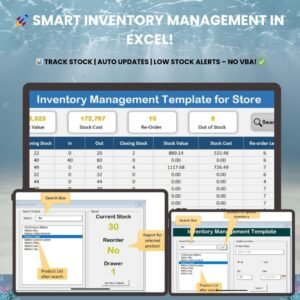
- Inventory Management Template for Store: stock tracking for a store
Browse all Excel checklist templates and inventory management templates.

























Reviews
There are no reviews yet.