



The Inventory Audit Calendar in Excel is a robust and user-friendly tool designed to help businesses manage their inventory and streamline their audit processes. This Excel-based calendar ensures that businesses, whether large or small, can keep track of inventory levels, schedule regular audits, and maintain accuracy in their stock records. With real-time tracking and customizable fields, it’s perfect for inventory managers, warehouse supervisors, and supply chain professionals who need an organized way to monitor stock and perform audits regularly.
This dashboard simplifies the process of setting up scheduled inventory audits, tracking audit results, and ensuring compliance with inventory management best practices. With easy-to-read charts and reports, this tool helps you optimize inventory control, prevent discrepancies, and streamline audit operations.
Key Features of the Inventory Audit Calendar in Excel
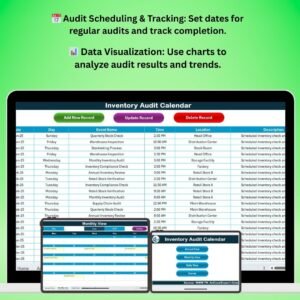
📅 Audit Scheduling & Tracking
Easily schedule regular inventory audits and track their completion. Set specific dates for monthly, quarterly, or annual audits to ensure you’re staying compliant with inventory management standards.
📊 Real-Time Data Tracking
Track inventory levels and audit results in real time. Make data-driven decisions with up-to-date information on stock levels and discrepancies identified during audits.
⚙️ Discrepancy Tracking
Track any discrepancies found during the audit process, such as missing or excess stock. Document corrective actions taken and ensure resolutions are logged for future reference.
📈 Visual Reports & Data Analysis
Use charts and graphs to visualize audit results and inventory trends. Analyze stock discrepancies, audit frequency, and inventory performance over time.
📝 Customizable Categories & Fields
Customize the calendar with your business-specific fields, such as stock categories, locations, or suppliers. Tailor the tool to suit your unique inventory management needs.
📅 Time-Based Tracking & Reporting
Monitor your inventory audit history with time-based tracking. Track audits across specific time periods (e.g., weekly, monthly, quarterly, annually) to analyze trends and identify recurring issues.
Why You’ll Love the Inventory Audit Calendar in Excel

✅ Streamlined Audit Process
Ensure that all scheduled audits are tracked and completed on time, preventing lapses and inaccuracies in inventory management.
✅ Improve Inventory Accuracy
Track discrepancies, investigate causes, and implement corrective actions to improve the overall accuracy of your inventory records.
✅ Data-Driven Decision Making
Use real-time data and visual reports to make informed decisions regarding inventory levels, stock orders, and audits.
✅ Ensure Compliance
Maintain accurate inventory records and stay compliant with auditing standards by scheduling and tracking audits efficiently.
✅ Fully Customizable
Adapt the calendar to meet the needs of your business, whether you’re managing a small store or a large warehouse. Track specific categories, locations, or audit frequencies.
What’s Inside the Inventory Audit Calendar in Excel?
- Audit Scheduling & Tracking: Set specific dates for inventory audits and track completion.
- Discrepancy Tracking: Log discrepancies found during audits and document corrective actions.
- Time-Based Tracking: Monitor audits and inventory performance over specific time periods.
- Customizable Fields & Categories: Modify the calendar to match your business needs.
- Real-Time Reporting & Data Analysis: Use charts to visualize trends, discrepancies, and stock levels.
How to Use the Inventory Audit Calendar in Excel
1️⃣ Download the Template: Get immediate access to the Inventory Audit Calendar in Excel.
2️⃣ Set Up Audit Dates & Frequencies: Schedule regular audits and set audit frequencies that fit your business.
3️⃣ Track Inventory Levels & Discrepancies: Monitor inventory data and track discrepancies found during each audit.
4️⃣ Log Corrective Actions: Document any corrective actions taken to resolve audit discrepancies.
5️⃣ Analyze & Visualize Data: Use charts and reports to visualize trends, discrepancies, and audit outcomes.
Who Can Benefit from the Inventory Audit Calendar in Excel?
🔹 Inventory Managers & Warehouse Supervisors
🔹 Supply Chain Professionals
🔹 Small & Medium Enterprises (SMEs)
🔹 Large Corporations & Retailers
🔹 E-commerce Businesses
🔹 Compliance & Audit Teams
Optimize your inventory management process and ensure accurate stock records with the Inventory Audit Calendar in Excel. Schedule regular audits, track discrepancies, and make data-driven decisions to improve your inventory control.
Click here to read the Detailed blog post
Visit our YouTube channel to learn step-by-step video tutorials
Youtube.com/@PKAnExcelExpert




























Reviews
There are no reviews yet.