



The HR Efficiency Monitor Dashboard in Google Sheets is an essential tool for Human Resources teams to track and analyze HR performance and efficiency. With this comprehensive dashboard, HR professionals can monitor key metrics such as employee productivity, turnover rates, recruitment performance, and training progress in real-time. The dashboard provides insightful visual data to help improve HR decision-making, streamline processes, and boost employee engagement.
Whether you’re tracking recruitment metrics, monitoring training programs, or analyzing employee performance, this HR dashboard simplifies HR data analysis and ensures your HR department is working efficiently and effectively.

Key Features of the HR Efficiency Monitor Dashboard in Google Sheets
📊 HR Metrics Tracking: Track essential HR KPIs, such as employee productivity, turnover rates, training progress, and more.
⚙️ Customizable Dashboards: Tailor the dashboard to suit your HR team’s specific needs, including unique KPIs and performance metrics.
📈 Real-Time Data: The dashboard updates automatically in real-time, ensuring you always have the most up-to-date information.
💼 Employee Performance Monitoring: Track individual and team performance, measure productivity, and identify areas for improvement.
📅 Recruitment & Training Tracking: Monitor the efficiency of your recruitment process and track training progress for employee development.
🔄 Easy Collaboration: Share the dashboard with your team for collaborative updates and real-time decision-making.
Why You’ll Love the HR Efficiency Monitor Dashboard in Google Sheets
✅ Streamlined HR Processes: Track multiple HR metrics in one place, reducing manual efforts and improving data accuracy.
✅ Actionable Insights: Make data-driven decisions by analyzing key HR performance indicators and identifying areas for improvement.
✅ Customizable to Fit Your Needs: Modify the dashboard to focus on the specific HR metrics that are most important for your organization.
✅ Real-Time Monitoring: Monitor HR activities and performance in real-time to ensure efficiency and meet organizational goals.
✅ Boost Employee Engagement: Track employee productivity, training, and performance to drive greater employee engagement and satisfaction.
What’s Inside the HR Efficiency Monitor Dashboard in Google Sheets?
📊 HR Metrics Dashboard: Visualize key HR metrics such as turnover rate, productivity, and training effectiveness.
⚙️ Performance Tracking: Monitor the performance of individual employees or teams using data-driven insights.
📈 Recruitment & Training Insights: Track the success of your recruitment process and employee training programs.
💼 Custom KPIs: Customize the dashboard to track unique HR metrics specific to your company’s HR goals.
📊 Data Visualization: Use color-coded graphs and charts to visualize trends in HR performance, turnover, and training.
How to Use the HR Efficiency Monitor Dashboard in Google Sheets
1️⃣ Download the Template – Gain instant access to the pre-configured HR efficiency monitor dashboard.
2️⃣ Input HR Data: Enter your team’s data, such as recruitment metrics, employee performance scores, and training progress.
3️⃣ Track Progress: Use the dashboard to monitor real-time performance and efficiency of HR processes.
4️⃣ Visualize Trends: Watch key trends in employee engagement, turnover, and performance progress through dynamic charts and graphs.
5️⃣ Collaborate: Share with team members and management to make informed HR decisions collaboratively.
Who Can Benefit from the HR Efficiency Monitor Dashboard in Google Sheets?
🔹 HR Managers
🔹 Recruitment Teams
🔹 Team Leaders
🔹 Operations Managers
🔹 Business Owners
🔹 Training Coordinators
🔹 Employee Engagement Teams
Enhance HR efficiency, streamline processes, and drive better HR outcomes with the HR Efficiency Monitor Dashboard in Google Sheets. Make data-driven decisions that improve employee engagement and organizational performance.
Click here to read the detailed blog post
Visit our YouTube channel to learn step-by-step video tutorials
Watch the step-by-step video tutorial:
Compatibility and Requirements
- Works in Google Sheets with a free Google account and a web browser. Nothing to install.
- Share the file with your team from Google Sheets for joint updates. Google explains charts in Add & edit a chart or graph.
Frequently Asked Questions
Which HR metrics does the dashboard track?
Employee productivity, turnover rate, recruitment performance and training progress, shown in color-coded charts.
Can I add my own KPIs?
Yes. The dashboard can be customized to track HR metrics specific to your company’s goals.
Does it update when I add data?
Yes. Enter recruitment, performance and training data and the dashboard updates automatically.
Can several people work on it?
Yes. Share the Google Sheets file with team members and management so everyone sees the same figures.
Related HR Dashboard Templates
- HR Performance Dashboard in Google Sheets: track HR performance in another Google Sheets layout
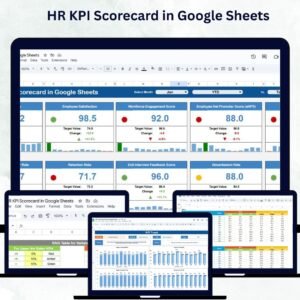
- HR KPI Dashboard in Google Sheets: HR KPIs with targets in Google Sheets
- Employee Productivity Dashboard in Google Sheets: a closer look at productivity
- HR Dashboard in Excel: the HR dashboard idea for Excel users
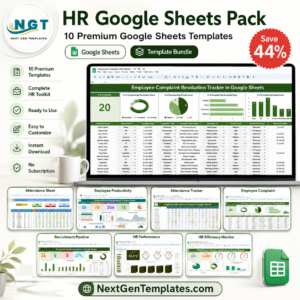
- HR Google Sheets Pack: 10 HR templates for Google Sheets in one bundle
Browse all Google Sheets dashboard templates or the Google Sheets HR and payroll templates.





Reviews
There are no reviews yet.