

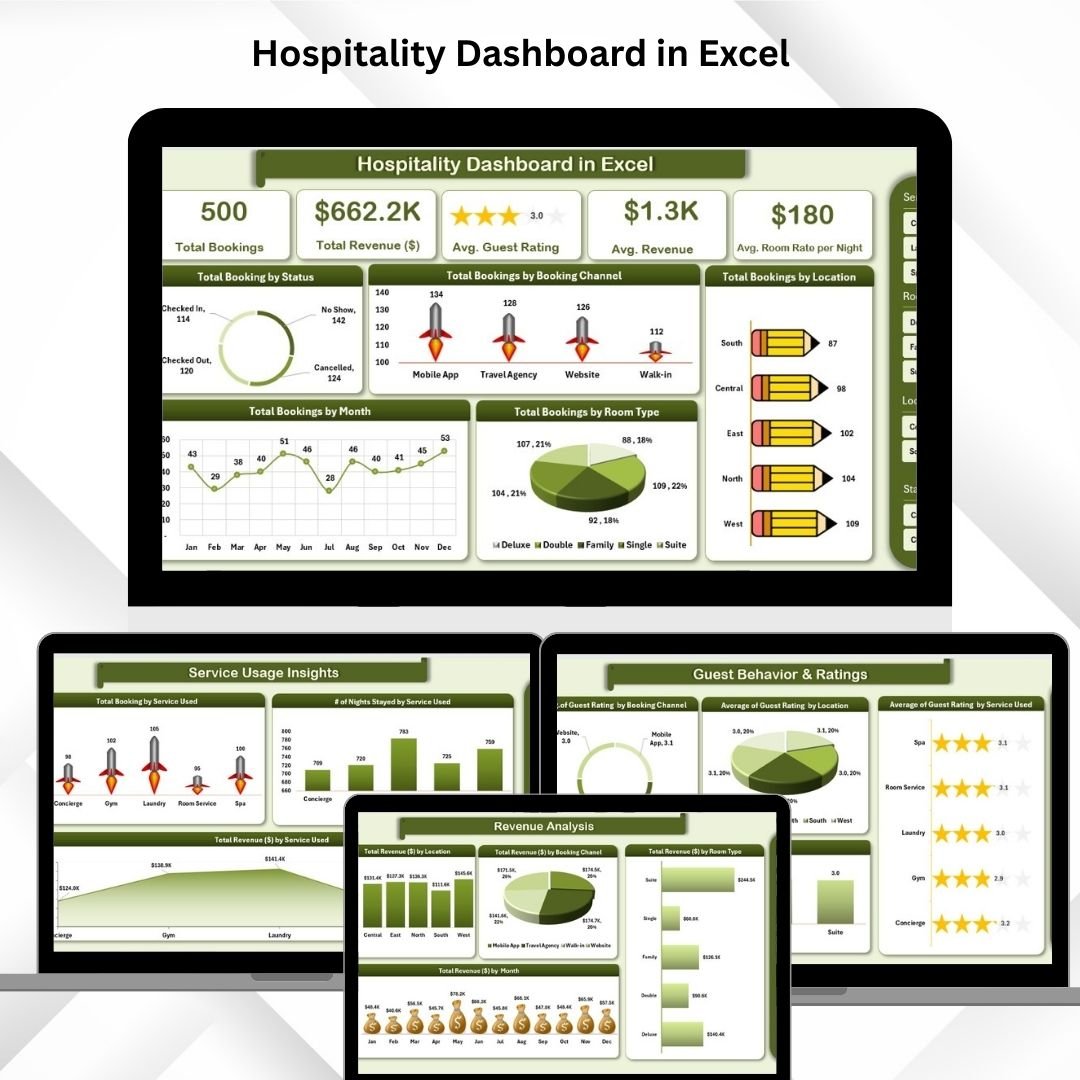

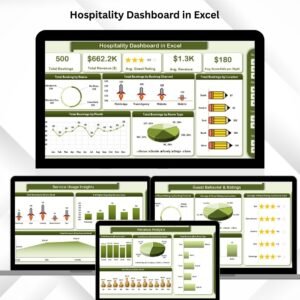
The Hospitality Dashboard in Excel is an advanced yet easy-to-use tool designed to help hotel managers optimize their operations by tracking key performance indicators. This interactive dashboard integrates various metrics such as bookings, revenue, guest ratings, and service usage into a single platform. With detailed charts, slicers, and visual cards, this dashboard offers a comprehensive view of your hotel’s performance, enabling data-driven decision-making for enhanced guest satisfaction and increased profitability.
Comprehensive Data Tracking: Easily track bookings, revenue, guest satisfaction, and service usage.
Real-Time Insights: Charts and metrics are updated automatically with every data input.
Customizable: Tailor the dashboard to suit your specific hotel’s needs, including multiple locations or services.
Data Visualization: Visual charts provide easy-to-read insights into key metrics like booking trends, guest ratings, and revenue.
Collaborative: Excel allows for seamless sharing and collaboration among team members for effective communication and decision-making.
What’s Inside the Hospitality Dashboard
The Hospitality Dashboard is built with several key sheets that help manage and analyze the hotel’s performance across different areas:
Overview Sheet Tab
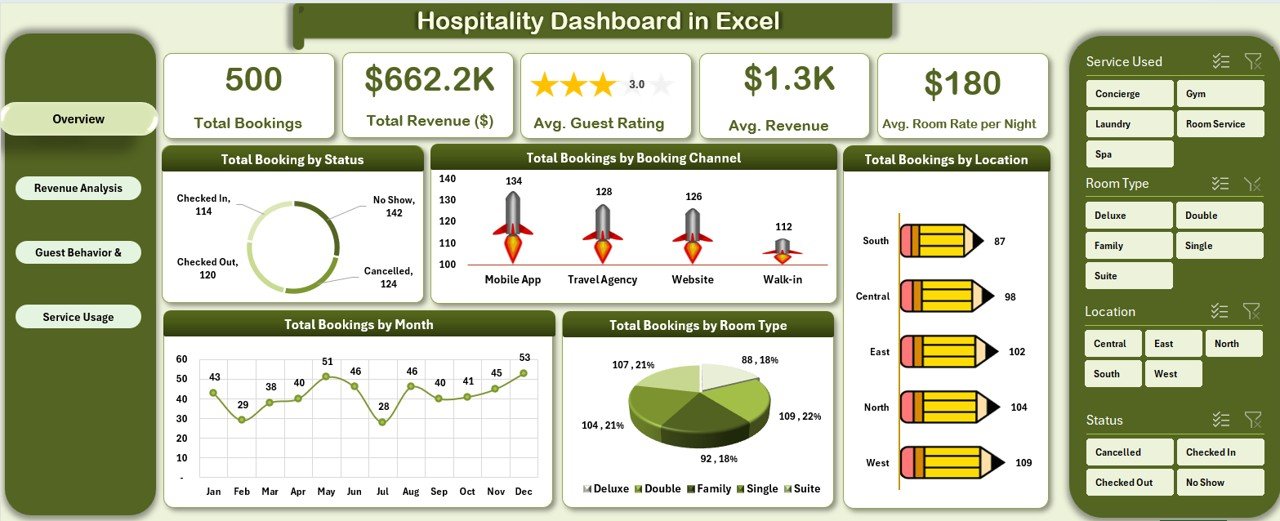
This is the central hub of the dashboard, where you’ll get a snapshot of your hotel’s performance, including:Total Bookings Card: Displays the total number of bookings made.
Total Revenue Card: Shows the total revenue generated.
Avg. Guest Rating: Provides the average rating for your hotel.
Charts:
Booking by Status: Breaks down bookings into categories (Confirmed, Canceled).
Bookings by Channel: Shows which booking channels (OTAs, direct) are driving the most business.
Bookings by Month: A trend line that shows bookings over time.
Bookings by Room Type: Shows how bookings are distributed across different room types.
Bookings by Location: Tracks booking data across hotel locations if applicable.
Revenue Analysis Sheet Tab
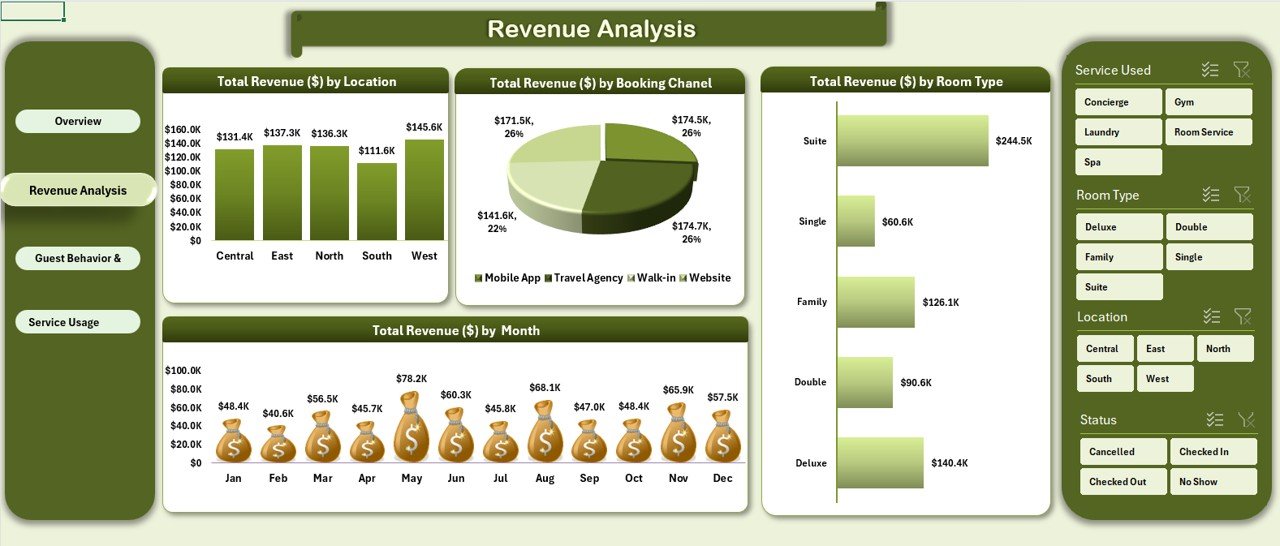
Get detailed insights into how revenue is generated:Revenue by Location: Visualizes revenue from different hotel locations.
Revenue by Booking Channel: Breakdown of revenue based on booking channels.
Revenue by Room Type: Shows which room types contribute the most revenue.
Revenue by Month: Identifies seasonal revenue trends.
Guest Behavior & Ratings Sheet Tab
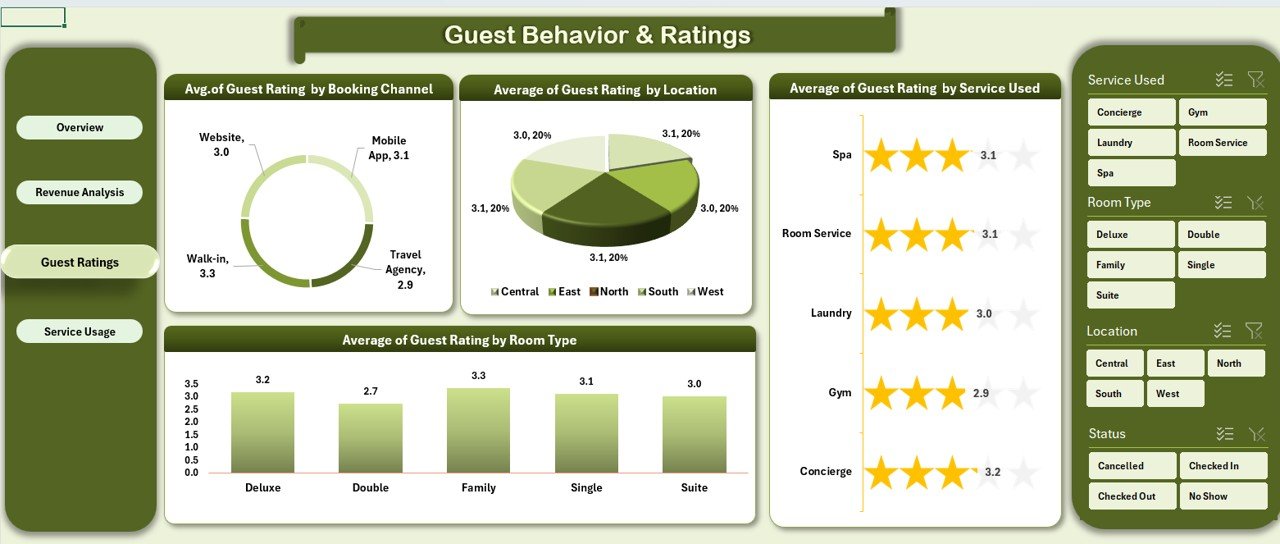
Understand how guests perceive their experience and track ratings:Guest Rating by Channel: Compare ratings from different booking channels.
Guest Rating by Location: Compare guest satisfaction by location.
Guest Rating by Service Used: Tracks satisfaction based on services like room service or spa.
Guest Rating by Room Type: Shows how ratings vary across room types.
Service Usage Insights Sheet Tab
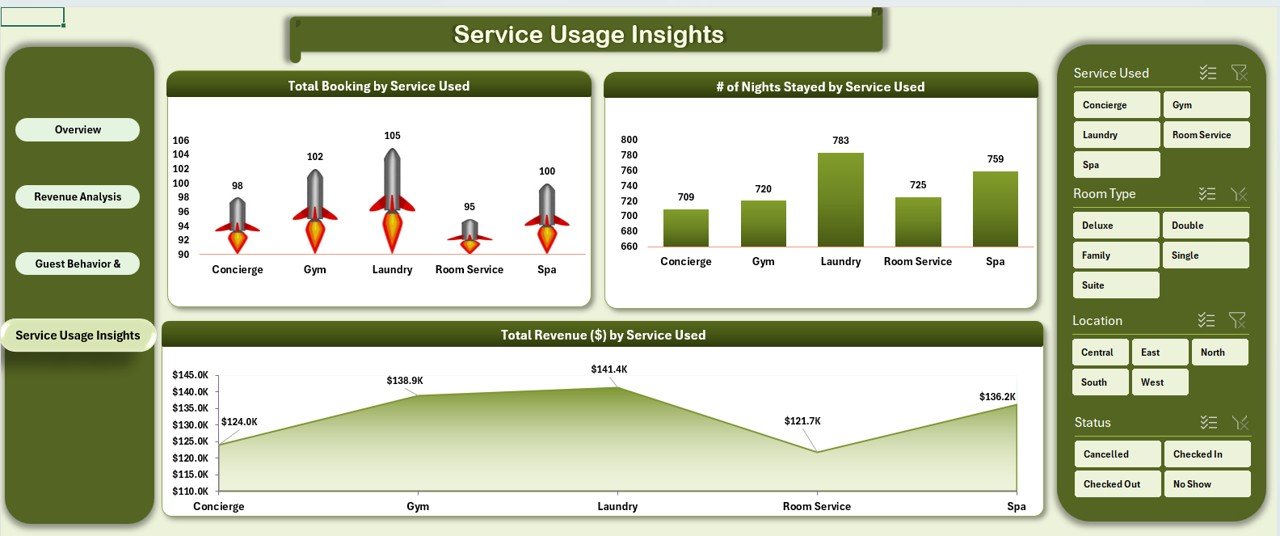
Analyze the popularity and profitability of various hotel services:Bookings by Service Used: Tracks how many bookings included specific services (room service, spa, etc.).
Nights Stayed by Service: Compares how often services are used in relation to the number of nights stayed.
Revenue by Service: Shows total revenue generated by each service.
Data Sheet Tab
The Data Sheet is where all raw data for your hotel’s performance is stored. Input the details of each booking, including guest information, room type, service usage, ratings, and more.
How the Hospitality Dashboard Works
Using the Hospitality Dashboard is simple and intuitive. Here’s how you can leverage it to improve your hotel’s performance:
Input Your Data: Start by adding booking details, including the guest’s rating, room type, and services used, into the Data Sheet.
Monitor Performance: The Overview Sheet automatically updates to reflect the current status of your bookings, revenue, and guest ratings.
Track Trends: Use the Revenue Analysis and Guest Behavior & Ratings sheets to identify seasonal trends, monitor guest satisfaction, and evaluate how your services are performing.
Collaborate with Your Team: Share the dashboard with your team to ensure that everyone has access to real-time performance data.
Who Can Benefit from This Hospitality Dashboard
The Hospitality Dashboard in Excel is ideal for hotel managers, owners, and marketing teams looking to optimize operations and enhance guest experiences. Here’s who can benefit from using this tool:
Hotel Managers: Efficiently track bookings, revenue, and guest ratings for better decision-making.
Marketing Teams: Evaluate the effectiveness of different booking channels and promotional campaigns.
Guest Relations Teams: Use guest ratings data to improve customer service and satisfaction.
Revenue Managers: Monitor revenue trends and identify opportunities for optimization.
Click here to read the Detailed blog post
Visit our YouTube channel to learn step-by-step video tutorials
Watch the step-by-step video tutorial:
Compatibility and Requirements
- Works in Microsoft Excel desktop (Excel 2016 or later, or Microsoft 365).
- The dashboard uses charts, slicers and cards fed from the Data sheet. Microsoft explains slicers in Use slicers to filter data.
Frequently Asked Questions
Which sheets are included?
Overview, Revenue Analysis, Guest Behavior and Ratings, Service Usage Insights and the Data sheet where each booking is entered.
Can it handle more than one hotel location?
Yes. Bookings, revenue and guest ratings can be broken down by location as well as by room type and booking channel.
Does it track hotel services?
Yes. The Service Usage Insights sheet shows bookings, nights stayed and revenue by service, such as room service or spa.
Do the charts update automatically?
Yes. Charts and cards update from the data you add to the Data sheet.
Related Hospitality Templates
- Hospitality Dashboard in Power BI: the Power BI edition
- Hospitality and Guest Booking Performance Dashboard in Google Sheets: bookings in Google Sheets
- Hotel and Hospitality Revenue Dashboard in Excel: a deeper revenue view
- Hospitality KPI Scorecard in Excel: monthly KPI scorecard for hotels
- Hospitality KPI Dashboard: hospitality KPIs in Excel
Browse all Excel dashboards.































Reviews
There are no reviews yet.