



The Home Maintenance Checklist in Excel is a practical and customizable tool designed to help homeowners, property managers, and maintenance teams stay on top of their home maintenance tasks throughout the year. This Excel-based checklist makes it easy to track routine maintenance, set reminders for important tasks, and ensure that your home or property is well-maintained and in top condition.
With this checklist, you can organize and schedule various home maintenance activities, such as HVAC system checks, plumbing inspections, roof maintenance, and seasonal tasks like gutter cleaning and landscaping. The template ensures that nothing is overlooked, helping you extend the lifespan of your home and appliances while also avoiding costly repairs.
Key Features of the Home Maintenance Checklist in Excel
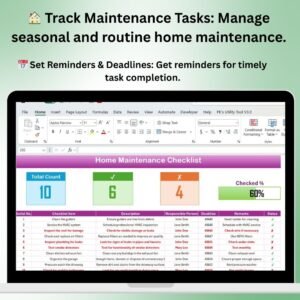
🏠 Track Seasonal & Routine Maintenance Tasks
Easily track both seasonal and routine home maintenance tasks, from changing air filters to inspecting your roof. The checklist organizes tasks by frequency (monthly, quarterly, annually), so you never forget an important maintenance task.
📅 Set Custom Reminders & Deadlines
Create reminders for upcoming maintenance tasks and track deadlines to ensure that tasks are completed on time. Never miss important home upkeep with clear, actionable reminders.
🛠️ Organize & Manage Multiple Home Maintenance Projects
Whether you’re managing a single home or multiple properties, this template helps you organize all home maintenance tasks in one place. The customizable layout allows you to track tasks for multiple locations and ensure each property stays in good condition.
💡 Track Costs & Budgeting
Record and track the costs associated with each maintenance task. This helps you stay within budget and plan for future expenses by keeping a clear record of ongoing maintenance costs.
📊 Visual Progress Monitoring
Track the completion of each task with color-coded sections and checkboxes. Visual indicators help you easily see which tasks have been completed and which are still pending.
🖥️ Customizable Template for Your Needs
This checklist is fully customizable to fit your specific needs. You can adjust categories, due dates, and task frequencies, making it a versatile tool for any home or property maintenance plan.
Why You’ll Love the Home Maintenance Checklist in Excel

✅ Stay on Top of Home Maintenance
Effortlessly track all routine and seasonal maintenance tasks to ensure your home is always in top shape.
✅ Simplify Task Management
Organize maintenance activities, assign tasks to family members or maintenance teams, and track completion progress easily.
✅ Avoid Costly Repairs
By regularly performing routine tasks and tracking inspections, you’ll be able to prevent major issues before they arise, saving money on repairs and replacements.
✅ Efficient & Effective Record-Keeping
Keep a record of maintenance history, costs, and completed tasks for reference. This is especially useful for future maintenance planning or when selling your home.
✅ Tailor the Checklist to Your Needs
Customize the checklist to reflect your home’s unique maintenance requirements, including specific appliances, systems, or property types.
What’s Inside the Home Maintenance Checklist in Excel?
- Seasonal & Routine Tasks: Track both regular and seasonal maintenance tasks such as HVAC checks, plumbing inspections, gutter cleaning, and landscaping.
- Task Deadlines & Reminders: Set custom deadlines and reminders to ensure timely completion of home maintenance tasks.
- Cost Tracking: Record and track maintenance-related expenses to stay within budget.
- Task Progress Monitoring: Use visual indicators and checkboxes to monitor the completion of each task.
- Customizable Categories & Layout: Adapt the template to suit your home’s unique maintenance needs and schedule.
How to Use the Home Maintenance Checklist in Excel
1️⃣ Download the Template: Instantly get access to the Home Maintenance Checklist Template in Excel.
2️⃣ Input Your Maintenance Tasks: List your routine and seasonal maintenance tasks in the template, including deadlines and reminders.
3️⃣ Track & Manage Progress: Use the checklist to monitor which tasks have been completed and which are still pending.
4️⃣ Set Reminders & Plan for the Future: Set custom reminders for future tasks and use the cost tracking feature to manage your budget.
Who Can Benefit from the Home Maintenance Checklist in Excel?
🔹 Homeowners & Renters
🔹 Property Managers
🔹 Landlords & Real Estate Investors
🔹 Maintenance Teams & Contractors
🔹 Individuals Looking to Maintain Their Homes Efficiently
Ensure that your home remains in excellent condition and avoid unexpected repair costs with the Home Maintenance Checklist in Excel. Stay organized, on schedule, and financially prepared with this easy-to-use, customizable checklist.
Click here to read the Detailed blog post
Visit our YouTube channel to learn step-by-step video tutorials
Youtube.com/@PKAnExcelExpert
Compatibility and Requirements
- Works in Microsoft Excel desktop (Excel 2016 or later, or Microsoft 365).
- Task status uses color-coded sections and checkboxes. Microsoft explains color rules in Use conditional formatting to highlight information.
Frequently Asked Questions
Which tasks can I track?
Routine and seasonal tasks such as HVAC checks, plumbing inspections, roof maintenance, gutter cleaning and landscaping.
Can I group tasks by frequency?
Yes. Tasks are organized by frequency: monthly, quarterly and annually.
Does it track maintenance costs?
Yes. You record the cost of each task to stay within budget and plan future expenses.
Can I use it for several properties?
Yes. The layout can be adjusted to track tasks for multiple locations.
Is there a Google Sheets version?
Yes. The Home Maintenance Checklist in Google Sheets works in a browser.
Related Home Maintenance Templates
- Home Maintenance Checklist in Google Sheets: the same checklist in Google Sheets
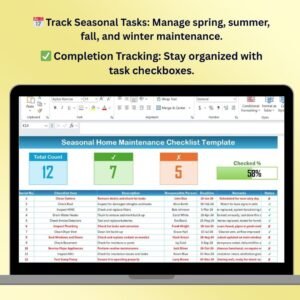
- Seasonal Home Maintenance Checklist Template in Excel: tasks grouped by season
- Seasonal Home Maintenance Checklist in Google Sheets: seasonal tasks in Google Sheets
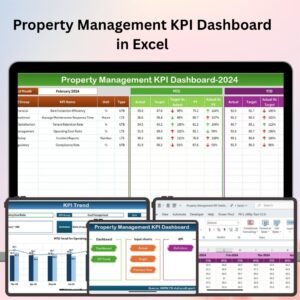
- Property Management KPI Dashboard in Excel: KPIs for rental properties
- Checklist & SOP Pack: 12 checklist templates in one download
Browse all Excel checklists or the template bundles.































Reviews
There are no reviews yet.