


Managing health insurance operations without clear visibility leads to delays, errors, and financial risk. Every health insurance organization handles premiums, claims, policy types, hospitals, regions, and processing timelines daily. However, when this information remains scattered across multiple Excel sheets, decision-making becomes slow and unreliable.
That is exactly where the Health Insurance Dashboard in Excel becomes a powerful and practical solution.
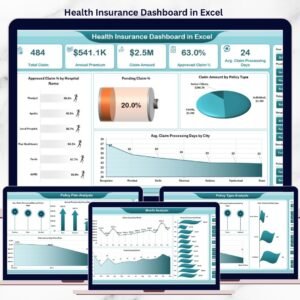
This ready-to-use Excel dashboard transforms complex insurance data into clear KPIs, visual charts, and actionable insights. Instead of spending hours preparing manual reports, insurance teams can instantly track approved claims, pending cases, premium trends, claim amounts, and processing efficiency from a single interactive dashboard.
Built entirely in Microsoft Excel using Pivot Tables, Pivot Charts, Slicers, and KPI cards, this dashboard is easy to use, cost-effective, and ideal for both technical and non-technical users.
🔑 Key Features of Health Insurance Dashboard in Excel
📊 5 structured analytical pages for complete insurance visibility
🧭 Page Navigator for smooth movement between dashboard pages
🎯 Interactive slicers for smart filtering
📈 Clear KPIs & visual charts for fast insights
⏱ Claim processing time tracking
🏥 Hospital-wise claim performance analysis
📍 Region and city-level insights
📆 Month-wise trend monitoring
🔄 Automatic dashboard refresh on data update
This dashboard turns raw insurance data into decision-ready intelligence.
📂 What’s Inside the Health Insurance Dashboard in Excel
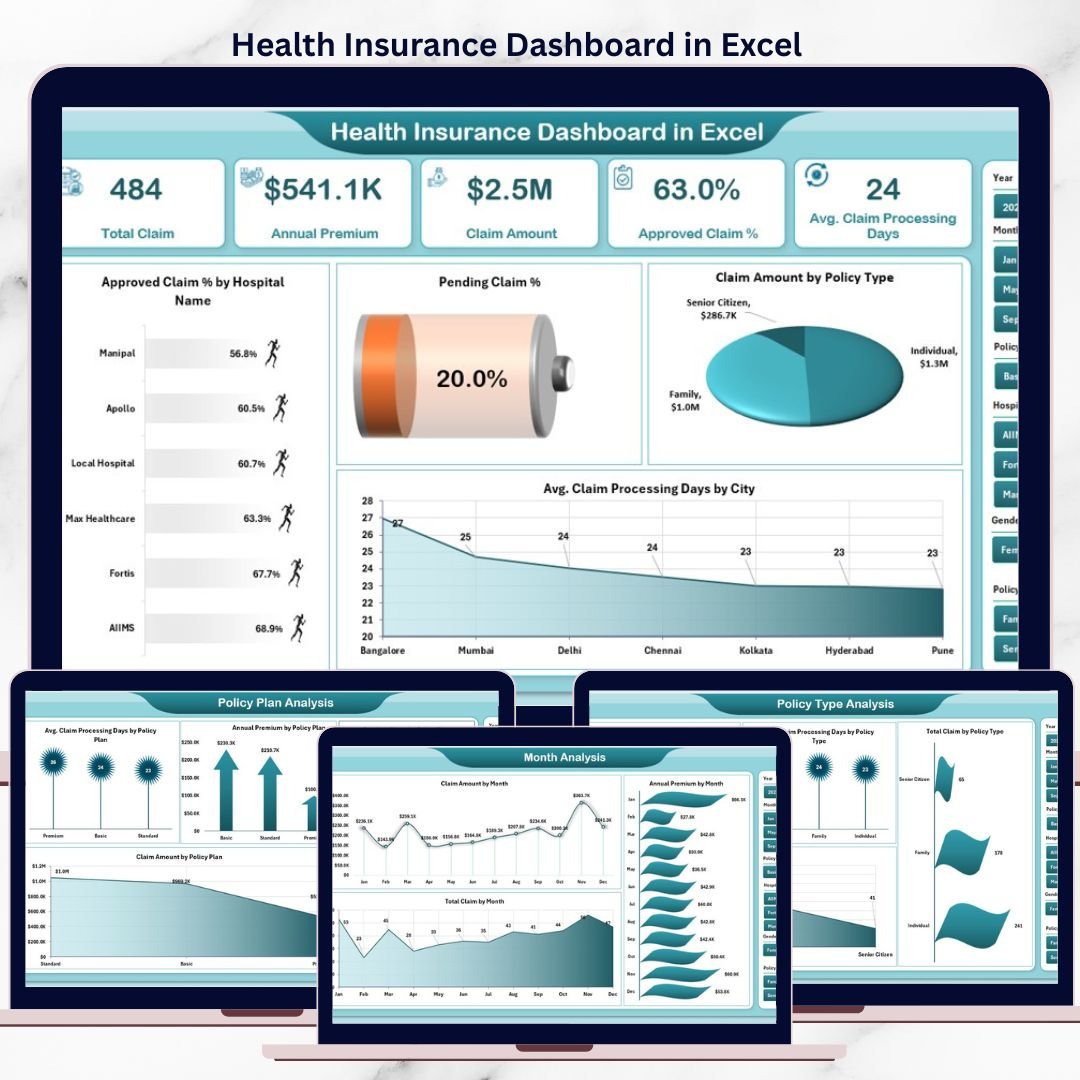
📊 Overview Page – Insurance Performance Control Center
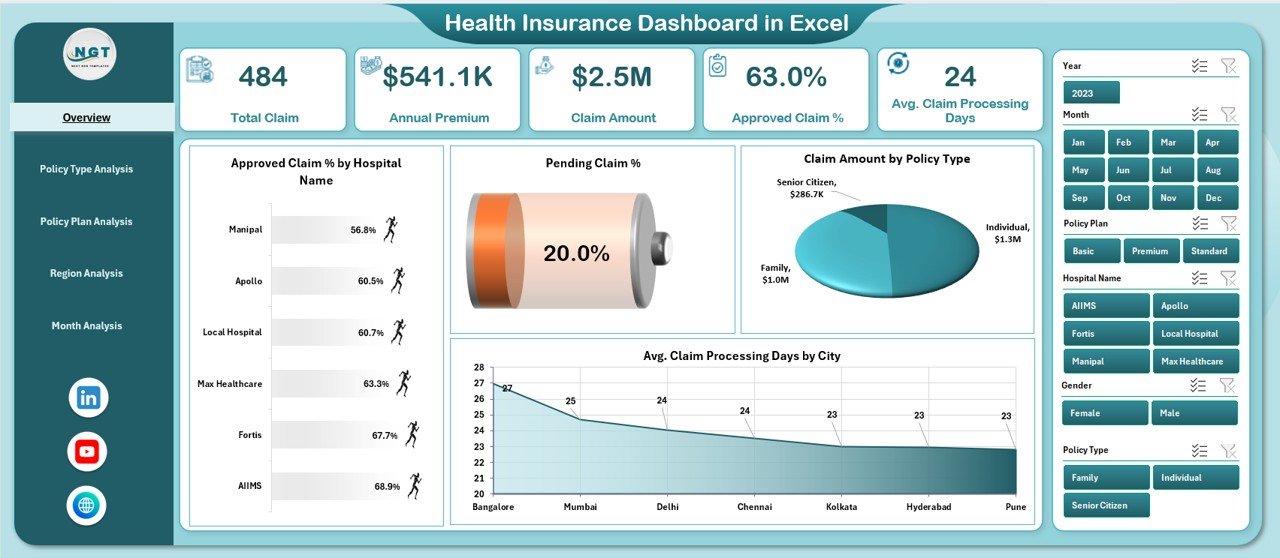
The Overview Page acts as the executive summary of the dashboard.
Key Insights Displayed:
Approved Claim % by Hospital Name
Pending Claim % by Hospital Name
Claim Amount by Policy Type
Average Claim Processing Days by City
This page allows leadership to identify bottlenecks and risk areas within seconds.
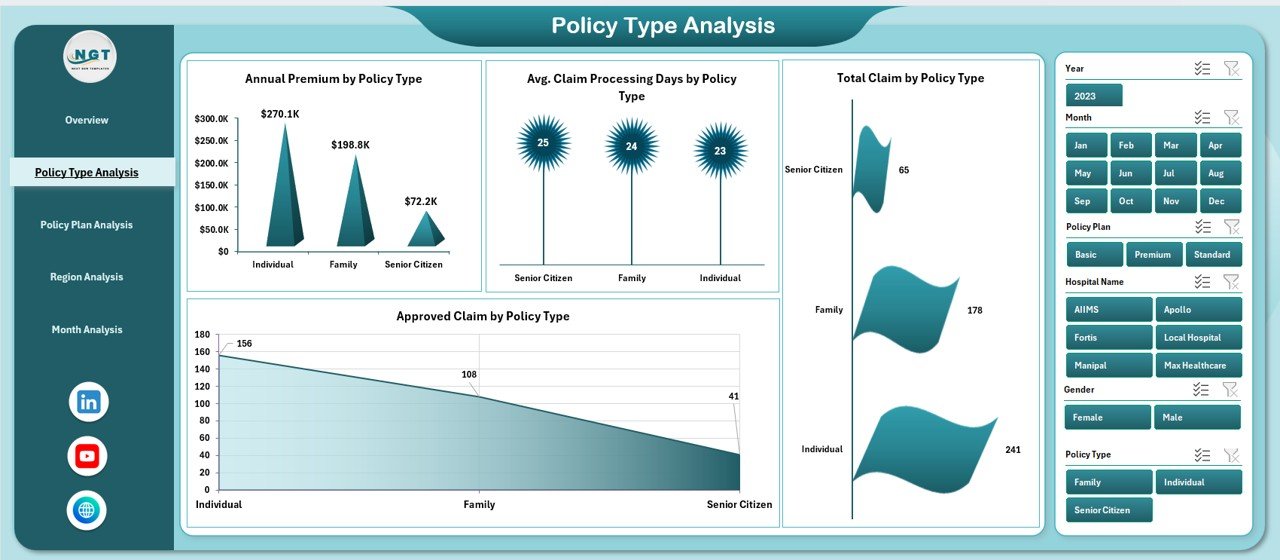
🧾 Policy Type Analysis Page
The Policy Type Analysis Page compares performance across different policy categories.
Charts Included:
Annual Premium by Policy Type
Average Claim Processing Days by Policy Type
Total Claim by Policy Type
Approved Claim by Policy Type
This analysis supports product strategy, pricing decisions, and risk assessment.
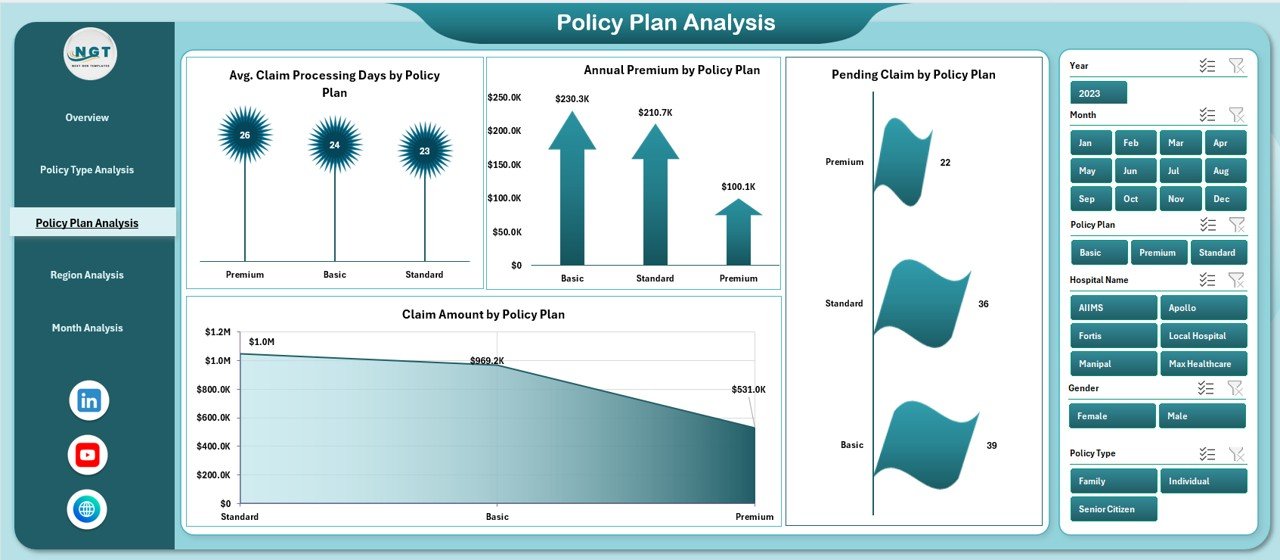
📑 Policy Plan Analysis Page
Policy plans differ in coverage depth and claim complexity. This page provides plan-level insights.
Charts Available:
Average Claim Processing Days by Policy Plan
Annual Premium by Policy Plan
Pending Claim by Policy Plan
Claim Amount by Policy Plan
Insurers can optimize underwriting rules and operational efficiency using this analysis.
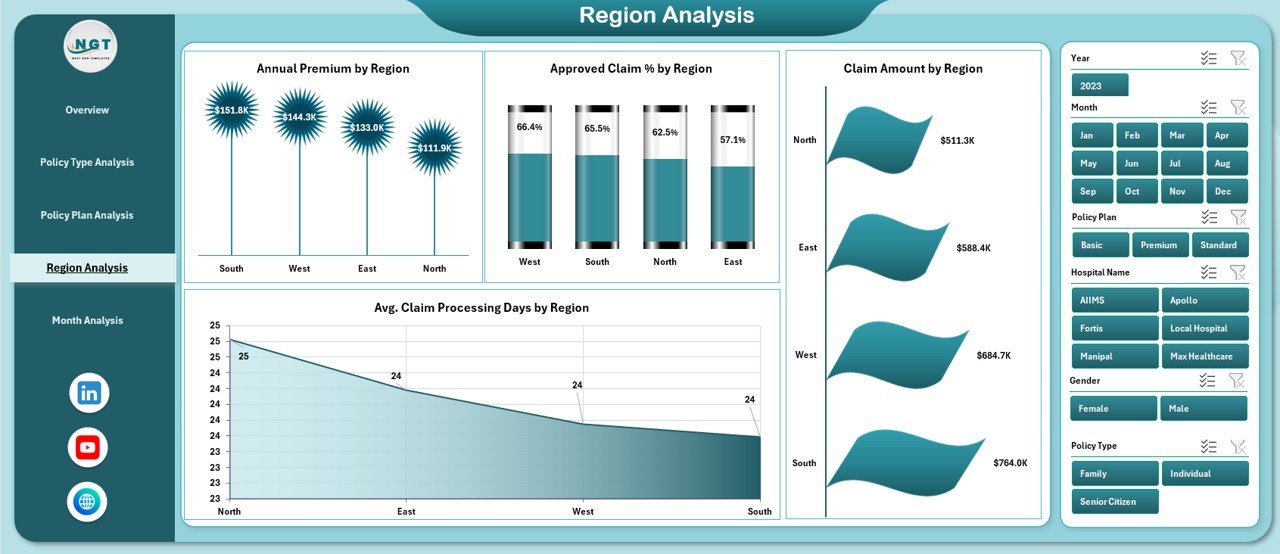
🌍 Region Analysis Page
The Region Analysis Page highlights geographical performance variations.
Key Metrics:
Annual Premium by Region
Approved Claim % by Region
Claim Amount by Region
Average Claim Processing Days by Region
This page helps organizations allocate resources and improve regional workflows.
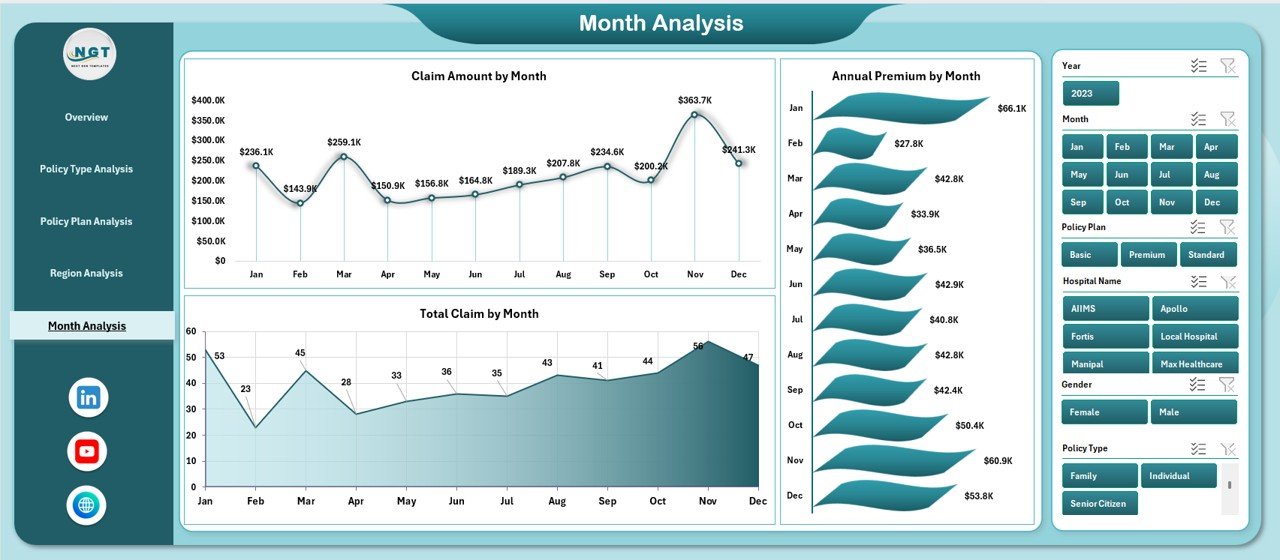
📆 Month Analysis Page
The Month Analysis Page focuses on time-based trends and seasonality.
Charts Included:
Claim Amount by Month
Annual Premium by Month
Total Claim by Month
This analysis supports forecasting, budgeting, and capacity planning.
🛠️ How to Use the Health Insurance Dashboard
✅ Update insurance data in the Data Sheet
✅ Refresh pivot tables if required
✅ Use slicers to filter by policy, hospital, region, or month
✅ Review KPIs and charts instantly
✅ Make faster, data-driven decisions
No macros, VBA, or advanced Excel skills required.
👥 Who Can Benefit from This Dashboard?
🏥 Health Insurance Companies
📊 Insurance Analysts
🧾 Claims & Operations Managers
💰 Finance & Risk Teams
🏢 Third-Party Administrators (TPAs)
🧑💼 Senior Leadership
Ideal for small, mid-size, and large insurance organizations.
### 👉 Click here to read the Detailed blog post
▶️ Visit our YouTube channel to learn step-by-step video tutorials
https://youtube.com/@PKAnExcelExpert
Watch the step-by-step video tutorial:
Compatibility and Requirements
- Works in Microsoft Excel desktop (Excel 2016 or later, or Microsoft 365).
- The dashboard is built with Pivot Tables, Pivot Charts, slicers and KPI cards, and it needs no macros or VBA. Microsoft explains slicers in Use slicers to filter data.
Frequently Asked Questions
How many pages does the dashboard have?
Five pages: Overview, Policy Type Analysis, Policy Plan Analysis, Region Analysis and Month Analysis. A Page Navigator moves you between them.
What can I filter with the slicers?
You can filter by policy, hospital, region or month. The KPIs and charts update to match your selection.
How do I update the data?
Enter your insurance data in the Data Sheet and refresh the pivot tables if needed. The dashboard then shows the new figures.
Does it track claim processing time?
Yes. It shows average claim processing days by city, policy type, policy plan and region.
Do I need macros or advanced Excel skills?
No. The dashboard uses no macros or VBA, and you work through the slicers and the Data Sheet.
Is there a Power BI version?
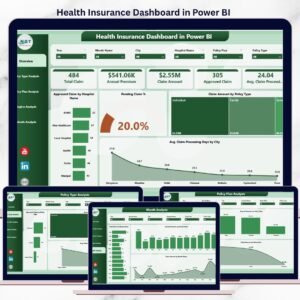
Yes. See the Health Insurance Dashboard in Power BI.
Related Insurance and Healthcare Templates
- Health Insurance Dashboard in Power BI: the same topic in Power BI
- Health Insurance KPI Dashboard in Excel: a KPI-focused view for health insurers
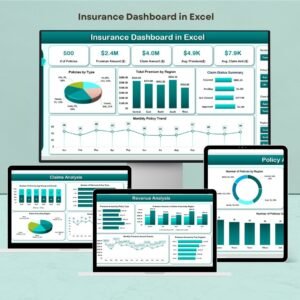
- Insurance Dashboard in Excel: a general insurance dashboard
- Healthcare Dashboard in Excel: a dashboard for healthcare operations
- Healthcare Insurance KPI Dashboard in Excel: another KPI view for healthcare insurance
Browse all Excel dashboards.

















Reviews
There are no reviews yet.