

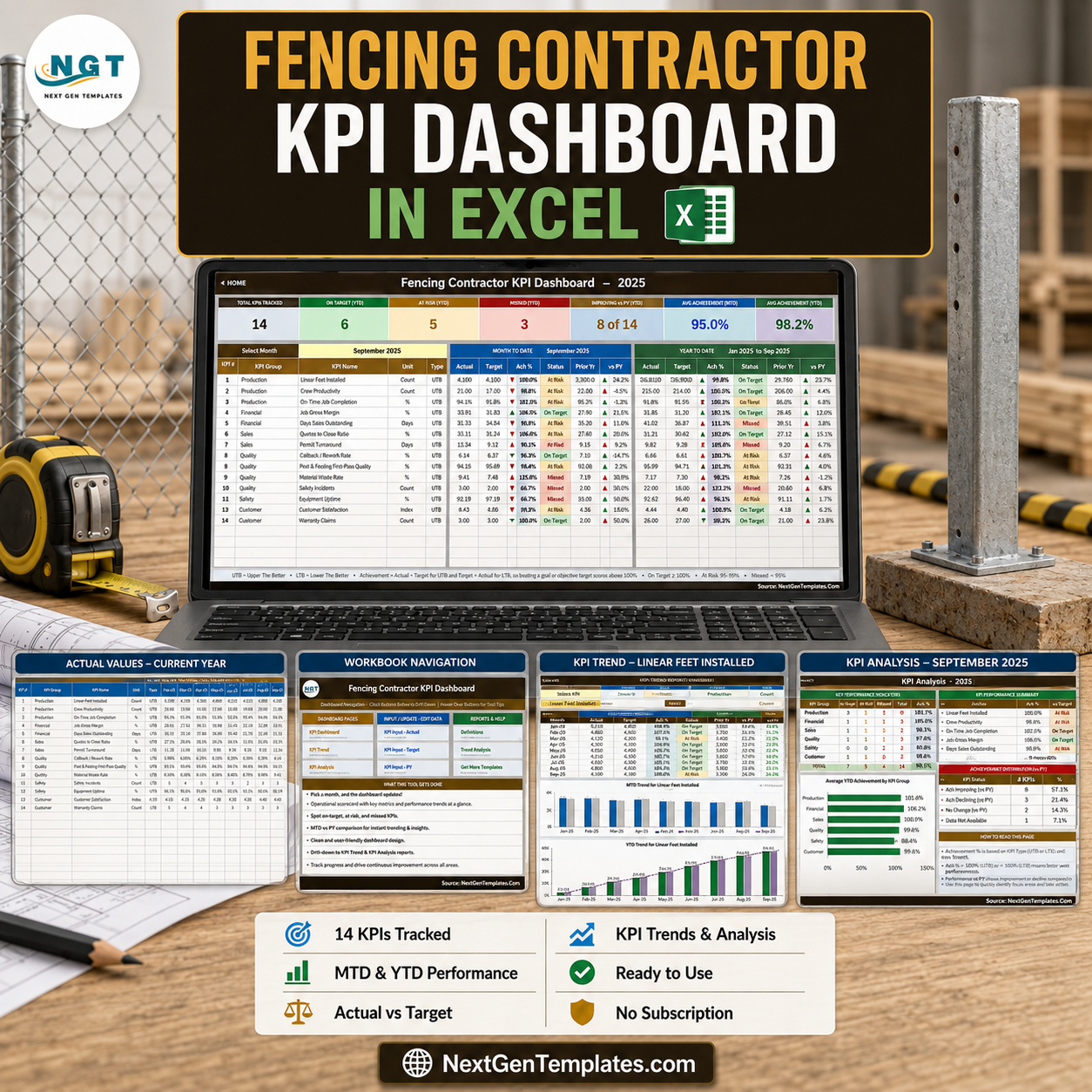

The Fencing Contractor KPI Dashboard in Excel is a month-picker KPI scorecard built for fencing contractors – chain link, wood, vinyl, ornamental and temporary fence installers. It tracks 14 fencing KPIs across 6 groups – Production, Financial, Sales, Quality, Safety and Customer – and shows MTD and YTD actual, target, achievement %, traffic-light status, prior year and year-on-year movement for every one of them from a single dropdown. It is 100% worksheet formulas: no macros, no Power Query, no Power Pivot, no add-ins, no data model. It opens in Excel 2013 and later and in Excel for the web. Sample 2025 data is included so you can see it working the second you open it, and every cell is unlocked so you can rename a KPI, move a target or change a threshold. Instant download, lifetime access to the file you buy. Fencing Contractor KPI Dashboard in Excel
Which template is this? NextGenTemplates ships three similarly named lines and they are genuinely different products. This is the KPI Dashboard line – a month picker, seven summary cards, traffic lights, and dedicated KPI Trend and KPI Analysis pages. It is not the analytical dashboards that chart a transaction table through slicers, and it is not the lighter ten-KPI Fencing Contractor KPI Scorecard in Excel. They complement each other rather than duplicate each other. Fencing Contractor KPI Dashboard in Excel
Also available as a Power BI build. There is a companion Fencing Contractor KPI Dashboard in Power BI. It is not this workbook ported across – it is a separate build with its own KPI set (12 KPIs, including Average Job Value, Post-Set Cost per Post, Gate & Latch Callback Count, Bid Win Rate, Utility Locate Turnaround and Estimate-to-Install Lead Time), five slicers for Month, KPI Group, Owner, Priority and Direction, month-on-month movement on the summary cards, and twelve-month sparklines inside the scorecard table. Buy the Excel file if you want something that opens and edits anywhere; buy the Power BI file if you already run Power BI Desktop and want slicer-driven filtering.
Key Features of the Fencing Contractor KPI Dashboard in Excel
- One dropdown drives the whole scorecard. Cell D6 on KPI Dashboard lists the twelve months of the reporting year. Pick September 2025 and all 14 rows, the seven summary cards and the entire KPI Analysis page follow it. There is no refresh step and no query to run.
- Direction-aware scoring. Each KPI carries a UTB (upper the better) or LTB (lower the better) flag. This build ships 8 UTB and 6 LTB – Days Sales Outstanding, Permit Turnaround, Callback / Rework Rate, Material Waste Rate, Safety Incidents and Warranty Claims are the lower-is-better six. Achievement is Actual / Target for UTB and Target / Actual for LTB, so cutting your permit turnaround or your waste rate below target scores above 100% rather than reading as a miss, and a rising callback rate shows a red arrow. Fencing Contractor KPI Dashboard in Excel
- Traffic lights with editable thresholds. On Target from 100%, At Risk 95-99%, Missed below 95%. The thresholds sit in plain formulas in columns L and U on KPI Dashboard – change them there to match your own governance.
- Seven summary cards. Total KPIs Tracked, On Target (YTD), At Risk (YTD), Missed (YTD), Improving vs PY (MTD), Avg Achievement (MTD) and Avg Achievement (YTD). In the shipped September 2025 sample they read 14, 6, 5, 3, 8 of 14, 95.0% and 98.2%.
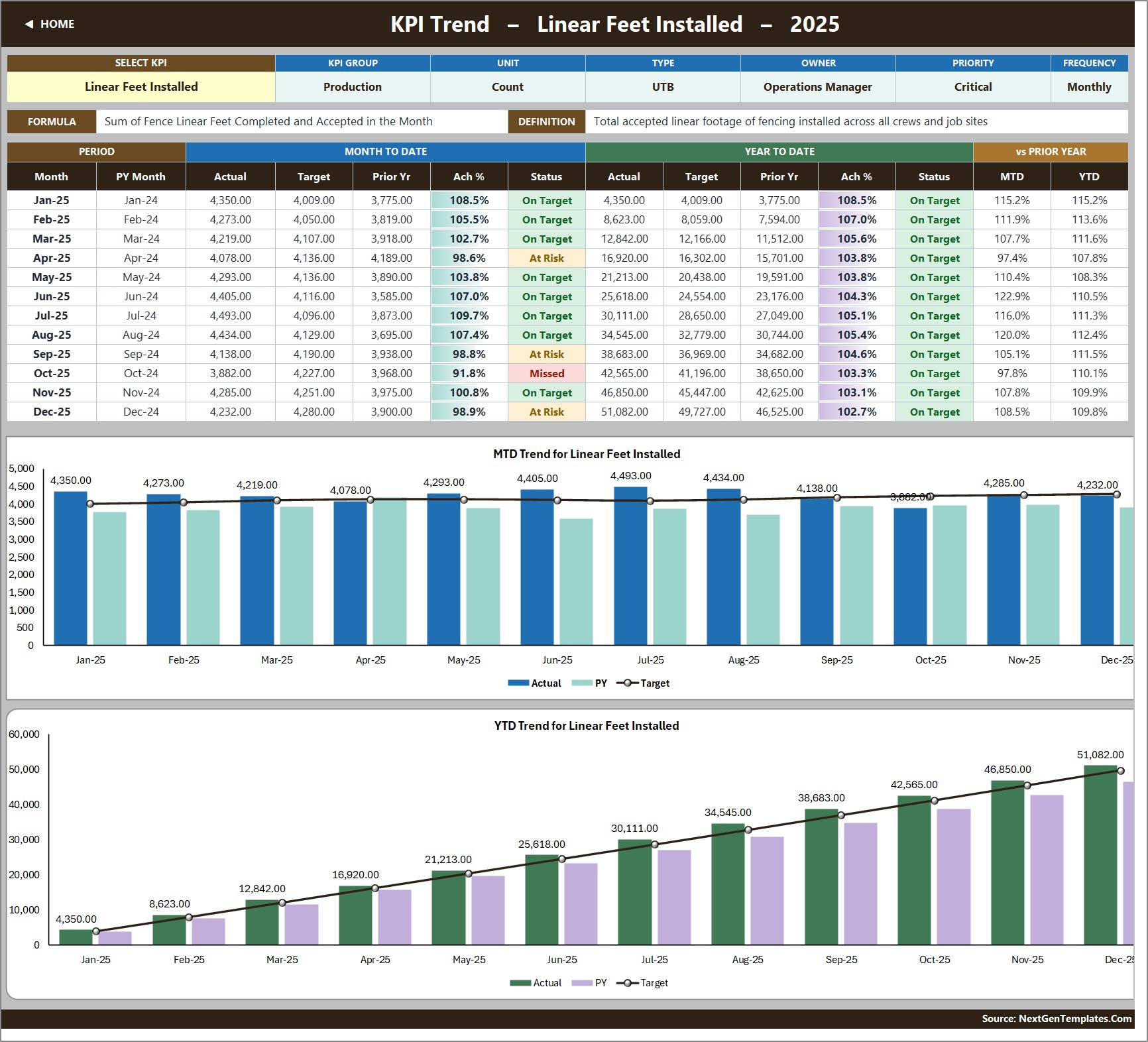
- A KPI Trend page for one KPI at a time. A second dropdown in B4 on KPI Trend lists every KPI name; the attribute strip (group, unit, type, owner, priority, frequency), the formula, the definition, the twelve-month table and both charts all redraw together.
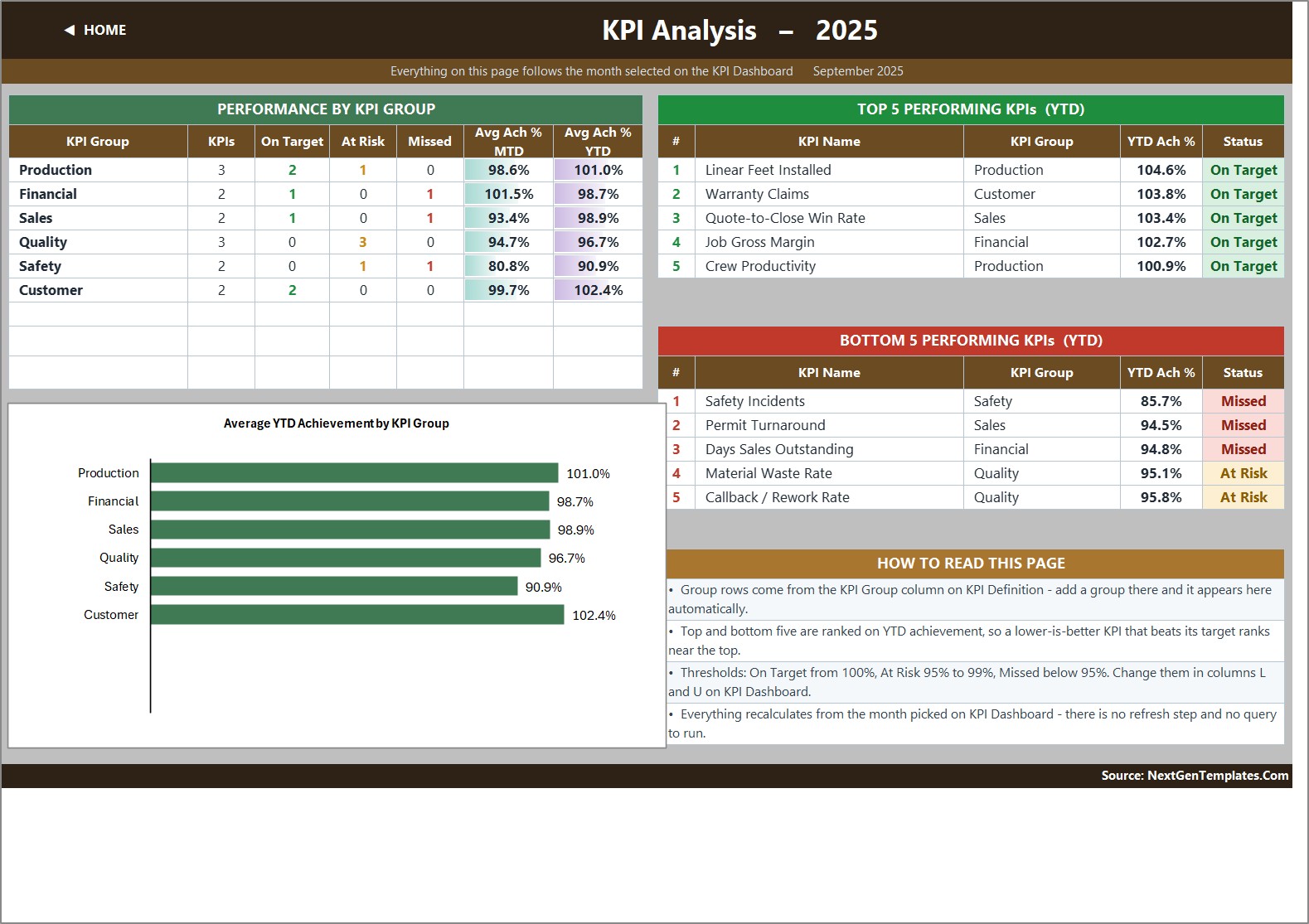
- Three live charts. “MTD Trend for Linear Feet Installed” and “YTD Trend for Linear Feet Installed” are combo charts – actual and prior-year columns with a target line – and “Average YTD Achievement by KPI Group” is a bar chart on the analysis page. Both trend chart titles rename themselves to whichever KPI you pick.
- Group roll-up plus top and bottom five. KPI Analysis counts On Target / At Risk / Missed per KPI group, averages MTD and YTD achievement per group, and ranks the best and worst five KPIs on YTD achievement. In the sample month the bottom five are Safety Incidents (85.7%), Permit Turnaround (94.5%), Days Sales Outstanding (94.8%), Material Waste Rate (95.1%) and Callback / Rework Rate (95.8%).
- Room to grow without formula work. The sheets are wired for 22 KPIs; 14 are filled in and the remaining rows are live and empty. Type a KPI on KPI Definition and it flows through the three input sheets, the scorecard, the trend dropdown and the analysis page automatically. Fencing Contractor KPI Dashboard in Excel
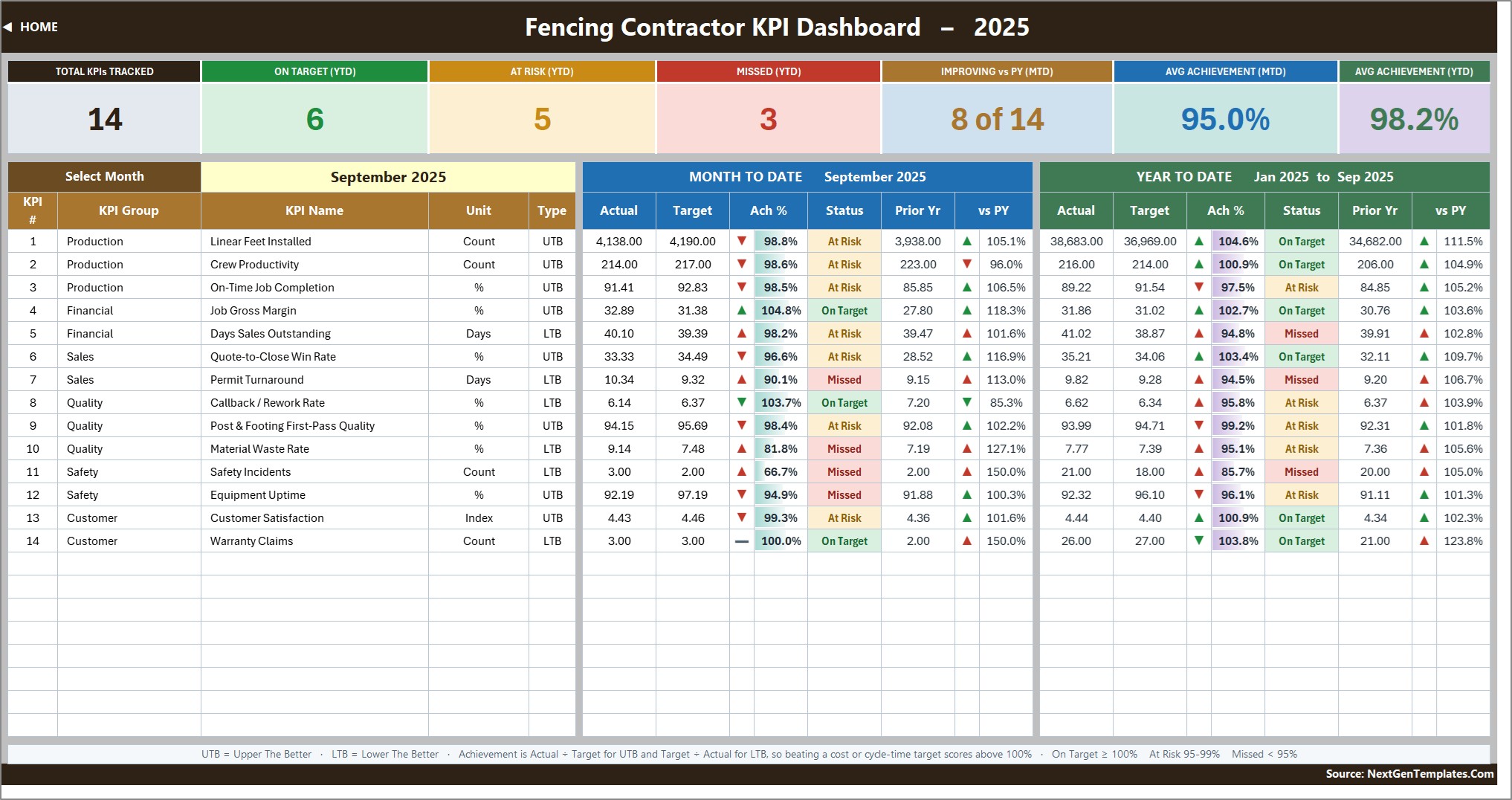
The 14 KPIs This Template Ships With
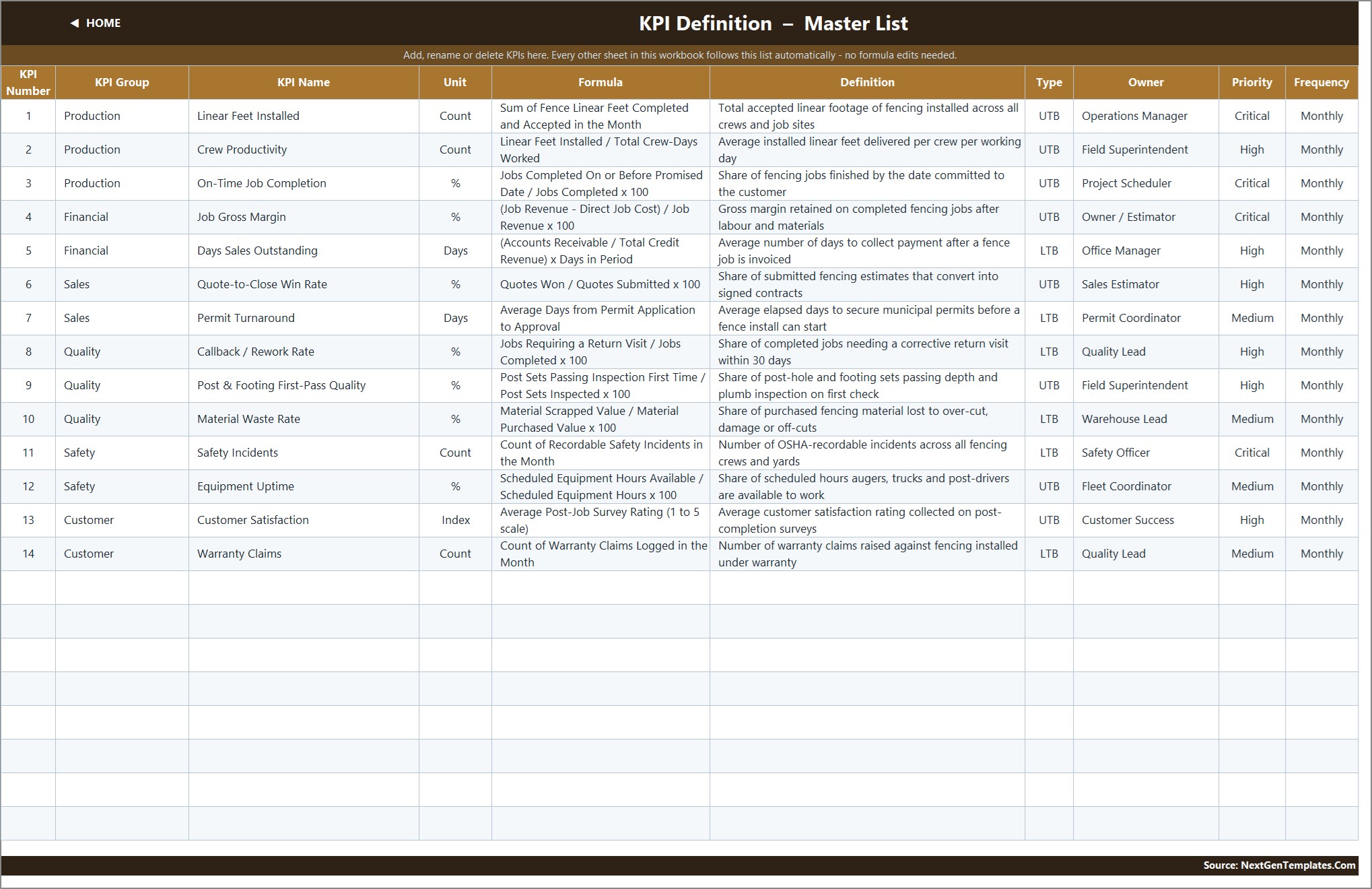
Every KPI below is on KPI Definition with its own group, unit, formula, plain-English definition, UTB/LTB flag, owner, priority and frequency. Rename any of them in one place and the whole workbook follows.
- Production (3): Linear Feet Installed (Count, UTB), Crew Productivity (Count, UTB), On-Time Job Completion (%, UTB).
- Financial (2): Job Gross Margin (%, UTB), Days Sales Outstanding (Days, LTB).
- Sales (2): Quote-to-Close Win Rate (%, UTB), Permit Turnaround (Days, LTB).
- Quality (3): Callback / Rework Rate (%, LTB), Post & Footing First-Pass Quality (%, UTB), Material Waste Rate (%, LTB).
- Safety (2): Safety Incidents (Count, LTB), Equipment Uptime (%, UTB).
- Customer (2): Customer Satisfaction (Index, UTB), Warranty Claims (Count, LTB).
The definitions are trade-specific rather than generic. Crew Productivity is linear feet divided by crew-days worked. Post & Footing First-Pass Quality is the share of post-hole and footing sets that pass depth and plumb inspection on the first check. Permit Turnaround is the average elapsed days from municipal permit application to approval, which for most fencing firms is the single biggest reason a signed job has not started yet. Equipment Uptime is scheduled hours your augers, trucks and post-drivers were actually available.
Each row also carries an owner (Operations Manager, Field Superintendent, Project Scheduler, Owner / Estimator, Office Manager, Sales Estimator, Permit Coordinator, Quality Lead, Warehouse Lead, Safety Officer, Fleet Coordinator, Customer Success) and a Critical / High / Medium priority – four Critical, six High and four Medium – so the scorecard doubles as a simple accountability list.
What Is Inside the Fencing Contractor KPI Dashboard in Excel
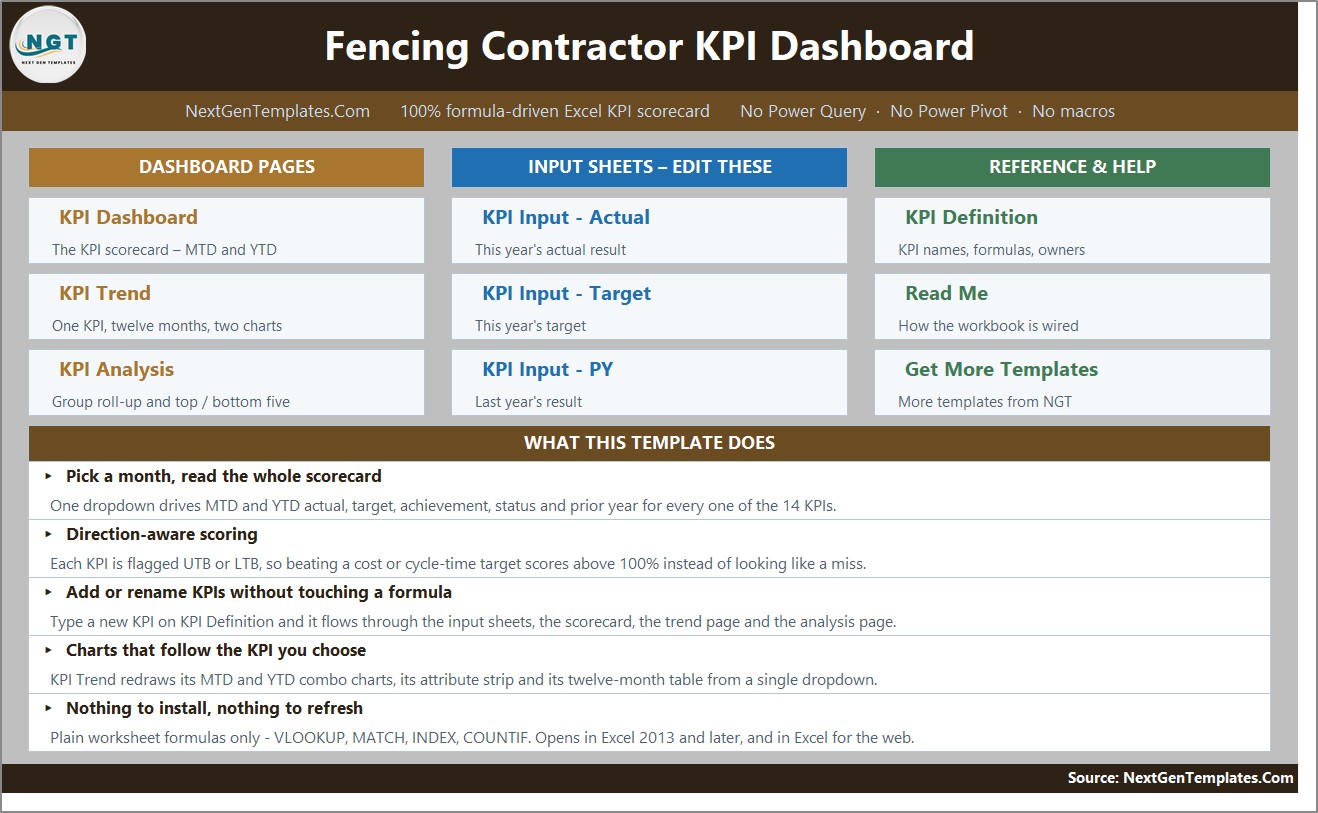
The download is a ZIP holding the .xlsx workbook and the Excel KPI Dashboard User Manual (PDF). The workbook has ten visible sheets plus one hidden helper sheet:
- Home – a nine-tile launcher plus a plain-English summary of what the file does.
- KPI Dashboard – the scorecard: month picker, seven summary cards, and one row per KPI with a full MTD block and a full YTD block.
- KPI Trend – one KPI, twelve months, two combo charts.
- KPI Analysis – group roll-up, bar chart, top 5 and bottom 5 on YTD achievement.
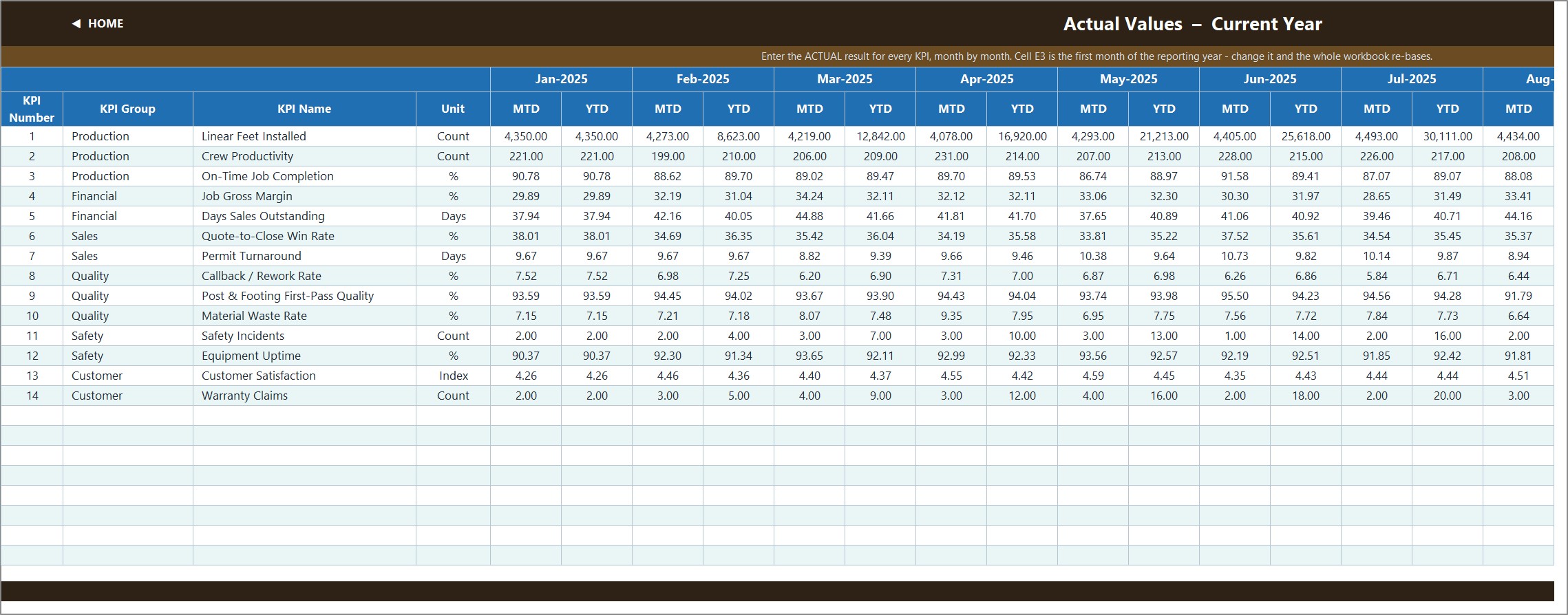
- KPI Input – Actual – this year’s numbers, an MTD and a YTD column for each of the twelve months.
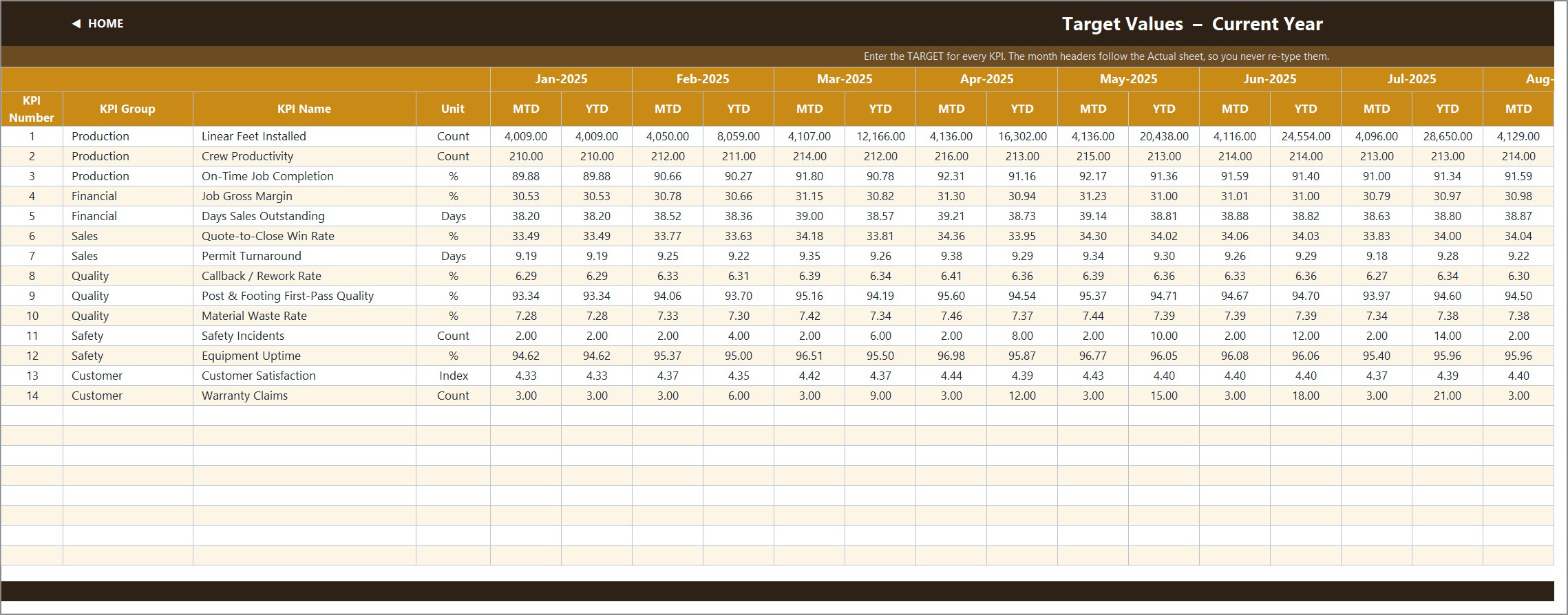
- KPI Input – Target – this year’s targets, same shape, month headers inherited from the Actual sheet.
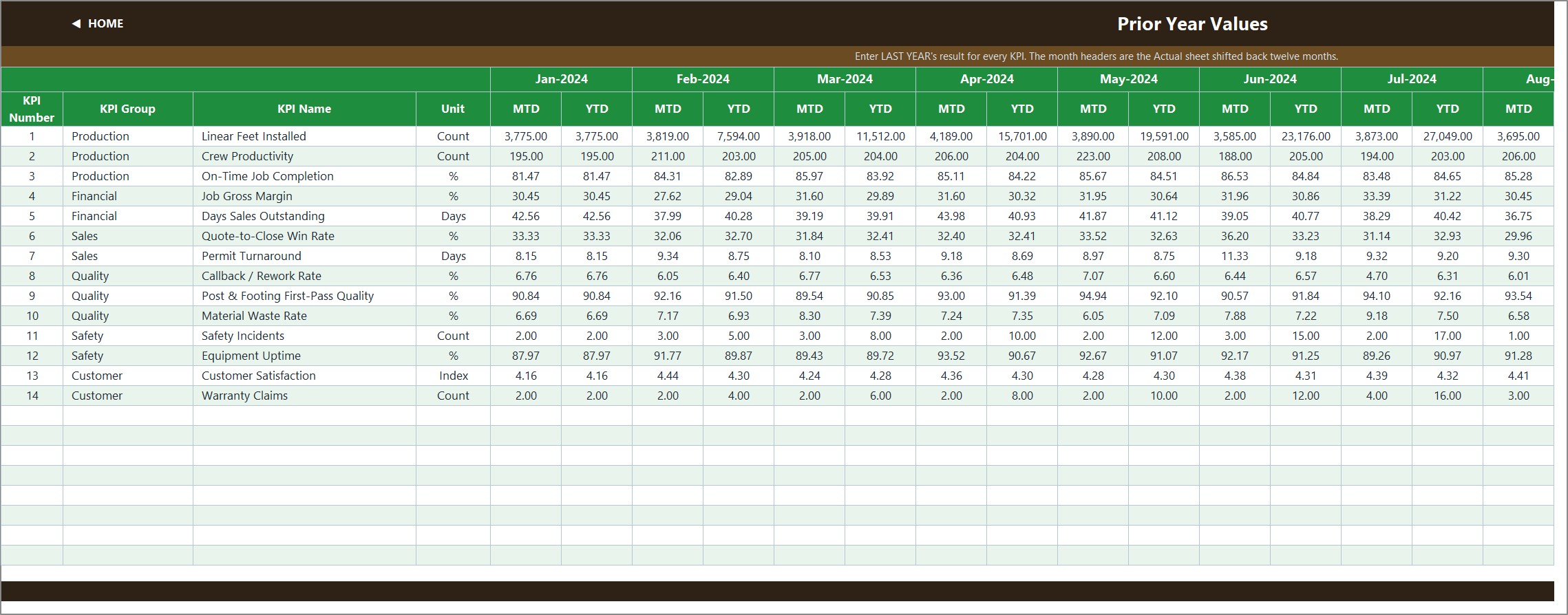
- KPI Input – PY – last year’s numbers, month headers shifted back twelve months automatically.
- KPI Definition – the master KPI list that every other sheet reads.
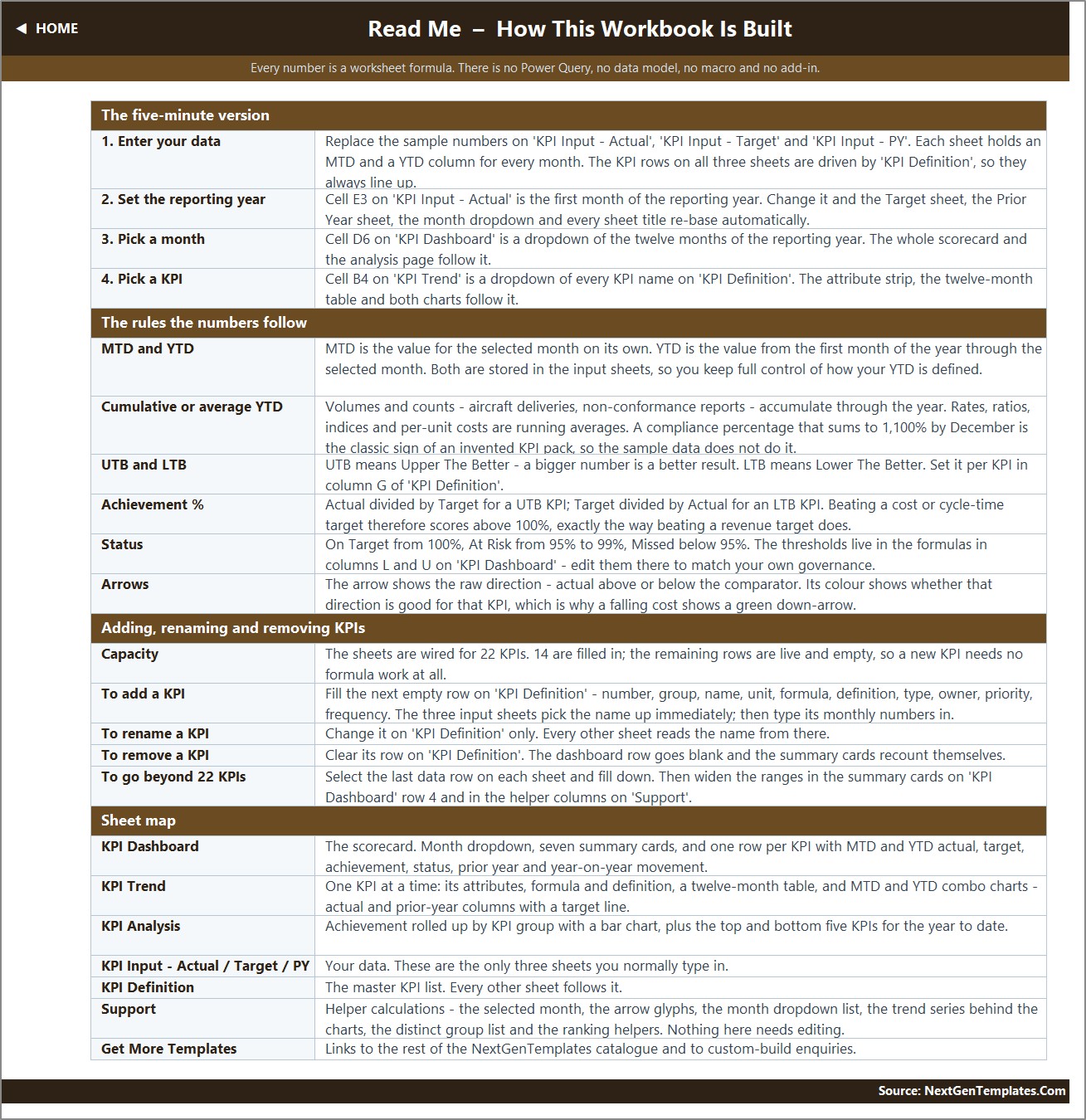
- Read Me – how the workbook is wired, in one page.
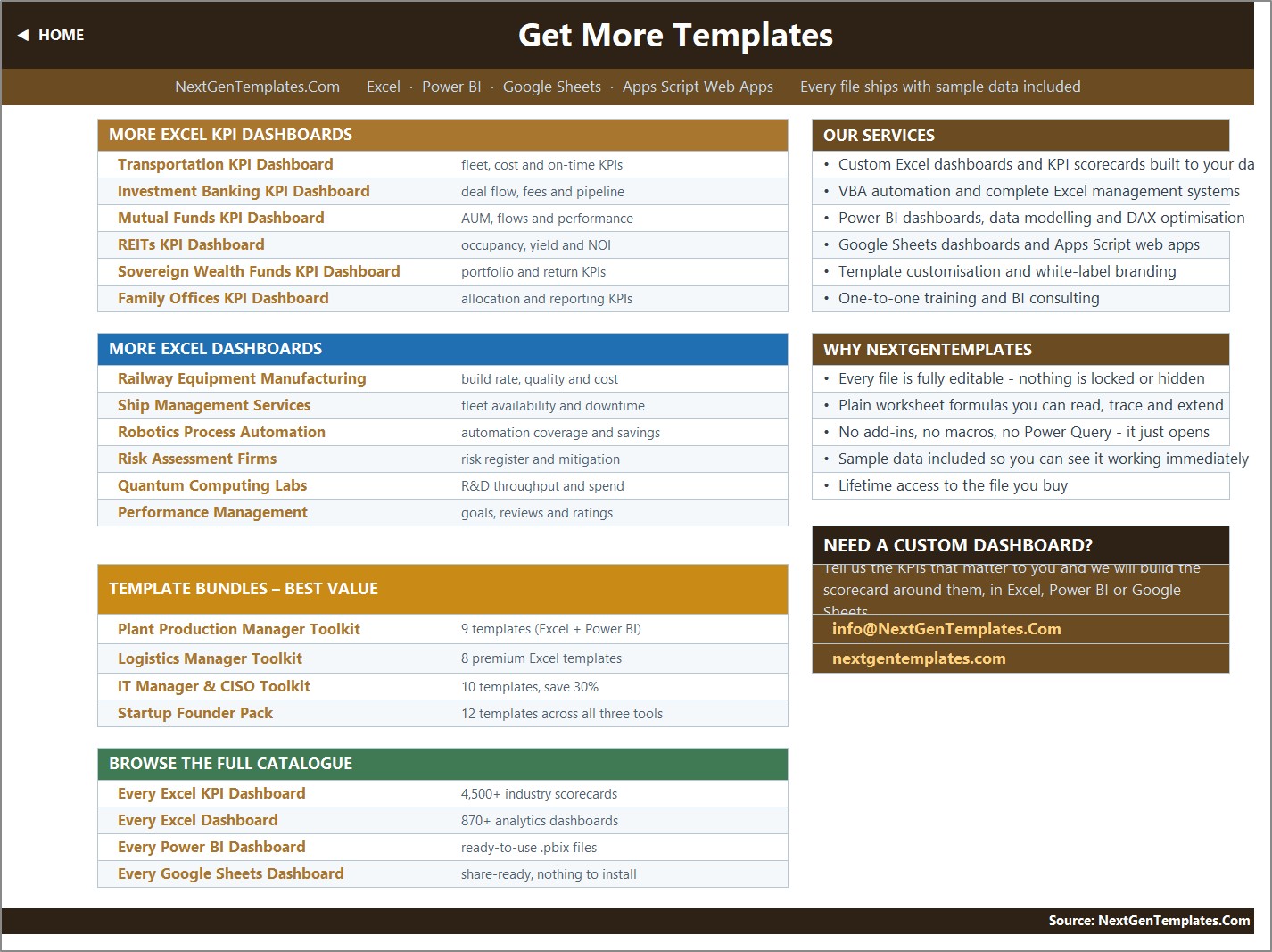
- Get More Templates – links to the rest of the NextGenTemplates catalogue.
- Support (hidden) – the selected month, arrow glyphs, month list, chart series and ranking helpers. Nothing here needs editing. Fencing Contractor KPI Dashboard in Excel
Fencing Contractor KPI Dashboard in Excel vs. Power BI vs. Paid Field-Service SaaS – Where This Fits
| What you need | This Excel KPI Dashboard | The Power BI edition | Field-service / construction SaaS |
|---|---|---|---|
| Cost | One-off 12.99, lifetime access | One-off, same price | Typically 50-300+ per user per month |
| What you need installed | Excel 2013+, Excel for Mac, or a browser | Power BI Desktop (Windows) | A browser and a subscription |
| Setup time | Open it, type your numbers over the sample | Open the .pbix, point it at the data file | Implementation, data mapping, training |
| Filtering | Two dropdowns – month, and KPI on the trend page | Five slicers – month, group, owner, priority, direction | Whatever the vendor built |
| Where your data lives | Your own file, on your own machine | Your own .pbix and data file | The vendor’s cloud |
| Works offline | Yes | Yes | No |
| Automatic capture from job costing / payroll | No – you type MTD and YTD in | No – it reads a data file you maintain | Yes, that is what you are paying for |
| Change a KPI, a target or a threshold | Type it – every cell is unlocked | Edit the data file; visuals follow | Vendor roadmap or a paid customisation |
Put plainly: this is the right tool if you already have your monthly numbers somewhere – a job-cost report, a crew timesheet summary, a QA log, an AR ageing – and you want a governed, board-ready scorecard on top of them without paying a monthly subscription. It is the wrong tool if you want the numbers to arrive on their own.
Who This Template Is For – and Who It Is Not For
It is for: owners and operations managers of fencing contracting firms – residential, commercial, agricultural or temporary-fence rental; field superintendents reporting crew output weekly and monthly; estimators watching quote-to-close win rate and job gross margin; office managers chasing days sales outstanding; permit coordinators whose turnaround gates the whole install schedule; safety officers who already keep an incident record elsewhere and want the headline count on the same page as production; and anyone preparing a monthly management pack for a partner, a franchisor or a lender.
It is not for you if you need job-by-job, crew-by-crew or site-by-site detail (this workbook stores one number per KPI per month), if you want the numbers pulled automatically from an accounting, estimating or job-costing system (there is no connection and no import), or if you are looking for a scheduling, dispatch or estimating tool. There is no job list, no customer record, no material take-off and no permit register in this file – it reports the summary numbers you produce elsewhere.
How to Use the Fencing Contractor KPI Dashboard in Excel
- Unzip and open the .xlsx. It opens straight into Home. Nothing to enable, nothing to install.
- Set your reporting year. Cell E3 on KPI Input – Actual is the first month of the year. Change it and the Target sheet, the Prior Year sheet, the month dropdown and every sheet title re-base themselves.
- Make the KPI list yours. On KPI Definition, rename, re-group or delete any of the 14 rows, or fill an empty row to add a fifteenth. Set the Type column to UTB or LTB – this is the single most important field, because it decides whether a rise is good news.
- Type your numbers. Replace the sample data on KPI Input – Actual, KPI Input – Target and KPI Input – PY. Each sheet holds an MTD and a YTD column for every month, so you decide how your year-to-date is defined – cumulative for linear feet, incidents and warranty claims, running average for rates, margins, DSO and satisfaction.
- Pick a month. Use the dropdown in D6 on KPI Dashboard. The scorecard, the cards and the analysis page follow it instantly.
- Drill into one KPI. On KPI Trend, pick a KPI from the dropdown in B4 to get its twelve-month table and both charts against target and prior year.
- Tune the thresholds if you need to. The 100 / 95 cut-offs live in the status formulas in columns L and U on KPI Dashboard.
Real-World Use Cases
- The monthly management meeting. Pick last month, print or share KPI Dashboard, and the discussion starts from the Missed rows rather than from a spreadsheet nobody agrees on. In the September 2025 sample those are Permit Turnaround, Material Waste Rate, Safety Incidents and Equipment Uptime.
- Crew productivity reviews. Linear Feet Installed and Crew Productivity on the trend page show whether a strong month was a real gain or a seasonal bump – the sample year peaks in July and dips in October, which is exactly the shape most fencing firms recognise.
- Permit bottleneck reporting. Permit Turnaround is a lower-is-better KPI with its own owner. Watching it next to On-Time Job Completion answers the argument about whether late jobs are a crew problem or a city-hall problem.
- Estimating feedback loop. Job Gross Margin and Quote-to-Close Win Rate together tell you whether you are winning work by pricing it away. Material Waste Rate sits alongside them because over-cut panels and damaged pickets come straight out of that margin.
- Quality and warranty control. Post & Footing First-Pass Quality, Callback / Rework Rate and Warranty Claims sit in the same view, so a rise in callbacks can be read next to the inspection numbers that predict it.
- Setting next year’s targets. The Prior Year sheet and the vs PY columns give you the base you need to argue for a realistic target rather than a round-number one.
Frequently Asked Questions
Does it contain macros? No. It is a plain .xlsx with worksheet formulas only – VLOOKUP, MATCH, INDEX, COUNTIF and friends. There is no VBA, no Power Query, no Power Pivot and no add-in, so there is no security prompt and nothing to enable.
Which Excel versions does it work in? Excel 2013 and later on Windows, Excel for Mac, Microsoft 365, and Excel for the web. Dropdowns and charts behave the same way in all of them.
Does it pull data from my accounting or job-costing software? No, and the listing does not pretend otherwise. You type your monthly numbers onto the three input sheets. Both the MTD and the YTD figures are typed – the workbook does not derive year-to-date from the monthly cells – which is deliberate, because it lets you define YTD as a running total for linear feet and incidents and a running average for margin, DSO and satisfaction, but it does mean you enter two numbers per KPI per month rather than one.
Can I change the KPIs to mine? Yes. KPI Definition is the master list and every other sheet reads from it. Rename, re-group, delete or add – there are 22 wired rows and 14 are used, so eight more KPIs need no formula work at all. To go beyond 22, select the last data row on each sheet and fill down, then widen the ranges in the summary cards on row 4 of KPI Dashboard. Fencing Contractor KPI Dashboard in Excel
Is this a safety or OSHA compliance system? No. Safety Incidents is included as a Critical KPI because fencing crews run augers and post-drivers, work near buried utilities and handle heavy panels, but it is simply a count you type in each month. There is no incident log, no OSHA 300 or 300A form, no near-miss register and no corrective-action tracking. Keep your compliance records in whatever system you already use and report the count here.
What is the difference between this and the Fencing Contractor KPI Scorecard? Different templates from different lines. The scorecard is a lighter ten-KPI file. This KPI Dashboard ships 14 KPIs, seven summary cards, a dedicated KPI Trend page with two combo charts, and a KPI Analysis page with a group roll-up and top/bottom five. Plenty of firms buy both – the scorecard for a quick weekly look, the dashboard for the monthly pack.
Is the Power BI version the same file? No. It is a separate build with a different KPI set – 12 KPIs including Average Job Value, Post-Set Cost per Post, Gate & Latch Callback Count, Bid Win Rate, Utility Locate Turnaround and Estimate-to-Install Lead Time – five slicers instead of two dropdowns, month-on-month movement on the cards, and sparklines in the scorecard table. Three KPIs overlap by name (Linear Feet Installed, Days Sales Outstanding and a gross-margin measure); the rest are genuinely different. Choose on the tool you already run, not on the assumption that they are twins.
Is the sample data real? No. The 2025 and 2024 figures are demonstration data generated for this template so that every chart, card and traffic light is populated when you open it. Delete it and type your own.
Are there any known cosmetic issues? Two worth knowing. The Read Me page’s “Cumulative or average YTD” row still carries example wording from another industry (“aircraft deliveries, non-conformance reports”) – the rule it describes is correct, the examples are simply not fencing ones, and you can edit that cell. And the Frequency column on KPI Definition is a documentation label rather than a switch: all 14 KPIs here are set to Monthly and sit on the same monthly grid.
About the Author
Built by the NextGenTemplates team, the same people behind PK: An Excel Expert – twenty years of building Excel, Power BI and Google Sheets reporting tools for businesses that need a working file today rather than a project next quarter. Every template ships with sample data, unlocked cells and plain formulas you can read and trace. Questions or a custom build: [email protected]. Fencing Contractor KPI Dashboard in Excel
Explore Related Templates
- Fencing Contractor KPI Dashboard in Power BI – the same trade, a separate 12-KPI slicer-driven build for Power BI Desktop.
- Fencing Contractor KPI Scorecard in Excel and Fencing Contractor KPI Scorecard in Google Sheets – the same trade, the lighter ten-KPI scorecard line.
- Masonry Contractor KPI Dashboard in Excel, Roofing Contractor KPI Dashboard in Excel and Carpentry Workshop KPI Dashboard in Excel – the same KPI Dashboard line for neighbouring trades.
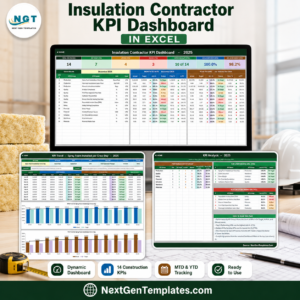
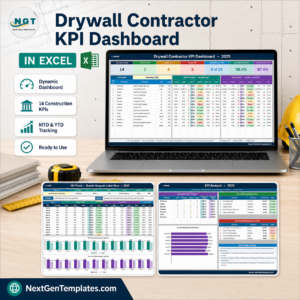
- Insulation Contractor KPI Dashboard in Excel and Drywall Contractor KPI Dashboard in Excel – useful if you sub out or bundle other exterior and interior trades.
- Browse the KPI Dashboard category and the MS Excel category for the rest of the shelf.
Download it now – instant delivery, the .xlsx plus the Excel KPI Dashboard User Manual PDF, lifetime access to the file you buy, and every cell unlocked so it becomes yours the moment you open it. Fencing Contractor KPI Dashboard in Excel
Watch the step-by-step video Demo:
Last updated: 02 September 2026.
Compatibility and Requirements
- Works in Microsoft Excel desktop (Excel 2016 or later, or Microsoft 365). The page also lists Excel 2013 and later and Excel for the web.
- The workbook uses worksheet formulas only, with no macros, Power Query or add-ins.
- Two dropdowns drive the file: the month picker on the KPI Dashboard sheet and the KPI picker on the KPI Trend sheet. Microsoft explains how they work in Create a drop-down list.
































Reviews
There are no reviews yet.