


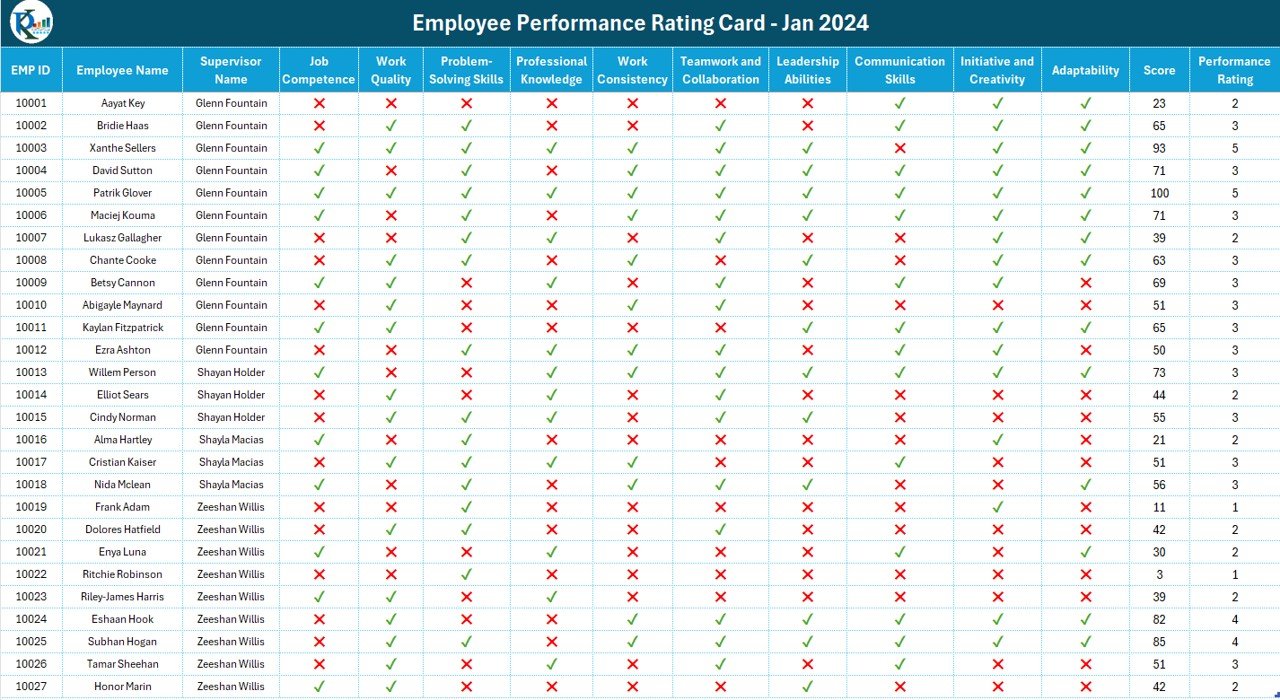


The Employee Performance Rating Card and Dashboard in Excel is an employee evaluation template with weighted scoring and visual performance summaries. Rate employees across ten criteria, adjust the weights and rating scale, then compare scores by employee or supervisor. The rating card provides a detailed view for individual review discussions.

📌 Key Features: Employee Performance Rating Card and Dashboard
✅ Comprehensive Performance Assessment
This dashboard evaluates employees based on 10 key performance parameters, including:
- Job Competence – Measures how well employees perform their responsibilities.
- Work Quality – Assesses accuracy, thoroughness, and reliability.
- Problem-Solving Skills – Evaluates the ability to handle challenges efficiently.
- Professional Knowledge – Gauges expertise in a particular field or role.
- Work Consistency – Determines how consistently employees meet performance expectations.
- Teamwork and Collaboration – Examines the ability to work effectively in a team.
- Leadership Abilities – Evaluates decision-making, management, and vision.
- Communication Skills – Assesses verbal and written communication proficiency.
- Initiative and Creativity – Measures innovation and problem-solving contributions.
- Adaptability – Determines how well employees adjust to change.
Each parameter has customizable weightages, allowing organizations to tailor the evaluation criteria to their specific needs.
📊 Dynamic Performance Scoring Grid
- Each employee’s score is automatically calculated based on individual and collective performance data.
- The total performance score is determined using the weighted criteria.
- Employees are assigned performance ratings based on score brackets, with a flexible rating scale that can be adjusted via the settings.
This scoring system ensures an objective and fair assessment of performance across all levels.
📈 Powerful Dashboard Visualizations
The interactive dashboard provides supervisor-wise, rating-wise, and employee-wise performance insights through dynamic visualizations, including:
- Average Performance Score by Supervisor (Circular Chart)
- Average Rating by Supervisor (Donut Chart)
- Employee Count by Ratings (Bar Chart)
- Top 10 Employees by Performance Score (Ranked Bar Chart)
These intuitive visuals make it easy to identify top performers, underperformers, and areas needing improvement.
📌 Performance Rating & Insights
The rating card gives a detailed breakdown of employee performance, helping HR teams and managers:
✔ Compare performance trends over time
✔ Identify high-performing employees for rewards or promotions
✔ Spot underperformers needing additional support or training
✔ Align performance evaluation with organizational goals
The customizable rating system allows organizations to set unique benchmarks for grading employee efficiency.
🔧 Customization and Flexibility
- Easily adjustable performance parameters to match different evaluation criteria.
- Interactive filters for employee and supervisor selection to view specific data.
- Editable rating scale for organizations with different evaluation policies.
This flexibility ensures that the dashboard adapts to diverse business needs across industries.
🚀 Streamline Your Performance Management
The Employee Performance Rating Card and Dashboard in Excel is the perfect tool for HR teams, managers, and leadership teams looking to improve performance tracking and evaluation processes.
With its interactive design, automated calculations, and real-time insights, this template makes performance assessments simple, transparent, and efficient.
📥 Download now and take control of employee performance management today!
Click here to read the detailed blog post Employee Performance Rating Card and Dashboard
Watch the step-by-step video tutorial: Employee Performance Rating Card and Dashboard
Also check our Inventory Management Form in Excel
Questions About Employee Performance Scoring
Can I change the evaluation weights?
Yes. Each of the ten performance parameters has a customisable weight. The rating scale is also editable, so managers can align the scoring structure with their review process.
Which performance comparisons are included?
The dashboard includes average performance score and average rating by supervisor, employee counts by rating, and the top ten employees by performance score.
For related templates and reporting options, explore our HR and payroll reporting guide.
Compatibility and Requirements
- Works in Microsoft Excel desktop (Excel 2016 or later, or Microsoft 365).
- Use the desktop app for the employee and supervisor filters and the dashboard charts.
- Microsoft explains how Excel charts work in Create a chart from start to finish.
More Questions About This Template
How many performance parameters does it rate?
Ten: job competence, work quality, problem solving, professional knowledge, work consistency, teamwork, leadership, communication, initiative and adaptability.
How is the performance rating assigned?
The total score is calculated from the weighted criteria, and each employee gets a rating based on score brackets that you can change in the settings.
Can I view one employee or one supervisor at a time?
Yes. Interactive filters let you select an employee or a supervisor to see that data on the rating card and dashboard.
Related Employee Performance Templates
- Employee Performance Tracking Dashboard in Excel: track performance over time in a separate dashboard
- Employee Performance Tracking Dashboard in Power BI: the same topic for Power BI users
- HR Performance Dashboard in Google Sheets: HR performance reporting in Google Sheets
- Employee Performance Management System V1.0: a full Excel system for managing reviews
- HR and Workforce Analytics Bundle: 10 HR templates for Excel, Google Sheets and Power BI
Browse all Excel dashboard templates or the Excel HR and payroll templates.
































Reviews
There are no reviews yet.