


Employee ID badges are a critical part of workplace security, access control, and employee identification. They help organizations protect assets, control entry points, and maintain accountability across departments. However, badges often need replacement due to loss, damage, name changes, role updates, or access modifications. When these replacement requests are handled through emails, verbal communication, or unstructured spreadsheets, tracking becomes inconsistent and error-prone. As a result, organizations face security risks, delays, and poor audit readiness.
That is exactly why the Employee ID Badge Replacement Tracker in Google Sheets becomes an essential administrative and security management tool.
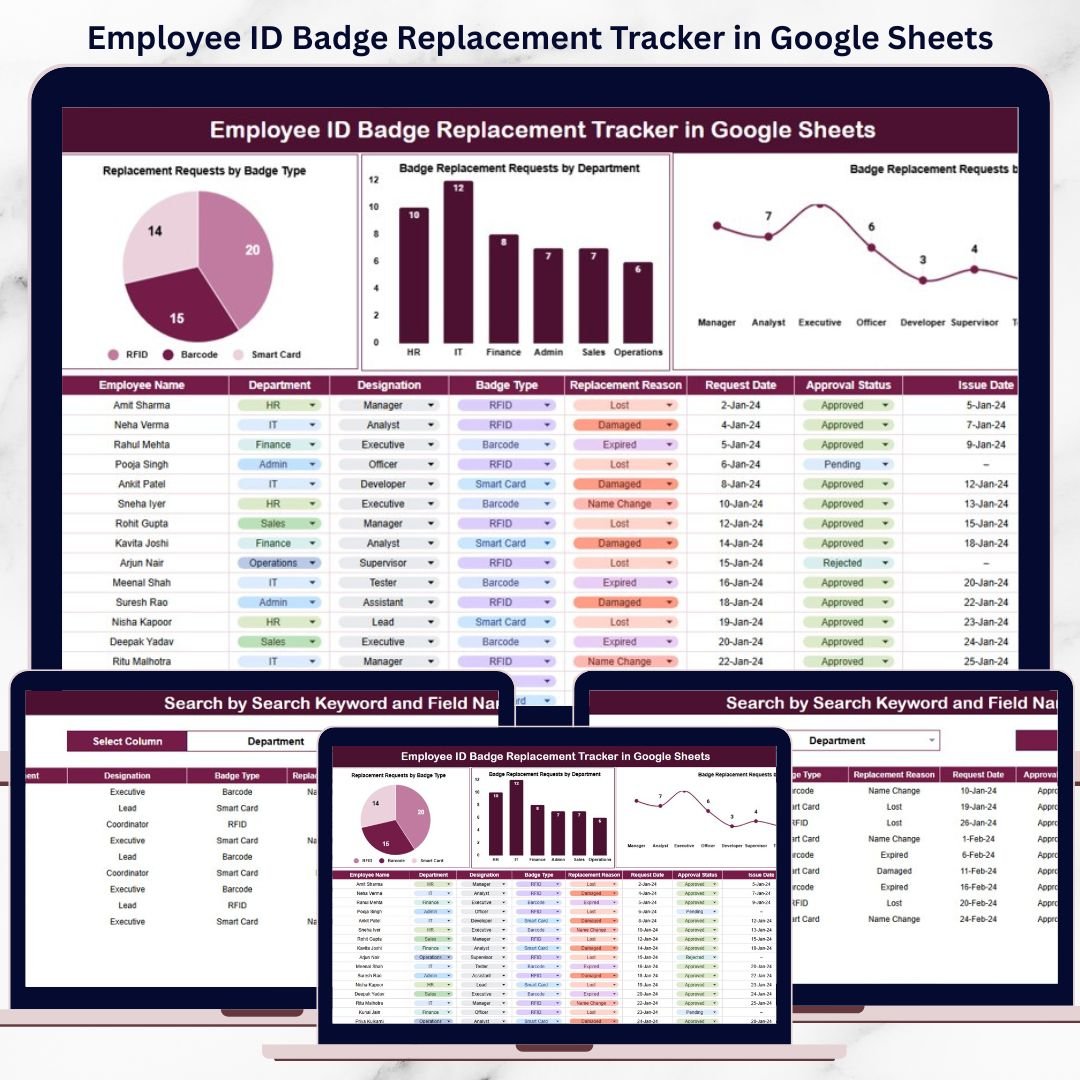
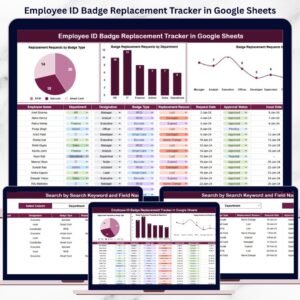
This ready-to-use tracker provides a centralized, structured, and visual way to log, monitor, and analyze employee ID badge replacement requests. Instead of searching through inboxes or scattered files, HR, admin, and security teams gain instant visibility into replacement reasons, department-wise trends, badge types, and request history. Because it runs entirely in Google Sheets, the tracker is easy to use, collaborative, and cost-effective—without the need for specialized badge management software.
✨ Key Features of the Employee ID Badge Replacement Tracker in Google Sheets
🪪 1. Centralized Badge Replacement Tracking
All badge replacement requests are captured in one structured tracker, ensuring no request is missed or duplicated.
📊 2. Auto-Updating Dashboard Charts
Built-in charts instantly convert raw request data into actionable insights.
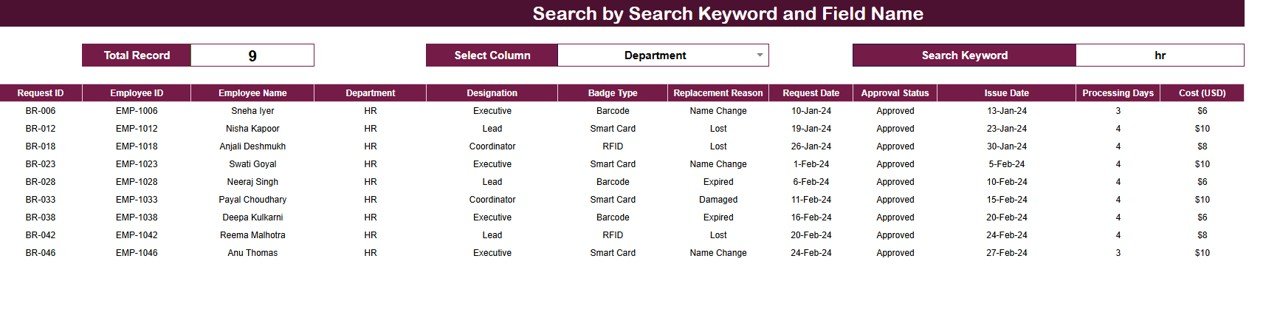
🔍 3. Smart Search Functionality
Find any replacement record instantly by employee, department, badge type, or reason.
⚡ 4. Real-Time Updates
As soon as a request is added or updated, all charts refresh automatically.
🤝 5. Google Sheets-Based Collaboration
HR, admin, and security teams can work together in real time using a shared file.
📦 What’s Inside the Employee ID Badge Replacement Tracker in Google Sheets
🗂️ Tracker Sheet Tab – Central Request Log
This is the core data sheet where every badge replacement request is recorded and maintained.
Typical fields include:
Employee ID / Employee Name
Department
Designation
Badge Type
Replacement Reason
Request Date
Approval Status
Replacement Status
Remarks
This structured format ensures clarity, accountability, and complete traceability.
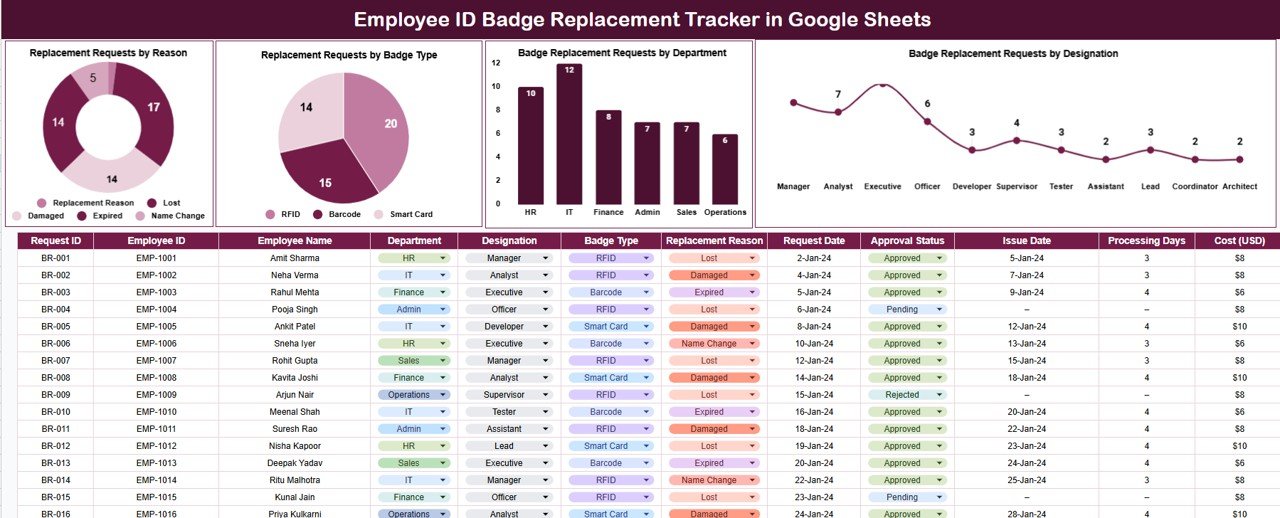
📈 Charts Included in the Tracker Dashboard
📌 Replacement Requests by Reason
This chart shows why badges are being replaced, such as:
Lost badge
Damaged badge
Role change
Name correction
It helps organizations identify frequent issues, improve awareness, and reduce avoidable replacement costs.
📌 Replacement Requests by Badge Type
This chart analyzes requests by badge type, including:
Permanent badges
Temporary badges
Visitor badges
Access-level badges
It supports better planning and inventory control.
📌 Badge Replacement Requests by Department
This chart highlights which departments raise the most replacement requests.
It helps management improve accountability and reinforce badge-handling policies.
📌 Badge Replacement Requests by Designation
This chart shows trends by employee role or designation.
It helps security teams review access levels and strengthen control measures.
🔍 Smart Search Feature – Find Records Instantly
The tracker includes a powerful search section that allows users to filter records by:
Employee Name
Employee ID
Department
Designation
Badge Type
Replacement Reason
By entering a Search Keyword and selecting a Field Name, matching records appear instantly—without scrolling.
This feature is especially useful during:
Security audits
HR reviews
Admin verifications
Incident investigations
🎯 Who Can Benefit from This Employee ID Badge Replacement Tracker
👥 HR Teams
Maintain accurate badge replacement history and employee records.
🏢 Admin & Facility Teams
Manage badge issuance and replacement efficiently.
🔐 Security Teams
Strengthen access control and audit readiness.
📊 Leadership & Compliance Teams
Gain visibility into security-related trends and risks.
🏬 Organizations of Any Size
Improve badge management without complex systems.
🛠️ How to Use the Employee ID Badge Replacement Tracker Effectively
Log every badge replacement request immediately
Standardize replacement reasons and badge types
Review department-wise trends monthly
Use charts to identify security risks
Restrict edit access to authorized users
Consistent usage ensures accurate records and improved workplace security.























Reviews
There are no reviews yet.