



This ready-to-use, interactive Excel template helps organizations systematically manage emergency response procedures. Designed for accessibility, it requires no special software or training—just Excel, some planning, and a proactive mindset.
📋 What Is It?
The Emergency Response Review Checklist in Excel is a powerful tool for managing emergency preparedness. With clearly assigned tasks, deadlines, progress tracking, and status updates, this checklist ensures nothing falls through the cracks when time matters most.
🗂️ What’s Included?
The template contains two fully functional sheets that work together for effortless emergency planning:
✅ 1. Emergency Response Review Checklist Sheet
The heart of the tool.

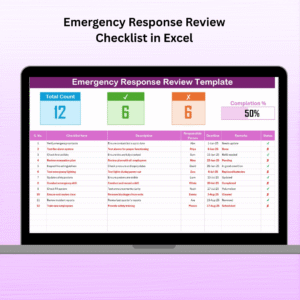
Top Summary Panel:
Total checklist items
✔ Checked count
✘ Crossed count
📊 Progress bar for visual tracking
Checklist Table with the following fields:
Serial No. (auto-generated)
Checklist Item (task title)
Description (under 70 characters)
Responsible Person (dropdown)
Deadline (due date)
Remarks (optional notes)
Status (✔ or ✘ via dropdown)
💡 This clean layout promotes transparency, accountability, and structure.
🧾 2. List Sheet
This supports dynamic dropdowns by letting you:
Add/edit Responsible Persons
Automatically populate dropdown lists in the main sheet
Avoid input errors or inconsistency
🎯 Why Use This Template?
Other project management tools might be too complex, expensive, or hard to learn. This Excel checklist keeps it simple, practical, and instantly usable by anyone—even beginners.
🔑 Key Advantages
🟩 Beginner-Friendly
Easy to use, with no coding or Excel macros required.
🟦 Full Accountability
Assign tasks directly to individuals, not just departments.
🟨 Clear Deadlines
Helps prioritize tasks and ensures follow-through.
🟥 Visual Progress Tracking
The progress bar makes review sessions fast and effective.
🟧 Reusable
Ideal for drills, audits, incident reviews, and annual reviews.
💼 Who Should Use This?
Perfect for:
Corporate Offices
IT Departments
Schools and Universities
Hospitals & Clinics
NGOs and Nonprofits
Factories & Warehouses
Government Bodies
If your team needs to prepare, respond to, or review emergencies—this checklist is essential.
🧠 How to Use the Template
1️⃣ Open the File in Excel
2️⃣ Add Your Team Members to the List Sheet
3️⃣ Fill in Checklist Items in the main sheet
4️⃣ Assign Responsible Persons and deadlines
5️⃣ Track Progress using the ✔ or ✘ status
6️⃣ Review Completion via the dashboard at the top
🧩 Best Practices
✔ Use specific and action-oriented checklist items
✔ Assign tasks to individuals, not teams
✔ Keep deadlines realistic and spaced
✔ Update status regularly for up-to-date accuracy
✔ Review the checklist monthly or quarterly
📌 Real-Life Use Case
Just finished a fire drill? Use this checklist to:
Review each point (alarms, exit routes, assembly)
Assign responsibility to HR, Security, etc.
Track status of each review task
Document findings for future audits
🔁 Customization Tips
🔹 Add a Priority Column
🔹 Include Comments/Attachments
🔹 Use Conditional Formatting for overdue items
🔹 Integrate with Power Automate for alerts
🙌 Why This Template Matters
Preparation is peace of mind. This Excel checklist transforms your emergency response from reactive to proactive. By giving structure to your review process, it ensures your team knows what to do—and does it well—when it matters most.
🎥 Video Tutorials
📺 Visit our YouTube Channel: @PKAnExcelExpert
🔗 Click here to read the Detailed blog post
Watch the step-by-step video tutorial:
Compatibility and Requirements
- Works in Microsoft Excel desktop (Excel 2016 or later, or Microsoft 365).
- The Responsible Person and Status columns use dropdown lists. Microsoft explains how they work in Create a drop-down list.
Frequently Asked Questions
Which sheets are included?
Two sheets: the Emergency Response Review Checklist sheet and a List sheet that feeds the dropdowns.
What fields does each checklist item have?
Serial No. (generated automatically), Checklist Item, Description, Responsible Person, Deadline, Remarks and Status.
How do I add team members to the Responsible Person dropdown?
Type the names on the List sheet. The dropdown on the main sheet picks them up.
How do I see how much of the review is done?
The top of the main sheet shows total items, the checked count, the crossed count and a progress bar. They update as you set each item to checked or crossed in the Status dropdown.
Does it need macros?
No. The template uses regular Excel features only.
Is there a Google Sheets version?
There is an Emergency Response Plan Checklist in Google Sheets.
Related Emergency Response Templates
- Emergency Response Plan Checklist in Excel: a checklist for building the plan
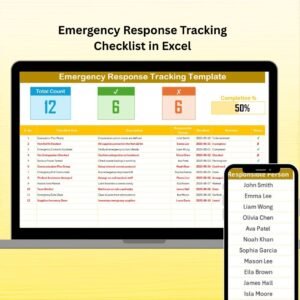
- Emergency Response Tracking Checklist in Excel: for tracking response tasks
- Emergency Response Planner Checklist in Excel: a planner-style checklist
- Emergency Response Documentation Checklist in Excel: for keeping response records
- Emergency Response Plan Checklist in Google Sheets: the plan checklist for Google Sheets
Browse all Excel checklists.































Reviews
There are no reviews yet.