



E-learning Platform KPI Scorecard Key Features
Unlock the full potential of your e-learning initiatives with our E-learning Platform KPI Scorecard – a meticulously designed, ready-to-use digital template that empowers you to track, analyze, and optimize key performance indicators with ease and precision. Whether you’re managing course completion rates, learner engagement, or revenue growth, this scorecard provides a holistic and intuitive platform to visualize success metrics and identify improvement areas.
This powerful template includes four essential worksheets, each crafted to enhance your data management and decision-making:

1. Scorecard Sheet
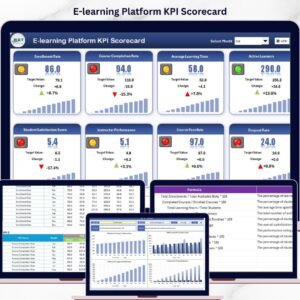
The Scorecard Sheet is your central dashboard for KPI performance monitoring. Here’s what makes it indispensable:
- 🗓️ Dropdown Menus: Seamlessly switch between monthly, Month-to-Date (MTD), and Year-to-Date (YTD) views for comprehensive time-based analysis.
- 📊 Actual vs Target Values: Compare real performance against predefined goals to quickly assess progress.
- 🎨 Visual Indicators: Color-coded visuals and conditional formatting provide instant insights into KPI status, making complex data easy to interpret.
- 📋 Comprehensive KPI Overview: All relevant KPI details including MTD and YTD comparisons are displayed to give you a full picture at a glance.
2. KPI Trend Sheet
Analyze trends and patterns over time with this dynamic worksheet:
- 🔍 KPI Selection: Use a dropdown in cell C3 to choose any KPI for detailed analysis.
- 📌 KPI Details: View KPI Group, Unit, KPI Type (whether a lower or upper value is better), the formula used, and a clear KPI definition.
- 📈 MTD & YTD Trend Charts: Visualize actual, target, and prior year (PY) numbers side-by-side to identify growth opportunities or warning signs early
3. Input Data Sheet
Effortlessly input and update your KPI data to keep your scorecard accurate and actionable:
- 🖊️ Data Entry: Enter actual values, targets, and other key metrics for each KPI with ease.
- 🔄 Flexible Updates: Quickly adjust data as new results come in, ensuring your analysis stays current and relevant.
4. KPI Definition Sheet
Maintain clarity and consistency by defining each KPI in detail:
- 📝 KPI Metadata: Enter KPI Name, KPI Group, Unit, Formula, and a detailed KPI definition all in one place.
- 📚 Standardization: Ensure all stakeholders understand the KPIs uniformly for better communication and alignment.
What’s Inside the E-learning Platform KPI Scorecard
When you purchase this digital product, you gain immediate access to a fully editable Excel scorecard template that contains:
- 📊 Four integrated worksheets designed for holistic KPI tracking and analysis.
- 📅 Dynamic dropdown menus for flexible time frame selection (Monthly, MTD, YTD).
- 🎨 Conditional formatting and visual indicators for at-a-glance performance insights.
- 📈 Trend charts allowing deep dives into KPI progress over time.
- 🛠️ User-friendly input sheets for quick data updates.
- 📘 Comprehensive KPI definitions to maintain clarity and consistency.
This template is 100% digital, instantly downloadable, and compatible with Microsoft Excel and Google Sheets for effortless integration into your existing workflows.
How to Use the E-learning Platform KPI Scorecard
Getting started is simple and straightforward. Follow these steps to maximize your results:
- 🔽 Select Timeframe: Use the dropdown menus on the Scorecard Sheet to choose the month, MTD, or YTD view.
- ✍️ Input Data: Enter your actual KPI values, targets, and historical data in the Input Data Sheet to keep the scorecard updated.
- 📊 Analyze Trends: Navigate to the KPI Trend Sheet to monitor your KPIs over time using interactive charts and detailed KPI information.
- 📝 Define KPIs: Update or add new KPIs in the KPI Definition Sheet to ensure your metrics are always aligned with business goals.
- 🔎 Review Visuals: Use color-coded indicators on the Scorecard Sheet to quickly spot areas needing attention or celebrating success.
- 💡 Make Data-Driven Decisions: Leverage insights from the scorecard to optimize your e-learning platform strategies and improve learner outcomes.
Who Can Benefit from This E-learning Platform KPI Scorecard
This template is designed to serve a wide range of professionals and organizations involved in e-learning and digital education:
- 🎓 E-learning Managers & Administrators: Track platform performance and learner engagement effortlessly.
- 📈 Data Analysts: Visualize and analyze KPI trends for actionable insights.
- 🏢 Educational Institutions: Monitor course completions, satisfaction rates, and operational efficiency.
- 🚀 Corporate Training Teams: Measure training effectiveness and ROI on learning initiatives.
- 💼 Freelance Instructional Designers: Demonstrate impact and improve course design based on data.
- 📊 Business Leaders & Stakeholders: Gain a clear understanding of e-learning success to make informed decisions.
Click here to read the Detailed blog post.
Visit our YouTube channel to learn step-by-step video tutorials
Compatibility and Requirements
- Works in Microsoft Excel desktop (Excel 2016 or later, or Microsoft 365).
- The time frame selectors and the KPI picker (cell C3 on the KPI Trend sheet) are drop-down lists. Microsoft’s guide to creating a drop-down list explains how they work.
Frequently Asked Questions
Which sheets are in the E-learning Platform KPI Scorecard?
Four sheets: Scorecard, KPI Trend, Input Data and KPI Definition.
How do I switch between monthly, MTD and YTD views?
Use the dropdown menus on the Scorecard sheet. Actual and target values and the color-coded indicators change to the view you pick.
How do I see the trend for one KPI?
Pick the KPI in cell C3 on the KPI Trend sheet. It shows the KPI group, unit, type, formula and definition, with MTD and YTD charts of actual, target and prior year numbers.
Can I add KPIs for my own platform?
Yes. Add the KPI name, group, unit, formula and definition on the KPI Definition sheet, then enter its numbers on the Input Data sheet.
Related E-learning Templates
- E-learning Platform KPI Dashboard in Excel: a dashboard view of the same KPIs.
- E-learning Platform KPI Dashboard in Google Sheets: for teams that work in Google Sheets.
- E-learning Platform KPI Dashboard in Power BI: the same topic in Power BI.
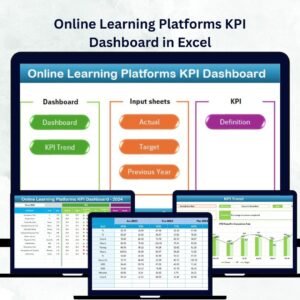
- Online Learning Platforms KPI Dashboard in Excel: KPIs for online learning platforms.
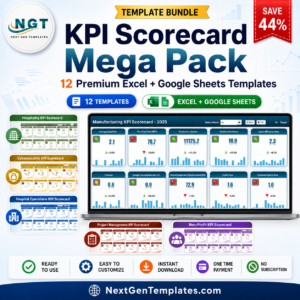
- KPI Scorecard Mega Pack: 12 Excel and Google Sheets KPI scorecards.
Browse all Excel KPI dashboards or the Excel education templates.











Reviews
There are no reviews yet.