



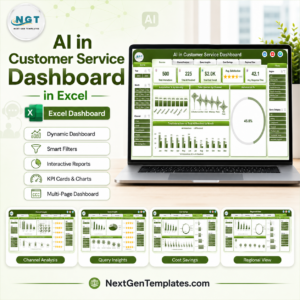
The Customer Service Dashboard in Excel is a comprehensive tool designed to help organizations track, analyze, and optimize their customer service performance. This Excel-based dashboard provides a clear visual representation of key performance indicators (KPIs), allowing customer service teams to monitor critical metrics like response times, resolution rates, and customer satisfaction levels.
With this tool, businesses can enhance their service efficiency, ensure customer satisfaction, and identify opportunities for improvement across customer support processes.

Key Features of the Customer Service Dashboard in Excel
📊 Comprehensive KPI Tracking
Track Key Metrics: Monitor essential KPIs such as average response time, first call resolution rate, customer satisfaction (CSAT) scores, and customer service costs.
Real-Time Data Updates: Ensure that the dashboard reflects up-to-date performance data with automatic updates.
📈 Customizable Metrics
Tailor to Your Needs: Define and track customer service KPIs that align with your organization’s goals, such as team performance or department-specific metrics.
Flexible Layout: Add or remove metrics as needed to reflect changes in your customer service operations.
🔧 User-Friendly Interface
Easy Setup: Designed for simplicity, this dashboard is easy to use and requires minimal setup, making it accessible to users with varying levels of Excel expertise.
Visual Indicators: Use charts, graphs, and color-coded signals to easily visualize trends and performance deviations.
Benefits of Using the Customer Service Dashboard in Excel
✅ Informed Decision-Making
The dashboard provides real-time insights into customer service performance, enabling managers to make quick, data-driven decisions that improve service quality.
✅ Improved Service Efficiency
By tracking key metrics like response times and resolution rates, the dashboard helps identify areas where customer service processes can be streamlined for greater efficiency.
✅ Enhanced Customer Satisfaction
Monitor customer satisfaction (CSAT) scores and service level agreement (SLA) compliance to ensure your team meets or exceeds customer expectations, improving retention and loyalty.
✅ Cost Control
Track customer service costs and identify areas for improvement, ultimately helping to reduce expenses associated with customer support operations.
Getting Started with Your Customer Service Dashboard in Excel
Download the Template: Download the Customer Service Dashboard template, which is ready for use and customization.
Set Up Your KPIs: Define and input the KPIs that reflect your customer service goals, such as response time, CSAT, and resolution rates.
Input Data: Regularly update the dashboard with actual customer service data to keep it accurate and current.
Monitor & Analyze: Use the dashboard to track trends and performance, making data-driven adjustments to improve efficiency and customer satisfaction.
Report & Share: Share the dashboard with key stakeholders for transparency and ongoing collaboration to improve customer service outcomes.
By using the Customer Service Dashboard in Excel, organizations can optimize their customer service operations, boost efficiency, and ensure a high level of customer satisfaction.
Click here to read the Detailed blog post
Customer Service Dashboard in Excel
Visit our YouTube channel to learn step-by-step video tutorials
YouTube.com/@PKAnExcelExpert
Watch the step-by-step video tutorial:
Compatibility and Requirements
- Works in Microsoft Excel desktop (Excel 2016 or later, or Microsoft 365).
- The dashboard uses Excel charts and colour-coded signals. Microsoft’s guide Create a chart from start to finish explains how to adjust them.
Frequently Asked Questions
Which customer service KPIs does the dashboard track?
Average response time, first call resolution rate, customer satisfaction (CSAT) scores, SLA compliance and customer service costs.
Can I add my own KPIs?
Yes. You can define the KPIs that match your goals, such as team or department metrics, and add or remove metrics as your operation changes.
How do I keep the numbers current?
Enter your actual customer service data on a regular schedule. The charts and indicators update from that data.
Is there a Power BI or Google Sheets version?
Yes. See the Customer Service Dashboard in Power BI and the Customer Service Dashboard in Google Sheets linked below.
Related Customer Service Templates
- Customer Service Dashboard in Power BI: the same topic in Power BI
- Customer Service Dashboard In Google Sheets: a browser-based version
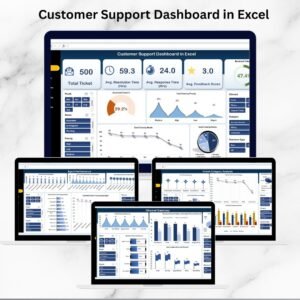
- Customer Support Dashboard in Excel: focus on support tickets and agents
- Customer Service Request Tracker in Excel: log each request before it reaches the dashboard
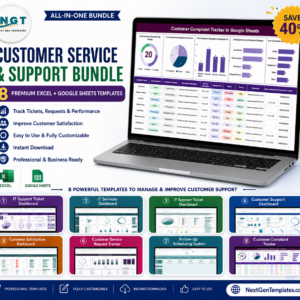
- Customer Service & Support Bundle: 8 customer service templates together
Browse all Excel dashboards or the Excel KPI dashboards.



















Reviews
There are no reviews yet.