

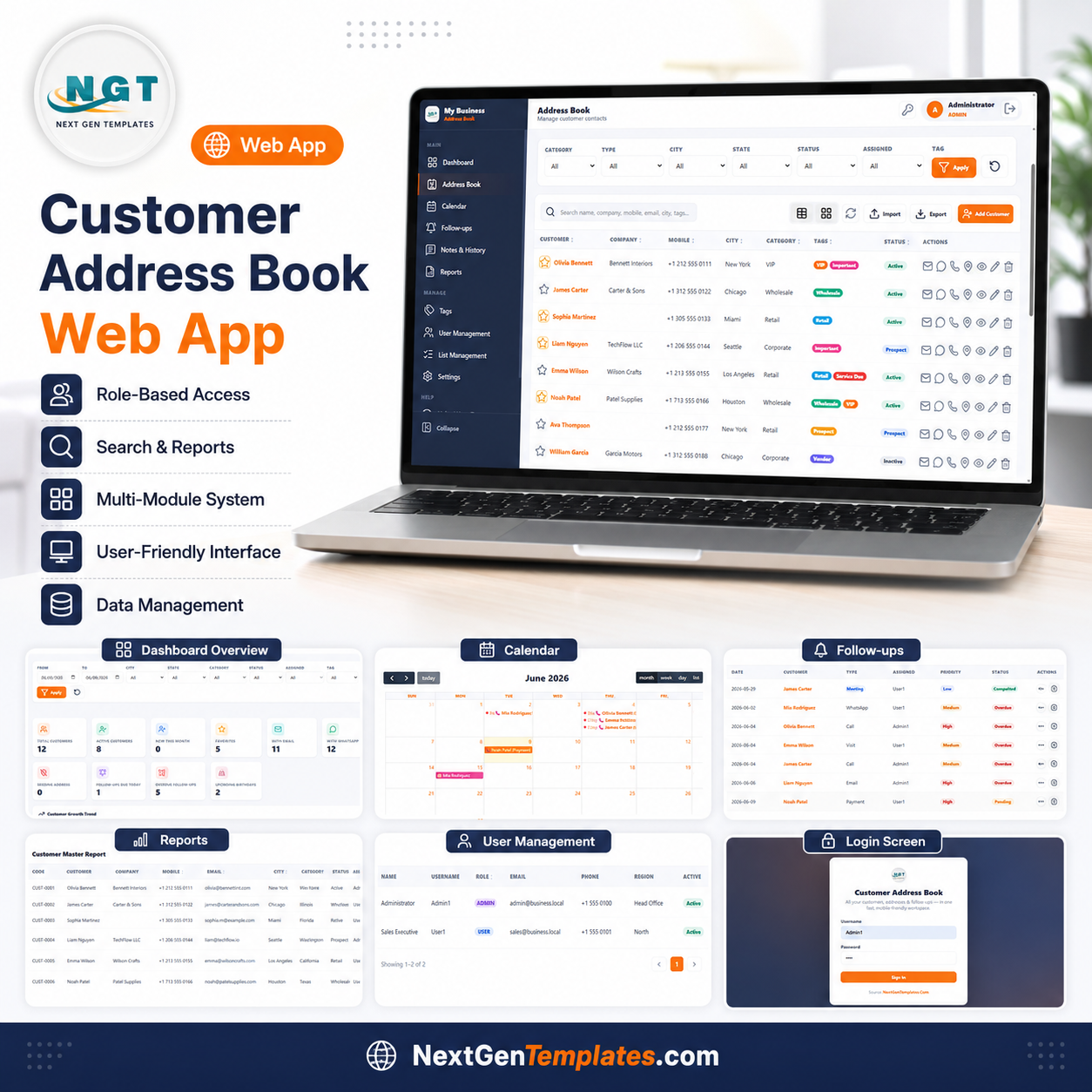

The Customer Address Book Web App centralizes all customer contact data, follow-up schedules, interaction history, and birthday reminders in one Google Apps Script web application. It manages 10 customer KPIs across 12 app pages, with 4 built-in charts and filters for Category, Type, City, State, Status, Assigned User, and Tag. Setup takes under 10 minutes — deploy once from Google Drive and every team member gets secure, role-based access.
🌍 Join 10,000+ customers in 180+ countries using NextGenTemplates to replace paid SaaS tools with one-time-purchase Google Sheets, Excel, Power BI, and HTML templates.
✅ Instant download · One-time payment · No subscription · No per-user fees · Lifetime access
🔑 Key Features of Customer Address Book Web App
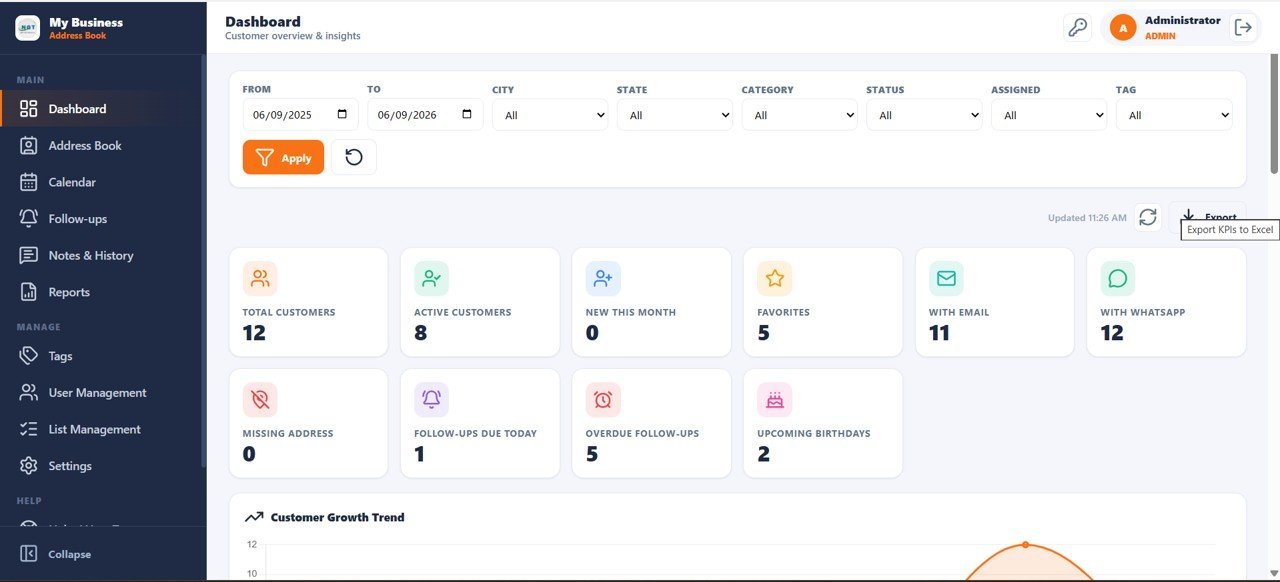
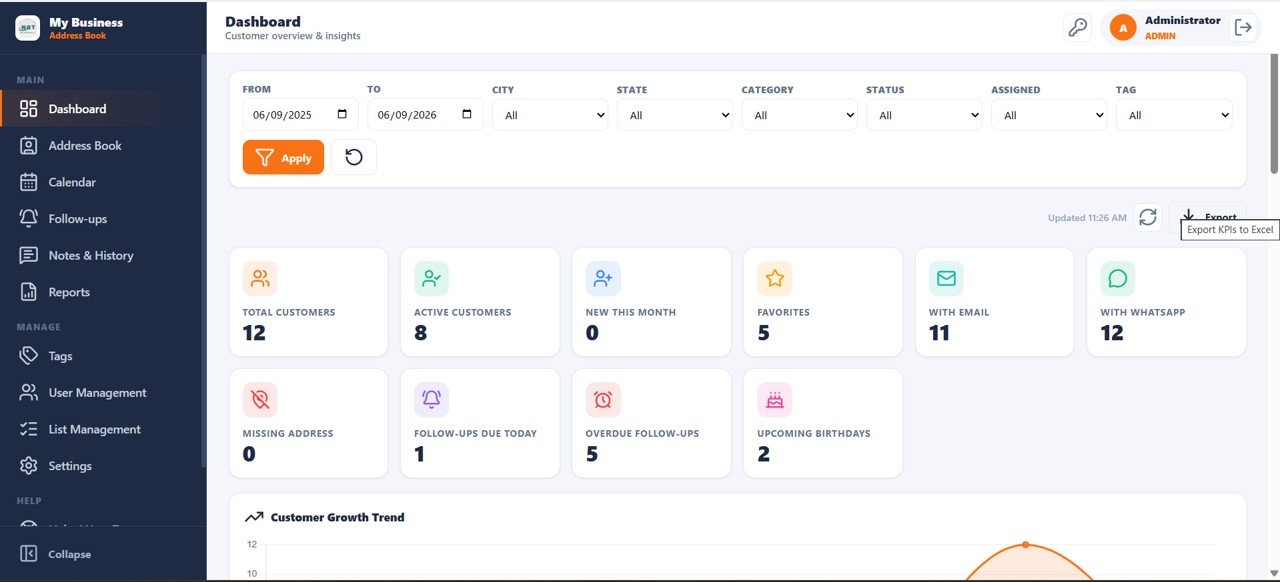
This web app tracks 10 dashboard KPIs including Total Customers, Active Customers, New This Month, Favorites, With Email, With WhatsApp, Missing Address, Follow-ups Due Today, Overdue Follow-ups, and Upcoming Birthdays — giving sales and service teams a complete customer health snapshot at a glance.
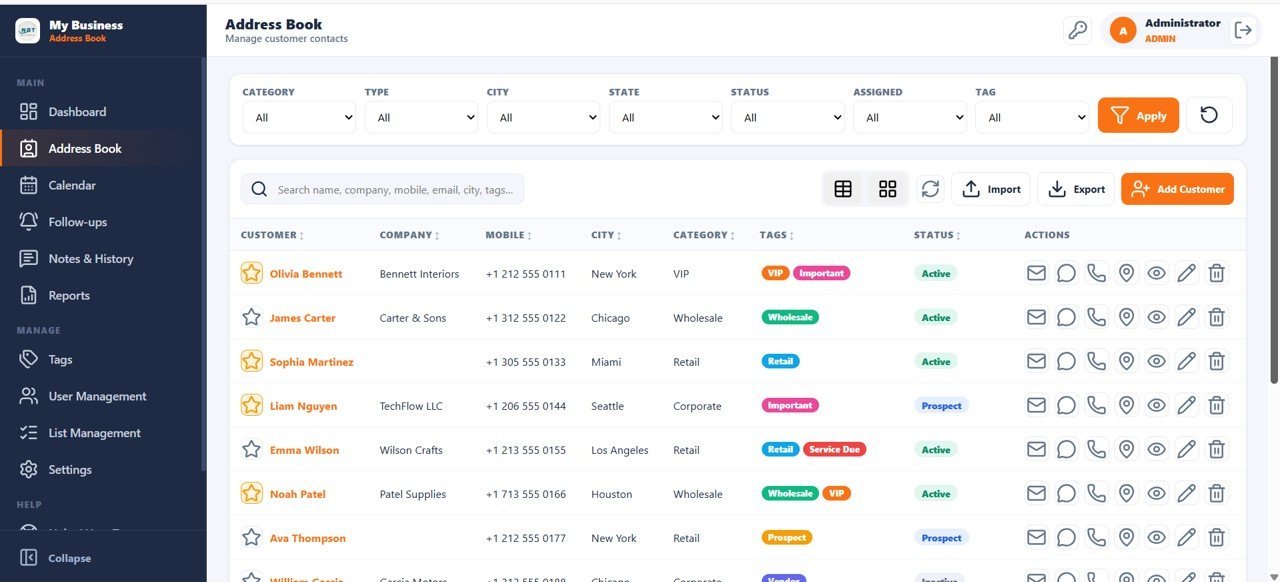
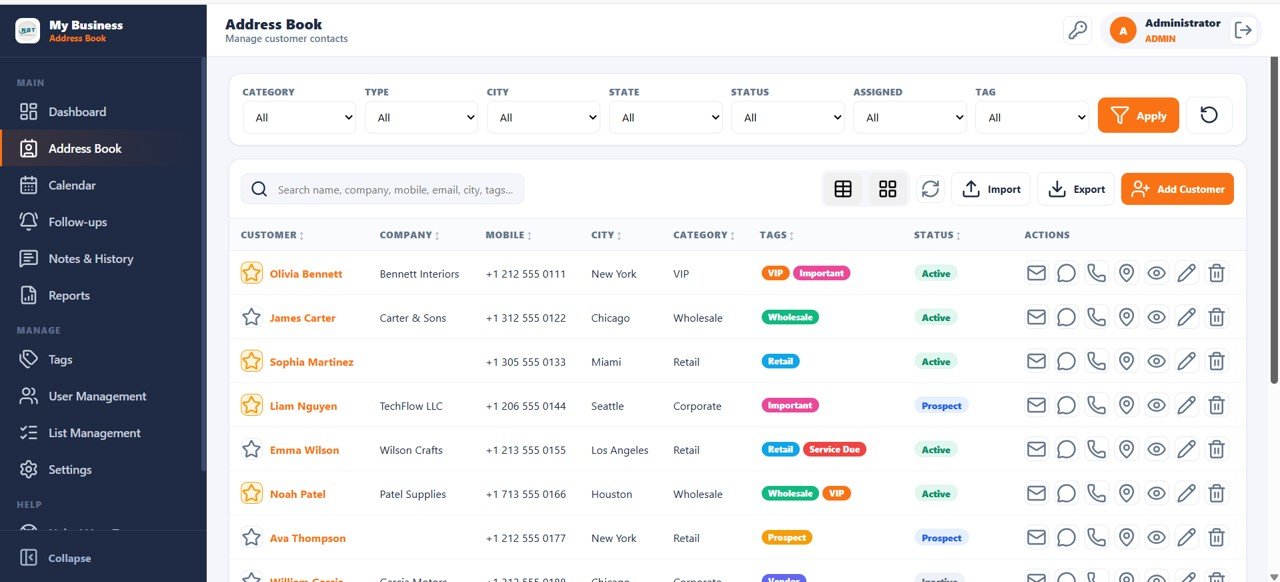
- 🔹 Address Book with 7 Smart Filters — Filter by Category, Type, City, State, Status, Assigned User, and Tag. Quick-action buttons for Email, WhatsApp, Call, Map, View, Edit, and Delete on every contact row.
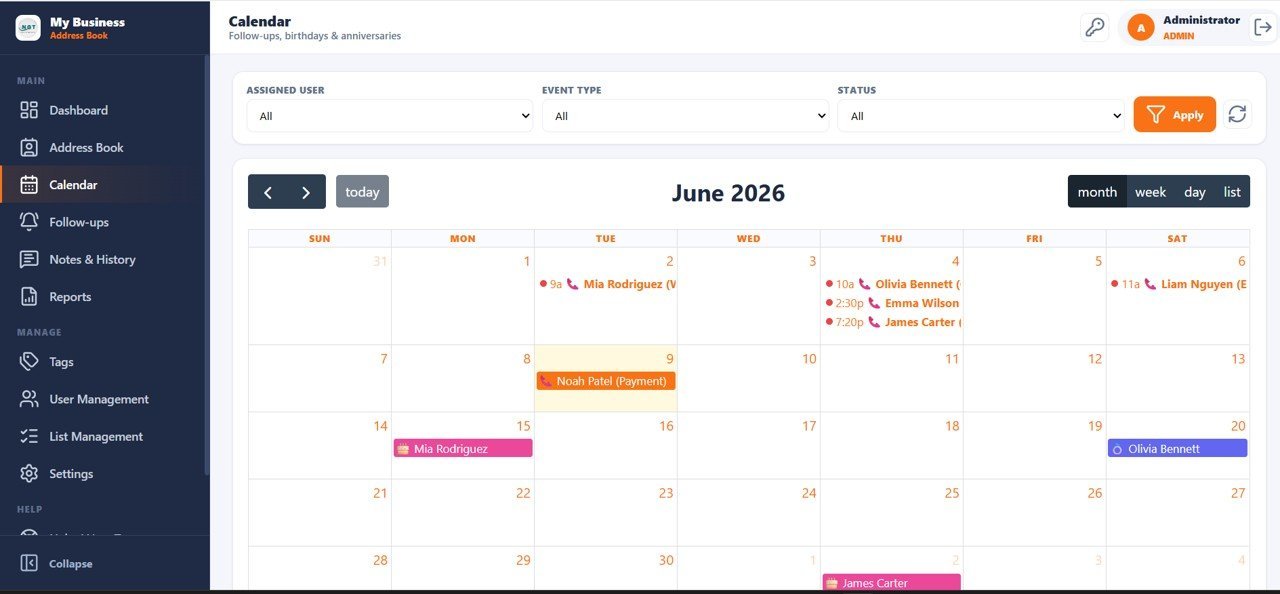
- 🔹 Calendar for Follow-ups and Anniversaries — Month, Week, Day, and List views with color-coded events for follow-ups, payments, birthdays, and anniversaries. Filter by Assigned User and Event Type.
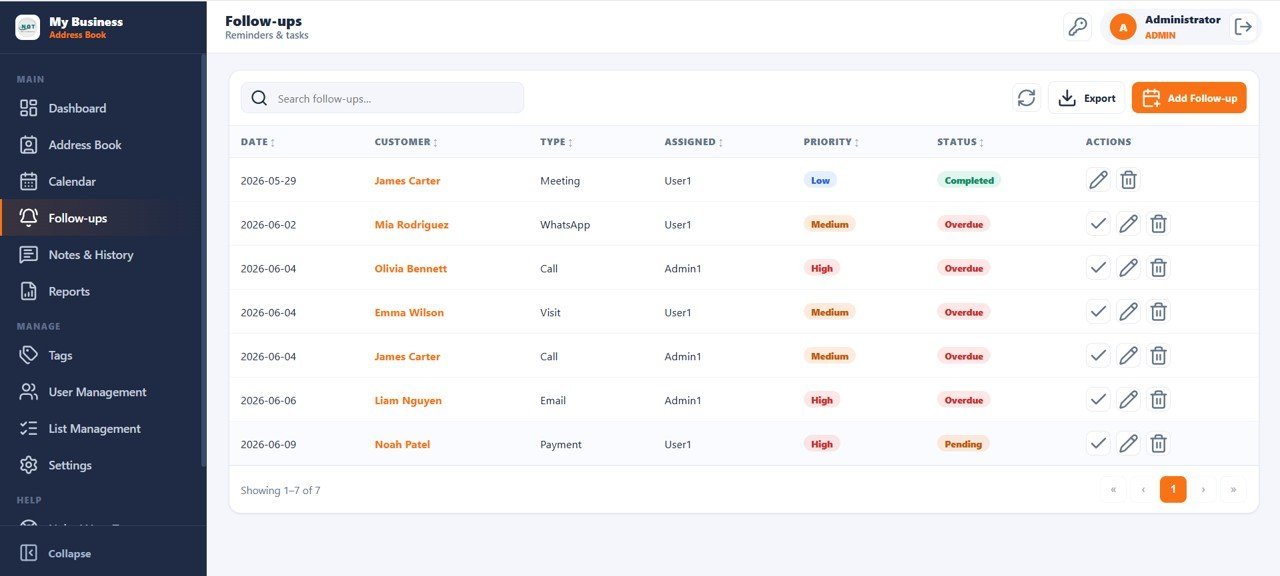
- 🔹 Follow-up Management — Status tracking across Completed, Overdue, and Pending tasks. Assign priority levels and due dates; get one-click Mark Done actions.
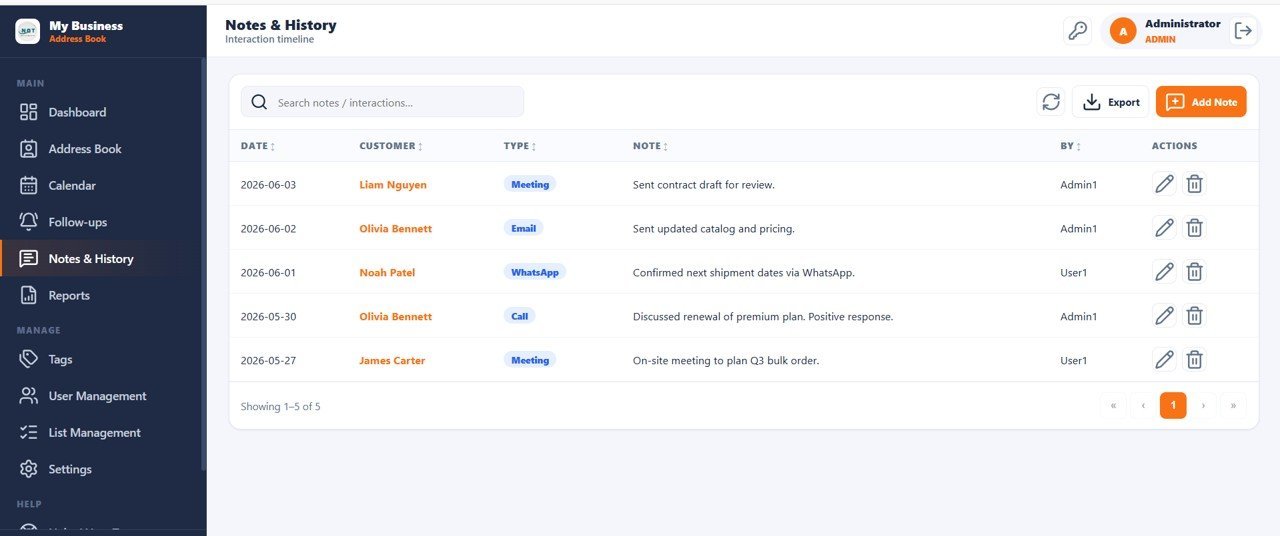
- 🔹 Complete Interaction Timeline — Notes and History page logs every Call, Email, WhatsApp, and Meeting interaction per customer with date, type, and agent fields.
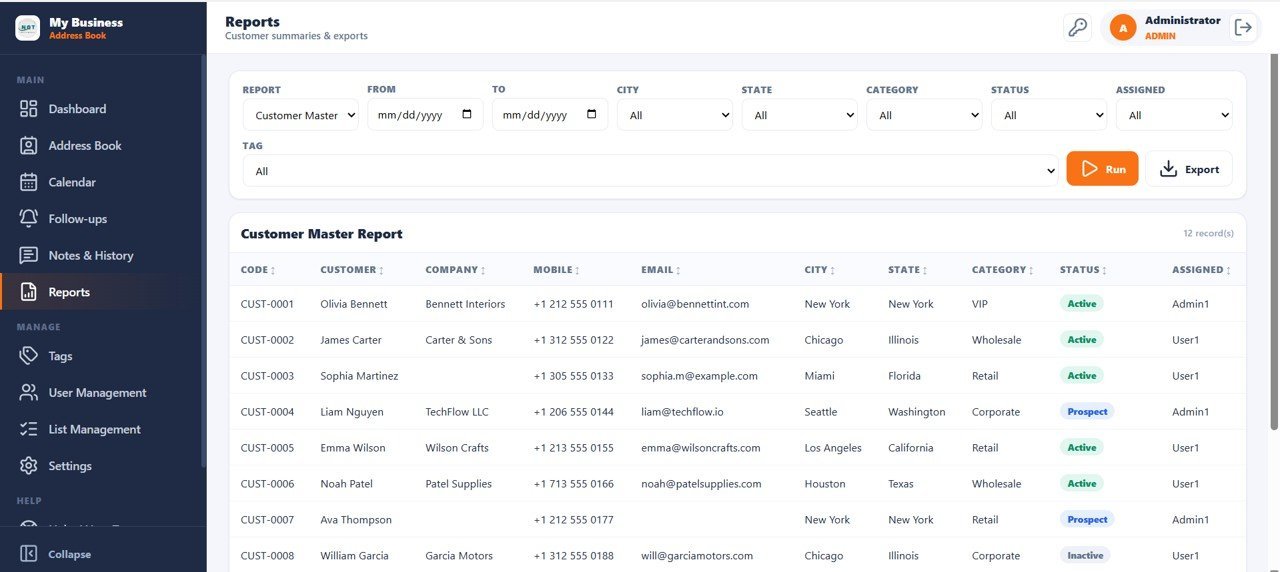
- 🔹 Customer Master Report — Run and export filtered reports by Date, City, State, Category, Status, Assigned User, and Tag. Columns include Customer Code, Name, Company, Mobile, Email, City, State, Category, Status, and Assigned.
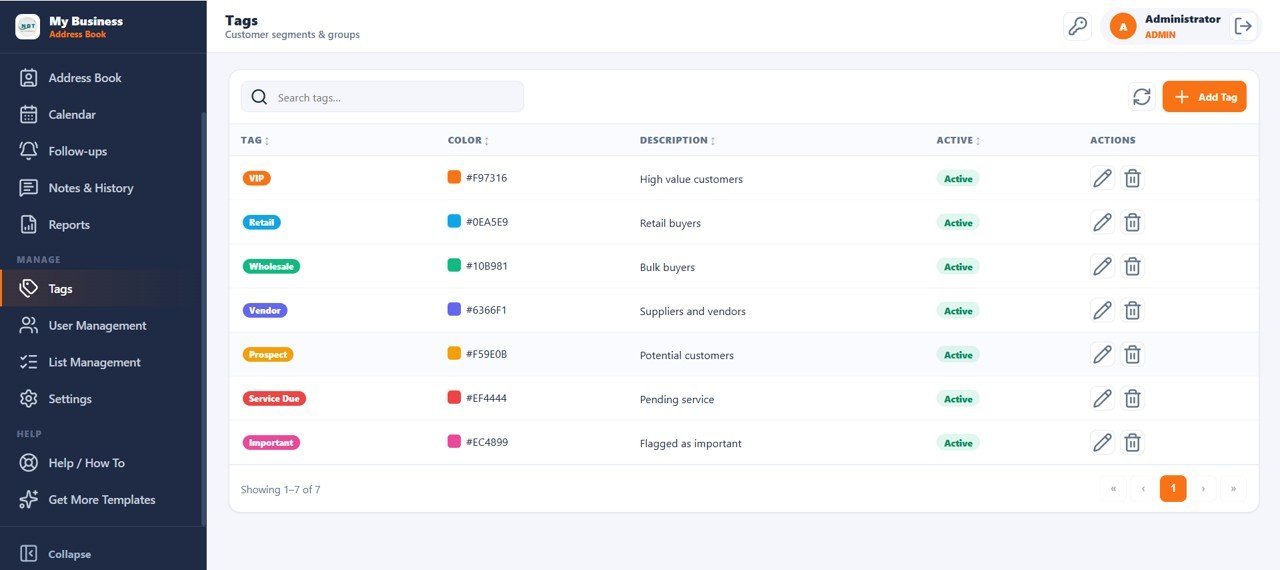
- 🔹 Color-Coded Tags — Segment customers with VIP, Retail, Wholesale, Vendor, Prospect, Service Due, and Important tags. Search, Add, Edit, and Delete tag values from within the app.
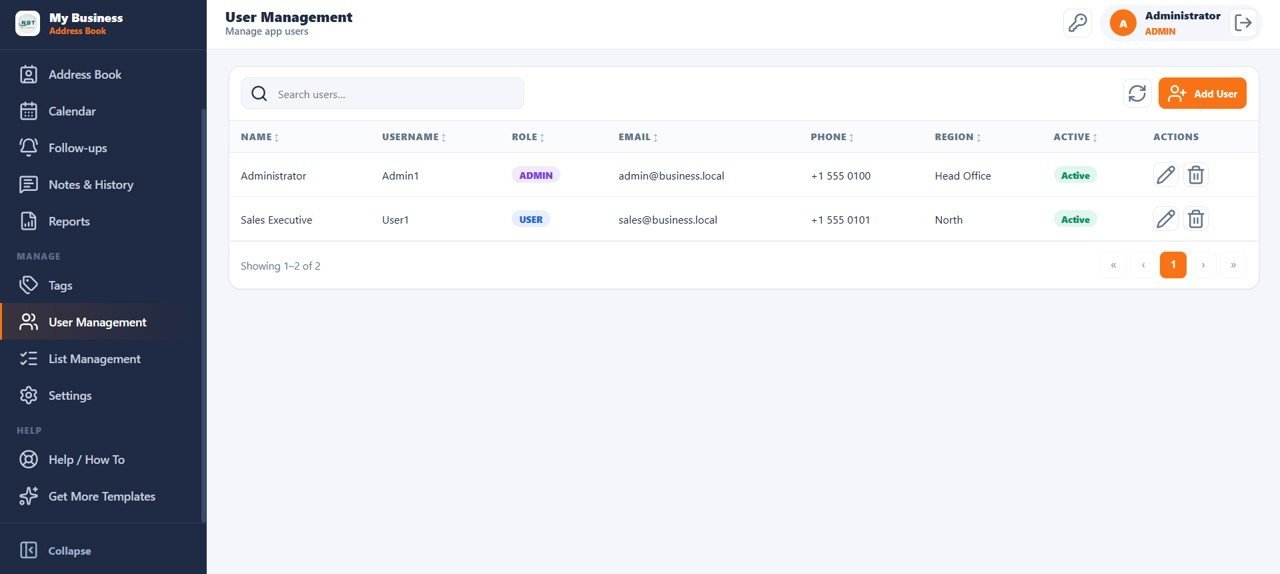
- 🔹 Role-Based User Management — Admin and User roles with Name, Username, Role, Email, Phone, and Region columns. Full CRUD from within the app.
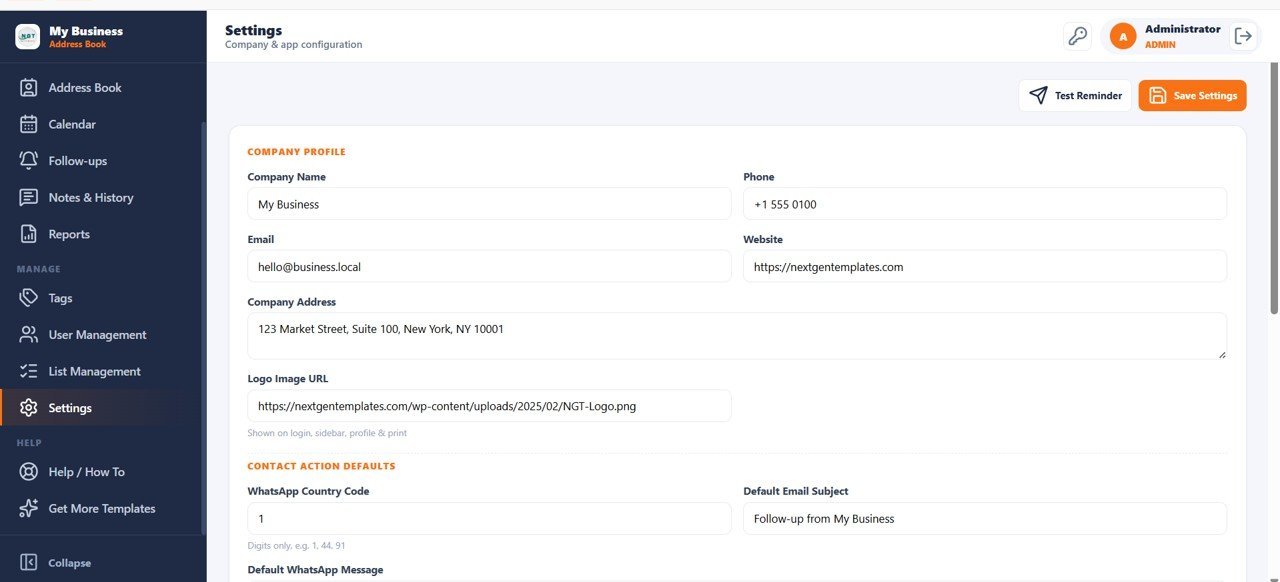
- 🔹 Settings Panel — Configure Company Profile (name, phone, email, website, address, logo), WhatsApp Country Code, Default Email Subject, and Default WhatsApp Message templates.
📦 What’s Inside the Customer Address Book Web App
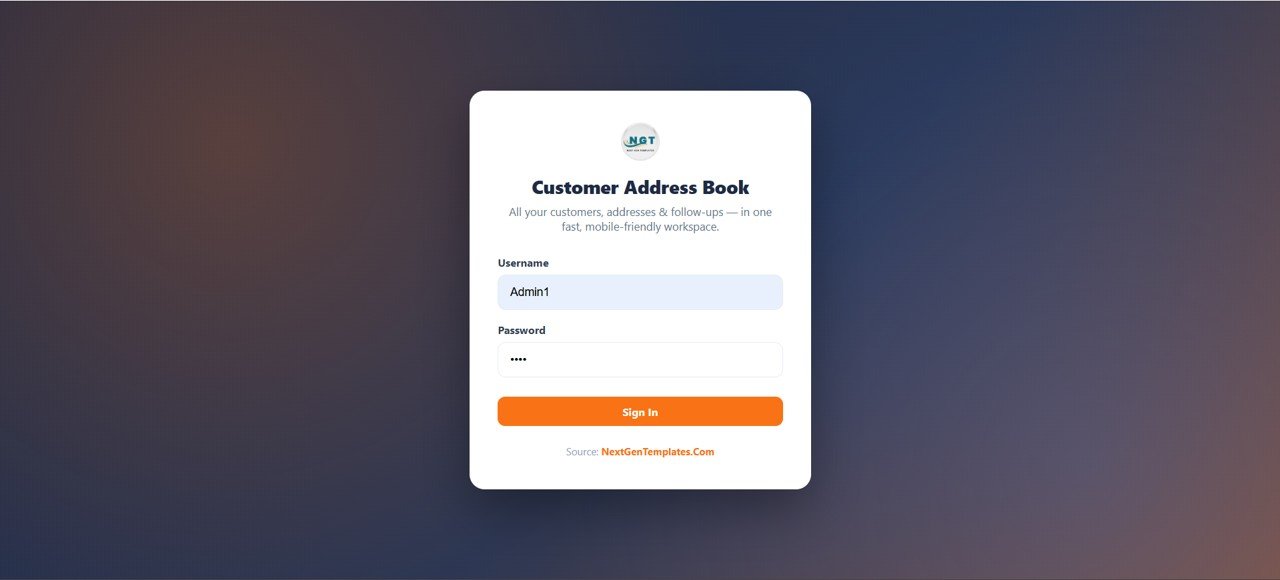
Login Page
The web app opens with a secure login screen. Each user signs in with their own username and password to access their private workspace with role-based permissions.
Dashboard
The dashboard displays 10 KPI cards — Total Customers, Active Customers, New This Month, Favorites, With Email, With WhatsApp, Missing Address, Follow-ups Due Today, Overdue Follow-ups, and Upcoming Birthdays — with multiple top filters for instant segmentation.
🚀 Try the Live Demo Before You Buy
We have deployed this web app in our own Google account so you can test every page, every role — with real sample data — before purchasing. No signup, no email required.
🔑 Test Login Credentials
Sign in as Admin1 to manage all contacts, users, and system settings or as User1 to browse, search, and manage assigned address records.
💡 What you get after purchase: The full source code (Code.gs + Index.html) plus a step-by-step deployment guide so you can deploy your own private instance in your own Google account in under 15 minutes.
Dashboard Charts
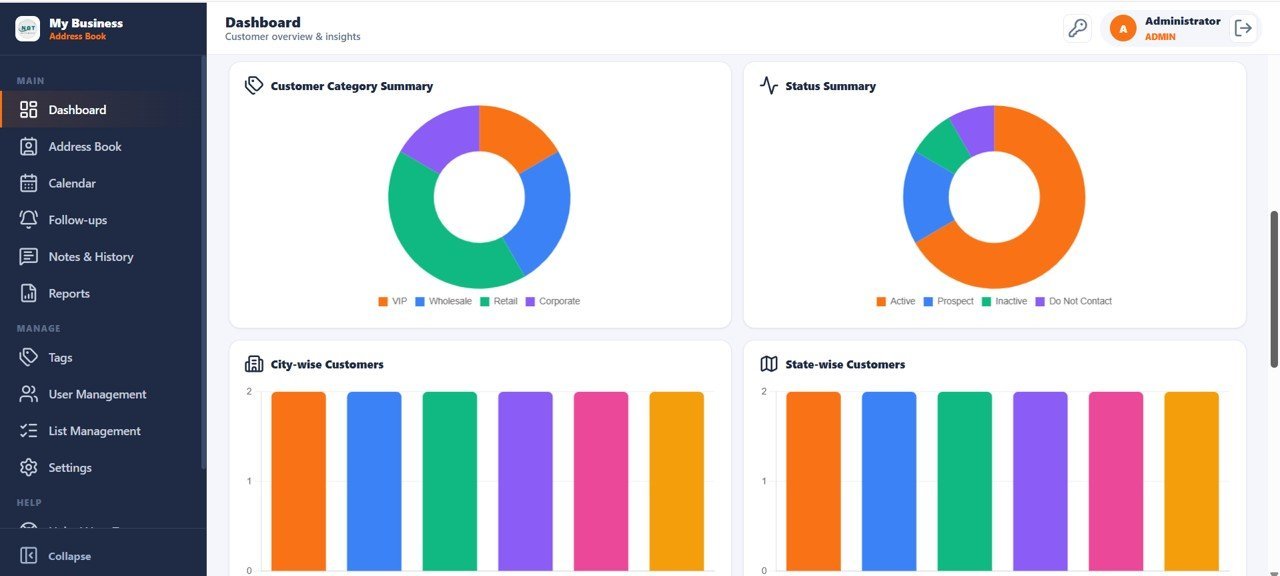
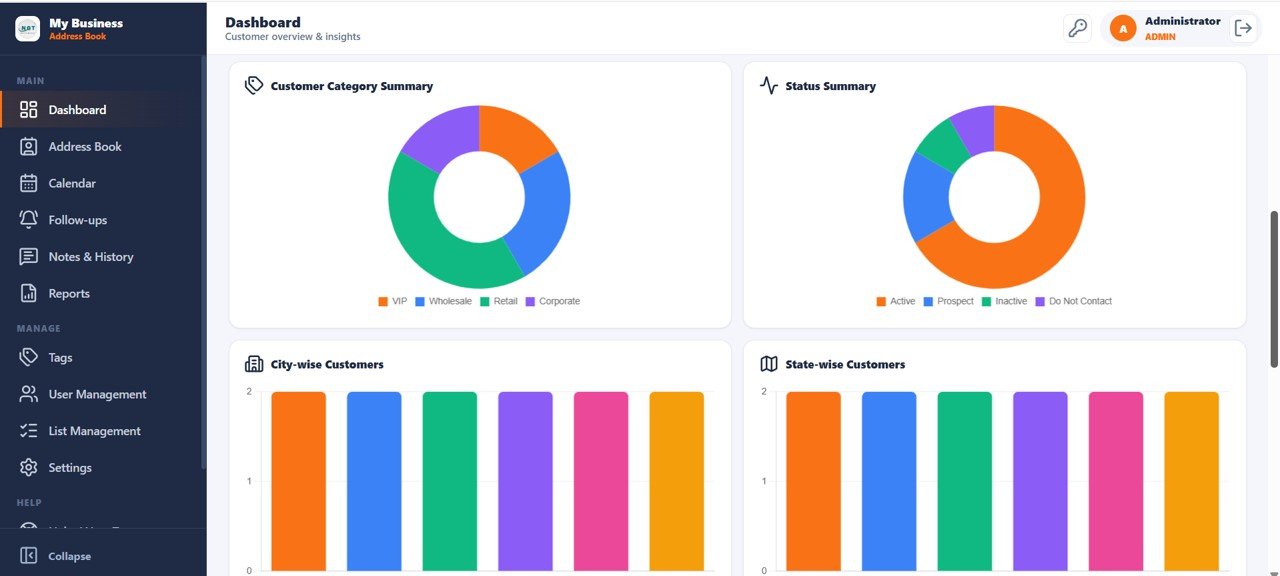
Four built-in charts visualize Customer Category Summary by Category, Customer Status Summary by Status, Customers by City, and Customers by State — giving management an instant geographic and segmentation overview.
Address Book
The complete customer contact list features 7 smart filters (Category, Type, City, State, Status, Assigned, Tag) with quick-action buttons for Email, WhatsApp, Call, Map, View, Edit, and Delete. Supports both Table and Card views, plus Import, Export, and Add Customer.
Calendar
The calendar view displays follow-ups, birthdays, and anniversaries in Month, Week, Day, and List views. Events are color-coded by type — follow-ups, payments, birthdays, and anniversaries — and filterable by Assigned User and Event Type.
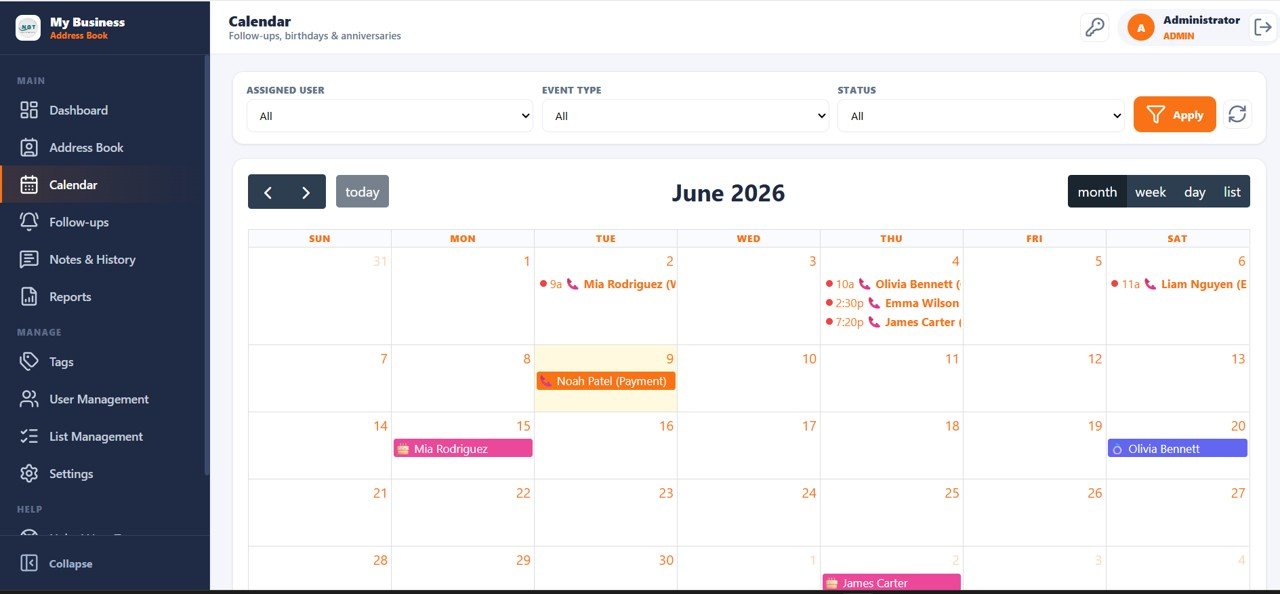
Follow-ups
The follow-ups page lists all reminders and tasks with Date, Customer, Type, Assigned, Priority, and Status columns. Tasks are tracked as Completed, Overdue, or Pending — with Search, Export, Mark Done, Edit, and Add Follow-up actions.
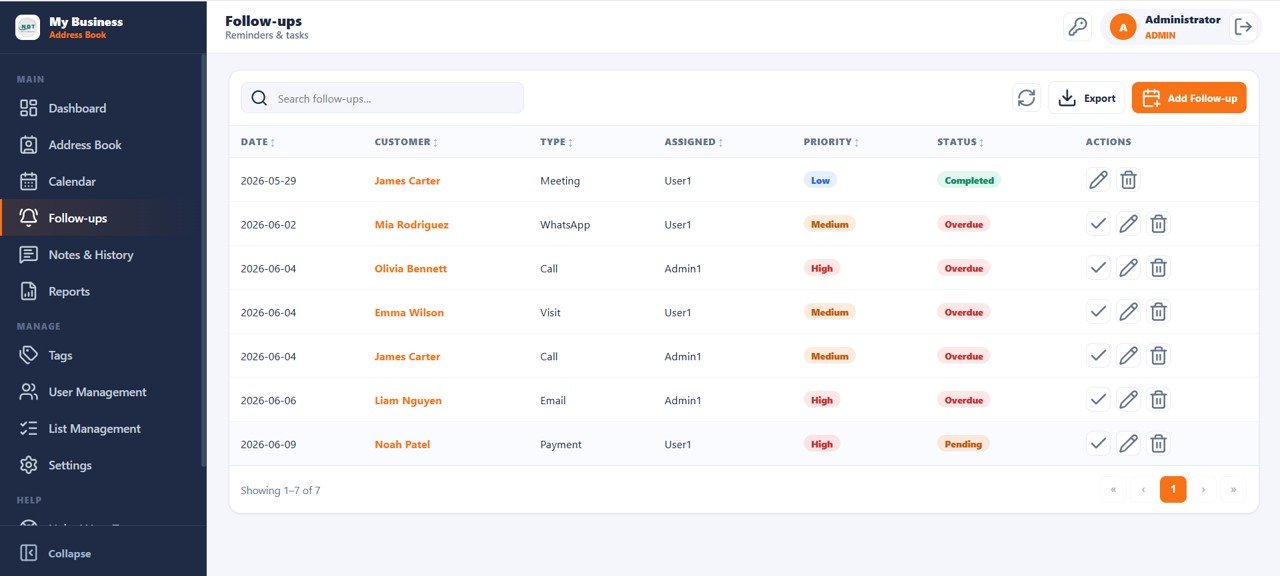
Notes and History
The complete interaction timeline for every customer logs Date, Customer, Interaction Type, Note, and Agent columns — covering Call, Email, WhatsApp, and Meeting interactions — with Search, Export, Edit, and Add Note actions.
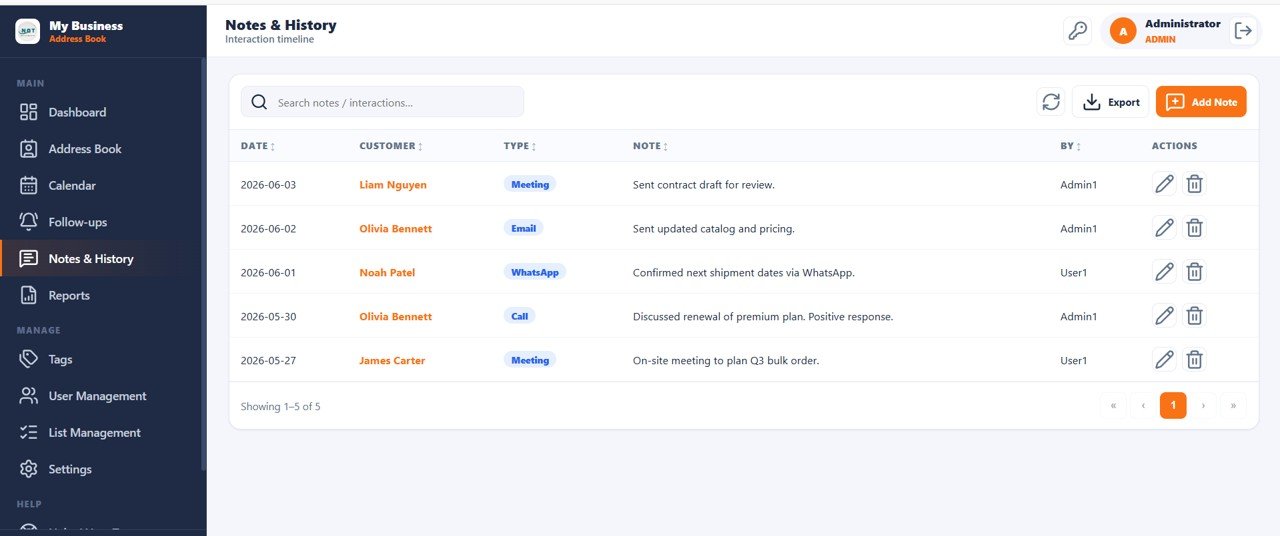
Reports
The Customer Master report provides filters for Date, City, State, Category, Status, Assigned User, and Tag — displaying Code, Customer, Company, Mobile, Email, City, State, Category, Status, and Assigned columns with Run and Export options.
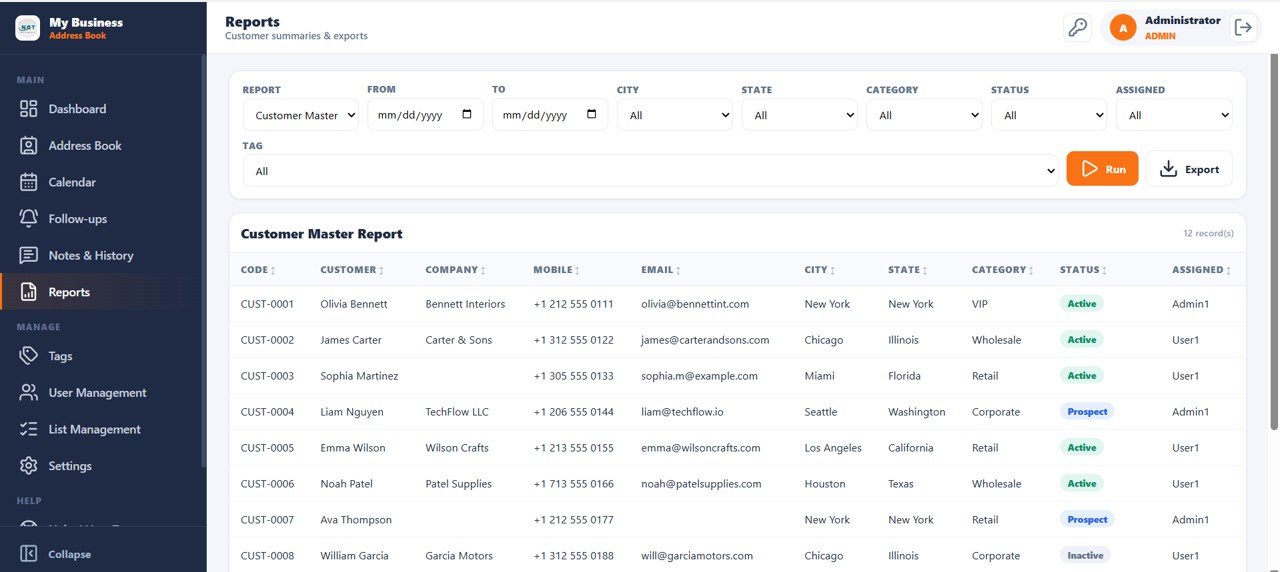
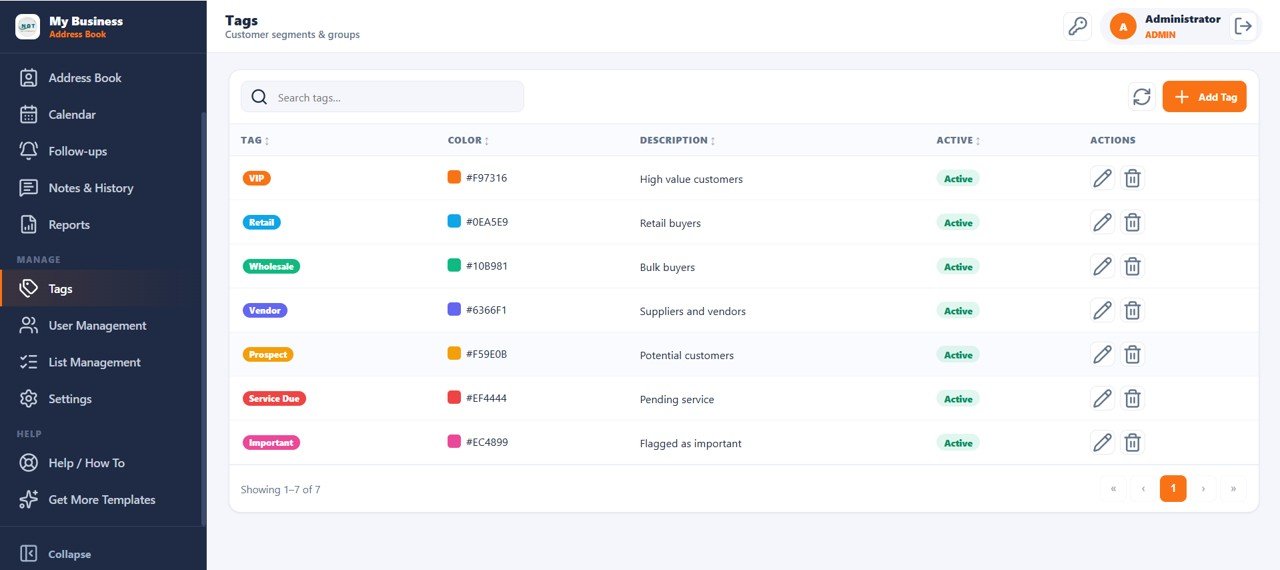
Tags
Customer segmentation tags — VIP, Retail, Wholesale, Vendor, Prospect, Service Due, and Important — are fully color-coded and manageable with Search, Add, Edit, and Delete Tag actions from the Tags management page.
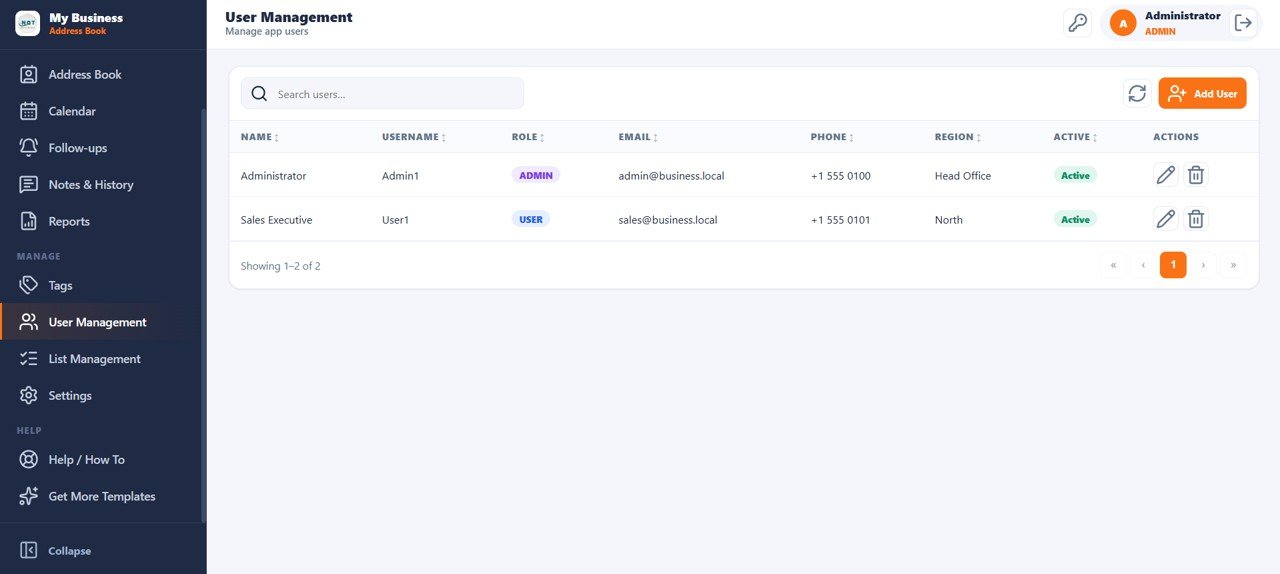
User Management
The User Management page lists all app users with Name, Username, Role, Email, Phone, and Region columns. Admin and User roles provide role-based access control — with full Search, Add, Edit, and Delete User functionality.
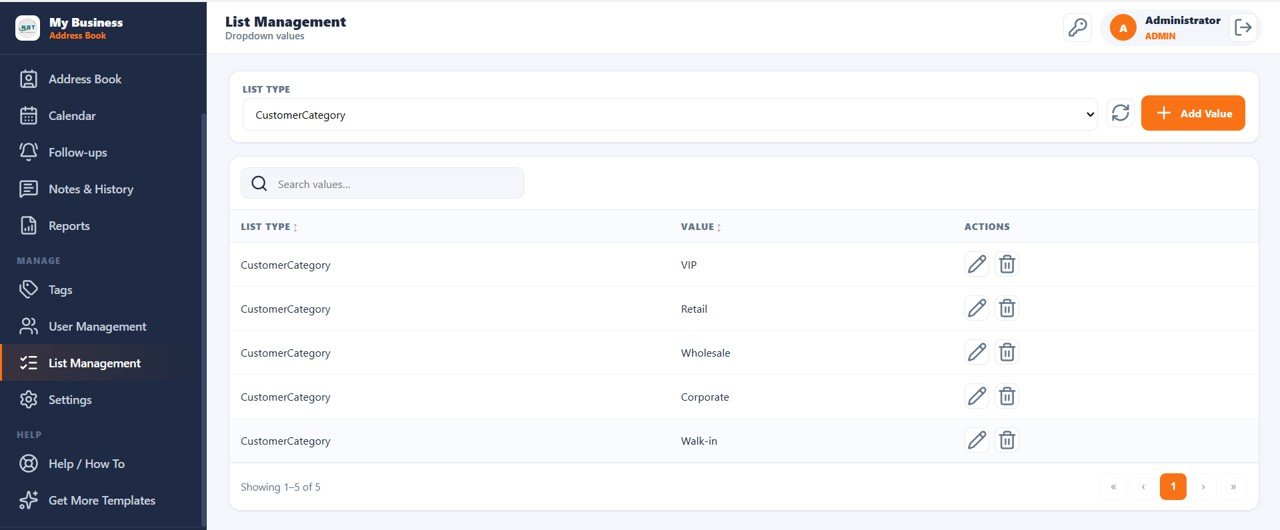
List Management
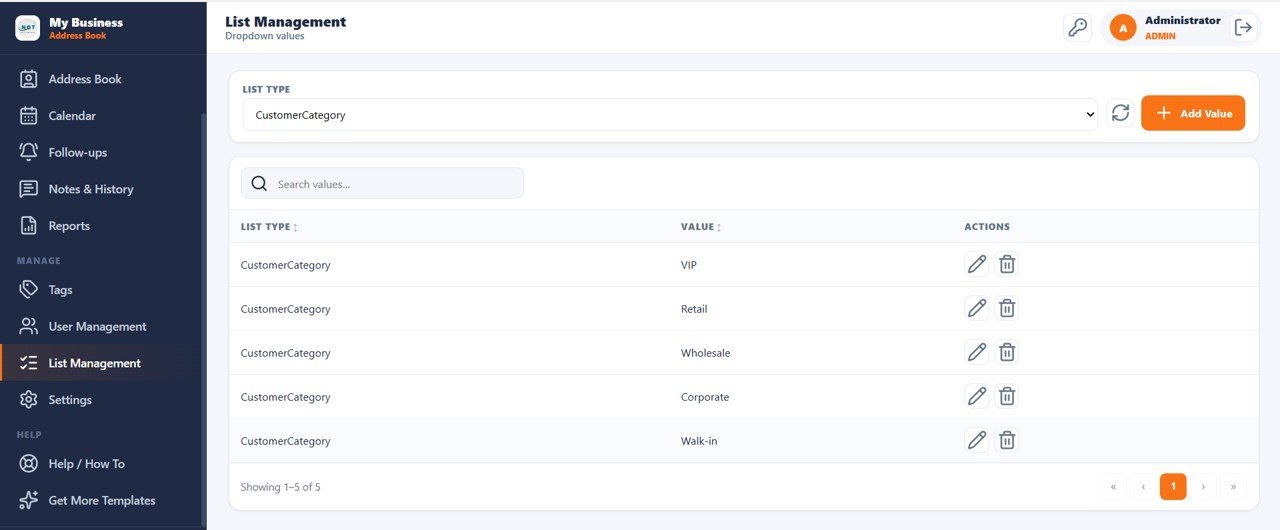
Manage all dropdown values used across the app — Customer Categories, statuses, and other picklists — from the List Management page with a List Type selector and Search, Add, Edit, and Delete Value actions.
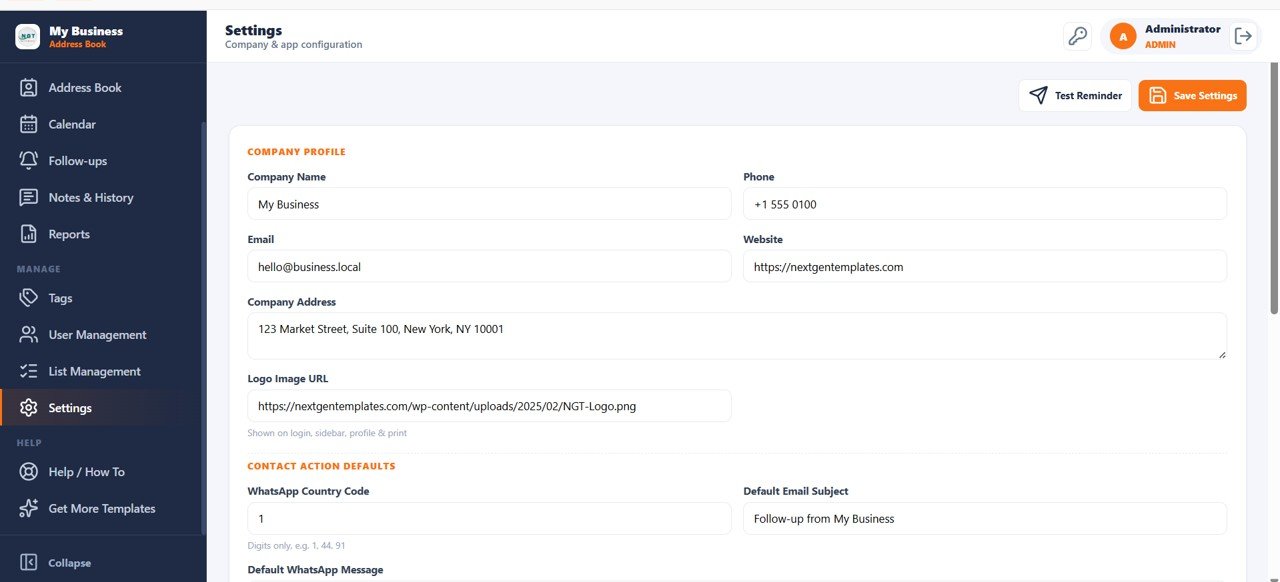
Settings
The Settings page configures Company Profile (Name, Phone, Email, Website, Address, Logo), Contact Action Defaults (WhatsApp Country Code, Default Email Subject, Default WhatsApp Message), with Test Reminder and Save Settings functionality.
📊 Customer Address Book Web App vs. Google Sheets CRM vs. HubSpot CRM — Where This Fits
| Feature | Customer Address Book Web App | Plain Google Sheets CRM | HubSpot CRM Free/Paid |
|---|---|---|---|
| Cost | $14.99 one-time | Free but manual setup | Free tier / $45–$800+/mo paid |
| Platform | Google Apps Script (browser) | Google Sheets | Web SaaS |
| Setup time | Under 10 minutes | 3–5 hours custom build | 30–120 min onboarding |
| Built-in login system | ✅ Yes — multi-user | ❌ No | ✅ Yes |
| Follow-up calendar | ✅ Month/Week/Day/List | ❌ Manual only | ✅ Yes |
| Interaction history log | ✅ Call/Email/WhatsApp/Meeting | ❌ No | ✅ Yes |
| Export contacts/reports | ✅ Yes — CSV/Export | Manual copy-paste | ✅ Paid plan only |
| Year-1 cost at 5 users | $14.99 total | $0 but 15+ hours setup | $540–$9,600+ |
| WhatsApp quick action | ✅ Yes — one-click | ❌ No | ❌ No (integration needed) |
For small businesses that need a structured customer contact system without paying $45–$800/month per HubSpot seat, the Customer Address Book Web App sits in the sweet spot.
👥 Who This Template Is For — and Who It’s Not For
✅ This template is built for:
- Small business owners managing 50–2,000 customer contacts without a CRM subscription
- Sales reps and field agents who need WhatsApp, call, and email quick-actions from a contact list
- Service businesses (salons, clinics, repair shops) tracking birthdays, anniversaries, and follow-ups
- Teams already using Google Drive who want a zero-infrastructure multi-user contact system
❌ This template is NOT for:
- Enterprise teams needing Salesforce-level automation, API integrations, or SOC 2 compliance
- Businesses with 10,000+ contacts requiring a dedicated database backend
- Teams that need native mobile apps (this runs in a browser)
⚙️ How to Use the Customer Address Book Web App
- Download the ZIP file and open the included PDF setup guide
- Click the Google Sheets copy link in the PDF to create your own editable copy in Google Drive
- Open the script editor (Extensions → Apps Script) and deploy as a web app — Execute as: Me / Access: Anyone
- Log in with the default Admin credentials (Admin1 / abcd) and change your password
- Add your customers via the Address Book page or use the Import function for bulk upload
- Configure Company Profile and WhatsApp defaults in the Settings page
- Create custom Tags, Categories, and dropdown values in List Management
- Add team members via User Management and share the web app URL
💼 Real-World Use Cases
Priya runs a 12-person salon and beauty services business. She uses the Customer Address Book Web App to track every client’s birthday, service due date, and last WhatsApp conversation. Her team logs follow-up tasks after each appointment and the calendar reminds them of anniversary discounts — without paying for a CRM subscription.
Carlos manages field sales for a wholesale distributor. He tracks 800 retail customers across 4 cities with the Address Book filters — filtering by City, Category, and Status to prioritize daily visits. The interaction history log captures every call note so nothing is lost between handoffs.
Meera heads operations at a dental clinic. The web app serves as her patient contact book with follow-up reminders for treatment schedules and birthday greetings sent via WhatsApp quick-action. The Customer Master report helps her export filtered lists for monthly SMS campaigns.
❓ Frequently Asked Questions
What KPIs does the Customer Address Book Web App track?
The Customer Address Book Web App tracks 10 KPIs including Total Customers, Active Customers, New This Month, Favorites, With Email, With WhatsApp, Missing Address, Follow-ups Due Today, Overdue Follow-ups, and Upcoming Birthdays — all visible on the main dashboard.
Does this work without any coding knowledge?
Yes. The Customer Address Book Web App deploys in under 10 minutes following the included PDF guide. No coding is required — the Google Apps Script is pre-built. You only need to click Deploy in the script editor and share the URL.
How does this compare to HubSpot CRM?
HubSpot CRM costs $45–$800+ per month for paid features; the Customer Address Book Web App is a one-time $14.99 purchase. It covers core contact management, follow-up tracking, interaction history, and calendar — without monthly fees or per-user pricing.
Can multiple users access it at the same time?
Yes. The Customer Address Book Web App supports multiple simultaneous users with role-based access (Admin and User roles). Each user logs in with their own credentials and sees only what their role permits.
How long does setup take?
Setup takes under 10 minutes. Download the ZIP, open the PDF guide, click the Google Sheets copy link, deploy the script as a web app, and share the URL with your team. No server, hosting, or IT support required.
Can I import my existing customer list?
Yes. The Address Book page includes an Import button for bulk-loading your existing contacts. You can also export the full contact list or filtered reports to CSV at any time using the Export option.
Does it work on mobile and tablets?
The Customer Address Book Web App runs in any modern browser, including mobile browsers on iOS and Android. While it’s optimized for desktop use, the interface is accessible on tablets and larger phone screens.
👤 About the Author
Built by PK — Microsoft Certified Professional with 15+ years of Excel, Google Sheets, and Power BI experience. Founder of NextGenTemplates, reaching 300K+ subscribers across YouTube channels
(@PK-AnExcelExpert,
@NextGenTemplates,
@NeoTechNavigators).
Every template is hand-built and tested before release.
🔗 Explore Related Templates
Looking for more Google Apps Script Web App Templates? Check these out:
- CRM and Sales Pipeline Management System Web App — Full sales pipeline with lead tracking and deal stages
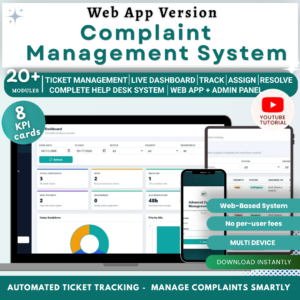
- Complaint Management System Web App — Log, track and resolve customer complaints with SLA tracking
- Daily Sales Purchase System Web App — Track daily sales and purchase transactions with reports
📖 Click here to read the Detailed Blog Post<
Watch the step-by-step video Demo:
🎥 Visit our YouTube channel for step-by-step video tutorials
👉 YouTube.com/@NeoTechNavigators































Reviews
There are no reviews yet.