

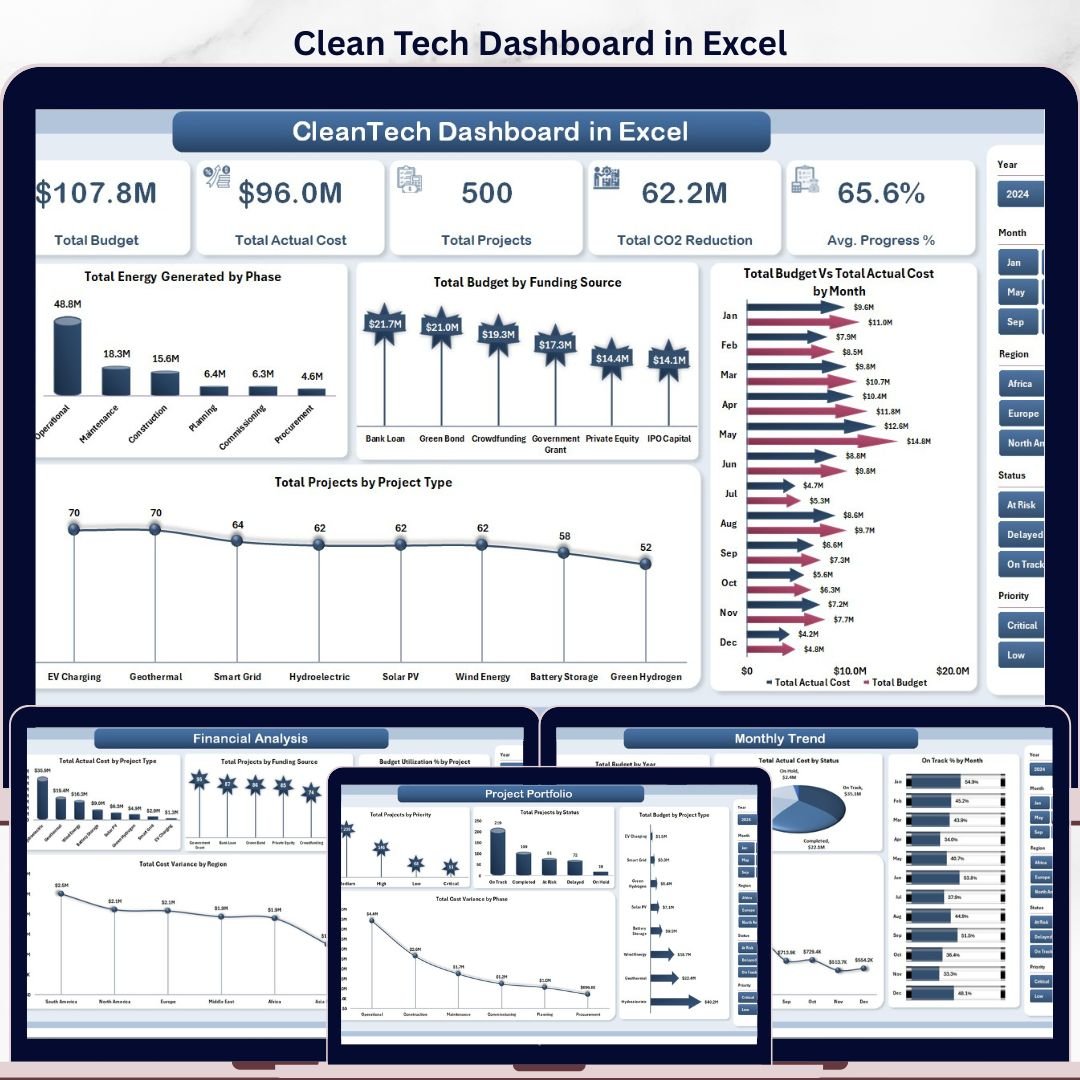



The Clean Tech Dashboard in Excel tracks 5 high-level KPIs across 5 interactive analysis pages, with 18 pre-built charts and multi-dimensional slicers covering project portfolio, financial performance, regional impact, and monthly trends. Setup takes under 10 minutes — drop your project data into the Data sheet, click Refresh All, and every chart, KPI card, and pivot recalculates automatically.
🌍 Join 8,400+ teams in 40+ countries using Nextgen Templates to replace paid SaaS tools with one-time-purchase Excel, Google Sheets, Power BI, and HTML templates.
✅ Instant download · One-time payment · No subscription · No per-user fees · Lifetime access
🔑 Key Features of Clean Tech Dashboard in Excel
- Five-page portfolio coverage – Overview, Project Portfolio, Financial Analysis, Regional Insights, and Monthly Trend pages each focus on a single decision-making angle so leadership reviews never require switching between five files.
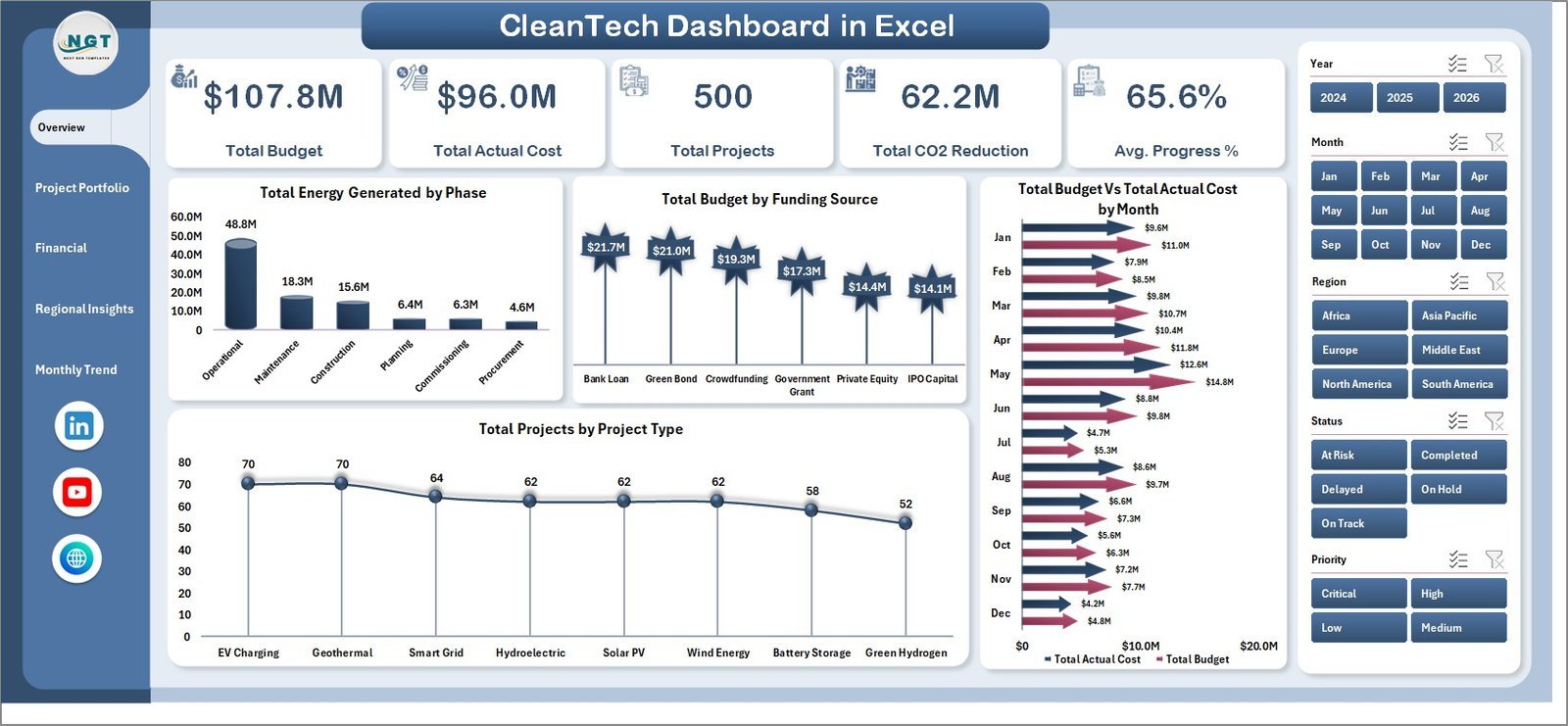
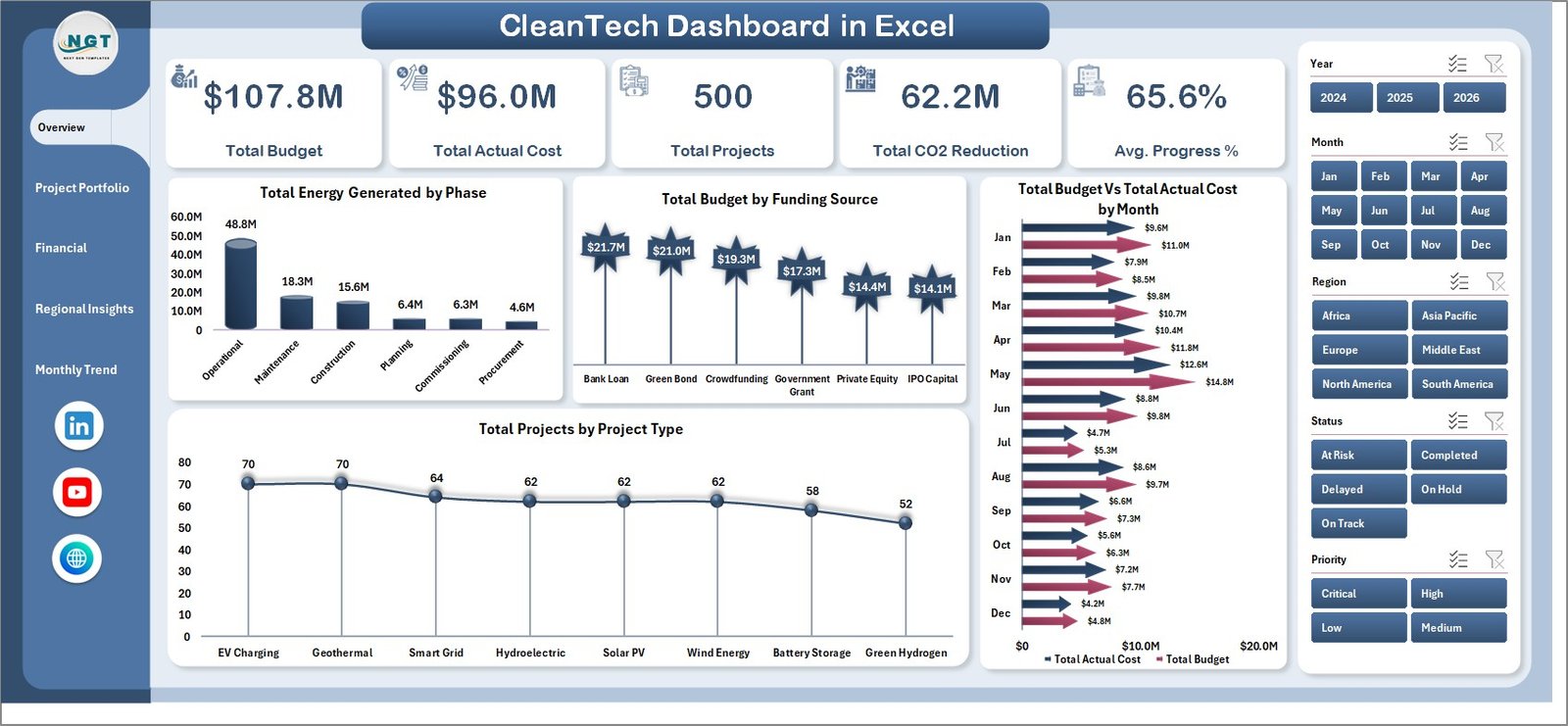
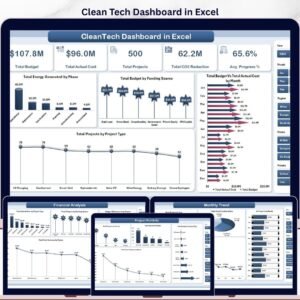
- Five executive KPIs in card format – Total Budget, Total Actual Cost, Total Projects, Total CO2 Reduction, and Average Progress % sit at the top of the Overview page so sponsors see portfolio health in 5 seconds.
- 18 ready-made charts – Energy generated by phase, budget by funding source, cost variance by region, capacity in MW by region, jobs created, and 13 more — all driven by pivot tables in the Support sheet.
- Multi-dimensional slicers – Filter the entire portfolio by Region, Project Type, Status, Phase, Funding Source, Priority, and Year with a single click. Slicers are synced across charts and KPI cards.
- Dynamic refresh workflow – Add new project rows to the Data sheet, click Data → Refresh All in the Excel ribbon, and every chart, slicer, and pivot recalculates instantly. No formula edits required.
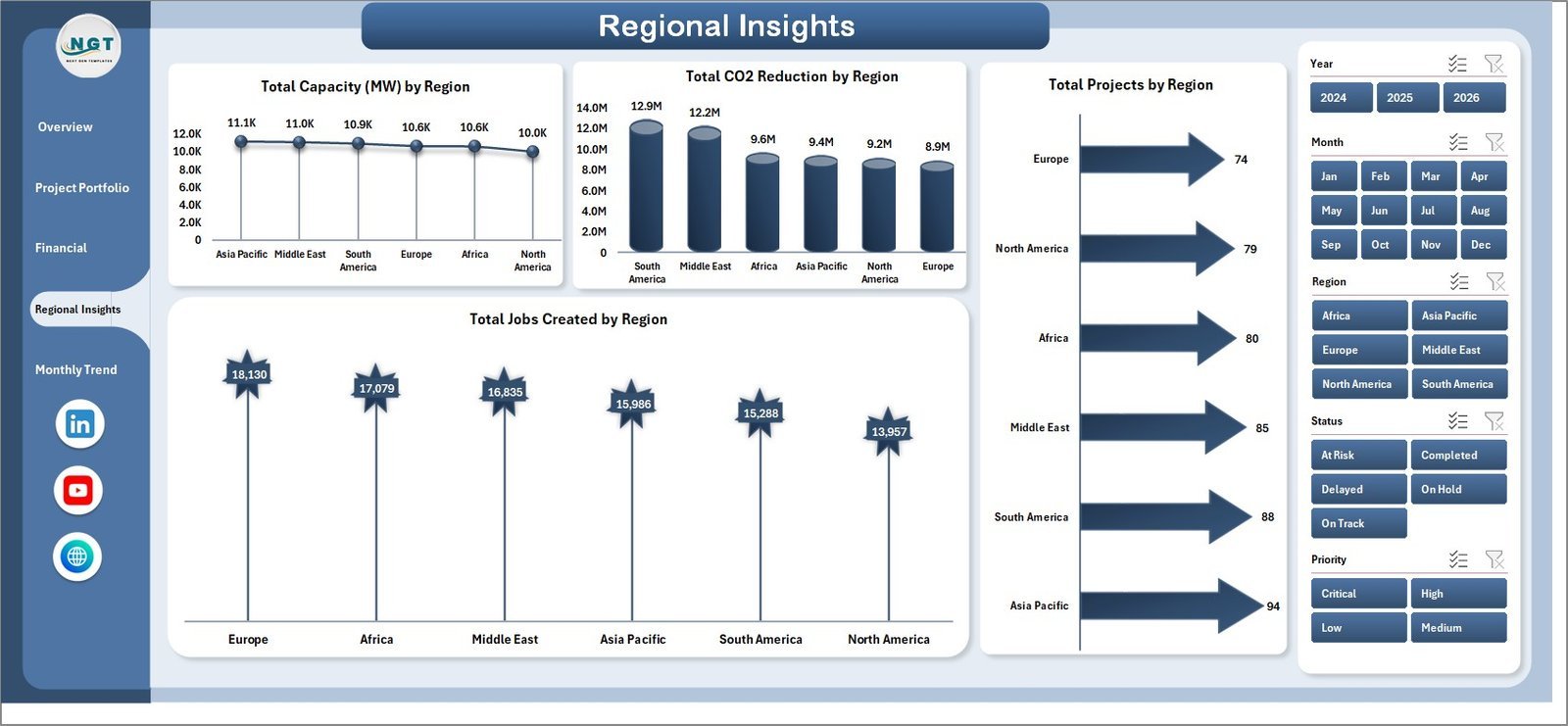
- Capacity, CO2, and jobs tracking – Three sustainability-specific metrics built into the Regional Insights page measure total installed capacity (MW), CO2 reduction by region, and jobs created — the three metrics ESG reports and investor decks require.
- Cost variance and budget utilization views – Financial Analysis page calculates budget utilization % by project type and cost variance by region/phase so finance leads spot over-budget projects before quarter-end.
- Hidden Support sheet – All pivot tables that power the dashboard are isolated in a Support tab you can hide before sharing — your team sees only the polished dashboard, not the calculation engine.
📦 What’s Inside the Clean Tech Dashboard in Excel
Page 1: Overview
The Overview page surfaces five KPI cards — Total Budget, Total Actual Cost, Total Projects, Total CO2 Reduction, and Average Progress % — alongside four anchor charts: Total Energy Generated by Phase, Total Budget by Funding Source, Total Budget Vs Total Actual Cost by Month, and Total Projects by Project Type. Slicers above the cards filter the entire portfolio instantly.
Page 2: Project Portfolio
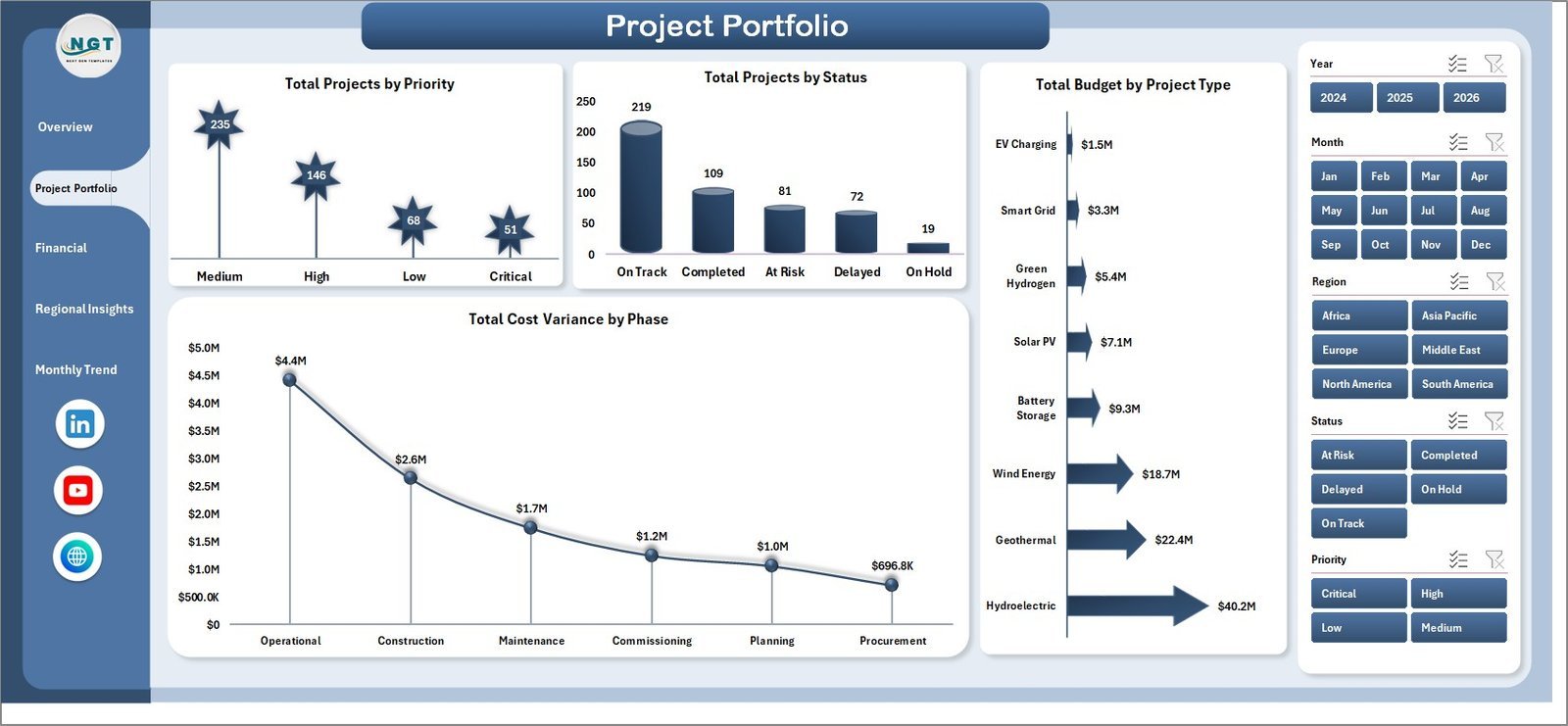
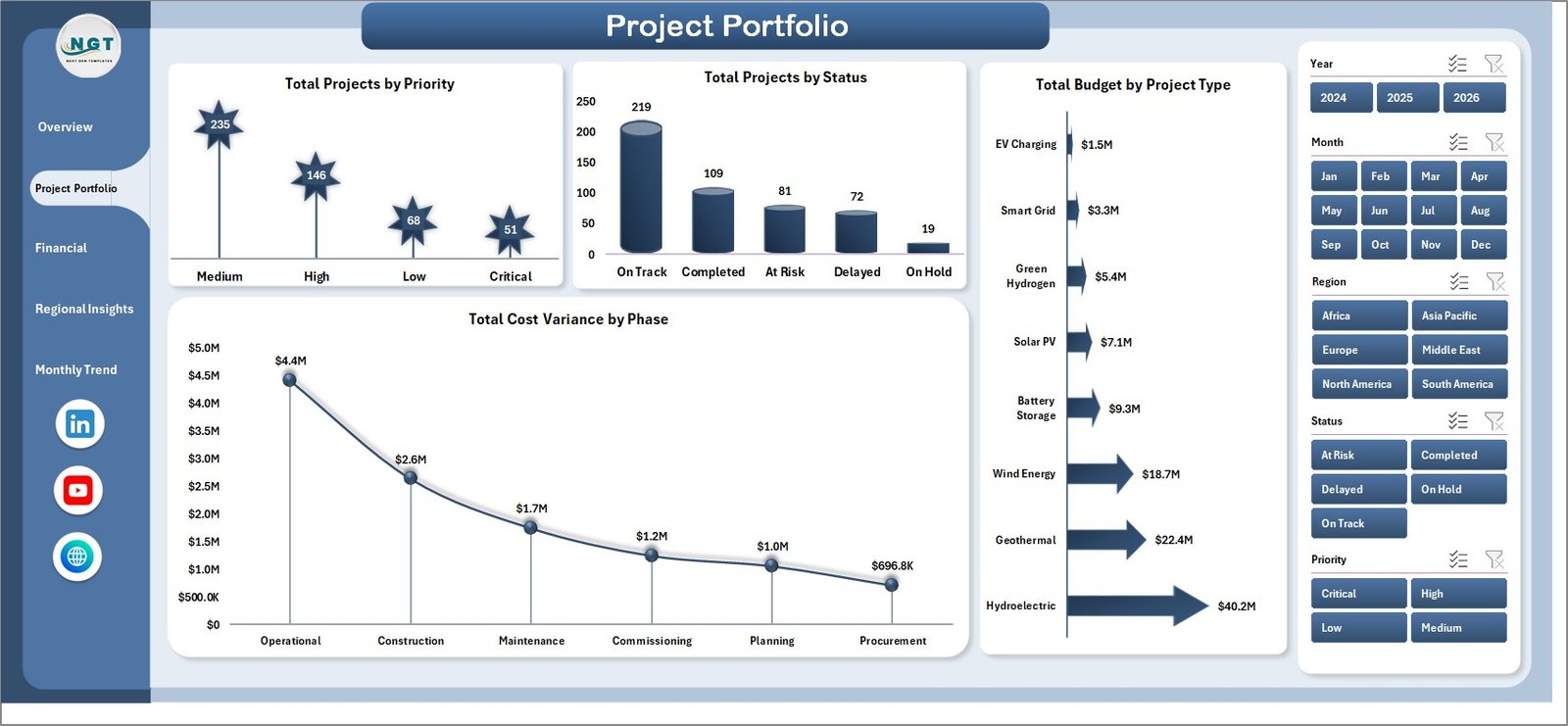
The Project Portfolio page profiles the active project pipeline with Total Projects by Priority, Total Projects by Status, Total Budget by Project Type, and Total Cost Variance by Phase. Use this view to identify high-priority projects that are slipping or phases consuming the most budget.
Page 3: Financial Analysis
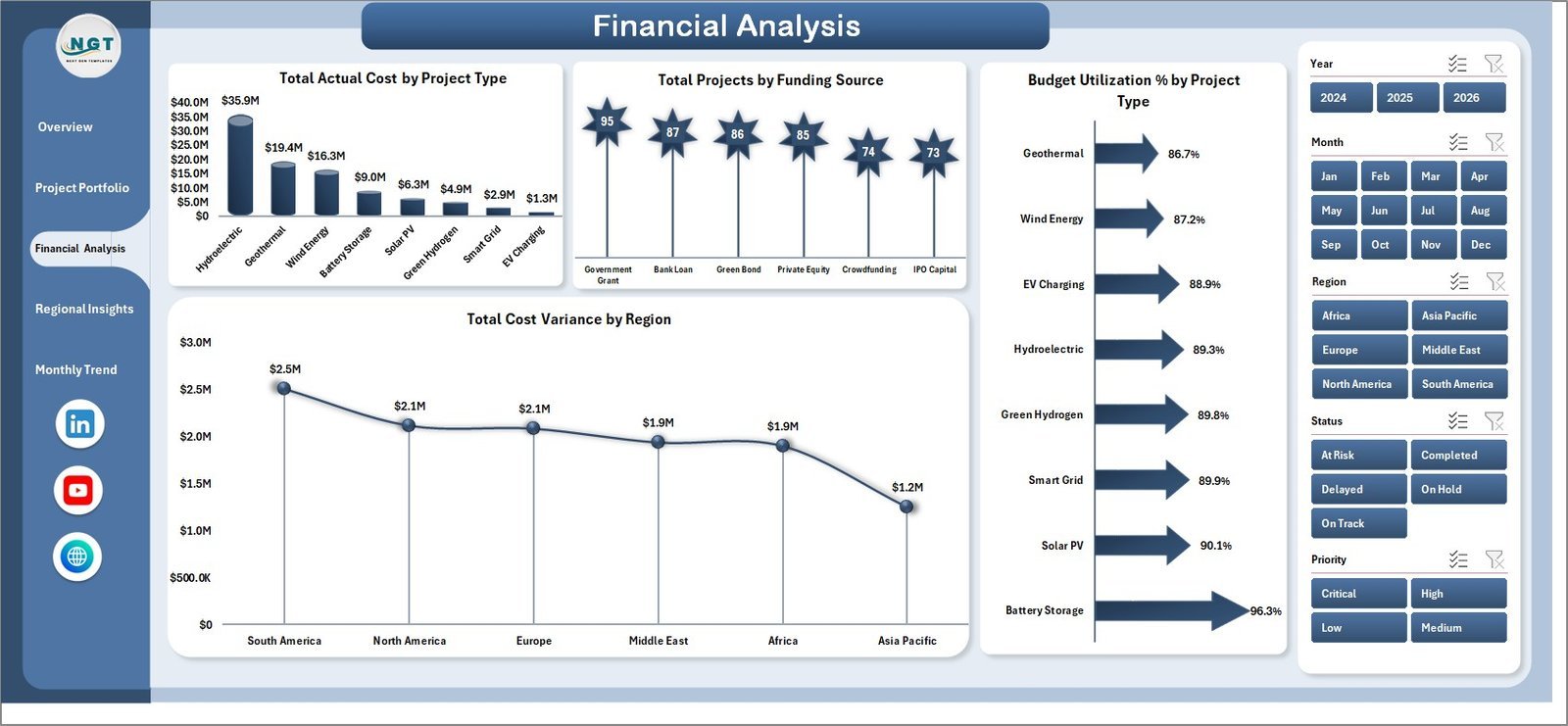
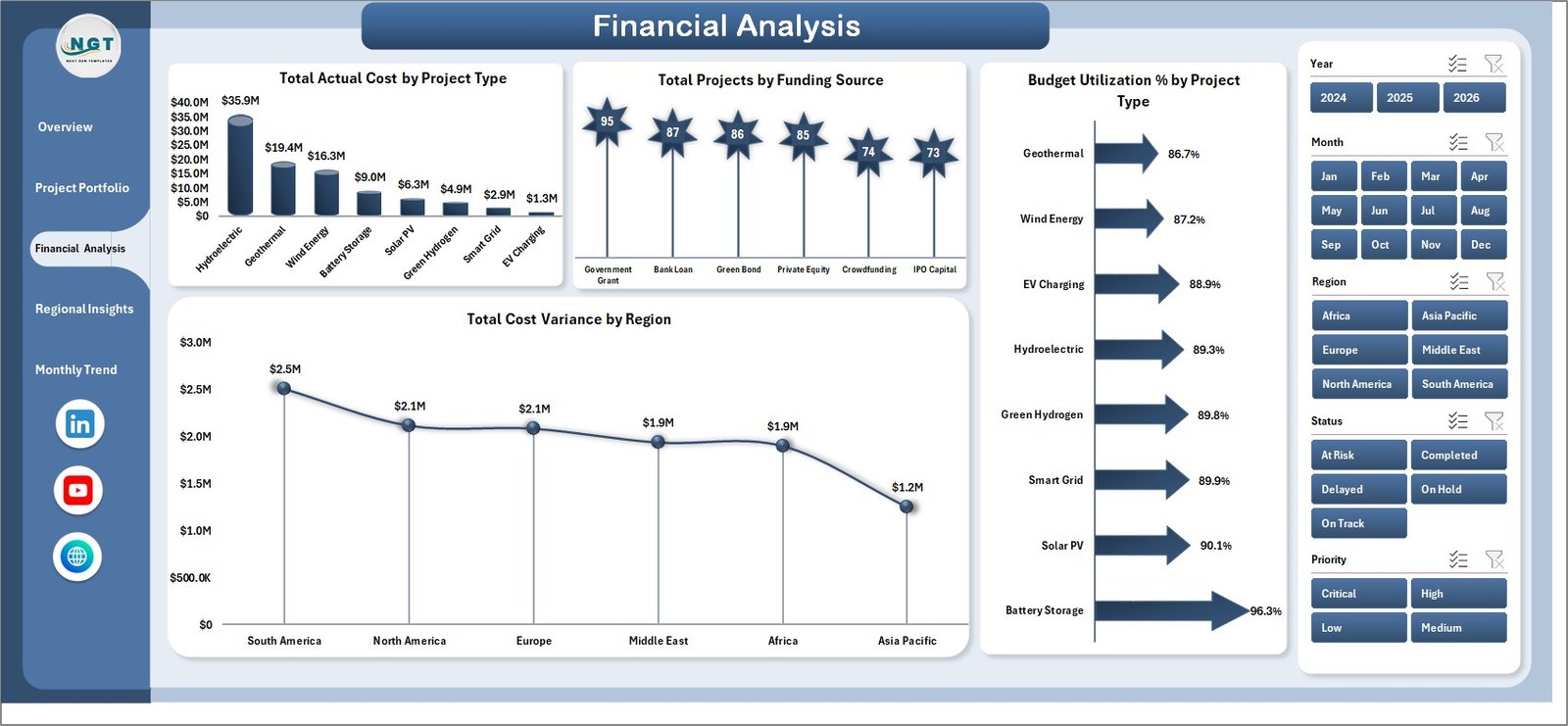
The Financial Analysis page focuses on money flow — Total Actual Cost by Project Type, Total Projects by Funding Source, Budget Utilization % by Project Type, and Total Cost Variance by Region. This is the page CFOs and finance leads will return to before each quarterly review.
Page 4: Regional Insights
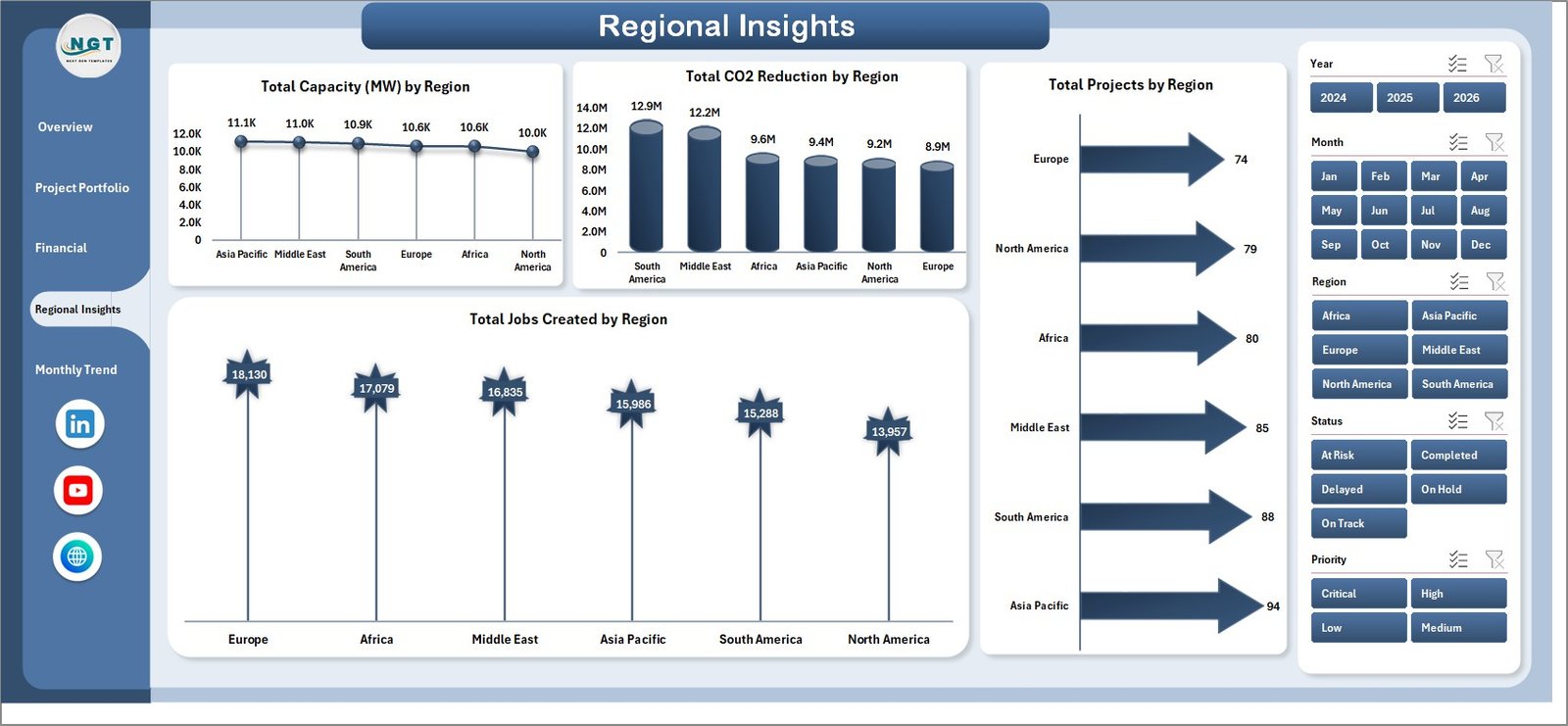
The Regional Insights page measures the on-the-ground impact of the portfolio — Total Capacity (MW) by Region, Total CO2 Reduction by Region, Total Projects by Region, and Total Jobs Created by Region. These four charts together answer “where are we deploying capital and what return are we generating per region?”
Page 5: Monthly Trend
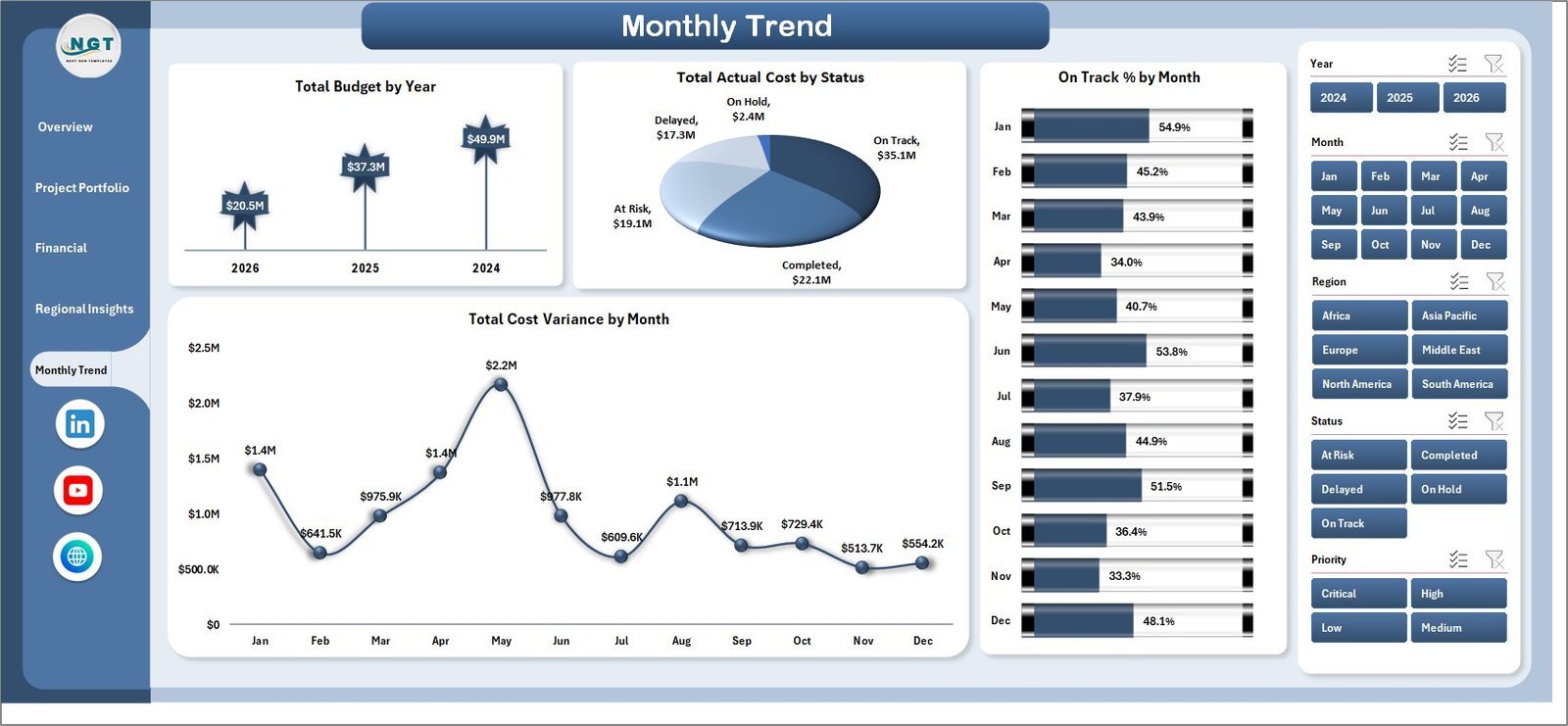
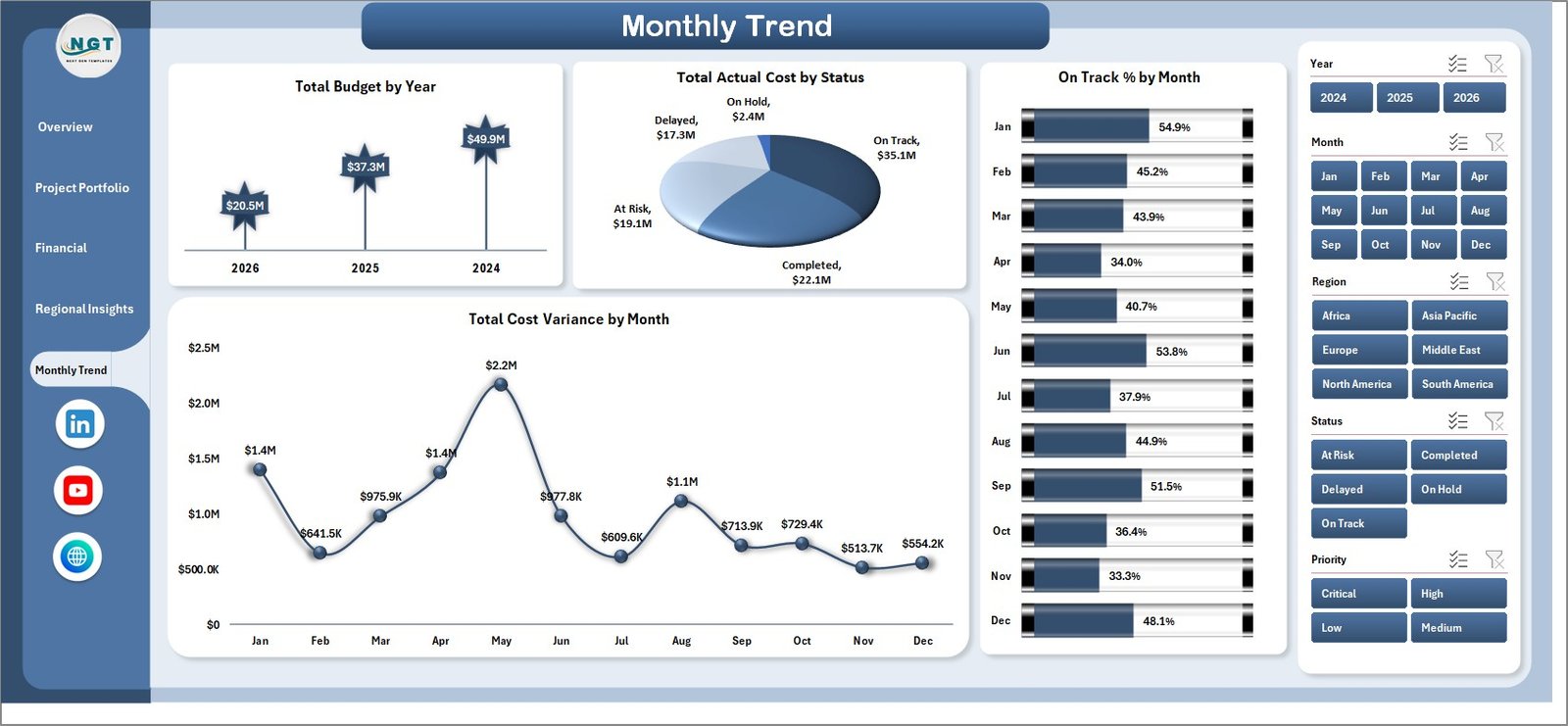
The Monthly Trend page tracks portfolio performance over time with Total Budget by Year, Total Actual Cost by Status, On Track % by Month, and Total Cost Variance by Month. Use these charts to spot seasonal cost spikes and quarter-over-quarter delivery trends.
Data Sheet
The Data Sheet is the input layer — add or replace project rows in the same column structure (Project ID, Project Type, Region, Phase, Funding Source, Budget, Actual Cost, Capacity in MW, CO2 Reduction, Jobs Created, Status, Priority, Start Date, End Date, Progress %) and the entire dashboard auto-updates after a single refresh.

Support Sheet
The Support Sheet hosts all the pivot tables that power the dashboard’s charts and slicers. After updating data, click Data → Refresh All in the Excel ribbon and every pivot recalculates. You can keep this sheet hidden so end-users see only the polished dashboard pages.

📊 Clean Tech Dashboard in Excel vs. Power BI vs. Paid Sustainability SaaS — Where This Fits
| Feature | Clean Tech Dashboard in Excel | Power BI Equivalent | Watershed / Persefoni / Sphera |
|---|---|---|---|
| Cost | $17.99 one-time | $10/user/month (Power BI Pro) | $25,000–$150,000 / year |
| Platform | Microsoft Excel (.xlsx) | Power BI Desktop + Service | Vendor-hosted SaaS |
| Setup time | Under 10 minutes | 2–4 hours | 6–12 weeks onboarding |
| Sharing | Email, OneDrive, SharePoint ✅ | Requires Power BI license per viewer | Per-seat license |
| Customisable charts/KPIs | Full control ✅ | Full control ✅ | Limited to vendor templates |
| Works offline | Yes ✅ | Desktop only | Cloud-only |
| CO2 + capacity tracking | Built-in ✅ | Manual model required | Built-in ✅ |
| Year-1 cost (5 users) | $17.99 | $600 | $25,000+ |
For clean energy and sustainability teams that want capacity, CO2, and budget tracking in one file without paying enterprise SaaS rates, the Clean Tech Dashboard in Excel sits in the sweet spot.
👥 Who This Template Is For — and Who It’s Not For
✅ This template is built for:
- Project managers running portfolios of 5–500 clean energy, solar, wind, EV-infrastructure, or energy-efficiency projects
- Sustainability and ESG leads needing CO2 reduction, MW capacity, and jobs-created metrics in a single executive view
- Finance leads at clean-tech firms tracking budget vs. actuals across funding sources (grants, equity, debt, public funding)
- Consultants and impact-investing analysts who need to present portfolio dashboards to clients without procuring SaaS for every engagement
- NGOs and government bodies reporting on the impact of clean energy programs by region
❌ This template is NOT for:
- Enterprise sustainability teams that need automated carbon-emission ingestion from IoT, ERP, or supply-chain feeds (use Watershed or Persefoni)
- Teams that need GHG Protocol Scope 1/2/3 calculation engines audited to ISO 14064 — this template tracks portfolio outcomes, not regulatory carbon accounting
- Users who don’t have Microsoft Excel 2016 or later — Google Sheets / Power BI versions available separately
⚙️ How to Use the Clean Tech Dashboard in Excel
- Download and unzip the file, then open it in Microsoft Excel 2016 or later (Excel 365 recommended).
- Open the Data sheet and replace the sample project rows with your own — keep the same column headers and data types.
- Click Data → Refresh All in the Excel ribbon. All pivot tables in the Support sheet recalculate.
- Open the Overview page first — KPI cards and the four anchor charts update with your project data.
- Apply slicers at the top of any page to filter the portfolio by Region, Status, Priority, Project Type, Funding Source, or Year.
- Hide the Support sheet (right-click tab → Hide) before sharing the file with stakeholders so they see only the dashboard pages.
- Save weekly or monthly snapshots by copying the file with a date suffix — useful for board-pack archives.
💼 Real-World Use Cases
Anika manages a 60-project clean energy portfolio at a mid-sized renewable infrastructure firm. She uses the Clean Tech Dashboard in Excel to track budget vs. actuals by funding source, present quarterly CO2 reduction figures to her board, and identify which regions are delivering the highest MW capacity per dollar invested — replacing a $40,000/year SaaS contract her CFO refused to renew.
Marcus runs ESG reporting at a private-equity-backed solar developer. He uses the Regional Insights page to show LPs the jobs-created impact across deployment regions and the Monthly Trend page to demonstrate on-track delivery percentage month-over-month. His team replaced 4 separate Excel files with this single dashboard, cutting board-pack preparation from 2 days to 3 hours.
Priya leads the climate-action grant program at a regional NGO deploying $12M across rural clean-cooking, micro-grid, and solar-water-pumping projects. She uses the Financial Analysis page to show budget utilization by project type and the Project Portfolio page to keep grant officers informed on phase progress, replacing a manual reporting workflow that previously consumed 1 FTE.
❓ Frequently Asked Questions
What KPIs does the Clean Tech Dashboard in Excel track?
The Clean Tech Dashboard in Excel tracks 5 portfolio-level KPIs — Total Budget, Total Actual Cost, Total Projects, Total CO2 Reduction, and Average Progress %. It also analyses MW capacity by region, jobs created by region, cost variance by phase and region, budget utilization by project type, and on-track delivery percentage by month across 18 charts.
Which Excel version do I need to run the Clean Tech Dashboard?
The Clean Tech Dashboard in Excel works on Microsoft Excel 2016, 2019, 2021, Excel for Microsoft 365 (Windows and Mac), and the Excel desktop app on Windows tablets. Slicers and modern pivot features require Excel 2013 or later — older versions are not supported.
How long does setup take for a new portfolio?
Setup typically takes under 10 minutes. Open the Data sheet, paste your project rows into the existing column structure (Project ID, Type, Region, Funding Source, Budget, Actual Cost, Capacity in MW, CO2 Reduction, Jobs Created, Status, Priority, Progress %), then click Data → Refresh All. Every chart and slicer updates instantly.
Can I add new project types, regions, or funding sources?
Yes — the Clean Tech Dashboard in Excel uses pivot tables in the Support sheet that auto-discover new categorical values. Add a new project type, region, or funding source in the Data sheet and after refresh, slicers, charts, and KPIs pick it up automatically with no formula edits required.
How does this compare to Watershed, Persephone, or Sphera?
Watershed, Persefoni, and Sphera are enterprise carbon-accounting platforms starting at $25,000/year with multi-week onboarding. The Clean Tech Dashboard in Excel is a $17.99 one-time-purchase project portfolio tool — ideal for project tracking, budget oversight, and CO2 outcome reporting, but not a substitute for audited GHG Protocol calculation engines.
Is the Clean Tech Dashboard editable, or is it locked?
The Clean Tech Dashboard in Excel is fully editable and unlocked. You own a perpetual license to customize KPIs, add charts, recolor the layout to your brand palette, change column structures, and integrate with your existing workflow. No password protection, no hidden formulas.
Can I share the dashboard with my team or stakeholders?
Yes — share via email, OneDrive, SharePoint, Microsoft Teams, or any file-sharing service. Recipients need only Microsoft Excel (no Power BI license, no per-user SaaS seat). For external sharing, hide the Support sheet first so only the polished dashboard pages are visible.
👤 About the Author
Built by PK — Microsoft Certified Professional with 15+ years of Excel, Google Sheets, and Power BI experience. Founder of NextGen Templates, reaching 300K+ subscribers across YouTube channels (@PK-AnExcelExpert, @NextGenTemplates, @NeoTechNavigators). Every template is hand-built and tested before release.
🔗 Explore Related Templates
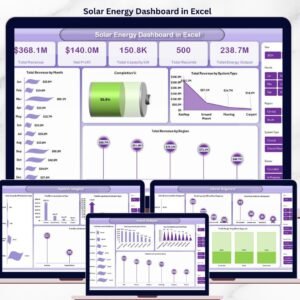
- Solar Energy Dashboard in Excel — focused dashboard for solar-only project portfolios
- Energy Consumption Analysis Dashboard in Excel — pairs well for tracking energy savings post-deployment
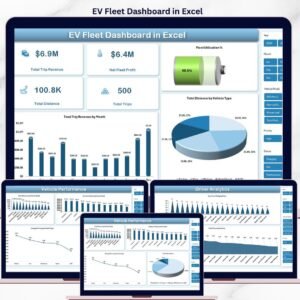
- EV Fleet Dashboard in Excel — clean mobility companion dashboard
- Climate Change NGOs Dashboard in Excel — for NGO-side impact reporting
Also available as: Renewable Infrastructure Projects Dashboard in Power BI for teams standardised on Microsoft Fabric/Power BI.
Browse the full library: Excel Dashboard templates | Power BI Dashboards
📖 Click here to read the Detailed Blog Post
🎥 Visit our YouTube channel for step-by-step video tutorials
👉 YouTube.com/@NextGenTemplates
📅 Last updated: May 2026
Watch the step-by-step video tutorial:
YouTube


























Reviews
There are no reviews yet.