

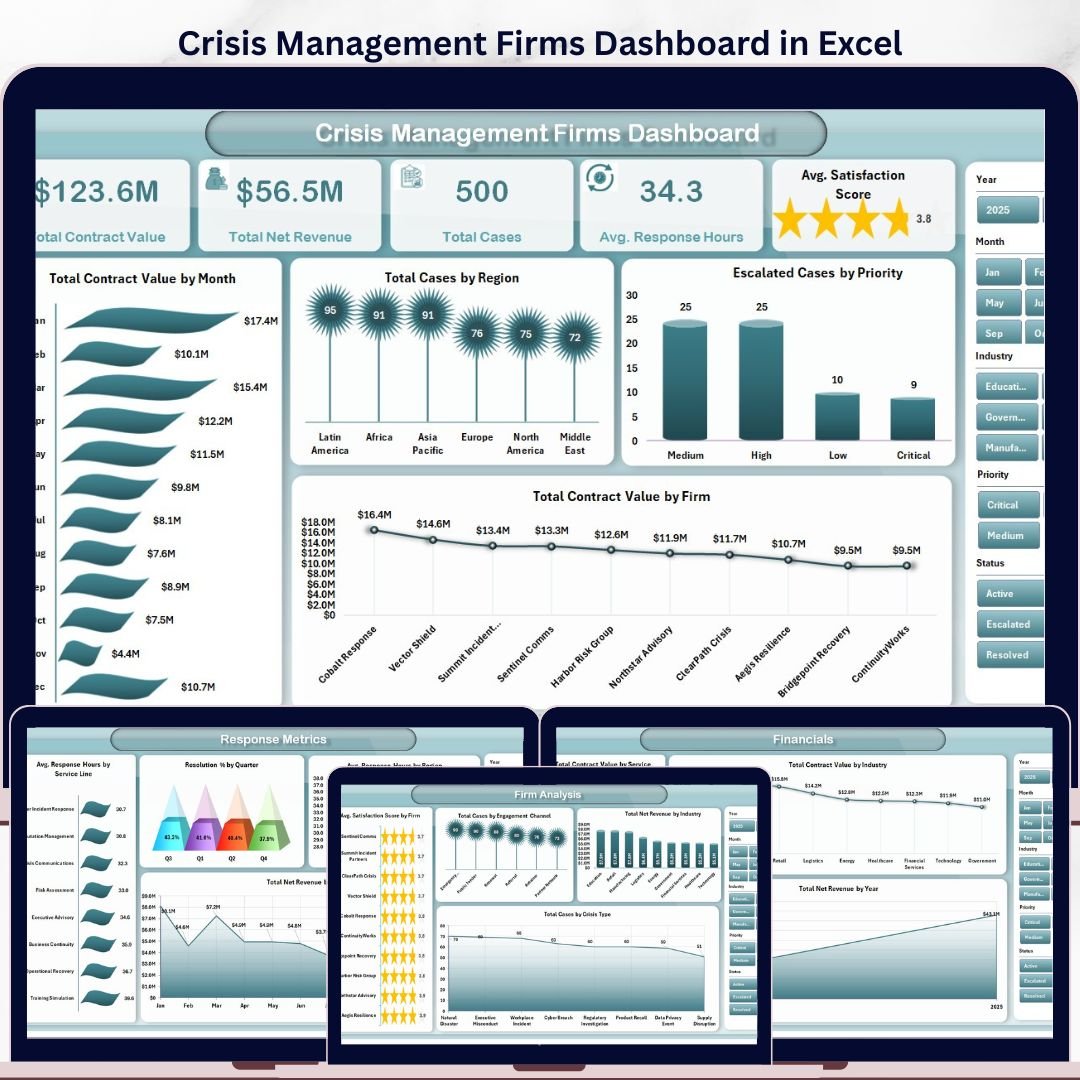
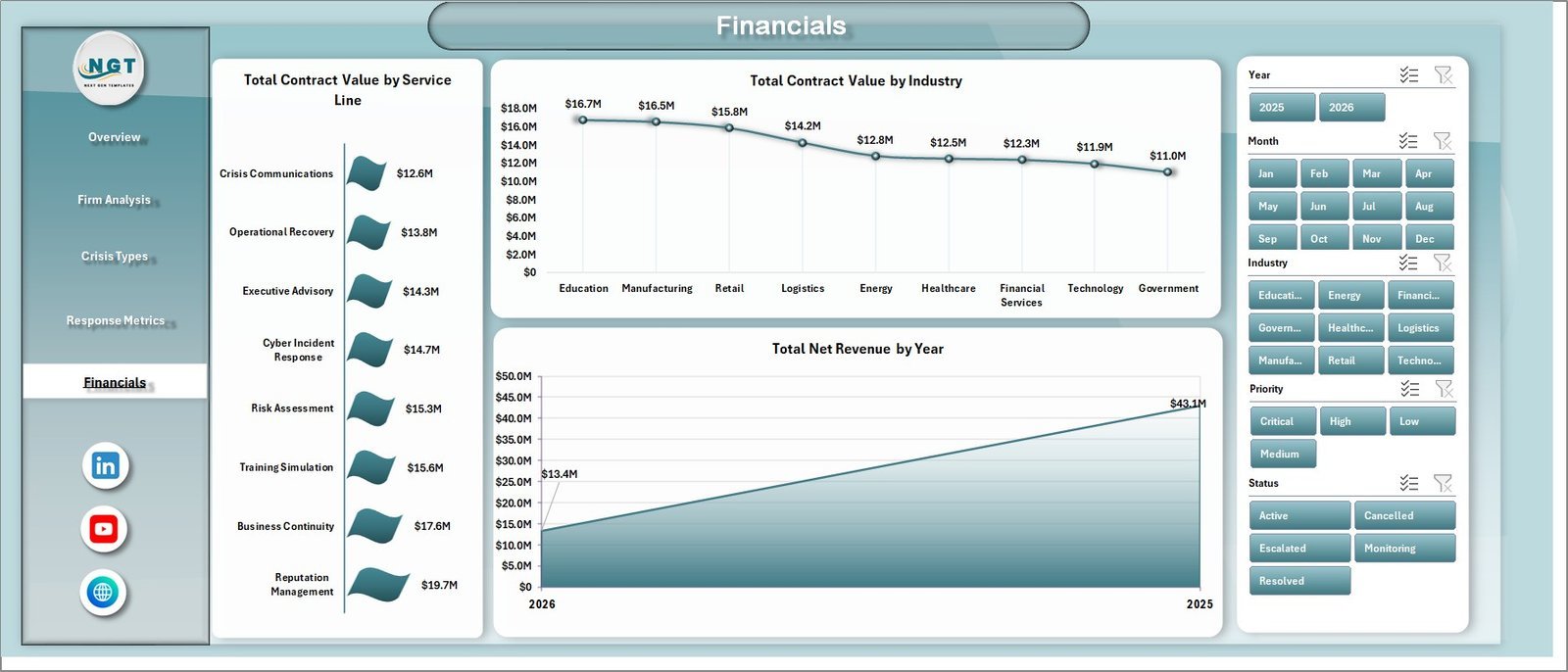


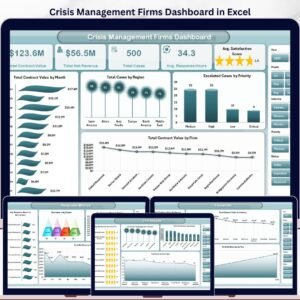
The Crisis Management Firms Dashboard in Excel gives crisis consultants, reputation advisors, incident response teams, and executive risk leaders a 7-sheet Excel reporting system for contract value, net revenue, cases, response hours, satisfaction, crisis type, priority, status, region, industry, and service-line performance. It includes 5 dashboard pages, 5 headline KPI cards, multiple slicers, a structured Data Sheet, and a Support Sheet with pivot tables that refresh the full workbook. For $17.99 one-time, teams get a practical Excel command-center instead of rebuilding crisis reports manually or paying ongoing SaaS fees.
Instant download. One-time payment. No subscription. No per-user fee. Lifetime access.
Key Features of Crisis Management Firms Dashboard in Excel
- 5 executive KPI cards for Total Contract Value, Total Net Revenue, Total Cases, Avg. Response Hours, and Avg. Satisfaction Score.
- 5 dashboard pages covering Overview, Firm Analysis, Crisis Types, Response Metrics, and Financials.
- 18+ chart views for month, region, priority, firm, engagement channel, industry, crisis type, status, resolution band, quarter, and service line.
- Interactive slicers help users filter the dashboard quickly and review specific firms, regions, industries, priorities, statuses, or crisis categories.
- Data Sheet included so users can paste their own crisis engagement records in the same table format.
- Support Sheet with pivot tables powers the dynamic dashboard and can be hidden after setup.
- Excel-native workflow with no subscription, no login, and no complex implementation project.
What’s Inside the Crisis Management Firms Dashboard in Excel
1. Overview Page
The Overview Page is the executive summary for crisis engagement performance. The top cards show Total Contract Value, Total Net Revenue, Total Cases, Avg. Response Hours, and Avg. Satisfaction Score so leadership can review commercial value, workload, responsiveness, and client sentiment in one glance.
Total Contract Value by Month: This chart shows how contract value moves month by month. It helps firms identify demand spikes, seasonal crisis cycles, and periods where high-value advisory work is concentrated.
Total Cases by Region: This chart compares case volume across operating regions. It helps leaders see where crisis activity is highest and where regional teams may need more capacity.
Escalated Cases by Priority: This view shows escalated work by priority level. It helps managers understand whether urgent and high-priority cases are driving operational pressure.
Total Contract Value by Firm: This chart ranks firms or client-facing teams by contract value. It is useful for partner reviews, account planning, and identifying top-performing advisory groups.
2. Firm Analysis
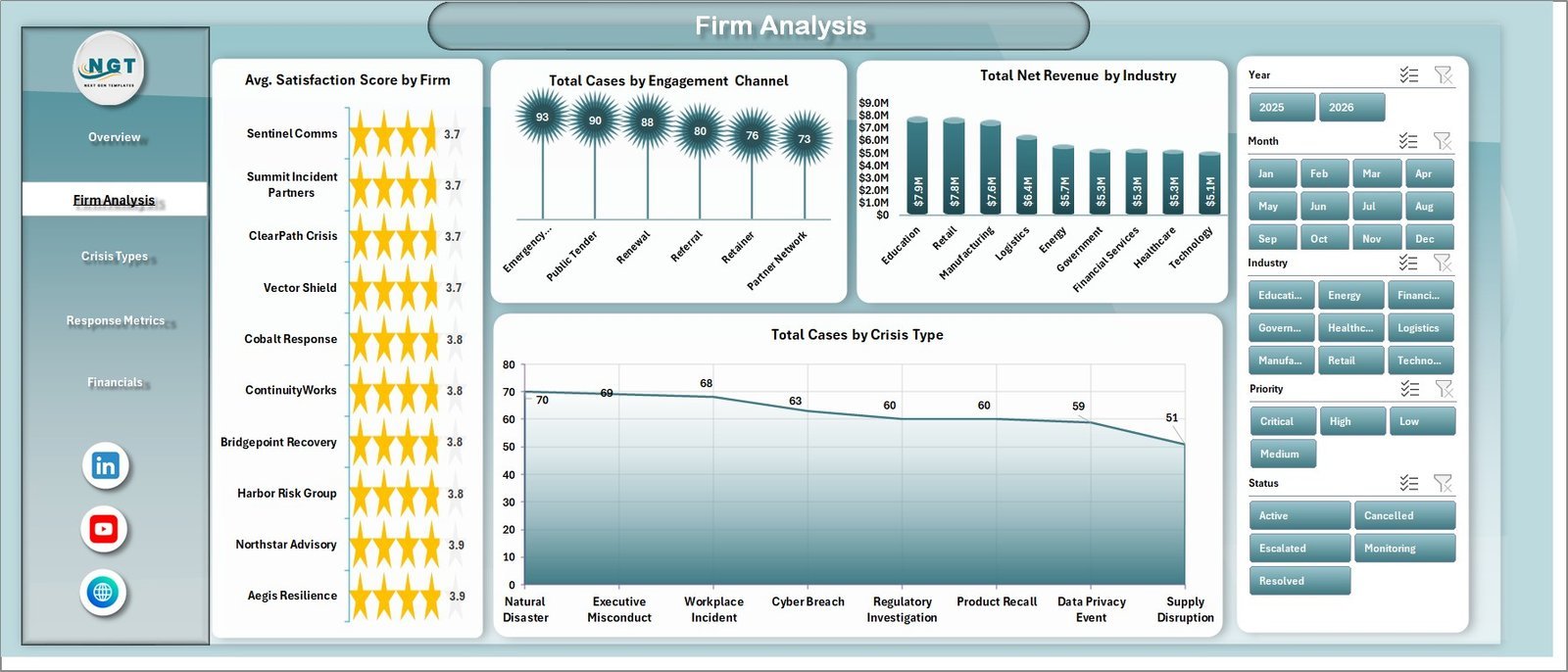
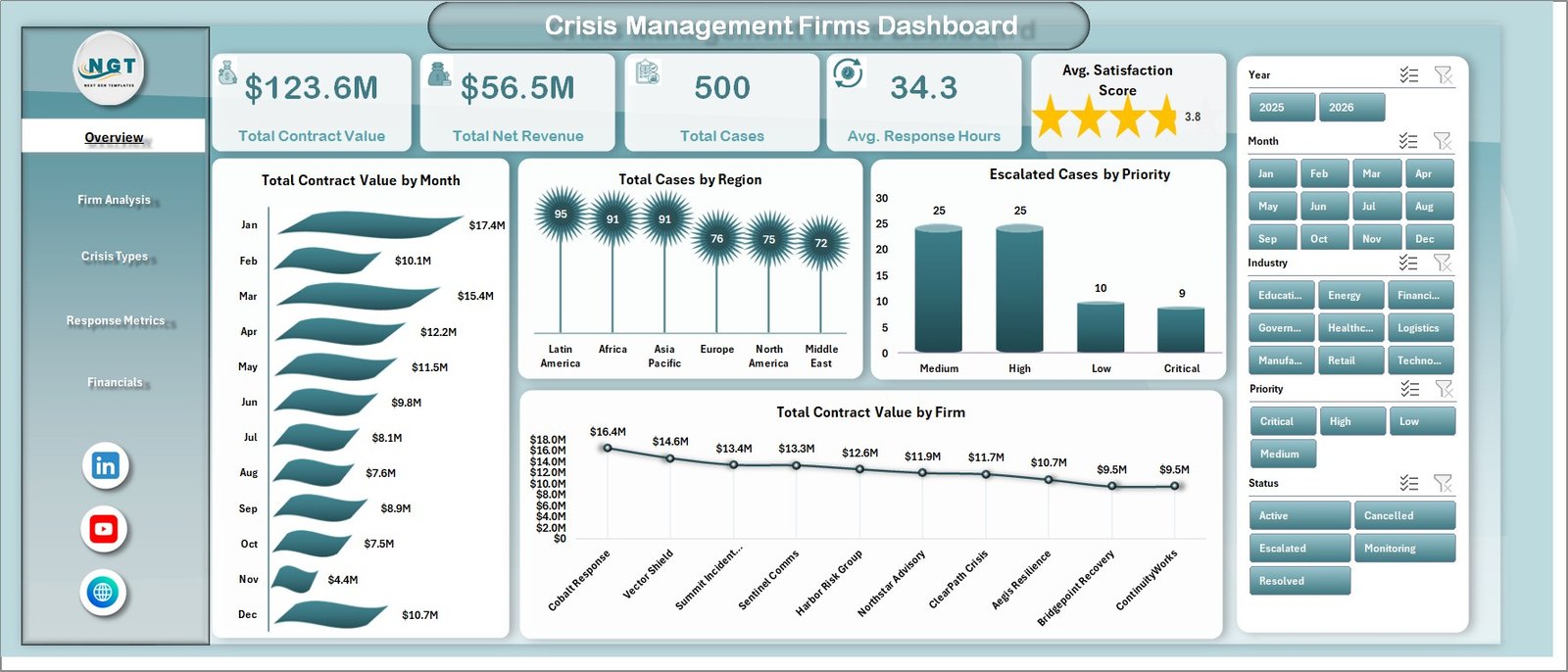
The Firm Analysis sheet helps users compare relationship quality, channel mix, industry revenue, and crisis workload. Avg. Satisfaction Score by Firm shows which firms are delivering the strongest client experience. Total Cases by Engagement Channel explains whether cases arrive through retainers, referrals, emergency calls, or advisory engagements. Total Net Revenue by Industry highlights the industries producing the most retained value, while Total Cases by Crisis Type shows which crisis categories dominate the portfolio.
3. Crisis Types
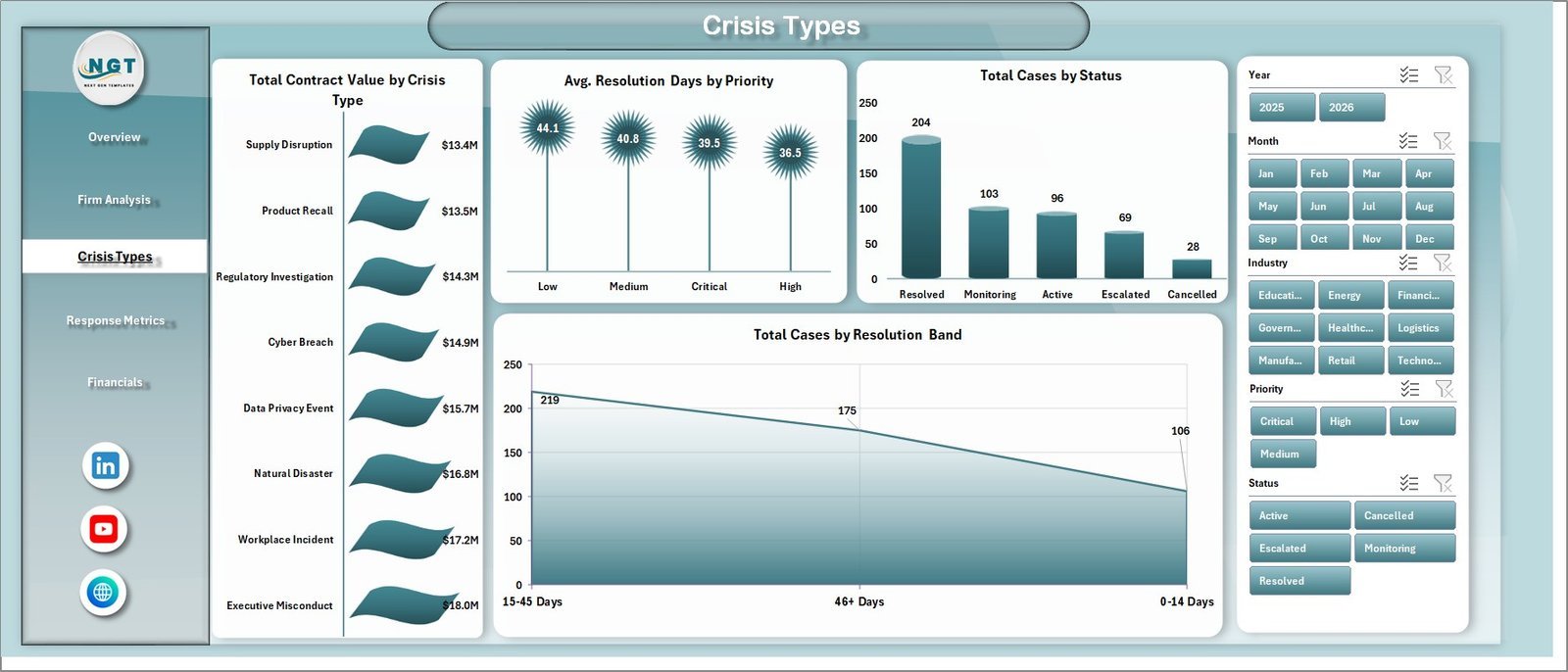
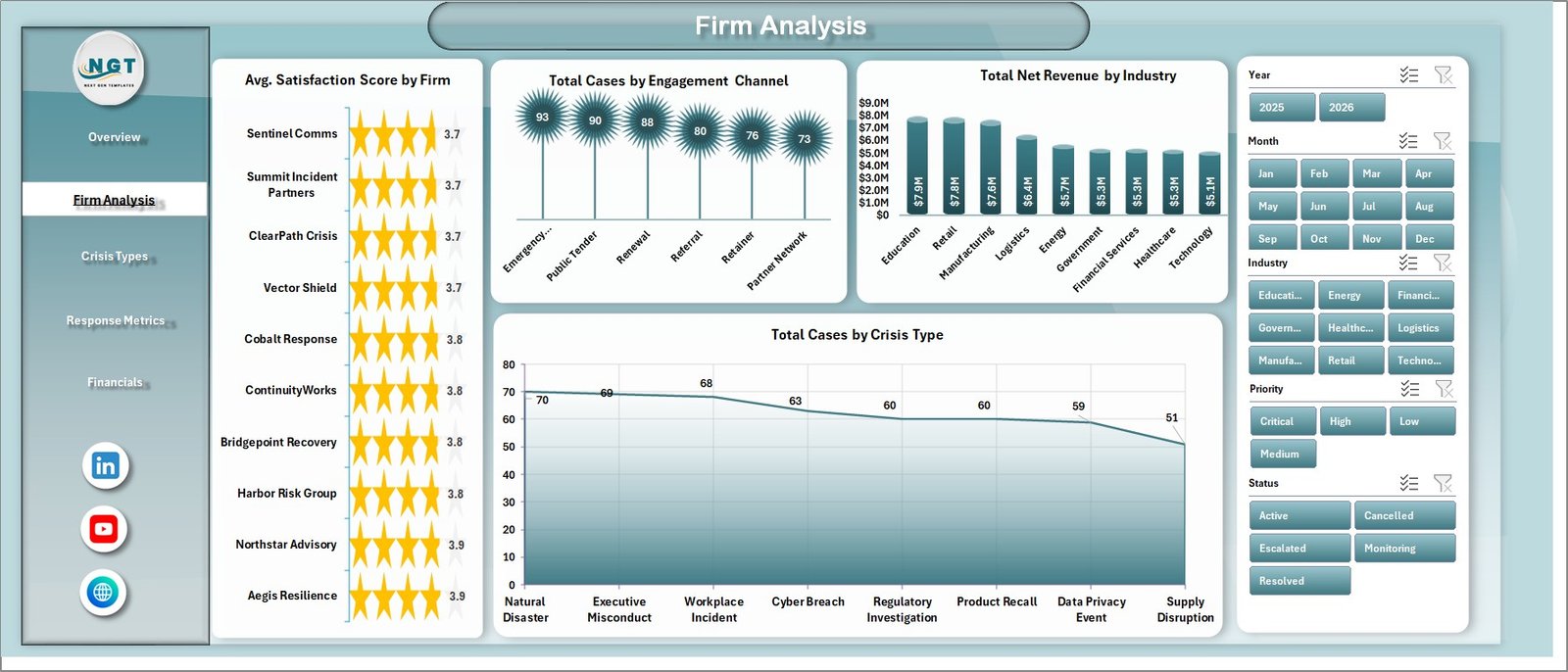
The Crisis Types page focuses on the nature and outcome of each engagement. Total Contract Value by Crisis Type shows which crisis categories carry the largest commercial value. Avg. Resolution Days by Priority reveals how long different priority levels take to close. Total Cases by Status shows active, closed, pending, or escalated case volume, and Total Cases by Resolution Band groups outcomes by resolution speed for quick service-level review.
4. Response Metrics
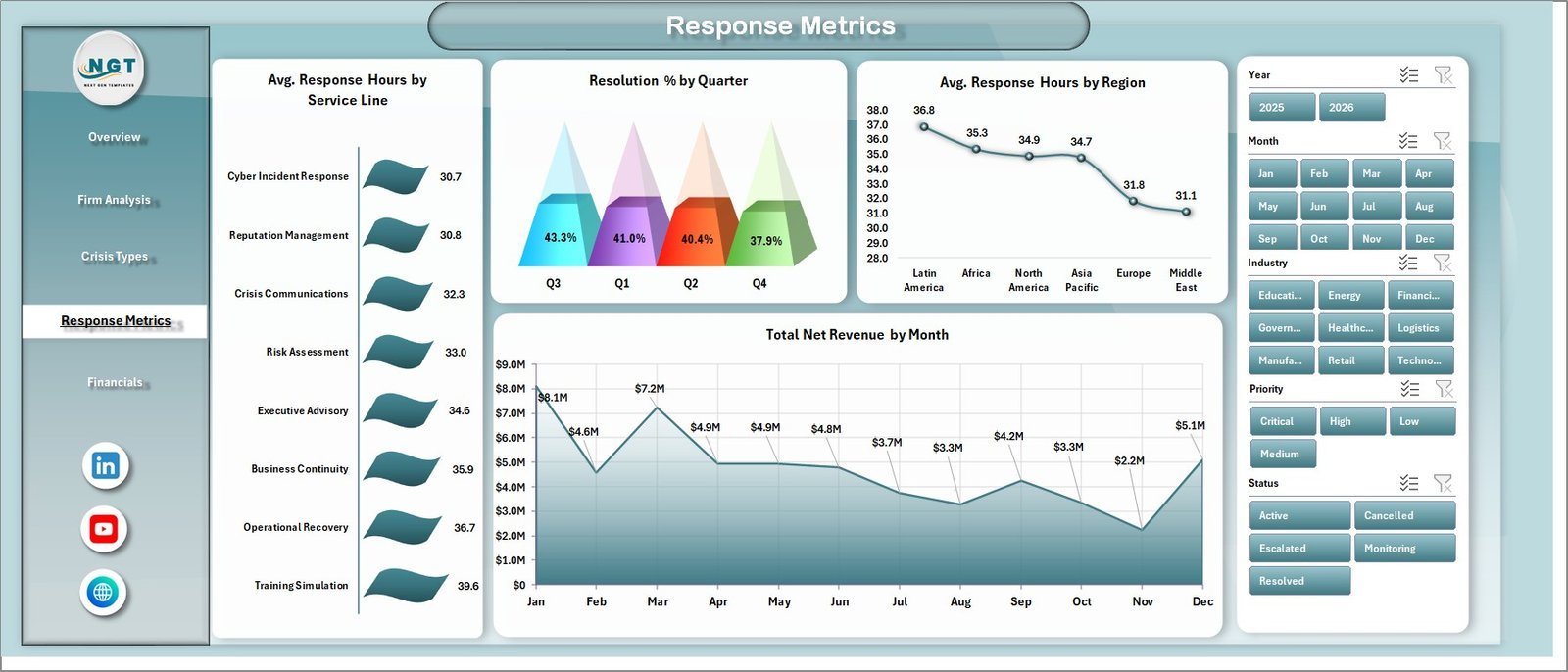
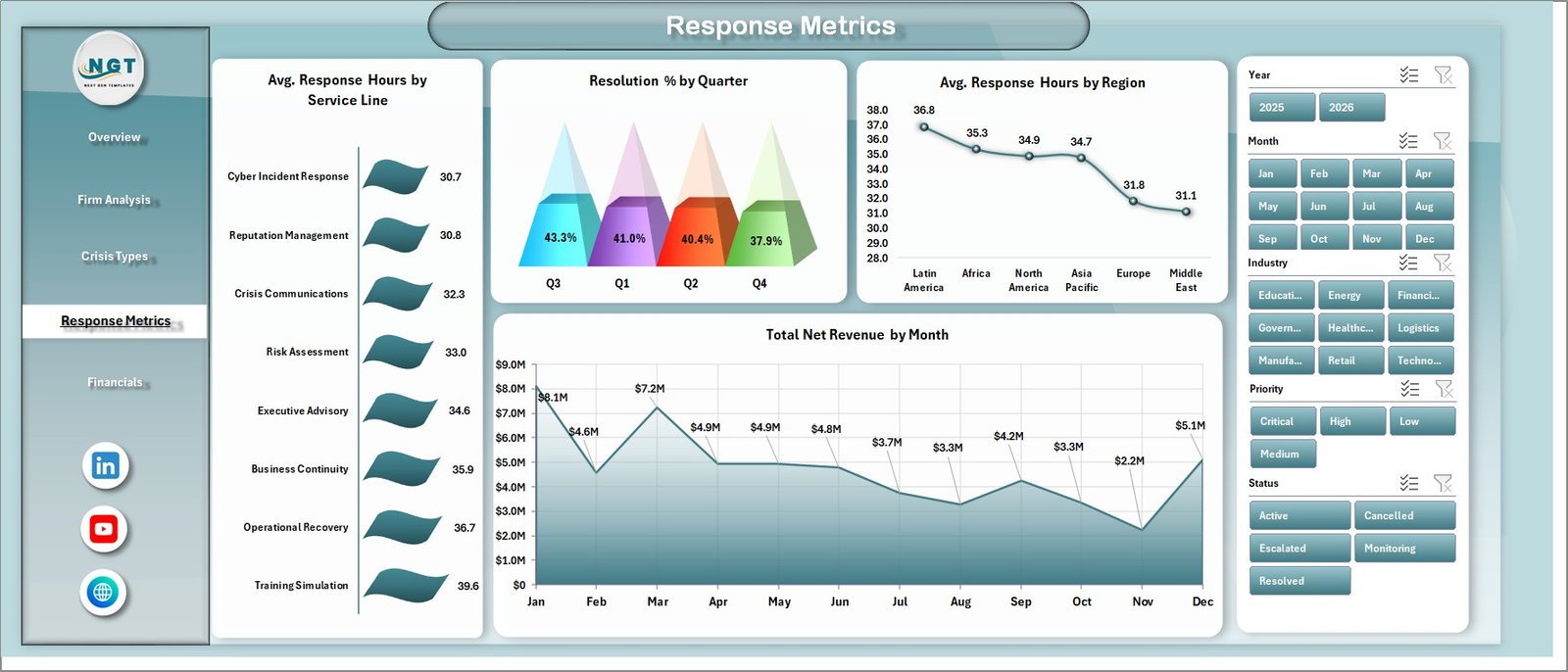
The Response Metrics page is built for speed and service-quality review. Avg. Response Hours by Service Line shows which advisory lines respond fastest or slowest. Resolution % by Quarter tracks closure performance over time. Avg. Response Hours by Region identifies location-based response gaps, and Total Net Revenue by Month connects operational response patterns with revenue movement.
5. Financials
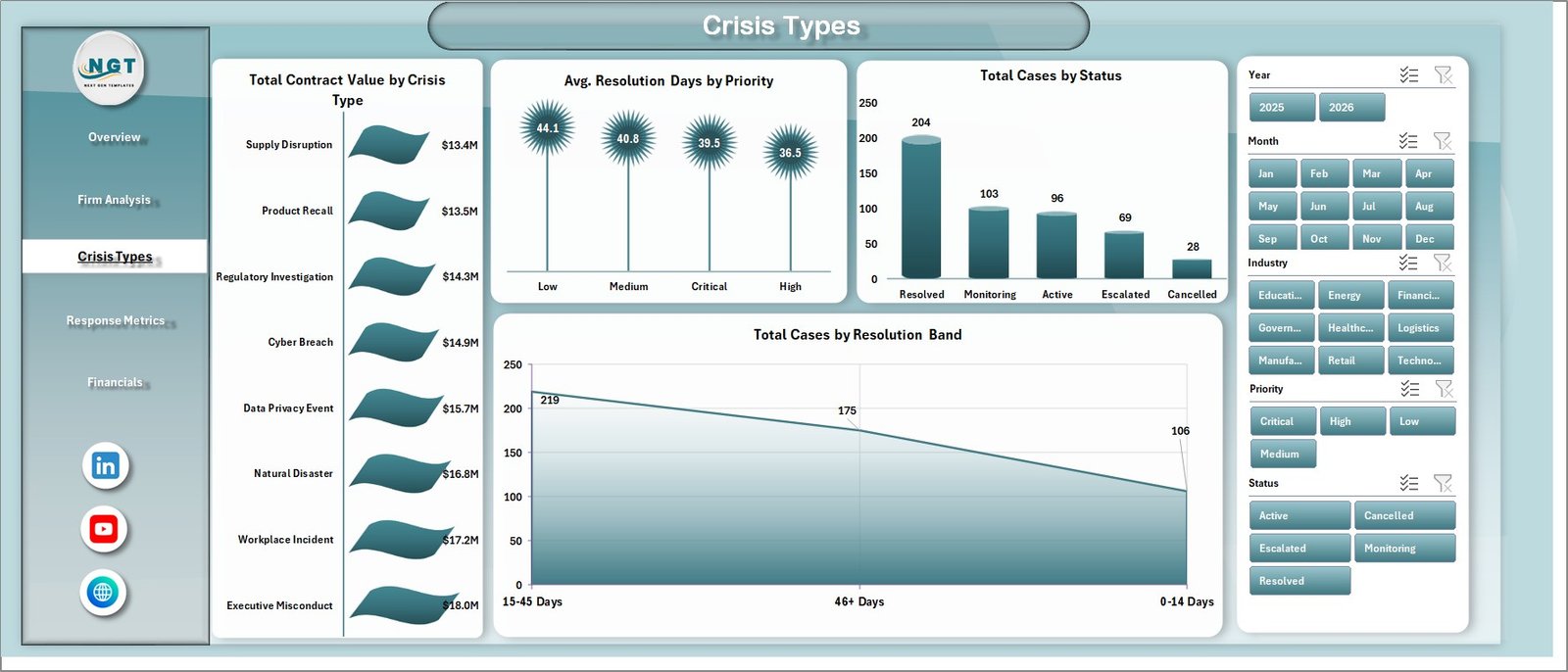
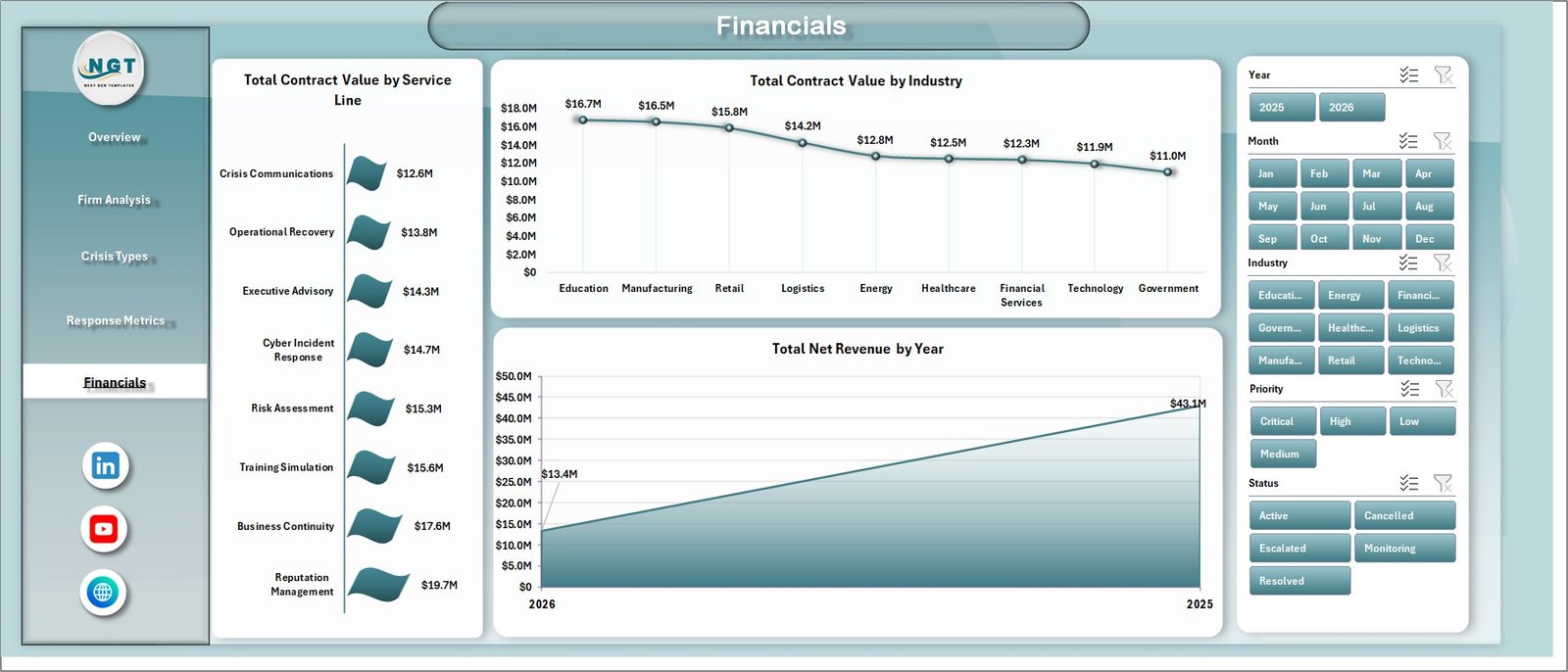
The Financials page gives partners and finance teams a direct view of commercial performance. Total Contract Value by Service Line shows which services produce the most value. Total Contract Value by Industry compares industry contribution, while Total Net Revenue by Year makes annual revenue movement easy to explain in leadership reviews.
6. Data Sheet Tab
The Data Sheet is the input table for the entire workbook. Replace the sample data with your crisis engagement records using the same column format, then refresh the workbook to update cards, slicers, pivot tables, and charts.

7. Support Sheet
The Support Sheet contains the pivot tables used to create the dashboard dynamically. After updating the Data Sheet, go to the Data tab in the Excel Ribbon and click Refresh All. All pivots and all dashboard charts refresh together. You can keep this sheet hidden in user-facing copies.

Crisis Management Firms Dashboard in Excel vs. Google Sheets vs. Paid CRM/SaaS – Where This Fits
| Feature | This Excel Dashboard | Google Sheets Alternative | Paid CRM/SaaS |
|---|---|---|---|
| Cost | $17.99 one-time | Template cost or manual build | $50-$300+ per user/month |
| Platform | Microsoft Excel | Google Sheets browser workflow | Vendor cloud app |
| Setup time | Open, replace data, refresh | Copy sheet and configure sharing | Onboarding, fields, permissions |
| Real-time team collaboration | Possible with OneDrive or SharePoint | Native Google collaboration | Usually seat-based |
| Mobile access | Excel mobile with limits | Google Sheets app | Usually available |
| Customizable fields | Fully editable workbook | Editable sheet structure | Limited by vendor settings |
| Share with link | Possible through cloud storage | Yes | Often login required |
| Year-1 cost at 5 users | $17.99 total | Template cost or internal build time | $3,000-$18,000+ |
| Crisis response analytics | Included across 5 pages | Possible with custom setup | Usually requires configuration |
Who This Template Is For – and Who It’s Not For
This template is for crisis management consulting firms, corporate affairs teams, reputation advisors, legal and compliance consultants, business continuity teams, and executive risk groups that need a structured Excel dashboard for case, revenue, response, and satisfaction reporting.
It is not a replacement for a live case-management platform with secure client portals, automated alerts, role-based permissions, evidence storage, or incident communication workflows. It works best when your team already tracks structured engagement data and needs a clear management dashboard for reviews.
How to Use the Crisis Management Firms Dashboard in Excel
- Download and unzip the file.
- Open the workbook in Microsoft Excel.
- Go to the Data Sheet and replace the sample rows with your own crisis engagement records.
- Keep the same column structure for reliable pivot refresh behavior.
- Click Data > Refresh All in the Excel Ribbon.
- Use slicers on each dashboard page to filter by firm, region, industry, crisis type, priority, status, service line, month, or quarter.
- Hide the Support Sheet if you want a cleaner user-facing workbook.
Real-World Use Cases
Olivia, managing partner at a crisis advisory firm: She uses the Overview and Financials pages before partner meetings to explain contract value, net revenue, case volume, and service-line performance.
Rahul, response operations lead: He reviews Response Metrics weekly to compare response hours by service line and region, then adjusts staffing for urgent crisis work.
Maya, client success director: She uses Firm Analysis to compare satisfaction by firm and engagement channel, helping account leads identify where client communication needs attention.
Frequently Asked Questions
What does the Crisis Management Firms Dashboard in Excel track?
It tracks contract value, net revenue, case count, average response hours, satisfaction score, region, firm, engagement channel, industry, crisis type, priority, status, resolution days, resolution band, service line, quarter, month, and year.
Do I need advanced Excel skills?
No. The normal workflow is simple: paste data into the Data Sheet, click Refresh All, and use slicers. Advanced users can edit pivot tables, charts, and formulas if needed.
Can I add my own crisis categories or service lines?
Yes. Add new categories or service lines in the Data Sheet, refresh the workbook, and the slicers and charts will pick up the updated records.
Can the dashboard be customized?
Yes. You can edit colors, labels, fields, charts, slicers, pivot tables, and sheet names because the file is a standard Excel workbook.
Does this include automated alerts or client portals?
No. This is an Excel analytics dashboard, not an incident communication or case-management SaaS platform.
Can the Support Sheet be hidden?
Yes. The Support Sheet powers the pivot tables and can be hidden after setup, while still remaining available for advanced edits.
About the Author
Built by PK – Microsoft Certified Professional with 15+ years of Excel, Google Sheets, and Power BI experience. Founder of NextGenTemplates, reaching 300K+ subscribers across YouTube channels. Every template is hand-built and tested before release.
Explore Related Templates
Emergency Management Report in Excel – incident and response reporting for emergency operations teams.
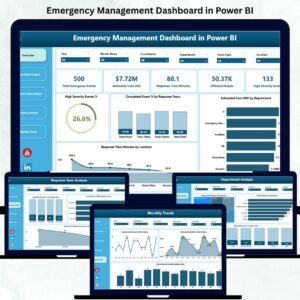
Emergency Management Dashboard in Power BI – Power BI dashboard for crisis and emergency response analytics.
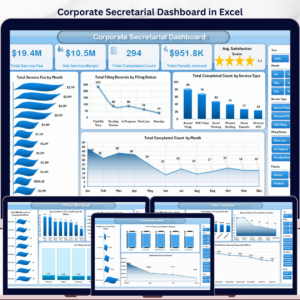
Corporate Secretarial Dashboard in Excel – compliance, filing, and governance reporting in Excel.
Legal Research KPI Dashboard in Excel – legal operations KPI tracking for research teams.
Browse more MS Excel templates and Excel Dashboard templates.
Ready to turn crisis engagement records into clear management reporting? Download the Crisis Management Firms Dashboard in Excel and start reviewing case activity, response performance, revenue, and client satisfaction from one workbook.
Last updated: May 2026
🔗 Click here to read the Detailed blog post

















Reviews
There are no reviews yet.