

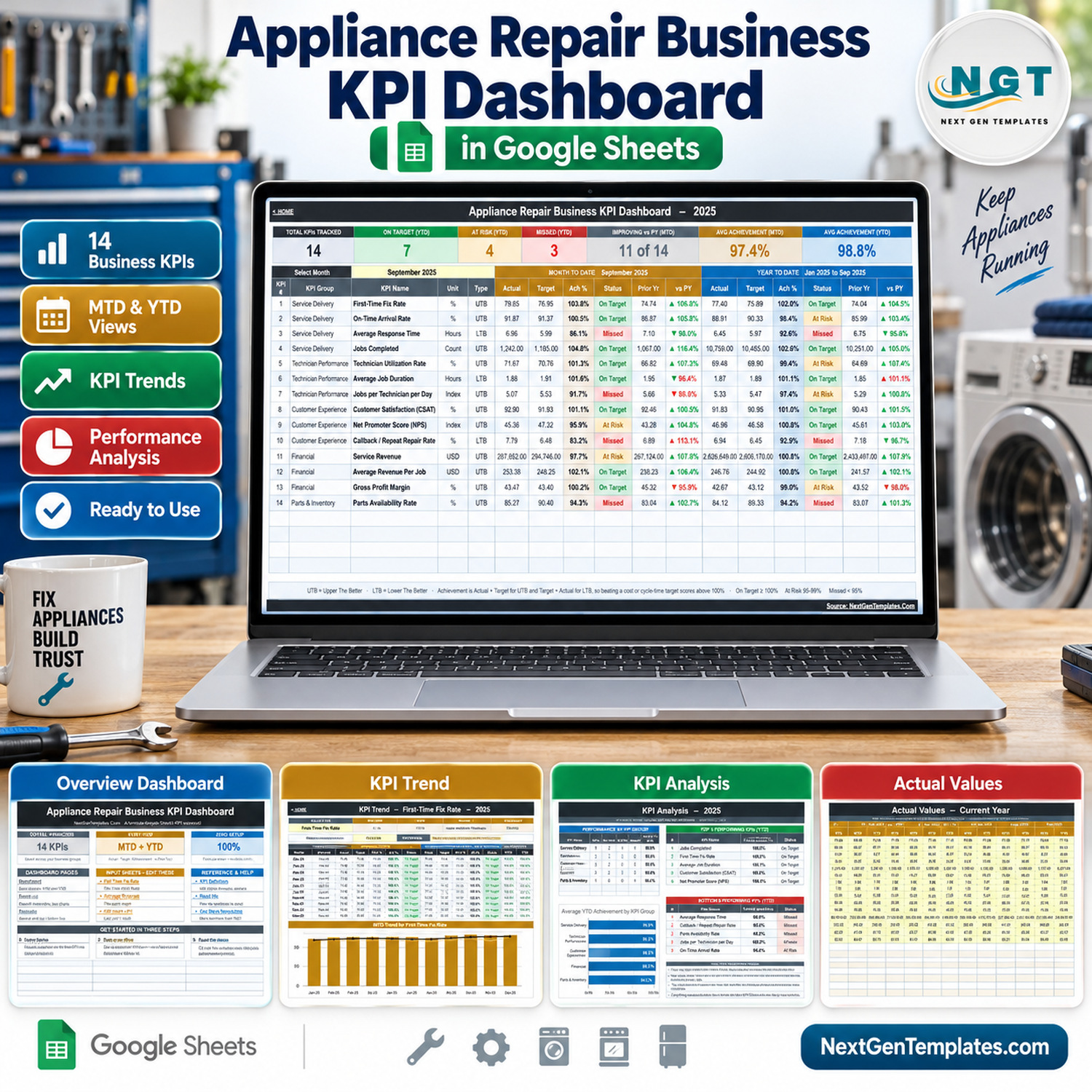

The Appliance Repair Business KPI Dashboard in Google Sheets tracks 14 appliance repair business KPIs in 5 groups (Service Delivery, Technician Performance, Customer Experience, Financial, Parts & Inventory) with Month-to-Date and Year-to-Date actual, target, achievement %, status and prior-year comparison in every row. Pick a month from one dropdown and the KPI Dashboard, KPI Trend and KPI Analysis pages all follow it. It is formula-driven, so there is nothing to install.
🌍 NextGenTemplates builds one-time-purchase Excel, Google Sheets, Power BI and HTML templates for owner-operators and small service teams who would rather not add another monthly subscription.
✅ Instant download · One-time payment · No subscription · No per-user fees · Lifetime access
🔑 Key Features of the Appliance Repair Business KPI Dashboard
📅 One month picker drives everything. Choose a month on the KPI Dashboard page and the MTD block, the YTD block (January to the selected month), the KPI Trend page and the KPI Analysis page all recalculate. The sample file opens on September 2025.
🎯 Direction-aware scoring. Eleven KPIs are Upper The Better (UTB) and three are Lower The Better (LTB): Average Response Time, Average Job Duration and Callback / Repeat Repair Rate. For LTB KPIs achievement is Target ÷ Actual, so a faster response or fewer callbacks than target scores above 100%.
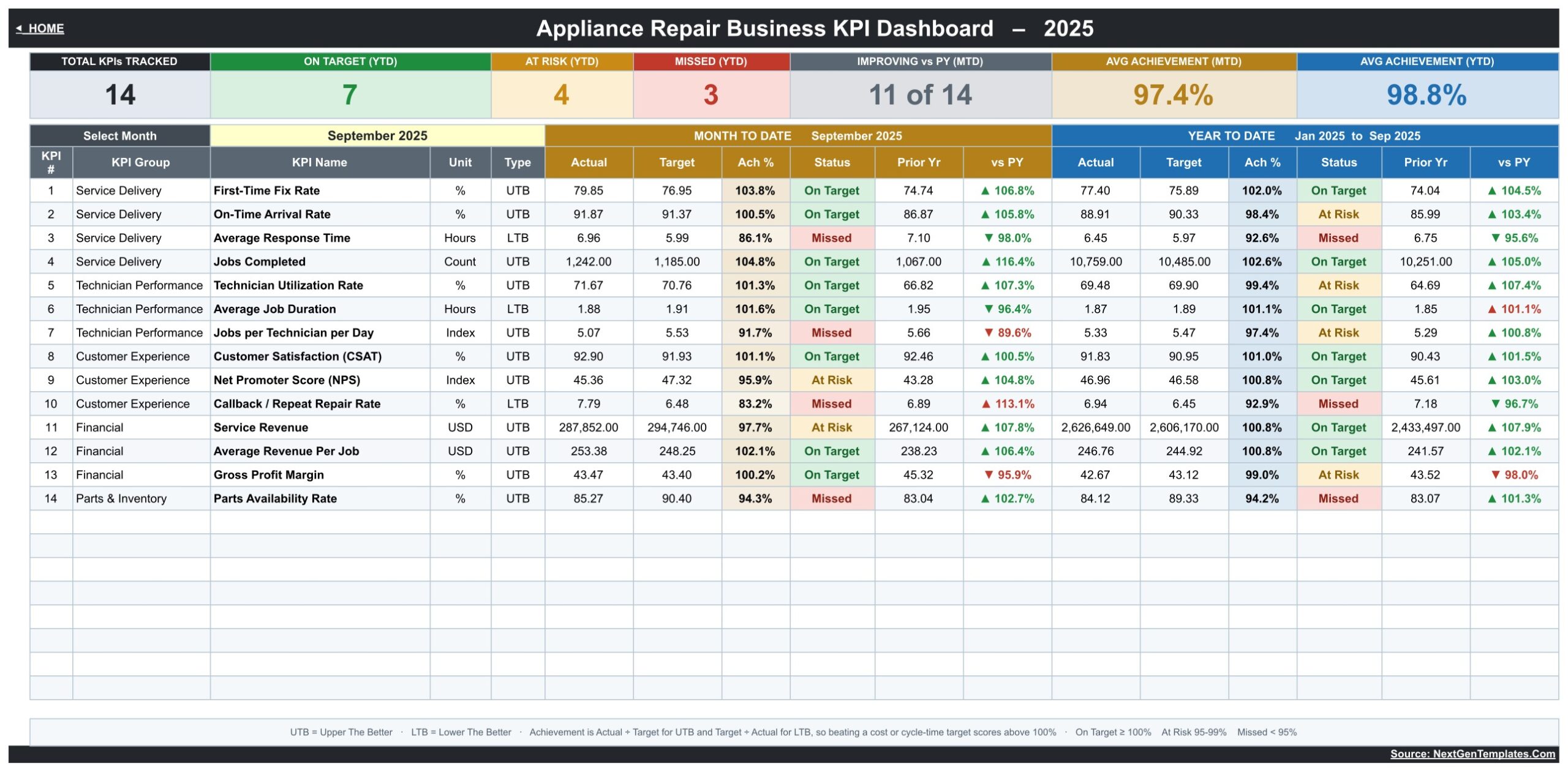
🚦 Traffic-light status you can edit. On Target from 100%, At Risk from 95% to 99%, Missed below 95%. In the sample September view the YTD column reads 7 On Target, 4 At Risk and 3 Missed, with 11 of 14 KPIs improving on the prior year (MTD).
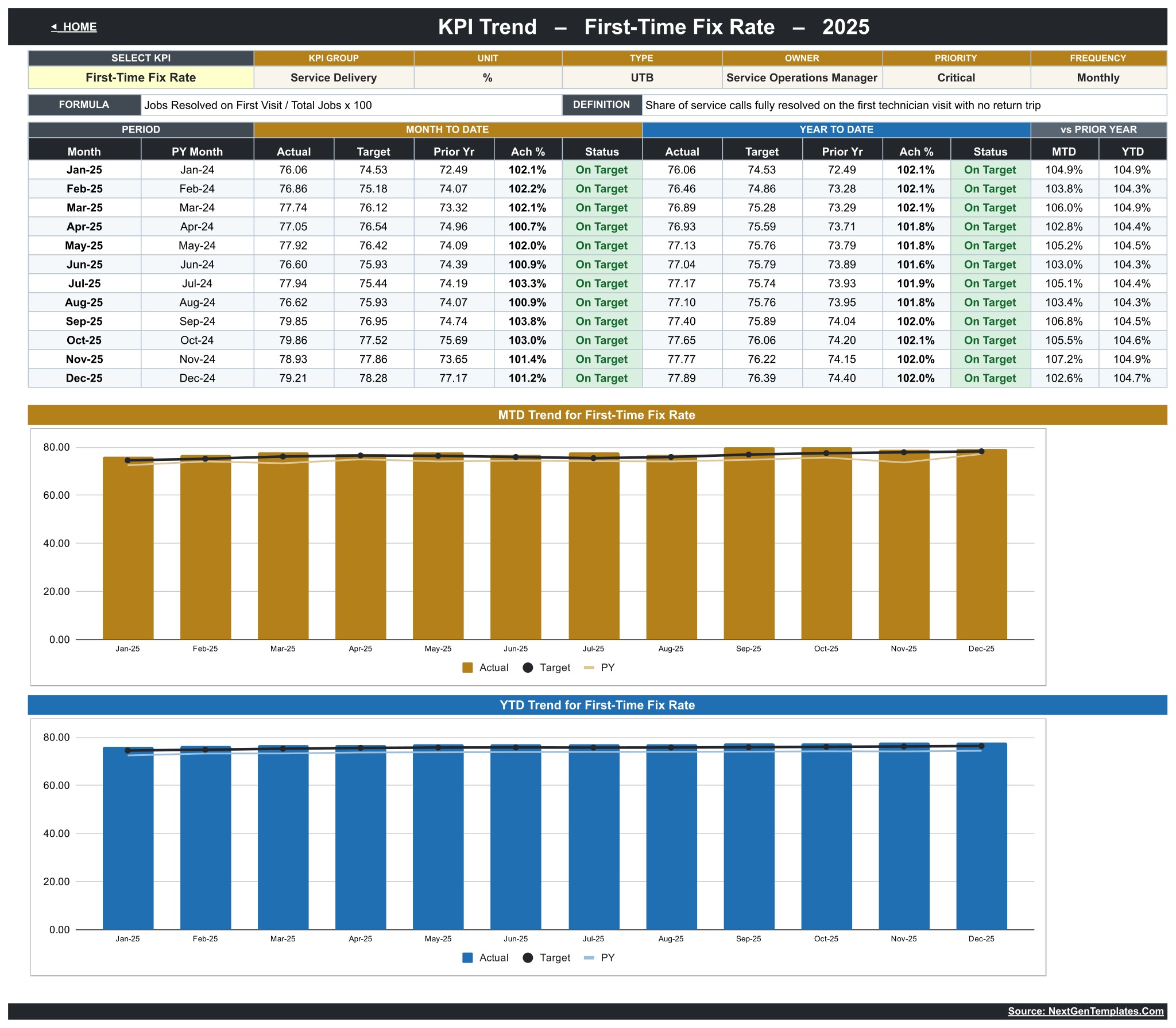
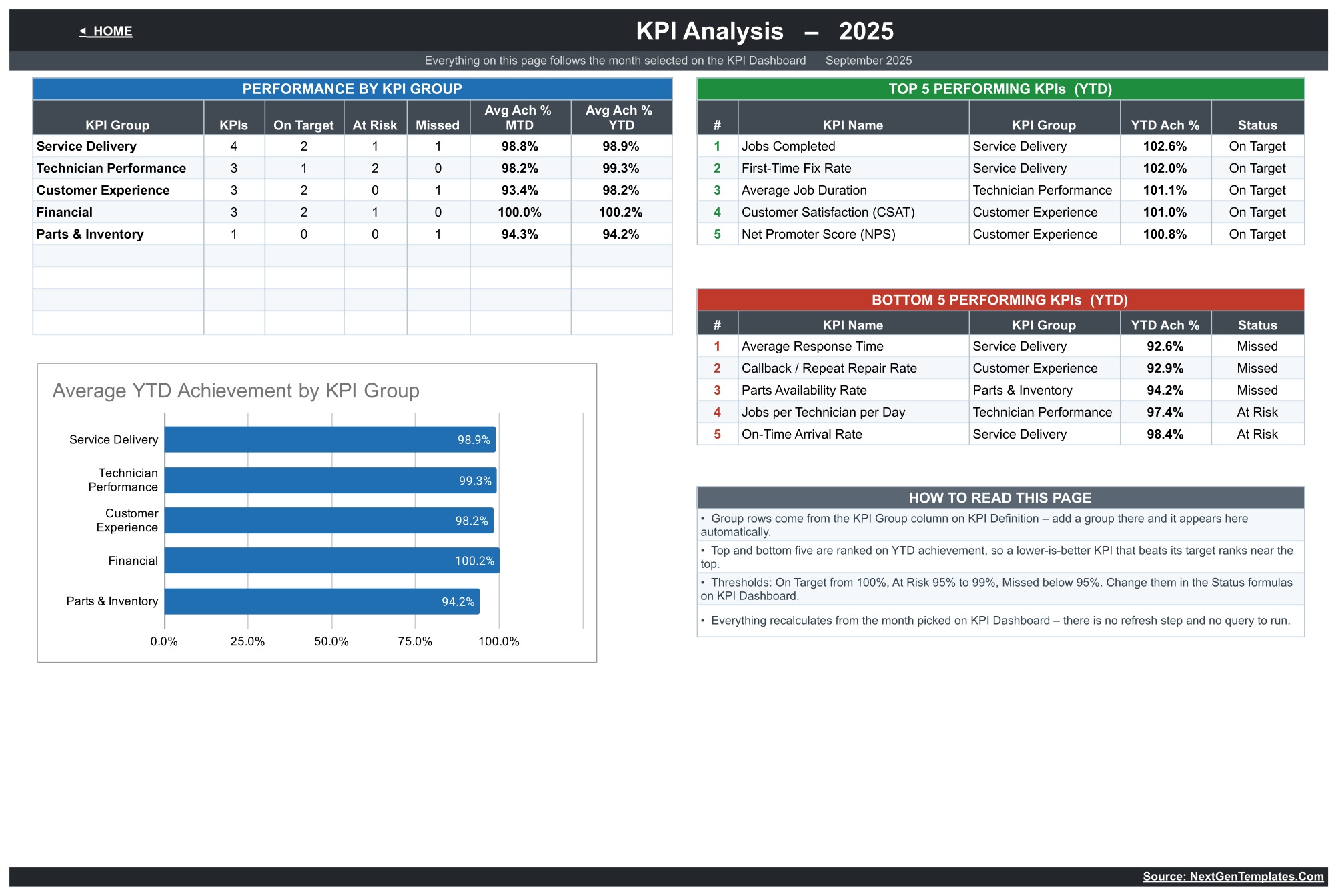
📈 KPI Trend and KPI Analysis pages. Trend shows one KPI, such as First-Time Fix Rate, across twelve months with an MTD chart and a YTD chart; Analysis rolls KPIs up by group and ranks the top five and bottom five by YTD achievement.
🧩 One master list. KPI names, groups, units, formulas, definitions, UTB/LTB type, owner, priority and frequency live on KPI Definition, with blank rows for up to 22 KPIs.
📦 What’s Inside the Appliance Repair Business KPI Dashboard in Google Sheets
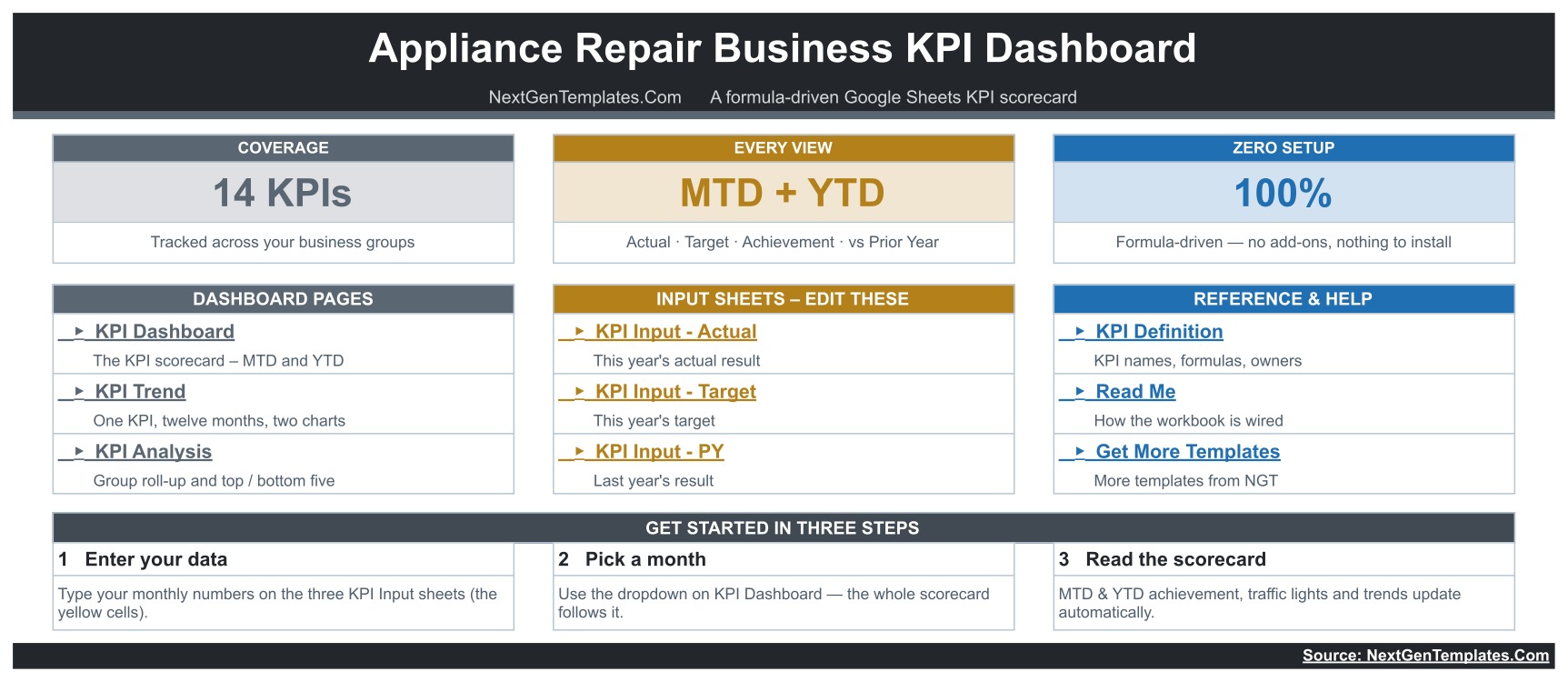
Page 1: Home
The start page with coverage cards (14 KPIs, MTD + YTD, formula-driven) and links to every tab: KPI Dashboard, KPI Trend, KPI Analysis, the three KPI Input sheets (Actual, Target, PY), KPI Definition, Read Me and Get More Templates, plus a three-step getting-started guide.
Page 2: KPI Dashboard
Seven summary cards (Total KPIs Tracked, On Target YTD, At Risk YTD, Missed YTD, Improving vs PY MTD, Avg Achievement MTD 97.4%, Avg Achievement YTD 98.8%) above a 14-row scorecard showing MTD and YTD Actual, Target, Ach %, Status, Prior Yr and vs PY arrows for each KPI.
Page 3: KPI Trend
Select one KPI to see its group, unit, type, owner, priority, frequency, formula and definition, a twelve-month MTD and YTD table, and two charts: MTD Actual, Target and PY by Month, and YTD Actual, Target and PY by Month.
Page 4: KPI Analysis
Performance by KPI Group (KPIs, On Target, At Risk, Missed, Avg Ach % MTD and YTD), the Average YTD Achievement by KPI Group chart, and the Top 5 and Bottom 5 Performing KPIs by YTD achievement.
Page 5: KPI Input – Actual
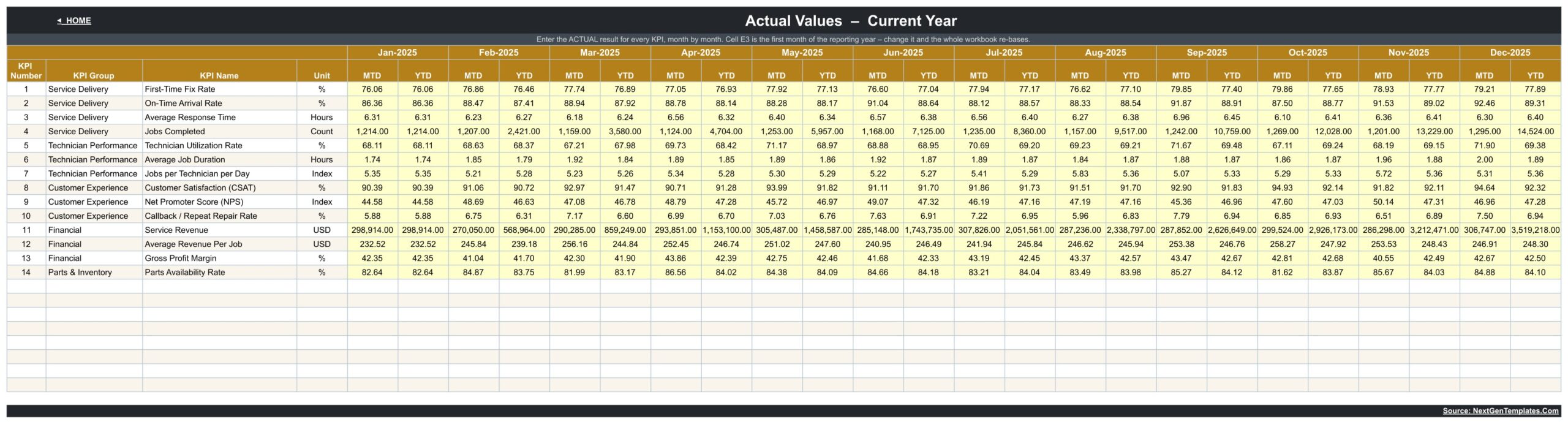
The yellow input grid: one row per KPI with an MTD and a YTD column for each month from January to December. KPI Input – Target and KPI Input – PY use the same layout, and the first month of the reporting year is set in one cell.
Page 6: KPI Definition
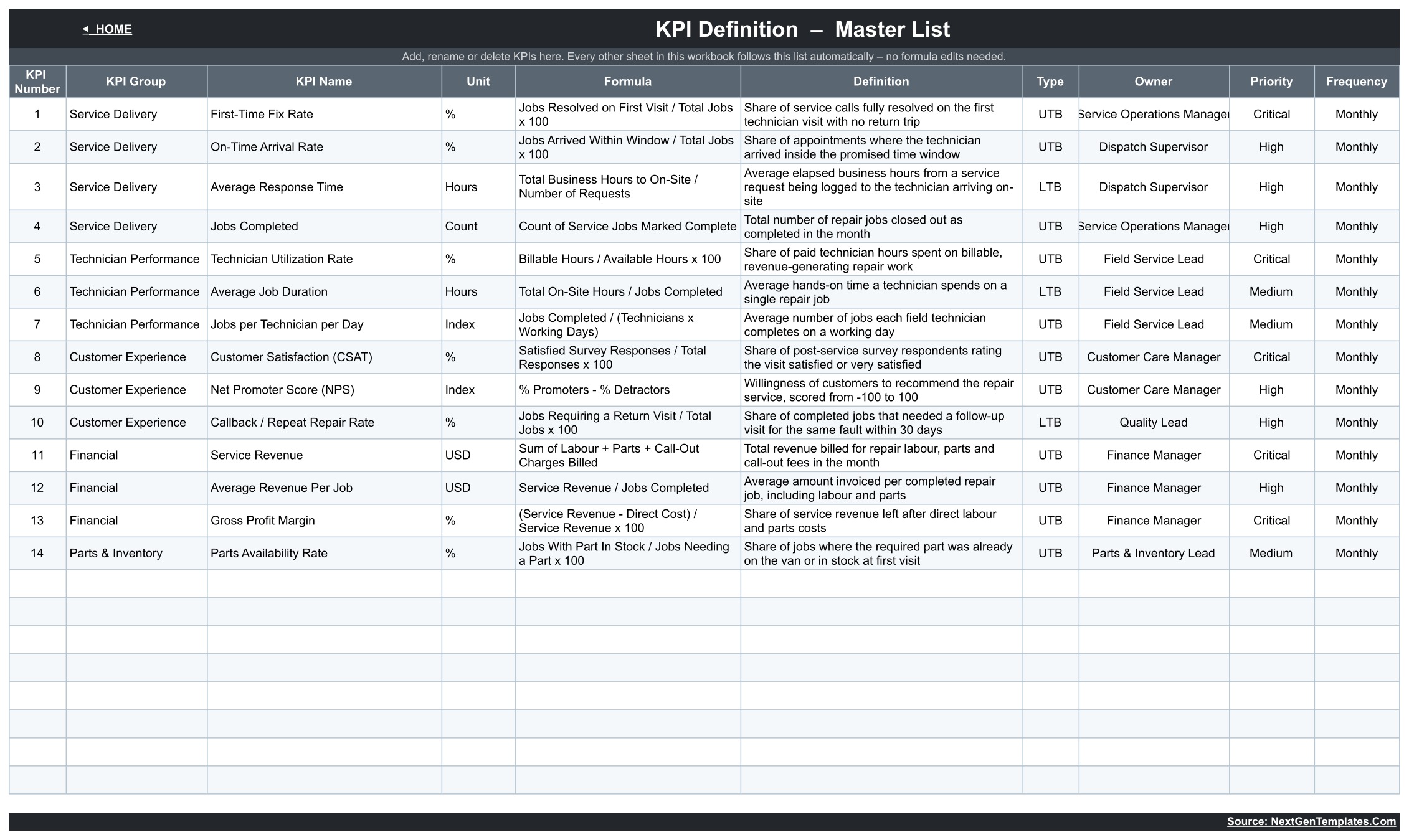
The master list of all 14 KPIs — for example First-Time Fix Rate, On-Time Arrival Rate, Technician Utilization Rate, Net Promoter Score (NPS), Gross Profit Margin and Parts Availability Rate — with formula, definition, type, owner, priority and frequency.
📊 Appliance Repair KPI Dashboard vs. Excel Dashboard vs. Field-Service Software — Where This Fits
| Feature | Appliance Repair Business KPI Dashboard in Google Sheets | Microsoft Excel KPI Dashboard | Field-service software (ServiceTitan / Housecall Pro type) |
|---|---|---|---|
| Cost | ✅ $8.99 one-time (sale) | One-time, plus an Excel licence | Monthly subscription |
| Platform | ✅ Any browser with a Google account | Excel desktop | Vendor web and mobile apps |
| Setup time | ✅ Type monthly numbers into three input sheets | Similar | Account setup, technicians, customers, price book |
| Real-time team collaboration | ✅ Google Sheets sharing | Via OneDrive/SharePoint | ✅ Built in |
| Mobile access | Google Sheets app (view and edit) | Excel mobile app | ✅ Dedicated technician apps |
| Customizable KPIs | ✅ Edit the KPI Definition list | ✅ Usually | Limited to vendor reports |
| Share with a link | ✅ Yes | Needs Microsoft 365 | User seats |
| Dispatch, invoicing, parts ordering | ❌ Not included | ❌ Not included | ✅ Core features |
| MTD + YTD vs target and prior year | ✅ Every KPI, every month | Depends on template | Varies by plan |
For owners who already run jobs in another tool and want a monthly management scorecard without another subscription, the Appliance Repair Business KPI Dashboard in Google Sheets sits in the sweet spot.
👥 Who This Template Is For — and Who It’s Not For
✅ This template is built for:
- Owners of appliance repair businesses reviewing monthly results against target and last year
- Service and dispatch managers tracking first-time fix, on-time arrival and response time
- Finance and parts leads watching service revenue, gross profit margin and parts availability
❌ This template is NOT for:
- Teams needing job scheduling, technician dispatch, invoicing or parts ordering — this is a KPI reporting sheet
- Anyone looking for warranty-claim processing, manufacturer reporting or safety-compliance records — it does none of these
⚙️ How to Use the Appliance Repair Business KPI Dashboard
- Make your own copy using the Google Sheets link inside the downloaded PDF.
- Edit KPI names, groups, units, UTB/LTB type and owners on KPI Definition.
- Type monthly MTD and YTD values into KPI Input – Actual, KPI Input – Target and KPI Input – PY.
- Pick a month on the KPI Dashboard page.
- Review KPI Trend for one KPI and KPI Analysis for group roll-ups and top/bottom five.
💼 Real-World Use Cases
Tom owns a five-technician appliance repair company. Each month he updates actuals and checks First-Time Fix Rate and Callback / Repeat Repair Rate; in the sample data the callback rate is Missed at 92.9% YTD achievement, exactly the kind of signal that starts a training or parts review.
Priya runs dispatch for a regional repair service. She watches On-Time Arrival Rate and Average Response Time in the Service Delivery group and uses the vs PY arrows to show whether scheduling changes actually helped.
❓ Frequently Asked Questions
What KPIs does the Appliance Repair Business KPI Dashboard track?
It tracks 14 appliance repair business KPIs: First-Time Fix Rate, On-Time Arrival Rate, Average Response Time, Jobs Completed, Technician Utilization Rate, Average Job Duration, Jobs per Technician per Day, Customer Satisfaction (CSAT), Net Promoter Score (NPS), Callback / Repeat Repair Rate, Service Revenue, Average Revenue Per Job, Gross Profit Margin and Parts Availability Rate.
How long does setup take?
Making the copy takes a minute. After that, setup is typing your monthly Actual, Target and prior-year values into the three yellow input sheets. Each month has its own MTD and YTD column, so keep both in step when you enter data.
Can I change the KPIs?
Yes. Add, rename or delete KPIs on KPI Definition, which has rows for up to 22 KPIs. The dashboard, trend and analysis pages read that list, and a new group name appears on KPI Analysis automatically.
How does this compare to field-service software?
Field-service apps schedule jobs, dispatch technicians and invoice customers on a monthly subscription. The Appliance Repair Business KPI Dashboard does none of that; it is a one-time-purchase monthly scorecard for comparing results with targets and last year.
Is this the same as the Appliance Repair Business KPI Scorecard?
No. The scorecard is a separate template built around ten KPI cards with mini charts. This KPI dashboard is a 14-row MTD/YTD table with prior-year comparison, a KPI Trend page and a KPI Analysis page.
Is the sample data real?
No. The 2025 figures are fictional sample data so you can see every page working before you enter your own numbers. Revenue KPIs are labelled USD in the sample; change the unit on KPI Definition.
👤 About the Author
Built by PK — Microsoft Certified Professional with 15+ years of Excel, Google Sheets and Power BI experience and founder of NextGenTemplates (@PKAnExcelExpert, @NextGenTemplates, @NeoTechNavigators). New to Sheets? See the Google Docs Editors Help Center.
🔗 Explore Related Templates
🔧 Appliance Repair Business KPI Scorecard in Google Sheets — a different build: ten KPI cards with a month picker, MTD/YTD and Target/PY selectors and a mini bar chart per card, rather than this 14-row MTD/YTD table with trend and analysis pages.
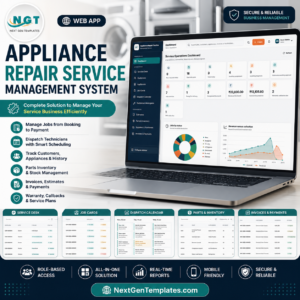
🛠️ Need to run the jobs themselves? The Appliance Repair Service Management System Web App handles day-to-day service records, and the Appliance Service Data Entry System in Excel logs service jobs. Also see the Warranty Expiration Calendar in Google Sheets and the Irrigation Installation KPI Dashboard.
📂 Browse all Google Sheets KPI Dashboards. An Excel edition is available: Appliance Repair Business KPI Dashboard in Excel.
📖 Click here to read the Detailed Blog Post
🎥 Visit our YouTube channel for step-by-step video tutorials
👉 YouTube.com/@NextGenTemplates
Watch the step-by-step video Demo:
📅 Last updated: September 2026
Compatibility and Requirements
- Works in Google Sheets. You need a free Google account and a web browser.
- You pick the month from a dropdown on the KPI Dashboard page, and the KPI Trend page has a KPI dropdown. Google explains dropdowns in Create an in-cell dropdown list.

















Reviews
There are no reviews yet.