


The best affordable Power BI templates under $20 are the Sustainability Reporting KPI Dashboard ($11.99) and the Rainfall Report Management Dashboard ($17.99) — both native .pbix files. Below them sit eight Excel and Google Sheets report templates from $6.99, so a full reporting stack costs less than one month of Power BI Pro.
Last updated: September 2026
Key takeaways
- Two genuine, ready-to-open Power BI reports are available under $20: the Sustainability Reporting KPI Dashboard at $11.99 and the Rainfall Report Management Dashboard at $17.99.
- The remaining eight picks are Excel and Google Sheets report templates from $6.99 — we label the format on every row so you never buy the wrong file type by mistake.
- All ten templates bought individually total $90.90, an average of $9.09 each, and none of them expire.
- A single Power BI Pro seat costs $14 per user per month ($168 a year), so one year of one subscription would buy this entire set nearly twice over.
- Buy Power BI when you need live refresh and row-level security; buy these affordable Power BI templates and report files when you need a finished layout today.
 Launch offer
From your first Pivot Table to the Data Model, DAX, Power Query and a one-page KPI dashboard. 11h 51m of video by PK, with practice files, quizzes and a capstone.
Affordable Power BI templates and report tools compared
| Template | Format | Best for | Price |
|---|---|---|---|
| Sustainability Reporting KPI Dashboard (Best overall) | Power BI (.pbix) | ESG & KPI reporting with MTD/YTD | $11.99 |
| Rainfall Report Management Dashboard | Power BI (.pbix) | Environmental & operational data | $17.99 |
| Product Inventory Report | Excel | Stock levels & reorder reporting | $7.99 |
| Facilities Management Report | Excel | Buildings, assets & maintenance | $7.99 |
| Administration Report | Excel | Back-office & office operations | $7.99 |
| Technology Report | Excel | IT assets, tickets & uptime | $7.99 |
| Mental Health Services Report | Excel | Clinics & care-service reporting | $7.99 |
| Office Security Incident Report Tracker | Excel (VBA) | Logged incident reporting | $6.99 |
| Confidential Incident Report Tracker | Google Sheets | Cloud, shared incident logs | $6.99 |
| Project Completion Report Tracker (Best value) | Google Sheets | Project & delivery reporting | $6.99 |
Every price above is the real, current USD list price on NextGenTemplates.com at the time of writing. For a wider view of premium builds, see our ranked guide to Power BI dashboard templates ranked by industry.
How we picked these
We searched the full NextGenTemplates catalogue of several hundred paid templates for every reporting file priced under $20, then filtered to the ten that are genuinely production-ready and clearly documented. Two are native Power BI .pbix files; we lead with those because the search intent here is Power BI. The other eight are Excel and Google Sheets report templates that solve the same reporting job in a different tool — we included them because under $20 the honest question is not “Power BI or nothing” but “what is the cheapest file that gives me a finished report today?”
We excluded free downloads, half-built samples and anything where the screenshots did not match the described feature set. Where a template is not Power BI, we say so plainly in its heading, in the comparison table, and again in its verdict. If you specifically need a .pbix and nothing else will do, only the first two picks qualify.
The 10 best affordable Power BI templates and report tools for 2026
1. Sustainability Reporting KPI Dashboard in Power BI — best overall
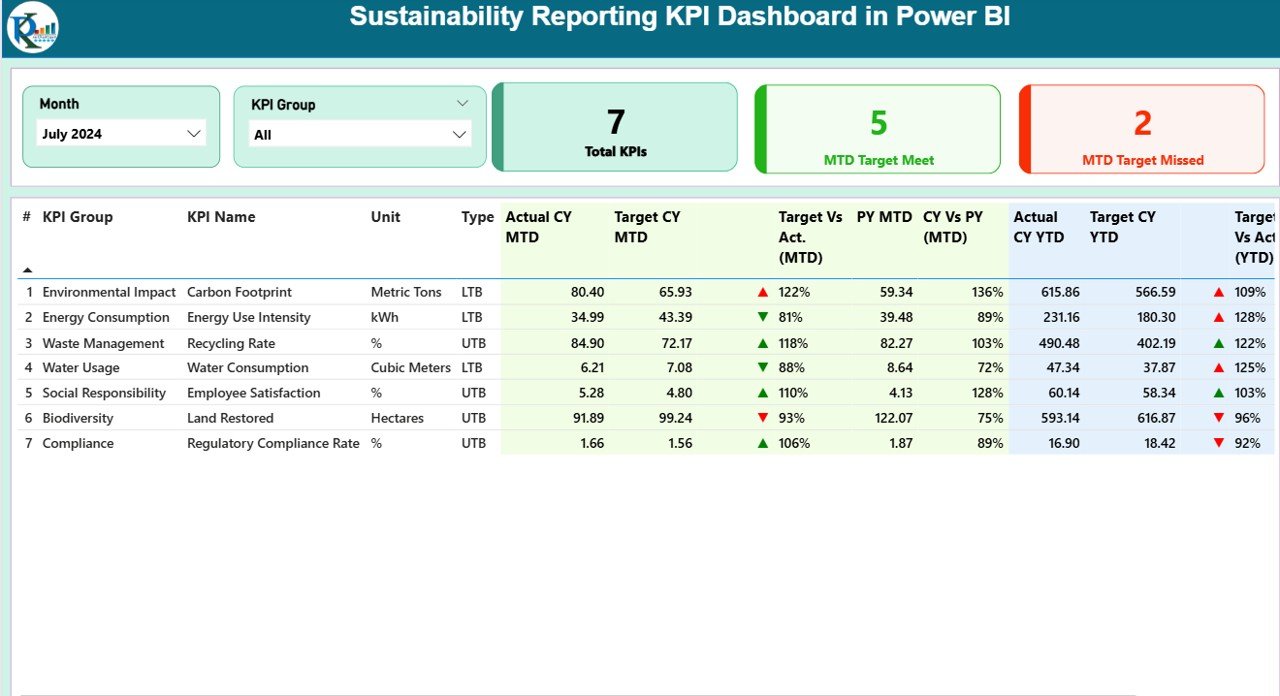
A native Power BI .pbix file built around month-to-date and year-to-date KPI tracking, with targets, variance and traffic-light status across environmental, social and governance metrics.
Who it is for: sustainability, operations and finance teams that have to report ESG KPIs to a board or a parent company and want a finished Power BI layout instead of building one from a blank canvas.
What is inside:
- MTD and YTD KPI cards with target vs actual variance
- A grouped KPI table (carbon, energy, water, waste, social, governance)
- Slicers for period and KPI group
- Traffic-light conditional formatting on every metric
- An editable data model you can repoint at your own figures
Because it is the true affordable Power BI templates pick with the broadest use case, it is our best overall. In practice a team tracking 7 KPIs across 12 months is reporting on roughly 84 data points a month; this file turns that into a one-screen review. Swap in your own numbers and a quarterly ESG pack that used to take a day drops to about an hour. At $11.99 it costs less than one week of a single Power BI Pro seat.
Best for: the buyer who wants one broadly reusable Power BI KPI report and will adapt it to their own metrics. Get the Sustainability Reporting KPI Dashboard — $11.99.
2. Rainfall Report Management Dashboard in Power BI — most complete .pbix
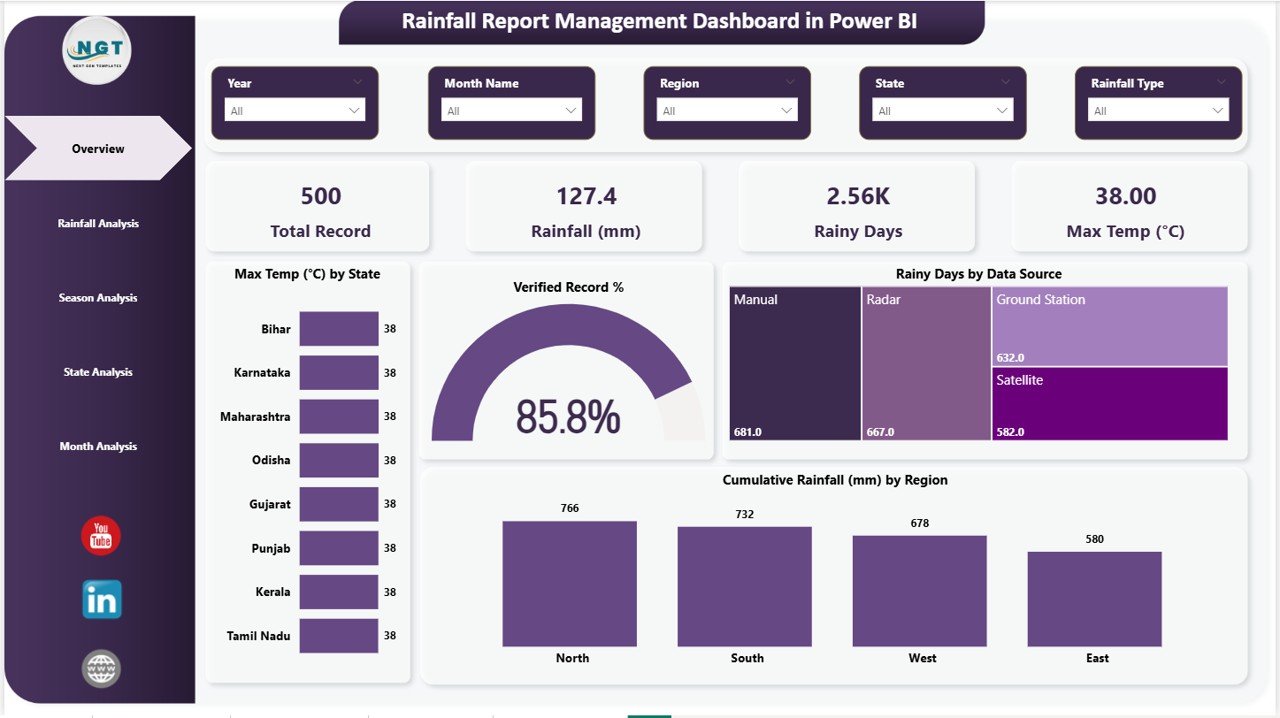
The most feature-dense Power BI file in this list and, at $17.99, the one that sits right at the top of the under-$20 band. It models rainfall and environmental data by state, region and time, with verified-record percentages and cumulative charts.
Who it is for: environmental agencies, agriculture and water teams, or anyone who needs a worked example of a full regional Power BI report they can restructure for their own geographic data.
What is inside:
- Region and state slicers with drill-down
- Rainy-days and max-temperature summary cards
- Verified-record gauge and data-source split
- Cumulative rainfall-by-region column charts
- A reusable regional data model
Even if you never report on rainfall, this is a legitimate way to learn how a multi-region Power BI report is wired — slicers, cards, gauges and cumulative measures — for the price of two coffees. Teams often buy it as a template skeleton, then repoint the model at sales-by-region or incidents-by-site. For pure enterprise builds, weigh it against the options in our Power BI Premium alternatives guide.
Best for: the buyer who wants the richest genuine .pbix under $20 and is comfortable adapting it. Get the Rainfall Report Management Dashboard — $17.99.
3. Product Inventory Report in Excel — best for stock reporting
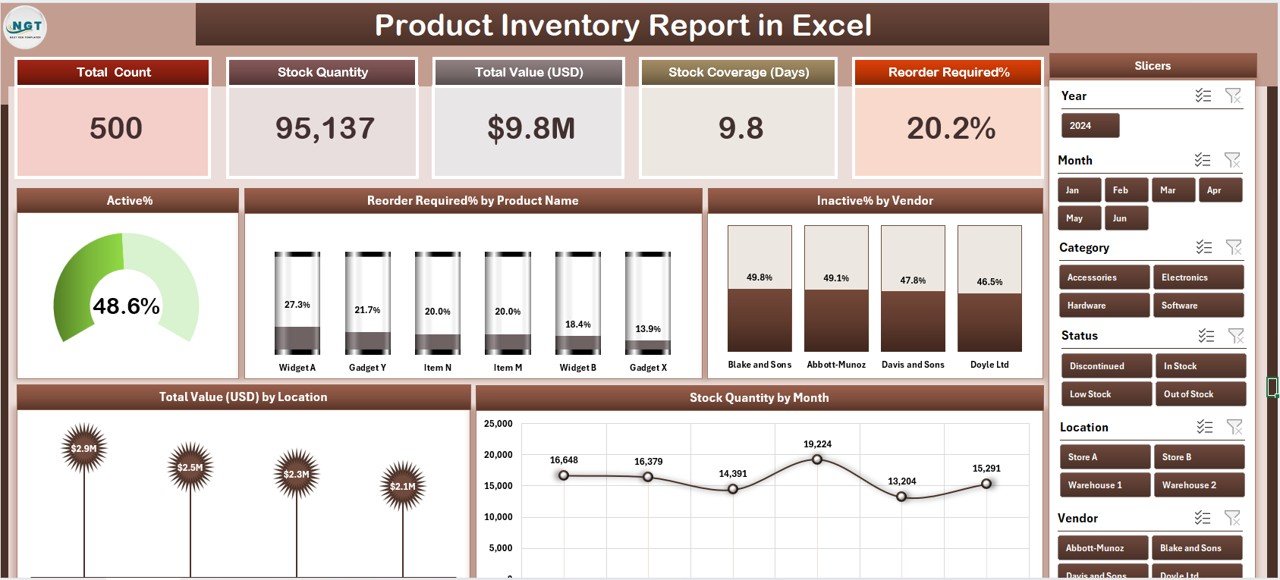
An Excel report — not Power BI — that turns a stock list into a manager-ready one-pager: total count, stock value, coverage days, reorder flags and stock-by-product charts.
Who it is for: retailers, warehouses and small manufacturers who live in Excel and want inventory reporting without a BI tool or a subscription.
What is inside:
- KPI header (count, quantity, total value, coverage days, reorder %)
- Reorder-required-by-product view
- Stock quantity by month trend
- Value-by-location breakdown
- Plain data entry with dropdowns
A shop carrying 500 SKUs can flag every item below reorder point in one click and see the exact dollar value tied up on the shelf. Because it is Excel, it opens on any machine with no gateway to configure. It pairs naturally with the operational builds in our manufacturing dashboard templates roundup.
Best for: Excel-first inventory reporting on a $7.99 budget. Get the Product Inventory Report — $7.99.
4. Facilities Management Report in Excel — best for operations
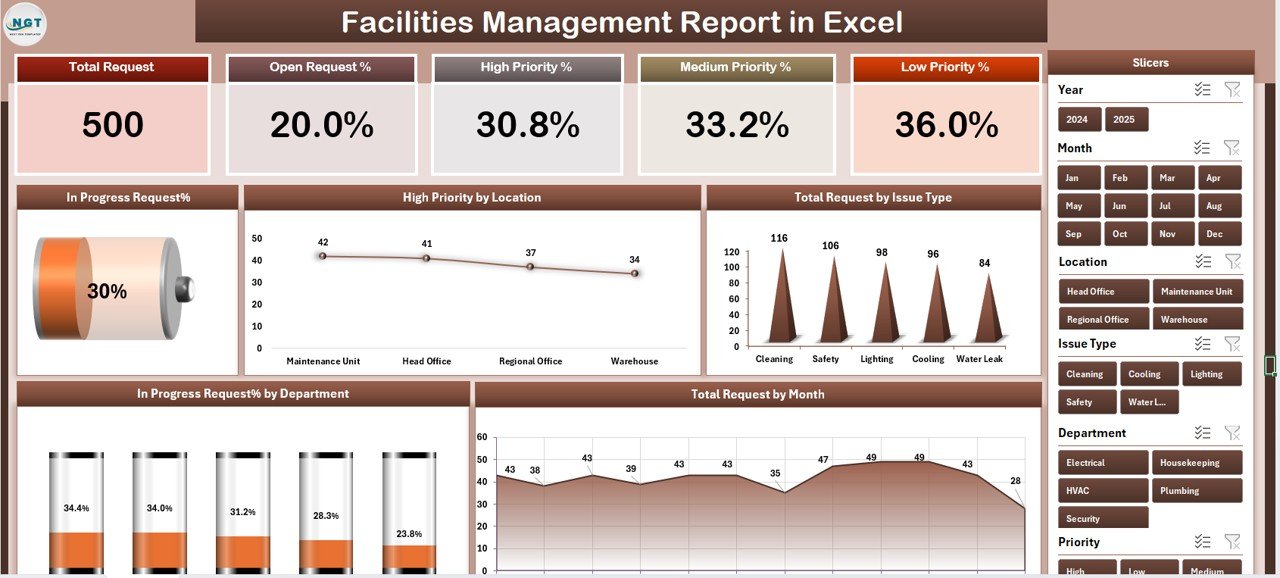
An Excel reporting template for buildings, assets and maintenance activity, summarising work orders, costs and asset status on a single review screen.
Who it is for: facilities and operations managers who report upward on maintenance load and spend and do not want a full CMMS.
What is inside:
- Work-order and maintenance KPI header
- Cost-by-category and by-site breakdowns
- Asset-status summary
- Monthly trend charts
- Structured entry tables
A site team handling 120 work orders a month can show completion rate, backlog and cost per site without touching a database. It is the same reporting logic a plant would run in Power BI, delivered in Excel for $7.99. For heavier plant use, compare it with our logistics and transportation dashboard templates.
Best for: lightweight facilities reporting in Excel. Get the Facilities Management Report — $7.99.
5. Administration Report in Excel — best for back-office
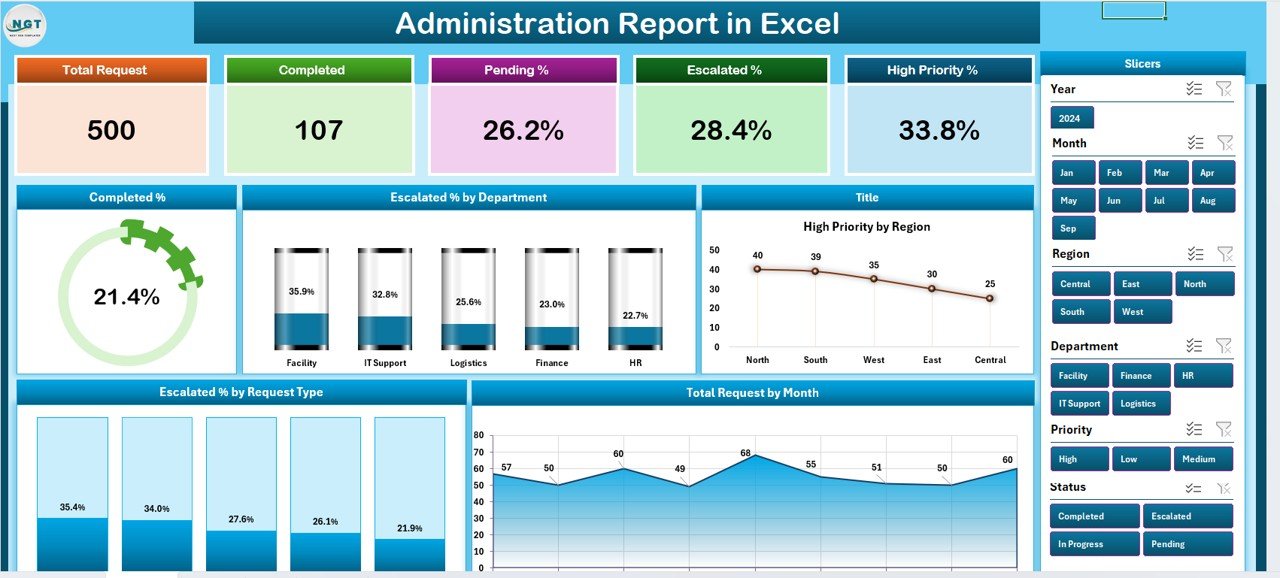
A general-purpose Excel administration report for office operations — requests, spend, headcount activity and service metrics — on one summary page.
Who it is for: office managers and admin leads who compile a monthly operations report and want a ready structure to drop numbers into.
What is inside:
- Operations KPI cards
- Request and spend breakdowns
- Category and department views
- Month-over-month trends
- Editable lookup lists
It is the most flexible of the Excel reports because “administration” spans so many teams — relabel the categories and it reports on almost any back-office function. That flexibility is exactly why it is a safer first buy than a niche dashboard if you are unsure. It sits comfortably alongside our attendance tracker templates for a fuller admin stack.
Best for: a reusable Excel operations report shell. Get the Administration Report — $7.99.
6. Technology Report in Excel — best for IT reporting
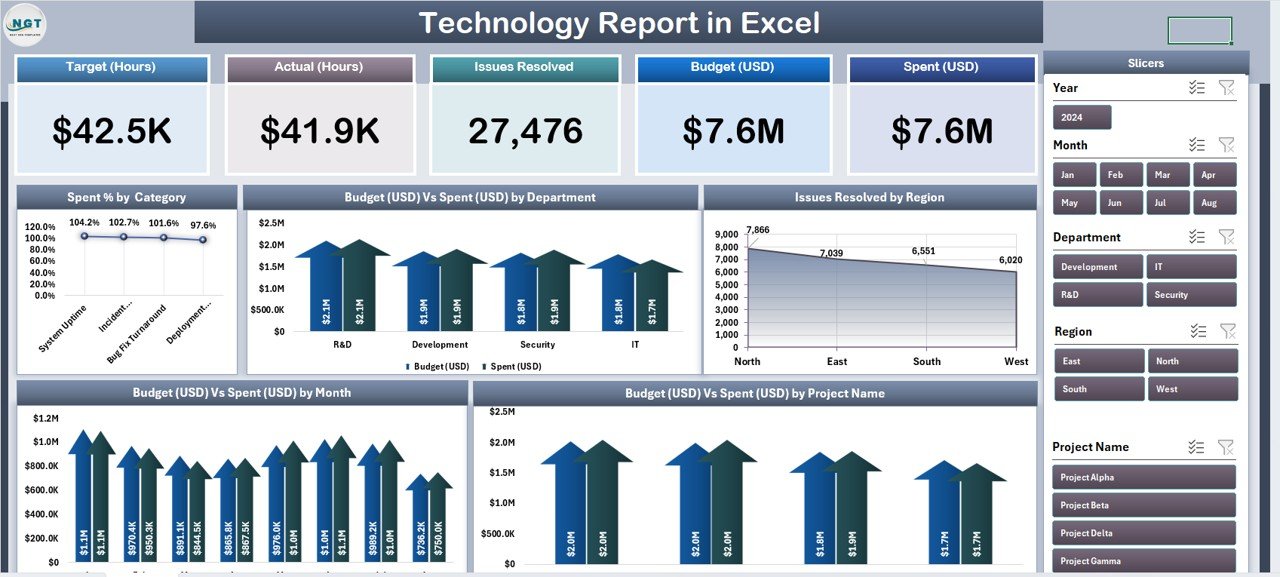
An Excel report tuned for IT and technology teams: assets, tickets, uptime and spend summarised for a monthly stakeholder review.
Who it is for: IT managers in small and mid-size teams who report to leadership and have no dedicated BI analyst.
What is inside:
- Asset and ticket KPI header
- Ticket-by-category and by-priority views
- Uptime and SLA summary
- Spend-by-area breakdown
- Monthly trend charts
An IT team closing 300 tickets a month can show resolution rate, backlog and cost per category in one page a director will actually read. Because it is Excel, there is no gateway, workspace or license to manage. When you outgrow it, the equivalent live build is covered in our procurement dashboard templates and Power BI guides.
Best for: Excel-based IT reporting at $7.99. Get the Technology Report — $7.99.
7. Mental Health Services Report in Excel — best for care services
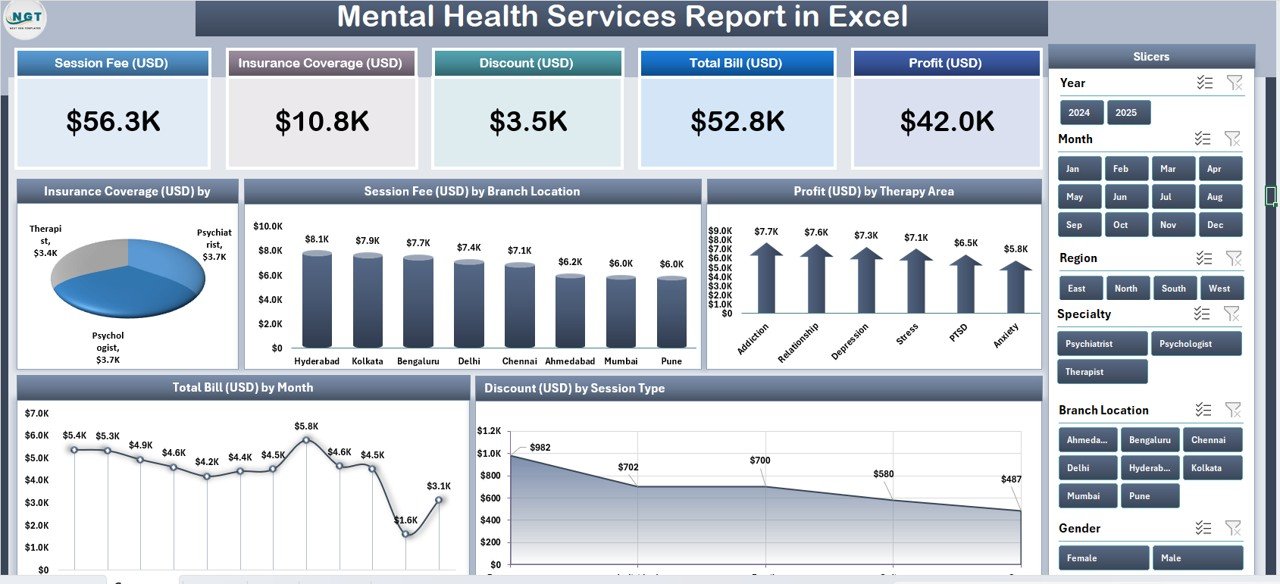
A specialised Excel report for clinics and care providers: caseload, session volume, outcomes and service KPIs summarised for management and funders.
Who it is for: clinic administrators and care-service coordinators who report caseload and outcomes and need a structured, private, offline file.
What is inside:
- Caseload and session KPI cards
- Service-type and outcome breakdowns
- Referral and wait-time views
- Monthly trend charts
- Confidential offline data entry
For a service seeing hundreds of sessions a month, it converts appointment logs into the outcome and volume figures funders ask for — and because it is offline Excel, sensitive data never leaves the machine. For broader clinical reporting, see our healthcare and hospital management templates.
Best for: private, offline care-service reporting. Get the Mental Health Services Report — $7.99.
8. Office Security Incident Report Tracker in Excel — best for incident logs
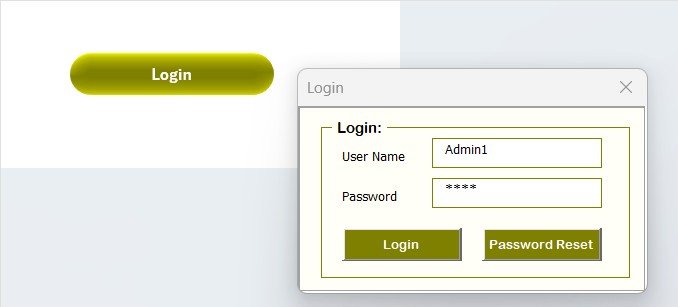
An Excel VBA tool — a form-driven tracker, not a Power BI file — for logging, categorising and reporting security incidents with Add / Update / Delete buttons.
Who it is for: office and facility security leads who need a structured incident log and a quick summary report without any BI platform.
What is inside:
- Data-entry form with macro buttons
- Incident-by-type and by-severity summaries
- Status and location breakdowns
- Auto-updating KPI header
- Printable incident report
A site logging 40 incidents a month gets a searchable record and an instant management summary. Note it uses macros, so it must be opened with content enabled — the trade-off for a proper form-driven workflow at $6.99.
Best for: macro-powered incident logging and reporting in Excel. Get the Office Security Incident Report Tracker — $6.99.
9. Confidential Incident Report Tracker in Google Sheets — best cloud tracker

A Google Sheets tracker — cloud, not Power BI — for confidential incident reporting where several people need shared, permission-controlled access.
Who it is for: HR, compliance and multi-site teams that need a shared incident log with access controls and no software install.
What is inside:
- Structured incident-entry rows with dropdowns
- Summary by type, severity and status
- Built-in charts
- Shareable, permissioned link
- Works on any browser or phone
The advantage over the Excel version is live collaboration: three managers across two sites can log to the same sheet at once, and Google’s sharing controls keep sensitive cases restricted. For teams already in Google Workspace, this is the friction-free option at $6.99.
Best for: shared, cloud-based confidential incident reporting. Get the Confidential Incident Report Tracker — $6.99.
10. Project Completion Report Tracker in Google Sheets — best value

A Google Sheets tracker for project and delivery reporting — completion rates, milestones, owners and status — at the lowest price in this list, which is why it is our best-value pick.
Who it is for: project managers and delivery leads who report weekly on completion and want a shared, zero-install file.
What is inside:
- Project and task entry with status dropdowns
- Completion-rate KPI cards
- By-owner and by-phase breakdowns
- Milestone and due-date views
- Built-in charts, shareable link
A PMO tracking 25 live projects can show overall completion, at-risk items and per-owner load in one shared tab the whole team edits. At $6.99 it is the cheapest way into report-ready project tracking, and it pairs well with the wider builds in our finance dashboard templates guide.
Best for: the tightest budget and a team already in Google Sheets. Get the Project Completion Report Tracker — $6.99.
Bundle vs single: the real maths under $20
Here is the transparent calculation this page exists to show. Buying all ten report templates individually costs $90.90:
| Set | What you get | Cost | Per template |
|---|---|---|---|
| Both Power BI reports | 2 native .pbix files | $29.98 | $14.99 |
| Five Excel reports | Inventory, facilities, admin, tech, care | $39.95 | $7.99 |
| Three trackers | 2 Google Sheets + 1 Excel VBA | $20.97 | $6.99 |
| All ten together | Complete reporting stack | $90.90 | $9.09 |
Now compare that to the software. A single Power BI Pro license from Microsoft is $14 per user per month — $168 per user per year. One year of one Pro seat costs more than buying all ten of these templates twice, and the templates are a one-time purchase that never expires. If you only need the reports, not live cloud refresh, single template purchases win the maths outright.
Most buyers do not need all ten. The sensible starter set is the two Power BI reports plus the one Excel report closest to your work — roughly $37.97 for a real Power BI skeleton and a finished Excel report you can ship this week. If you want a genuine multi-tool discount instead, our template bundles vs single templates breakdown and the small business template bundle show where bundling actually beats buying singly.
How to choose between them
- You need a real .pbix file: only picks 1 and 2 qualify. Start with the Sustainability KPI dashboard unless your data is regional/geographic, then take Rainfall.
- You live in Excel and want a finished report today: picks 3–7, chosen by subject (inventory, facilities, admin, IT, care).
- You need a form-driven log with buttons: pick 8 (Excel VBA), accepting that macros must be enabled.
- Several people edit at once, no install: picks 9 and 10 (Google Sheets).
- Tightest budget: pick 10 at $6.99.
When a template is NOT the right answer
Be honest with yourself before buying. These are finished files, not a data platform. A $7.99 Excel report or an $11.99 .pbix will not connect to your live database, refresh on a schedule, or enforce row-level security across departments. If you need automated hourly refresh from SQL, a shared enterprise gateway, or per-user data permissions for hundreds of staff, buy Power BI Pro or Premium — the subscription is the correct tool and these templates are not a substitute.
Two more honest limits. First, most of this list is not Power BI at all: if the words “Power BI” in the title made you expect ten .pbix files, only two of these are — the rest are Excel and Google Sheets, and that is stated on every row. Second, if your reporting need is highly specialised (regulated clinical, financial-audit, or safety-critical reporting), treat these as a starting layout to be validated, not a compliance-ready system. For enterprise-scale needs, our Power BI Premium alternatives guide is the better starting point.
Frequently asked questions
Are there any real Power BI templates under $20?
Yes. Two native Power BI .pbix files sit under $20 on NextGenTemplates: the Sustainability Reporting KPI Dashboard at $11.99 and the Rainfall Report Management Dashboard at $17.99. Both open directly in Power BI Desktop and include an editable data model you repoint at your own figures. The other templates in this guide are Excel or Google Sheets, clearly labelled.
Why are most of the templates in this list not Power BI?
Because under $20 the honest answer to “how do I get a finished report cheaply?” is often Excel or Google Sheets, not Power BI. We lead with the two genuine .pbix files, then include eight report and tracker templates from $6.99 that solve the same reporting job in a different tool. Every row and heading names its real format so you never buy the wrong file type.
What is the cheapest affordable Power BI template alternative?
The Project Completion Report Tracker in Google Sheets at $6.99 is the cheapest reporting file here, followed by the two other $6.99 trackers. If you specifically need Power BI, the entry point is the $11.99 Sustainability Reporting KPI Dashboard. All are one-time purchases with no subscription attached.
Do these templates need a Power BI subscription to use?
The two .pbix files open in the free Power BI Desktop app, so you can build and edit reports at no monthly cost. You only need a paid Power BI Pro license ($14/user/month) if you want to publish and share online with automatic refresh. The Excel and Google Sheets templates need no BI license at all.
Is it cheaper to buy templates or subscribe to Power BI Pro?
For most small teams, templates. All ten files here total $90.90 once, versus $168 per user per year for Power BI Pro. If you only need finished reports rather than live cloud refresh and per-user security, one-time template purchases are decisively cheaper and never expire.
Can I edit these affordable Power BI templates with my own data?
Yes. The Power BI files include an editable data model you can repoint at your own tables, and every Excel and Google Sheets report uses structured entry areas with dropdowns. You replace the sample data with yours and the KPIs, charts and summaries recalculate automatically. No coding is required for the non-VBA files.
What is the difference between the Excel and Google Sheets report versions?
Excel reports work offline on a single machine, which suits private or sensitive data, and one uses VBA macros for a form-driven workflow. Google Sheets trackers are cloud-based and let several people edit at once with sharing permissions and no install. Choose Excel for offline privacy, Sheets for live collaboration.
Will these open in the free version of Power BI?
Yes. Power BI Desktop is free to download from Microsoft and opens both .pbix files fully, including editing visuals and the data model. A paid Pro seat is only required to publish to the Power BI service and share dashboards online with scheduled refresh.
Do the prices ever change?
Prices are the live USD list prices at the time of writing ($6.99 to $17.99) and may move during sales. Each is a one-time purchase, not a subscription, so once you buy a template you own that version outright with no recurring fee.
Which single template should I buy first?
If you need Power BI, start with the $11.99 Sustainability Reporting KPI Dashboard — it is the most broadly reusable. If you live in Excel, buy the report matching your function (inventory, facilities, admin, IT or care). If budget is the only constraint, the $6.99 Project Completion Report Tracker is the best value entry point.
Get more affordable Power BI templates and reports
These ten report templates prove you do not need an enterprise budget to ship a professional report. Start with the Sustainability Reporting KPI Dashboard at $11.99 for a true Power BI file, or the Project Completion Report Tracker at $6.99 for the best-value entry point. For deeper, industry-specific builds, browse our Power BI dashboard templates ranked by industry.
Prefer to watch a build before you buy? See our walkthroughs on the NextGenTemplates YouTube channel, where we open these files and repoint them at sample data step by step.