

The Board Exam Revision Calendar in Google Sheets puts a full year of revision sessions, mock tests, doubt-clearing clinics and pre-board papers into one spreadsheet: 100 sample events from 6 January to 26 December 2026, 16 revision event types, 17 study rooms, labs and halls, and four linked views (Annual, Monthly, Daily and an Events master list) opened from a single Home page. It runs on a free Google account, and the PDF in your download carries the “Make a copy” link.
🌍 It joins more than 100 Google Sheets calendar templates from NextGenTemplates, all built on the same tested four-view layout.
✅ Instant download · One-time payment · No subscription · No per-user fees · Lifetime access
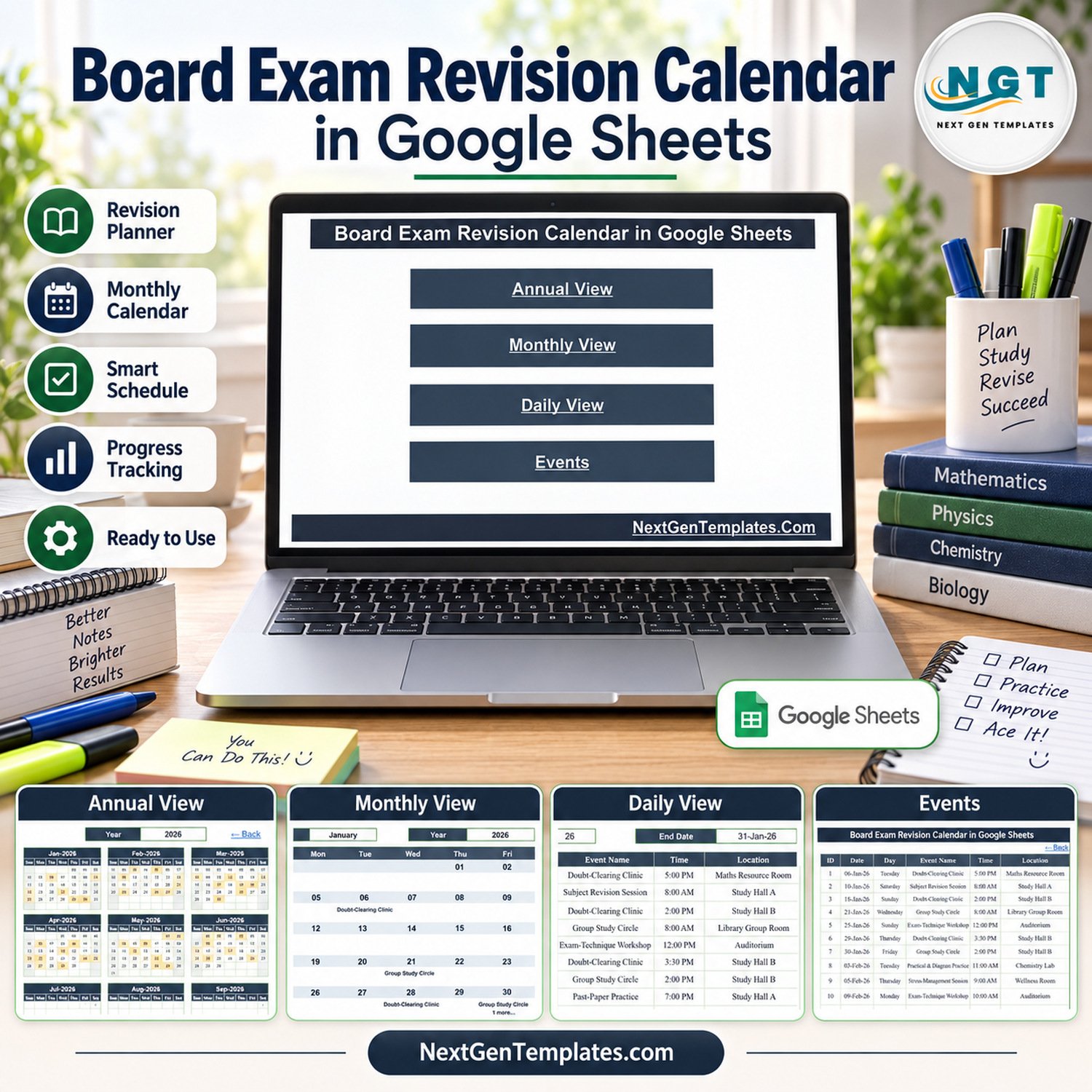
🔑 Key Features of the Board Exam Revision Calendar in Google Sheets
📅 Annual View with 12 month grids. Pick a year and all twelve months appear on one screen. Every date that holds a revision event is shaded, so mock-test weeks and pre-board dates stand out before the study season starts.
🗓️ Monthly View with Month and Year selectors. A Sunday-to-Saturday grid prints the first event name under each date and adds a “1 more…” note when a second event shares that day.
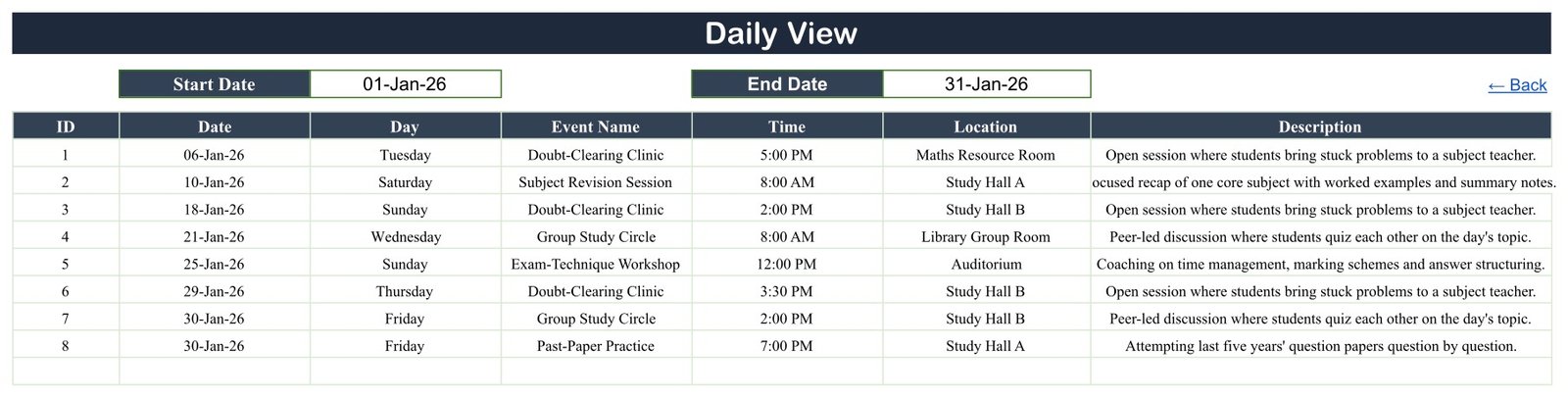
📋 Daily View for any date range. Enter a Start Date and an End Date and the sheet lists every event in that window with its ID, date, weekday, event name, time, location and description. Use one week for a study-group notice or one month for a revision plan.
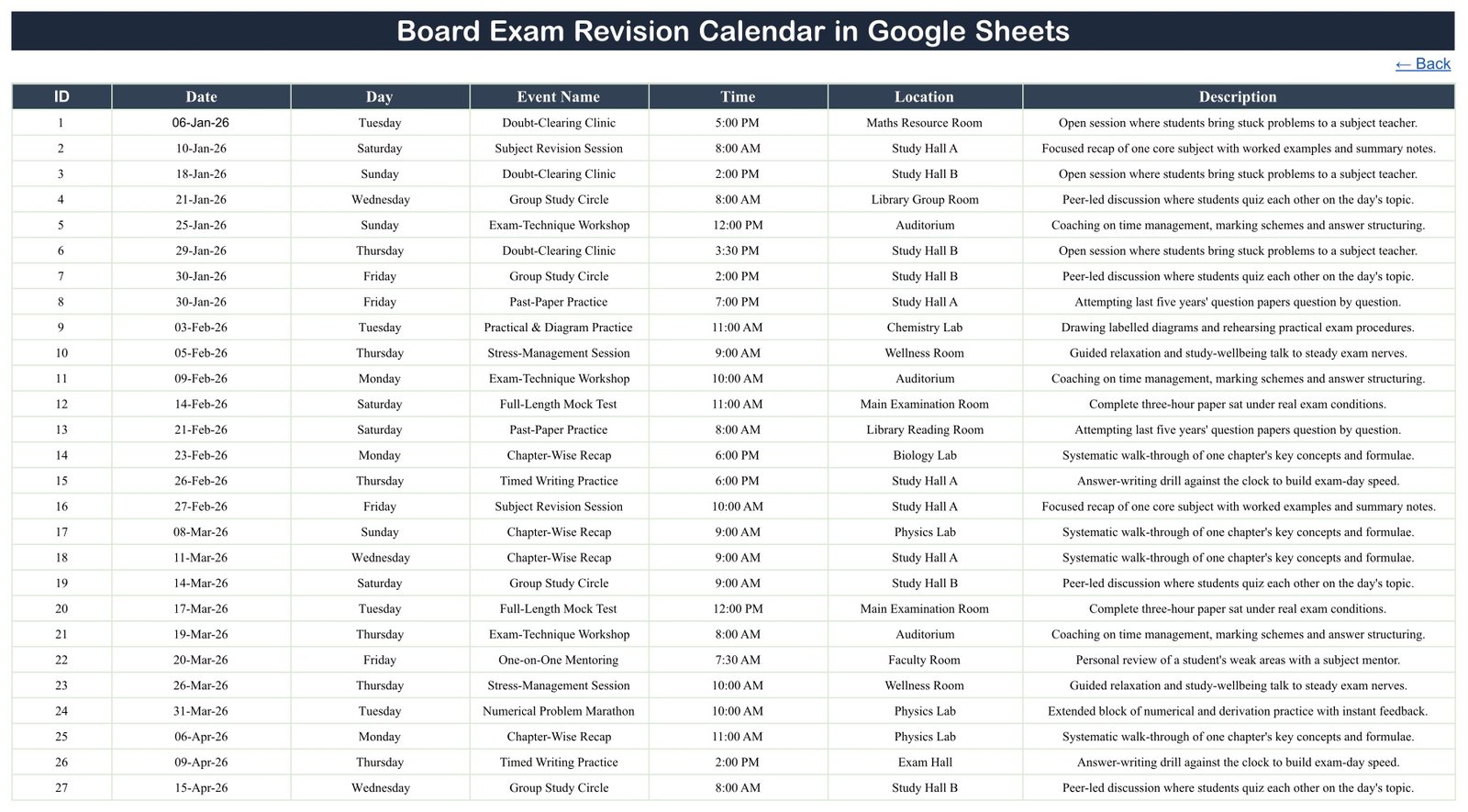
🗂️ One Events sheet feeds every view. The Events table holds ID, Date, Day, Event Name, Time, Location and Description. The Annual, Monthly and Daily views all read from it, so you edit one table instead of three.
📚 16 revision event types in the sample. Chapter-Wise Recap, Subject Revision Session, Group Study Circle, Exam-Technique Workshop, Full-Length Mock Test, Pre-Board Examination, Past-Paper Practice, Timed Writing Practice, Numerical Problem Marathon, Formula & Vocabulary Drill, Concept Map & Flashcard Review, Practical & Diagram Practice, Doubt-Clearing Clinic, One-on-One Mentoring, Stress-Management Session and Syllabus Completion Checkpoint.
📍 17 sample locations. Study Hall A and B, Exam Hall, Main Examination Room, Assessment Room, Auditorium, Seminar Room, the Physics, Chemistry and Biology Labs, Maths Resource Room, Library Group Room, Library Reading Room, Faculty Room, Wellness Room, Counselling Room and Coordinator Office.
✔️ Checked sample data. IDs run 1 to 100 with no gaps, all 100 weekday labels match their dates, the events fall on 99 separate days (only 30 January holds two), every month carries eight or nine entries, and start times run from 7:30 AM to 7:00 PM.
📦 What’s Inside the Revision Planner
Page 1: Home
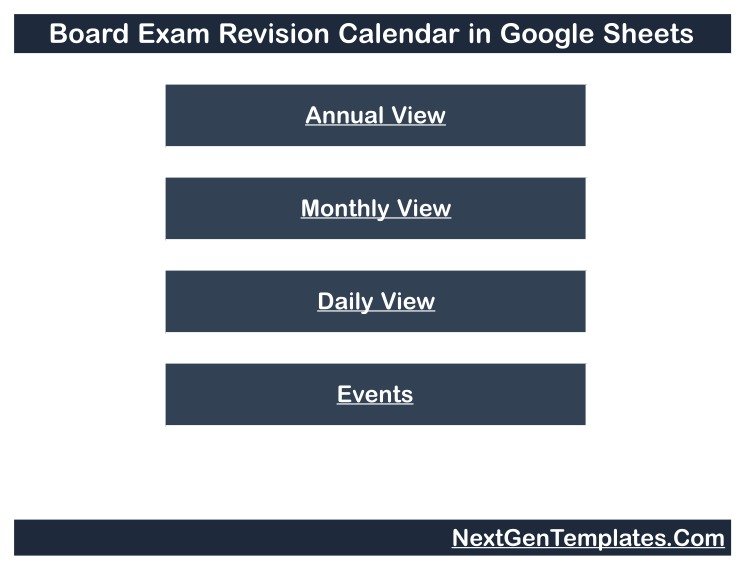
The Home page shows the calendar title and four navigation buttons: Annual View, Monthly View, Daily View and Events. Every view carries a “← Back” link that returns you here.
Page 2: Annual View
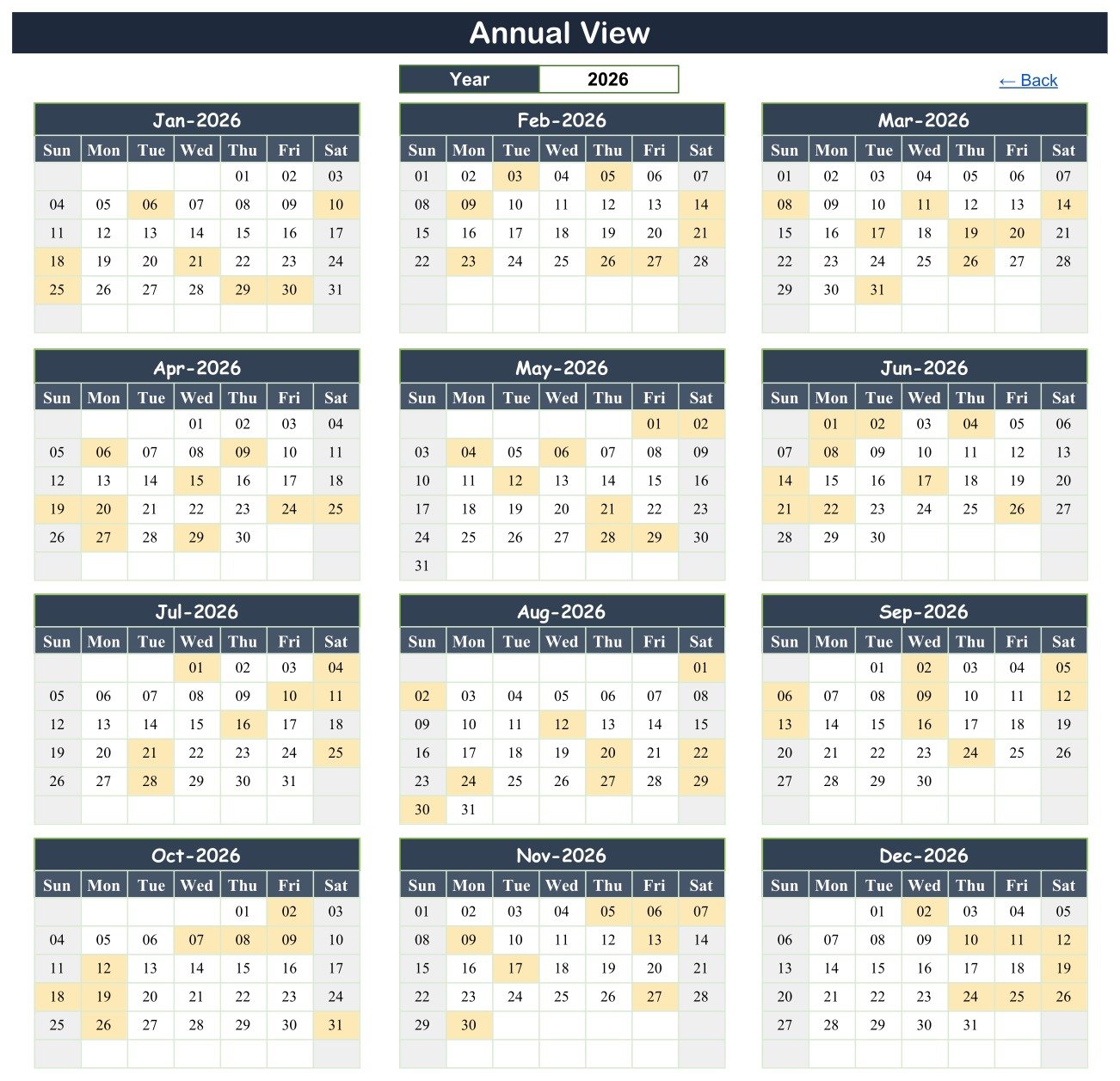
The year is set to 2026 and January through December appear as twelve month grids. Shaded cells mark dates with at least one event; January shades the 6th, 10th, 18th, 21st, 25th, 29th and 30th.
Page 3: Monthly View
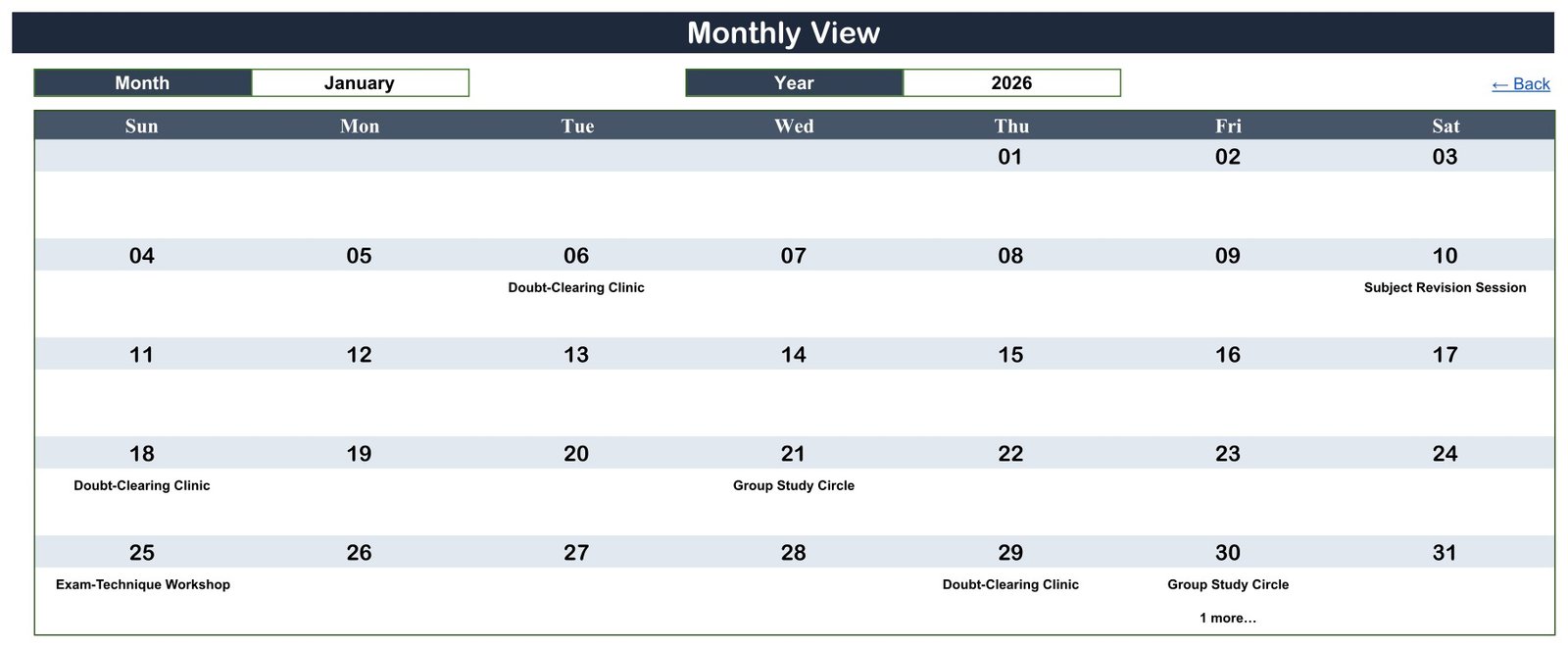
January 2026 is shown: Doubt-Clearing Clinic on the 6th, 18th and 29th, Subject Revision Session on the 10th, Group Study Circle on the 21st, Exam-Technique Workshop on the 25th, and Group Study Circle with “1 more…” on the 30th.
Page 4: Daily View
With the range set from 01-Jan-26 to 31-Jan-26 the list returns eight events, IDs 1 to 8, including both events on 30 January: a Group Study Circle at 2:00 PM in Study Hall B and Past-Paper Practice at 7:00 PM in Study Hall A.
Page 5: Events
The master list of all 100 sample events. Row 1 is a Doubt-Clearing Clinic on Tuesday 06-Jan-26 at 5:00 PM in the Maths Resource Room; the last row is a Pre-Board Examination on Saturday 26-Dec-26 at 11:00 AM in the Exam Hall. Replace these rows with your own dates.
📊 This Revision Calendar vs. an Excel Calendar vs. a Study App or LMS
| Feature | Board Exam Revision Calendar (Google Sheets) | Desktop Excel calendar | Study-planner app or learning management system |
|---|---|---|---|
| Cost | ✅ $4.99 one-time (regular $8.99) | One-time template plus an Excel licence | Often a recurring subscription |
| Platform | ✅ Any browser with a free Google account | Excel desktop | Vendor app or website |
| Setup time | ✅ Minutes: make a copy, replace the rows | Minutes | Accounts, classes and settings first |
| Real-time shared editing | ✅ Yes, through Google Sheets sharing | Limited | ✅ Yes |
| Mobile access | ✅ Google Sheets app | Excel mobile, reduced | ✅ Usually |
| Share with a link | ✅ Yes, view-only or edit | File sharing | Student and teacher logins |
| Customizable columns and views | ✅ Fully editable sheets | ✅ Yes | Vendor-defined |
| Question papers, marks and progress scores | ❌ Not included | ❌ Not included | ✅ Typical |
| Reminders and recurring sessions | ❌ Not included | ❌ Not included | ✅ Typical |
For a school, tutor or student who wants the whole revision season on one shared calendar without paying for a study platform, this template sits in the sweet spot.
👥 Who This Template Is For, and Who It Is Not For
✅ Built for:
- 🏫 Exam coordinators scheduling mock tests, pre-board papers and doubt-clearing clinics for final-year classes
- 👩🏫 Subject teachers pacing chapter recaps, practical rehearsals and timed writing practice before the board exams
- 🧑🏫 Tutors and coaching centres planning group study circles and one-on-one mentoring slots
- 🧑🎓 Students and parents who want a clear revision timetable they can view on a phone
❌ Not for:
- Anyone looking for study notes, question papers, mark schemes or practice content: this is a scheduling calendar only
- Schools that need a learning management system, gradebook, attendance register or automatic reminders
⚠️ What This Calendar Deliberately Does Not Do
- 🚫 It contains no study material, past papers or answers, and it cannot predict or improve exam results; outcomes depend on the student’s own preparation
- 🚫 It is not affiliated with, endorsed by or based on any exam board, and follows no official board timetable or syllabus
- 🚫 It stores no marks or progress scores; “Syllabus Completion Checkpoint” and “Pre-Board Examination” are event labels only
- 🚫 It sends no emails or reminders and does not sync with Google Calendar; events have a start time only, with no end time or repeat rule
- 🚫 The Day column is typed text and does not update itself when you change a date
- 🚫 The Monthly View shows the first event name per date plus a “more” note; very long event names and descriptions are clipped in the narrow columns. The Daily View lists every event
All 100 sample rows are fictional demo data. Wording such as “last five years’ question papers”, “real exam conditions” or “the real grading scheme” is sample description text, not a feature. Use batch names and rooms, not student names; if you add personal details, you are responsible for keeping that data secure.
⚙️ How to Use It
- Open the PDF in your download and click the link to make your own copy in Google Drive.
- Go to the Events sheet and delete the 100 sample rows.
- Enter each session: ID, Date, Day, Event Name, Time, Location and a short description.
- Open the Annual View and choose your exam year.
- Use the Monthly View’s Month and Year selectors to review one month at a time.
- Set a Start Date and End Date in the Daily View to list a week or the final revision month.
- Share the file view-only with students and parents who only need to read it.
Google explains link sharing in Share files from Google Drive, and getting started in How to use Google Sheets.
💼 Real-World Use Cases
An exam coordinator at a senior secondary school enters every Full-Length Mock Test and Pre-Board Examination for the final-year classes, then checks the Annual View to make sure no mock test lands on the same day as a practical rehearsal.
A physics and maths tutor places a Numerical Problem Marathon every few weeks and a Doubt-Clearing Clinic after each mock test, then shares a view-only link with the batch.
A parent helping a Class 12 student uses the Daily View for the coming fortnight to list recap sessions and stress-management breaks, and keeps the page open on the family laptop.
❓ Frequently Asked Questions
Does it need Google Sheets or Excel?
It is a Google Sheets file. You need a free Google account and a web browser; the PDF in your download holds the link that makes your own editable copy in Google Drive. An Excel edition, Board Exam Revision Calendar in Excel, is being prepared but is not part of this download.
Does it include study material or guarantee better results?
No. The Board Exam Revision Calendar in Google Sheets schedules and displays revision sessions only. It contains no notes, past papers or answers and makes no promise about marks; how well a student does depends on their own study.
Is it linked to a particular exam board?
No. The calendar is a general planning template, not affiliated with any exam board. The 100 events, times and rooms are fictional 2026 demo rows, so enter your own board’s official dates after checking them with your school.
Can I use a different year?
Yes. The Annual View and Monthly View both have a year selector, and the month grids redraw for whichever year you pick. Enter that year’s sessions on the Events sheet and they appear in all three views.
How long does setup take?
Making the copy takes seconds. Entering a term’s recaps, mock tests and clinics usually takes a few minutes, because you only type into the Events sheet and the Annual, Monthly and Daily views update from it.
How does it compare with a study-planner app?
Study apps add reminders, progress scores and content, usually on a subscription. This calendar only schedules and shows revision dates, for a one-time price, which suits schools and tutors who keep marks and material elsewhere.
👤 About the Author
Built by PK, a Microsoft Certified Professional with 15+ years of Excel, Google Sheets and Power BI experience and the founder of NextGenTemplates. Video tutorials are on @PKAnExcelExpert, @NextGenTemplates and @NeoTechNavigators. Every template is built and tested before release.
🔗 Explore Related Templates
📝 Exam Timetable Calendar in Google Sheets – schedule the exam papers themselves in the same four-view layout.
📘 Syllabus Coverage Calendar in Google Sheets – plan chapter starts and portion milestones before revision begins.
🧑🏫 Coaching Batch Calendar in Google Sheets – organise tuition batches alongside the revision plan.
📊 Test Preparation Centers Dashboard in Google Sheets – analyse a coaching centre’s performance once the calendar is running.
Browse every Google Sheets template in the store.
📖 Click here to read the Detailed Blog Post
🎥 Visit our YouTube channel for step-by-step video tutorials
👉 YouTube.com/@NextGenTemplates
Watch the step-by-step video Demo:
📅 Last updated: September 2026




























Reviews
There are no reviews yet.