

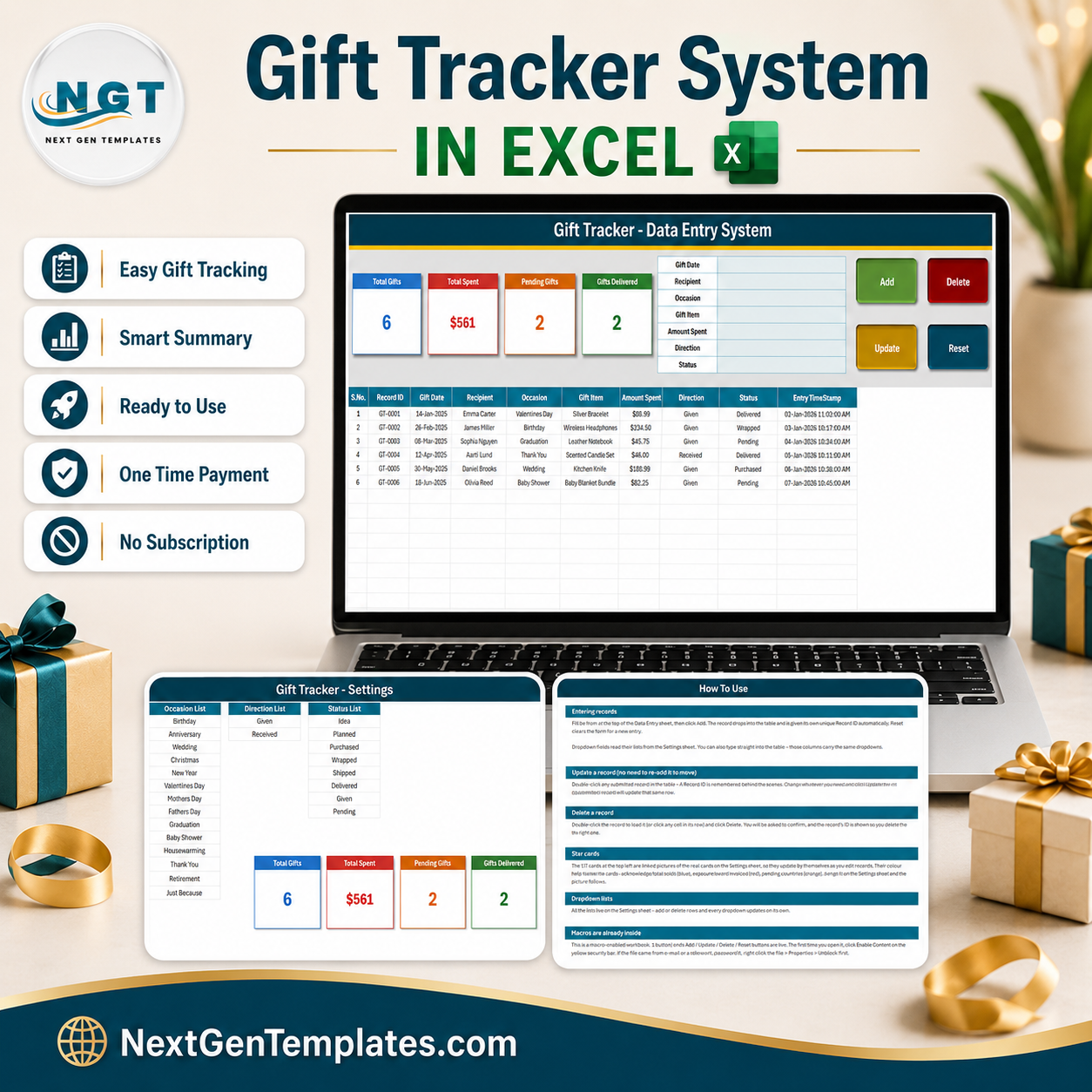

The Gift Tracker Data Entry System in Excel is a single macro-enabled workbook that records every gift you plan, buy and hand over – who it is for, what it cost, and how far along it is. One file, four sheets, a seven-field entry form, four live KPI cards and a ten-column record table. The Add, Update, Delete and Reset buttons are real VBA, so nothing has to be copied down and no formula can be broken by a paste. Six sample records ship inside so you can see it working in about thirty seconds. Instant download, one-time payment of $6.99, no subscription and no account to create.
Key Features of the Gift Tracker Data Entry System in Excel
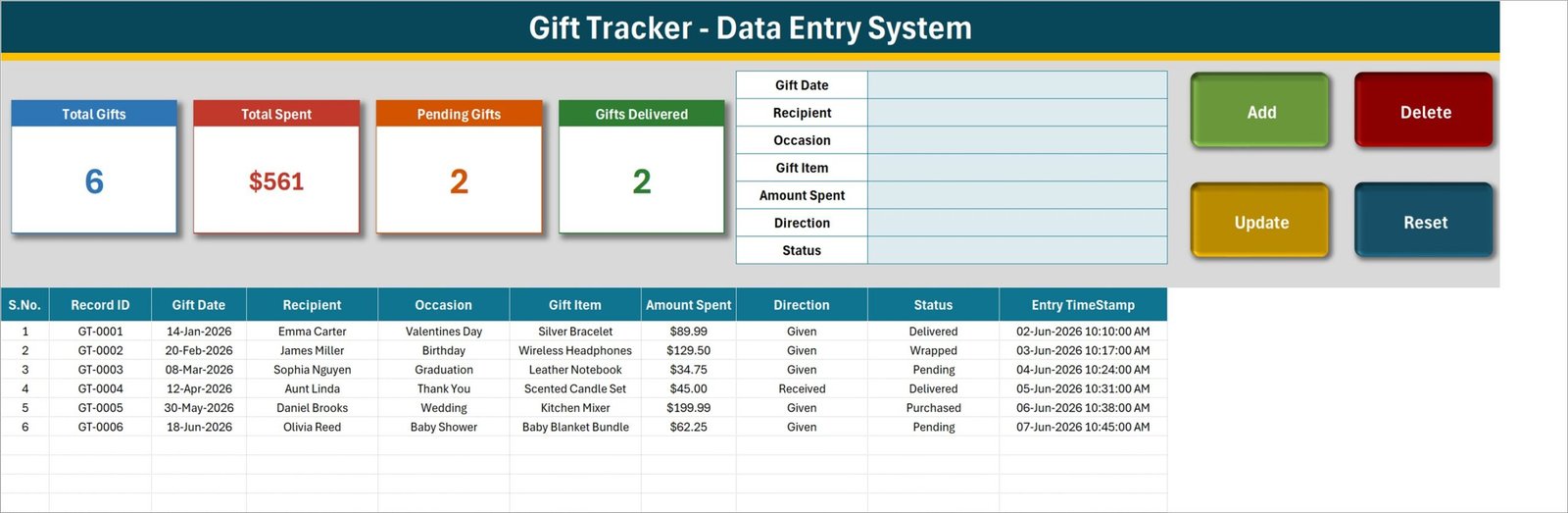
- Seven-field entry form – Gift Date, Recipient, Occasion, Gift Item, Amount Spent, Direction and Status, all in one panel at the top of the Data Entry sheet.
- Four live VBA buttons – Add, Update, Delete and Reset. Delete asks you to confirm and shows the Record ID first, so you cannot remove the wrong row by accident.
- Automatic Record IDs – every entry is stamped GT-0001, GT-0002 and onwards. The macro remembers the highest number ever used, so IDs stay unique even after you delete rows.
- Double-click to edit – double-click any record to load it back into the form. The Record ID is held behind the scenes, so Update finds the right row wherever it has moved to; you never have to re-select it.
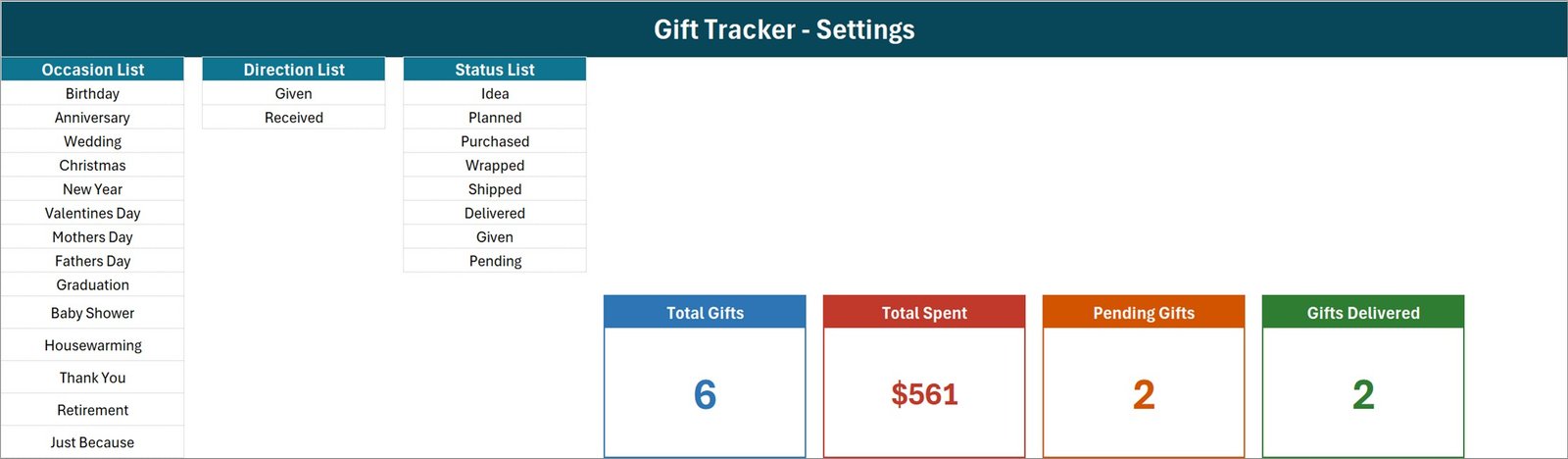
- Six-stage progress Status – Idea, Planned, Purchased, Wrapped, Shipped, Delivered, plus Given and Pending. Eight values in all, and you can edit the list.
- Given and Received in one sheet – the Direction field separates gifts you give from gifts you receive without needing a second workbook.
- Four KPI cards – Total Gifts, Total Spent, Pending Gifts and Gifts Delivered. They live on the Setting sheet and appear on Data Entry as linked pictures, so they refresh on their own.
- Fourteen ready occasions – Birthday, Anniversary, Wedding, Christmas, New Year, Valentines Day, Mothers Day, Fathers Day, Graduation, Baby Shower, Housewarming, Thank You, Retirement and Just Because. Add your own and the dropdown follows.
- Entry timestamp column – each record stores the date and time it was saved, separate from the gift date itself.
- One .xlsm file – desktop Microsoft Excel for Windows, no add-ins, no cloud service, no monthly fee.
What’s Inside the Gift Tracker Data Entry System in Excel
The download is a single zip holding one workbook with four sheets.
1. Data Entry. The working screen. The seven-field form sits top centre, the four KPI cards sit top left, and the Add, Delete, Update and Reset buttons sit top right. Below them the record table runs across ten columns: S.No., Record ID, Gift Date, Recipient, Occasion, Gift Item, Amount Spent, Direction, Status and Entry TimeStamp. Records begin on row 15 and the table is open-ended.
2. Setting. Three editable lists and the four real KPI cards. Occasion List carries fourteen entries, Direction List carries Given and Received, and Status List carries Idea, Planned, Purchased, Wrapped, Shipped, Delivered, Given and Pending. Every dropdown on the Data Entry sheet reads from here, so changing a list here changes the form and the table together.
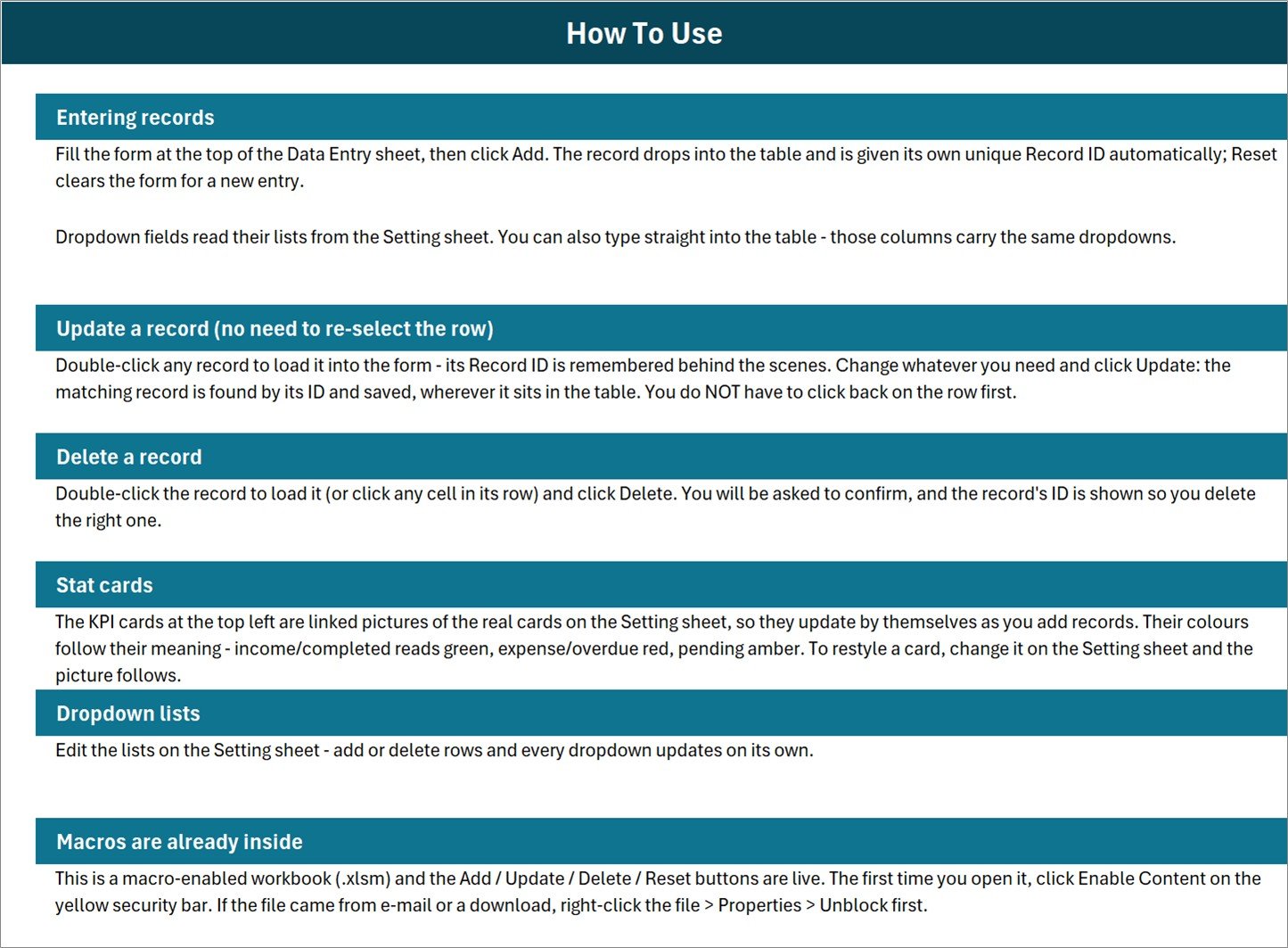
3. Instructions. A one-page How To Use guide covering entering records, updating without re-selecting the row, deleting safely, how the stat cards work, editing the dropdown lists, and enabling macros the first time you open the file.
4. Get More Templates. Links back to the rest of the NextGenTemplates catalogue.
Gift Tracker in Excel vs. Google Sheets vs. a Paid Gift-List App – Where This Fits
| This Excel template | A Google Sheets gift list | Paid gift-list app or online registry | |
|---|---|---|---|
| Cost | $6.99 once | Free, but you build it | $3 – $10 per month, or free with ads |
| Platform | Desktop Excel for Windows | Any browser | Web and phone app |
| Setup time | Open, enable macros, delete six sample rows | Hours of building formulas and validation | Sign up, verify e-mail, invite people |
| Real-time team collaboration | No – single user, one file | Yes | Yes |
| Mobile access | No – VBA does not run on Excel mobile or Excel for the web | Yes | Yes |
| Customizable fields | Yes – lists and columns are yours to edit | Yes | Usually fixed |
| Share with link | No – you send the file | Yes | Yes |
| Tracks money spent | Yes – Amount Spent column with a running total | Only if you build it | Often not – most are wish lists, not budgets |
| Six-stage progress status | Yes – Idea through Delivered | Only if you build it | Rarely |
| Data stays on your own PC | Yes | No – Google’s servers | No – the vendor’s servers |
| Year-1 cost at 5 users | $6.99 total, one file copied five times | $0 | $180 – $600 |
Who This Template Is For – and Who It’s Not For
It is for you if you buy for a lot of people across the year and keep losing track of what you already bought; if you want one place that holds both the gifts you give and the gifts you receive; if you care what the whole year actually cost; or if you would rather your family’s gift list sat on your own machine than in somebody’s cloud.
It is not for you if you need several people editing the same list at once – it is one file, one user at a time. It is not for you if you want it on your phone: the Add, Update, Delete and Reset buttons are VBA, and VBA does not run on Excel for the web, Excel for Mac’s older builds, Excel mobile or Google Sheets. And it is not a registry service – it will not talk to a store, pull prices, or let guests claim an item.
How to Use the Gift Tracker Data Entry System in Excel
- Unzip and open in desktop Excel. Click Enable Content on the yellow bar. If the file came by e-mail or download, right-click it first, choose Properties and tick Unblock, or the macros will stay switched off.
- Make the lists yours. On the Setting sheet, edit Occasion List, Direction List and Status List. Add rows, delete rows – every dropdown updates by itself.
- Delete the six sample records. GT-0001 to GT-0006 are demonstration data. Clear rows 15 to 20 on the Data Entry sheet before you start.
- Add your first gift. Fill the form and click Add. Gift Date is the one field the macro insists on; the rest can be filled in later.
- Move it along. Double-click the record to load it, change Status from Idea to Planned to Purchased to Wrapped, and click Update. You do not have to click back on the row first.
- Watch the cards. Total Gifts, Total Spent, Pending Gifts and Gifts Delivered redraw themselves as the table fills.
Real-World Use Cases
Priya, who buys for twenty-two people every December. She opens the workbook in October and enters every name with Status set to Idea and no amount yet. As she shops, each row moves to Purchased and gets a price. By the first week of December she can see at a glance that nine are still at Idea and what the season has cost so far.
Daniel, who keeps a running family record. Birthdays, anniversaries and the odd housewarming all go in the same sheet. Gifts he receives go in with Direction set to Received, so when he is wondering what his sister gave him last year, it is one filter away rather than a scroll through photos.
Anita, running a small office’s staff gifting. Retirement, work anniversaries and new-baby gifts across forty staff. The Occasion list gets three of her own entries, the Status list keeps her honest about what has actually been handed over, and the Amount Spent column gives her a figure to hand to accounts at year end.
Frequently Asked Questions
How is this different from the Gift Register Data Entry System?
They look similar and they are deliberately different tools. The Gift Register Data Entry System in Excel is built around acknowledging gifts: its seventh field is Thank You Status and its cards count Gifts Received and Thank You Pending. This Gift Tracker is built around buying: its seventh field is a six-stage progress Status and its cards report Total Spent and Gifts Delivered. Both carry a Direction field, so either can hold both sides. Pick the one that matches the question you ask most often.
Does the “Shipped” status track my parcel?
No. Every status in this workbook is a label you set by hand. There is no carrier link, no tracking number field and no delivery lookup. Shipped means you marked it Shipped.
What exactly does the Total Spent card add up?
It sums the Amount Spent column for every row in the table, with no filter. That means it includes rows whose Direction is Received, and rows still sitting at Idea or Planned that you have not paid for yet. In the six shipped sample records the card reads $561, which includes $45.00 for a gift that was received rather than given – the true outlay on gifts given is $516.48. If you want a strict spend figure, add a SUMIFS on Direction, or keep Received rows in a separate copy of the file.
Why don’t Pending Gifts and Gifts Delivered add up to Total Gifts?
Because only two of the eight statuses have a card. Pending and Delivered are counted; Idea, Planned, Purchased, Wrapped, Shipped and Given are not. The cards are meant as two spotlights, not as a breakdown that sums to the total.
Will it work on my Mac, my phone, or in Excel for the web?
The workbook opens, but the buttons will not run. Add, Update, Delete and Reset are VBA macros, and VBA is not supported in Excel for the web, on Excel mobile, or in Google Sheets. Treat this as a desktop Excel for Windows tool.
Can two people use it at the same time?
No. It is one file with one record table and no locking. Put it on a shared drive and the second person will get a read-only copy. If you need several people working at once, a Google Sheets tracker such as the Corporate Gift Request Tracker in Google Sheets is the better fit.
Do I need to know VBA to change it?
No. The lists, the columns and the card styling are all normal Excel. You only need the VBA editor if you want to change what the four buttons do.
About the Author
Built by PK – Microsoft Certified Professional with 15+ years of Excel, Google Sheets, and Power BI experience. Founder of NextGenTemplates, reaching 300K+ subscribers across YouTube channels. Every template is hand-built and tested before release.
Explore Related Templates
- Gift Register Data Entry System in Excel – the thank-you side of the same story.
- Gift Wrapping Checklist in Excel – for the week everything has to be wrapped at once.
- Holiday & Christmas Budget Tracker in Google Sheets – the whole season’s spending, not just the gifts.
- Gift Card and Store Credit Tracker in Google Sheets – so unused balances stop expiring.
- Tracker Toolkit – 12 Premium Templates – if you want the whole shelf at once.
More in Excel VBA Tools and Excel Trackers.
Get Your Copy
Download the Gift Tracker Data Entry System in Excel for $6.99 instead of $11.99, pay once, and keep the file. Add it to your cart above, and the zip is yours to download the moment checkout finishes. A full walkthrough of how the workbook is built is on the PK-AnExcelExpert blog.
Last updated: 26 August 2026.































Reviews
There are no reviews yet.