

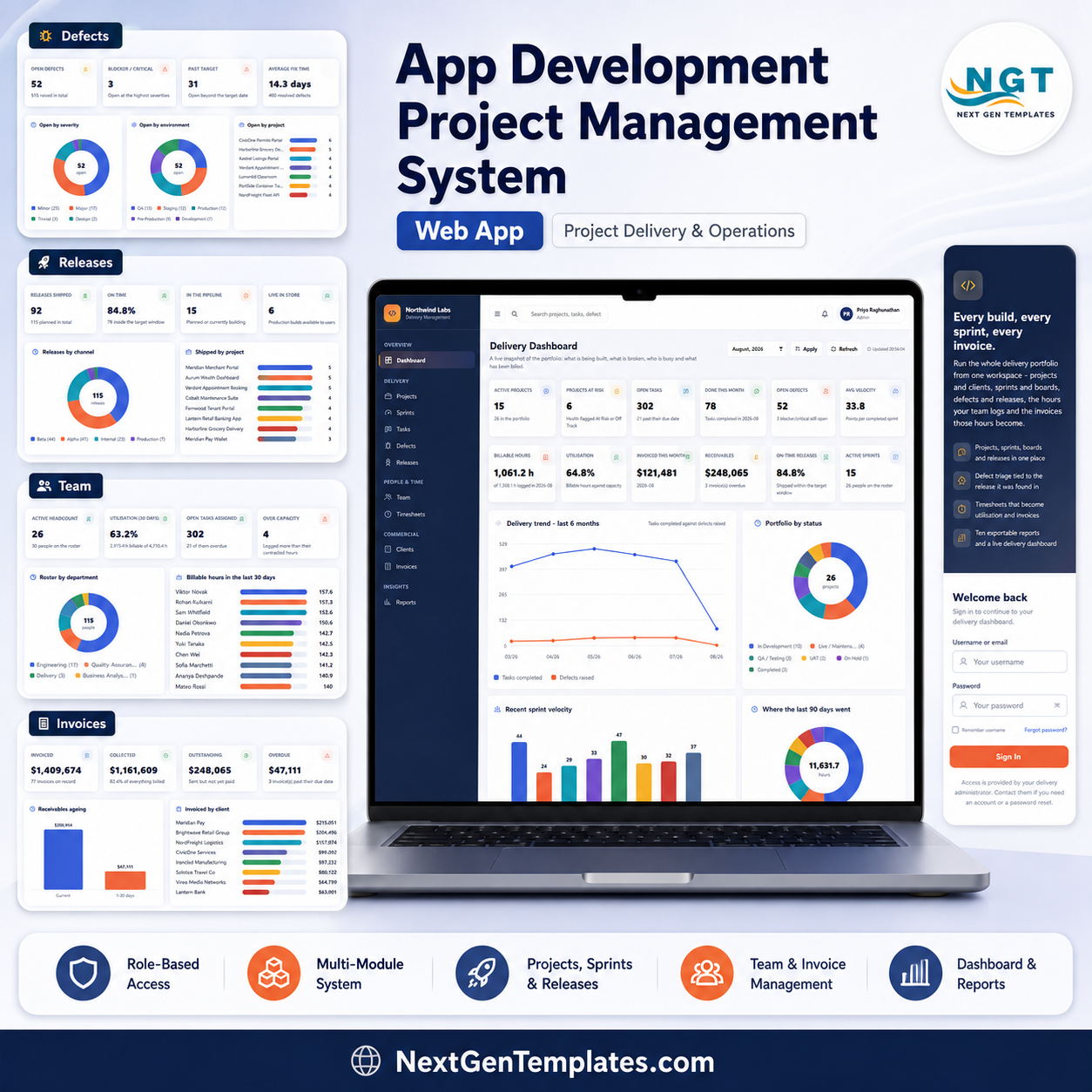
The App Development Project Management System Web App is a Google Apps Script delivery workspace that runs a sign-in screen plus 17 role-gated modules over a Google Sheets database you own. Setup builds 17 sheets and seeds 11,793 rows of demo data so nothing is empty on day one: 26 projects, 22 clients, 268 sprints, 3,108 tasks, 515 defects, 115 releases, 30 team members, 7,240 timesheet lines and 77 invoices, all of it deletable and replaceable with your own records. Six roles – Administrator, Delivery Manager, Project Manager, Developer, QA Engineer and Finance Officer – each see a different slice of the app, so a developer cannot delete a project and a finance officer never lands on the sprint board. One purchase, no per-seat licence, no server to rent. App Development Project Management System Web App
You get the complete, unminified source (Code.gs + Index.html) and a PDF deployment guide. Paste both files into a new Apps Script project, deploy, run setup once, and it is yours to rename, recolour and extend. If it is not what the screenshots show, email [email protected] – but try the live demo below first, because you can see the entire product before you spend anything.
The Sign-In Screen
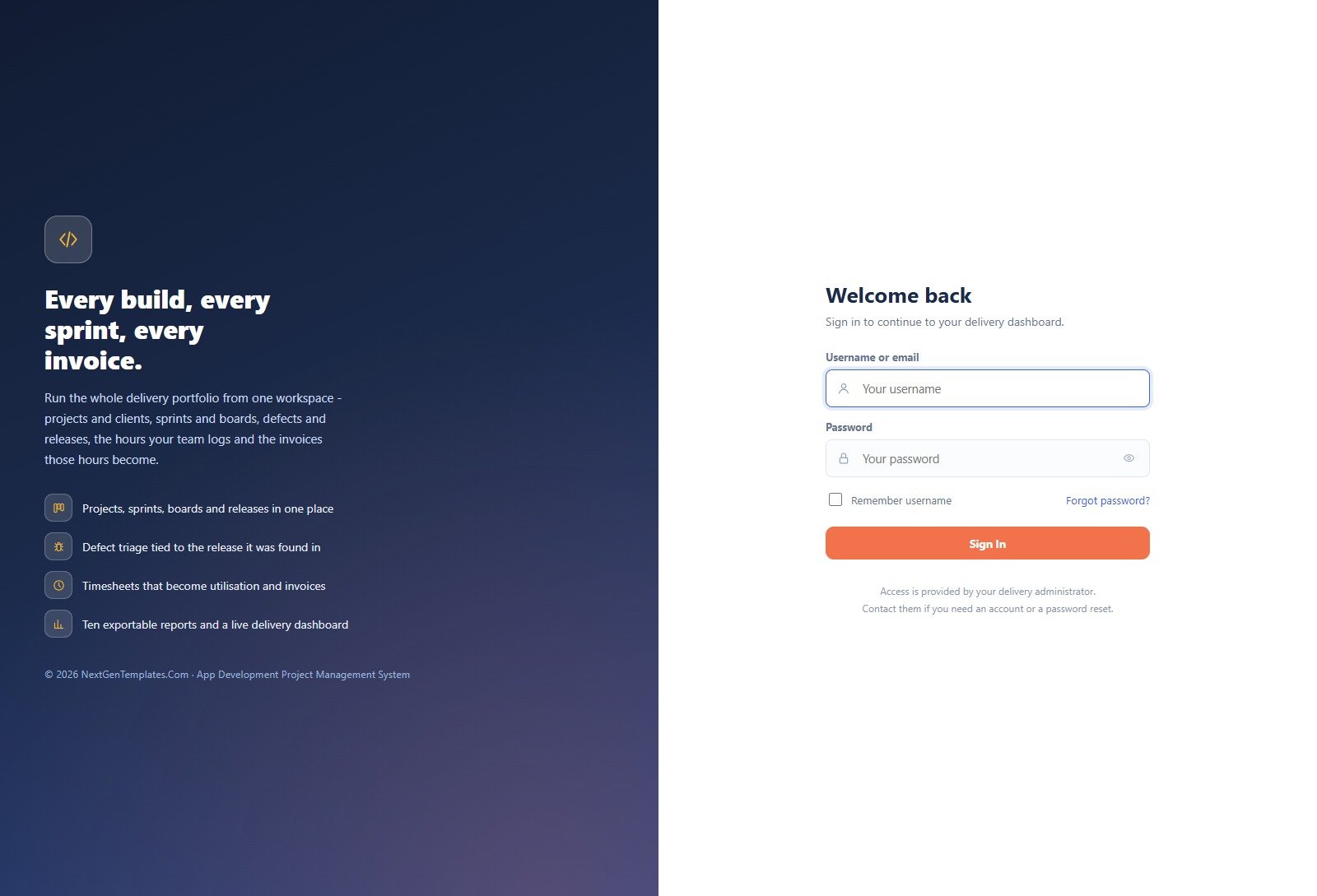
A single username-and-password card guards the whole app; there is no public area and no self-registration. Accounts are created by an administrator in User Management, and the role attached to each account decides which of the 17 modules appear in the sidebar after sign-in. App Development Project Management System Web App
🚀 Try the Live Demo Before You Buy
We have deployed this web app in our own Google account so you can test every page, every role and every report – with the seeded demo data – before purchasing. No signup, no email required.
🔑 Test Login Credentials
Sign in as admin to see everything, including User Management, List Management, Settings and the Audit Log. Then sign in as dev and watch two-thirds of the sidebar disappear – that is the role model doing its job. All six seeded roles are below, so you can check each one against the way your own studio is organised.
💡 These are public demo logins on a shared, self-resetting demo instance – not a customer deployment and not your data. Anyone can sign in and change things, and the records reset. What you get after purchase: the full source code (Code.gs + Index.html) plus a step-by-step deployment guide so you can stand up your own private instance in your own Google account in under 15 minutes.
Key Features of the App Development Project Management System Web App
- Six roles, enforced on the server. The Role permissions tab in User Management is a grid of module against action – view, create, edit, delete, export, approve – and the app checks it on every request, not just when drawing the sidebar.
- One active sprint per project. The system refuses a second one. Closing a sprint recomputes its completed points from the board and can roll unfinished items into the next sprint.
- Logged hours come from the timesheet, never typed onto a task. A task can only ever claim time somebody actually booked, and nobody can book more than 8.5 hours against a single day.
- Defects tie back to the release they were found in and to the task that introduced them, with target resolution dates derived from severity when you do not set one.
- Approved billable hours become an invoice with one button. Total is always subtotal plus tax and balance is always total less payments – the server enforces both.
- Ten exportable reports across delivery, quality, people and commercial, each with a date range and project or client filters, each printable at your chosen paper size.
- Excel and CSV export on every table in the app, including the filtered view rather than the whole sheet.
- 32 editable dropdown lists (193 values seeded) drive every select box – statuses, severities, environments, activity types, platforms, departments – so you can match your own vocabulary without touching code.
- A full audit log of who did what in which module, plus the server error log, filterable by user, module, action and date.
- Your Google account, your data. The database is an ordinary Google Sheet you can open, back up, archive or export at any time. App Development Project Management System Web App
What Is Inside the App Development Project Management System Web App – Page by Page
Delivery Dashboard
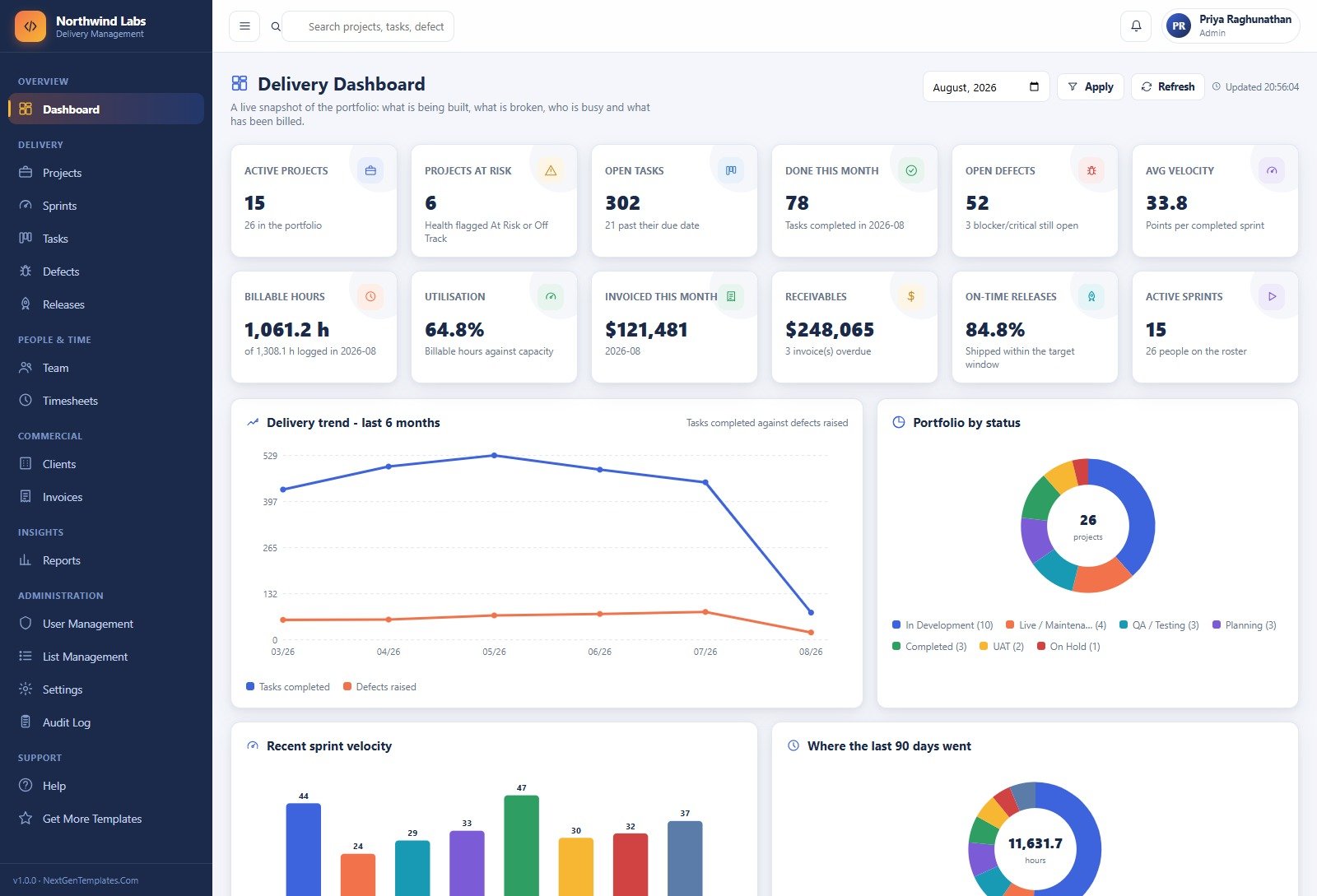
Twelve KPI cards covering delivery, quality, people and money, with a month picker at the top. The demo shows 15 active projects of 26, 302 open tasks, 52 open defects, 64.8% utilisation and $248,065 in receivables, under a six-month trend of tasks completed against defects raised.
Projects
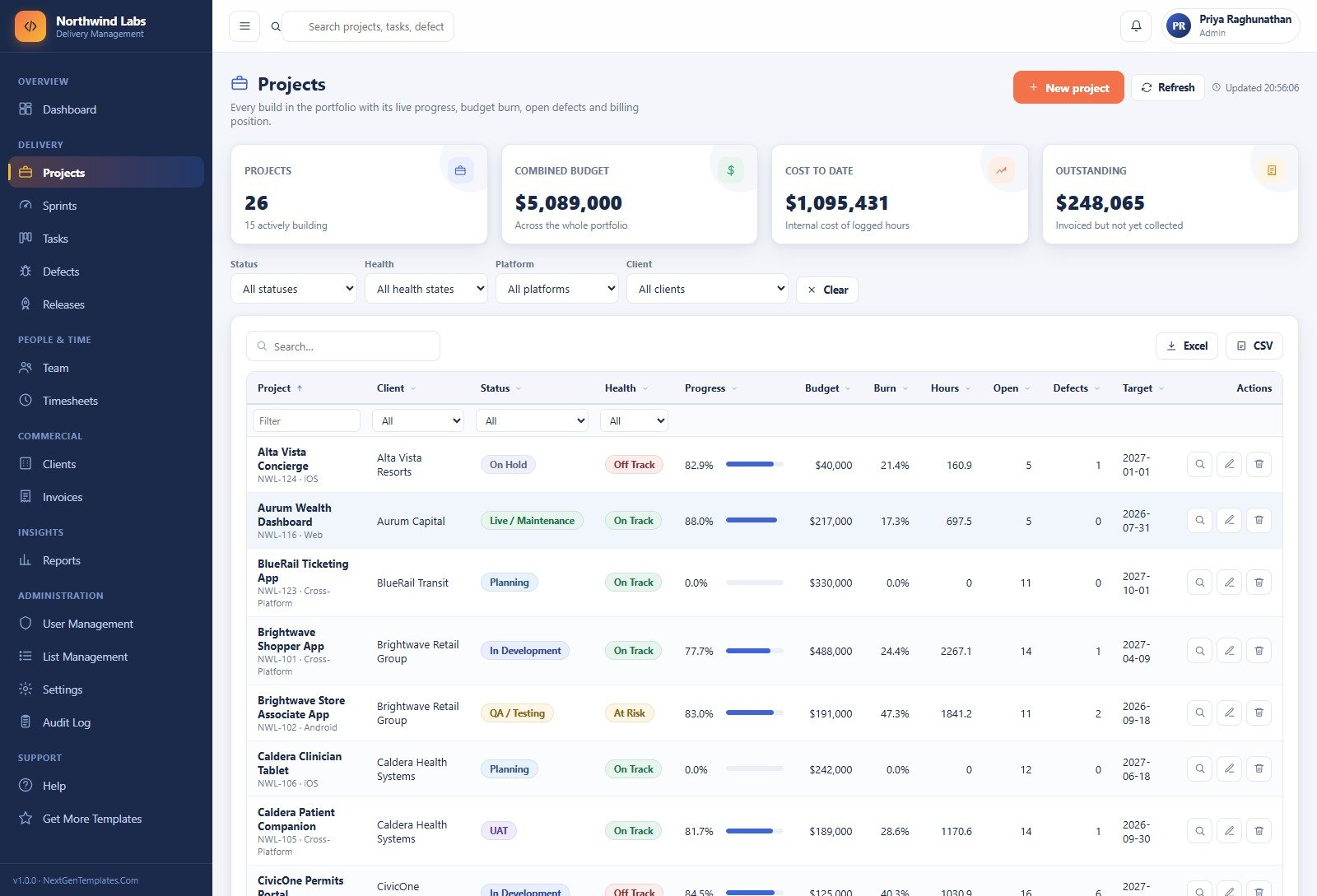
The portfolio register: every build with its live progress, budget burn, hours logged, open tasks, open defects and target date. Filter by status, health, platform or client, then open any row for its milestone schedule, sprint history, releases, contributors and invoices.
Sprints
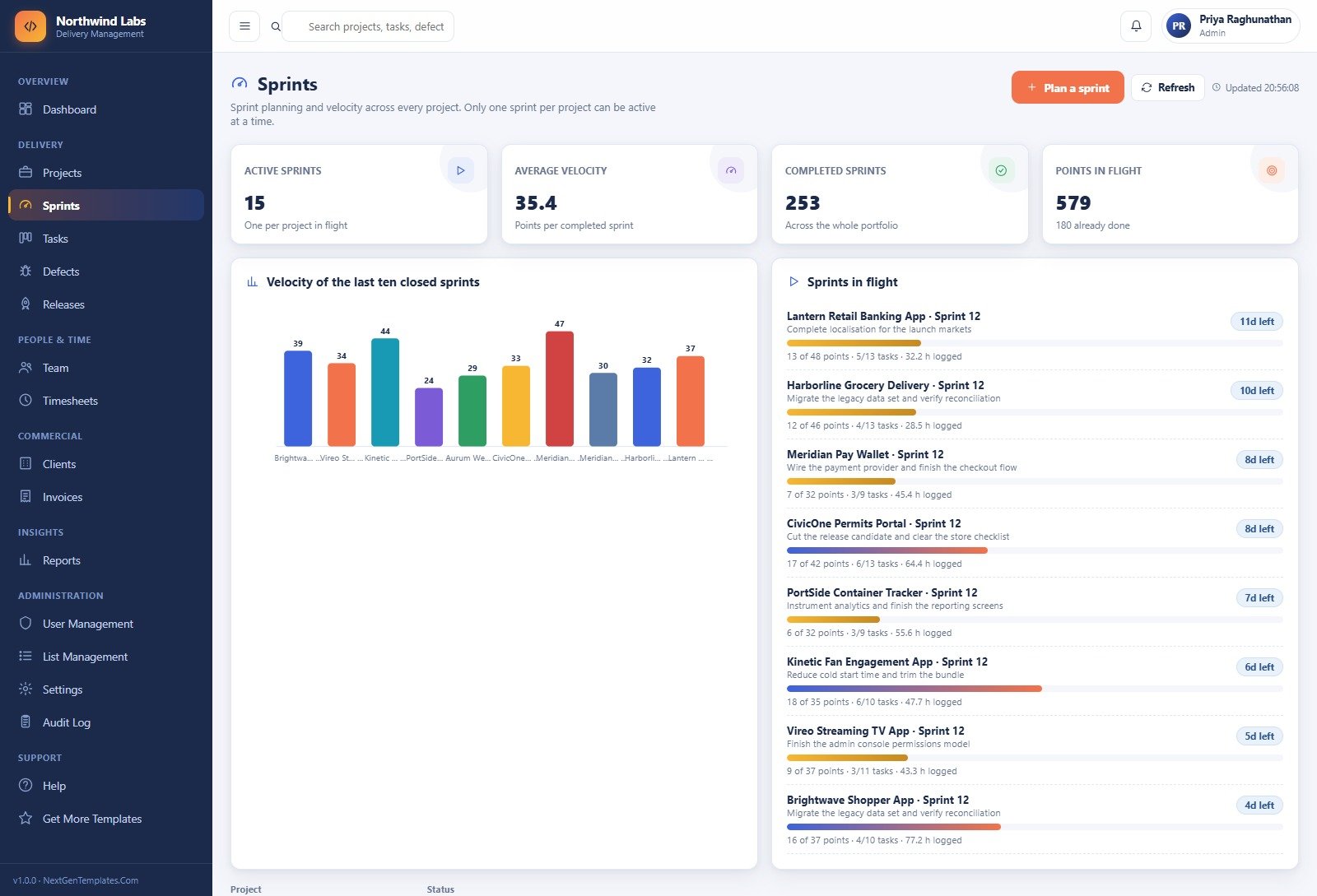
Sprint planning and velocity across every project, with a bar chart of the last ten closed sprints and a live Sprints in flight panel showing points done, tasks done, hours logged and days remaining for each one.
Tasks and the Sprint Board
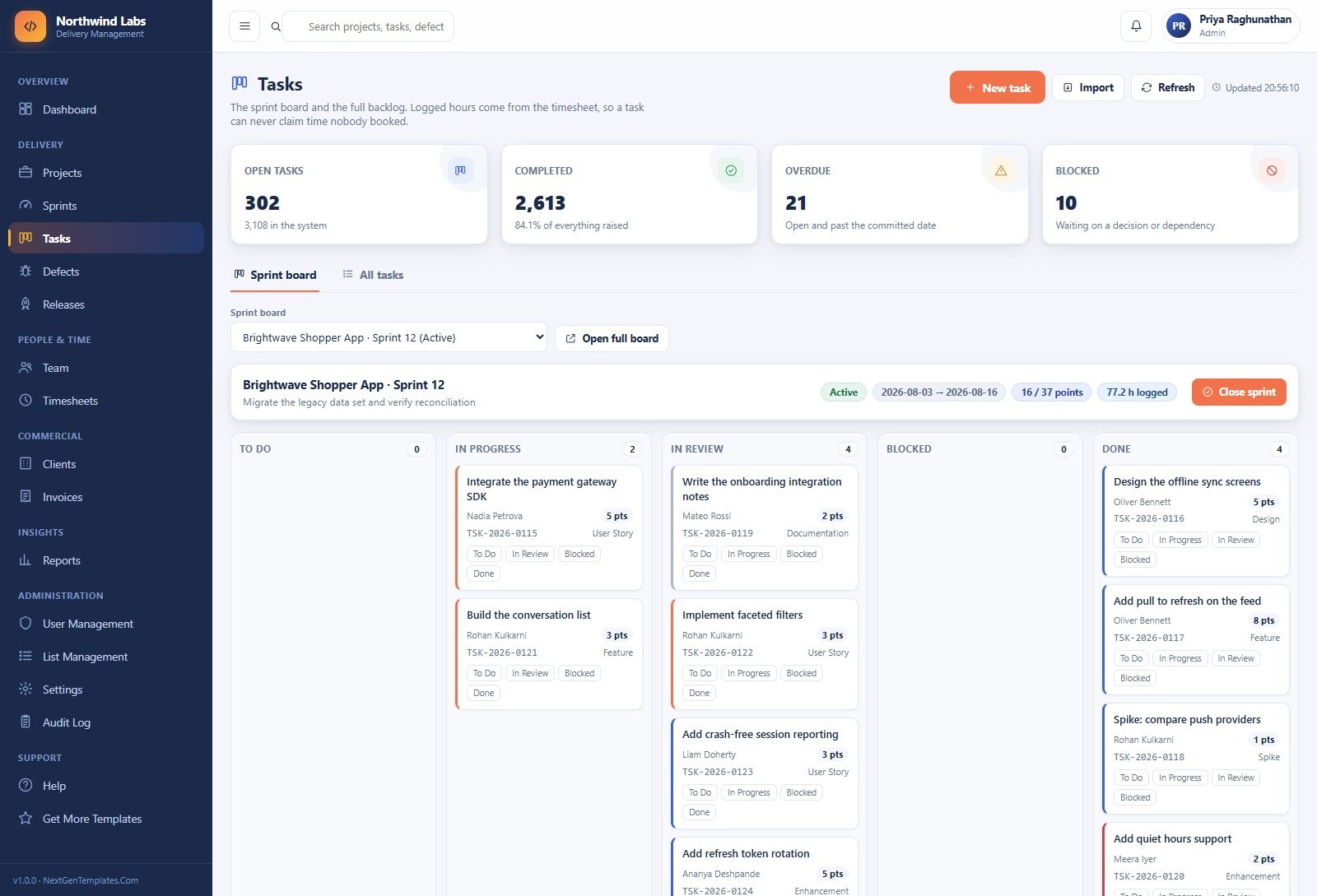
A five-column board – To Do, In Progress, In Review, Blocked, Done – over any sprint you pick, plus a fully filterable All tasks list of the backlog. Each card carries its ID, assignee, story points and work type, and moves with one click.
Defects
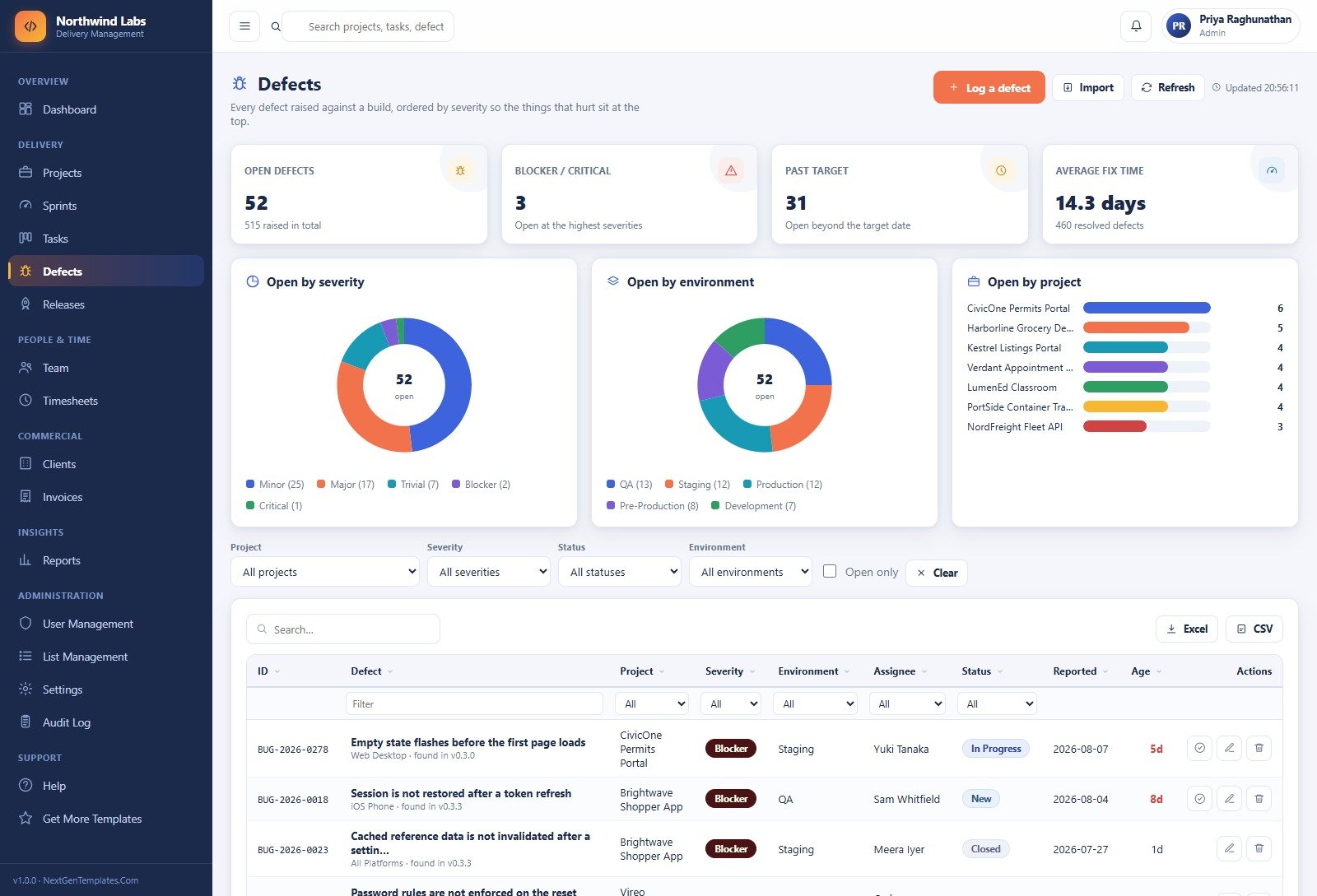
Every defect raised against a build, ordered by severity so the painful ones sit at the top. Donuts break the open queue down by severity and by environment, and a bar chart shows which projects are carrying the most.
Releases
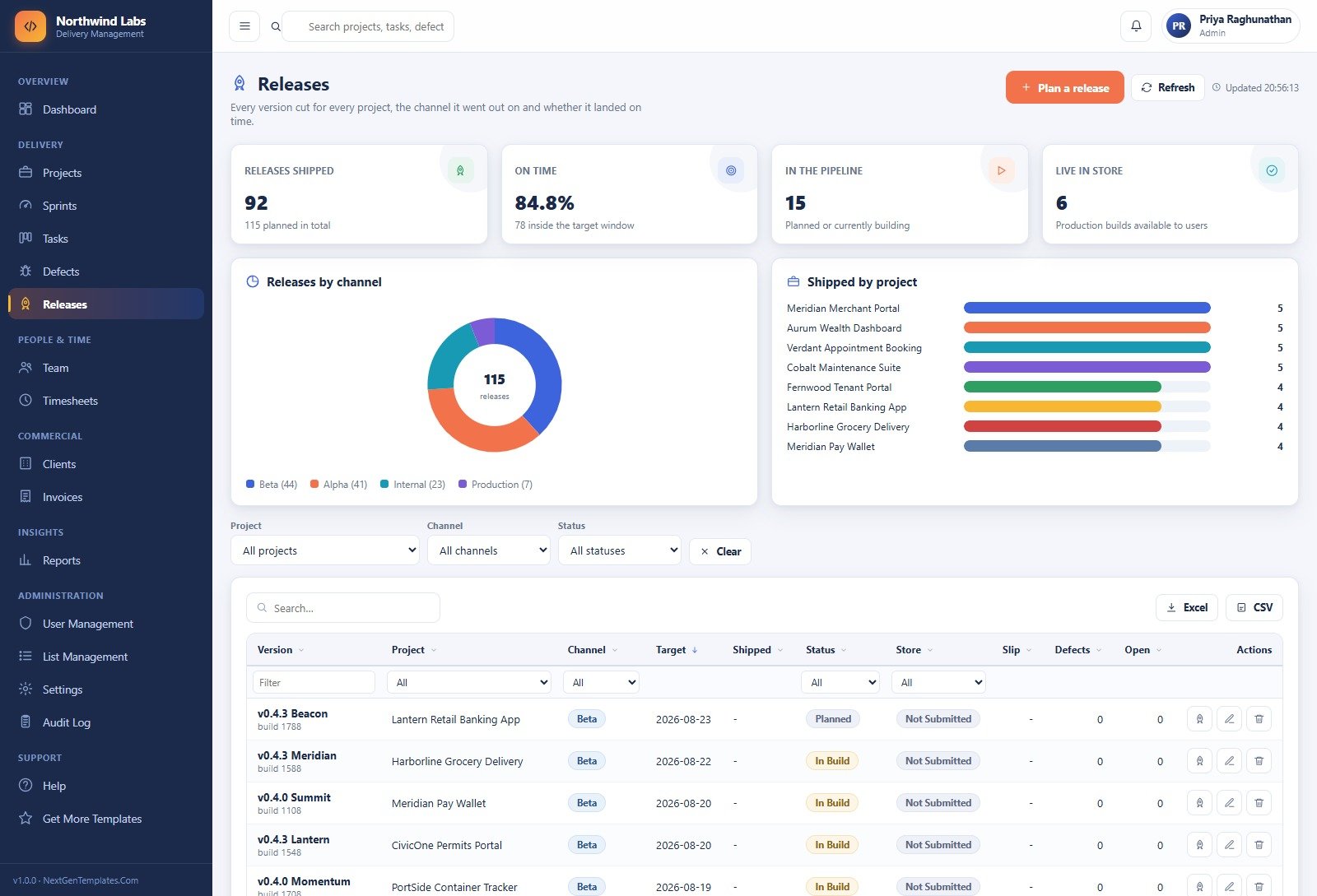
Version and build history per project – channel, target date, shipped date, store status and slip – with a donut of releases by channel and a bar chart of versions shipped per project. Marking a release shipped stamps the date and the approver. App Development Project Management System Web App
Timesheets
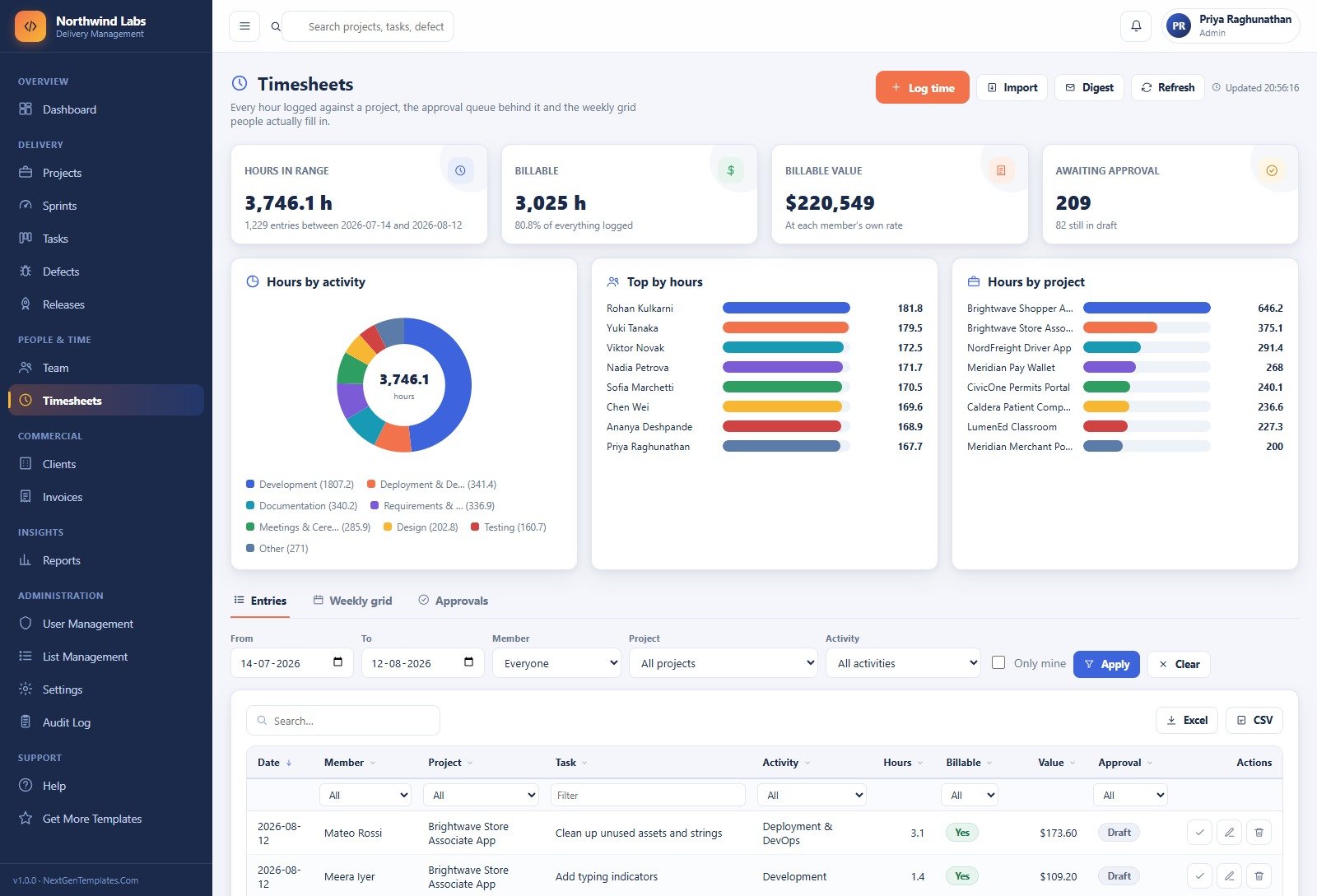
Three views over the same hours: a filterable entry list, a weekly grid per person, and an approval queue with bulk approve and reject. Donuts and bars split the period by activity type, by person and by project.
Invoices
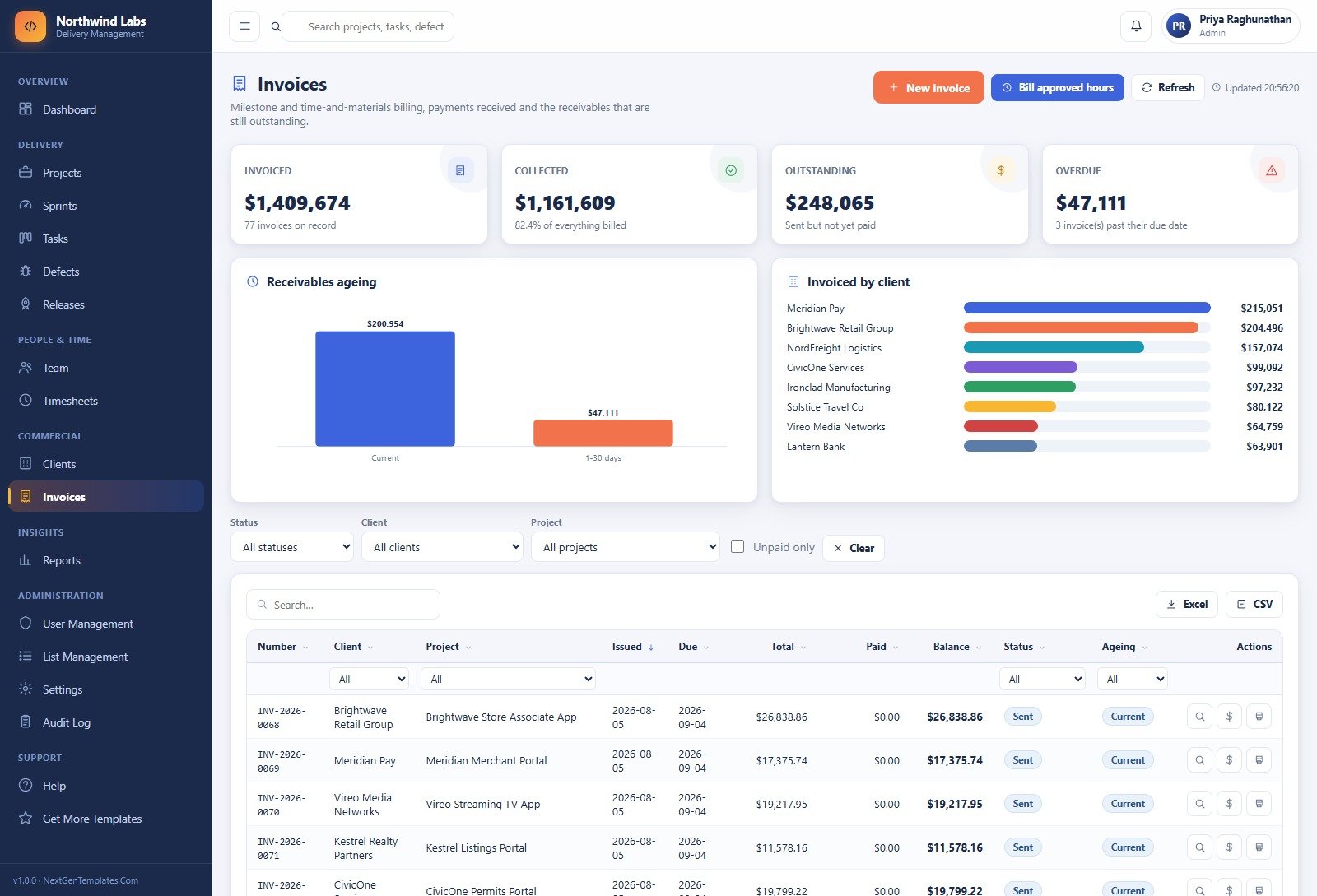
Milestone and time-and-materials billing built from approved hours, plus payments received and the receivables still outstanding. A receivables ageing chart buckets the balance and an invoiced-by-client bar chart ranks the accounts.
Reports
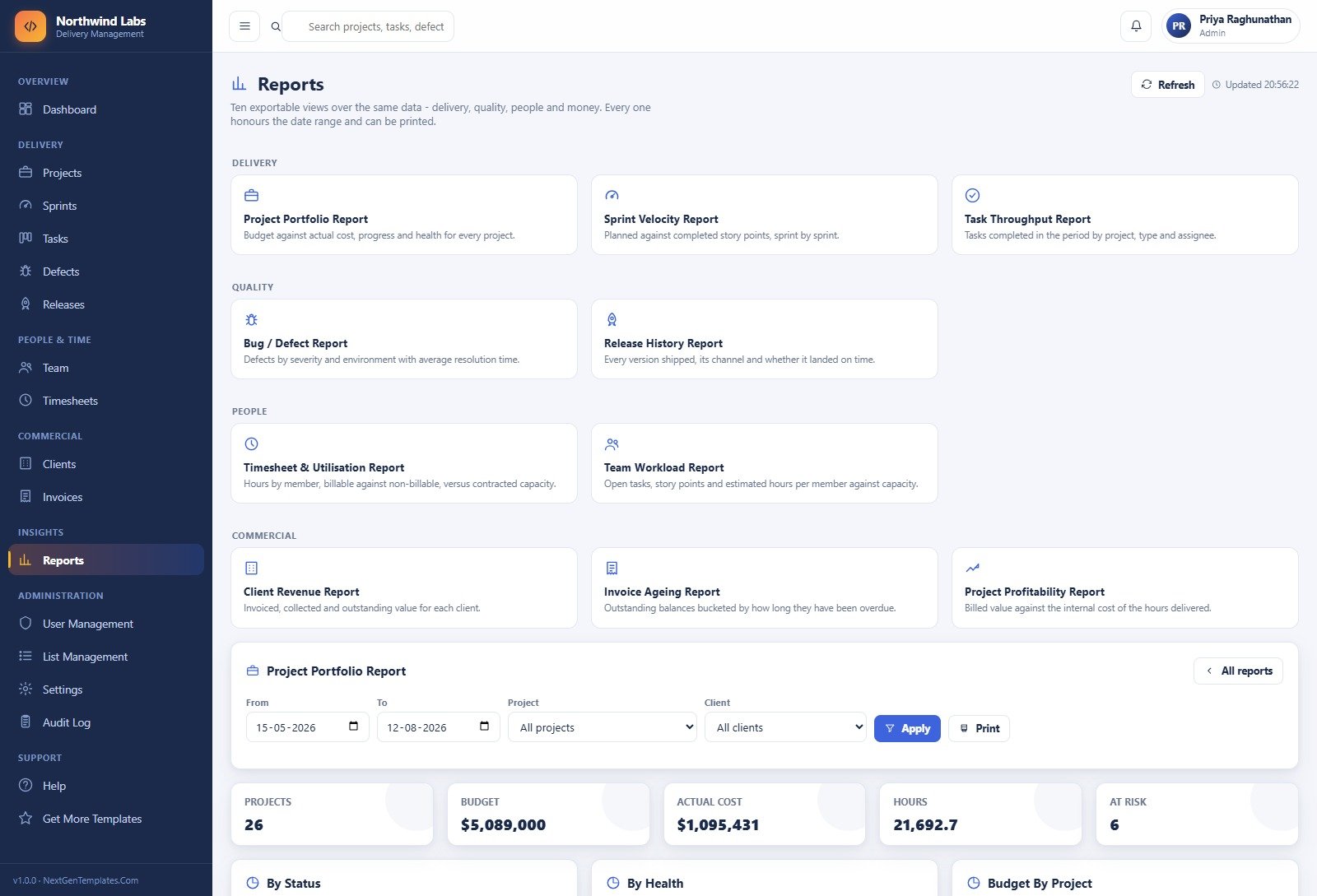
Ten reports grouped into Delivery, Quality, People and Commercial – portfolio, sprint velocity, task throughput, defects, release history, timesheet and utilisation, team workload, client revenue, invoice ageing and project profitability. Every one honours the date range and prints.
Team, Clients and the Administration Modules
Five further pages complete the app and are not pictured above. Team is the roster with live workload – open tasks, points in flight, hours logged in the last thirty days and how that sits against contracted capacity, with the cost and billable rates that drive the profitability report. Clients is the account directory with project counts, invoiced value and outstanding balance per account. User Management holds the accounts list and the role-permissions grid. List Management is where all 32 dropdown lists live, reorderable and deactivatable. Settings carries ten tabs – Business, Finance, Numbering, Operations, Print, Email, Theme, Security, Archive and Maintenance – which is where you rename the studio, change the ID prefixes, recolour the app and archive the database. A Help page documents every module and a Get More Templates page links back to the catalogue.
App Development Project Management System Web App vs. a Spreadsheet vs. Paid Delivery SaaS – Where This Fits
| This Web App | A shared spreadsheet | Paid delivery SaaS | |
|---|---|---|---|
| Cost | One-time purchase | Free with your Google or Microsoft account | Recurring per-seat subscription |
| Platform | Google Apps Script + Google Sheets | Google Sheets or Excel | Vendor-hosted |
| Setup time | About 15 minutes: paste two files, deploy, run setup | Minutes to start, weeks to make it hold up | Account setup plus configuration |
| Real-time team collaboration | Yes – multiple signed-in users | Yes, but everyone sees everything | Yes |
| Mobile access | Responsive in any browser | Sheets/Excel mobile app | Native apps |
| Role-based permissions | Six roles across a module-by-action grid | File-level sharing only | Yes |
| Timesheet feeds the invoice | Yes – approved hours bill in one click | Manual re-keying | Often a paid add-on or a second product |
| Customisable fields | 32 editable lists, plus the source is yours to change | Fully, by hand | Within what the vendor exposes |
| Who holds the data | Your own Google Drive | Your own Drive or OneDrive | The vendor |
| Year-1 cost at 5 users | The purchase price, once | Nothing, plus the hours you spend maintaining it | Five seats, renewed every year |
Who This Template Is For – and Who It Is Not For App Development Project Management System Web App
It fits app development studios and small software agencies of roughly 5 to 40 people who bill clients for build work; freelance developer collectives who need one shared record of projects, hours and invoices; in-house product teams who want a delivery register their finance colleagues can also read; and anyone currently running delivery on three spreadsheets and a chat thread.
It does not fit if you need it to talk to your source control, your CI pipeline or your issue tracker – there is no integration with any of them, and tasks and defects are entered in the app. It does not fit if you need certified methodology conformance, a formal audit-grade financial ledger, or a system your organisation has to sign off against a data-protection standard; this is a record-keeping tool fed by your own data, and you remain responsible for what you put in it and where you host it. It also does not fit teams of hundreds, or anyone who wants a mobile app rather than a responsive web page. App Development Project Management System Web App
How to Use the App Development Project Management System Web App
- Try the live demo first. Open the green box above, sign in as
admin, then sign in again asdevorfinance. Ten minutes there tells you more than any description – and it costs nothing. - Deploy your own copy. Unzip the download, create a new Apps Script project, paste
Code.cs.txtintoCode.gsandIndex.txtinto an HTML file namedIndex, then Deploy → New deployment → Web app, executing as you, accessible to anyone. - Run setup once. Either click Set up the database on the first-run panel or run
setupfrom the editor. It builds all 17 sheets and seeds the demo data. It is idempotent, so re-running it is safe. - Change the seeded passwords immediately. Sign in as the administrator, change your own password, then open User Management and remove or re-credential every account you are not going to use. Turn on ForcePasswordChange in Settings → Security.
- Make it yours. Settings → Business for the studio name and address, Numbering for your ID prefixes, Theme for the colours, Finance for tax and currency defaults, Print for paper size.
- Load your own records. Clear the demo transactions with Reseed Demo Data or delete them from the sheets, add your clients and team, then create your first project and plan its first sprint.
- Work the loop. Developers log hours daily, the board moves, defects get raised against releases, a manager approves the week’s timesheets, and finance bills the approved hours.
Real-World Use Cases
Marcus runs delivery at a 30-person studio. Every Monday he opens the dashboard, checks which of his projects are flagged At Risk or Off Track, looks at the 21 tasks past their due date, and works the Sprints in flight panel top to bottom. He used to rebuild that picture by hand from four spreadsheets.
Hana leads QA. She lives on the Defects page, sorted by severity, filtered to her environments. When a release candidate is cut she checks the release history for what shipped in the last build and files against the right version, so the defect and the build it came from stay attached. App Development Project Management System Web App
Elena is the finance officer. She never opens the sprint board – her role does not show it. She approves billable time, hits Bill approved hours, and watches the receivables ageing chart. The invoice ageing and project profitability reports are her month-end. App Development Project Management System Web App
Frequently Asked Questions
Can I try it before buying?
Yes. The green box above has a live, deployed copy and every one of the six seeded logins. Sign in, click around, run a report, print it. Those are public demo credentials on a shared instance that resets – other visitors are using it too, so treat anything you see there as demo data, not a customer deployment. App Development Project Management System Web App
What exactly do I download?
A ZIP containing Code.cs.txt (the full Apps Script backend), Index.txt (the complete front end) and a PDF user manual covering every module, the roles and the deployment steps. The source is plain, commented JavaScript – nothing is minified, obfuscated or licence-locked.
Do I need a paid Google Workspace account?
No. It runs on a free personal Google account. A Workspace account gives you higher Apps Script quotas, which matters more as your team and data grow.
Does it connect to GitHub, Jira, or my CI pipeline?
No. There is no integration with source control, CI, or an external issue tracker, and none is planned in this template. Tasks, defects and releases are recorded in the app itself. If you need those links, this is the wrong tool – or a starting point you would have to extend yourself, which the source licence allows.
Can I change the roles, fields and colours?
Yes. Roles and their module-by-action permissions are edited in User Management. Dropdown values are edited in List Management – 32 lists, no code. Colours, the studio name, ID prefixes, tax defaults and print size are in Settings. Anything beyond that, you have the source.
Where is my data stored, and who can see it?
In a Google Sheet in your own Google Drive, created by your own deployment. We never see it. You are responsible for how you share that Drive, who you give accounts to, and whether your use of it satisfies any privacy or data-protection obligations you have – the template makes no compliance claim.
Is the seeded data real?
No. Northwind Labs, its 22 clients, 26 projects and 11,793 rows are generated demo data, included so every screen and report is populated the first time you sign in. Delete it or reseed it whenever you like.
Will it handle my team size?
It is built for small studios – the demo runs 30 people, 26 projects and 3,108 tasks comfortably. Google Sheets and Apps Script quotas are the practical ceiling, so a team of hundreds with hundreds of thousands of rows is outside what this is for.
About the Author
Built by PK – Microsoft Certified Professional with 15+ years of Excel, Google Sheets, and Power BI experience. Founder of NextGenTemplates, reaching 300K+ subscribers across YouTube channels. Every template is hand-built and tested before release.
Explore Related Templates
- Consulting Project and Billing Management System Web App – the same projects-hours-invoices loop for a consultancy rather than a build studio.
- Recruitment Applicant Tracking System Web App – for the hiring pipeline that keeps the roster full.
- Payroll and Salary Management System Web App – pairs with the timesheet side of this system.
- Home Renovation Project Management Web App – the same delivery structure applied to physical projects.
- SaaS Development Dashboard in Power BI – if you want the analytics layer without the data-entry app.
- Adventure Sports Booking Management System Web App and Cloud Kitchen Management System Web App – two more systems built the same way.
- Browse the whole range in Web Apps.
Try the demo, then deploy your own. The green box above is the entire product, running. If it does what your studio needs, buy it once, paste two files into Apps Script, and stop paying per seat. App Development Project Management System Web App
Last updated: 15 August 2026.






























Reviews
There are no reviews yet.