



The Roof Inspection Checklist in Excel is a comprehensive tool designed for homeowners, property managers, and contractors to efficiently inspect, monitor, and maintain the condition of roofs. This Excel-based checklist helps you identify potential issues, track repairs, and ensure that your roof remains in top condition, prolonging its lifespan and preventing costly damage.
With an easy-to-use interface and customizable features, this checklist covers key aspects of roof inspection, including roof structure, shingles, flashing, gutters, and drainage systems. By using this template, you can systematically assess the condition of the roof, document findings, and schedule necessary maintenance to protect your home or property.
Key Features of the Roof Inspection Checklist in Excel
🏠 Comprehensive Roof Inspection Coverage
The checklist includes a wide range of inspection points such as roof shingles, flashing, gutters, downspouts, attic insulation, and ventilation. Ensure every aspect of your roof is thoroughly checked for potential issues.
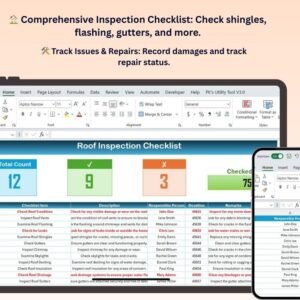
🛠️ Track Issues & Repairs
Easily track and document any issues discovered during the roof inspection, including missing shingles, leaks, or damage to flashing. Record repairs needed and monitor their completion status to stay on top of necessary maintenance.
📅 Schedule & Plan Future Inspections
Plan and schedule regular roof inspections to ensure your roof is well-maintained throughout the year. The template helps you set reminders for future inspections, keeping you proactive about roof care.
💰 Cost Tracking for Repairs & Maintenance
Track the cost of repairs, replacements, and regular maintenance for budgeting purposes. Ensure that you are aware of any expenses related to roof upkeep and plan your finances accordingly.
🖥️ Customizable & Easy-to-Use Interface
The checklist is fully customizable to suit your specific roof inspection needs. You can add or remove inspection points, adjust dates, and modify the layout to fit your preferences and requirements.
Why You’ll Love the Roof Inspection Checklist in Excel
✅ Ensure Roof Longevity
Regular roof inspections are key to preventing costly damage and extending the life of your roof. This checklist helps you keep track of maintenance tasks and avoid major repairs.
✅ Stay Organized
Document all roof inspection findings in one place, ensuring you never miss any important details. Stay organized by tracking repair status, costs, and inspection schedules.
✅ Proactive Maintenance
Stay ahead of potential roof problems by regularly inspecting and addressing minor issues before they become major repairs. Prevent leaks, water damage, and structural issues.
✅ Cost-Effective Roof Maintenance
Track the cost of roof inspections, repairs, and replacements to help with budget planning. By keeping up with regular maintenance, you can save money in the long run by avoiding emergency repairs.
✅ Customizable for Your Needs
Tailor the checklist to your unique roof inspection requirements. Add specific inspection points or adjust the template to suit your roof type, whether it’s flat, pitched, or has unique materials.
What’s Inside the Roof Inspection Checklist Template in Excel?
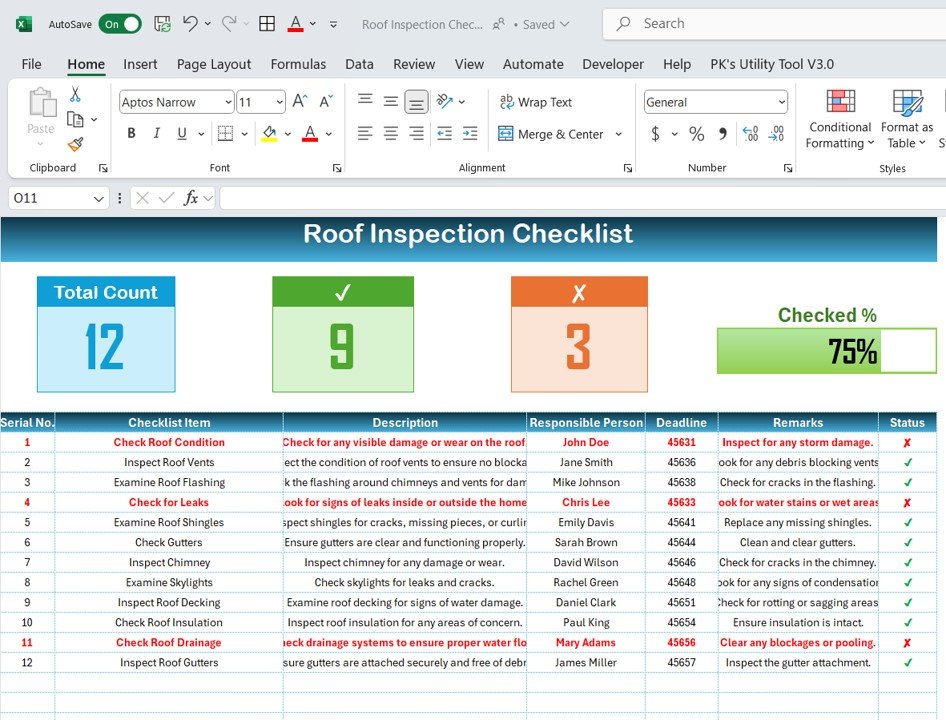
- Roof Structure & Condition: Check for structural integrity, leaks, and damage to shingles.
- Flashing & Gutters Inspection: Monitor the condition of roof flashing, gutters, and downspouts.
- Attic Ventilation & Insulation: Ensure proper attic ventilation and check insulation quality.
- Damage & Repairs Tracking: Record any damages found and track repairs made.
- Cost & Budget Tracking: Track costs for inspections and repairs for budgeting.
- Future Inspection Scheduling: Set reminders for future inspections and maintenance.
How to Use the Roof Inspection Checklist in Excel
1️⃣ Download the Template: Get instant access to the Roof Inspection Checklist in Excel.
2️⃣ Enter Inspection Data: Document your roof’s condition, including issues with shingles, flashing, gutters, and ventilation.
3️⃣ Track Repairs & Maintenance: Monitor the status of any repairs or replacements needed.
4️⃣ Schedule Future Inspections: Plan and schedule regular roof inspections to ensure proactive maintenance.
5️⃣ Track Costs & Budgeting: Record repair costs and plan your roof maintenance budget effectively.
Who Can Benefit from the Roof Inspection Checklist in Excel?
🔹 Homeowners & Property Managers
🔹 Roof Inspectors & Contractors
🔹 Real Estate Agents & Inspectors
🔹 Insurance Agents & Claims Adjusters
🔹 DIY Enthusiasts & Home Improvement Fans
🔹 Facility & Building Managers
Ensure your roof remains in excellent condition with the Roof Inspection Checklist in Excel. Track inspection results, monitor maintenance tasks, and ensure timely repairs to protect your home or property.
Click here to read the Detailed blog post
Visit our YouTube channel to learn step-by-step video tutorials
Youtube.com/@PKAnExcelExpert
Compatibility and Requirements
- Works in Microsoft Excel desktop (Excel 2016 or later, or Microsoft 365).
- You enter inspection findings, repair status and costs in the workbook. Microsoft’s Excel for Windows training covers the basics if you are new to Excel.
Frequently Asked Questions
What parts of the roof does the checklist cover?
It covers roof structure and condition, flashing, gutters and downspouts, and attic ventilation and insulation.
Can I track repairs and what they cost?
Yes. You record damage found, note the repair status and enter costs for inspections and repairs, so you can plan a maintenance budget.
Can I plan future inspections?
Yes. The template has a section for scheduling future inspections and maintenance so you can set reminders for regular roof checks.
Can I change the inspection points?
Yes. You can add or remove inspection points, adjust dates and change the layout to suit your roof type, whether flat, pitched or made of other materials.
Is there a Google Sheets version?
Yes. See the Roof Inspection Checklist in Google Sheets.
Related Maintenance Checklists
- Roof Inspection Checklist in Google Sheets: the same roof checklist for Google Sheets
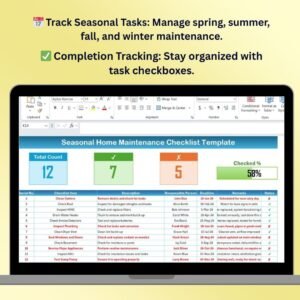
- Seasonal Home Maintenance Checklist Template in Excel: home upkeep tasks through the year
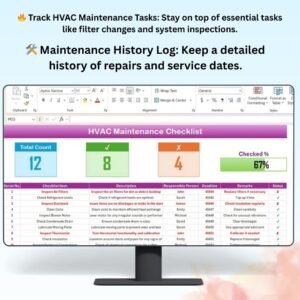
- HVAC Maintenance Checklist in Excel: heating and cooling upkeep
- Pest Control Checklist Template in Excel: another property care checklist
- Tool Inventory Checklist Template in Excel: keep track of repair tools
Browse all Excel checklists.






























Reviews
There are no reviews yet.