

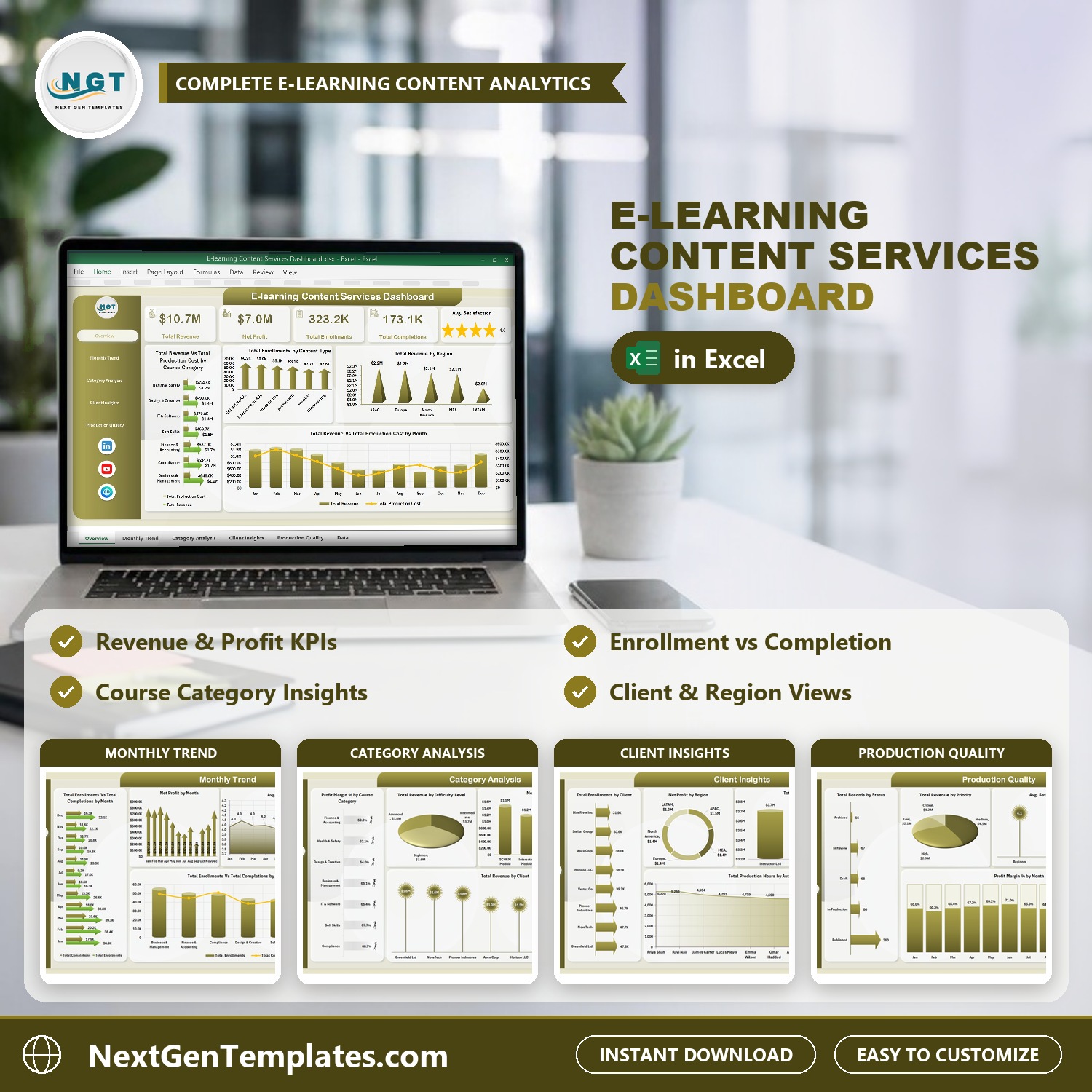




E-learning Content Services Dashboard in Excel is a ready-made Excel report for companies that build and sell e-learning content: course categories, content types, clients, authors and delivery modes all in one workbook. It tracks revenue, production cost, net profit, enrollments, completions, satisfaction scores and production status across 5 dashboard pages driven by pivot tables and slicers. Replace the sample data with your own course records, click Refresh All, and every chart updates. One-time download, no monthly SaaS fee, built by PK, a Microsoft Certified Professional with 15+ years of Excel dashboard experience.
Key Features of E-learning Content Services Dashboard in Excel
- Overview KPI cards for Total Revenue, Net Profit, Total Enrollments, Total Completions and Avg. Satisfaction.
- Slicers for Year, Month, Status, Priority and Delivery Mode, synced across the dashboard pages.
- Enrollment vs completion charts by month and by course category, so you can watch your course completion rate move.
- Profit views: Net Profit by Month, Net Profit by Content Type, Net Profit by Region and Profit Margin % by Course Category and by Month.
- Client and team views: Total Revenue by Client, Total Enrollments by Client, Total Revenue by Delivery Mode and Total Production Hours by Author.
- Data sheet with 20 columns (Content ID, Date, Course Category, Content Type, Author, Delivery Mode, Client, Region, Difficulty Level, Production Hours, Modules, Enrollments, Completions, Revenue, Production Cost, Satisfaction Score, Status, Priority, Month, Year).
- Works in Microsoft Excel. No add-ins and no macros needed to use it.
What’s Inside the E-learning Content Services Dashboard in Excel
1. Overview
The Overview page puts the five headline KPIs at the top: Total Revenue, Net Profit, Total Enrollments, Total Completions and Avg. Satisfaction shown as a star rating. Below them:
Total Revenue Vs Total Production Cost by Course Category: compares income and production spend for categories such as Business & Management, Compliance, Finance & Accounting, Soft Skills, IT & Software, Design & Creative and Health & Safety.
Total Enrollments by Content Type: shows which formats (SCORM Module, Interactive Module, Video Course, Assessment, Webinar, Microlearning) attract the most learners.
Total Revenue by Region: compares APAC, Europe, North America, MEA and LATAM.
Total Revenue Vs Total Production Cost by Month: a month-by-month view of income against cost.
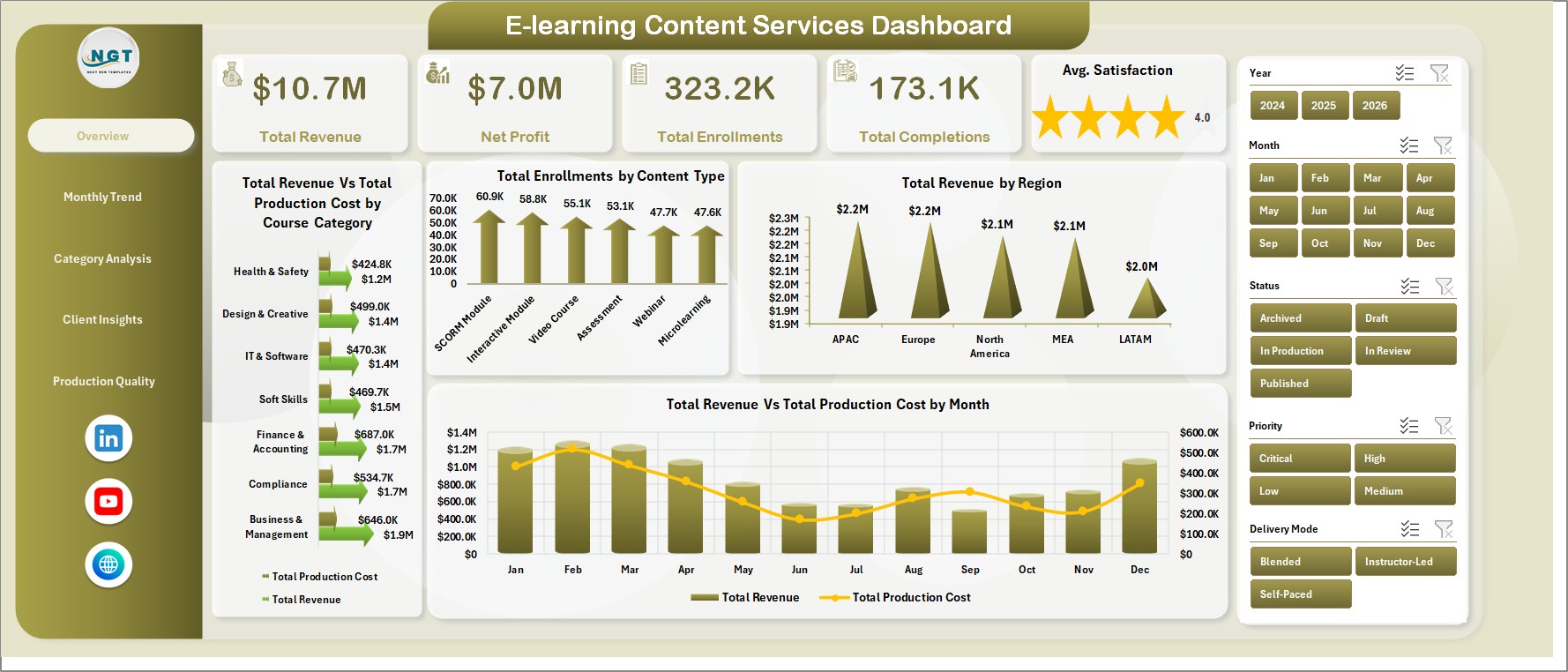
Overview
2. Monthly Trend
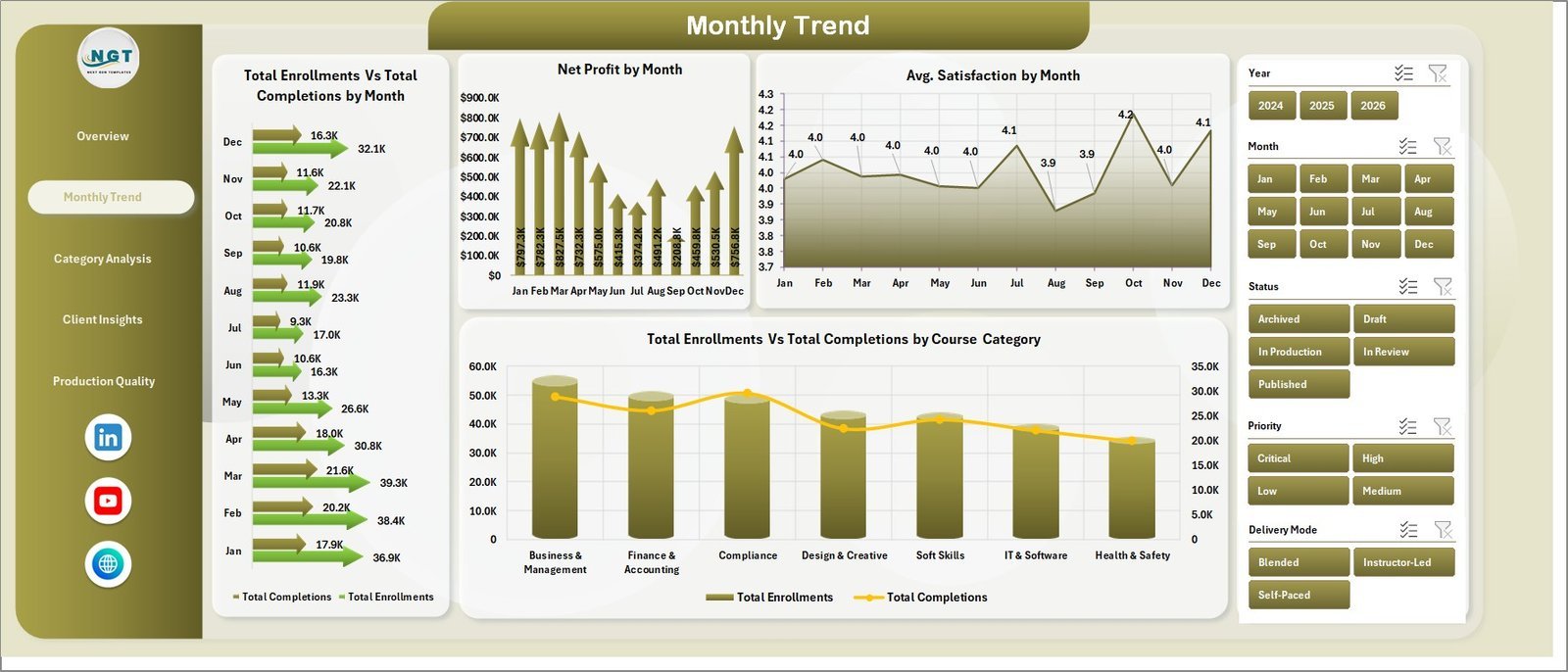
This page follows learner activity and profit over the year: Total Enrollments Vs Total Completions by Month, Net Profit by Month, Avg. Satisfaction by Month and Total Enrollments Vs Total Completions by Course Category. It is the quickest way to see whether new enrollments are turning into finished courses.
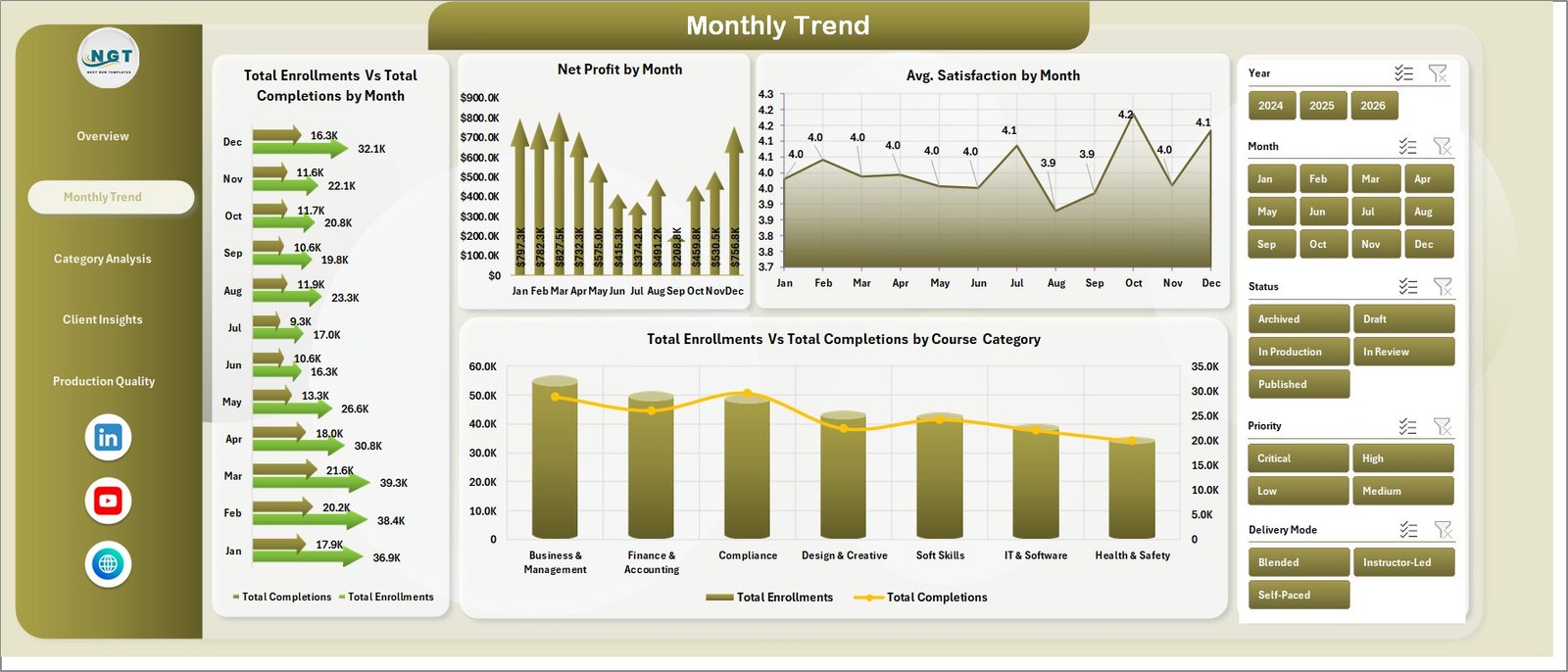
Monthly Trend
3. Category Analysis
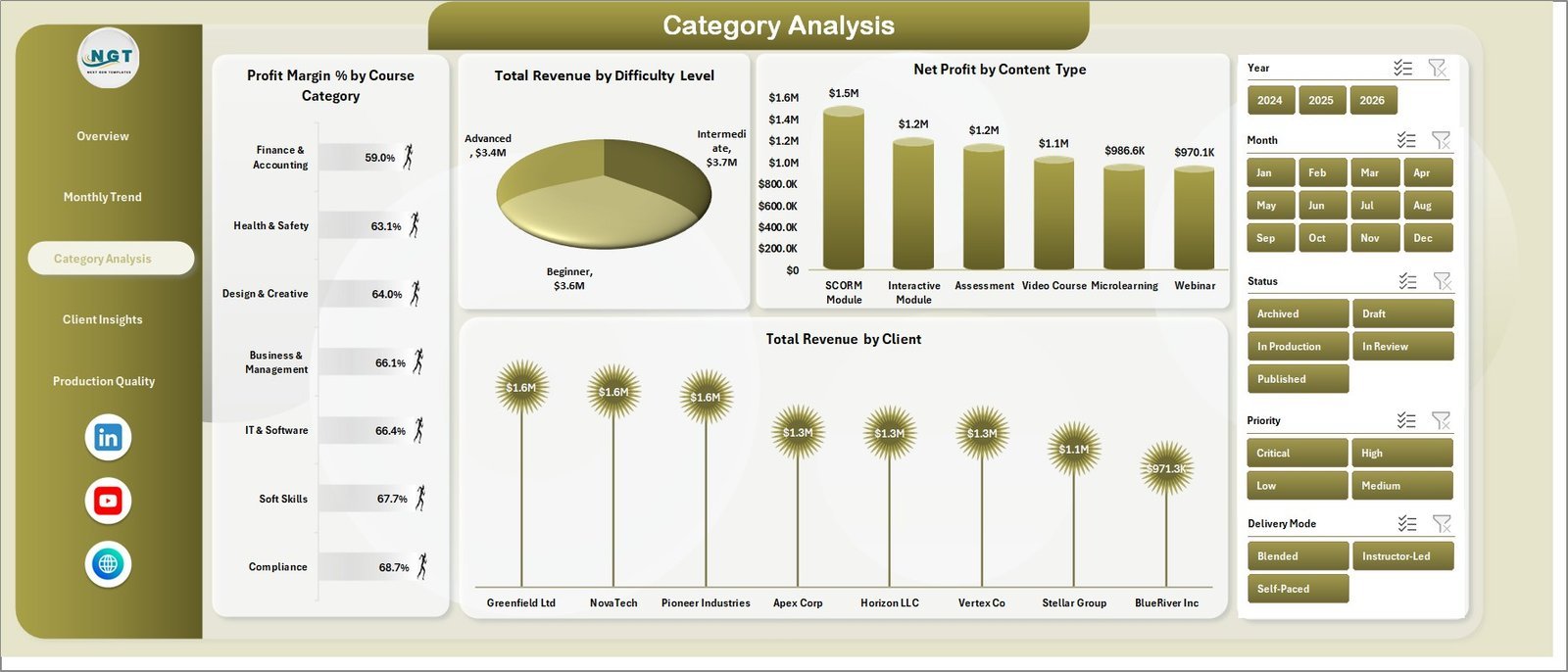
Category Analysis compares course segments: Profit Margin % by Course Category, Total Revenue by Difficulty Level (Beginner, Intermediate, Advanced), Net Profit by Content Type and Total Revenue by Client.
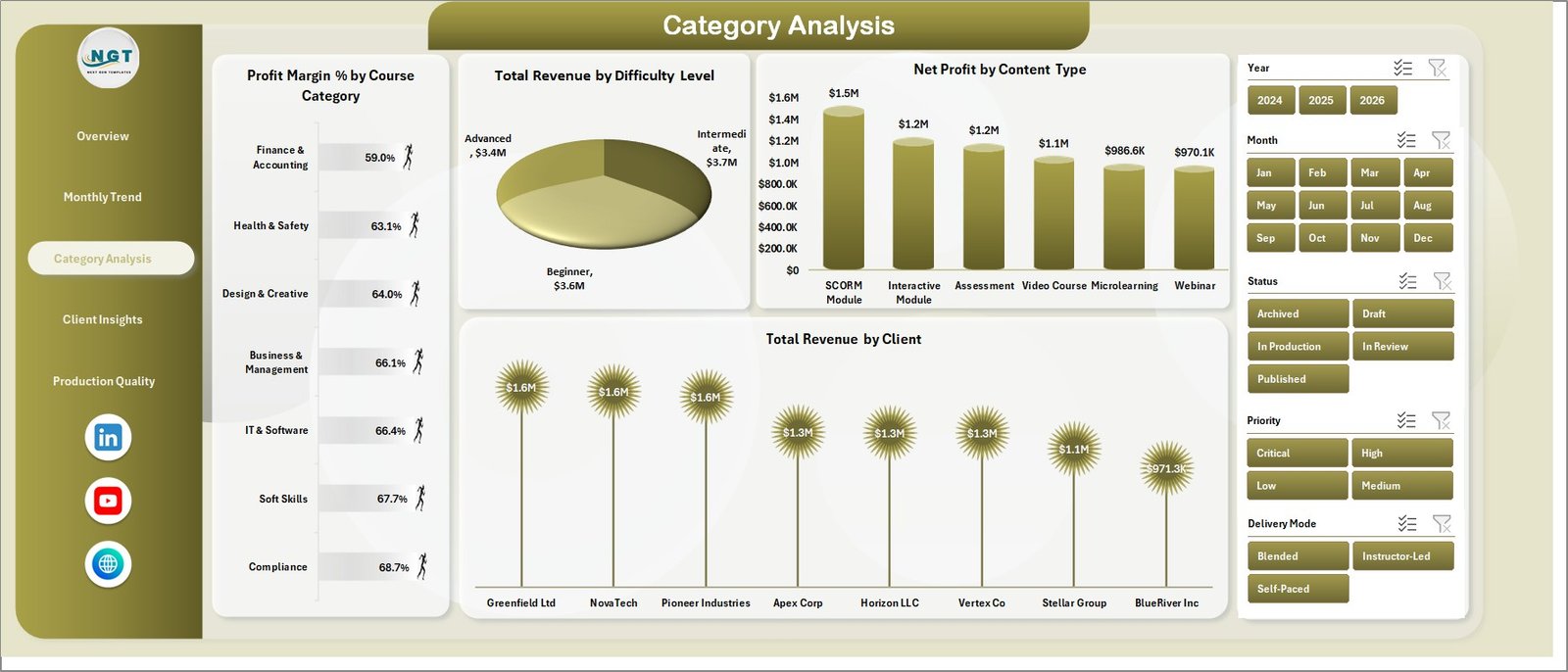
Category Analysis
4. Client Insights
Client Insights shows Total Enrollments by Client, Net Profit by Region, Total Revenue by Delivery Mode (Instructor-Led, Blended, Self-Paced) and Total Production Hours by Author, which helps you balance workload across your content team.
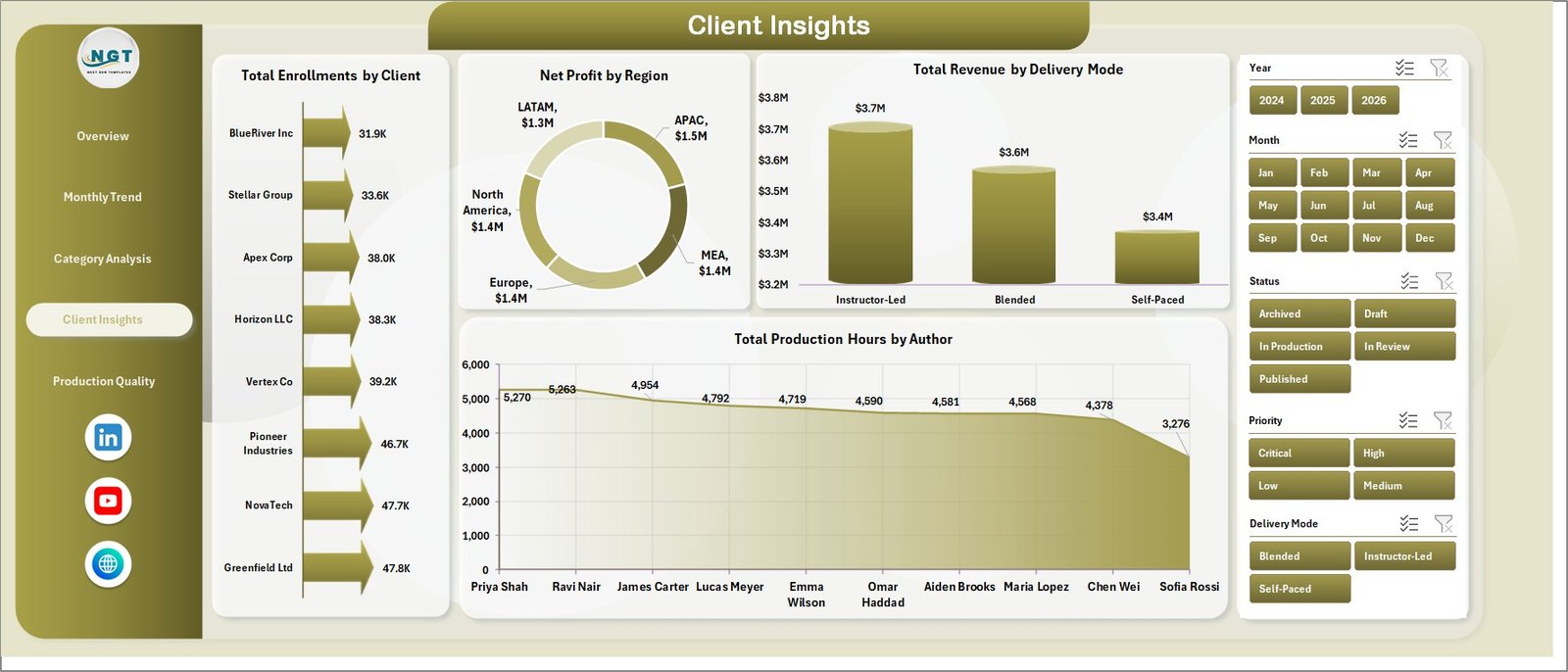
Client Insights
5. Production Quality
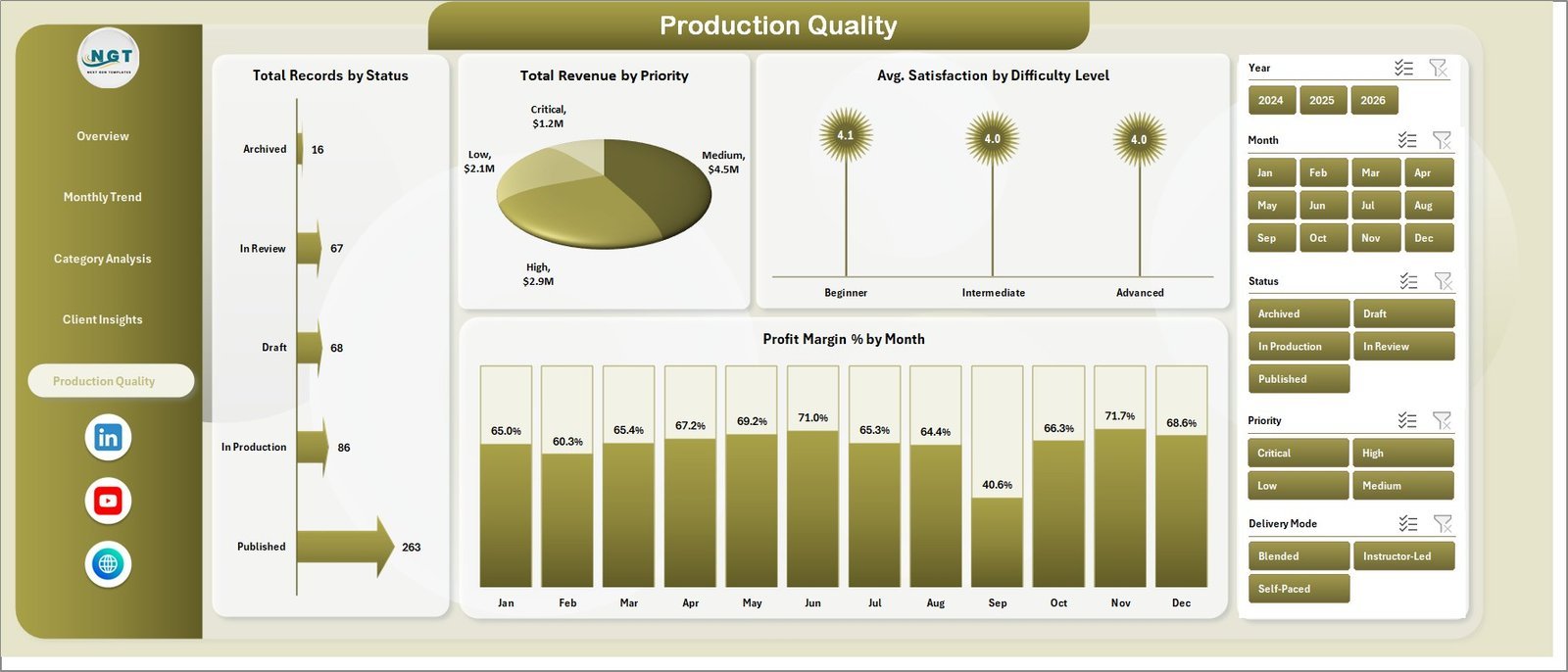
Production Quality tracks the pipeline and the quality of what ships: Total Records by Status (Published, In Production, Draft, In Review, Archived), Total Revenue by Priority, Avg. Satisfaction by Difficulty Level and Profit Margin % by Month.
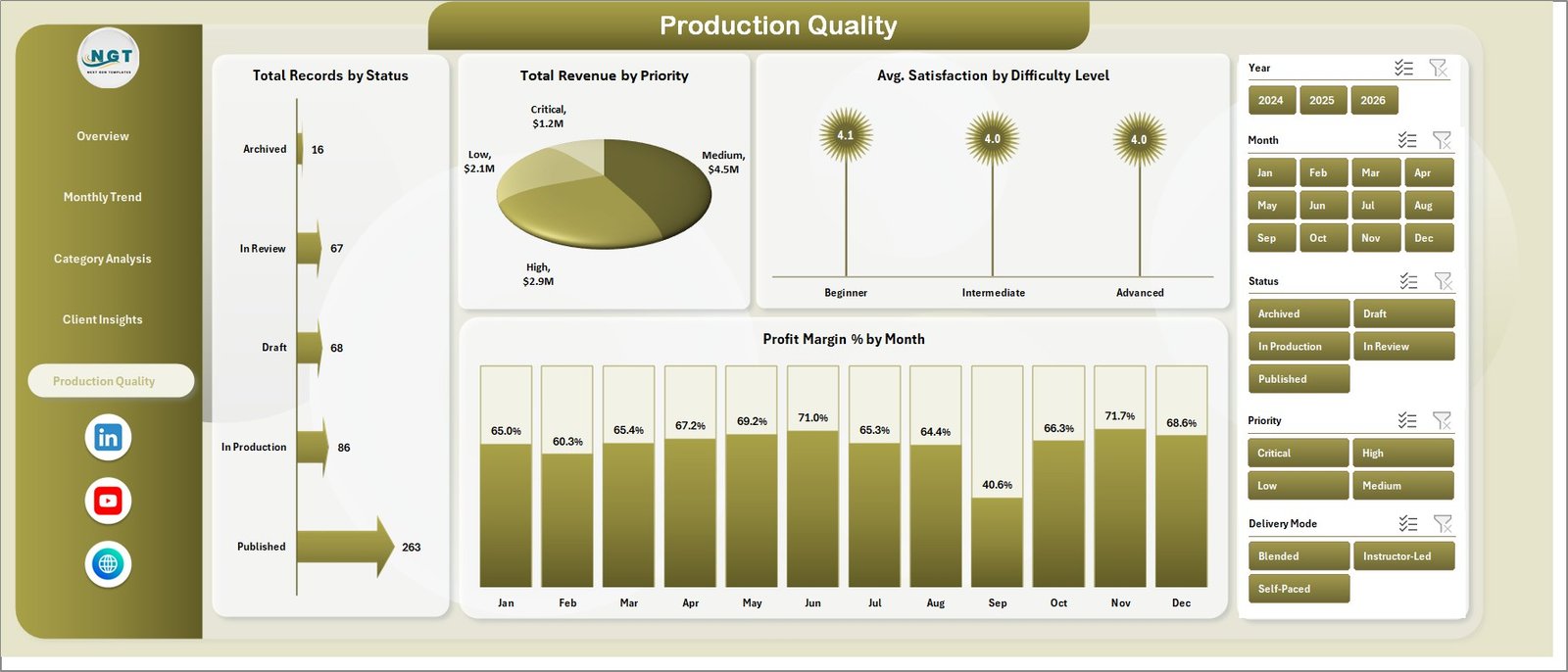
Production Quality
6. Data Sheet
The Data sheet holds one row per course or content item. Paste your own records in the same columns, keep the headers as they are, and refresh.

Data sheet
7. Support Sheet
The Support sheet holds the pivot tables behind the charts (revenue and cost by course category, enrollments by content type, revenue by region, revenue and cost by month). After updating the Data sheet, go to Data > Refresh All. You can hide this sheet once you are set up.

Support sheet
E-learning Content Services Dashboard in Excel vs. Google Sheets vs. Paid SaaS – Where This Fits
| Feature | This Excel Template | Google Sheets Alternative | Paid SaaS Alternative |
|---|---|---|---|
| Cost | $17.99 one-time | Free to build manually | Monthly or annual subscription |
| Platform | Microsoft Excel | Google Sheets | Vendor cloud platform |
| Setup time | Replace data and refresh | Build pivots and charts yourself | Onboarding and configuration |
| Customization | Edit pivots, charts, slicers and sheets | Editable, slower on large files | Limited by plan and vendor settings |
| E-learning revenue, cost and completion views | Pre-built across 5 pages | Must be created | Depends on the module |
Who This Template Is For – and Who It’s Not For
It is for e-learning agencies, course production studios and training providers who sell content to clients and want one view of revenue, production cost, enrollments, completions and satisfaction. If your business does e-learning content development for corporate clients, the Client Insights and Production Quality pages are built for exactly that. It also works as a training dashboard Excel users can share with managers who do not use BI tools.
It is not a learning management system, course authoring tool or live learning analytics dashboard connected to an LMS. It reports on data you already have in a table.
How to Use the E-learning Content Services Dashboard in Excel
- Download and unzip the file.
- Open the workbook in Microsoft Excel.
- Go to the Data sheet and replace the sample rows with your own course records, keeping the same columns.
- Click Data > Refresh All to update the pivots and charts.
- Use the Year, Month, Status, Priority and Delivery Mode slicers to filter the pages.
Real-World Use Cases
Aisha, head of a course production studio: uses the Overview and Category Analysis pages in monthly reviews to see which course categories earn the best profit margin.
Rahul, client success lead: opens Client Insights before account calls to compare enrollments and revenue for each client.
Meera, content operations manager: checks Production Quality each week to see how many items are still Draft or In Review and how satisfaction scores compare by difficulty level.
Frequently Asked Questions
What is included in this Excel dashboard?
Five dashboard pages (Overview, Monthly Trend, Category Analysis, Client Insights, Production Quality), a Data sheet and a Support sheet with the pivot tables.
Can I use my own data?
Yes. Replace the sample rows on the Data sheet, keep the column headers, and refresh all pivots.
How is the completion rate worked out?
Completions are compared with enrollments for whatever you filter, so you can read the course completion rate by month, category, client or delivery mode.
Do I need advanced Excel skills?
No. If you can paste data and click Refresh All, you can use it.
Can the dashboard be customized?
Yes. Charts, slicers, colors and sheet layouts are all editable.
Is there a Power BI version?
Yes, see the E-learning Content Services Dashboard in Power BI.
About the Author
Built by PK – Microsoft Certified Professional with 15+ years of Excel, Google Sheets, and Power BI experience. Founder of NextGenTemplates, reaching 300K+ subscribers across YouTube channels. Every template is hand-built and tested before release.
Explore Related Templates
- E-learning Content Services Dashboard in Power BI
- Educational NGOs Dashboard in Power BI
- Browse Excel Dashboard Templates
- Browse Education Excel Templates
Download the E-learning Content Services Dashboard in Excel and turn your course revenue, cost, enrollment and completion data into clear Excel reporting.
Last updated: October 14, 2026.
Watch the step-by-step video tutorial:
Compatibility and Requirements
- Works in Microsoft Excel desktop (Excel 2016 or later, or Microsoft 365).
- No add-ins and no macros are needed.
- The pages use pivot tables and slicers. Microsoft explains slicers in Use slicers to filter data.































Reviews
There are no reviews yet.