

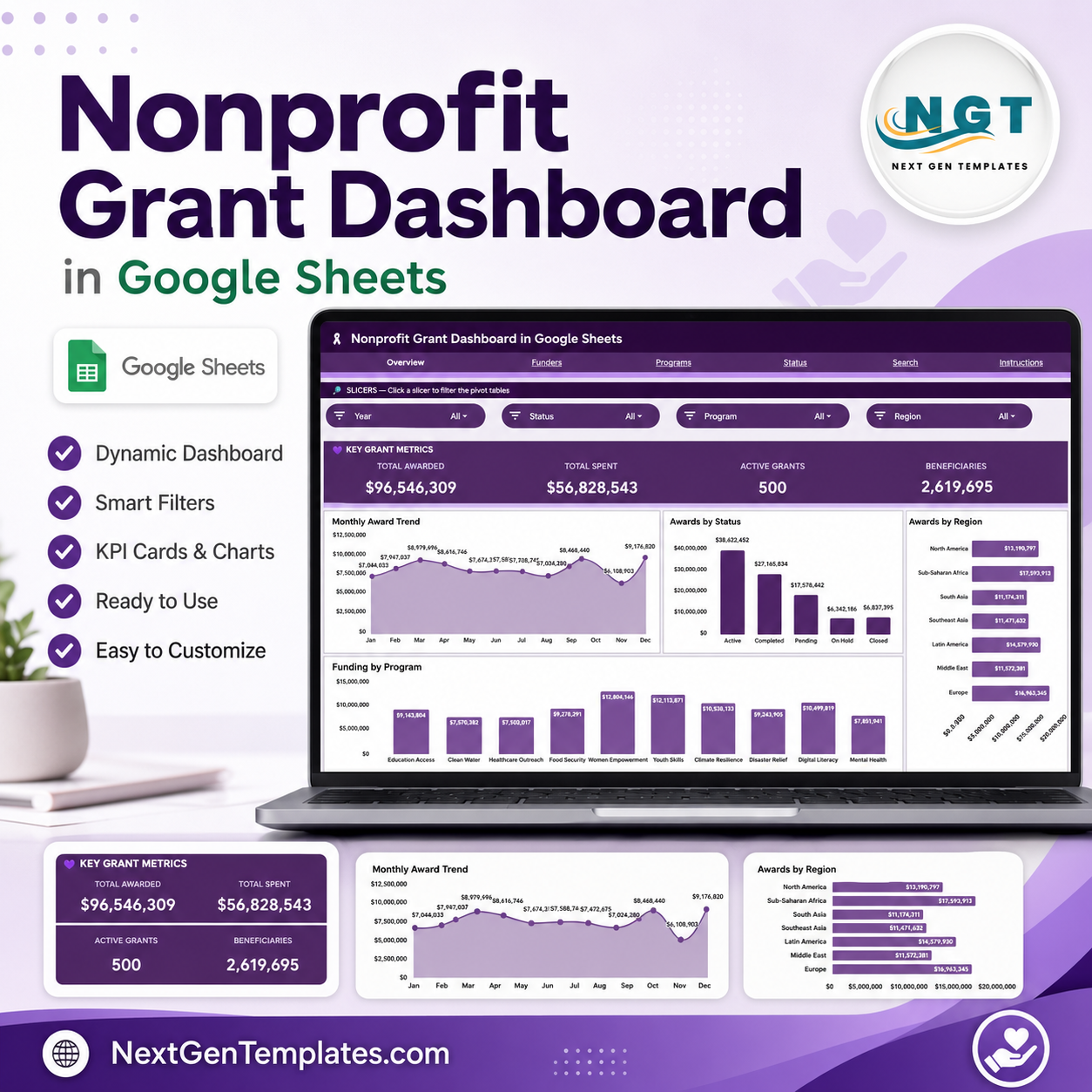

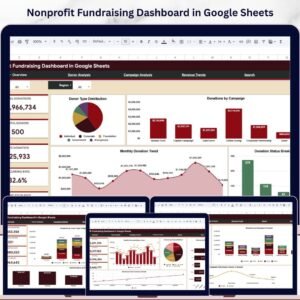
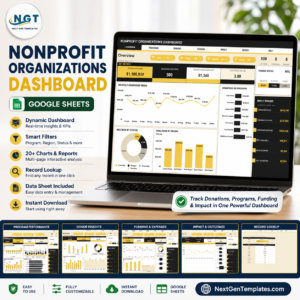
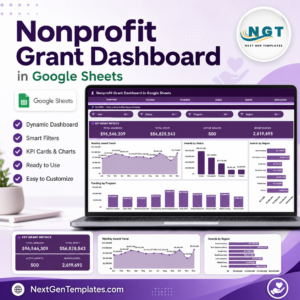
The Nonprofit Grant Dashboard in Google Sheets tracks 4 headline KPIs and 13 pre-built charts across 6 connected tabs, with slicer filters and a Grant ID lookup. Setup takes under 10 minutes — paste your grant records into the Data tab and every card, chart and filter updates automatically.
🌍 Join 8,400+ teams in 40+ countries using NextGenTemplates to replace paid SaaS tools with one-time-purchase Excel, Google Sheets, Power BI, and HTML templates.
✅ Instant download · One-time payment · No subscription · No per-user fees · Lifetime access
🔑 Key Features of the Nonprofit Grant Dashboard in Google Sheets
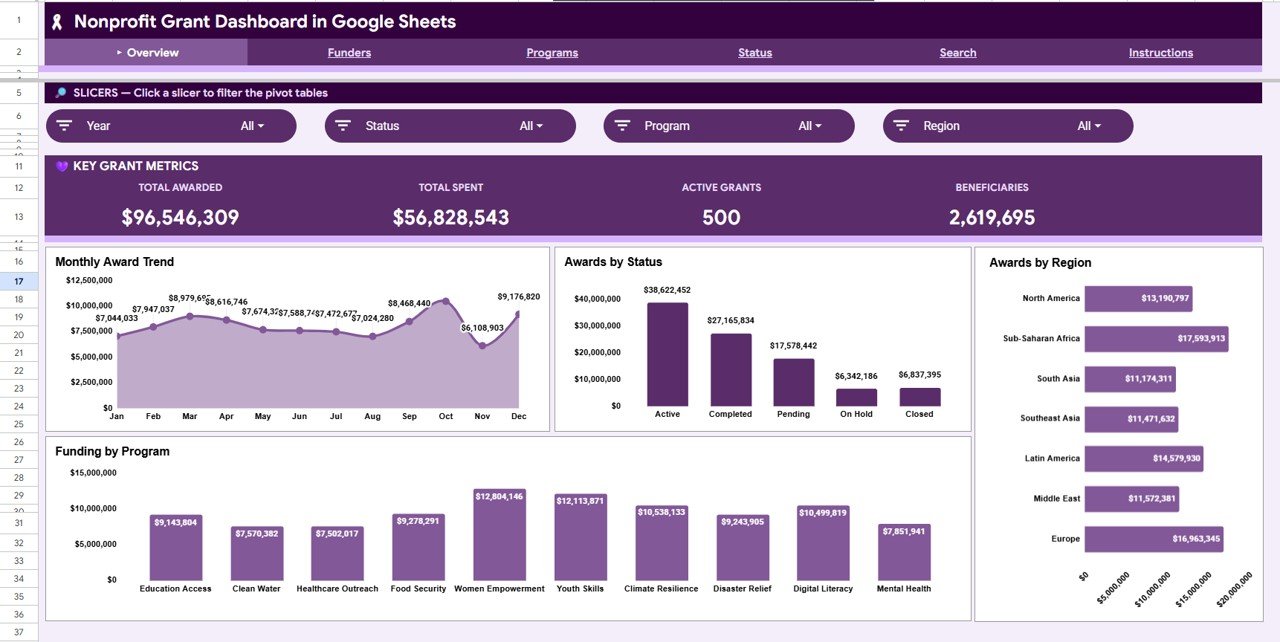
This dashboard gives grant teams a single source of truth for every award. The Overview tab surfaces four KPI cards — Total Awarded, Total Spent, Active Grants and Beneficiaries — so leadership can read program health in one glance without opening a single report.
It ships with 13 ready-made charts spread across four analysis tabs, covering award trends over time, status breakdowns, regional reach, funder contributions and program funding. Every visual is wired to native slicers, so a single click filters the entire page by funder, program, region or status.
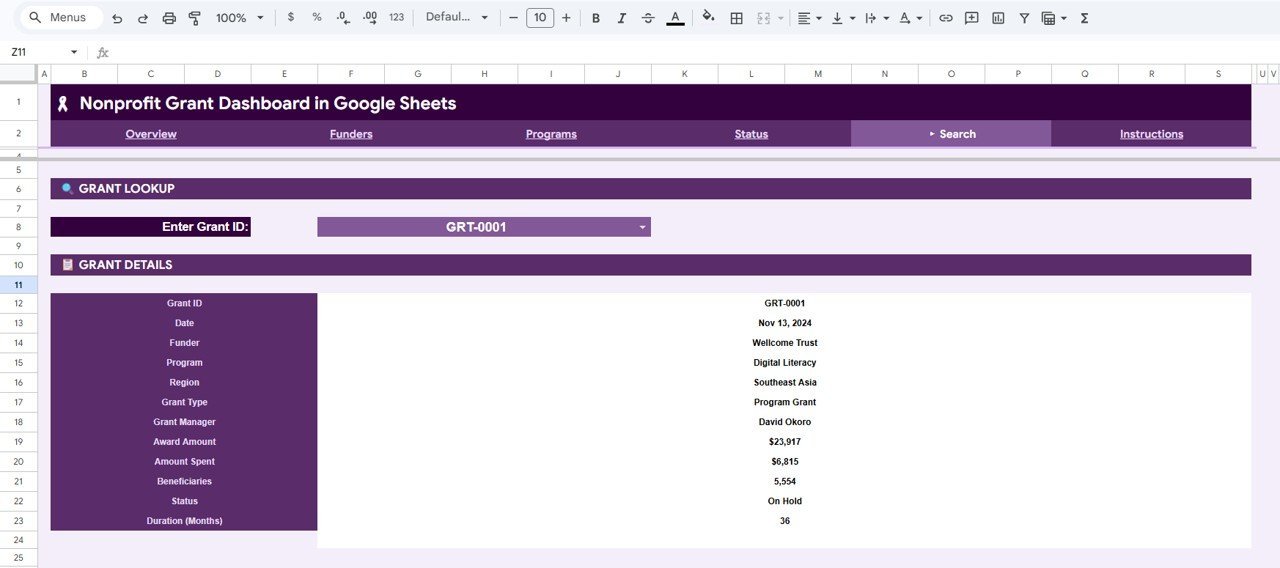
A dedicated Search tab works as a Grant Lookup: select any Grant ID from a dropdown and the sheet returns its full record — Date, Funder, Program, Region, Grant Type, Grant Manager, Award Amount, Amount Spent, Beneficiaries, Status and Duration in Months. It runs entirely inside Google Sheets Dashboards with no add-ons, scripts or installs required.
📦 What’s Inside the Nonprofit Grant Dashboard in Google Sheets
Page 1: Overview Dashboard
The Overview tab leads with four KPI cards — Total Awarded, Total Spent, Active Grants and Beneficiaries — plus slicers that filter every chart at once. The four charts here are: Monthly Award Trend — plots awarded value month by month so you can spot funding peaks and dry spells. Awards by Status — splits the portfolio across statuses like Active, Completed and Pending. Awards by Region — compares award value across the regions you serve. Funding by Program — shows which programs attract the most grant money.
Nonprofit Grant Dashboard in Google Sheets
Page 2: Funders
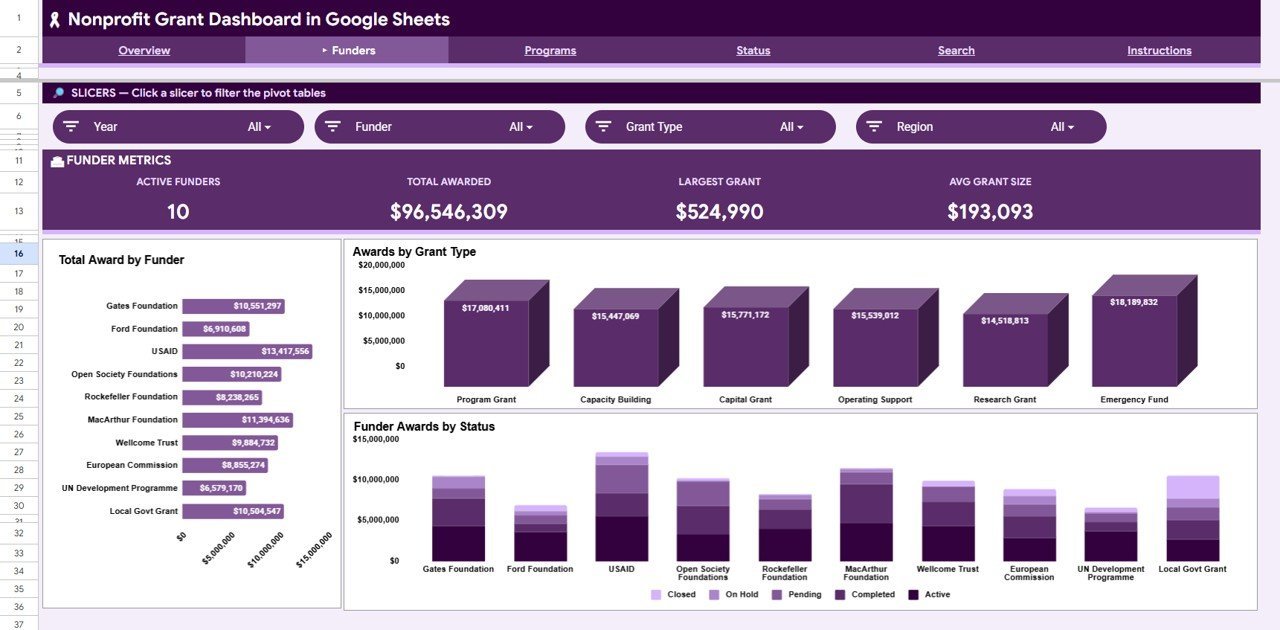
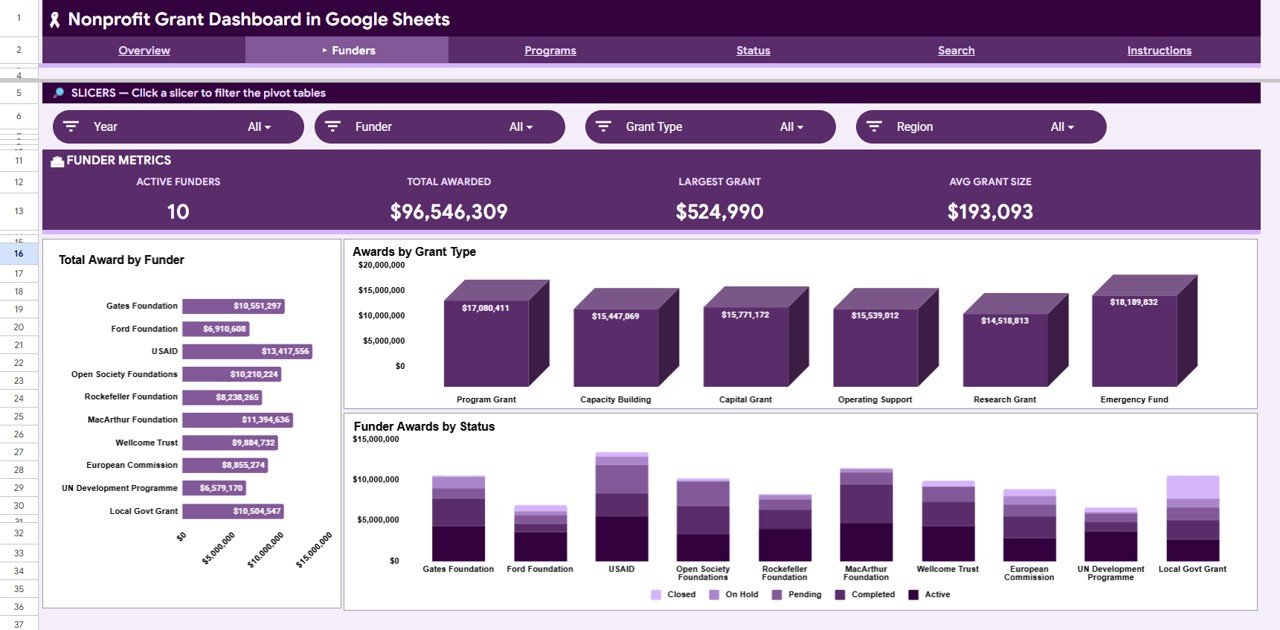
The Funders tab analyses where your money comes from. Total Award by Funder — ranks every funder by total value contributed. Awards by Grant Type — breaks the portfolio down by grant type so you can see your funding mix. Funder Awards by Status — cross-tabs each funder against grant status to track progress per funder.
Funders Analysis
Page 3: Programs
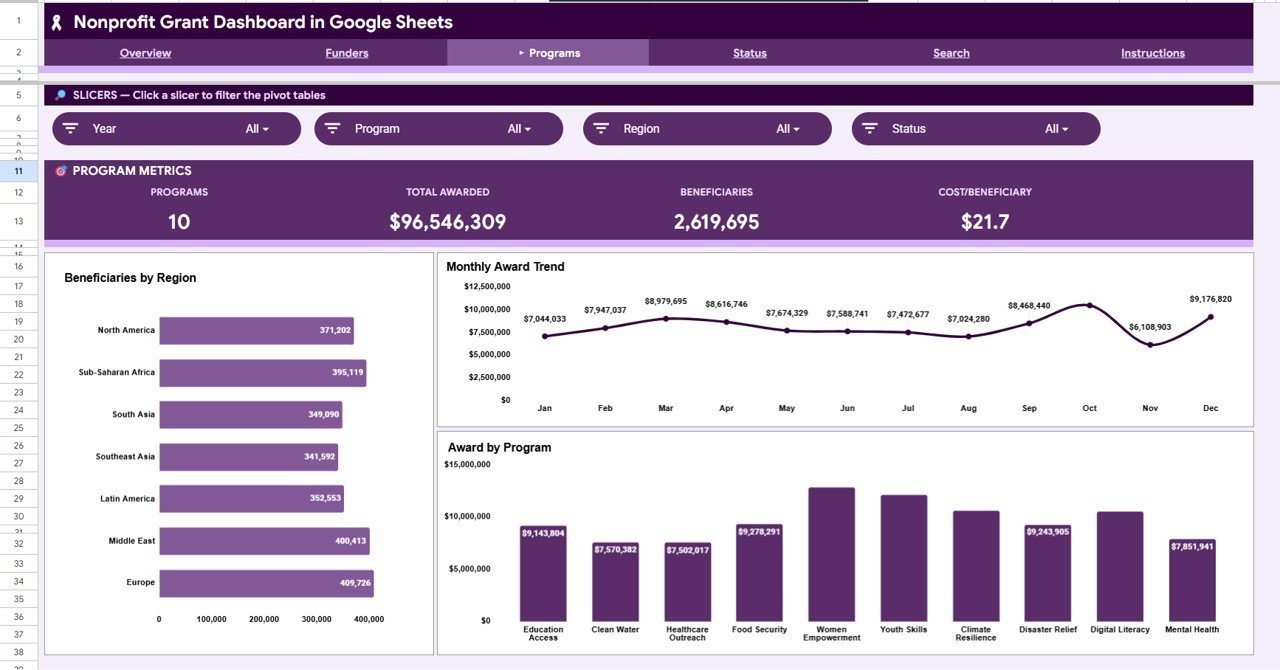
The Programs tab connects funding to impact. Beneficiaries by Region — shows how many people each region reaches. Monthly Award Trend — tracks program-level award flow across the year. Award by Program — compares total award value secured per program.
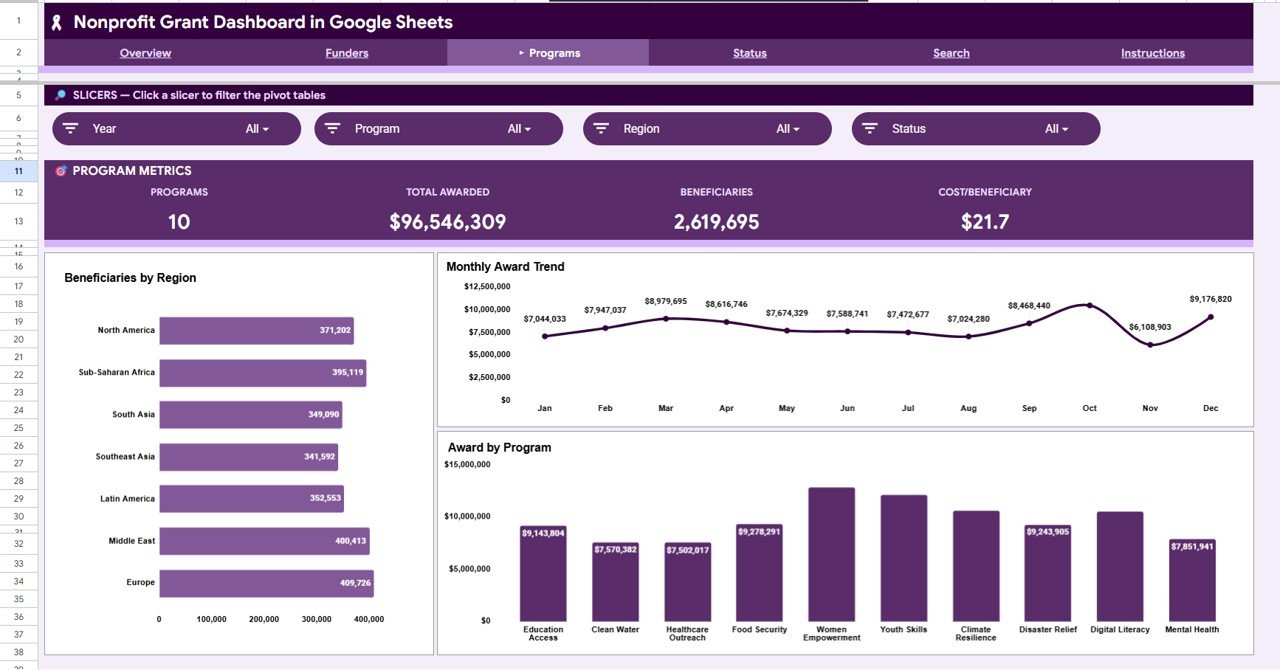
Programs Analysis
Page 4: Status
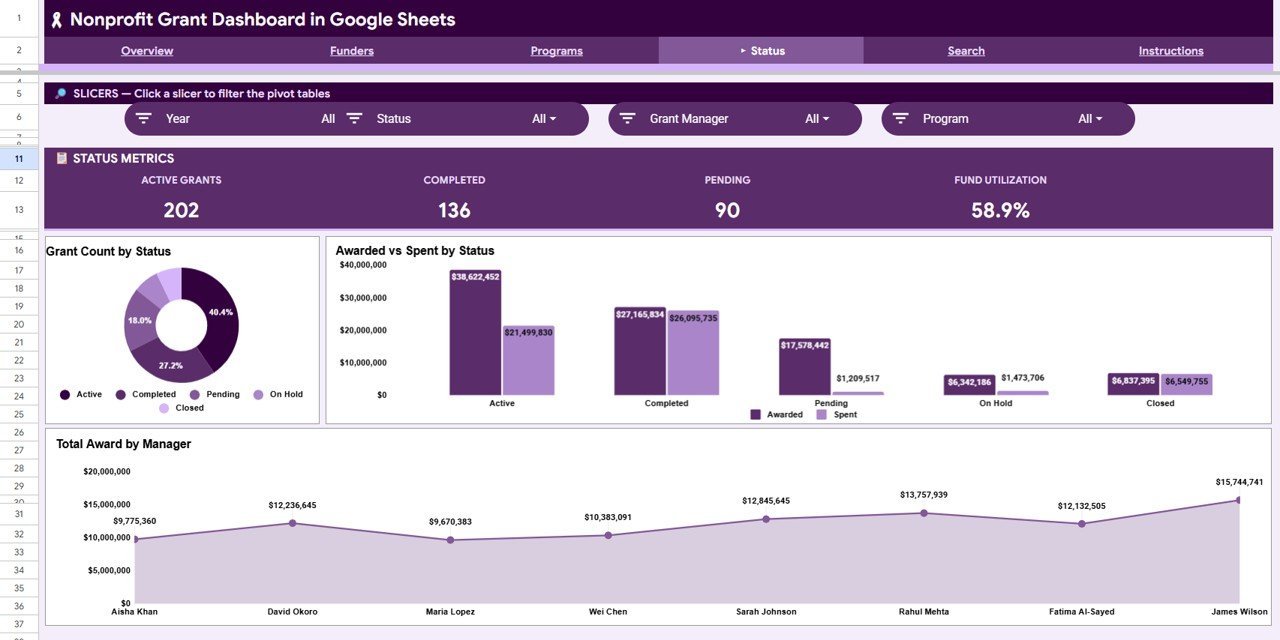
The Status tab is built for utilisation and accountability. Grant Count by Status — counts how many grants sit in each status stage. Awarded vs Spent by Status — compares committed money against money actually spent per status. Total Award by Manager — shows the award value each grant manager is responsible for.
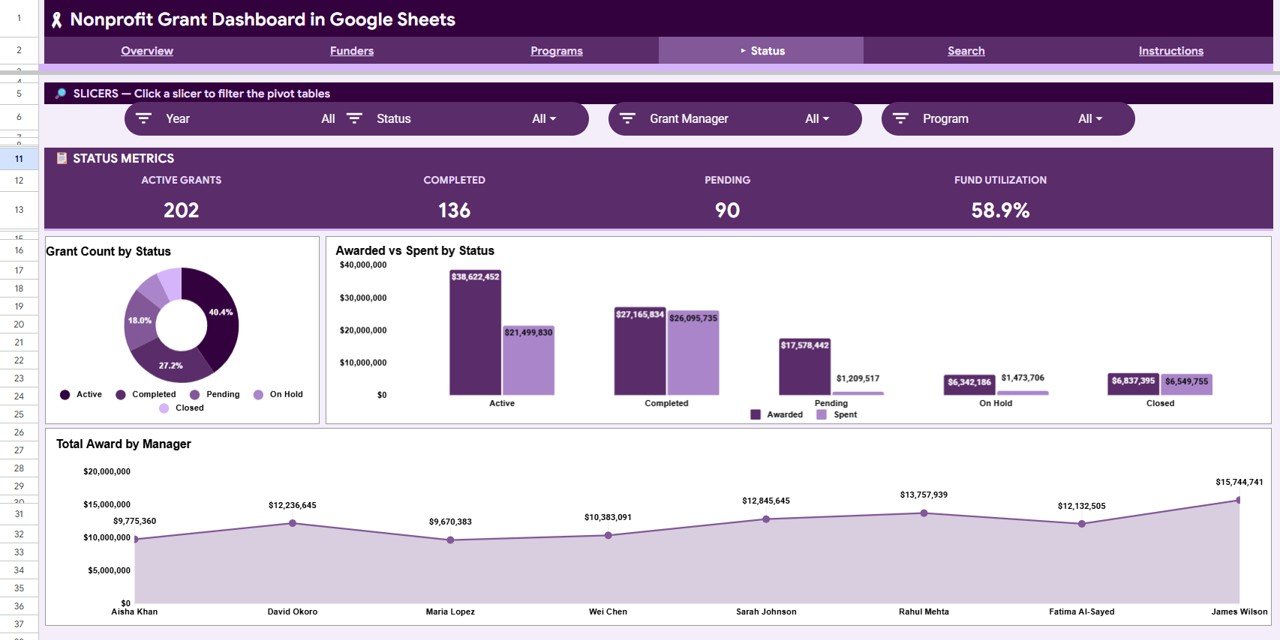
Status Analysis
Page 5: Search Sheet
The Search tab is a Grant Lookup. Select any Grant ID from the dropdown and it returns the complete record — Date, Funder, Program, Region, Grant Type, Grant Manager, Award Amount, Amount Spent, Beneficiaries, Status and Duration in Months — perfect for pulling up a single grant during a call or audit.
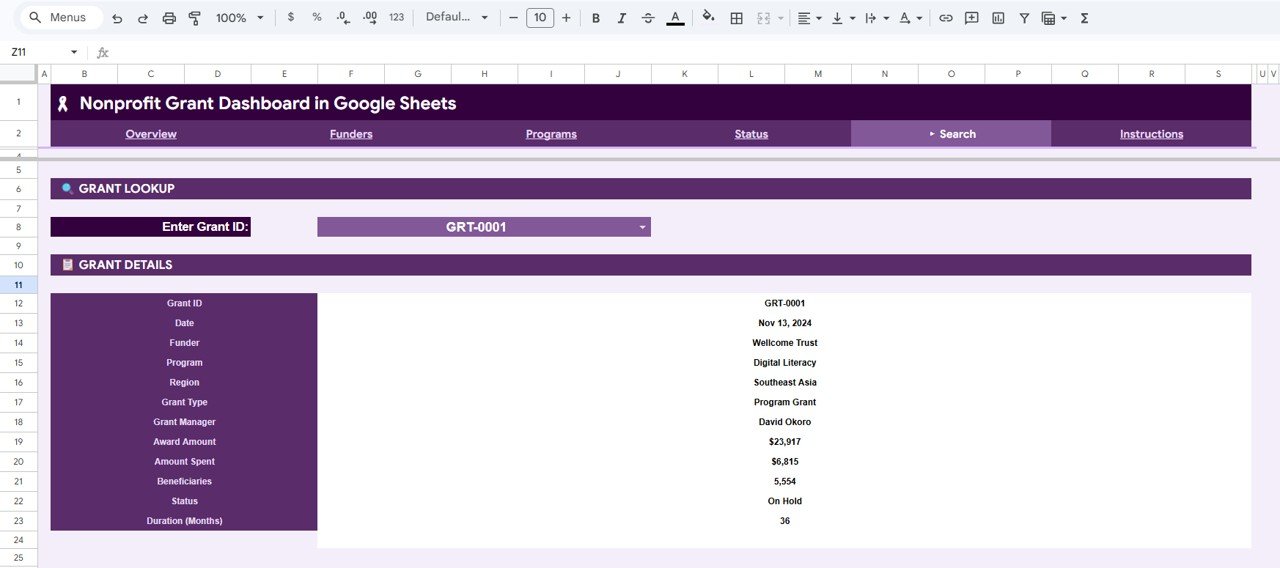
Search Sheet tab
Page 6: Data Sheet
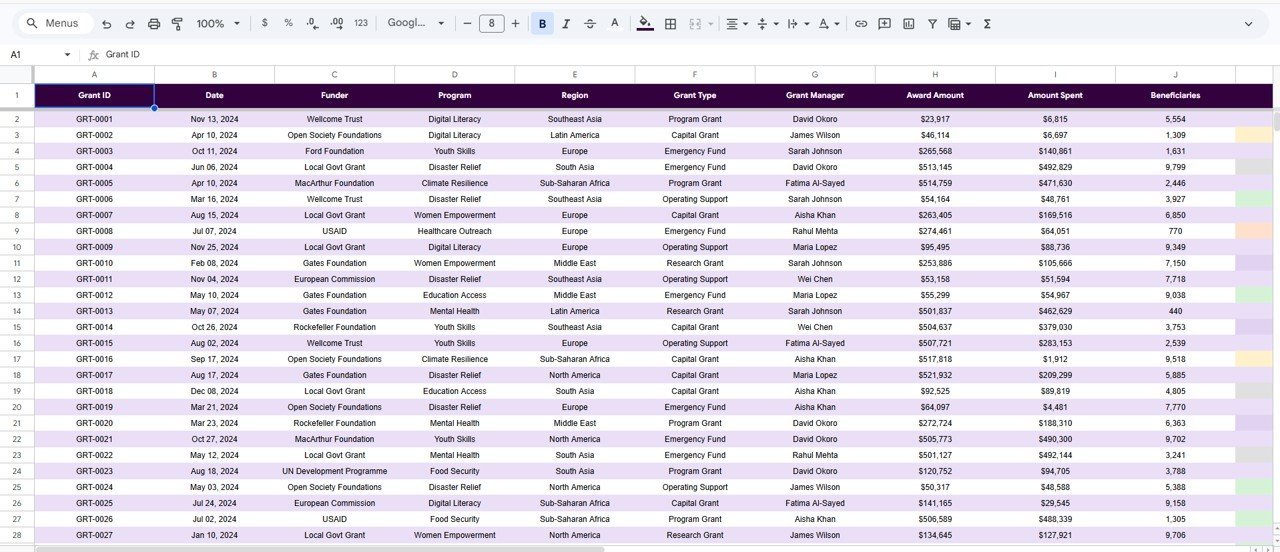
The Data tab is where everything starts. Enter or paste your grant records in the same column format and the entire dashboard — cards, charts, slicers and the lookup — rebuilds from this single table.
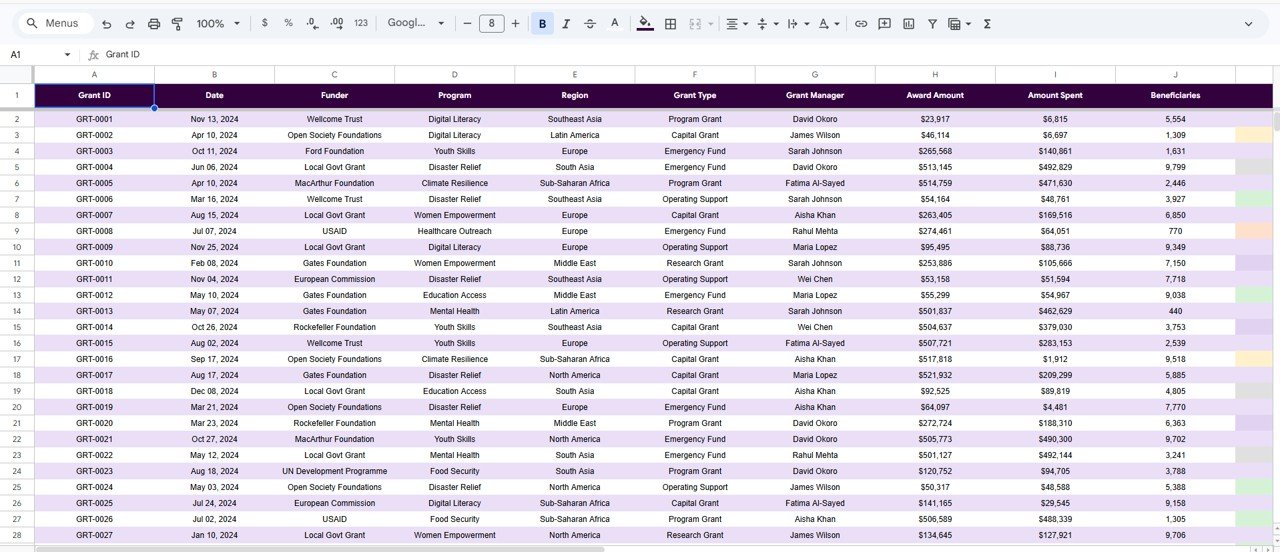
Data Sheet tab
📊 Nonprofit Grant Dashboard: Google Sheets vs. Excel vs. Paid Grant Software
| Feature | This Template (Google Sheets) | Microsoft Excel Dashboard | Fluxx / Submittable / Blackbaud |
|---|---|---|---|
| Cost | $9.99 one-time | $17.99 one-time | $5,000–$30,000+ / year |
| Platform | Browser, any device | Desktop Excel | Web SaaS |
| Setup time | Under 10 minutes | Under 10 minutes | Weeks (onboarding) |
| Real-time team collaboration | ✅ Built in | Needs OneDrive / 365 | ✅ Yes |
| Mobile access | ✅ Google Sheets app | Limited | ✅ Yes |
| Customisable fields | ✅ Fully open | ✅ Fully open | Limited / paid tiers |
| Share with a link | ✅ One click | File send | ✅ Yes |
| Grant ID lookup search | ✅ Built in | ✅ Built in | ✅ Yes |
| Year-1 cost at 5 users | $9.99 total | $17.99 total | $5,000–$30,000+ |
For grant teams that want funder-ready reporting without paying thousands a year for grant-management software, the Nonprofit Grant Dashboard in Google Sheets sits in the sweet spot.
👥 Who This Template Is For — and Who It’s Not For
✅ This template is built for:
- Small and mid-size nonprofits managing 10–500 grants across multiple funders and programs
- Grant managers and program officers who need funder-ready charts without a data team
- Founders and treasurers tracking awarded vs spent and beneficiaries reached on a fixed budget
❌ This template is NOT for:
- Large foundations needing full grants-management workflow, approvals and SOC 2 compliance
- Teams that require automated funder portals or online application intake
⚙️ How to Use the Nonprofit Grant Dashboard in Google Sheets
- Open the PDF guide in your download and click the Google Sheets copy link to save your own editable copy.
- Go to the Data tab and paste your grant records in the same column order.
- Open the Overview tab — the four KPI cards and charts populate automatically.
- Use the slicers to filter by funder, program, region or status across every chart.
- Open the Search tab and pick a Grant ID to pull any single grant’s full record.
💼 Real-World Use Cases
Maria runs grants at a 25-person community nonprofit. She pastes her award log into the Data tab each month and uses the Overview cards to show her board Total Awarded versus Total Spent in seconds — no more rebuilding a slide deck from scratch.
David is a program officer managing 60 grants across four regions. He uses the Status tab to compare Awarded vs Spent and the Total Award by Manager chart to balance workload across his team.
Aisha prepares funder reports for a global education charity. She filters the Programs tab by region with one slicer click and exports a clean Beneficiaries by Region view for each funder.
❓ Frequently Asked Questions
What KPIs does the Nonprofit Grant Dashboard in Google Sheets track?
The Nonprofit Grant Dashboard in Google Sheets tracks four headline KPIs — Total Awarded, Total Spent, Active Grants and Beneficiaries — plus 13 charts covering award trends, status, region, funder and program. All metrics update automatically when you replace the sample data.
How long does setup take?
Setup for the Nonprofit Grant Dashboard in Google Sheets takes under 10 minutes. Make your own copy, paste your grant records into the Data tab in the same column order, and every card, chart, slicer and the Grant Lookup rebuild themselves.
Can I filter the dashboard by funder or program?
Yes. The Nonprofit Grant Dashboard in Google Sheets uses native slicers on the analysis tabs, so a single click filters every chart on the page by funder, program, region or status — no formulas to edit.
How does this compare to paid grant software like Fluxx or Blackbaud?
Paid grant-management platforms run $5,000–$30,000+ per year. The Nonprofit Grant Dashboard in Google Sheets is a one-time $9.99 purchase that covers reporting, filtering and grant lookup — ideal for teams that need clear analytics without enterprise pricing.
Do I need any add-ons or installs?
No. The Nonprofit Grant Dashboard in Google Sheets runs entirely in your browser inside Google Sheets, with no extensions, scripts or installs. It also works on the Google Sheets mobile app.
Is the dashboard editable and shareable?
Yes. Every tab is fully editable, and because it lives in Google Sheets you can share view or edit access with trustees, funders or teammates using a single link.
👤 About the Author
Built by PK — Microsoft Certified Professional with 15+ years of Excel, Google Sheets, and Power BI experience. Founder of NextGenTemplates, reaching 300K+ subscribers across YouTube channels (@PK-AnExcelExpert, @NextGenTemplates, @NeoTechNavigators). Every template is hand-built and tested before release.
🔗 Explore Related Templates
Also available on other platforms: Nonprofit Grant Dashboard in Excel and Nonprofit Grant Dashboard in Power BI — same analysis, your choice of tool.
Pair it with the Grant Proposal Submission Calendar in Google Sheets to plan deadlines, or the Corporate Sponsorship Request Tracker in Excel to manage sponsor outreach. Browse more Google Sheets Dashboards.
📖 Click here to read the Detailed Blog Post
Watch the step-by-step video tutorial:
🎥 Visit our YouTube channel for step-by-step video tutorials
👉 YouTube.com/@NextGenTemplates
📅 Last updated: June 2026
Compatibility and Requirements
- Works in Google Sheets. You need a free Google account and a web browser.
- It runs without add-ons or scripts. Open the PDF guide in your download and use its link to save your own copy.
- New to Google Sheets? Google explains the basics in How to use Google Sheets.

























Reviews
There are no reviews yet.