

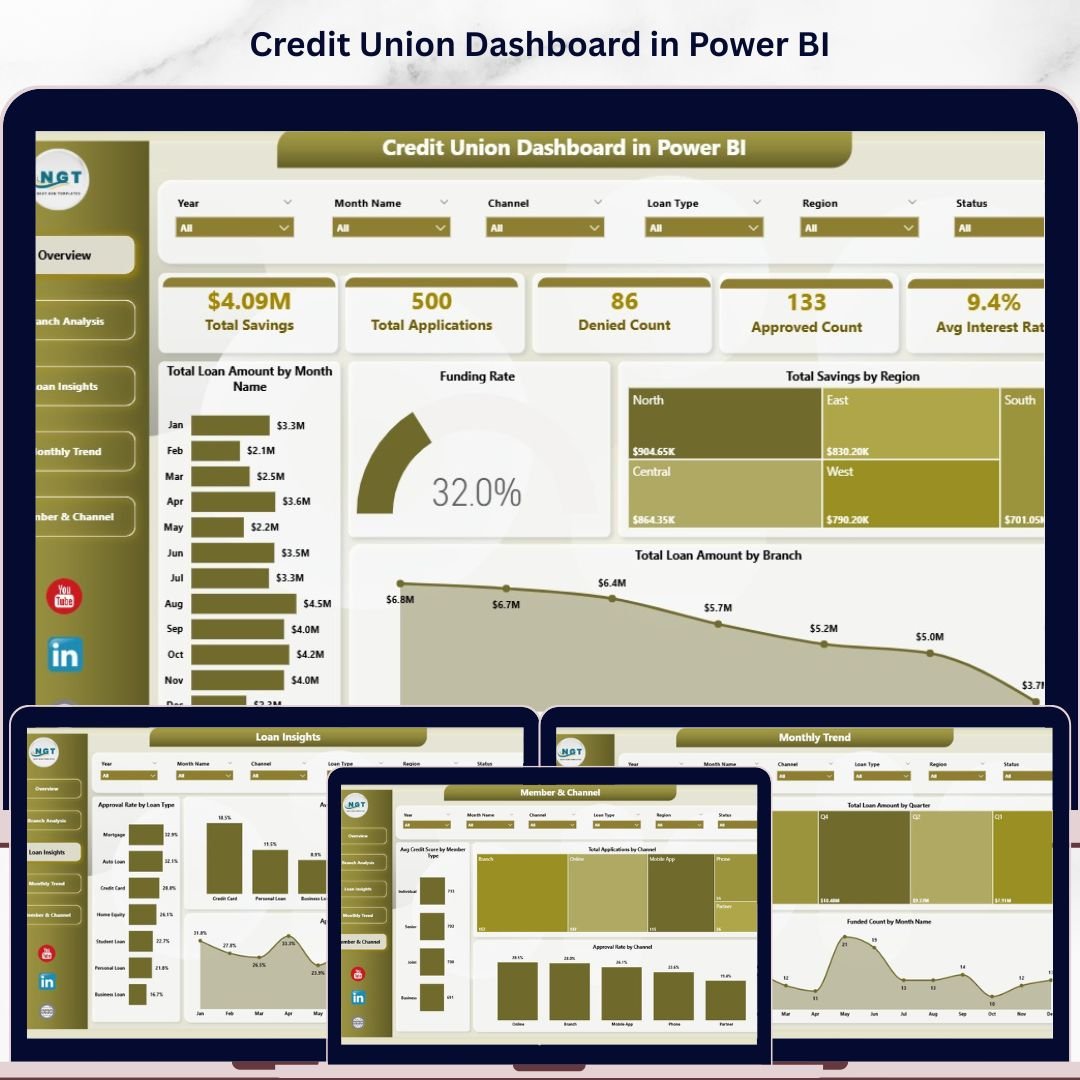
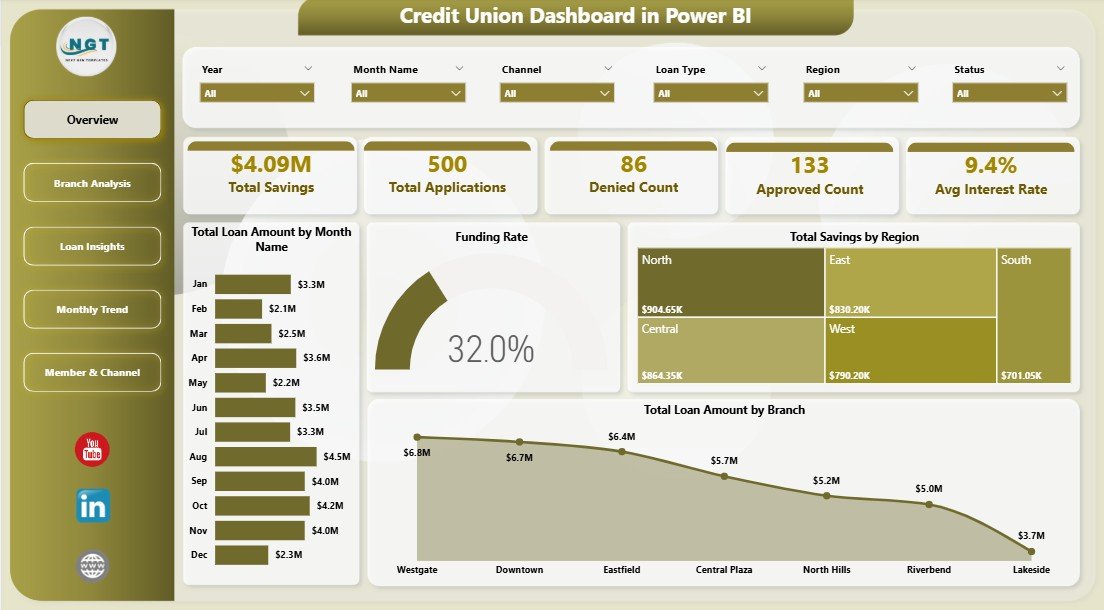
The Credit Union Dashboard in Power BI tracks 5 portfolio KPIs across 5 interactive report pages, with 13 visuals spanning loan funding, savings, branch performance, member channels, and monthly trends. Setup takes under 10 minutes — connect your data, replace the sample source, and every chart, KPI card, and slicer refreshes automatically.
🌍 Join 8,400+ teams in 40+ countries using NextGenTemplates to replace paid SaaS tools with one-time-purchase Excel, Google Sheets, Power BI, and HTML templates.
✅ Instant download · One-time payment · No subscription · No per-user fees · Lifetime access
Credit Union Dashboard in Power BI
🔑 Key Features of the Credit Union Dashboard in Power BI
📌 5 KPI Summary Cards on the Overview page — Total Savings, Total Applications, Denied Count, Approved Count, and Avg Interest Rate sit as headline tiles. Each card recalculates instantly when you change a slicer or refresh the data source, so leadership sees fresh portfolio numbers without rebuilding visuals.
📌 4 multi-dimensional slicers filter every visual on every page — Branch, Region, Loan Type, and Member Type. Click one slicer and Funding Rate, Total Loan Amount, and Approval Rate all rerender across the report in under a second on a typical mid-range laptop.
📌 5 dedicated report pages separate Overview, Branch Analysis, Loan Insights, Monthly Trend, and Member & Channel views — so loan officers, branch managers, and the CFO each open the page that matches their role instead of scrolling through one cluttered tab.
📌 Funding Rate KPI measures the percentage of approved applications that actually funded — the single most important leakage metric for a credit union loan pipeline. The dashboard breaks this down by month and by branch so you can spot which locations are converting approvals into disbursed loans.
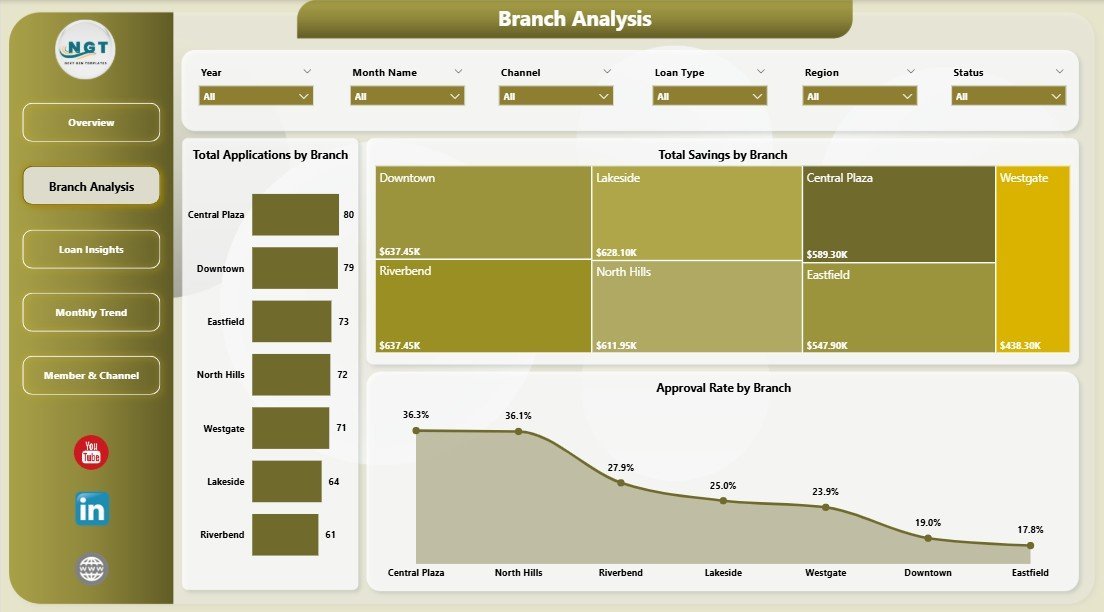
📌 Branch-level performance comparison — Total Applications by Branch, Total Savings by Branch, and Approval Rate by Branch sit side-by-side on the Branch Analysis page, making it obvious which branches drive volume and which need pipeline coaching.
📌 Print-ready and presentation-ready — Power BI’s native export pushes the entire report to PDF or PowerPoint without breaking formatting, making board meetings and regulator submissions a 1-click task.
📦 What’s Inside the Credit Union Dashboard in Power BI
This dashboard contains multiple report pages, each engineered for a specific credit union persona — CFO, branch manager, lending head, and member services lead.
1 — Overview Page
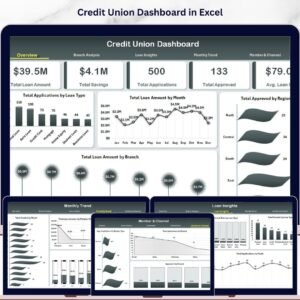
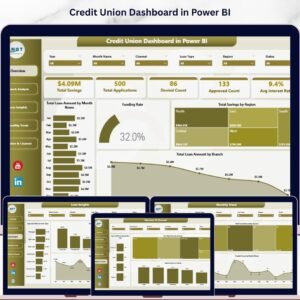
The Overview is the executive landing page. The top strip contains five KPI cards giving an instant read on portfolio health:
🔸 Total Savings
🔸 Total Applications
🔸 Denied Count
🔸 Approved Count
🔸 Avg Interest Rate
Below the cards, four visuals show how the portfolio is moving:
🔸 Total Loan Amount by Month Name — reveals seasonality and identifies which months drive the bulk of disbursements, so you can plan capacity and treasury timing.
🔸 Funding Rate — measures approved-to-funded conversion as a single citable percentage, the cleanest health check on the loan pipeline.
🔸 Total Savings by Region — shows deposit concentration across regions, useful for liquidity planning and regional marketing spend allocation.
🔸 Total Loan Amount by Branch — ranks branches on lending volume so the CFO can spot top and bottom performers in one glance.
Credit Union Dashboard in Power BI
2 — Branch Analysis
This page is built for branch managers and regional heads who need a comparable scorecard across locations. Visuals on this page include:
🔸 Total Applications by Branch — volume of pipeline coming in at each branch, used to size staffing and underwriting capacity.
🔸 Total Savings by Branch — deposit base per branch, a key indicator of member loyalty and cross-sell potential.
🔸 Approval Rate by Branch — the percentage of applications approved at each location, flagging branches with unusually low or high acceptance for credit policy review.
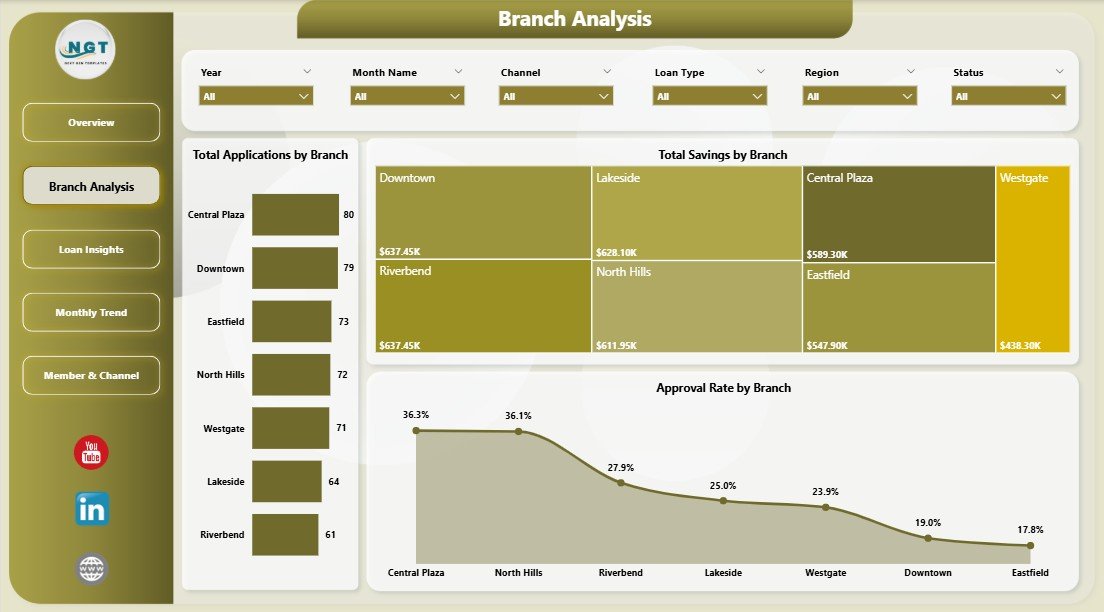
Branch Analysis
3 — Loan Insights
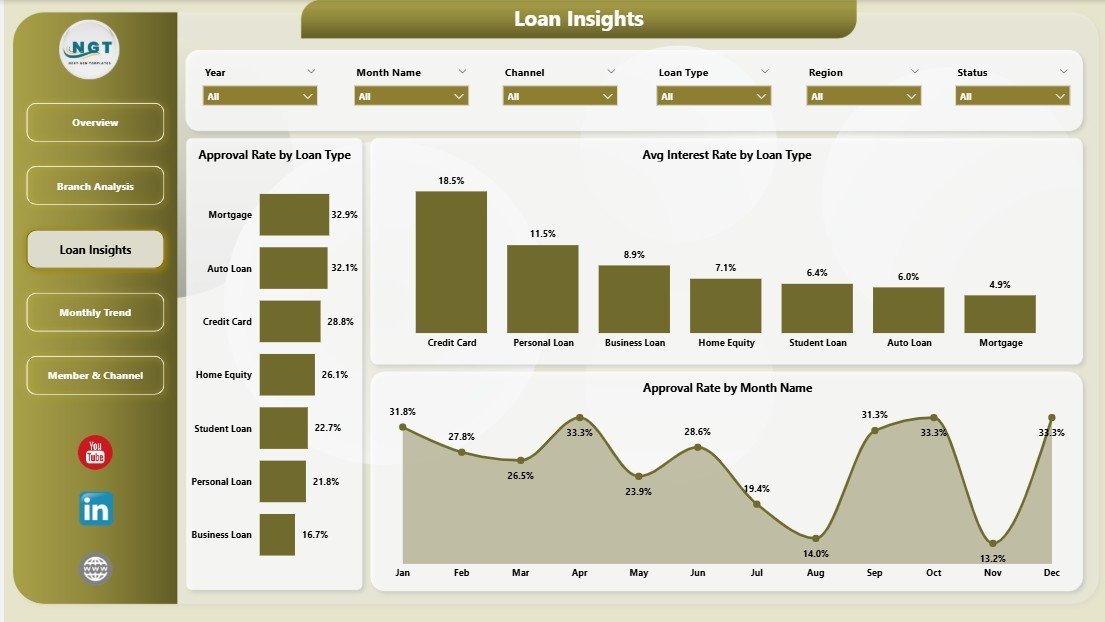
The Loan Insights page slices the loan book by product type and time, giving the lending head a clear picture of which products drive returns and which underperform.
🔸 Approval Rate by Loan Type — shows which loan products (auto, mortgage, personal, share-secured, etc.) get approved most often, useful for tightening or loosening underwriting policy by product.
🔸 Avg Interest Rate by Loan Type — benchmarks pricing across loan products against market and against your own rate sheet.
🔸 Approval Rate by Month Name — tracks how approval discipline is trending month over month, surfacing seasonal patterns or policy drift.
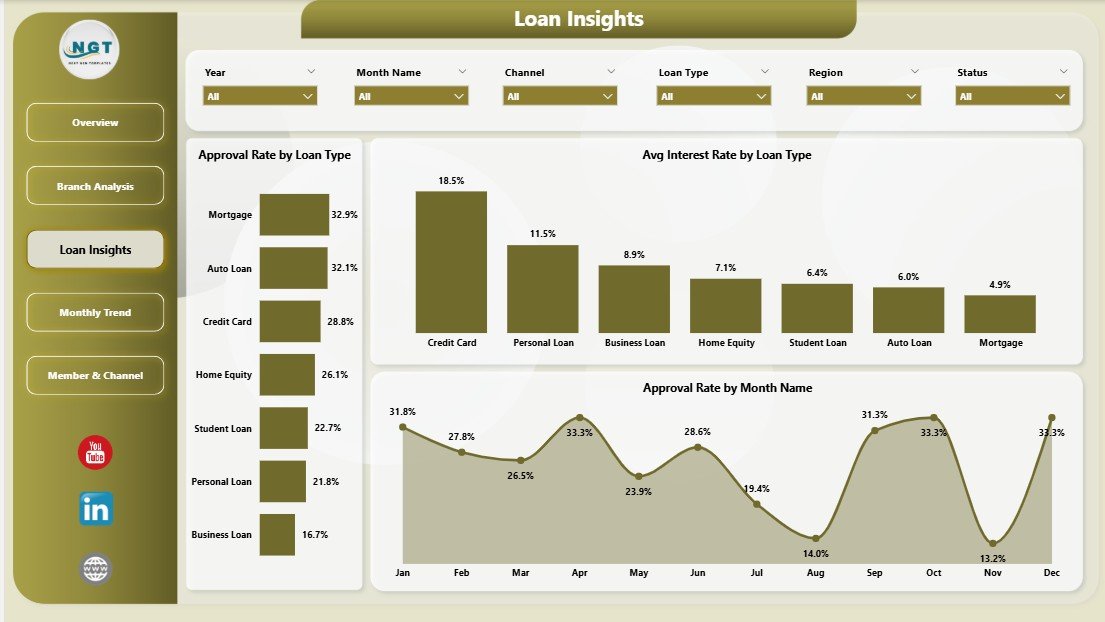
Loan Insights
4 — Monthly Trend
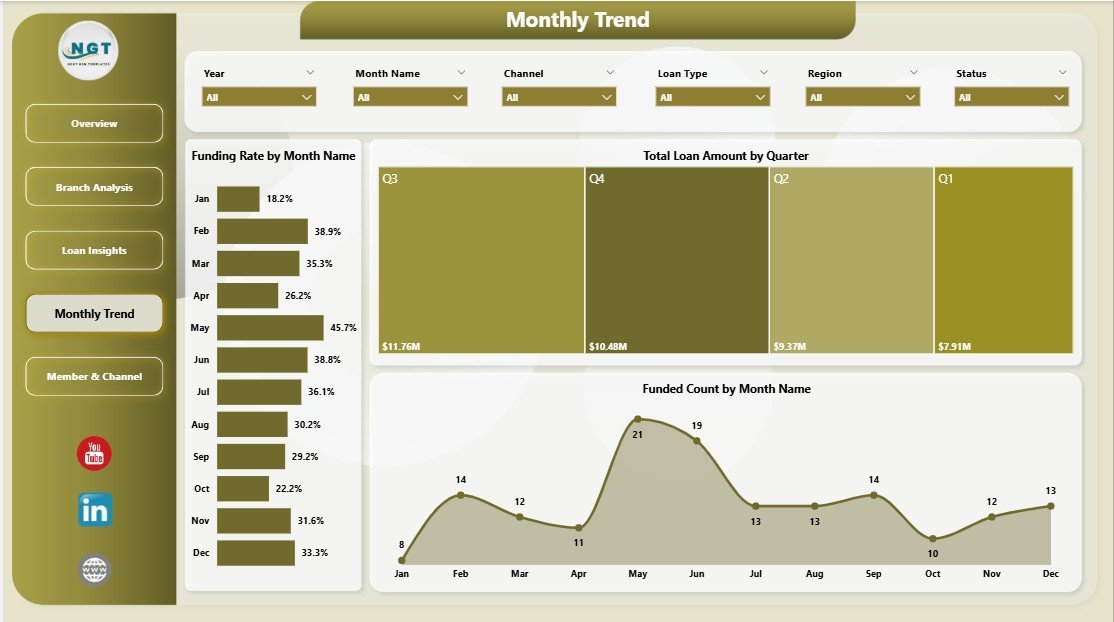
The Monthly Trend page connects activity to time, the lens regulators and boards usually want.
🔸 Funding Rate by Month Name — tracks how reliably approvals are converting into funded loans across the calendar.
🔸 Total Loan Amount by Quarter — rolls disbursement up to quarterly totals for board reporting and YoY comparisons.
🔸 Funded Count by Month Name — loan-count trend that complements the dollar view, useful when small loans drive the count and a few large loans drive the amount.
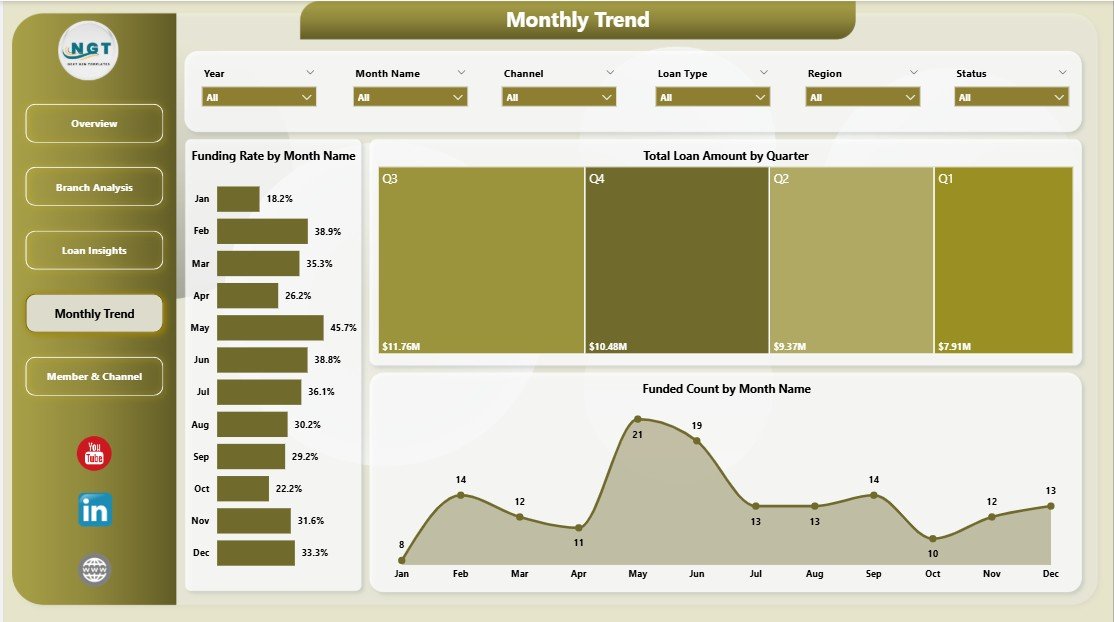
Monthly Trend
5 — Member & Channel
The Member & Channel page focuses on who is borrowing and how they arrived — the right lens for member services and digital strategy teams.
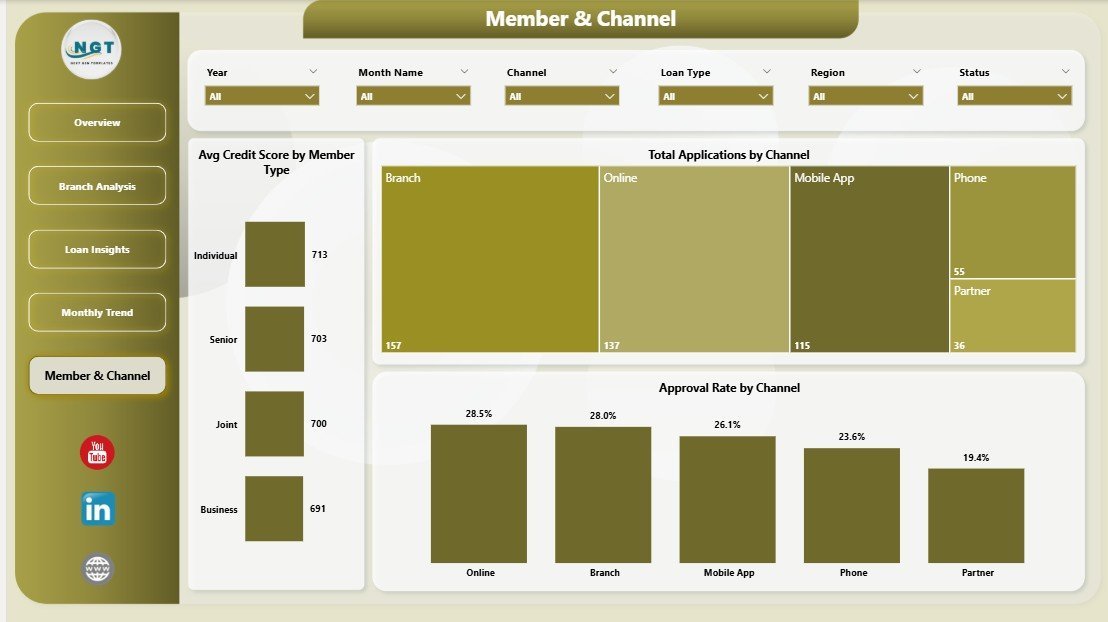
🔸 Avg Credit Score by Member Type — compares borrower quality across member segments (e.g., individual, business, joint, youth) for risk-based pricing decisions.
🔸 Total Applications by Channel — shows whether branch, online, mobile app, or call center is winning the pipeline, guiding channel investment.
🔸 Approval Rate by Channel — flags whether some channels send through better-quality applications, useful for refining digital intake forms and pre-qualification logic.
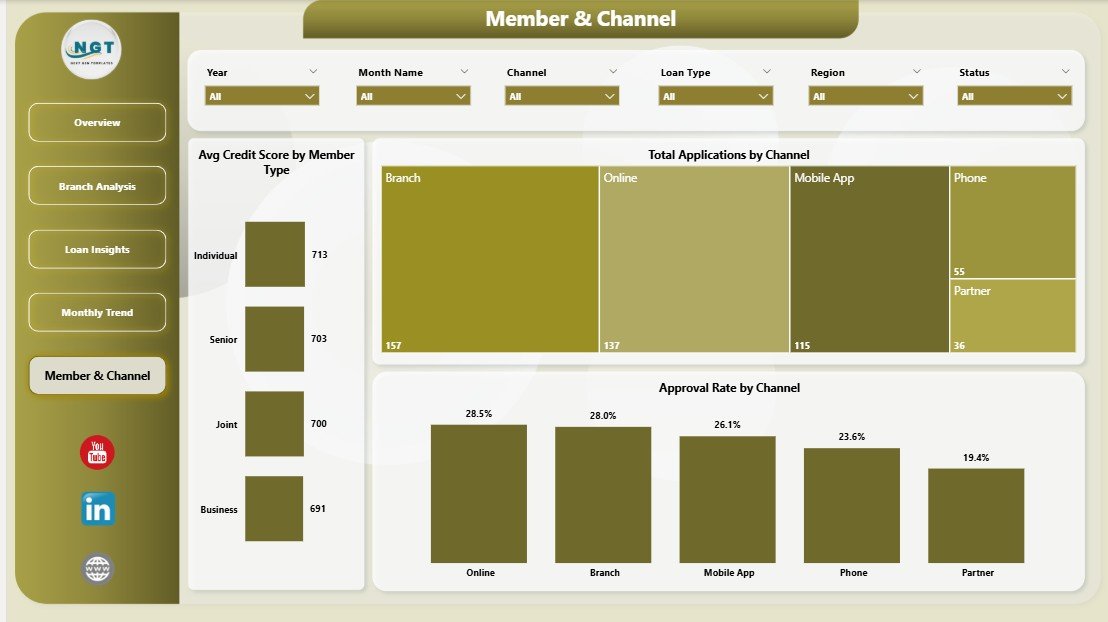
Member & Channel
📊 Credit Union Dashboard in Power BI vs. Tableau Credit Union Dashboard vs. nCino — Where This Fits
| Feature | Credit Union Dashboard in Power BI | Tableau Credit Union Build | nCino / Jack Henry Symitar Analytics |
|---|---|---|---|
| Cost | $17.99 one-time | $2,500–$10,000 consultant build | $30,000–$150,000 / year + implementation |
| Platform | Power BI Desktop (free) | Tableau Creator $75 / user / month | Vendor-hosted core banking add-on |
| Setup time | Under 10 minutes | 2–6 weeks | 3–9 month implementation |
| Customizable visuals | ✅ Full editor access | ✅ Full editor access | ❌ Vendor templates only |
| Branch / Region / Channel slicers | ✅ Built-in | Build manually | ✅ Built-in |
| Funding Rate KPI | ✅ Included | Build manually | ✅ Included |
| Export to PDF / PowerPoint | ✅ Native | ✅ Native | Limited |
| Year-1 cost at 5 users | $17.99 total | $4,500 + build | $30,000+ |
| Required to connect core banking | ❌ Optional — works on flat file | ❌ Optional | ✅ Required |
For credit unions that want a regulator-ready, slicer-driven loan and savings dashboard without the six-figure core-banking analytics bill, the Credit Union Dashboard in Power BI sits in the sweet spot.
👥 Who This Template Is For — and Who It’s Not For
✅ This template is built for:
- CFOs and finance leads at credit unions with 1–20 branches who report to a board monthly
- Branch managers tracking applications, savings, and approval rate against peers
- Lending heads who need a single view of funding rate, approval rate, and average interest rate by loan type
- Power BI analysts at financial cooperatives who want a working template instead of a blank canvas
- Consultants delivering monthly portfolio reviews to community banks and credit unions
❌ This template is NOT for:
- Large national banks needing SOC 2, SSO, and row-level security tied to AD / Entra ID
- Teams without Power BI Desktop access — consider our Credit Union Dashboard in Excel instead
- Credit unions needing live integration with Jack Henry, Fiserv DNA, or Corelation KeyStone out of the box (the data model is flat-file by default, though you can rewire it to a DirectQuery source)
- Anyone needing real-time streaming KPIs — this is a refresh-based model, not a streaming dataset
⚙️ How to Use the Credit Union Dashboard in Power BI
- Download the .zip file from your order confirmation email and extract it to a local folder.
- Open the .pbix file in Power BI Desktop (free download from Microsoft).
- Open the data source from the Home ribbon > Transform Data, and point it at your own loan application and savings data using the same column names as the sample.
- Click Refresh on the Home ribbon — every KPI card, chart, and slicer recalculates automatically across all 5 pages.
- Use the Branch, Region, Loan Type, and Member Type slicers to filter the entire report instantly.
- Publish to Power BI Service or export to PDF / PowerPoint for board meetings.
💼 Real-World Use Cases
Maria leads finance at a 6-branch regional credit union. She opens the Overview page each Monday, screens the Total Savings and Approved Count KPI cards, and uses the Branch slicer to identify which two branches drove the previous week’s growth — without paying $30,000+ a year for vendor-hosted analytics.
Devon is a lending head at a single-branch credit union with 4,200 members. He uses the Loan Insights page to compare Avg Interest Rate by Loan Type against his rate sheet, and the Approval Rate by Month Name visual to confirm his underwriting team isn’t drifting tighter or looser quarter over quarter.
Priya is a Power BI consultant working with three credit union clients. She uses this template as her standard starter, swapping the data source in under 10 minutes per client, then customizes the Member & Channel page based on each client’s digital intake mix — saving her ~6 hours of build time per engagement.
❓ Frequently Asked Questions
What KPIs does the Credit Union Dashboard in Power BI track?
The Credit Union Dashboard in Power BI tracks 5 portfolio KPIs on the Overview page: Total Savings, Total Applications, Denied Count, Approved Count, and Avg Interest Rate. Funding Rate and Approval Rate KPIs are derived inside the report’s analysis pages.
How long does setup take for this Power BI credit union template?
Setup takes under 10 minutes. Download the .pbix file, open it in Power BI Desktop, point the data source to your own loan and savings file using the same column structure, and click Refresh. All 5 pages, 13 visuals, and 4 slicers update automatically.
Do I need a Power BI Pro license to use this dashboard?
No. The Credit Union Dashboard in Power BI works entirely in Power BI Desktop, which is free from Microsoft. Power BI Pro is only required if you want to share the report through Power BI Service workspaces with other licensed users.
How does this compare to nCino or Jack Henry Symitar analytics?
nCino and Jack Henry Symitar analytics typically cost $30,000–$150,000 per year plus implementation, and tie you to a vendor. The Credit Union Dashboard in Power BI is a $17.99 one-time purchase you fully own and edit, suitable for credit unions that want regulator-ready reporting without enterprise procurement.
Can I add my own loan types, branches, and regions to this dashboard?
Yes. The Credit Union Dashboard in Power BI is fully customizable in Power BI Desktop. Add or rename loan types, branches, regions, and channels by editing the source data — the Branch, Region, Loan Type, and Member Type slicers update automatically on refresh.
Does this Power BI template include a Funding Rate visual?
Yes. The Overview page includes a Funding Rate KPI visual that measures approved-to-funded conversion. The Monthly Trend page also breaks Funding Rate down by month so you can spot pipeline leakage across the calendar.
What data format does the Credit Union Dashboard in Power BI expect?
The dashboard expects a flat application-level table with columns for Application ID, Date, Branch, Region, Loan Type, Loan Amount, Status (Approved / Denied / Funded), Interest Rate, Member Type, Channel, and Savings Balance. You can rewire it to a DirectQuery core-banking source if needed.
👤 About the Author
Built by PK — Microsoft Certified Professional with 15+ years of Excel, Google Sheets, and Power BI experience. Founder of NextGenTemplates, reaching 300K+ subscribers across YouTube channels (@PK-AnExcelExpert, @NextGenTemplates, @NeoTechNavigators). Every template is hand-built and tested before release.
🔗 Explore Related Templates
📌 Also available as: If you prefer Excel, the Credit Union Dashboard in Excel covers the same KPIs with pivot-driven charts and slicers in Microsoft Excel.
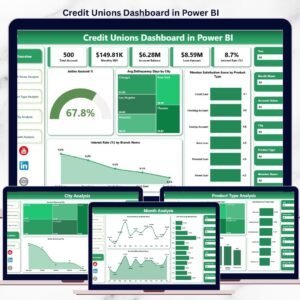
📌 Credit Unions Dashboard in Power BI — the earlier-edition credit union template if you want a different layout style.
📌 Peer-to-Peer Lending KPI Dashboard in Excel — adjacent lending-portfolio template for fintech and online lenders.
📌 Loan Portfolio KPI Dashboard in Google Sheets — if your team lives in Google Workspace.
📌 Browse all Power BI Dashboard Templates or our full Dashboard Templates library.
📖 Click here to read the Detailed Blog Post
🎥 Visit our YouTube channel for step-by-step video tutorials
👉 YouTube.com/@NextGenTemplates





























Reviews
There are no reviews yet.