



The Employee Onboarding Audit Checklist in Excel is a comprehensive tool designed to help HR teams, managers, and business owners efficiently manage the onboarding process. This template ensures that all critical steps in the onboarding process are completed, making the new hire integration smooth and seamless. From document submission to training schedules, this checklist covers everything needed to ensure a successful employee onboarding experience.
By organizing and tracking each onboarding task, this Excel template helps you stay organized and ensures that no step is overlooked. Whether you’re onboarding a single employee or multiple team members, this checklist provides a streamlined solution to monitor every step of the process.

Key Features of the Employee Onboarding Audit Checklist in Excel
📅 Onboarding Task Tracking: Organize and track all onboarding tasks, including document submission, training, and system setup.
⚙️ Task Assignment: Assign tasks to relevant team members or departments responsible for completing each step.
📈 Progress Monitoring: Track completion status with color-coded indicators to ensure that each task is completed on time.
💼 Customizable Fields: Modify the template to fit your company’s unique onboarding process, adding or removing steps as needed.
📊 Visual Dashboard: Visualize task completion and onboarding progress using built-in graphs and charts.
🔄 Real-Time Updates: Share and update the checklist in real time for better collaboration among HR teams and managers.
Why You’ll Love the Employee Onboarding Audit Checklist in Excel
✅ Streamlined Onboarding: Keep track of all steps in the onboarding process to ensure a smooth integration for new employees.
✅ Customizable: Tailor the checklist to fit your specific needs, from document submission to system access.
✅ Real-Time Updates: Share and update the checklist with your team for seamless collaboration and to ensure that no steps are missed.
✅ Easy Task Tracking: Monitor task progress, completion status, and any pending items with color-coded visual indicators.
✅ Improved New Hire Experience: Ensure a welcoming, organized onboarding experience for new hires, helping them feel prepared and confident.
What’s Inside the Employee Onboarding Audit Checklist in Excel?
📅 Task List: A detailed list of all onboarding tasks, including training, document submission, and equipment setup.
⚙️ Responsibility Assignment: Assign specific tasks to HR teams, managers, or departments to ensure timely completion.
📈 Progress Tracking: Use visual status indicators and charts to track the progress of each onboarding task.
💼 Customizable Fields: Modify fields to include any company-specific tasks or requirements.
📊 Reporting Tools: Generate reports to monitor onboarding progress and identify areas that require attention.
How to Use the Employee Onboarding Audit Checklist in Excel
1️⃣ Download the Template – Access the pre-configured Employee Onboarding Audit Checklist template.
2️⃣ Add Employee Details: Input new hire information, including name, position, and start date.
3️⃣ Assign Tasks: Assign onboarding tasks to relevant departments or individuals and set due dates.
4️⃣ Track Progress: Monitor the completion status of each task using color-coded indicators and visual charts.
5️⃣ Collaborate: Share the checklist with your HR team and other departments to ensure smooth onboarding.
Who Can Benefit from the Employee Onboarding Audit Checklist in Excel?
🔹 HR Managers
🔹 Onboarding Coordinators
🔹 Team Leaders
🔹 Business Owners
🔹 Managers in Small to Medium-Sized Businesses (SMBs)
🔹 Startups with Growing Teams
Simplify your employee onboarding process and improve new hire integration with the Employee Onboarding Audit Checklist in Excel. Track tasks, assign responsibilities, and ensure every step is completed on time.
Click here to read the detailed blog post
Visit our YouTube channel to learn step-by-step video tutorials
Compatibility and Requirements
- Works in Microsoft Excel desktop (Excel 2016 or later, or Microsoft 365).
- Task progress is shown with color-coded indicators and built-in charts. Microsoft explains Excel charts in Create a chart from start to finish.
Frequently Asked Questions
Which onboarding tasks does the checklist cover?
It lists the common onboarding steps, such as document submission, training and equipment or system setup. You can add or remove steps to match your own process.
Can I assign tasks to different people?
Yes. Assign each task to an HR team member, a manager or a department and set a due date.
How do I see onboarding progress?
Each task has a completion status with color-coded indicators, and the charts show how much of the onboarding is done.
What new hire details can I record?
Enter the new hire’s name, position and start date, then track the tasks for that person.
Related Onboarding Templates
- Employee Onboarding Checklist Template in Excel: a general onboarding checklist.
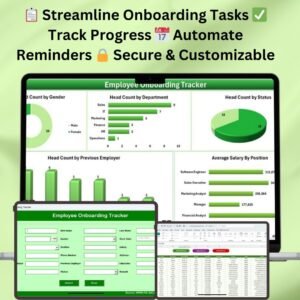
- Employee Onboarding Tracker in Excel: track several new hires in one file.
- Employee Onboarding Evaluation Checklist in Excel: review how onboarding went.
- New Hire Onboarding Calendar in Excel: plan onboarding dates on a calendar.
- Checklist & SOP Pack: 12 Excel and Google Sheets checklist templates.
Browse all Excel checklist templates or the Excel HR and Payroll templates.
































Reviews
There are no reviews yet.