



The Study Planner Checklist Template in Excel is the ultimate tool to help students stay organized and focused on their academic goals. Whether you’re a high school student, college student, or someone looking to improve study habits, this customizable template will help you track assignments, plan study sessions, and achieve academic success.
This easy-to-use Excel template allows you to plan your weekly and daily study schedules, track assignments, set study goals, and monitor your progress. With built-in reminders and a clear overview of your study tasks, this template ensures that you stay on top of your academic responsibilities.
Key Features of the Study Planner Checklist Template in Excel
📚 Comprehensive Study Planning
Organize and plan study sessions for each subject, assignment, and exam. This checklist ensures that you are fully prepared for each academic challenge.
📅 Weekly & Daily Scheduling
Create detailed weekly and daily study schedules. Track your time efficiently, set deadlines, and avoid last-minute cramming.
⚡ Real-Time Progress Tracking
Monitor your study progress in real-time with task completion indicators and progress bars, ensuring that no assignment is missed.
🔄 Customizable for Your Needs
Tailor the template to your specific study habits and schedule. Add or remove study sessions, set personal goals, and adjust deadlines as needed.
📊 Study Progress Dashboard
Visualize your study progress with an interactive dashboard that tracks completed tasks, pending assignments, and upcoming deadlines.
🖥️ User-Friendly Interface
The intuitive design ensures that you can quickly navigate and update the checklist, making it easier to stay organized and on track.
Why You’ll Love the Study Planner Checklist Template in Excel

✅ Stay Organized & Focused
Plan your study sessions and assignments with a comprehensive checklist, keeping you on track throughout the semester.
✅ Track Academic Progress
Monitor your study progress with real-time updates, ensuring that you stay on top of your tasks and deadlines.
✅ Customizable for Your Schedule
Adapt the checklist to fit your personal study schedule, whether you’re studying for exams or working on assignments.
✅ Visualize Study Progress
With the built-in dashboard and progress bars, it’s easy to see how much you’ve accomplished and what tasks are still pending.
✅ Efficient Time Management
Set study goals, track study hours, and stay on schedule, ensuring that you allocate enough time for each subject or task.
What’s Inside the Study Planner Checklist Template in Excel?
- Study Session Overview: A list of study sessions, assignments, and exams with due dates and priorities.
- Weekly & Daily Scheduling: Sections for organizing your weekly and daily study plans and deadlines.
- Progress Tracking: Real-time task completion indicators and visual progress bars to monitor progress.
- Study Dashboard: A summary dashboard to track overall study progress, upcoming assignments, and deadlines.
- Reminder Alerts: Set up alerts and reminders for important study tasks and deadlines.
How to Use the Study Planner Checklist Template in Excel
1️⃣ Download the Template: Get instant access to your study planner upon purchase.
2️⃣ Plan Study Sessions: Add your subjects, assignments, and deadlines, and organize your study sessions.
3️⃣ Track Progress: Use the progress bars and dashboard to stay on top of your tasks and deadlines.
4️⃣ Stay on Schedule: Set daily and weekly goals, and monitor your progress to ensure timely completion of tasks.
Who Can Benefit from the Study Planner Checklist Template in Excel?
🔹 High School Students
🔹 College Students
🔹 Graduate Students
🔹 Parents & Tutors
🔹 Anyone Looking to Improve Study Habits
🔹 Educational Institutions
Stay organized, on track, and achieve academic success with this easy-to-use, customizable study planner checklist.
Click here to read the Detailed blog post
Visit our YouTube channel to learn step-by-step video tutorials
Youtube.com/@PKAnExcelExpert
Compatibility and Requirements
- Works in Microsoft Excel desktop (Excel 2016 or later, or Microsoft 365).
- New to Excel? Microsoft has a beginner course in Excel for Windows training.
Frequently Asked Questions
What does the template include?
A study session overview, weekly and daily scheduling sections, progress tracking, a study dashboard and reminder alerts.
Can I track assignments and exams?
Yes. The study session overview lists sessions, assignments and exams with due dates and priorities.
How do I see my progress?
Task completion indicators and progress bars update as you mark tasks done, and the dashboard summarizes pending work and deadlines.
Is there a Google Sheets version?
Yes. The Study Planner Checklist in Google Sheets works in a browser with a free Google account.
Related Study and Student Templates
- Study Planner Checklist in Google Sheets: the same planner in Google Sheets
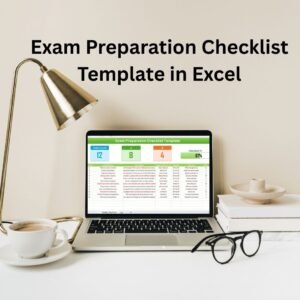
- Exam Preparation Checklist Template in Excel: get ready for each exam
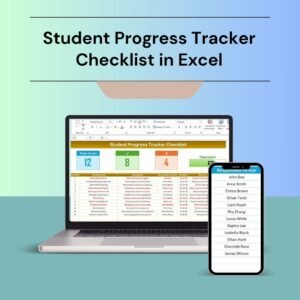
- Student Progress Tracker Checklist in Excel: follow progress across subjects
- Student Assignment Tracker in Google Sheets: log assignments and due dates
- Education & School Management Bundle: 8 school templates in one download
Browse all Excel checklists or the Excel education templates.































Reviews
There are no reviews yet.