

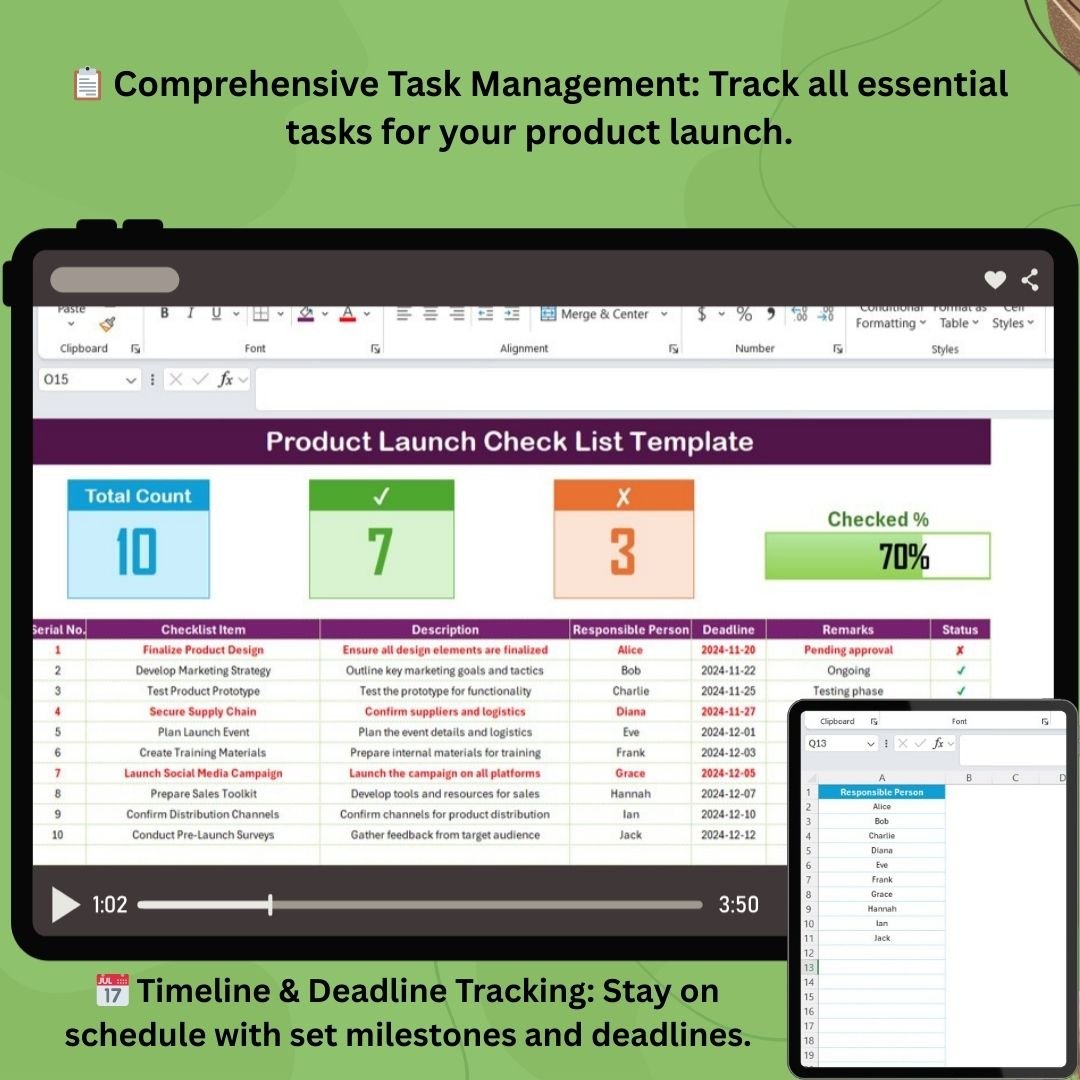


The Product Launch Checklist Template in Excel is an essential tool for businesses looking to streamline and organize their product launch process. Whether you’re launching a new product or service, this customizable checklist ensures that all necessary tasks are completed on time, helping you avoid mistakes and stay on track throughout the launch journey.
With this easy-to-use Excel template, you can plan and monitor key tasks, track deadlines, and assign responsibilities. From market research to final launch preparation, this template covers every critical step in the process, making it the perfect solution for product managers, marketing teams, and business owners.
Key Features of the Product Launch Checklist Template in Excel
📋 Comprehensive Task Management
Track and manage every task required for a successful product launch, from initial planning to post-launch follow-ups, ensuring nothing is overlooked.
📅 Timeline & Deadline Tracking
Set timelines for each task and stay on top of launch deadlines. Get reminders to keep your product launch on schedule.
⚡ Real-Time Progress Monitoring
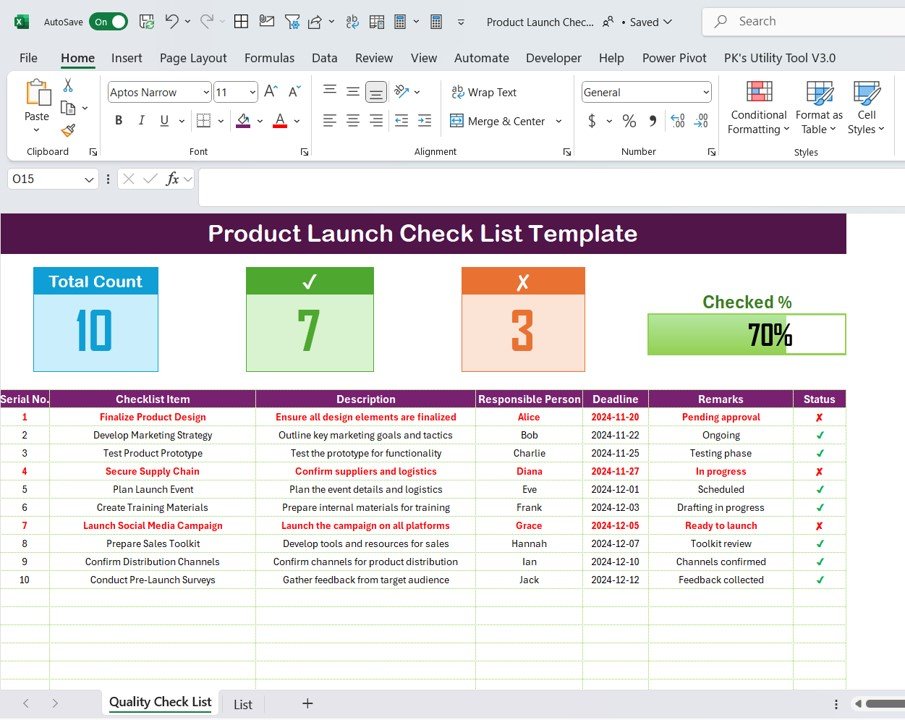
Monitor your progress with real-time tracking. Track completed tasks and identify what’s still pending using visual progress bars.
🔄 Customizable for Your Launch Needs
Adapt the checklist to fit the specific needs of your product launch. Add, modify, or remove tasks based on your launch goals.
📊 Launch Readiness Dashboard
Get a clear overview of your product launch’s progress with a dynamic dashboard summarizing completed tasks, deadlines, and areas that need attention.
🖥️ Simple, User-Friendly Interface
The template is designed for easy navigation, making it simple for all team members to update and track their tasks in real time.
Why You’ll Love the Product Launch Checklist Template in Excel
✅ Streamlined Product Launch
Organize your entire product launch process in one place, ensuring that each task is completed on time and according to plan.
✅ Stay On Schedule
Track deadlines and set priorities to ensure that no task is missed, helping you meet all product launch goals.
✅ Visualize Your Progress
Keep everyone aligned with progress tracking features and the launch readiness dashboard, providing a clear view of your launch status.
✅ Customizable for Any Launch
Tailor the checklist to suit your product, your industry, and your unique launch requirements.
✅ Improves Team Collaboration
Assign tasks to team members, track their progress, and collaborate more effectively to ensure a smooth launch.
What’s Inside the Product Launch Checklist Template in Excel?
- Task Overview: A detailed list of tasks, their deadlines, and responsible team members.
- Timeline Tracking: Set milestones and deadlines for each phase of the product launch.
- Launch Readiness Dashboard: A visual overview of the progress of your product launch.
- Real-Time Progress Updates: Track task completion status and get notified of any upcoming deadlines.
- Collaborative Features: Assign tasks to team members and track their progress.
How to Use the Product Launch Checklist Template in Excel
1️⃣ Download the Template: Get immediate access to your Excel file after purchase.
2️⃣ Customize the Checklist: Add or modify tasks based on your specific product launch needs.
3️⃣ Set Deadlines & Assign Tasks: Assign deadlines and responsibilities to your team members.
4️⃣ Monitor Progress: Use the real-time progress tracking features to stay updated on each task’s status.
Who Can Benefit from the Product Launch Checklist Template in Excel?
🔹 Product Managers
🔹 Marketing Teams
🔹 Entrepreneurs
🔹 Business Owners
🔹 Project Managers
🔹 Small & Medium Businesses (SMBs)
Ensure a smooth and successful product launch with this customizable, easy-to-use checklist template.
Click here to read the Detailed blog post
Visit our YouTube channel to learn step-by-step video tutorials
Youtube.com/@PKAnExcelExpert
Compatibility and Requirements
- Works in Microsoft Excel desktop (Excel 2016 or later, or Microsoft 365).
- New to Excel? Microsoft’s Excel for Windows training covers the basics.
Frequently Asked Questions
What does the checklist track?
Launch tasks, deadlines and the team member responsible for each task, from planning through to post-launch follow-ups.
Can I see overall launch progress?
Yes. Progress bars and the launch readiness dashboard summarize completed tasks, deadlines and areas that need attention.
Can I change the task list?
Yes. You can add, modify or remove tasks to fit your product, industry and launch goals.
Can I assign tasks to my team?
Yes. Each task can have a responsible team member and a deadline, so everyone knows what they own.
Related Product Launch Templates
- Product Launch Calendar in Excel: puts launch dates on a calendar
- Product Launch KPI Dashboard in Excel: measures launch results with KPIs
- Product Launch Action Plan in Excel: plans actions and owners
- Product Launch Checklist in Google Sheets: the same checklist online
- Checklist & SOP Pack: 12 checklist templates in one download
Browse all Excel checklists or the Excel project management templates.

































Reviews
There are no reviews yet.