



The Document Retention Checklist Template in Excel is an indispensable tool for businesses looking to maintain proper document management and ensure compliance with document retention regulations. Whether you’re an office manager, compliance officer, or business owner, this checklist helps you organize, track, and securely manage important documents while adhering to industry standards and regulations.
With this easy-to-use, customizable Excel template, you can track document retention periods, set reminders for disposal, and keep an accurate record of your organization’s documents. The built-in features ensure your business stays compliant, organized, and ready for audits.
Key Features of the Document Retention Checklist Template in Excel
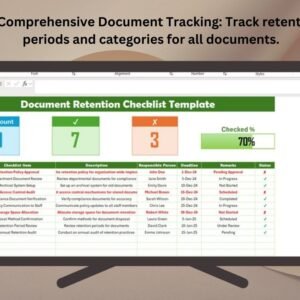
📋 Comprehensive Document Tracking
Track all important documents within your organization, from contracts to financial records, ensuring that each document’s retention period is followed correctly.
⚡ Real-Time Tracking & Notifications
Stay updated with real-time tracking of document status. Receive reminders for upcoming disposal dates, ensuring documents are disposed of in compliance with regulations.
📅 Retention Period & Disposal Management
Set and track document retention periods for each document category. Easily manage document disposal deadlines and ensure timely compliance.
🔄 Customizable for Your Needs
Adapt the template to fit your organization’s document retention requirements. Add, modify, or remove document categories and retention periods as needed.
📊 Document Retention Dashboard
Visualize your document retention progress with an interactive dashboard that summarizes upcoming disposal tasks and document statuses.
🖥️ User-Friendly Interface
The simple, intuitive design ensures that team members can easily navigate and update the template, making document retention tracking a breeze.
Why You’ll Love the Document Retention Checklist Template in Excel

✅ Simplified Document Management
Effortlessly track and manage document retention and disposal with this easy-to-follow checklist template.
✅ Ensure Compliance
Stay on top of regulatory requirements and ensure compliance with document retention policies.
✅ Real-Time Updates
Monitor document statuses, track retention periods, and receive timely reminders to dispose of documents appropriately.
✅ Customizable for Any Business
Tailor the checklist to fit your organization’s specific document categories and retention policies.
✅ Audit-Ready
Keep an organized record of all documents for easy access during audits or compliance reviews.
What’s Inside the Document Retention Checklist Template?
- Document Overview: A comprehensive list of all documents, their categories, and retention periods.
- Real-Time Tracking: Track the status of each document and receive notifications for approaching disposal dates.
- Retention Dashboard: A dashboard that provides a visual summary of document statuses, upcoming disposals, and retention periods.
- Reminder Alerts: Set automatic reminders for disposal dates to ensure compliance with retention schedules.
- Disposal Management: Record and track the disposal of documents to maintain accurate, compliant records.
How to Use the Document Retention Checklist Template in Excel
1️⃣ Download the Template: Instantly access your Excel file upon purchase.
2️⃣ Add Document Information: Enter document details, categories, and retention periods for each document.
3️⃣ Track Retention Periods: Use the checklist to monitor each document’s retention period and status.
4️⃣ Set Reminders & Dispose Documents: Set reminders for document disposal and track actions taken for compliance.
Who Can Benefit from the Document Retention Checklist Template in Excel?
🔹 Office Managers
🔹 Compliance Officers
🔹 Legal Teams
🔹 HR Managers
🔹 Small & Medium Businesses (SMBs)
🔹 Large Enterprises
Ensure your document management system stays organized, compliant, and audit-ready with this customizable checklist template.
Click here to read the Detailed blog post
Visit our YouTube channel to learn step-by-step video tutorials
Youtube.com/@PKAnExcelExpert
Compatibility and Requirements
- Works in Microsoft Excel desktop (Excel 2016 or later, or Microsoft 365).
- Everything is inside one workbook, so there is nothing else to install.
- New to Excel charts? Microsoft explains the basics in Create a chart from start to finish.
Frequently Asked Questions
What does the Document Retention Checklist track?
Each document with its category, retention period, status and disposal date, plus a record of documents already disposed of.
Is there a summary view?
Yes. A retention dashboard summarizes document statuses, upcoming disposals and retention periods.
Can I use my own document categories?
Yes. You can add, change or remove document categories and retention periods to match your policy.
Is there a Google Sheets version?
Yes. See the Document Retention Checklist in Google Sheets.
Related Document Management Templates
- Document Retention Checklist in Google Sheets: the same checklist online
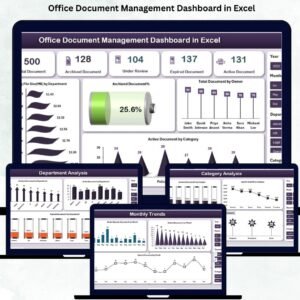
- Office Document Management Dashboard in Excel: a dashboard for office documents
- Document Receiving Log Tracker in Excel: log documents as they arrive
- Checklist & SOP Pack: 12 checklist templates in one bundle
Browse all Excel checklists or the Excel operations templates.
























Reviews
There are no reviews yet.