

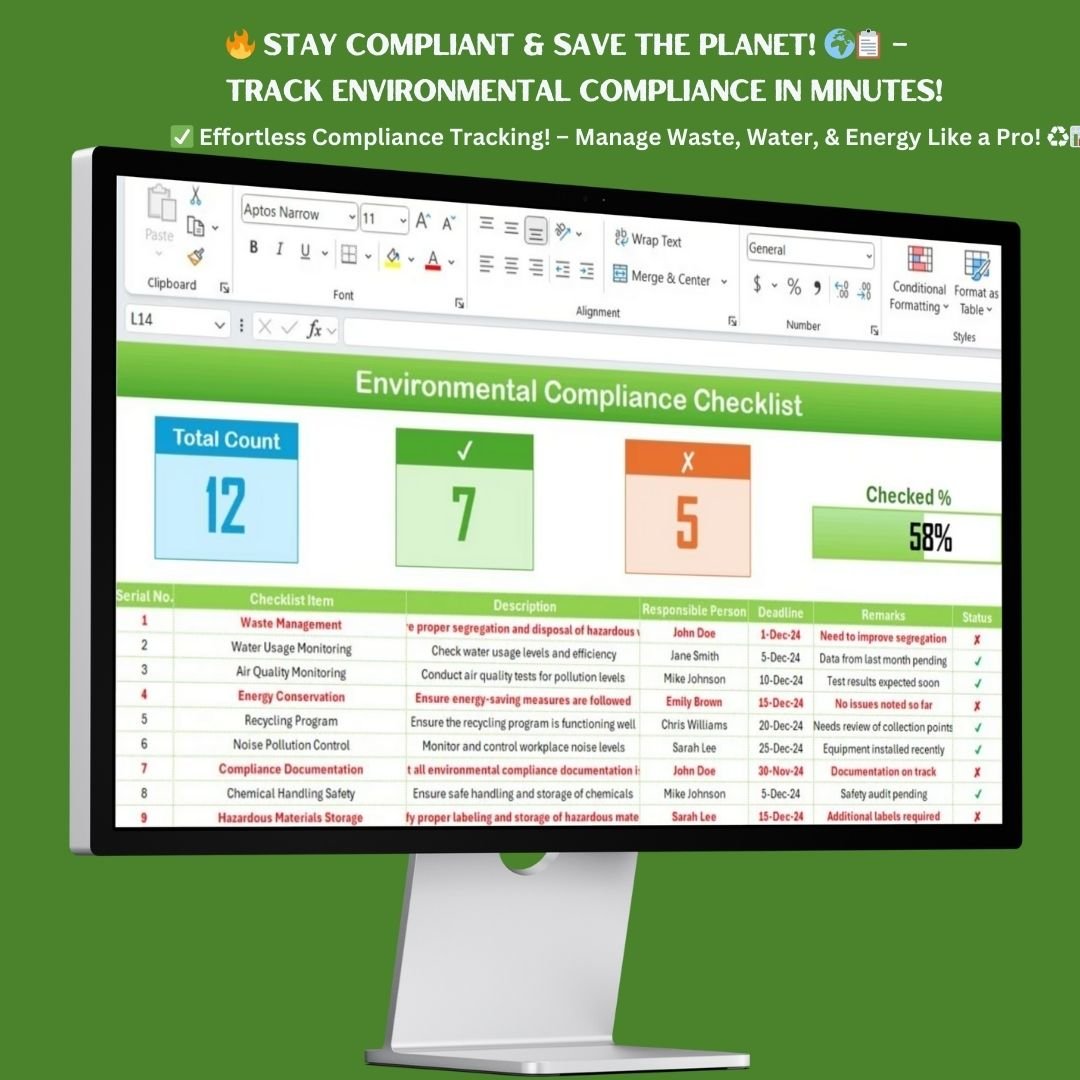

Managing environmental compliance can be overwhelming, but with the Environmental Compliance Checklist in Excel, you can streamline your processes, track essential tasks, and ensure adherence to environmental regulations. This ready-to-use template is designed for businesses, safety managers, and compliance officers to effectively monitor environmental obligations while staying on top of key tasks.
Why Use an Environmental Compliance Checklist?
Environmental compliance is critical for businesses to avoid penalties, reduce their carbon footprint, and promote sustainable practices. This checklist provides a structured framework to document, track, and manage compliance efforts across various environmental parameters.
Key Features of the Environmental Compliance Checklist
This Excel-based checklist template includes all essential components to keep your compliance efforts well-organized. Here’s what makes this template powerful and efficient:

📌 Two Structured Worksheets
The template consists of two key sheets to enhance organization and data management:
- Environmental Compliance Checklist Tab:
- The primary worksheet where compliance-related tasks are listed, tracked, and monitored.
- Provides a clear breakdown of tasks, deadlines, responsible persons, and status updates.
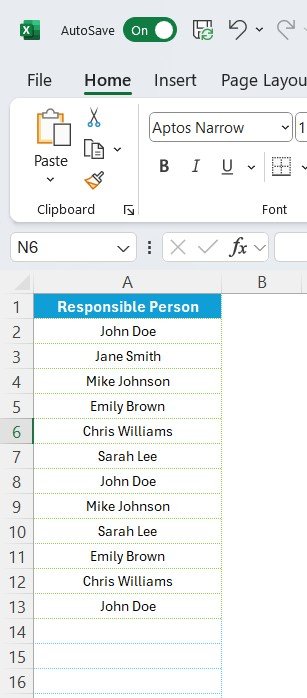
- List Sheet Tab:
- Stores the responsible persons’ list for task assignments.
- Used to create drop-down menus for easy selection in the main checklist.
📌 At-a-Glance Progress Tracking
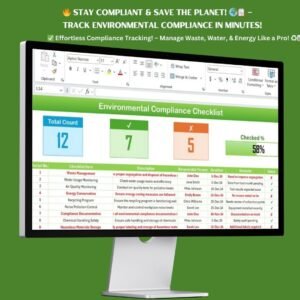
At the top section of the Environmental Compliance Checklist, you’ll find essential summary cards and progress indicators:
- ✅ Total Count – Displays the total number of compliance tasks.
- ✅ Checked Count – Shows the number of completed tasks.
- ❌ Crossed Count – Identifies the incomplete or pending tasks.
- 📊 Progress Bar – Provides a visual representation of the overall completion percentage.
This real-time tracking helps you monitor progress efficiently, ensuring compliance deadlines are met.
📌 Detailed Checklist Table
The checklist table is where the core compliance tasks are managed. Each row includes:
- 🔹 Serial No. – Unique ID for each compliance task.
- 🔹 Checklist Item – A description of the environmental compliance activity.
- 🔹 Description – Additional details about the task to provide clarity.
- 🔹 Responsible Person – Assign a person responsible for the task using the drop-down selection feature.
- 🔹 Deadline – The date by which the task should be completed.
- 🔹 Remarks – Any additional notes or status updates related to the task.
- 🔹 Status Column – ✅ for completed tasks, ❌ for incomplete tasks.
This structured layout ensures accountability and keeps everything in one organized space.
🌎 Key Compliance Areas Covered
The Environmental Compliance Checklist covers a wide range of compliance areas, including but not limited to:
✔ Waste Management – Ensure proper segregation and disposal of hazardous materials.
✔ Water Usage Monitoring – Track water usage and ensure efficiency measures are in place.
✔ Air Quality Monitoring – Conduct air quality tests and implement pollution controls.
✔ Energy Conservation – Implement energy-saving measures to reduce carbon emissions.
✔ Recycling Program – Manage and monitor waste recycling initiatives.
✔ Noise Pollution Control – Monitor noise levels and comply with workplace noise policies.
✔ Compliance Documentation – Ensure all compliance documentation is complete and up to date.
✔ Chemical Handling Safety – Follow proper procedures for handling hazardous chemicals.
✔ Environmental Training – Conduct regular training sessions on environmental safety.
This comprehensive approach ensures that all key environmental areas are addressed proactively.
🔹 How to Use the Environmental Compliance Checklist
Using this template is quick and simple! Follow these steps to get started immediately:
1️⃣ Enter Compliance Tasks – Populate the Checklist Table with compliance-related tasks.
2️⃣ Assign Responsibilities – Select the responsible person for each task using the drop-down list.
3️⃣ Set Deadlines – Define a realistic timeline for each task to ensure timely completion.
4️⃣ Update Status – Mark tasks ✅ (completed) or ❌ (pending) as progress is made.
5️⃣ Track Progress – Use the summary cards and progress bar to monitor overall compliance.
This checklist helps you stay organized, meet compliance deadlines, and prevent risks associated with non-compliance.
🎯 Who Can Benefit from This Template?
The Environmental Compliance Checklist in Excel is designed for: ✔ Compliance Managers – Maintain accurate compliance records and track obligations.
✔ Safety Officers – Monitor environmental safety standards and reduce violations.
✔ Business Owners – Ensure regulatory compliance and minimize legal risks.
✔ Sustainability Teams – Keep track of green initiatives and corporate social responsibility (CSR) goals.
✔ Facility Managers – Implement best environmental practices in operational processes.
This versatile template can be used across industries, including manufacturing, healthcare, construction, and corporate offices.
💡 Why Choose This Template?
Using the Environmental Compliance Checklist in Excel offers several advantages: 🌟 Saves Time – No need to build a checklist from scratch; it’s ready to use!
🌟 Boosts Accountability – Clearly assigns tasks to responsible persons.
🌟 Prevents Compliance Violations – Reduces the risk of fines and penalties.
🌟 Customizable & Scalable – Modify to fit your organization’s needs.
🌟 User-Friendly Excel Format – No need for complex software—just download & start using!
📥 Instant Download – Get Started Now!
Don’t leave compliance to chance. Download the Environmental Compliance Checklist today and take control of your regulatory obligations!
✅ Format: Microsoft Excel
✅ Instant Access – Download immediately after purchase
✅ Fully Editable & Customizable
✅ Lifetime Access & Free Bug Fixes
Click hare to read the Detailed blog post
Visit our YouTube channel to learn step-by-step video tutorials































Reviews
There are no reviews yet.