

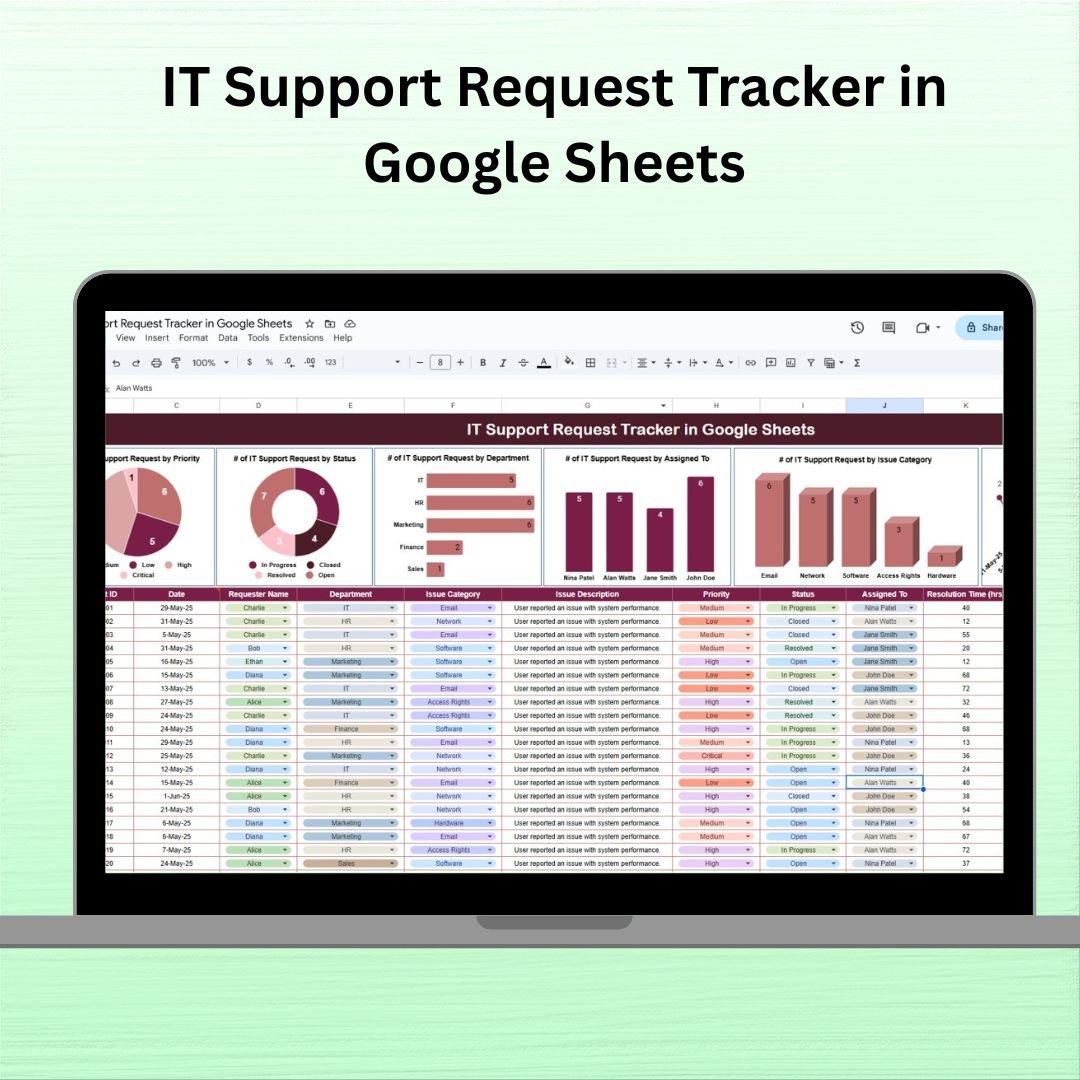
A single Zendesk Suite Team seat runs $55/agent/month, and the median Zendesk customer pays around $47,772 per year across ~1,035 verified purchase transactions. Freshdesk starts at $15/agent/month and Jira Service Management at $20/agent/month — before the 7% annual renewal uplifts and the Atlassian Marketplace apps most teams end up buying. For internal IT teams with 1-10 technicians, those platforms are overbuilt and overpriced. The IT Support Request Tracker in Google Sheets is a ready-to-use template that lets internal IT, MSPs, schools, and remote-first teams log tickets, assign technicians, track resolution time, and visualize workload — without the $2,000-$10,000/year starting investment for a full ITSM platform.
Open the sheet, share it with your team, and start logging. Every field technicians actually need is pre-built: priority, category, assignee, resolution notes, and a live dashboard that updates automatically as you close tickets. No setup fees, no per-agent costs, no SaaS contract to negotiate.
Why Small IT Teams Are Rethinking ITSM Spend in 2026
- Zendesk’s list pricing runs $19-$169 per agent per month, with a median verified customer contract value of approximately $47,772/year across 1,035 purchases.
- Jira Service Management starts at $20/agent/month and rises to $51.42/agent/month for Premium, before Marketplace apps and implementation fees.
- 3-year TCO for a 100-agent Zendesk deployment is estimated at $120,000-$180,000, including licenses, implementation, and training (per ITQlick 2026 analysis).
- Renewal uplifts of 7-16% are common, and they compound. A $24,000 contract today can be $32,000 in three years on autopilot.
For an IT team of 2-10 technicians handling password resets, laptop provisioning, software installs, and network tickets, a $1,000-$4,000/month help desk platform is the wrong tool for the job. A structured Google Sheets tracker captures the same fields — Request ID, Requester, Department, Category, Priority, Status, Assignee, Resolution Time, Resolution Notes — and feeds them into a live dashboard. For most internal IT shops, that covers 90% of what they’d actually use Zendesk for.
What’s Inside the IT Support Request Tracker
🧮 Real-Time Dashboard
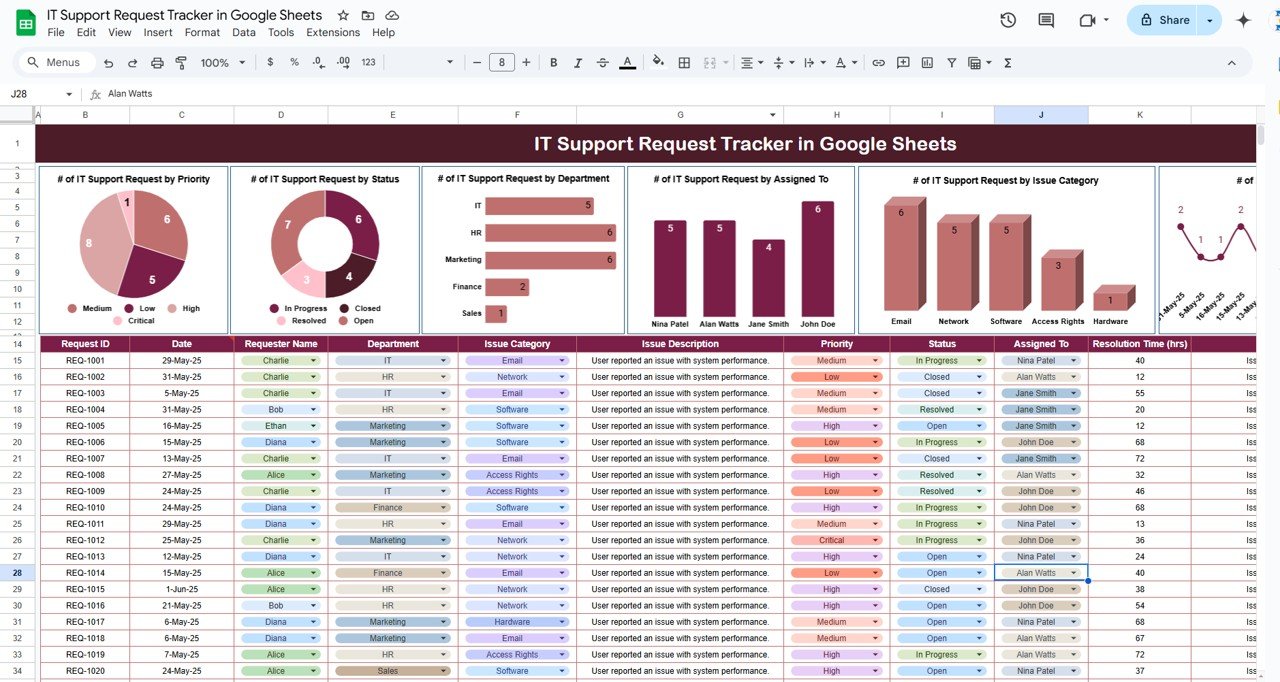
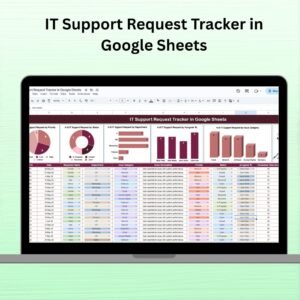
A single-sheet dashboard auto-refreshes as tickets are logged. Five core visualizations:
- Support Requests by Priority — High / Medium / Low breakdown to spot priority inflation
- Support Requests by Status — Open / In Progress / Resolved ticket volume
- Requests by Department & Assignee — workload distribution across your team and requesting departments
- Requests by Category — Hardware / Software / Network / Access issue types
- Requests Over Time — monthly ticket volume and resolution trend
📥 Structured Ticket Log
Every ticket captures the fields that matter for SLA tracking and post-incident review:
- Request ID (auto-incremented)
- Requester Name
- Department
- Issue Category (Hardware / Software / Network / Access / Other)
- Issue Description
- Priority (High / Medium / Low)
- Status (Open / In Progress / Resolved / Closed)
- Assigned To (dropdown of your team)
- Resolution Time (hours or days)
- Resolution Notes (so you have a searchable history)
🔎 Smart Filters & Customization
Built-in filter views let you see tickets by category, assignee, priority, or resolution time. Every dropdown, category, and status value is editable — adapt the template to your organization in under five minutes.
💻 Stop running IT support out of a shared email inbox.
Get a structured Google Sheets ticket log with a live dashboard, priority breakdown, technician workload view, and resolution-time tracking — in one sheet, with no per-agent fees.
IT Support Tracker vs. Full Help Desk Platforms vs. Shared Inbox
| Feature | Our Google Sheets Tracker | Full Help Desk (Zendesk / Freshdesk / JSM / Freshservice) | Shared Email Inbox |
|---|---|---|---|
| Pricing | One-time $6.99 | $15-$169/agent/month (recurring, with 7-16% annual uplifts) | Free but chaotic |
| Team Access | Unlimited via Google Sheets sharing | Per-agent license fees | Unlimited (but no accountability) |
| Ticket Tracking | Request ID, Category, Priority, Status, Assignee | Full lifecycle + SLA + escalations + CMDB | Email subject line |
| Live Dashboard | Auto-refreshing, 5 built-in charts | Advanced reporting with custom KPIs | None |
| Ticket Volume Handled | Up to ~500/month comfortably | Tens of thousands per month | Depends on inbox discipline |
| End-User Portal | Add a Google Form in 10 minutes | Native customer portal with login | “Just email IT” |
| Automation & SLA | Apps Script for email alerts (optional) | Built-in SLA, escalations, routing | None |
| Setup Time | Under 5 minutes | Weeks to months for full rollout | Instant |
| Best For | 1-10 technicians handling under ~500 tickets/month | Teams with 20+ agents, SLA contracts, ITIL practices | Teams still figuring out if IT “needs a system” |
Honest positioning — if you run customer-facing support for a SaaS product with 10,000+ paying customers, Zendesk or Freshdesk are the right answer. If you’re running internal IT for a 50-500 person company and currently routing tickets through “IT-Support@” email or a Slack channel, this tracker gets you 80% of ITSM discipline for less than a single agent-month of Zendesk.
Who Uses This Template
| Role / Industry | Primary Use Case |
|---|---|
| Internal IT Departments | Password resets, laptop provisioning, software installs, VPN access, printer issues |
| Managed Service Providers (MSPs) | Simple ticket tracking for multiple small-business clients without ConnectWise overhead |
| Schools & Universities | Classroom tech issues, Chromebook refreshes, LMS access, lab equipment tickets |
| Remote-First Teams | Home-office hardware, SaaS provisioning, distributed-team support across time zones |
| Startups (Under 100 Employees) | Lean IT without committing to multi-year Zendesk or Freshservice contracts |
| Healthcare Practices & Clinics | EMR issues, practice-management software tickets, imaging system support |
| Non-Profits | Volunteer IT support, donor database issues, grant-funded tech programs |
| Facilities + IT Combined Teams | Combined work order tracking for IT plus facilities requests |
Benefits You’ll See in the First 30 Days
- 🎫 One ticket log for the whole team — no more “did anyone take the Karen password reset?”
- ⚡ Faster first response — priority sort on the dashboard surfaces High-priority tickets immediately
- 📊 Technician workload visibility — see if one person is drowning while another is idle
- 🔄 Trend insight — recurring categories (e.g., same printer, same VPN) become obvious
- 💾 Searchable resolution history — “we fixed this before, what did we do?” becomes answerable
- 💰 No SaaS contract — one-time $6.99, no annual uplifts, no seat expansion bills
- 🤝 Works across devices — desktop, iOS, Android, anywhere your team is
How to Use the Tracker (Step-by-Step)
- Purchase and open the PDF. It contains your Google Sheets copy link.
- Click the link — Google will prompt you to Make a copy into your own Drive. That copy is yours.
- Share with your IT team — Editor access for technicians, Viewer access for management or leadership.
- Customize the dropdowns — Department list, Issue Category, Assignees — to match your organization.
- Log tickets as they come in. Add a row for every new request, even 30-second password resets.
- Update status as work progresses. Moving from Open → In Progress → Resolved takes two clicks.
- Review the dashboard weekly with your team. Look at priority mix, category trends, and who’s overloaded.
- Add a Google Form (optional, 10 minutes) so end-users can submit tickets directly into the sheet.
- Archive annually. Duplicate the sheet at year-end for historical trend analysis.
Optional Upgrades You Can Add Later
- Google Form intake — let end-users submit tickets without editing the sheet themselves.
- Apps Script email alerts — auto-notify assignees when a new ticket is assigned to them.
- SLA tracking columns — add Target Resolution Date and a formula that flags overdue tickets.
- Slack integration via Zapier — send new High-priority tickets to a #it-tickets channel.
- Requester satisfaction score — add a post-resolution column for CSAT tracking.
- Asset linking — add a “Related Asset” column tied to your asset register sheet.
Best Practices From High-Performing IT Teams
- Log everything, even 30-second fixes. Your ticket count is the single best input for capacity planning. Under-logging hides real workload.
- Never leave Priority blank. Unprioritized tickets become invisible. Default everything to Medium if unsure.
- Use Resolution Notes as your internal knowledge base. When the same issue comes back next month, the notes field is your first-line answer.
- Review Category trends monthly. If “Printer” is suddenly 40% of your tickets, it’s time to talk to Facilities or replace the device.
- Close the loop with requesters. A one-line email confirming resolution reduces repeat tickets and builds trust.
Related Templates You May Need
- Task Management Tracker in Google Sheets — general team task workflow
- Equipment Maintenance Log Tracker in Google Sheets — pair with IT hardware tracking
- Project Status Update Tracker in Google Sheets — for larger cross-functional IT projects
- Inventory Management System V3.0 — track IT hardware and spare parts inventory
- Monthly Attendance Sheet in Google Sheets — pair with team scheduling
- All Google Sheets Trackers — full catalog
- All Excel & Google Sheets Dashboards
Frequently Asked Questions
Does this replace Zendesk, Freshdesk, or Jira Service Management?
For internal IT teams with 1-10 technicians handling under ~500 tickets per month, yes — this covers the core workflow (log, assign, track, close, report) that those platforms charge $19-$169/agent/month for. It does not include SLA enforcement, customer portals, AI ticket triage, CMDB, or ITIL-certified workflows. If you need any of those, upgrade when you actually need them, not before.
Can end-users submit tickets themselves without editing the sheet?
Yes — attach a Google Form to the sheet (takes about 10 minutes). Form submissions drop directly into the ticket log as new rows, and end-users never see the sheet or other tickets. This is the most common first upgrade teams make.
How many tickets can the sheet handle before it slows down?
Google Sheets handles up to ~500 tickets per month comfortably. Beyond ~5,000 rows total, dashboard refresh starts to lag. If you’re exceeding that, you’ve genuinely outgrown a spreadsheet and should evaluate Freshdesk, Zendesk, or Jira Service Management.
Does this work with Microsoft Teams or Slack?
Not natively — but Zapier or Google Apps Script can push new High-priority tickets to a Slack or Teams channel in about 15 minutes of setup. This is a common DIY integration.
Can I track SLAs in this template?
Basic SLA tracking — yes, using the Resolution Time column and a formula that flags tickets overdue against a target time. Formal ITIL SLA enforcement with automatic escalation is a feature of paid platforms like Jira Service Management Premium. For most internal IT teams, the basic version is enough.
Is this template ITIL-compliant?
No — ITIL is a framework with formal definitions for Incident, Problem, Change, and Request Management that dedicated ITSM tools like JSM or ServiceNow implement. This tracker covers the Request Management workflow only. If your organization requires formal ITIL certification, you need a dedicated ITSM platform.
How many people can share the sheet?
Google Sheets supports up to 100 concurrent editors and unlimited viewers. For a typical internal IT team of 1-20 technicians, there’s no practical limit.
Does it work on mobile?
Yes. The Google Sheets mobile app (iOS and Android) lets technicians log and update tickets from the field. Charts render best on tablet or desktop.
Can I get email notifications when a ticket is assigned to me?
Not out of the box — Google Sheets doesn’t send per-row emails natively. A 10-line Google Apps Script using onEdit triggers can add this in an hour. We have a free Apps Script snippet on our blog if you want this.
How is this different from starting my own Google Sheet?
The structure, dropdowns, dashboard formulas, and five pre-built charts save roughly 10-20 hours of template design work. More importantly, they enforce discipline — if Priority is a dropdown, technicians can’t leave it blank or make up new values. That single constraint is what makes the difference between a useful ticket log and a spreadsheet graveyard.
Read the Full Blog Post on NeoTechNavigators
For a detailed implementation walkthrough, screenshots, and Google Form integration instructions, read the full guide on our Google Sheets blog: IT Support Request Tracker in Google Sheets — Full Guide.
Watch the Walkthrough Video
See the tracker in action — logging a ticket, assigning it to a technician, moving through status changes, and reading the dashboard:
🎥 Subscribe to YouTube.com/@NeotechNavigators for weekly Google Sheets tutorials, dashboard templates, and Apps Script automation walkthroughs.
Ready to get your IT tickets out of email and into a proper log?
Download the IT Support Request Tracker for Google Sheets — one-time $6.99, unlimited team access, works on any device.


Reviews
There are no reviews yet.