



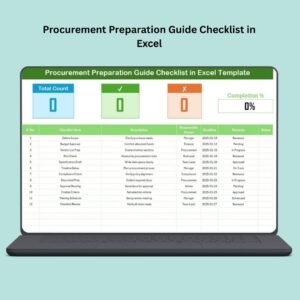
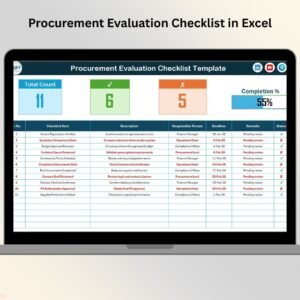
The Procurement Review Checklist in Excel is an essential tool designed to help procurement managers, teams, and business owners streamline the procurement review process. This Excel-based checklist ensures that all key procurement tasks, from vendor selection to contract finalization, are reviewed and completed efficiently. It provides a structured framework to ensure that all procurement activities meet company standards, legal requirements, and cost efficiency goals.
By organizing the procurement review process, this checklist helps mitigate risks, avoid costly mistakes, and ensure compliance with regulations. Whether you’re reviewing a single vendor or managing multiple procurement projects, this template is customizable and user-friendly, making it an indispensable tool for businesses of all sizes.
Key Features of the Procurement Review Checklist in Excel
📋 Vendor Evaluation & Selection Tracking
Track the evaluation and selection process for vendors. Review vendor proposals, pricing, and qualifications to ensure the best options are selected based on your procurement needs.
📑 Compliance & Legal Requirements
Ensure that all procurement activities comply with legal requirements, including contract terms, vendor documentation, and regulatory standards. This section helps businesses stay compliant and avoid legal issues.
💼 Procurement Process Monitoring
Monitor each step of the procurement process, including needs assessment, sourcing, vendor selection, negotiation, and contract approval. Stay on track and ensure every step is completed thoroughly.
🔑 Action Plan & Task Assignment
Assign specific tasks and responsibilities to team members for each step of the procurement process. The checklist helps ensure accountability and transparency, keeping the process moving forward smoothly.
⚙️ Customizable Fields
Customize the checklist to suit your specific procurement needs. Whether you’re handling one-time purchases or ongoing procurement projects, the template can be adjusted to match your business requirements.
📈 Reporting & Insights
Use the checklist to generate reports on procurement performance, cost savings, and vendor effectiveness. Analyze key metrics to optimize future procurement activities.
Why You’ll Love the Procurement Review Checklist in Excel

✅ Streamline the Procurement Process
Track and monitor every stage of the procurement process in one place, ensuring that each step is completed efficiently and on time.
✅ Mitigate Risk & Ensure Compliance
Keep track of legal and compliance requirements, reducing the risk of issues arising from non-compliance or missed contract terms.
✅ Improve Vendor Selection
Evaluate vendors based on clear, objective criteria, ensuring that the best options are chosen based on your company’s needs and goals.
✅ Boost Team Accountability
Assign clear tasks and responsibilities for each step, improving team collaboration and ensuring timely execution of the procurement process.
✅ Gain Insights & Improve Procurement Efficiency
Track procurement performance over time, identify bottlenecks, and generate valuable insights that help streamline future procurement projects.
What’s Inside the Procurement Review Checklist in Excel?
Vendor Evaluation & Selection Tracking: Track vendor proposals, pricing, and qualifications.
Compliance & Legal Requirements: Ensure that all activities comply with legal standards and regulations.
Procurement Process Monitoring: Monitor needs assessment, sourcing, and vendor selection.
Action Plan & Task Assignment: Assign tasks to ensure efficient execution of the procurement process.
Customizable Fields: Adjust the checklist based on your company’s procurement needs.
Reporting & Insights: Generate procurement reports and analyze performance metrics.
How to Use the Procurement Review Checklist in Excel
1️⃣ Download the Template: Instantly access the Procurement Review Checklist in Excel.
2️⃣ Customize the Checklist: Add or modify fields to fit your specific procurement needs and requirements.
3️⃣ Track Vendor Selection: Evaluate vendors, compare proposals, and select the best option.
4️⃣ Monitor the Procurement Process: Track progress on needs assessment, vendor selection, and contract negotiation.
5️⃣ Generate Reports & Analyze Data: Use the reporting features to gain insights into procurement performance and improve future projects.
Who Can Benefit from the Procurement Review Checklist in Excel?
🔹 Procurement Managers & Teams
🔹 Business Owners & Entrepreneurs
🔹 Compliance & Legal Departments
🔹 Sourcing & Vendor Management Teams
🔹 Small & Medium Enterprises (SMBs)
🔹 Large Enterprises & Corporations
🔹 Procurement Consultants & Specialists
Ensure a smooth, compliant, and cost-effective procurement process with the Procurement Review Checklist in Excel. Streamline vendor selection, ensure legal compliance, and enhance your procurement operations with this essential tool.
Click here to read the Detailed blog post
Visit our YouTube channel to learn step-by-step video tutorials
Youtube.com/@PKAnExcelExpert
Watch the step-by-step video Demo:
Compatibility and Requirements
- Works in Microsoft Excel desktop (Excel 2016 or later, or Microsoft 365).
- You can add or change checklist fields with normal Excel editing. Microsoft’s guide Apply data validation to cells explains how to add your own input rules.
Frequently Asked Questions
What does the procurement review checklist cover?
It covers vendor evaluation and selection, compliance and legal requirements, each step of the procurement process, task assignment and reporting.
Which procurement steps can I track?
Needs assessment, sourcing, vendor selection, negotiation and contract approval.
Can I assign tasks to team members?
Yes. The action plan section lets you assign tasks and responsibilities for each step.
Can I change the checklist items?
Yes. You can add or modify fields to fit one-time purchases or ongoing procurement projects.
Related Procurement Templates
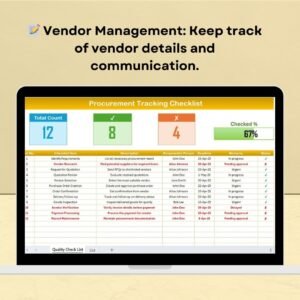
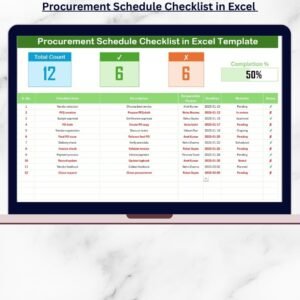
- Procurement Tracking Checklist in Excel: tracks each purchase step
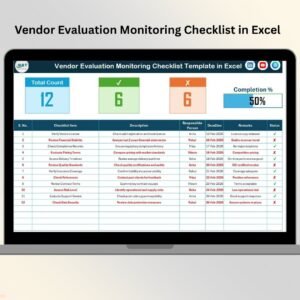
- Vendor Evaluation Checklist Template in Excel: scores vendors before you choose
- Procurement Dashboard in Excel: charts for procurement spending
- Procurement Tracker and Dashboard in Google Sheets: for teams that work in Google Sheets
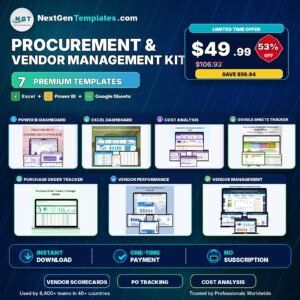
- Procurement and Vendor Management Kit: 7 premium procurement templates in one bundle
Browse all Excel checklists or the MS Excel templates.

























Reviews
There are no reviews yet.