



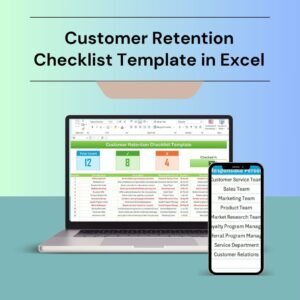
The Customer Retention Checklist Template in Excel is an essential tool designed for businesses to help improve customer loyalty and retention strategies. Whether you’re managing a small business or a large corporation, this template helps you track and evaluate customer interactions, feedback, and engagement to ensure a personalized experience that encourages long-term customer relationships.
This Excel-based checklist allows you to systematically monitor each step of your customer retention process—from follow-ups and loyalty programs to customer feedback and satisfaction tracking. With this template, you can ensure no customer is overlooked and that every touchpoint is utilized to its full potential to boost customer loyalty.

Key Features of the Customer Retention Checklist Template in Excel
📋 Customer Interaction Tracking
Document and track each customer interaction, including inquiries, follow-up calls, emails, or meetings. Keep detailed records of how each customer engages with your business.
📝 Feedback Collection & Analysis
Track customer feedback, including satisfaction surveys, reviews, and comments. This allows you to understand customer concerns and identify areas for improvement.
💡 Loyalty Program Monitoring
Manage and monitor your customer loyalty programs. Track customer participation in rewards, discounts, and loyalty incentives to keep customers coming back.
📅 Follow-Up Schedule & Reminders
Set reminders for follow-ups with customers to ensure timely interactions. Never miss an opportunity to engage with customers and enhance their experience with your brand.
⚙️ Customizable Tracker
Customize the checklist to fit your unique customer retention strategies. Add or modify columns to reflect specific goals, metrics, and actions for your business.
📈 Progress Tracking & Reporting
Generate progress reports on customer retention activities. Track KPIs such as customer satisfaction rates, retention rates, and engagement levels to measure your business’s success.
Why You’ll Love the Customer Retention Checklist Template in Excel
✅ Stay Organized & Efficient
Keep track of every customer interaction, ensuring no customer is left behind. The checklist helps you stay organized, efficient, and proactive in managing your customer base.
✅ Improve Customer Satisfaction
By tracking feedback and follow-ups, you can identify customer pain points and take action to address concerns. This ultimately leads to improved customer satisfaction and retention.
✅ Boost Customer Loyalty
Monitor your loyalty programs and track customer participation. Strengthen customer relationships by rewarding loyal customers and offering incentives to keep them engaged.
✅ Personalized Customer Experience
With detailed tracking, you can create a personalized customer experience that meets individual needs and preferences. This enhances the overall customer experience and fosters loyalty.
✅ Data-Driven Decisions
Analyze customer feedback and track retention metrics to make informed, data-driven decisions. Use insights to refine your retention strategies and grow your business.
What’s Inside the Customer Retention Checklist Template in Excel?
Customer Interaction Tracking: Document and track every customer interaction.
Feedback Collection & Analysis: Track customer feedback and satisfaction.
Loyalty Program Monitoring: Monitor customer participation in loyalty programs.
Follow-Up Schedule: Set reminders for follow-up interactions.
Customizable Tracker: Tailor the checklist to reflect your business’s customer retention strategies.
Progress Reports & Analysis: Track key retention metrics and generate reports.
How to Use the Customer Retention Checklist Template in Excel
1️⃣ Download the Template: Access the Customer Retention Checklist in Excel instantly.
2️⃣ Track Customer Interactions: Record all interactions with your customers, including inquiries, feedback, and follow-ups.
3️⃣ Collect & Analyze Feedback: Use the template to collect customer feedback and identify areas for improvement.
4️⃣ Monitor Loyalty Programs: Track customer participation in loyalty programs and reward loyal customers.
5️⃣ Set Reminders & Follow-Ups: Schedule follow-ups and ensure timely interactions to improve customer relationships.
Who Can Benefit from the Customer Retention Checklist Template in Excel?
🔹 Customer Service Teams
🔹 Marketing & Sales Teams
🔹 Business Owners & Entrepreneurs
🔹 Small & Medium Businesses (SMBs)
🔹 E-commerce Platforms & Online Retailers
🔹 Customer Relationship Management (CRM) Professionals
🔹 Marketing Agencies & Consultancies
Ensure your customers stay loyal to your brand and receive the best experience with the Customer Retention Checklist Template in Excel. Improve communication, track engagement, and boost customer satisfaction—all in one simple tool.
Click here to read the Detailed blog post
Visit our YouTube channel to learn step-by-step video tutorials
Youtube.com/@PKAnExcelExpert
Compatibility and Requirements
- Works in Microsoft Excel desktop (Excel 2016 or later, or Microsoft 365).
- If you are new to Excel, Microsoft’s Excel for Windows training covers the basics.
Frequently Asked Questions
What can I record in this checklist?
You can record customer interactions, feedback, loyalty program participation and follow-up dates for each customer.
Does it help with follow-ups?
Yes. The follow-up schedule lets you set reminders so you contact customers on time.
Can I track retention results?
Yes. Progress tracking covers KPIs such as customer satisfaction, retention rates and engagement levels.
Can I add my own columns?
Yes. You can add or change columns to match your own retention goals and actions.
Is there a Google Sheets version?
Yes. The Customer Retention Checklist in Google Sheets covers the same job in a browser.
Related Customer Retention Templates
- Customer Retention Checklist in Google Sheets: the same checklist in Google Sheets
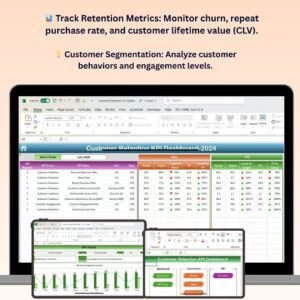
- Customer Retention KPI Dashboard in Excel: retention KPIs with targets
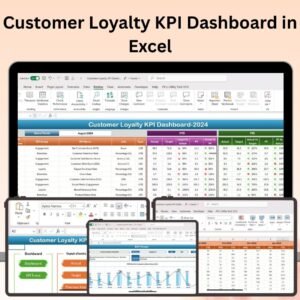
- Customer Loyalty KPI Dashboard in Excel: loyalty program KPIs
- Customer Feedback Tracker in Excel: log customer feedback
- Checklist & SOP Pack: 12 checklist templates in one download
Browse all Excel checklists or the Excel sales and marketing templates.































Reviews
There are no reviews yet.