

The best PMO dashboard template Excel stack starts with the Project Management Dashboard in Excel ($17.99) for Gantt, workload and risk, then adds the Resource Allocation Dashboard in Excel ($17.99), the Service Delivery KPI Dashboard ($14.99) and a $6.99 status tracker. Four files cover planning, tracking, reporting and presenting for $57.96.
Last updated: October 2026
Key takeaways
- The Project Management Dashboard in Excel ($17.99) is the anchor file: task status, Gantt scheduling, resource heat map and a risk register in one workbook.
- The Multiple Project Management Dashboard in Google Sheets ($9.99) is the cheapest way to see a whole portfolio by department, manager, status and budget variance.
- Resource Allocation is sold in Excel and Power BI, both $17.99, so you pick the format your stakeholders already open.
- A full eight-template stack costs $99.92 once; a four-file core stack in Excel costs $57.96.
- The stack is organised as plan, track, report and present, and a 30-day rollout table below shows what to switch on each week.
 Launch offer
From your first Pivot Table to the Data Model, DAX, Power Query and a one-page KPI dashboard. 11h 51m of video by PK, with practice files, quizzes and a capstone.
PMO dashboard templates compared
| Template | Format | Best For | Price |
|---|---|---|---|
| Project Management Dashboard in Excel (Best overall) | Excel | Single-program control: Gantt, workload, risks | $17.99 |
| Multiple Project Management Dashboard in Google Sheets (Best value) | Google Sheets | Portfolio view across departments and managers | $9.99 |
| Resource Allocation Dashboard in Excel | Excel | Utilization and workload balancing | $17.99 |
| Resource Allocation Dashboard in Power BI | Power BI | Presenting capacity to leadership | $17.99 |
| Project Management Service Delivery KPI Dashboard in Excel | Excel | MTD and YTD delivery KPIs | $14.99 |
| Project Status Update Tracker in Excel | Excel | Weekly status, milestones, risks | $6.99 |
| Project Status Update Tracker in Google Sheets | Google Sheets | Shared status with budget vs spent | $6.99 |
| Project Status Tracker in Google Sheets | Google Sheets | Task-level progress and milestones | $6.99 |
How we picked these
We searched the NGT catalog of project management, dashboard and tracker templates and kept only paid files that a PMO Lead would use in a normal reporting cycle. Each had to cover one of four jobs: plan, track, report or present. Where the same tool exists in Excel, Google Sheets or Power BI, we included more than one format so you can match your team’s tools.
We left out single-purpose files such as generic to-do lists and anything that duplicated another template without a different format. Product details come from the listings. We have not run your data through them, so check fit against your own portfolio before you roll out.
What does a PMO Lead actually need in a dashboard stack?
A PMO answers four questions every week. What is planned and who is on it? Where does each project stand today? What numbers go into the report? What does leadership see? Most PMOs answer these in four different places, and that is where the reporting hours go.
The stack below maps one or two templates to each question. If you already use project management dashboard templates for individual teams, treat this as the layer that sits above them.
| Stage | Template | What this replaces |
|---|---|---|
| Plan | Project Management Dashboard in Excel; Resource Allocation Dashboard in Excel | Smartsheet Gantt and workload views; Monday.com workload widget |
| Track | Project Status Update Tracker (Excel or Google Sheets); Project Status Tracker in Google Sheets | Asana status updates and project check-in forms |
| Report | Service Delivery KPI Dashboard in Excel; Multiple Project Management Dashboard in Google Sheets | Smartsheet portfolio reports; Monday.com dashboards |
| Present | Resource Allocation Dashboard in Power BI | Separate BI add-ons built on top of a work-management tool |
The replacement column is a judgement, not a feature-for-feature match. Smartsheet, Monday.com and Asana do things these files do not, such as automated notifications and cross-team workflows. Check what your team uses before cancelling anything, and see the limits section below.
The 8 best PMO dashboard templates for 2026
1. Project Management Dashboard in Excel: best overall
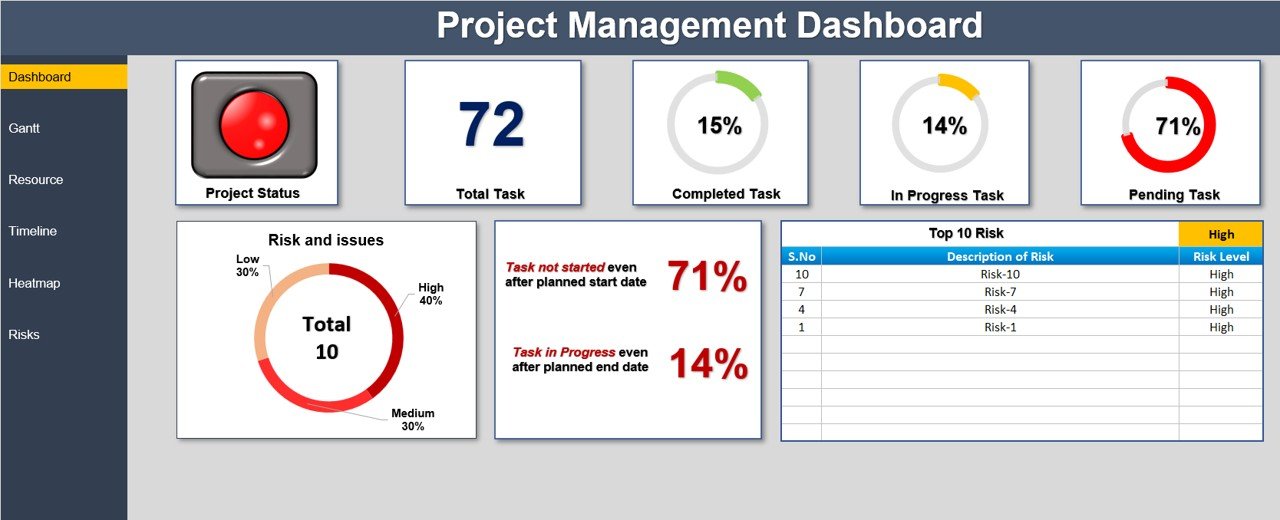
This is the file we would open first as a PMO Lead. It is a single workbook that shows task status, a Gantt schedule, resource workload and risks side by side. It earns the number one spot because it covers the most PMO questions for one program at $17.99.
Who it is for: PMO Leads and project managers who run one program with many tasks and need a single control view.
- Task summary: total, completed, in progress and pending tasks with a percentage breakdown.
- Interactive Gantt chart with color-coded completed, in-progress and pending tasks.
- Resource heat map showing underused and overburdened people.
- Milestone timeline with scrollable date adjustment.
- Risk register with low, medium and high severity and named owners.
Use cases: A 40-task rollout reviewed every Monday; a staffing check when two people show hot on the heat map; a risk review limited to high-severity items; a steering-committee slide pulled from the summary view.
Price: $17.99. Get the Project Management Dashboard in Excel.
Best for: one program that needs planning, tracking and risk in one file.
2. Multiple Project Management Dashboard in Google Sheets: best value
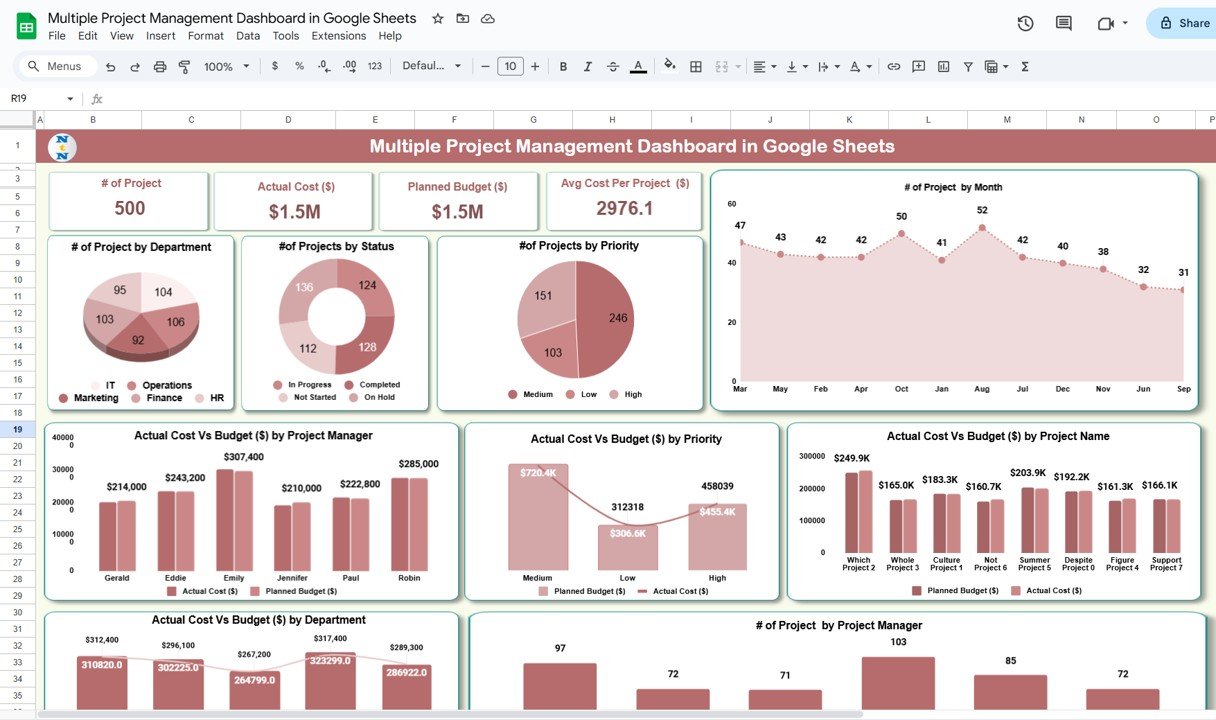
At $9.99 this is the cheapest portfolio view in the stack, and the one that most directly answers the question a PMO gets asked: how are all the projects doing?
Who it is for: PMO Leads who manage many projects across departments and want a shared, browser-based view.
- KPI cards for total projects, planned budget, actual cost and average cost per project.
- 9 auto-updating charts by department, status, priority, project manager and month.
- Budget vs actual comparison by project, priority, manager and department.
- A data tab with project name, budget, cost, dates, status, priority, manager and department.
Use cases: a monthly portfolio review that flags which department is over budget; a look at how many projects start each month to see load coming; a manager-by-manager view before performance conversations; a priority split to decide what gets cut first.
Price: $9.99. Get the Multiple Project Management Dashboard in Google Sheets.
Best for: a low-cost portfolio overview shared over Google Sheets.
3. Resource Allocation Dashboard in Excel: plan capacity
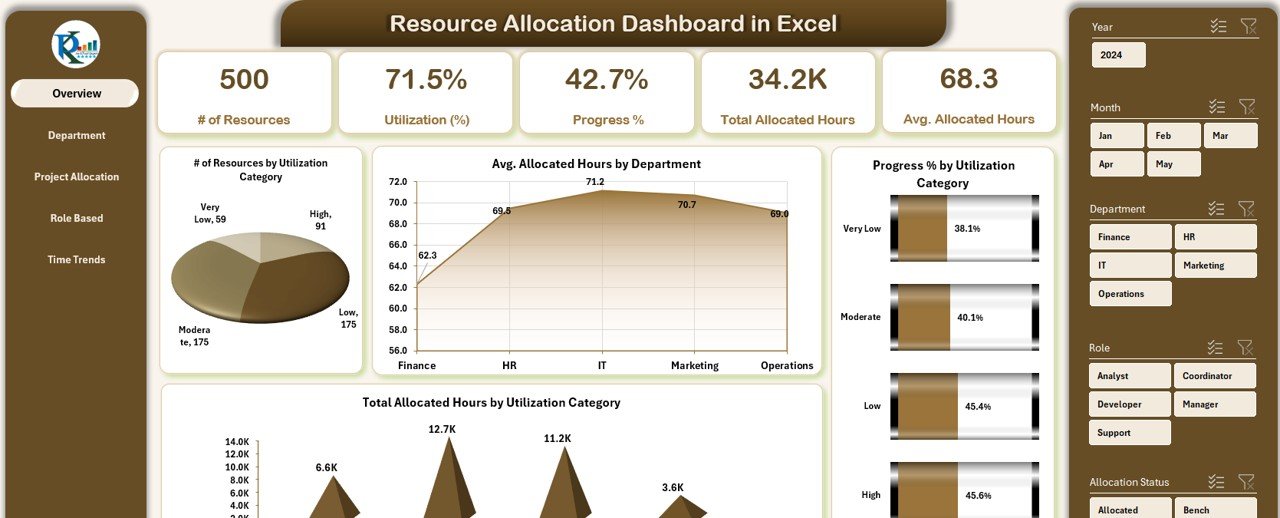
Capacity is where PMOs lose arguments. This workbook turns one input sheet into five views, so you can show who is overloaded with numbers instead of opinions.
Who it is for: PMO Leads, resource managers and HR partners who assign people across projects.
- Page navigator across five views: overview, department summary, project allocation, role-based utilization and time trends.
- Single data sheet with resource ID, employee, department, project, role, dates, allocated hours, utilization %, status and progress.
- Built-in slicers for role, department or time.
- A support sheet that handles dropdowns and backend logic.
Use cases: spotting that developers are overused while designers are idle; comparing departments on utilization %; checking which project absorbs the most hours; viewing monthly allocation to plan next quarter’s hiring.
Price: $17.99. Get the Resource Allocation Dashboard in Excel.
Best for: balancing workloads without leaving Excel.
4. Resource Allocation Dashboard in Power BI: present capacity
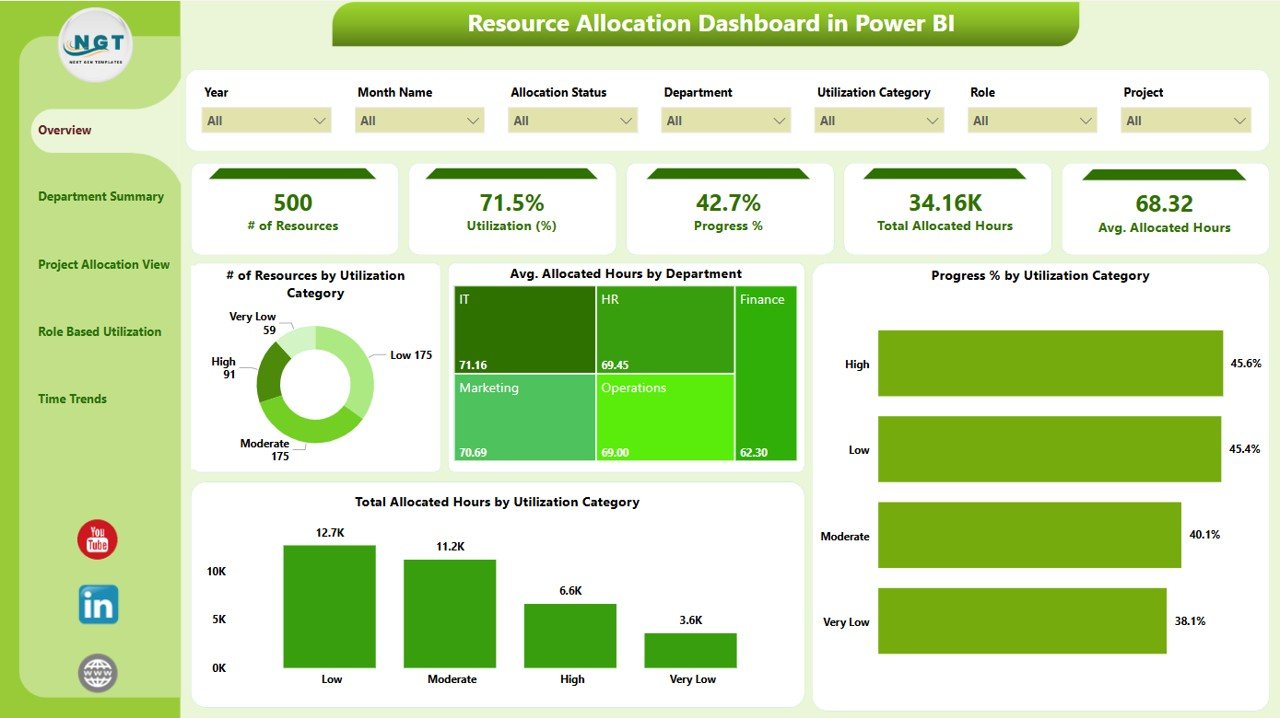
This is the same job as number 3 in a format built for presenting. It has five pages, live KPIs and seven slicers on each page, so a director can filter by project, department, role or time without asking you for a new export.
Who it is for: PMO Leads who present to executives and already use Power BI.
- Five pages: overview, department, projects, roles and time trends.
- KPIs for total resources, average utilization % and total allocated hours.
- Connects to Excel, SQL and Google Sheets data sources.
- Ships as a .pbix file with sample data, ready to publish to Power BI Service or share internally.
Use cases: a quarterly capacity review where leadership drills into a department; a role view that shows skill gaps; a monthly trend page to support a headcount request; sample data for training your analysts before you connect real data.
Price: $17.99. Get the Resource Allocation Dashboard in Power BI.
Best for: interactive capacity reviews with leadership.
5. Project Management Service Delivery KPI Dashboard in Excel: report delivery
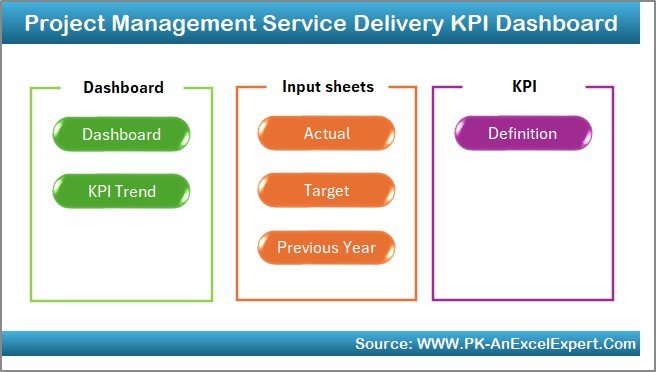
This is the reporting file. It tracks KPIs with month-to-date and year-to-date values, which is what most PMO packs ask for when they say performance against target.
Who it is for: PMO Leads and service delivery managers who report monthly KPIs.
- KPIs for task completion rates, timelines, resource utilization and project costs.
- MTD and YTD tracking for each KPI.
- Progress bars and color codes for quick reading.
- Customizable input fields for your own project data.
Use cases: a monthly delivery report with completed vs pending tasks; a year-to-date view for the annual review; a bottleneck check when completion rate slips; a cost line next to utilization for the finance partner.
Price: $14.99. Get the Service Delivery KPI Dashboard in Excel.
Best for: the monthly KPI pack.
6. Project Status Update Tracker in Excel: track weekly
The cheapest Excel file in the stack at $6.99, and the one project managers will actually update every week.
Who it is for: project managers who feed status into the PMO.
- Milestone, task and deadline tracking.
- Task assignment with progress per team member.
- Color-coded status updates.
- Risk and issue records with mitigation notes.
- Customizable progress reports for stakeholders.
Use cases: a Friday status roll-up; a stakeholder report with one page per project; a risk log kept with mitigation notes; a milestone slip check before the steering meeting.
Price: $6.99. Get the Project Status Update Tracker in Excel.
Best for: a simple weekly status habit in Excel.
7. Project Status Update Tracker in Google Sheets: track and share
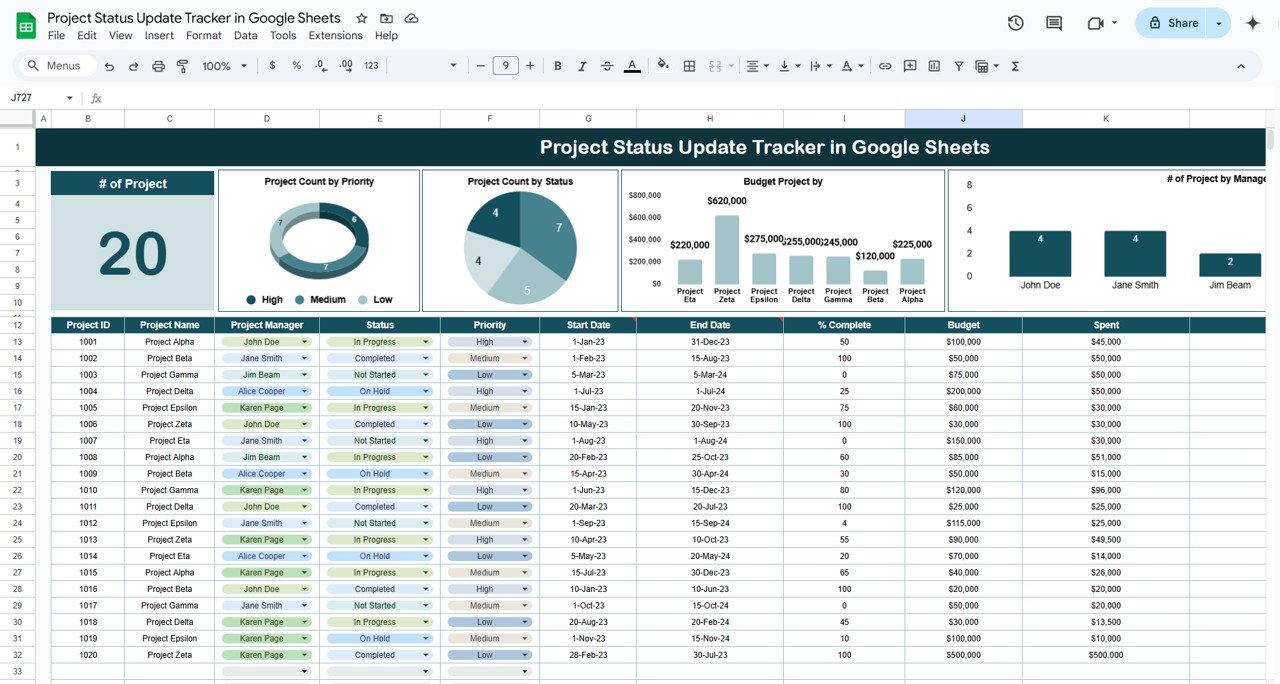
The Google Sheets version adds a budget vs spent column and live sharing, which suits distributed teams where several people edit at once.
Who it is for: PMOs with remote project managers, or teams that already live in Google Workspace.
- Status dropdown: Not Started, In Progress, Completed.
- Priority field: High, Medium, Low.
- Start and end dates, % completion and a remarks column.
- Budget vs spent per project.
- Auto-updating pie, column and bar charts.
Use cases: a shared status sheet that each manager updates before Monday; a count of projects by status for the weekly note; a budget check by project; a priority split to see what is high and not started.
Price: $6.99. Get the Project Status Update Tracker in Google Sheets.
Best for: shared status with a budget column.
8. Project Status Tracker in Google Sheets: task-level detail

Where number 7 works at project level, this one works at task level. It lists tasks, deadlines and statuses, with resource allocation and milestone tracking added.
Who it is for: team leads inside a project who need a task list the PMO can read.
- Task, deadline and completion status in one sheet.
- Status indicators: Not Started, In Progress, Completed.
- Color-coded progress bars and charts.
- Resource allocation to tasks and milestone tracking.
Use cases: a sprint-style task list for a small project; a milestone check before a gate review; a quick look at which tasks have no resource assigned; a lightweight tracker for a project that does not justify a full dashboard.
Price: $6.99. Get the Project Status Tracker in Google Sheets.
Best for: small projects that need a task list, not a dashboard.
How do you choose between them?
| If you… | Start with | Cost |
|---|---|---|
| Run one large program in Excel | Project Management Dashboard in Excel | $17.99 |
| Manage a portfolio and live in Google Workspace | Multiple Project Management Dashboard in Google Sheets | $9.99 |
| Fight over who is overloaded | Resource Allocation Dashboard in Excel or Power BI | $17.99 |
| Owe leadership a monthly KPI pack | Service Delivery KPI Dashboard in Excel | $14.99 |
| Need project managers to report weekly | A $6.99 status tracker | $6.99 |
Bundle maths: all eight templates cost $99.92 at list price. A four-file core stack of the Project Management Dashboard, Resource Allocation Dashboard in Excel, Service Delivery KPI Dashboard and Status Update Tracker in Excel costs $57.96. A Sheets-leaning stack of the Multiple Project Management Dashboard, Status Update Tracker in Google Sheets and Project Status Tracker costs $23.97.
If you also want formulas for the numbers, two are worth standardising. Utilization % is allocated hours divided by available hours. Budget variance is actual cost minus planned budget, divided by planned budget. Agree these definitions with finance before you load data.
What does a 30-day PMO rollout look like?
Do not switch everything on at once. Each week adds one layer, and each layer has an exit check so you know whether to continue.
| Week | Action | Template | Exit check |
|---|---|---|---|
| 1 | Load the current project list and dates | Project Management Dashboard in Excel or Multiple Project Management Dashboard in Google Sheets | Every active project appears once with an owner |
| 2 | Start weekly status updates | Project Status Update Tracker (Excel or Sheets) | Every project manager updated before the Friday deadline |
| 3 | Load resource hours by person and project | Resource Allocation Dashboard in Excel | Utilization % reviewed for each department |
| 4 | Produce the first KPI pack and leadership view | Service Delivery KPI Dashboard in Excel; Resource Allocation Dashboard in Power BI | One report issued with MTD and YTD numbers |
At the end of week four, run the old tool and the new files in parallel for one reporting cycle. Compare the numbers. Only cancel a Smartsheet, Monday.com or Asana seat once the report matches and nobody still relies on its automations. Our project management dashboard templates guide has more options if one of your teams needs something smaller.
Where do other functions fit around the PMO?
A PMO rarely works alone. Cost numbers are often shared with the finance team, so the CFO dashboard template stack is a useful reference. People data lines up with the HR dashboard templates in Excel. Vendor-heavy programs benefit from procurement dashboard templates, and training rollouts pair with learning dashboard templates.
If your PMO supports marketing programs, the sibling post on a demand generation dashboard template stack uses the same plan, track, report, present logic. For operational programs, see manufacturing dashboard templates and logistics dashboard templates. The Project Management Institute publishes research on PMO practice in its Pulse of the Profession reports, which is a good source for benchmarks to put beside your own figures.
When is a template NOT the right answer?
Templates are files. They suit a PMO that reports on a rhythm and wants to own its data. They are the wrong answer in several situations.
- You need automated workflows, such as approvals that trigger tasks or notifications to many teams. Smartsheet, Monday.com and Asana do this and a spreadsheet does not.
- Hundreds of people edit the same plan at once and need permissions, audit trails and comments tied to each task.
- You need resource-levelled scheduling with dependencies across many interlinked projects. Dedicated scheduling software such as Microsoft Project is built for that.
- Your data lives in a system that cannot export to Excel, Sheets or a database, so you would be retyping everything.
- Nobody on the team is willing to enter data weekly. A dashboard fed by stale rows is worse than none.
In these cases keep the SaaS tool for execution and use the templates only for reporting on top of it. That is a common pattern, and it still removes the manual slide-building.
Frequently asked questions
What is the best PMO dashboard template in Excel?
The Project Management Dashboard in Excel ($17.99) is the best single pick. It combines task status, a Gantt chart, a resource heat map, a milestone timeline and a risk register. Add the Resource Allocation Dashboard in Excel ($17.99) when you need a deeper view of utilization by role and department.
Can Excel replace Smartsheet or Monday.com for a PMO?
For reporting, often yes. Excel templates cover Gantt views, status, workload and KPIs. They do not replace automated workflows, notifications or live multi-user permissions. Run both for one cycle, compare the reports, then decide which seats to cancel.
How much does a PMO template stack cost?
A four-file Excel core stack costs $57.96: Project Management Dashboard $17.99, Resource Allocation Dashboard $17.99, Service Delivery KPI Dashboard $14.99 and Status Update Tracker $6.99. All eight templates in this post cost $99.92. Each is a one-time price per listing.
Which templates work in Google Sheets?
Three do. The Multiple Project Management Dashboard in Google Sheets costs $9.99. The Project Status Update Tracker in Google Sheets and the Project Status Tracker in Google Sheets each cost $6.99. They suit teams that share files in a browser and edit together in real time.
Is there a Power BI template for resource allocation?
Yes. The Resource Allocation Dashboard in Power BI costs $17.99. It has five pages, seven slicers per page and KPIs for utilization %, progress % and allocated hours. It connects to Excel, SQL and Google Sheets, and arrives as a .pbix file with sample data.
How do you calculate resource utilization?
Utilization % is allocated hours divided by available hours, multiplied by 100. A person with 30 allocated hours out of 40 available is at 75%. Agree the definition of available hours first, since leave and public holidays change the denominator.
What should a PMO dashboard include?
It should cover task status, schedule, milestones, resource workload, budget against actual and open risks. The Project Management Dashboard in Excel includes the first five of those and a risk register. Add KPIs with month-to-date and year-to-date values for reporting to leadership.
How long does it take to set up a PMO dashboard?
Loading a project list into a template can take an afternoon. A realistic full rollout takes about 30 days, adding one layer per week: project list, weekly status, resource hours, then KPI and leadership reporting. The week-four exit check is a report that matches your old numbers.
Do I need Power BI if I already use Excel?
No. The Excel templates work on their own. Power BI helps when you present to leadership who want to filter by project, department or role. The Resource Allocation Dashboard exists in both Excel and Power BI at $17.99, so you can start in Excel and move later.
Are these templates good for multiple projects?
Yes. The Multiple Project Management Dashboard in Google Sheets ($9.99) is built for portfolios, with nine charts by department, status, priority, manager and month. The Status Update Trackers also record many projects in one table. For one large program, the Excel Project Management Dashboard is stronger.
Get more PMO templates
Start with the Project Management Dashboard in Excel for $17.99, or cover the portfolio for $9.99 with the Multiple Project Management Dashboard in Google Sheets. Join 10,000+ customers in 180+ countries.
Watch walkthroughs on the NextGen Templates YouTube channel.