

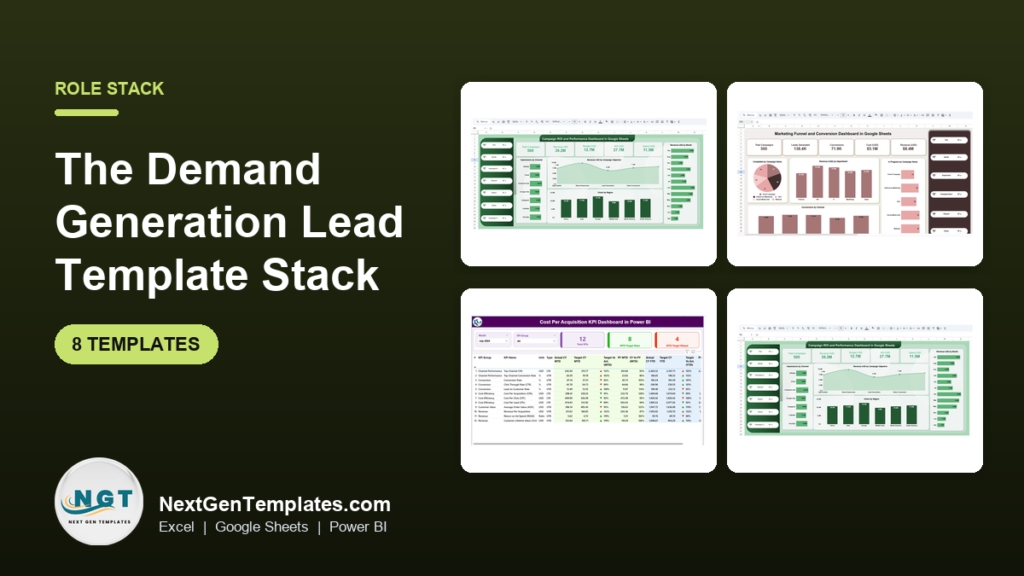
The best demand generation dashboard template stack for 2026 uses eight tools: the Campaign ROI and Performance Dashboard in Google Sheets ($9.99) for budget and ROI, a funnel tracker ($6.99), CPA and PPC dashboards, and Power BI views to present. The full set costs $100.92 and covers plan, track, report and present.
Last updated: October 2026
Key takeaways
- The stack has 8 templates across Excel, Google Sheets and Power BI, and the whole set costs $100.92 (individual prices run from $6.99 to $14.99).
- The Campaign ROI and Performance Dashboard in Google Sheets ($9.99) is the best overall starting point because it tracks revenue, spend, budget and ROI by channel, region and objective.
- The Marketing Funnel and Conversion Dashboard in Google Sheets is the best value at $6.99 and covers leads to conversion to revenue.
- The templates are grouped by job: plan (2), track (3), report (1) and present (2), so a Demand Generation Lead can roll them out in 30 days.
- The Power BI templates (CPA at $11.99, PPC at $11.99) read their data from Excel, so there is no coding to update them.
 Launch offer
From your first Pivot Table to the Data Model, DAX, Power Query and a one-page KPI dashboard. 11h 51m of video by PK, with practice files, quizzes and a capstone.
Demand generation dashboard templates compared
| Template | Format | Best For | Price |
|---|---|---|---|
| Campaign ROI and Performance Dashboard (best overall) | Google Sheets | Budget, spend and ROI by channel and region | $9.99 |
| Cost Per Acquisition KPI Dashboard | Excel | CPA targets and previous-year comparison | $14.99 |
| Marketing Funnel and Conversion Dashboard (best value) | Google Sheets | Lead-to-sale funnel tracking | $6.99 |
| Lead Nurturing KPI Dashboard | Excel | Lead engagement and follow-up tasks | $14.99 |
| Ecommerce Conversion Rate KPI Dashboard | Excel | Conversion rate by channel and device | $14.99 |
| Event ROI KPI Dashboard | Excel | Event revenue, cost and engagement | $14.99 |
| PPC Campaign KPI Dashboard | Power BI | ROI, CTR, CPC and conversions for paid ads | $11.99 |
| Cost Per Acquisition KPI Dashboard | Power BI | Presenting CPA to executives | $11.99 |
How we picked these templates
We searched the NextGenTemplates catalog of roughly 6,900 products for marketing, lead, campaign, funnel and acquisition dashboards. We kept only paid templates that map to a real step in a demand generation workflow: budgeting, funnel tracking, nurturing, reporting and presenting.
We excluded free or loosely related templates, and anything that did not describe KPIs a Demand Generation Lead would review weekly. Where the same tool exists in two formats (CPA in Excel and Power BI), we kept both so you can pick the one your team already uses.
One limit to state up front: we did not check keyword demand tools for this topic, so the ranking reflects workflow fit and price, not search volume.
What does a demand generation lead actually need to track?
A demand generation lead owns the number of qualified leads and the cost of getting them. That means four jobs: plan the budget and targets, track the funnel from lead to sale, report spend against return, and present the result to people who control the budget.
The templates below are sorted into those four groups. For the metric definitions behind them, see our guide to marketing KPIs to track in 2026.
The 8 best demand generation dashboard templates for 2026
1. Campaign ROI and Performance Dashboard in Google Sheets – best overall (Plan)
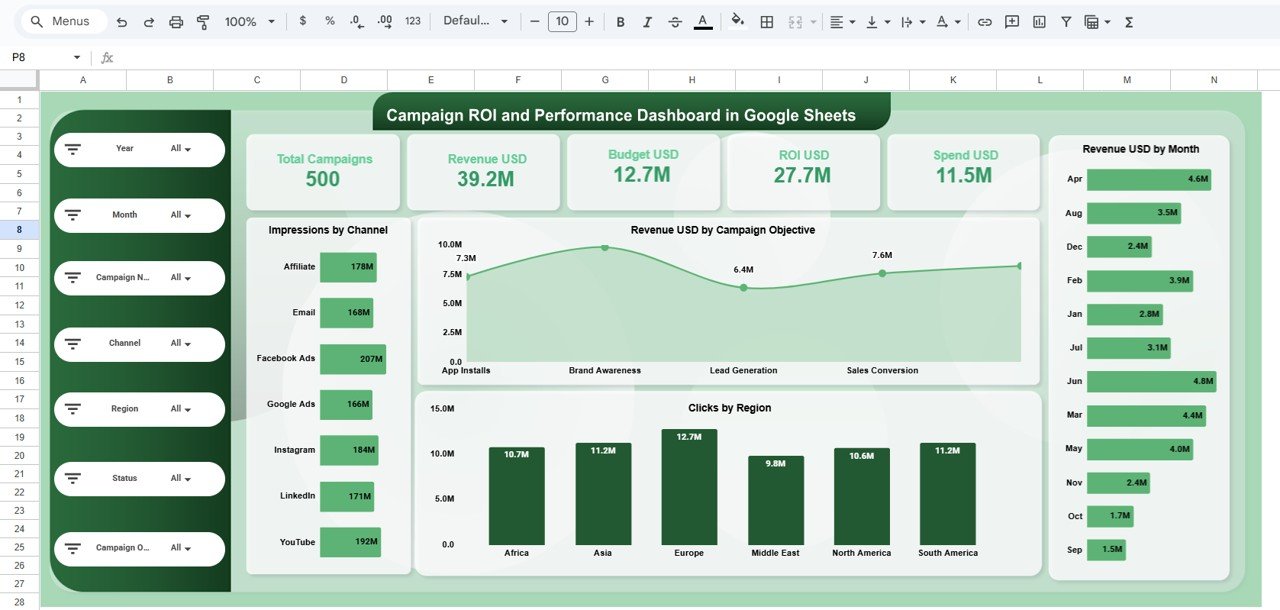
It is ranked first because it answers the question a budget owner asks most: what did we spend and what did we get back? It sits at $9.99, the second-lowest price in the stack, and it is shareable by link.
What it is: a Google Sheets dashboard that turns raw campaign data into KPIs and charts for revenue, spend, budget and ROI.
Who it is for: marketing teams running campaigns across several channels and regions.
- Multi-channel comparison across Email, Google Ads, Facebook, LinkedIn and YouTube
- Region-wise insights on impressions, clicks, revenue and budget
- Campaign objective analysis (Lead Generation, Sales, Traffic, Awareness)
- Monthly trends, a searchable campaign table, and slicers
Use cases: compare cost-per-channel before moving next quarter’s budget; find which region returns the least per dollar; check whether Awareness campaigns are eating budget meant for Lead Generation; share one live link instead of emailing a weekly PDF.
Price: $9.99. Get the Campaign ROI dashboard in Google Sheets.
Best for: a lead who needs one ROI view across every channel.
2. Cost Per Acquisition KPI Dashboard in Excel (Plan)
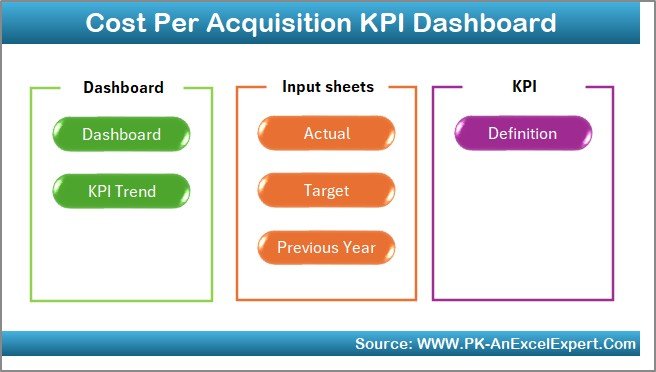
What it is: an Excel dashboard for tracking, analyzing and reducing Cost Per Acquisition, with targets built in.
Who it is for: leads who are held to a CPA number and need to see month-to-date and year-to-date progress against it.
- 7 worksheets: Home, Dashboard, KPI Trend, Actual Numbers Input, Target, Previous Year Data and KPI Definition
- Month dropdown that updates the KPIs instantly
- MTD and YTD indicators with conditional formatting arrows
- Trend charts for Actual, Target and Previous Year
- Customizable KPIs, so you can add or remove metrics
Use cases: set a monthly CPA target for each quarter; compare this March against last March; keep a KPI definition sheet so finance and marketing use the same formula; add a custom KPI such as cost per qualified lead.
CPA formula: total acquisition spend divided by new customers acquired. Example: $12,000 spend and 80 new customers gives a CPA of $150.
Price: $14.99. Get the cost per acquisition KPI dashboard in Excel.
Best for: setting and defending a CPA target.
3. Marketing Funnel and Conversion Dashboard in Google Sheets – best value (Track)
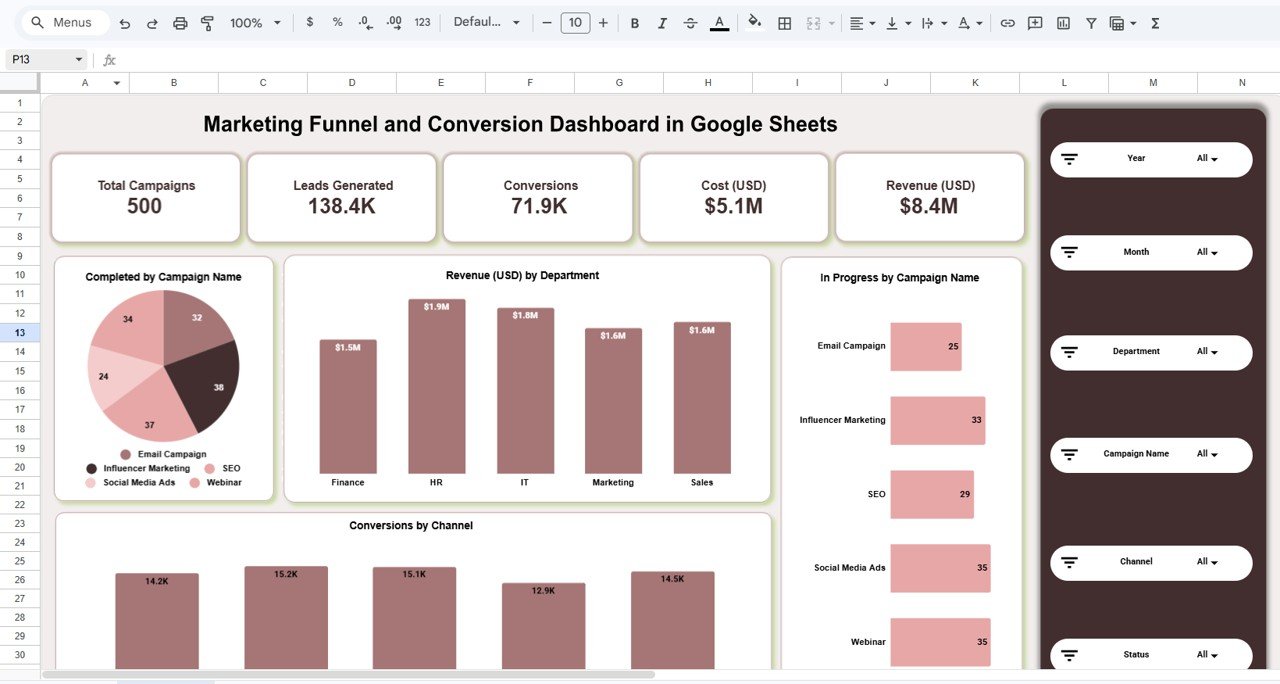
What it is: a Google Sheets dashboard that follows leads, conversions and revenue through the funnel.
Who it is for: leads who need a funnel view and have little budget to spend on tooling. At $6.99 it is the cheapest template here.
- Filters and slicers by year, month, department, campaign and channel
- Funnel performance from lead generation to conversion
- Revenue and cost analysis for profitability and ROI
- Channel insights and campaign progress tracking
- Automated KPI calculations and real-time team collaboration
Use cases: see which channel produces the most leads that convert; spot the month where conversion dropped; flag campaigns that are behind; give sales read access so both teams look at the same numbers.
Lead-to-sale rate: sales divided by leads. Example: 40 sales from 800 leads is 5%.
Price: $6.99. Get the marketing funnel dashboard in Google Sheets.
Best for: the lowest-cost way to see the whole funnel.
4. Lead Nurturing KPI Dashboard in Excel (Track)
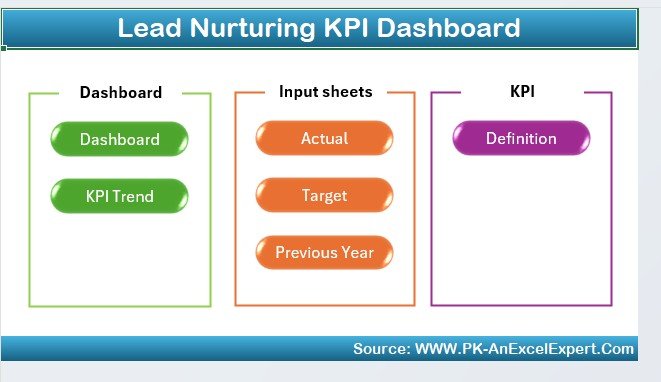
What it is: an Excel dashboard for marketing and sales teams to track lead engagement, conversion and follow-up.
Who it is for: leads running inbound or outbound programs where leads sit in nurture for weeks before sales picks them up.
- Lead engagement tracking: open rates, click-through rates, social interactions
- Lead conversion monitoring from first contact to customer
- Follow-up scheduling and task management for each lead
- Lead source and channel analysis
- Customizable KPIs
Use cases: find the stage where nurtured leads stall; check which source brings leads that engage; make sure no lead goes without a follow-up task; show sales how many leads moved forward last month.
Click-through rate: clicks divided by emails delivered. Example: 150 clicks on 5,000 delivered emails is 3%.
Price: $14.99. Get the lead nurturing KPI dashboard in Excel.
Best for: the middle of the funnel, where leads are warm but not sales-ready.
5. Ecommerce Conversion Rate KPI Dashboard in Excel (Track)

What it is: an Excel dashboard that tracks the share of visitors who complete a purchase or other desired action.
Who it is for: leads whose demand ends in an online checkout, or who need to prove that paid traffic converts on the site.
- Overall conversion rate
- Conversion rate by channel, such as organic search, paid ads and social media
- Device performance across desktop, mobile and tablet
- Historical comparison and industry benchmarks
- Funnel bottleneck identification
Use cases: learn whether mobile traffic converts worse than desktop; compare paid and organic conversion before shifting spend; track the effect of a landing page change month over month; check your rate against the benchmarks you enter.
Conversion rate: conversions divided by visitors. Example: 600 orders from 24,000 visits is 2.5%.
Price: $14.99. Get the ecommerce conversion rate dashboard in Excel.
Best for: connecting traffic quality to what happens on the site.
6. Event ROI KPI Dashboard in Excel (Report)

What it is: an Excel dashboard that measures return on events through attendance, revenue, cost and engagement.
Who it is for: leads who run webinars, field events or trade shows and need to justify the spend.
- KPI tracking for attendance, ticket sales, sponsorship revenue and post-event engagement
- Revenue and cost analysis against event costs
- Engagement metrics from surveys, feedback and social interactions
- Goal tracking and performance comparison
- Customizable KPIs
Use cases: compare two events on cost per attendee; check whether sponsorship revenue covered the venue; report engagement alongside revenue; set a goal for next year’s event using this year’s figures.
ROI formula: (revenue minus cost) divided by cost. Example: $30,000 revenue on $20,000 cost is 50%.
Price: $14.99. Get the event ROI KPI dashboard in Excel.
Best for: reporting on events, which most paid-media dashboards ignore.
7. PPC Campaign KPI Dashboard in Power BI (Present)
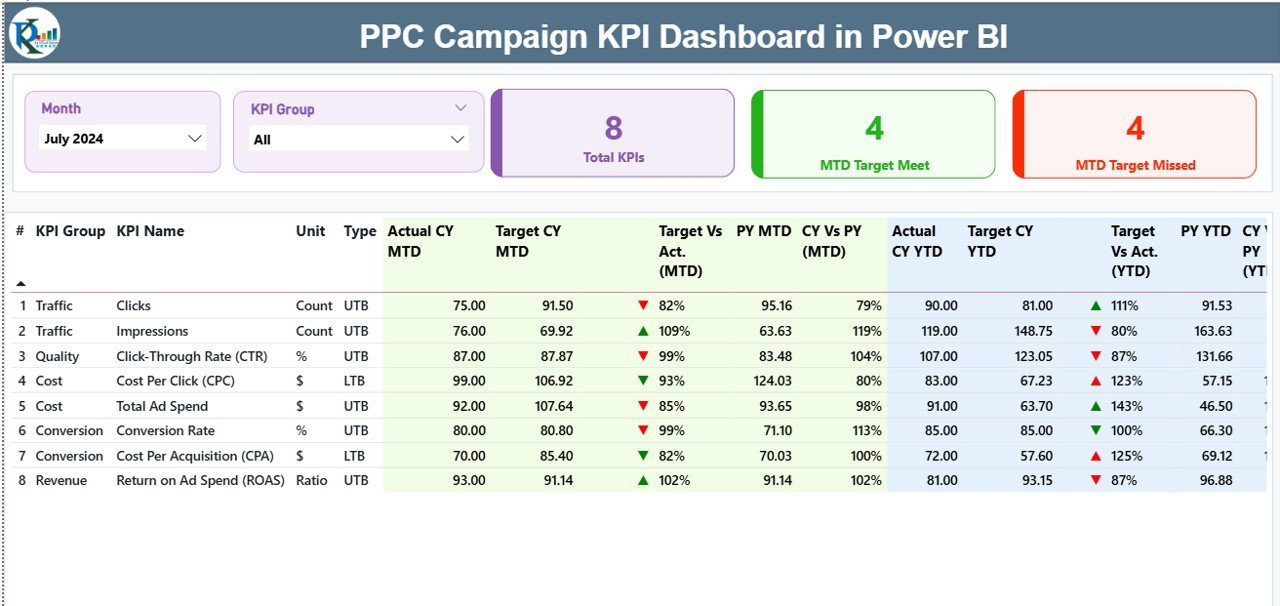
What it is: a Power BI dashboard that tracks ROI, CTR, CPC and conversions with MTD and YTD comparisons.
Who it is for: leads and agencies who report paid performance across Google Ads, Meta and LinkedIn to people outside the marketing team.
- Summary page with KPI cards: total KPIs, MTD target met, MTD target missed
- KPI Trend page with MTD and YTD combo charts and a KPI slicer
- KPI Definition page with formulas, units and types, reached by drill-through
- Excel-powered data, so updates are made in Excel and the visuals refresh
Use cases: open a meeting on the Summary page and show which KPIs missed target; pick CTR or CPC on the trend page to explain a seasonal dip; hand the definition page to a new analyst.
CTR is clicks divided by impressions, and CPC is spend divided by clicks. Example: $900 spend on 600 clicks is a $1.50 CPC.
Price: $11.99. Get the PPC campaign KPI dashboard in Power BI.
Best for: presenting paid-ad results in a clean, interactive format.
8. Cost Per Acquisition KPI Dashboard in Power BI (Present)
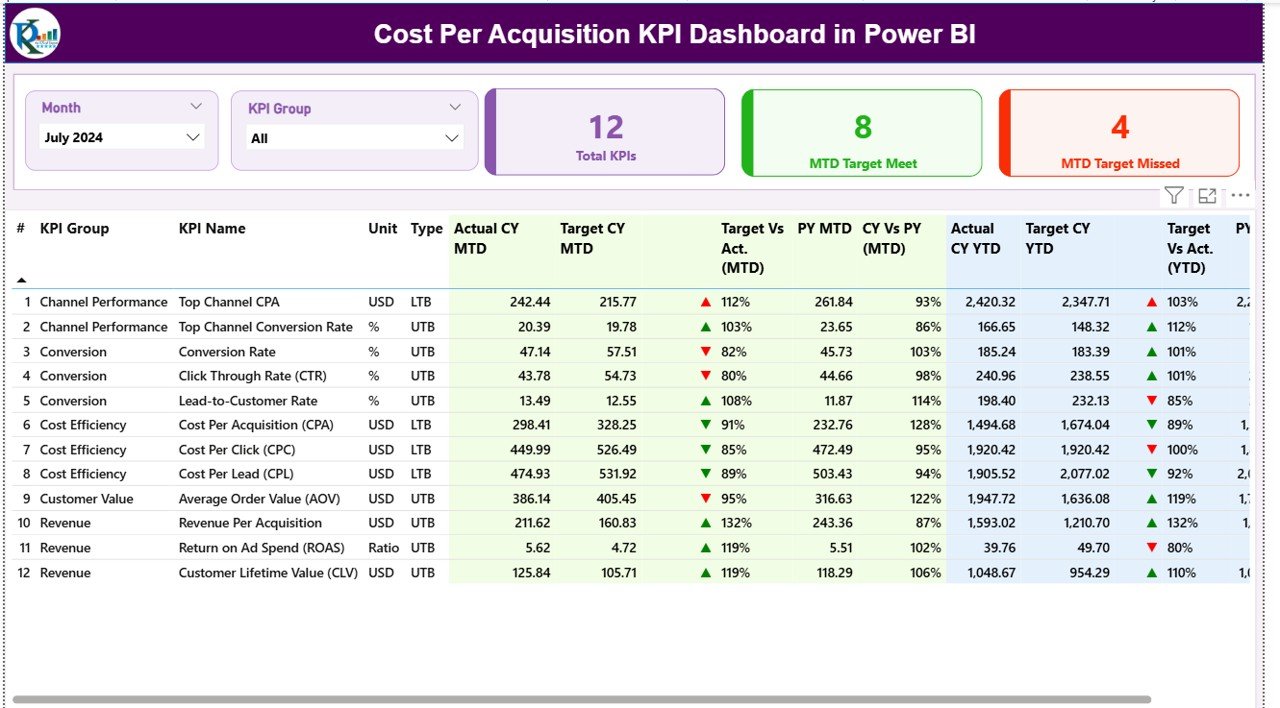
What it is: the Power BI version of the CPA dashboard, built for marketing managers, analysts and business leaders.
Who it is for: leads who already plan CPA in Excel and need an interactive view for leadership.
- Three pages: Summary, KPI Trend and KPI Definition
- MTD and YTD acquisition cost with Month and KPI Group slicers
- Actual vs Target vs Previous Year combo charts
- Green and red icons for target met or missed
- Drill-through to each KPI’s formula and logic
Use cases: show the board a green or red CPA status in seconds; compare actual to previous year by month; filter to one KPI group in a review; keep updates in Excel while Power BI refreshes.
Price: $11.99. Get the cost per acquisition KPI dashboard in Power BI.
Best for: executive-facing CPA reporting.
Start with the cheapest useful pair. The Campaign ROI dashboard in Google Sheets ($9.99) plus the marketing funnel dashboard in Google Sheets ($6.99) costs $16.98 and covers budget, ROI and funnel. Add the rest as the need appears.
Which SaaS subscriptions can this stack replace?
These templates do not pull data from ad platforms on their own. You enter or paste the data, so they replace reporting layers, not data connectors. Check your own contracts before cancelling anything.
| Template | Job | What it may replace |
|---|---|---|
| Campaign ROI (Google Sheets) | Plan | Cross-channel ROI reporting in tools such as Databox or Klipfolio |
| CPA (Excel) | Plan | A custom CPA report built by an analyst |
| Marketing Funnel (Google Sheets) | Track | Funnel report add-ons in marketing automation suites |
| Lead Nurturing (Excel) | Track | Nurture reporting add-ons and manual follow-up lists |
| Ecommerce Conversion (Excel) | Track | Conversion report subscriptions |
| Event ROI (Excel) | Report | Event reporting modules |
| PPC (Power BI) | Present | Paid-media reporting dashboards from tools such as Supermetrics or Funnel.io, if you only used them for display |
| CPA (Power BI) | Present | A separate BI seat used only for one CPA view |
If a subscription also moves data automatically from Google Ads or Meta into a database, keep it. The template is the report, not the pipe.
How do you roll out the stack in 30 days?
| Days | Group | Action | Template |
|---|---|---|---|
| 1-5 | Plan | Enter last quarter’s spend, revenue and budget by channel | Campaign ROI (Google Sheets) |
| 6-10 | Plan | Set CPA targets and load previous-year data | CPA (Excel) |
| 11-15 | Track | Load leads, conversions and revenue by channel | Marketing Funnel (Google Sheets) |
| 16-20 | Track | Add nurture stages and follow-up tasks; add conversion data by device | Lead Nurturing and Ecommerce Conversion (Excel) |
| 21-24 | Report | Enter the most recent event and compare cost to revenue | Event ROI (Excel) |
| 25-30 | Present | Point Power BI at the Excel data and run the first leadership review | PPC and CPA (Power BI) |
Spend the first week on data quality. A dashboard fed with inconsistent channel names will show split totals, so agree on one list of channels and campaign objectives before you start entering rows.
How do you choose between them?
| If you need to… | Start with |
|---|---|
| See ROI across all channels | Campaign ROI (Google Sheets), $9.99 |
| Hit a CPA target | CPA in Excel, $14.99 |
| See the funnel on a tight budget | Marketing Funnel (Google Sheets), $6.99 |
| Prove paid ads work | PPC in Power BI, $11.99 |
| Show leadership a live view | CPA in Power BI, $11.99 |
Pick Google Sheets if several people edit the same data. Pick Excel if the numbers stay with one analyst. Pick Power BI when the audience wants slicers and drill-through; Microsoft documents how Power BI connects to Excel files, which is how these two templates are fed.
If your demand program feeds a sales team, pair this stack with the lead tracker and sales pipeline template stack and review sales pipeline metrics so both sides use the same definitions. The CRM metrics guide and the sales KPIs guide cover the hand-off.
When is a template NOT the right answer?
Buy software instead if you need data to flow automatically from Google Ads, Meta and LinkedIn every day. These templates need data entered or pasted, and the Power BI files refresh from Excel, not from the ad platforms directly.
Software also wins when you need multi-touch attribution, because the templates report channel and campaign totals, not individual customer journeys. Teams with several dozen channels and a data engineer may be better served by a warehouse and a BI tool built around it.
A template is the right answer when you have one to a few people maintaining the numbers, a monthly or weekly reporting rhythm, and a budget that cannot absorb another per-seat subscription.
Finally, a dashboard does not fix poor tracking. If your campaigns are not tagged consistently, the numbers will be wrong however good the charts look.
Frequently asked questions
What is a demand generation dashboard template?
A demand generation dashboard template is a pre-built spreadsheet or Power BI file that tracks leads, spend, conversions and ROI by channel and campaign. You enter your data and the charts update. The Campaign ROI and Performance Dashboard in Google Sheets costs $9.99 and covers revenue, spend, budget and ROI.
Which demand generation dashboard template should I buy first?
Buy the Campaign ROI and Performance Dashboard in Google Sheets first at $9.99. It shows revenue, spend, budget and ROI by channel, region and campaign objective. If you also need a funnel view, add the Marketing Funnel and Conversion Dashboard in Google Sheets at $6.99.
How much does the full demand generation stack cost?
The eight templates in this post total $100.92: Campaign ROI $9.99, Marketing Funnel $6.99, CPA in Excel $14.99, Lead Nurturing $14.99, Ecommerce Conversion $14.99, Event ROI $14.99, and the PPC and CPA Power BI dashboards at $11.99 each. You can buy them one at a time.
Do these templates connect to Google Ads and Meta automatically?
No. The templates run on data you enter or paste. The Power BI dashboards refresh from an Excel file you update, not directly from ad platforms. If you need automatic daily pulls from Google Ads, Meta or LinkedIn, keep a connector tool and use the templates as the reporting layer.
Should I use Google Sheets, Excel or Power BI?
Use Google Sheets when several people share and edit the data, Excel when one analyst owns the numbers, and Power BI when the audience wants slicers and drill-through. CPA is available in both Excel ($14.99) and Power BI ($11.99), so you can start in one and add the other.
How do you calculate cost per acquisition?
Cost per acquisition is total acquisition spend divided by the number of new customers acquired in the same period. For example, $12,000 of spend and 80 new customers gives a CPA of $150. The Cost Per Acquisition KPI Dashboard includes a KPI definition sheet that shows each formula.
What is a good marketing ROI formula to use?
Marketing ROI is revenue minus spend, divided by spend. If a campaign costs $20,000 and brings in $30,000, ROI is 50%. The Campaign ROI and Performance Dashboard in Google Sheets tracks revenue, spend, budget and ROI together, so you do not have to calculate it by hand.
Can I track events and webinars in the same stack?
Yes. The Event ROI KPI Dashboard in Excel ($14.99) tracks attendance, ticket sales, sponsorship revenue, costs and post-event engagement, with goal tracking. It sits in the report group of the stack, next to the Campaign ROI dashboard, so event return can be compared to other spend.
How long does it take to set up the stack?
A 30-day rollout is realistic for one person: plan templates in the first ten days, funnel and nurture tracking by day twenty, event reporting by day twenty-four and the Power BI views by day thirty. Most of the effort goes into cleaning channel names and loading past data.
Is there a bundle that includes all eight templates?
We have not listed a bundle for this exact set, so each template is bought separately at its own price. The eight together come to $100.92. Start with the two cheapest, the Marketing Funnel dashboard at $6.99 and the Campaign ROI dashboard at $9.99, and add others later.
Get more demand generation and marketing templates
Start with the Campaign ROI and Performance Dashboard in Google Sheets for $9.99, then add the cost per acquisition KPI dashboard in Excel for $14.99. The full eight-template set is $100.92.
Watch walkthroughs and dashboard demos on the NextGen Templates YouTube channel. For retail teams, our retail KPIs guide covers the metrics that follow a conversion.