

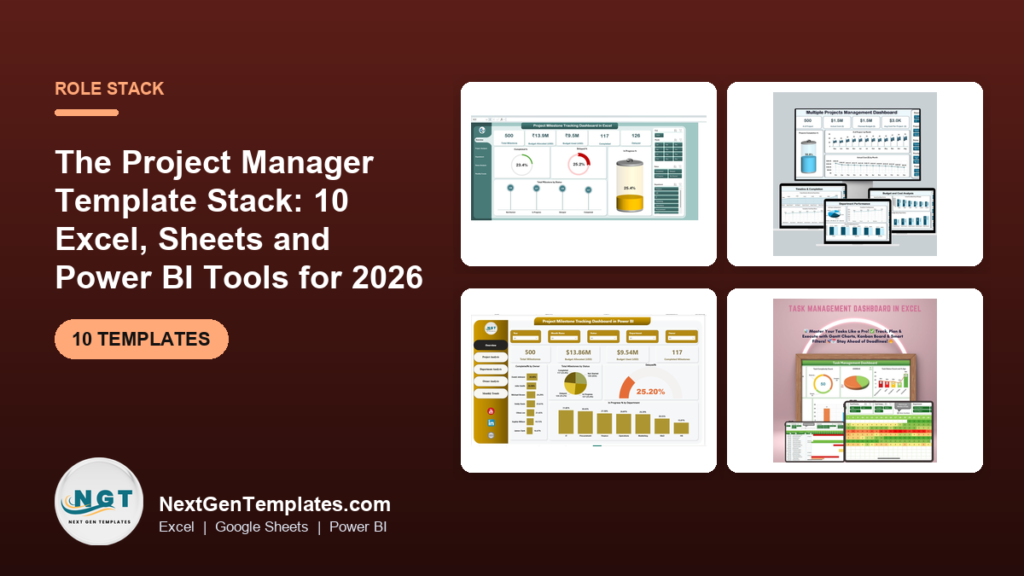
The best project manager Excel templates cover four jobs: plan, track, report and present. The Project Manager Power Pack ($48.99) bundles 10 Excel and Google Sheets templates for all of them. Add single Gantt charts from $4.99 or a Power BI milestone dashboard ($17.99) if you only need one layer.
Last updated: October 2026
Key takeaways
- The Project Manager Power Pack costs $48.99 for 10 templates (5 Excel, 5 Google Sheets), against $86.90 bought one by one.
- A project manager’s week splits into four jobs: plan (Gantt), track (tasks and issues), report (milestones and budget) and present (dashboards).
- Single Gantt charts start at $4.99, so a plan-only stack costs under $10.
- The Project Milestone Tracking Dashboard exists in three formats: Excel ($13.99), Google Sheets ($9.99) and Power BI ($17.99).
- A 30-day rollout works in four one-week steps, and the whole stack can replace a per-seat tool for small and mid-size teams.
 Launch offer
From your first Pivot Table to the Data Model, DAX, Power Query and a one-page KPI dashboard. 11h 51m of video by PK, with practice files, quizzes and a capstone.
Project manager Excel templates compared
| Template | Format | Best For | Price |
|---|---|---|---|
| Project Manager Power Pack (Best overall and best value) | Excel + Google Sheets | One PM who needs the full toolkit | $48.99 |
| Project Management Pro Bundle | Excel + Google Sheets | PMOs, scrum masters, team leads | $49.99 |
| Resource Allocation KPI Dashboard | Excel | Balancing people and budget across projects | $14.99 |
| Milestone Tracking Dashboard | Excel | Budget vs progress by project and owner | $13.99 |
| Milestone Tracking Dashboard | Power BI | Leadership reporting with slicers | $17.99 |
| Milestone Tracking Dashboard | Google Sheets | Shared, cloud-first teams | $9.99 |
| Milestone Status and Performance Dashboard | Google Sheets | Department and owner performance views | $9.99 |
| Project Task Assignment Tracker | Excel | Assigning tasks with priority and status | $6.99 |
| Dynamic Project Planner Gantt Chart | Excel (VBA) | Daily and weekly schedule views | $4.99 |
| Project Plan Gantt Chart | Excel | A simple, fast project timeline | $4.99 |
How we picked these project manager templates
We searched the Next Gen Templates catalog of roughly 6,900 products for project management, Gantt, milestone, task and resource tools. We kept paid templates that a project manager would use weekly, covered more than one format where the same tool exists, and put bundles first because they cost less per template.
We left out generic task lists and unrelated dashboards, and anything that did not clearly belong to the project manager’s job. The ten picks are grouped by the work they do (plan, track, report, present), so you can buy one layer or the whole stack.
What is the project manager template stack?
The stack is a set of spreadsheet and dashboard templates that replace the separate tools a project manager usually pays for. Instead of one big subscription, you pick a tool per job. A Gantt chart handles the schedule, a tracker handles tasks, a dashboard handles status and budget, and a Power BI file handles the leadership review.
The table below maps each layer to the tool it can replace. Treat it as a guide, not a promise: a spreadsheet will not match every feature of a hosted platform such as Asana, ClickUp, Smartsheet or Monday.com.
| Layer | Template | What this replaces |
|---|---|---|
| Plan | Project Plan Gantt Chart, Dynamic Project Planner Gantt Chart | Hand-drawn timelines, a Microsoft Project licence for small schedules |
| Track | Task Assignment Tracker, Resource Allocation KPI Dashboard | Task boards, email follow-ups, a resource planning sheet |
| Report | Milestone Tracking (Excel), Milestone Tracking (Sheets), Milestone Status and Performance (Sheets) | Weekly status decks assembled by hand |
| Present | Milestone Tracking Dashboard in Power BI | Static PDF reports for steering meetings |
| All four | Project Manager Power Pack, Project Management Pro Bundle | Buying and learning each template separately |
The 10 best project manager Excel templates for 2026
1. Project Manager Power Pack, best overall and best value
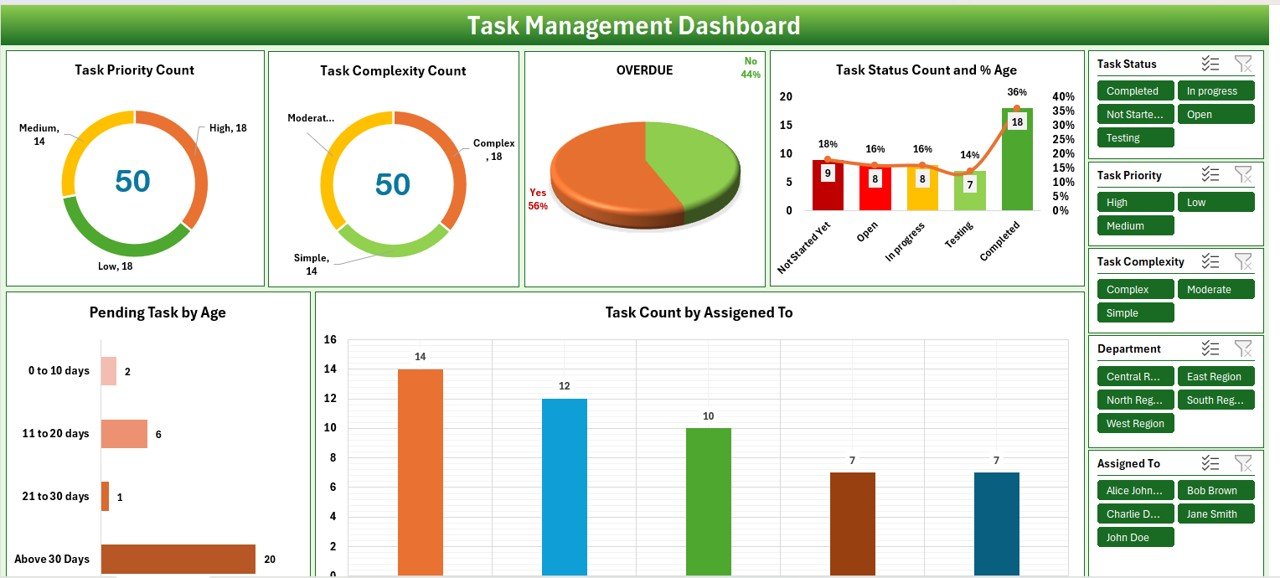
The Project Manager Power Pack is a 10-template control system for people who run projects. It ranks first because it covers every layer of the stack, in two platforms, for $48.99. Bought one by one, the ten cost $86.90, so the bundle saves $37.91 (44%).
Who it is for: project managers who want one purchase instead of assembling a stack.
- 4 Gantt and planning tools: daily, hourly and multi-project timelines with auto-calculating bars
- 2 executive dashboards: Project Management and Task Management, with KPI cards and charts
- 2 issue-tracking systems to log, assign, prioritise and close issues
- 5 Excel workbooks plus 5 Google Sheets templates
- One-time purchase, no user caps
Use cases: run a 12-week rollout on the Gantt tools; track overdue counts on the dashboard; give a Google Sheets team unlimited simultaneous editors; log issues before they become escalations. The listing says deployment takes under 10 minutes: download, enter your data, and the dashboard is live.
Price: $48.99. Get the Project Manager Power Pack.
Best for: a single PM who wants the full toolkit at the lowest cost per template.
2. Project Management Pro Bundle

The Project Management Pro Bundle has 9 templates for $49.99, against $84.91 individually (a saving of $34.92, or 41%). It is aimed at project managers, scrum masters, team leads and PMO directors.
Who it is for: PMOs that track several projects at once and want milestone planning included.
- Pro Gantt chart planners with data entry forms in Excel and Google Sheets
- Multi-project dashboards with KPI cards and progress indicators
- A task management tracker and a project issue tracker
- A progress tracker with visual status indicators and milestone tracking
Use cases: a PMO director compares several projects on one dashboard; a scrum master keeps the task tracker in Google Sheets for live editing; a project manager uses Excel offline for a client site visit.
Price: $49.99. See the Project Management Pro Bundle.
Best for: PMO-style multi-project tracking. It costs $1.00 more than the Power Pack and has one template fewer, so pick it for the multi-project dashboards and milestone planning.
3. Project Management Resource Allocation KPI Dashboard in Excel

This dashboard shows how people, equipment and budget are spread across projects. It tracks KPIs such as resource utilization rate, cost per resource and project progress percentage.
Who it is for: project managers, team leaders and business analysts who juggle shared resources.
- Resource allocation tracking across projects, with under and over-utilization visible
- Project timelines and milestones with progress against deadlines
- Task assignment to team members
- Actual cost against allocated budget per project
Use cases: a utilization rate is hours used divided by hours available, so a person at 120% is overloaded; cost per resource is spend divided by resources assigned; budget variance is allocated minus actual. Review these each Monday.
Price: $14.99. Buy the resource allocation KPI dashboard in Excel.
Best for: managers whose main problem is who is doing what, and whether they have capacity.
4. Project Milestone Tracking Dashboard in Excel
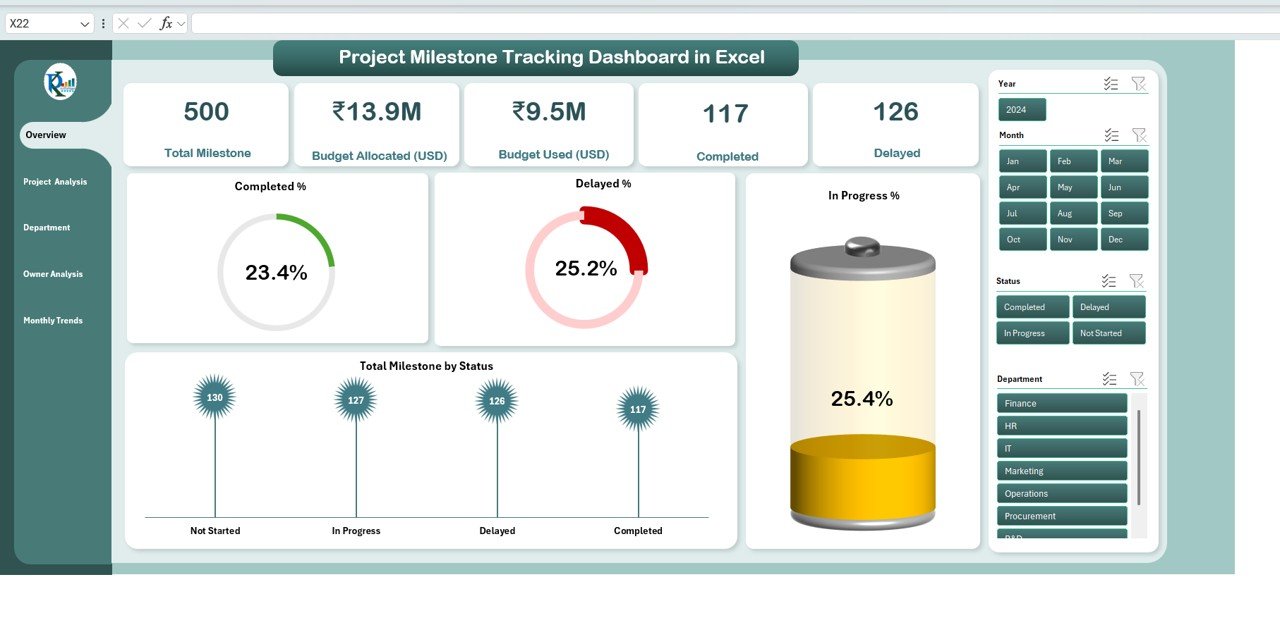
A workbook with five analytical pages that compares Budget Allocated with Budget Used and shows milestones as Completed, In Progress or Delayed. It has interactive slicers for project, department and owner, plus monthly trend charts.
Who it is for: project managers, business analysts and department heads working offline in Excel.
- Overview page with project health, budget status and completion percentages
- Slicers that filter by project, department or owner
- Department and owner analysis for accountability
- Fully automated formulas, with no coding needed
Use cases: the completion rate is completed milestones divided by total milestones; spot the month where delays cluster on the trend chart; compare owners before a quarterly review; keep sensitive budgets offline, since it is 100% Excel-based.
Price: $13.99. Get the milestone tracking dashboard in Excel.
Best for: an offline, secure milestone and budget report.
5. Project Milestone Tracking Dashboard in Power BI
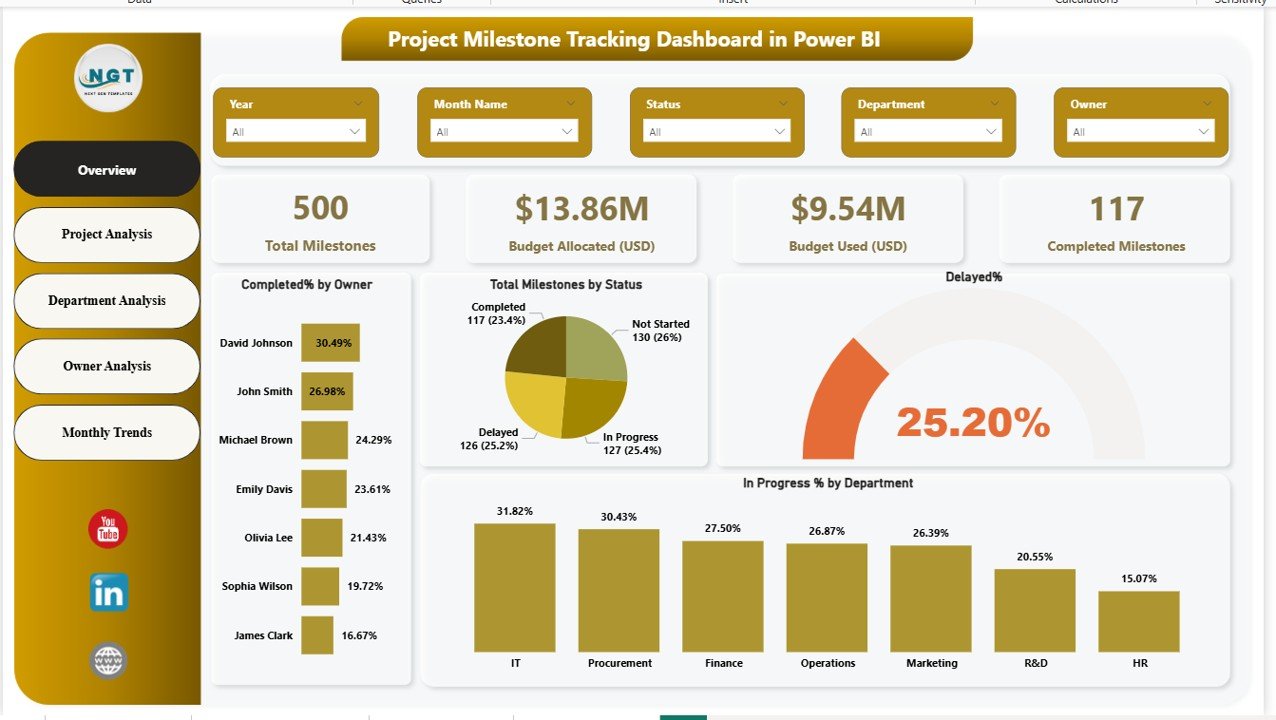
The Power BI version of the milestone dashboard is the presentation layer of the stack. It puts milestones, budgets, owners, status and trends into one interactive file with a multi-page layout.
Who it is for: project managers who report to leadership and want slicers by project, department, owner, status and month.
- Completed, in-progress, delayed and not-started milestones in one view
- Budget allocated versus budget used across projects, departments and owners
- Monthly trend analysis to detect delays and budget spikes
- A professional multi-page design for operations and leadership
Use cases: replace a static monthly PDF with a live file in the steering meeting; filter to one owner when a milestone slips; show budget spikes by month; keep a single page open for executives.
Price: $17.99. Get the milestone tracking dashboard in Power BI.
Best for: steering committee and executive reporting on a Microsoft stack.
6. Project Milestone Tracking Dashboard in Google Sheets
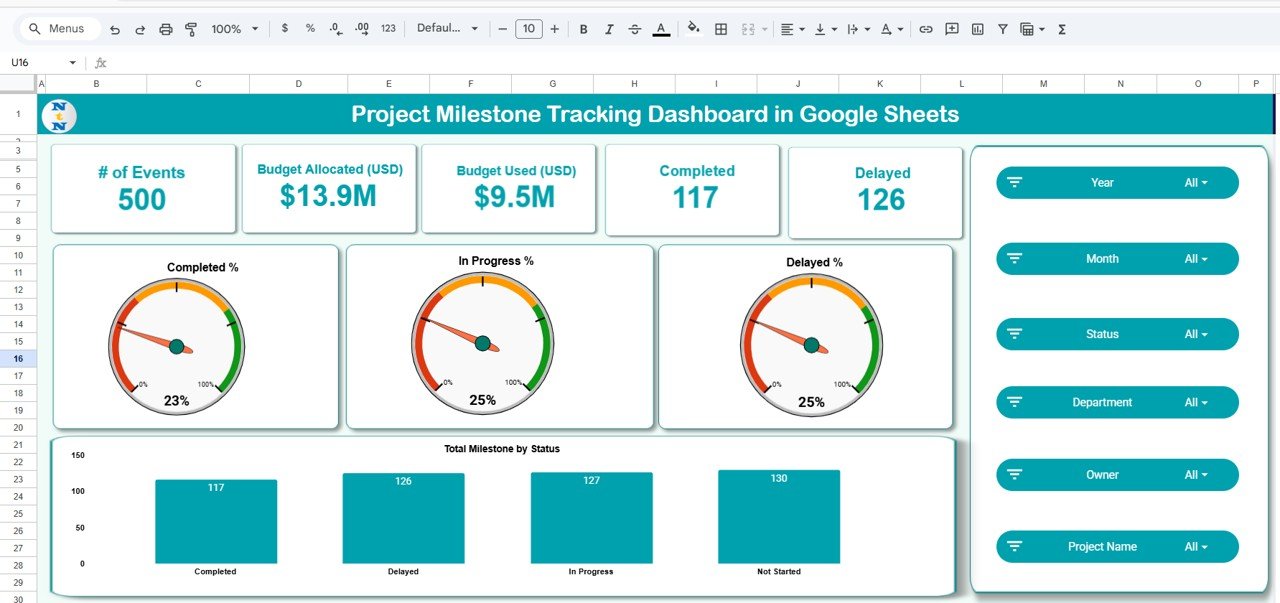
The cheapest of the three milestone formats at $9.99. It has an Overview tab with cards for number of milestones, Budget Allocated (USD), Budget Used (USD), Completed and Delayed, plus Project, Department and Owner analysis tabs.
Who it is for: teams that live in Google Workspace and share one file.
- Overview tab with status charts and completion percentages
- Project analysis charts: budget used and allocated by project name
- Monthly trend charts to spot recurring delays
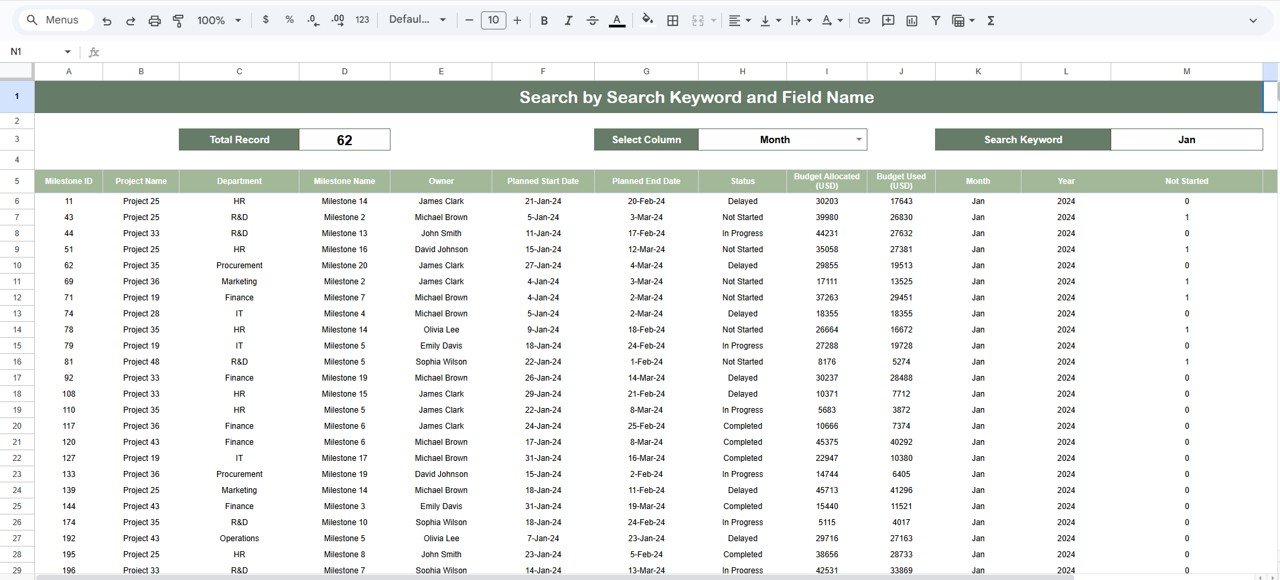
- Smart search to find milestones and projects quickly
Use cases: share a single link with stakeholders instead of emailing files; check delayed milestones before a Friday call; compare budget used with budget allocated by project; open it on a phone between meetings.
Price: $9.99. Get the milestone dashboard in Google Sheets.
Best for: a low-cost, collaborative milestone view.
7. Project Milestone Status and Performance Dashboard in Google Sheets
A second Google Sheets dashboard at $9.99, with a stronger focus on department and owner performance. The Overview has cards and charts for Completed %, Delayed % and In Progress %, and a chart of milestones by month.
Who it is for: project managers and coordinators who need to see which department or owner is behind.
- Overview with total milestones by status
- Department analysis: budget used versus budget allocated by department
- Owner analysis for accountability
- Auto-updating charts and a search function
Use cases: review department spend before approving more budget; show owners their own delayed milestones; track the monthly milestone trendline; cut manual reporting time because charts update on their own.
Price: $9.99. Get the milestone status and performance dashboard.
Best for: department-level performance reviews in Google Sheets.
8. Project Task Assignment Tracker in Excel
A tracker for assigning tasks, setting deadlines, and marking priority and status. It is the lowest-cost way to answer who owns what and by when.
Who it is for: project managers, team leads and business owners running small teams or single projects.
- Task assignment with deadlines per team member
- Priority levels such as high, medium and low
- Status such as pending, in progress and completed
- Overall progress and completion rates
Use cases: sort by high priority before a stand-up; count pending tasks to gauge workload; add extra columns for your own fields; hand a clear list to each team member with a deadline attached.
Price: $6.99. Get the project task assignment tracker.
Best for: small teams that need task ownership without a board tool.
9. Dynamic Project Planner Gantt Chart in Excel

An interactive Excel Gantt chart driven by VBA automation. Enter start and end dates, set a status, and the timeline updates. A drop-down switches between daily and weekly views.
Who it is for: project managers and team leaders who want an automated schedule with detail on demand.
- Daily and weekly timeline views
- Color-coded Pending, In Progress and Completed statuses
- Password protection (default password 1234, so change it)
- Customizable tasks, timelines and colors
Use cases: use the weekly view for the roadmap shown to sponsors; use the daily view for a launch fortnight; protect the sheet before sharing it; extend dates when scope moves. It needs macros enabled, which some locked-down company machines block.
Price: $4.99. Get the dynamic project planner Gantt chart.
Best for: a scheduling tool you can switch between detail and overview.
10. Project Plan Gantt Chart in Excel
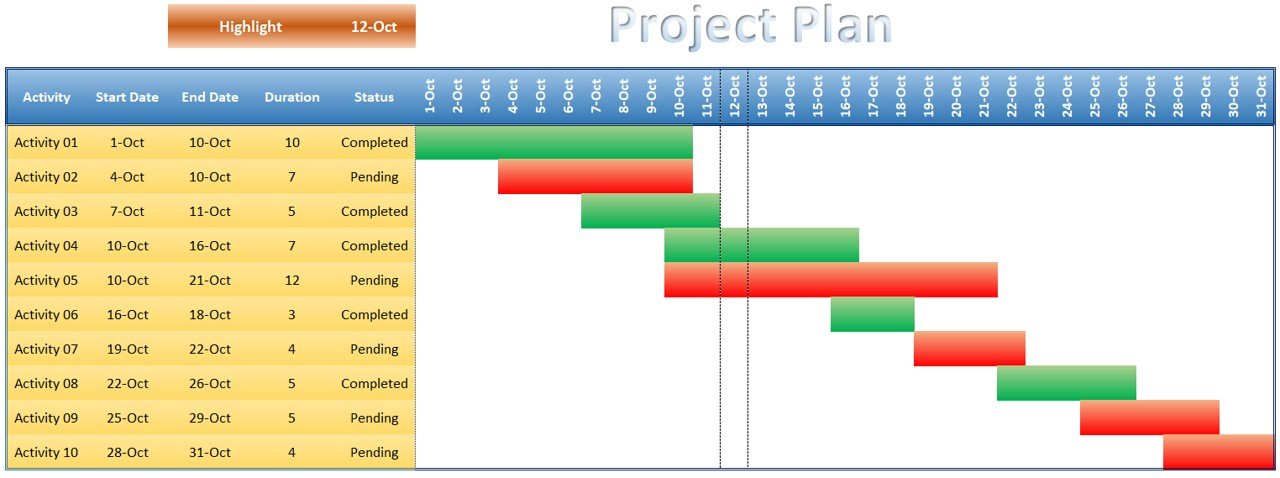
The simplest planner in the stack. Enter tasks with start and end dates, update status, and the visual timeline updates automatically. Completed tasks show green and pending tasks show red.
Who it is for: project managers, teams and individuals new to Gantt charts.
- Automatic Gantt timeline from start and end dates
- Green and red color coding by status
- Highlight Key Dates for milestones and deadlines
- Protected formulas that can be unprotected for customizing
Use cases: plan a small campaign or office move; mark a go-live date as a key date; show overlapping tasks to a manager; use it as the first template while you learn scheduling.
Price: $4.99. Get the project plan Gantt chart in Excel.
Best for: the lowest-cost way to get a visual project timeline.
How do you choose between them?
Start with your biggest weekly pain, then buy the layer that fixes it. If you want everything, the bundle is cheaper than any three singles combined.
| If your problem is… | Buy | Price |
|---|---|---|
| I need everything, in Excel and Sheets | Project Manager Power Pack | $48.99 |
| I manage several projects as a PMO | Project Management Pro Bundle | $49.99 |
| I only need a schedule | Project Plan Gantt Chart or Dynamic Project Planner | $4.99 each |
| Tasks are unclear | Project Task Assignment Tracker | $6.99 |
| People are overloaded | Resource Allocation KPI Dashboard | $14.99 |
| Leadership wants live reports | Milestone Tracking Dashboard in Power BI | $17.99 |
| My team works in Google Sheets | Milestone Tracking Dashboard in Google Sheets | $9.99 |
The eight single templates (not the bundles) add up to $83.92. The Power Pack costs $48.99 and covers planning, tracking and issues in both Excel and Google Sheets, though it does not contain the Power BI file or the resource allocation dashboard. Buy it first, then add a single template for any layer it leaves open.
How do you roll out the stack in 30 days?
Do not install everything at once. One layer per week gives the team time to build the habit. The Project Management Institute (PMI) publishes guidance on schedule, scope and stakeholder practice if you want a framework to match the plan.
| Days | Layer | Action | Template |
|---|---|---|---|
| 1-7 | Plan | Enter every task, start and end date; mark key dates | Gantt chart (Power Pack, or the $4.99 singles) |
| 8-14 | Track | Assign owners, priority and status; log issues | Task Assignment Tracker or the Power Pack issue trackers |
| 15-21 | Report | Load milestones, Budget Allocated and Budget Used | Milestone Tracking Dashboard (Excel or Google Sheets) |
| 22-30 | Present | Run the first leadership review from the dashboard | Milestone Tracking Dashboard in Power BI or the Power Pack executive dashboards |
By day 30 you have a schedule, an owner for every task, a milestone report and a presentation view. Review the data weekly; a dashboard is only as current as the last update.
How do these compare with Asana, ClickUp, Smartsheet and Monday.com?
Hosted tools win on notifications, mobile apps and built-in automation. Templates win on cost model: you buy once, with no per-seat licence. If you are weighing the subscription route, read our guides to Asana alternatives in Excel and Sheets, ClickUp alternatives, Smartsheet alternatives and Monday.com alternatives.
If your work is more notes and planning than scheduling, see Notion alternatives in spreadsheets, or Airtable alternatives for trackers and databases. For a wider choice of dashboards, browse our project management dashboard templates. If you also run technology teams, our IT manager template stack follows the same plan, track, report, present logic.
When is a template NOT the right answer?
Spreadsheets have limits, and you should know them before you buy.
- Large teams needing real-time notifications. If 50 or more people need alerts, comments and @mentions, a hosted tool such as Asana, ClickUp or Monday.com is the better choice.
- Strict dependency scheduling. Critical path analysis across hundreds of linked tasks is a job for Microsoft Project or a similar scheduler.
- Formal portfolio governance. If you need approval workflows, audit trails and role-based permissions, buy software.
- Locked-down machines. The Dynamic Project Planner uses VBA, so macros must be allowed in your organisation.
- Nobody updates the data. A dashboard shows only what you enter. If the team will not keep the file current, no tool will help.
For most small and mid-size teams, a spreadsheet stack covers the daily work at a fraction of the cost. Be honest about which group you are in.
Frequently asked questions
What project manager Excel templates do I need?
At minimum you need a Gantt chart for the schedule, a task tracker for ownership, and a milestone dashboard for status and budget. The Project Manager Power Pack ($48.99) includes planning, dashboards and issue trackers in one purchase, so it is the easiest starting point for a new project manager.
Can Excel templates replace Asana or ClickUp?
For small and mid-size teams, often yes. Gantt charts, task trackers and dashboards cover scheduling, ownership and reporting without a per-seat fee. Excel will not send notifications or run built-in automations, so teams that depend on those features may still prefer a hosted tool.
How much does a project manager template stack cost?
The Project Manager Power Pack costs $48.99 for 10 templates and the Project Management Pro Bundle costs $49.99 for 9. Single templates range from $4.99 for a Gantt chart to $17.99 for the Power BI milestone dashboard. Eight singles together total $83.92.
Is Excel or Google Sheets better for project management?
Excel suits offline work, macros and larger local files. Google Sheets suits teams who edit the same file at once. Both bundles here include Excel and Google Sheets templates, and the milestone dashboard exists in each format, so you can choose by how your team collaborates.
Should I buy the Power Pack or the Pro Bundle?
The Power Pack ($48.99) has 10 templates, including two issue trackers and two executive dashboards. The Pro Bundle ($49.99) has 9 and adds multi-project dashboards and milestone planning. Choose the Pro Bundle if you run a PMO with several projects; otherwise the Power Pack gives more for less.
Can Excel build a Gantt chart automatically?
Yes. The Project Plan Gantt Chart in Excel ($4.99) builds the timeline from start and end dates and colors tasks green or red by status. The Dynamic Project Planner Gantt Chart ($4.99) uses VBA to update the bars and switch between daily and weekly views.
Do I need Power BI to manage projects?
No. Excel and Google Sheets dashboards cover most project reporting. Power BI is worth adding if you present to leadership and want interactive slicers by project, department, owner, status and month. The Project Milestone Tracking Dashboard in Power BI costs $17.99.
What KPIs should a project manager track?
Track milestone completion rate (completed divided by total milestones), delayed milestones, budget variance (budget allocated minus budget used), resource utilization rate (hours used divided by hours available) and overdue tasks. The milestone and resource allocation dashboards in this stack show these in one place.
How long does it take to set up these templates?
The Project Manager Power Pack lists a deployment time of under 10 minutes: download, enter your data and the dashboard is live. A full team rollout takes longer, so we suggest a 30-day plan: plan in week one, track in week two, report in week three, present in week four.
When should I buy project software instead?
Buy software when you need real-time alerts for large teams, critical path scheduling across hundreds of linked tasks, approval workflows or audit trails. Templates fit teams that want low cost, no per-seat fees and full control of the file, and who will keep the data current.
Get more project manager templates
Best value: the Project Manager Power Pack, $48.99. Ten templates in Excel and Google Sheets, 44% off the $86.90 individual total. Get the Project Manager Power Pack.
Running a PMO? The Project Management Pro Bundle is $49.99. Watch walkthroughs on the Next Gen Templates YouTube channel.