

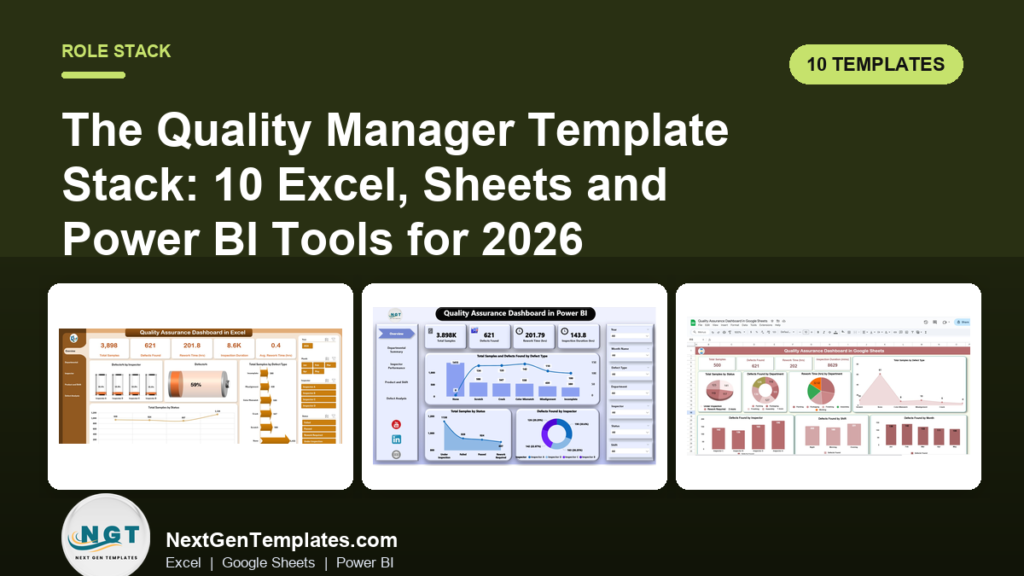
The best quality manager dashboard Excel setup is the Quality Assurance Dashboard in Excel ($17.99) for daily defect reporting, backed by the Quality & Audit Management Bundle ($47.99) for audit calendars, checklists and compliance tracking. Together they cover planning, tracking, reporting and presenting, with Google Sheets and Power BI versions where your team needs them.
Last updated: October 2026
Key takeaways
- The Quality Assurance Dashboard in Excel costs $17.99 and tracks defects by inspector, department, shift and product line from one data sheet.
- The Quality & Audit Management Bundle gives you 8 Excel templates for $47.99 (was $79.92, a saving of $31.93), and it is the best-value starting point.
- The same QA dashboard exists in Excel ($17.99), Power BI ($17.99) and Google Sheets ($9.99), so you pick the format your team already uses.
- The stack is grouped into four jobs: plan, track, report and present. Ten templates cover all four.
- The 30-day rollout table below gets one layer live per week, so you are not rebuilding your whole quality system at once.
 Launch offer
From your first Pivot Table to the Data Model, DAX, Power Query and a one-page KPI dashboard. 11h 51m of video by PK, with practice files, quizzes and a capstone.
Quality manager dashboard templates compared
Every template in the stack, with format and price. The role group in brackets shows which job it does.
| Template | Format | Best For | Price |
|---|---|---|---|
| 1. Quality Assurance Dashboard in Excel (Report) – Best overall | Excel | Defect and inspector reporting | $17.99 |
| 2. Quality & Audit Management Bundle (Plan) – Best value | Excel | QA, audit, safety and compliance in one pack | $47.99 |
| 3. Quality Assurance KPI Dashboard in Excel (Report) | Excel | MTD and YTD KPIs against target | $12.99 |
| 4. Quality Assurance Dashboard in Power BI (Report) | Power BI | Slicer-driven QA reviews | $17.99 |
| 5. Quality Assurance Dashboard in Google Sheets (Report) | Google Sheets | Shared, multi-user QA teams | $9.99 |
| 6. Compliance and Audit Dashboard in Excel (Present) | Excel | Audit findings and framework compliance | $17.99 |
| 7. Compliance Audits Dashboard in Power BI (Present) | Power BI | Committee-ready audit reporting | $17.99 |
| 8. Manufacturing Quality Assurance KPI Dashboard in Excel (Report) | Excel | Yield, defect and rework rates | $12.99 |
| 9. Compliance Audit Tracker in Excel (Track) | Excel (VBA) | Audit logging with user login | $6.99 |
| 10. Quality Control Tracker in Google Sheets (Track) | Google Sheets | Pass/fail inspection logging | $6.99 |
Prices are one-time USD. Join 10,000+ customers in 180+ countries who use NextGenTemplates dashboards instead of renting reporting tools.
How we picked these
We searched the NextGenTemplates catalog for quality assurance, quality control, KPI and compliance audit products. We kept paid templates that a quality manager would actually use week to week, and we kept more than one format where the same tool exists. We left out general project trackers and anything only loosely related to quality. Each template is placed in one of four jobs: plan, track, report or present.
What is the quality manager template stack?
A quality manager does four things on repeat. You plan audits and inspections, track what was found, report the numbers, and present them to people who control budget. Most teams own a tool for one of those and improvise the rest. The stack below assigns one or two templates to each job so nothing lives in a loose file.
| Job | Template | What this replaces |
|---|---|---|
| Plan | Quality & Audit Management Bundle | Hand-built audit calendars and finding checklists |
| Track | Compliance Audit Tracker in Excel; Quality Control Tracker in Google Sheets | Paper inspection logs and email threads of findings |
| Report | QA Dashboard (Excel, Power BI, Sheets); QA KPI Dashboard; Manufacturing QA KPI Dashboard | Monthly pivot tables rebuilt from scratch |
| Present | Compliance and Audit Dashboard in Excel; Compliance Audits Dashboard in Power BI | Slide decks assembled by hand from exports |
The 10 best quality manager dashboard and template tools for 2026
1. Quality Assurance Dashboard in Excel – best overall
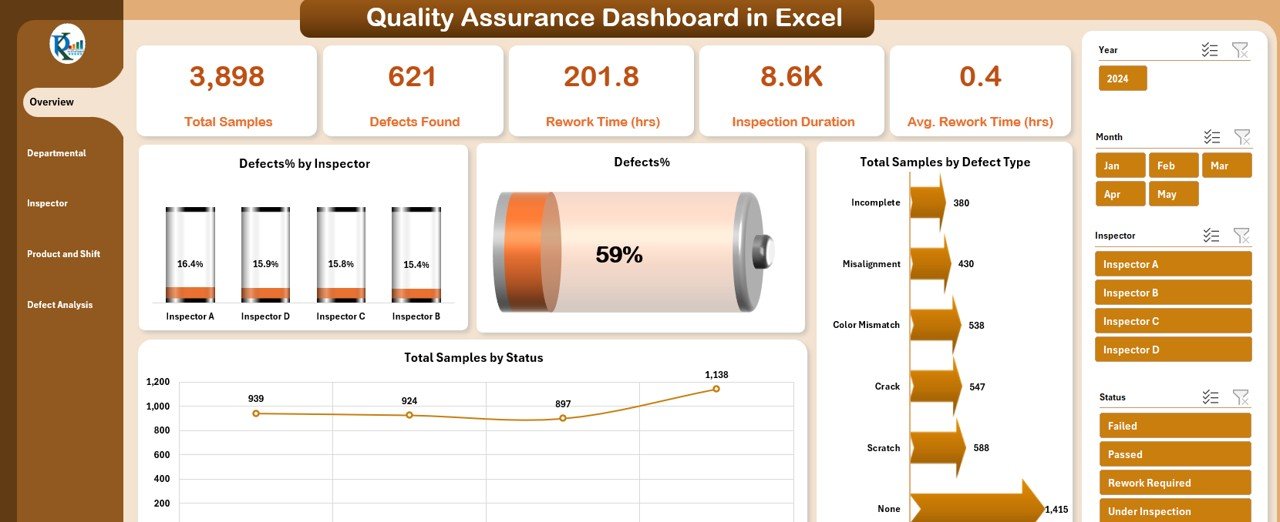
This is the quality manager dashboard Excel template we would buy first. It turns one data sheet of inspections into five dashboard views, reachable from a page navigator. It ranks first because it covers the daily questions a quality manager gets asked: where are defects coming from, who found them, and how long did rework take.
Who it is for: QA managers and inspection leads who report on defects weekly.
- Overview page with KPI cards for inspections, samples and defect rate
- Departmental summary comparing defects, rework time and inspection duration
- Inspector performance and shift or product line breakdowns
- Defect analysis by status, type and monthly trend
Use cases: Compare defects per department to decide where to send training. Check defect rate (defects divided by samples, times 100) by shift to find a night-shift problem. Export a PDF for the Monday ops meeting. Filter by inspector to have a fair, data-backed performance conversation.
Price: $17.99. Get the Quality Assurance Dashboard in Excel
Best for: a quality manager who wants one Excel file to answer most defect questions.
2. Quality & Audit Management Bundle – best value
This bundle packs 8 Excel templates covering quality, internal audit, compliance and safety. Bought separately they come to $79.92. The bundle is $47.99, a saving of $31.93 (40%).
Who it is for: quality, audit and compliance managers who want the planning layer sorted in one download.
- Dashboards, trackers, calendars and checklists in a single pack
- Pre-built KPIs and charts for defect rates, audit status and compliance scores
- Audit and safety calendars for inspections, drills and renewals
- Action-plan checklists that turn findings into tasks with owners and due dates
Use cases: Schedule the year’s internal audits on the audit calendar. Assign each finding an owner and due date through the checklists. Keep safety and compliance dashboards next to QA reporting. Use it across unlimited audits and sites, since file access is for life.
Price: $47.99. See the Quality & Audit Management Bundle
Best for: anyone who needs more than one of these templates, since the bundle costs less than buying them one by one.
3. Quality Assurance KPI Dashboard in Excel
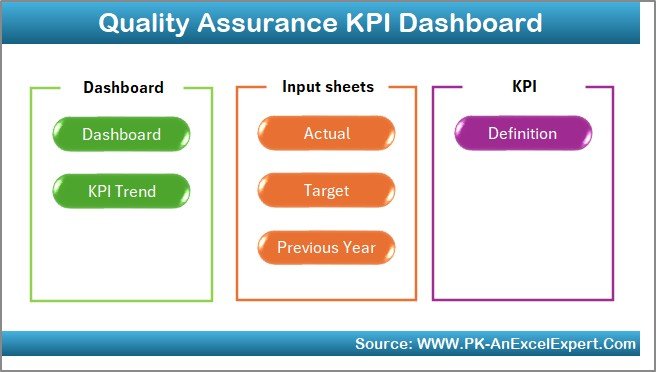
Where the QA dashboard shows inspection records, this one tracks KPIs against targets. A month drop-down updates the whole view, and each KPI shows month-to-date and year-to-date values against target and previous year.
Who it is for: quality managers who report KPI performance to leadership.
- Interactive month filter with automatic updates
- MTD and YTD comparison against target and previous year
- Arrow indicators for improvement or decline
- KPI definition sheet with formulas and units, plus separate input sheets for actual, target and previous year
Use cases: Set a target for each KPI and see the gap in one view. Keep one definition sheet so every site calculates a KPI the same way. Compare this October with last October without building a second table. Hand the YTD view to a director who has five minutes.
Price: $12.99. Open the Quality Assurance KPI Dashboard in Excel
Best for: target-based quality reporting at a low price. For metric formulas, see our guide to quality KPIs such as DPMO, FPY and COQ.
4. Quality Assurance Dashboard in Power BI
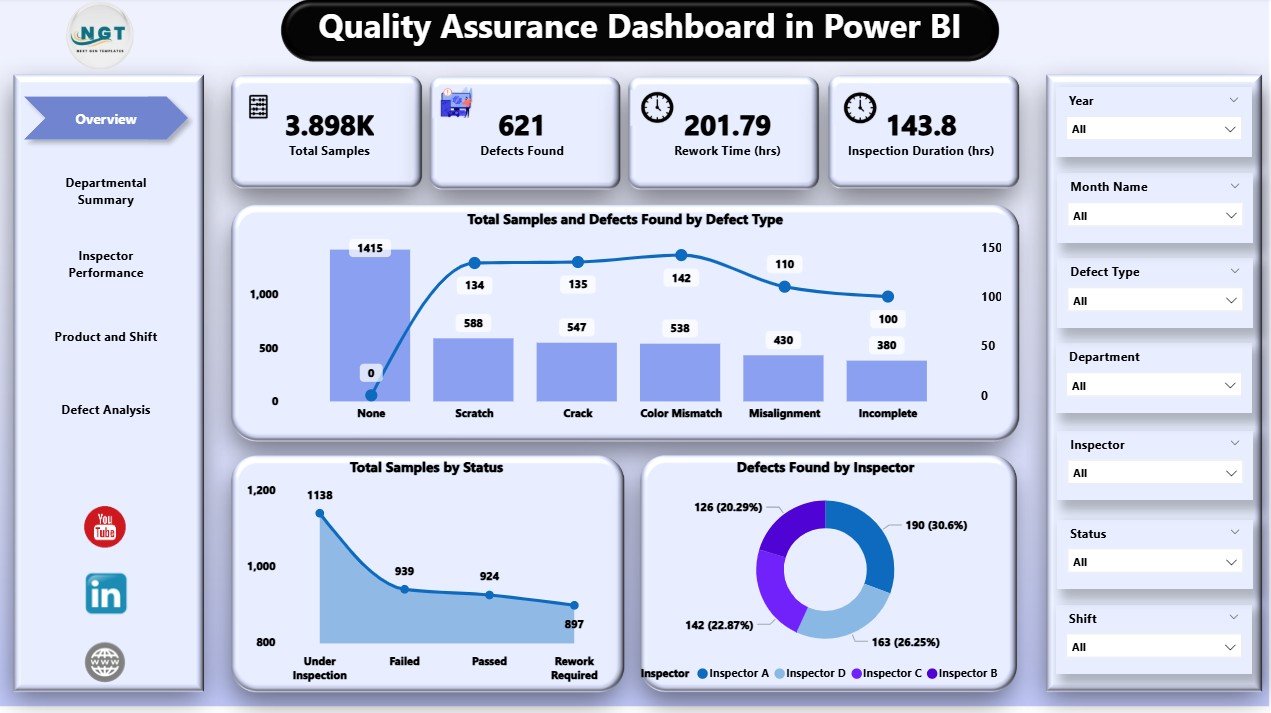
The Power BI version of the QA dashboard has the same structure with more filtering. The overview page has 7 slicers and 5 KPI cards, and it connects to a live Excel file for updates.
Who it is for: quality teams already on Power BI, or those who need to slice QA data live in a meeting.
- Overview with 7 slicers for department, product, inspector and more
- Departmental summary of rework time, inspection duration and defects
- Inspector performance and product and shift views
- Defect trends by month, and a live Excel connection
Use cases: Filter by department during a review and answer follow-up questions on the spot. Spot recurring issues in the monthly defect trend. Compare inspectors on samples inspected, defects detected and average rework time. Refresh from your Excel data file without rebuilding visuals.
Price: $17.99. Get the Quality Assurance Dashboard in Power BI
Best for: Power BI shops that want interactive QA reviews. Our comparison of QA dashboards in Google Sheets and Power BI goes deeper.
5. Quality Assurance Dashboard in Google Sheets

The cheapest route to a working QA dashboard. It is built entirely in Google Sheets, so several inspectors can enter data and see charts update in real time.
Who it is for: small QA teams and multi-site groups without Excel licences on every desk.
- Cards for total samples, defects found, rework time (hrs) and inspection duration (mins)
- Charts by status, department, defect type, month, shift and inspector
- A search tab to find records by keyword or field name
- A customizable data sheet where you add your own metrics
Use cases: Let inspectors on different sites log into one sheet. Use the search tab to pull every record for one defect type before an audit. Watch sample status split between completed, pending and in-progress. Add a parameter for your own process without touching formulas elsewhere.
Price: $9.99. Try the Quality Assurance Dashboard in Google Sheets
Best for: collaborative QA teams on a tight budget.
6. Compliance and Audit Dashboard in Excel
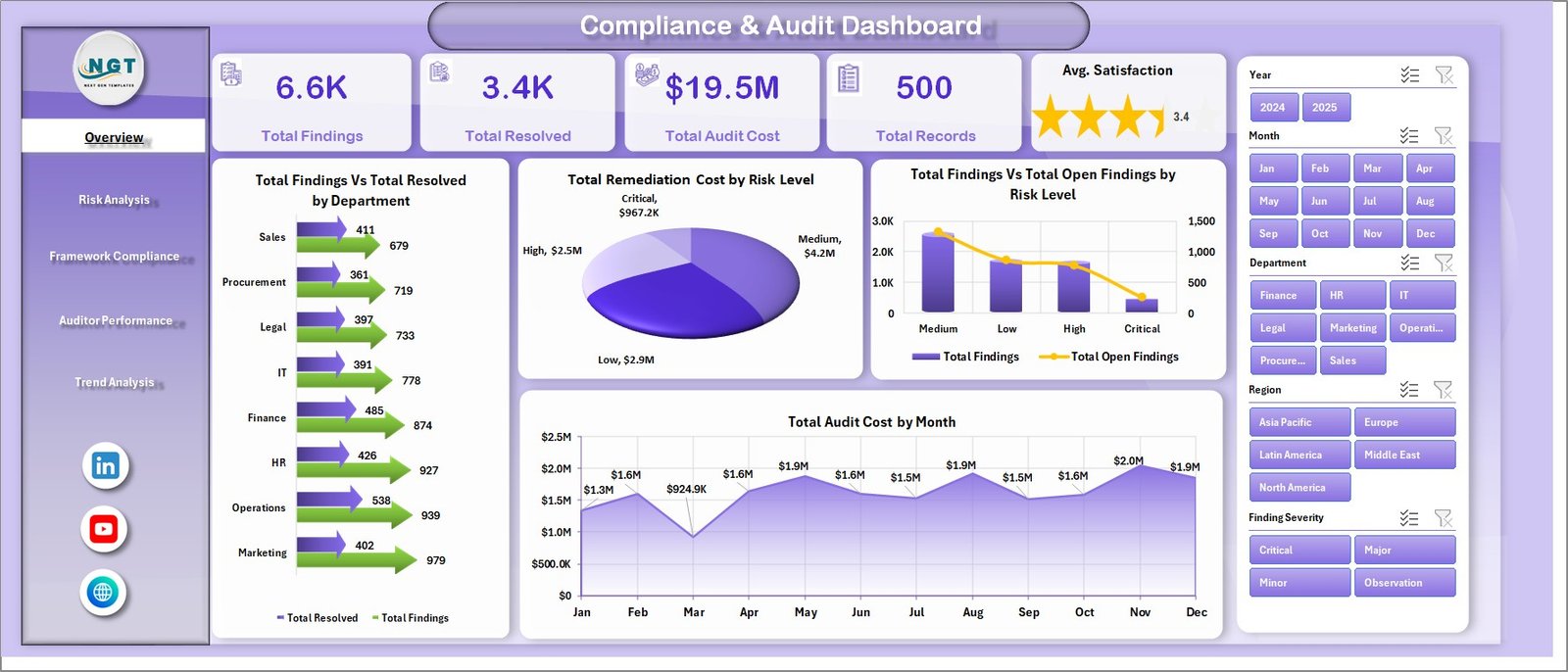
This is the presentation layer for audit results. It has 5 interactive pages: Overview, Risk Analysis, Framework Compliance, Auditor Performance and Trend Analysis. Five KPI cards sit on the overview: Total Findings, Total Resolved, Total Audit Cost, Total Records and Avg. Satisfaction.
Who it is for: quality and compliance managers who report audit outcomes upward.
- 15+ pre-built charts, including findings vs. resolved and controls tested vs. passed
- Global slicers for department, risk level, framework, region or audit type
- A dedicated Data sheet: paste your records and click Refresh All
- A support sheet holding the pivot tables
Use cases: Show findings against resolved items for the quarter. Filter every page to one region before a site visit. Check remediation cost by risk level to justify a corrective-action budget. Setup takes under 10 minutes once your records are pasted in.
Price: $17.99. Get the Compliance and Audit Dashboard in Excel
Best for: audit reporting in Excel without paid GRC software.
7. Compliance Audits Dashboard in Power BI
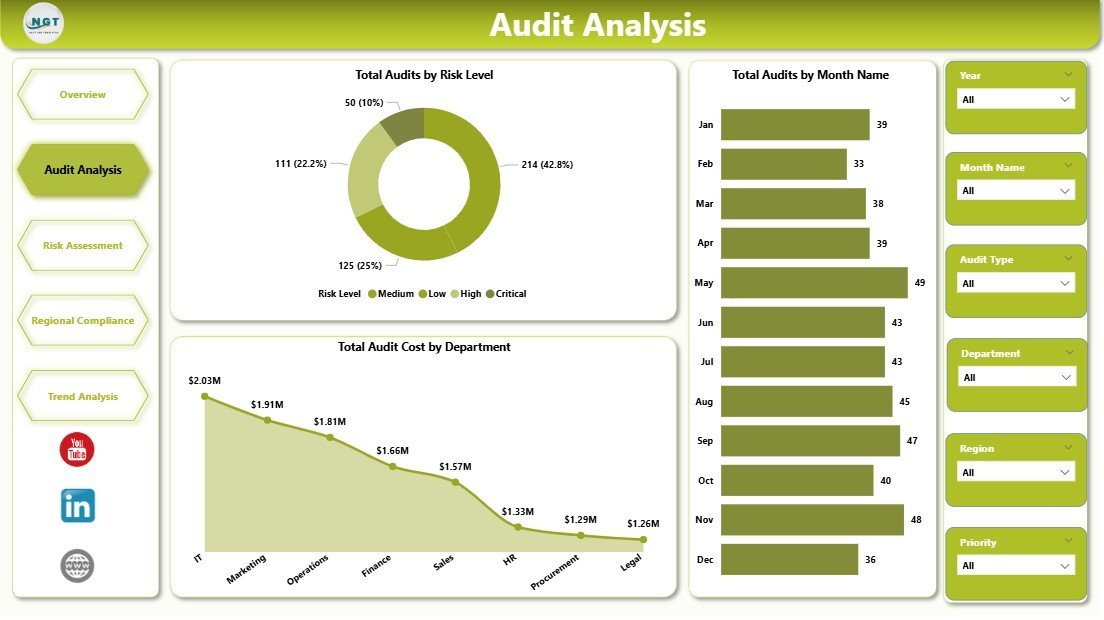
A 5-page Power BI report for audit committees. The 5 KPI cards cover penalties, findings, critical findings, audit cost and overdue audits, and 15 visuals span audit, risk, region and trend pages.
Who it is for: compliance, internal audit and GRC teams that report in Power BI.
- Pages for Overview, Audit Analysis, Risk Assessment, Regional Compliance and Trend Analysis
- Slicers for audit type, department, region, risk level, priority, status and month
- An editable .pbix file for Power BI Desktop
- One-time purchase with no subscription or per-user template fee
Use cases: The listing notes audit teams often spend 6 to 12 hours preparing monthly committee reports from spreadsheets and GRC exports, and this replaces that prep with a refresh. Use the risk page to isolate critical exposure. Compare regions on penalties, cost, findings and pass rate. Track overdue audits as a standing agenda item.
Price: $17.99. See the Compliance Audits Dashboard in Power BI
Best for: committee reporting where leaders filter live.
8. Manufacturing Quality Assurance KPI Dashboard in Excel
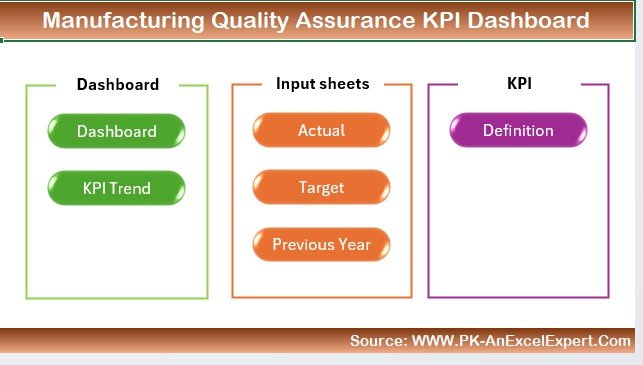
Built for plants. It tracks defect rates, yield rates, inspection pass rates and rework rates, and compares actual production output with planned output.
Who it is for: quality managers in manufacturing who need yield and rework next to production numbers.
- Defect, yield, inspection pass and rework rate tracking
- Defect analysis by category, production line or machine
- Actual vs. planned production output
- Customizable layout, metrics and data sources, with time-based trends
Use cases: Break defects down by machine to find the root cause. Check yield (good units divided by units produced) over several periods. Compare rework rate before and after a process change. See whether output kept pace with plan while quality held.
Price: $12.99. Open the Manufacturing Quality Assurance KPI Dashboard
Best for: shop-floor quality reporting. More plant tools sit in our manufacturing dashboard templates guide.
9. Compliance Audit Tracker in Excel
An Excel and VBA tool for logging audit findings. It has a password login, forms to add, edit or delete records, a user management panel and a live dashboard with 5 slicers and 6 charts.
Who it is for: teams where several people log audit findings and access should be controlled.
- Secure login with role-based access
- Forms for adding, editing and deleting audit records
- Due date monitoring to spot overdue actions
- Custom dropdowns for departments, statuses and compliance areas
Use cases: Log safety, finance, quality or environmental audits in one table. See overdue actions without scanning rows. Add a new user and restrict what they can see. Edit dropdown lists as your departments change.
Price: $6.99. Get the Compliance Audit Tracker in Excel
Best for: the cheapest way to get audit findings out of email. Note it uses VBA, so macros must be enabled.
10. Quality Control Tracker in Google Sheets
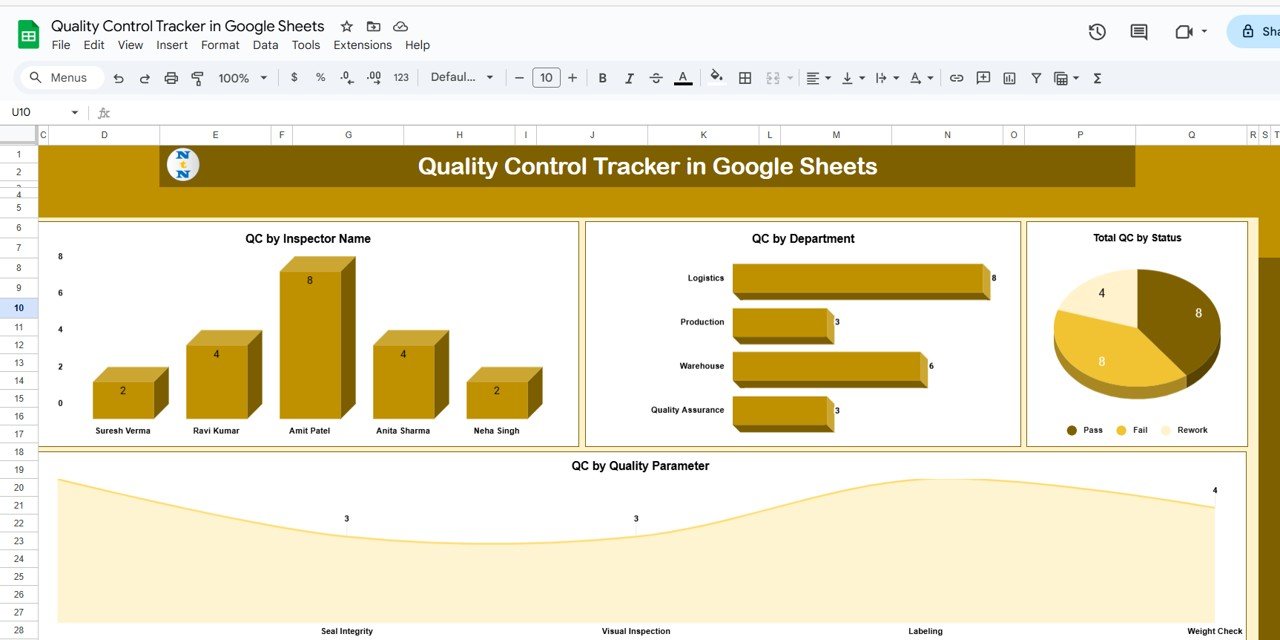
A lightweight inspection log. Each record holds an ID, inspection date, inspector, department, quality parameter, observation notes, score and pass/fail status.
Who it is for: small teams moving off paper inspection sheets.
- Summary cards for total QC activities, passed and failed
- Charts by inspector, department, status and quality parameter
- Search by keyword and field name
- A pivot-friendly data sheet and pre-filled sample data
Use cases: Log a packaging or visual inspection on a phone. See pass versus fail by department. Pull all records for one inspector before a review. Feed the structured data into the QA dashboard later.
Price: $6.99. Try the Quality Control Tracker in Google Sheets
Best for: a first digital inspection log. For ISO-focused teams, see our quality control Excel templates.
Ready for the whole stack?
The Quality & Audit Management Bundle gives you 8 Excel templates for $47.99 instead of $79.92. Add the Quality Assurance Dashboard in Excel at $17.99 and you have planning, tracking and reporting covered for $65.98. Buy the Quality & Audit Management Bundle
How do you roll out the stack in 30 days?
Do one layer per week. Teams that try to launch every dashboard at once usually end up with five half-filled files.
| Days | Job | Action | Template |
|---|---|---|---|
| 1 to 7 | Plan | Load next quarter’s audits into the calendars; set owners on action-plan checklists | Quality & Audit Management Bundle |
| 8 to 14 | Track | Start logging inspections and audit findings in one place; set dropdown lists | Quality Control Tracker (Sheets) or Compliance Audit Tracker (Excel) |
| 15 to 22 | Report | Paste a month of inspection data into the QA dashboard; agree KPI definitions and targets | QA Dashboard and QA KPI Dashboard |
| 23 to 30 | Present | Load audit records, check the risk and trend pages, and present the first monthly pack | Compliance and Audit Dashboard (Excel or Power BI) |
How do you choose between them?
- Need audit planning and checklists first: start with the bundle.
- Need defect reporting from inspection data: the QA dashboard in your format (Excel $17.99, Power BI $17.99, Sheets $9.99).
- Need KPIs against targets: the QA KPI dashboard ($12.99), or the manufacturing version ($12.99) for plants.
- Need to present audit results to a committee: the compliance dashboard in Excel or Power BI ($17.99 each).
- Starting from paper logs on a tiny budget: either tracker at $6.99.
If your IT team owns the reporting stack, the IT manager dashboard template stack shows how the same four-job approach works there. For compliance depth, see our legal compliance dashboards guide, and for the QA view in more formats read QA dashboards for data-driven teams.
When is a template not the right answer?
Templates suit teams that need visibility and reporting. They are the wrong choice in several situations.
- You need electronic signatures, version-controlled document approval or audit trails that a regulator will inspect. A dedicated QMS platform such as MasterControl or ETQ is built for that, and a spreadsheet is not.
- Hundreds of people must enter data at once with strict workflow rules. Spreadsheets get slow and messy at that scale.
- You need automatic live feeds from machines or an ERP with no manual paste step. These templates are fed by data you enter or paste, so integration work sits on you.
- Your certification body requires specific records in a specific system. Check requirements first. The ISO 9001 standard asks for documented information but does not demand specific software.
If none of those apply, a template stack costs far less than a per-user subscription and gets you reporting in days.
Frequently asked questions
What is the best quality manager dashboard in Excel?
The Quality Assurance Dashboard in Excel at $17.99 is our top pick. It has five dashboard views covering defect rate, inspector performance, departmental rework and shift or product line breakdowns, all driven from one data sheet that updates charts automatically.
Can I get a quality dashboard in Power BI or Google Sheets instead?
Yes. The Quality Assurance Dashboard exists in Power BI for $17.99 and in Google Sheets for $9.99, alongside the Excel version at $17.99. The structure is similar across all three, so you can choose based on where your team already works.
How much does the Quality and Audit Management Bundle cost?
The Quality & Audit Management Bundle costs $47.99 for 8 Excel templates. Bought individually they total $79.92, so the bundle saves $31.93, or 40%. It includes dashboards, trackers, audit and safety calendars and action-plan checklists in one download.
What is the difference between a QA dashboard and a QA KPI dashboard?
The QA dashboard analyzes individual inspection records by inspector, department, shift and defect type. The QA KPI dashboard tracks KPIs against targets and previous year using month-to-date and year-to-date comparisons. Many quality managers use both: one for investigation, one for reporting to leadership.
How do you calculate defect rate in Excel?
Divide the number of defects found by the number of samples inspected, then multiply by 100. For example, 12 defects in 400 samples is a 3% defect rate. The Quality Assurance Dashboard in Excel shows this as a KPI card and trend chart.
Do these templates need macros or add-ins?
Most do not. The Quality & Audit Management Bundle states it works in Microsoft Excel with no add-ins or special software. The exception is the Compliance Audit Tracker in Excel, which is built with VBA for its login and forms, so macros must be enabled there.
Can I use these instead of paid GRC or QMS software?
For visibility and reporting, yes. The Compliance and Audit Dashboard in Excel is positioned as an alternative to paid GRC SaaS reporting. For electronic signatures, controlled document approval or regulator-facing audit trails, buy dedicated QMS software instead.
Is it a one-time payment?
Yes. The templates are one-time purchases, with no subscription and no per-user fee on the Power BI compliance template. The bundle includes lifetime file access, and you can reuse it across unlimited audits, sites and projects.
Which template should a new quality manager buy first?
Start with the Quality & Audit Management Bundle at $47.99 if you need audit planning, or the Quality Assurance Dashboard in Excel at $17.99 if reporting defects is the urgent job. Add trackers and compliance dashboards as the stack grows over the first 30 days.
Get more quality manager templates
The Quality & Audit Management Bundle is the best-value way to start at $47.99 for 8 Excel templates. Get the Quality & Audit Management Bundle. Watch walkthroughs on the NextGenTemplates YouTube channel.