



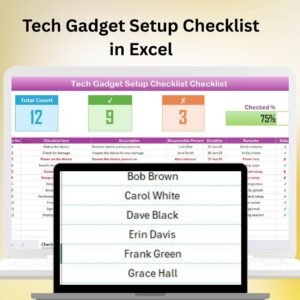
The Tech Gadget Setup Checklist in Excel is a comprehensive and easy-to-use tool designed to help you efficiently set up your tech gadgets, whether it’s for personal use or business purposes. This checklist ensures that every gadget, from smartphones and laptops to smart home devices and accessories, is set up correctly and configured to meet your needs.
With organized task lists, user-friendly tracking, and customizable fields, this Excel-based checklist helps you stay on top of your tech setup. It ensures that you don’t miss important configuration steps, updates, or software installations, making the process streamlined and efficient.

Key Features of the Tech Gadget Setup Checklist in Excel:
📋 Step-by-Step Setup Process
Track each step in the setup process for each device, from unboxing to configuration, software installation, and connecting to your home or office network.
📦 Inventory and Gadget Details
Maintain a detailed inventory of your tech gadgets, including model names, purchase dates, warranty information, and serial numbers for easy access.
💻 Software and App Installation Tracker
Keep track of software, apps, and updates that need to be installed on each device, ensuring that all necessary tools are available and up-to-date.
🔄 Configuration and Settings Tracker
Ensure that each gadget is configured correctly by tracking settings like system preferences, network settings, and security options for each device.
📝 Customizable Notes Section
Add personalized notes or additional tasks for specific gadgets that may require special attention or unique configuration steps.
🚀 Why You’ll Love the Tech Gadget Setup Checklist in Excel:
✅ Efficient Setup Process – Track and complete all necessary steps to set up your gadgets without missing a beat.
✅ Stay Organized – Keep an inventory of all your tech gadgets with relevant details, warranties, and important configuration steps.
✅ Ensure Device Security – Track security-related setup tasks, such as enabling firewalls, setting up passwords, and updating antivirus software.
✅ Simplify Software Installation – Easily manage and track the installation of all required apps, tools, and updates.
✅ User-Friendly – With Excel’s intuitive layout, this tool is simple to use and customizable to fit your specific tech gadget needs.
✅ Prevent Setup Issues – Avoid common setup issues by following a structured and comprehensive checklist that covers all aspects of gadget setup.
What’s Inside the Tech Gadget Setup Checklist in Excel:
- Gadget Inventory: Track all the gadgets you own, including model names, serial numbers, and purchase dates, making it easy to refer back to important device information.
- Step-by-Step Setup: Follow an organized checklist of tasks that must be completed for each device, ensuring everything from device unboxing to installation is covered.
- App and Software Installation: Monitor the installation and updating of apps and software on each device.
- Configuration Details: Track important configuration settings like security preferences, network connections, and system preferences for each gadget.
- Notes Section: Add any additional personalized notes to ensure all setup steps are completed without overlooking important details.
How to Use the Tech Gadget Setup Checklist in Excel:
1️⃣ Download the Template – Access your Excel file instantly upon purchase.
2️⃣ Add Gadget Details – Enter important details for each device, such as model, serial number, purchase date, and warranty.
3️⃣ Track Setup Progress – Follow the setup steps and mark each task as completed as you go.
4️⃣ Track Software and App Installations – Log the installation and updates of required software and apps for each gadget.
5️⃣ Customize for Your Devices – Use the customizable fields to track any additional setup steps or unique requirements for your gadgets.
Who Can Benefit from the Tech Gadget Setup Checklist in Excel:
- Tech Enthusiasts
- IT Professionals
- Business Owners with multiple devices
- Home Office Setup Organizers
- Gadget Enthusiasts
- People setting up tech gadgets for personal use or gifting
- Small Business IT Managers
The Tech Gadget Setup Checklist in Excel is the perfect tool for keeping your devices organized, configured, and ready to use. Whether you’re setting up new tech gadgets for home, office, or personal use, this checklist ensures that all steps are followed, tasks are completed, and nothing is forgotten.
Click here to read the Detailed blog post
https://www.pk-anexcelexpert.com/tech-gadget-setup-checklist-in-excel/
Visit our YouTube channel to learn step-by-step video tutorials
Youtube.com/@PKAnExcelExpert
Compatibility and Requirements
- Works in Microsoft Excel desktop (Excel 2016 or later, or Microsoft 365).
- If you want tick boxes for finished tasks, Microsoft explains them in Using check boxes in Excel.
Frequently Asked Questions
Which gadget details can I record?
Model names, serial numbers, purchase dates and warranty information for each device.
Can I track software and app installs?
Yes. A tracker lists the software, apps and updates each device needs, so nothing is missed.
Does it cover settings and security?
Yes. You can track system preferences, network settings and security options such as passwords, firewalls and antivirus updates.
How do I track my progress?
Follow the setup steps for each device and mark each task as completed as you go.
Can I add my own steps?
Yes. Use the customizable fields and the notes section for extra tasks or special setup steps.
Related IT Setup and Asset Templates
- IT Asset Management Report in Excel: a report on all company devices
- IT Asset Management Dashboard in Excel: a dashboard for IT assets
- IT Asset Management Dashboard in Google Sheets: IT assets in Google Sheets
- Employee Onboarding Checklist Template in Excel: covers new hire setup tasks
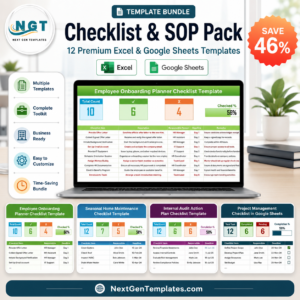
- Checklist & SOP Pack: 12 premium Excel and Google Sheets checklists in one bundle
Browse all Excel checklists or the Excel IT templates.


















Reviews
There are no reviews yet.