

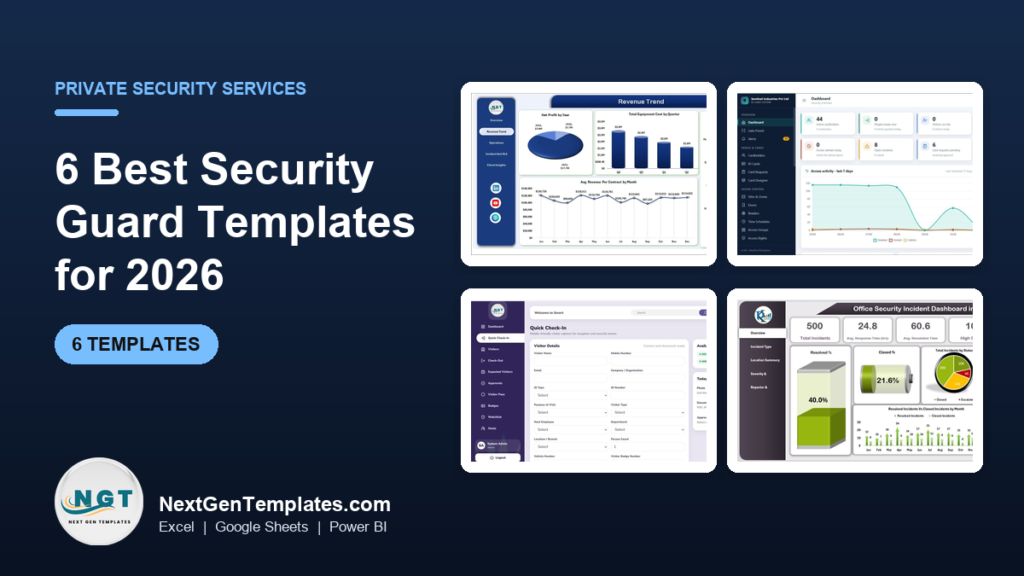
The best security guard templates for most private security companies in 2026 start with the Security Company Dashboard ($17.99 in Excel or Power BI, $9.99 in Google Sheets). It tracks revenue, contracts, guards deployed and SLA compliance across five pages. Add a visitor or access control web app for the gate, and a shift scheduler for the roster.
Last updated: October 2026
Key takeaways
- Our top pick is the Security Company Dashboard: 17 KPIs on five pages covering revenue, net profit, contracts, guards deployed and SLA compliance, in Excel, Power BI and Google Sheets.
- For sites with gates, cards and keys, the Access Control and ID Card Management System ($39.99) gives guards, managers, HR, reception and auditors their own logins across 29 screens.
- Reception and gatehouse teams get quick check-in, check-out, badges, host approvals and a watchlist from the Visitor Entry Management System ($24.99).
- Incidents are covered twice: an Office Security Incident Dashboard for analysis and an Incident Tracker and Report Web App ($14.99) for logging with SLA status.
- Every pick is a one-time purchase from $6.99 to $39.99, with no per-guard or per-site fee.
 Launch offer
SUMIFS, XLOOKUP, FILTER, LAMBDA and checking AI-written formulas, with real business projects. 11h 47m of video by PK, with practice files, quizzes and a capstone.
Security guard templates compared
| Template | Format | Best For | Price |
|---|---|---|---|
| Security Company Dashboard (Best overall) | Excel, Power BI, Google Sheets | Revenue, contracts, guards deployed and SLA compliance | $9.99 to $17.99 |
| Access Control and ID Card Management System | Web app (Google Sheets + Apps Script) | Gates, ID cards, access rights, vehicle and material passes | $39.99 |
| Visitor Entry Management System | Web app (Google Sheets + Apps Script) | Reception check-in, badges, host approvals and watchlist | $24.99 |
| Office Security Incident Dashboard | Excel, Power BI, Google Sheets | Incident response and resolution times by location and severity | $6.99 to $17.99 |
| Incident Tracker and Report Web App (Best value) | Web app (Google Sheets + Apps Script) | Logging incidents with owners, SLA status and reports | $14.99 |
| Shift Scheduling Management System | Excel (VBA) | Guard rosters by shift, site and date range | $19.99 |
Running a private security company means running three businesses at once. There is the contract business, where margins are thin and every client wants a monthly report. There is the people business, where a no-show on a night shift leaves a site uncovered. And there is the incident business, where a client judges you on how fast a guard turned up and how clearly the report was written.
Most firms track all of this in a mix of paper logbooks, WhatsApp groups and a spreadsheet that one supervisor understands. The alternative is guard management software, usually priced per guard or per site every month. For a firm with 20 to 200 guards that bill adds up fast, and much of it pays for features a small operation never opens. A good set of security guard templates gives you the reports, the logs and the roster for a one-time price.
How we picked these security guard templates
We searched the NextGenTemplates catalog for files built for physical security work: security companies, guards, visitors, gates, access control, incidents and shift rosters. Search for “security” alone returns mostly cybersecurity products, so we checked every result by hand and dropped anything about networks, malware or IT audits. Those belong in our cybersecurity KPIs guide instead. For ready-made files, see our cybersecurity dashboard templates.
We kept tools that serve the daily work of a guarding firm or an in-house security team, from the gatehouse to the owner’s monthly review. Where one tool comes in several formats we list it once with every price. We ranked on how much of a security operation a file covers, how quickly a small team can start using it, and price.
The 6 best security guard templates for 2026
1. Security Company Dashboard: best overall
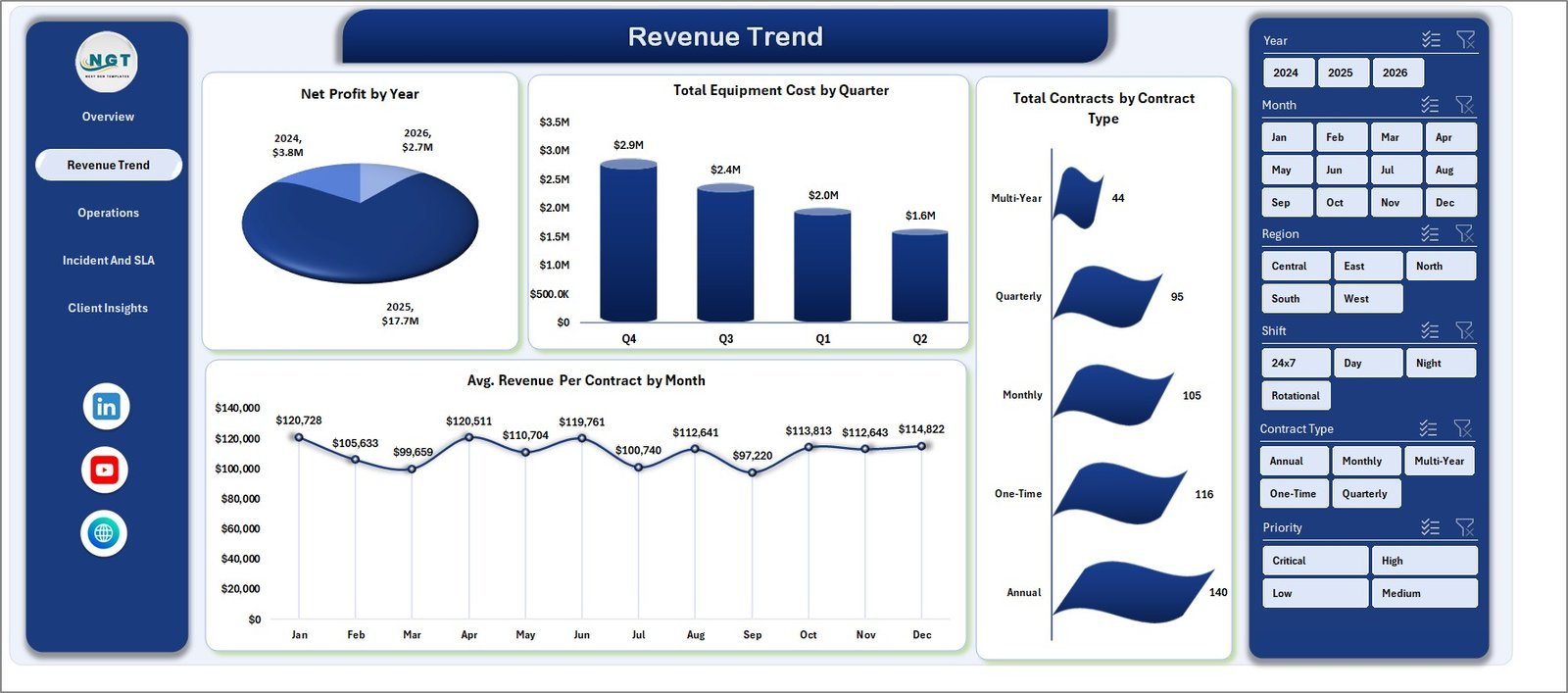
This is the file we would give the owner or operations manager of a guarding company. It answers the questions that decide whether the business makes money: which contracts are profitable, how many guards are out on sites, which regions miss their response times, and how revenue moves month to month.
Who it is for: owners, directors and operations managers of private security companies, and regional managers who report to them.
What is inside the Excel edition:
- 17 KPIs across five pages: Overview, Revenue Trend, Operations, Incident and SLA, and Client Insights
- KPI cards for total revenue, net profit, total contracts, total guards deployed and average revenue per contract
- An Incident and SLA page with average response time by priority and by incident type, and SLA compliance % by service type and region
- Revenue trend views such as net profit by year, equipment cost by quarter and contracts by contract type
- 15+ pivot charts and slicers for year, month, region, shift, contract type and priority, refreshed with one click
The Power BI edition leads with staff cost, guards deployed, service revenue, net profit and contracts, and adds profit by branch office and contracts by shift. The Google Sheets edition tracks contract value, services and incidents logged in a shared file that a remote manager can open from a phone.
Price: $17.99 in Excel, $17.99 in Power BI and $9.99 in Google Sheets.
Best for: the monthly management meeting where profit, guard numbers and SLA results sit on one screen.
2. Access Control and ID Card Management System: best for site and gate operations

Pick #1 reports on the business. This web app runs the site. It is the closest thing in our catalog to a full security operations system, built for a factory, campus, office park or residential complex where guards control who goes in and out.
Who it is for: security managers and site supervisors, plus the HR and reception teams that issue cards and passes.
What is inside:
- 29 connected screens: cardholders, ID cards, card requests, a card designer, sites, zones, doors, readers, schedules, access groups and rights
- A gate punch screen for guards, plus visitors, vehicle passes, material gate passes and key control
- Incidents, watchlists, alerts, reports and audit logs in the same system
- Six roles with their own permissions: Admin, Security Manager, Security Guard, HR Officer, Receptionist and a read-only Auditor
- A dashboard that opens with 8 cards, such as people inside now, access denials and open incidents
You get the source code and a deployment guide, and the app runs in your own Google account. You can try a live demo with every role before you buy.
Price: $39.99 one time.
Best for: sites where guards manage gates, cards, keys and vehicle passes, and auditors want a clean log.
Not sure where to start? Guarding firms usually begin with the Security Company Dashboard ($17.99) for the business view, then add the Access Control and ID Card Management System ($39.99) for their largest site. Both together cost $57.98, paid once.
3. Visitor Entry Management System: best for reception and gatehouse desks
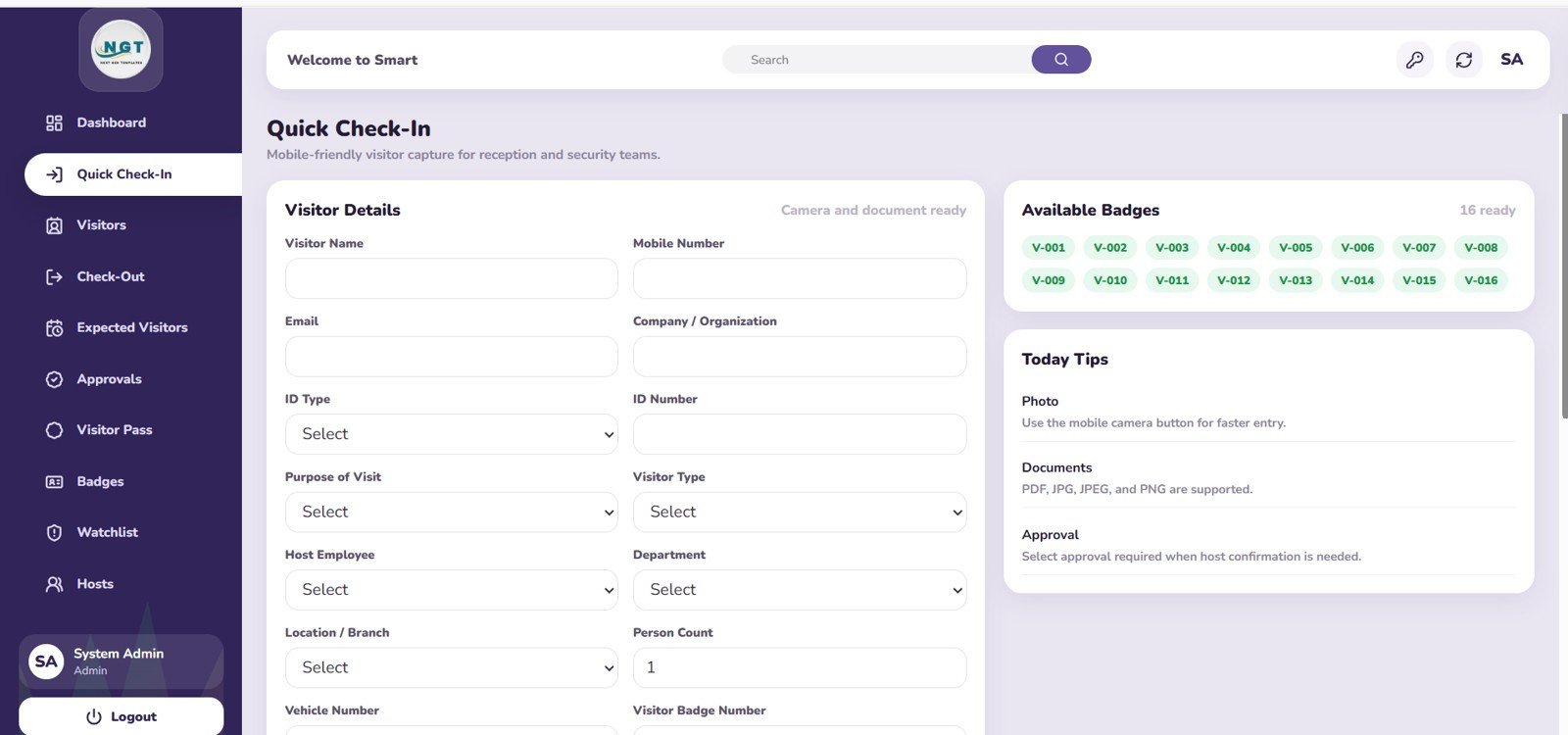
Many security contracts are really front-desk contracts. The guard at reception checks visitors in, calls the host, issues a badge and makes sure everyone signs out. This web app replaces the paper visitor book with a proper system that the client can audit.
Who it is for: reception and gatehouse guards, office administrators, coworking spaces, factories, schools, clinics and gated communities.
What is inside:
- Visitor registration with quick check-in and quick check-out screens
- Badge control, visitor passes and pre-registered expected visits
- Host approvals, so the person being visited can approve or reject a request
- Watchlist and blacklist alerts, and an employee master for hosts
- Four roles: Admin, Reception/Security, Host/Employee and a view-only Manager
- An overview dashboard with daily movement, pending approvals, visitors inside and alert counts
Prefer a desktop file? The Visitor Entry Register V1.0 in Excel ($19.99) logs name, organisation, purpose, host and time in and out with automatic stamps, and the Visitor Log Book in Excel VBA ($6.99) is the simplest digital replacement for a paper register.
Price: $24.99 one time.
Best for: a staffed reception or gatehouse where hosts approve visitors and the client wants a full visitor history.
4. Office Security Incident Dashboard: best for incident analysis

Clients do not judge a security provider on how many incidents happened. They judge it on how fast the team responded and how many cases were closed. This dashboard turns an incident log into exactly those numbers.
Who it is for: security supervisors, office administrators and facility managers who review incidents every month.
What is inside the Excel edition:
- An Overview with total incidents, average response time, average resolution time, high-severity count and high-severity %
- Resolved % and closed %, resolved against closed by month, and incident types such as theft, vandalism, fire alarms and unauthorised access
- A Location Summary that shows which areas have the most high-severity cases and the slowest resolution
- Severity and Response analysis, plus Reporter and Assignee pages for team accountability
- A data sheet with incident ID, type, date, reporter, assignee, severity, status, response and resolution hours
Price: $17.99 in Excel, $17.99 in Power BI and $6.99 in Google Sheets.
Best for: a monthly client report that proves response times and closure rates site by site.
5. Incident Tracker and Report Web App: best value
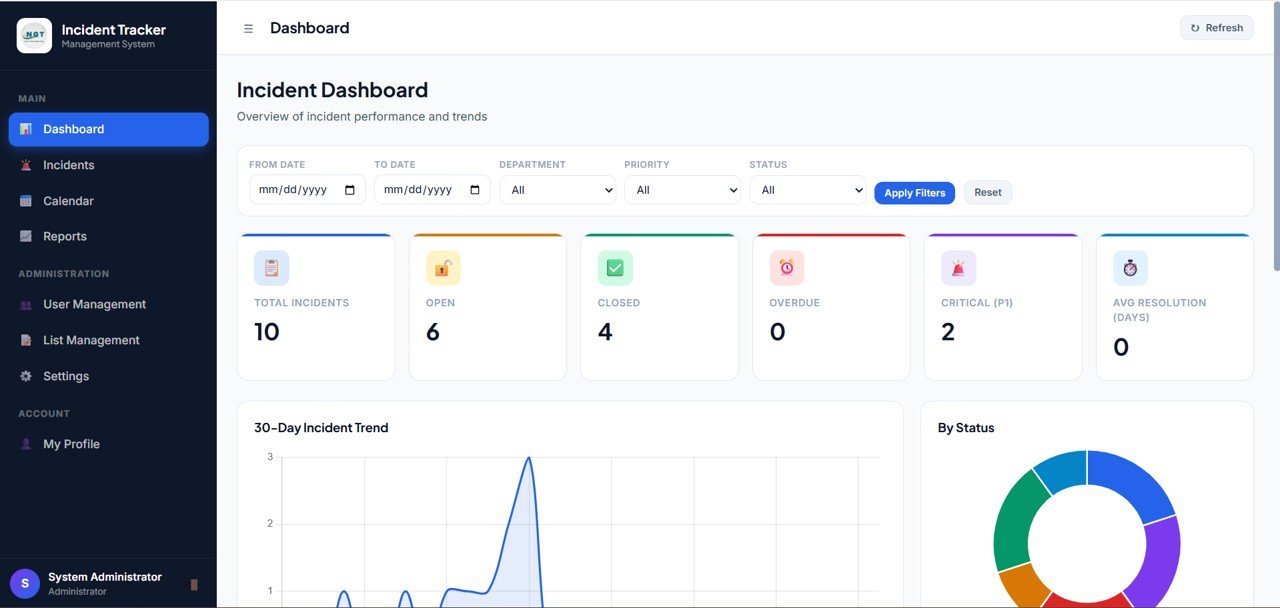
The dashboard in pick #4 needs clean data, and clean data starts with a log that guards actually fill in. This web app is that log. Each incident gets an owner, a severity and a due time, and the app flags anything overdue.
Who it is for: security, safety and operations teams that want every incident recorded the same way, with clear ownership.
What is inside:
- 10 core views, 8 KPI cards and 12 tracker fields behind a secure, role-based login
- KPI cards for total incidents, open, resolved, overdue, high severity, unassigned, average closure and SLA health
- Charts by status and severity, a 30-day trend and a list of incidents that need action
- A reports page by period, status, severity and assignee, plus settings for SLA hours, departments and locations
- A limited user view, so a guard sees only the incidents assigned to them
For a spreadsheet version, the Office Security Incident Report Tracker ($6.99 in Excel or Google Sheets) has a login form, entry forms, follow-up status and charts by department and severity.
Price: $14.99 one time.
Best for: replacing paper occurrence books and WhatsApp messages with one incident record per case.
6. Shift Scheduling Management System: best for guard rosters
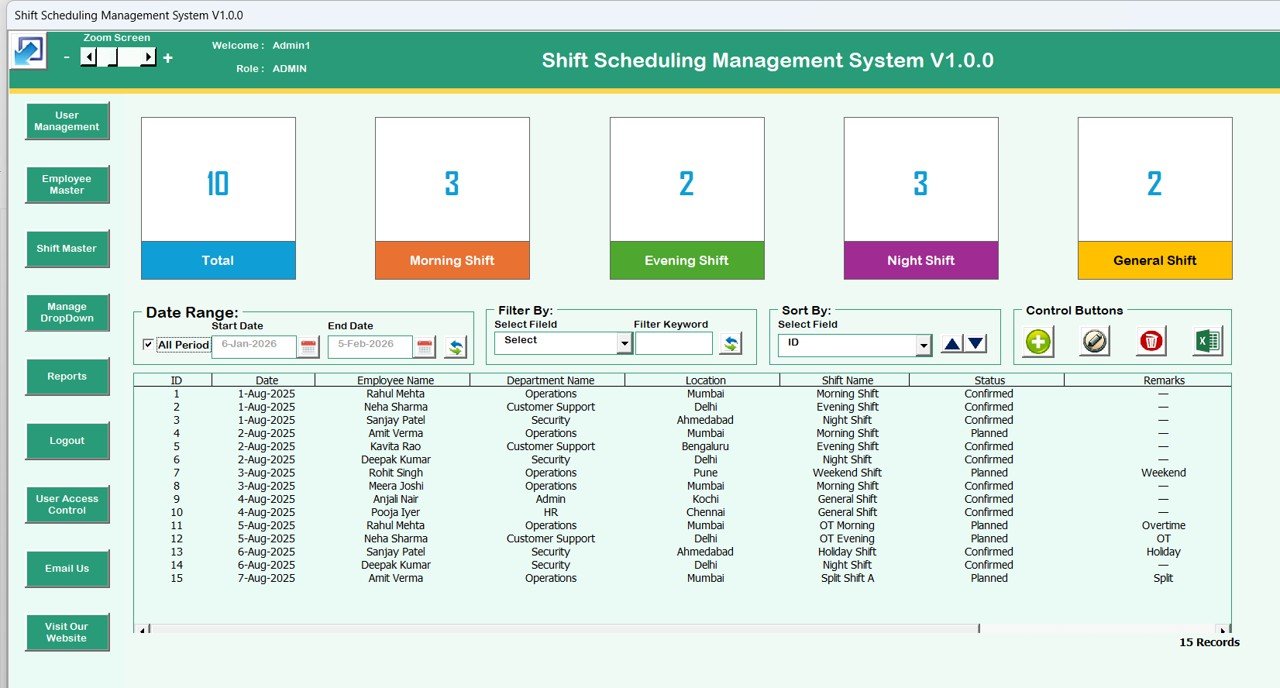
An uncovered post is the fastest way to lose a security contract. Rostering guards across morning, evening, night and weekend shifts on several sites is hard in a plain spreadsheet, and harder on paper. This Excel system turns the roster into a small application with forms, filters and reports.
Who it is for: rostering officers, site supervisors and HR teams at guarding companies, and in-house security managers with round-the-clock cover.
What is inside:
- A secure login with Admin and User roles and user access control
- A main screen that lists shift records with date filters, column filters and sorting, plus add, update and delete forms
- A Shift Master for shift types and an Employee Master for guard details, department and location
- Reports for any date range and one-click export of shift data to a new Excel file
If you only need a simple shared roster, the Employee Shift Schedule in Google Sheets ($6.99) is a lighter start. For leave planning around the roster, see our leave tracker templates.
Price: $19.99 one time.
Best for: checking that every site has cover before the week starts, and keeping a record of who worked where.
Working in a specialised setting? The Airport Security Services Dashboard ($13.99 in Excel, $17.99 in Power BI) analyses incidents, risk levels, processing times and cost by zone and shift. The Cargo Security KPI Dashboard ($14.99) tracks theft, damage and breach incidents for logistics security teams. For the equipment itself, the Security System Maintenance Checklist ($3.49) covers routine checks on alarms, cameras and access control hardware.
Which KPIs should a private security company track?
Pick five or six of these and review them every month. The dashboards above cover most of them out of the box, and you can add the rest as columns in the data sheet.
| KPI | Formula | What it tells you |
|---|---|---|
| SLA compliance | Incidents answered within agreed time / Total incidents x 100 | Whether you keep the promise in each contract |
| Average response time | Total minutes from alert to guard on scene / Incidents | How quickly clients see a guard arrive |
| Average resolution time | Total hours from report to close / Closed incidents | How long issues stay open |
| Post coverage rate | Shifts covered / Shifts scheduled x 100 | Whether every post was staffed as sold |
| Guard turnover rate | Guards who left in period / Average guard headcount x 100 | Hiring and training cost pressure |
| Overtime share | Overtime hours / Total hours worked x 100 | Roster gaps and margin leakage |
| Net profit margin | Net profit / Total revenue x 100 | Which contracts and regions actually make money |
| Revenue per contract | Total revenue / Active contracts | Contract size and pricing strength |
| High-severity incident share | High-severity incidents / Total incidents x 100 | Risk level across sites |
| Visitor exceptions | Watchlist hits + unsigned exits / Total visitors x 100 | How tight the front desk really is |
For industry standards, training and research on security management, ASIS International is the main professional body for the field. For job and pay data on guards in the United States, see the U.S. Bureau of Labor Statistics occupational outlook.
How do you choose the right security guard template?
Start with the problem that costs you the most today, whether that is a lost contract, an uncovered shift or a client complaint.
| If you are… | Start with |
|---|---|
| The owner of a guarding company who needs profit and SLA numbers | Security Company Dashboard |
| A security manager running gates, cards and keys on one large site | Access Control and ID Card Management System |
| A reception or gatehouse team still using a paper visitor book | Visitor Entry Management System |
| A supervisor preparing monthly incident reports for clients | Office Security Incident Dashboard |
| A team that loses incidents in chat groups and occurrence books | Incident Tracker and Report Web App |
| A rostering officer covering several sites around the clock | Shift Scheduling Management System |
Then pick the format. Choose Excel if one manager owns the numbers and the file stays in the office. Choose Google Sheets or a web app if guards, supervisors and the office all need the same data from different sites and phones. Choose Power BI if your company already uses it and managers want to filter reports themselves.
A common setup is one operating tool per site and one report for the business: the visitor or access control app at the gate, the incident tracker for every shift, and the Security Company Dashboard for the monthly review. If you also look after the buildings you guard, our facility management templates cover work orders and maintenance. Supervisors who manage a warehouse site may like our warehouse supervisor template stack, and HR leads can see the HR templates for directors.
When a template is NOT the right answer
Templates are reporting tools and light operating systems. In some cases they are the wrong buy, and it is better to know that first.
- You need live guard tours and GPS. None of these files tracks guards on a map, scans NFC checkpoints or raises a panic alarm. Dedicated guard management software does that, and you can still use a dashboard for the monthly summary.
- You need hardware integration. The access control app records gates, cards and rights, but it does not open doors or read card readers by itself. Physical access hardware needs its own controller software.
- You run hundreds of sites with mobile guards. At that scale, automatic dispatch, client portals and payroll links are worth a monthly fee.
- Nobody updates the data. A dashboard is only as current as its last entry. If no supervisor will spend a few minutes per shift on it, the numbers go stale.
For everyone else, which is most small and mid-sized guarding firms and in-house teams, security guard templates are the fastest route to clean records and clear client reports. Serving public sector clients? See our government and public sector templates. Reselling these files to your own clients? Read our template licensing guide first.
Frequently asked questions
What are security guard templates?
Security guard templates are ready-made spreadsheets, dashboards and small web apps for running a guarding business or an in-house security team. They cover contracts and revenue, guard deployment, SLA response times, visitor and gate logs, incident reports and shift rosters. You add your own records and the charts and KPI cards update from that data.
Which security guard template should I buy first?
Most guard companies should start with the Security Company Dashboard ($17.99 in Excel or Power BI, $9.99 in Google Sheets). It shows revenue, net profit, contracts, guards deployed and SLA compliance in one file. An in-house team that mainly runs a gate or reception desk should start with the Visitor Entry Management System ($24.99) instead.
Can a spreadsheet replace security guard management software?
For a small or mid-sized guarding firm, a dashboard plus a scheduling file and an incident log covers most of the reporting work. A spreadsheet will not give you GPS guard tours, panic buttons or NFC checkpoint scans. If you need those, buy guard management software and keep a template for the monthly owner or client report.
How do I track SLA compliance for security contracts?
Log every call-out or incident with its priority, the time it was raised and the time a guard responded. SLA compliance is the share of incidents answered inside the agreed response time. The Security Company Dashboard has an Incident and SLA page that shows SLA compliance by service type and region, plus response time by priority.
Is there a security company template in Google Sheets?
Yes. The Security Company Dashboard comes in Google Sheets for $9.99, and the Office Security Incident Dashboard and the Office Security Incident Report Tracker are $6.99 each in Google Sheets. The visitor, access control and incident web apps also run on Google Sheets with Apps Script, inside your own Google account.
How should I write a security guard incident report?
Record the date, time and exact location, the incident type, who reported it and who was assigned, the severity, what happened in plain facts, and the action taken. Close it with a status and a resolution time. The incident tracker web app and the Excel incident tracker both use fields like these, so every report reads the same way.
How do I schedule security guards across several sites?
Set up your shift types (morning, evening, night, weekend) once, keep an employee list with each guard's site and department, and then assign shifts by date. The Shift Scheduling Management System does this in Excel with filters by date, sort options and date-range reports, so you can check cover for every site before the week starts.
Are these templates a one-time purchase?
Yes. Prices run from $6.99 for a tracker to $39.99 for the access control web app, paid once. You download the file, or copy the web app into your own Google account, and keep it. There is no monthly fee and no per-guard, per-site or per-user charge.
Can I show these reports to my clients?
Yes. Many guard companies send a monthly client report built from the dashboard: incidents by site, response times and SLA compliance. Filter the dashboard to one client with the slicers, then export or print the page. Remove other clients' data before you share any file.
Is visitor and guard data safe in these files?
Excel files stay on your own computer. The Google Sheets files and web apps live in your own Google account, not on our servers, and the web apps have role-based logins. You control who sees what, so set sensible access and follow your local privacy rules for visitor and staff records.
Get your security guard templates
Start with the Security Company Dashboard ($17.99, or $9.99 in Google Sheets) to see profit, guards deployed and SLA compliance in one place, or the Incident Tracker and Report Web App ($14.99) to get every incident logged properly. Each one is a one-time purchase that you can edit and keep.
Want to see how these files work before you buy? Watch the walkthroughs on the NextGenTemplates YouTube channel.