

The best free leave tracker Excel template in 2026 is Vertex42’s Employee Leave Tracker. It has 12 monthly sheets and a year-to-date summary, handles up to 6 leave types and half days, and covers 30 employees out of the box. For a printable request form, NextGenTemplates gives away a free Leave Application Form for Word and Google Docs.
Last updated: October 2026
Tracking who turned up rather than who is off? Our list of free attendance sheet templates covers present and absent registers, and our free timesheet templates cover hours worked. This page is about leave: vacation, sick days, personal days and PTO balances.
Key takeaways
- All 8 leave tracker templates in the free list cost nothing to download. One is a NextGenTemplates file, one is from Vertex42, three come from Smartsheet and three from smaller template publishers. We opened every source page in October 2026.
- Best overall free leave tracker Excel file: Vertex42’s Employee Leave Tracker, with 12 monthly sheets, a yearly summary, up to 6 leave codes and half-day entries for 30 employees.
- Best free tracker for leave balances: CharlieHR’s Annual Leave Tracker, which sets an allowance per person in days or hours and works out what is left. It comes in Excel and Google Sheets.
- A free leave tracker records leave. It does not handle approvals with logins, stop two people editing the same file, or show leave cost and unplanned absence by department. Those gaps are why HR teams upgrade.
- The 8 paid NextGenTemplates upgrades below cost $6.99 to $39.99, paid once with no subscription. Three of them cost just $6.99.
 Launch offer
SUMIFS, XLOOKUP, FILTER, LAMBDA and checking AI-written formulas, with real business projects. 11h 47m of video by PK, with practice files, quizzes and a capstone.
Free leave tracker Excel templates compared
Every free leave tracker in this guide, side by side. One row is flagged best overall. All eight are free.
| # | Template | Source | Format | Best For | Price |
|---|---|---|---|---|---|
| 1 | Employee Leave Tracker (Best overall) | Vertex42 | Excel | Monthly leave codes and a yearly summary for up to 30 staff | Free |
| 2 | Leave Application Form Template | NextGenTemplates | Word, Google Docs | A signed leave request with handover details | Free |
| 3 | Employee Leave Tracker | Indzara | Excel (Google Sheets version separate) | Team calendar with custom weekends and holidays | Free |
| 4 | Annual Leave Tracker | CharlieHR | Excel, Google Sheets | Allowances and remaining balance per person | Free |
| 5 | Leave Tracker Template | Spreadsheet Daddy | Excel, Google Sheets, PDF | A simple printable monthly leave grid | Free |
| 6 | Vacation Schedule Template | Smartsheet | Excel | Requested, approved and taken status with coverage | Free |
| 7 | Employee Attendance Tracker Template | Smartsheet | Excel | Attendance plus sick, vacation and personal days | Free |
| 8 | Attendance Dashboard Template | Smartsheet | Excel | Charts of vacation, personal and sick leave totals | Free |
Here are the paid upgrades we recommend once a free leave tracker runs out of road. One row is best overall and one is best value.
| Upgrade | Format | Best For | Price |
|---|---|---|---|
| Leave Application Management System V1.0 (Best overall) | Excel VBA | Logins, leave applications, balances and reports in one file | $19.99 |
| Annual Leave Tracker with Daily Monthly View in Excel (Best value) | Excel | Leave totals by category for any date range | $6.99 |
| Leave Management System | Excel VBA | Marking several leave dates at once through a form | $6.99 |
| Leave Balance Adjustment Management System V1.0 | Excel VBA | Auditable corrections to leave balances | $19.99 |
| Employee Leave Dashboard in Excel | Excel | Leave cost, reasons and unplanned leave by department | $17.99 |
| Employee Leave Dashboard in Google Sheets | Google Sheets | The same leave analysis, shared in the cloud | $6.99 |
| Employee Leave Dashboard in Power BI | Power BI | Leave reporting for HR, finance and executives | $17.99 |
| HR Employee Management System Web App | Web app | Leave requests, approvals, attendance and payroll with logins | $39.99 |
How we picked these free leave trackers
We started where people really look for a free leave tracker Excel file: the big template libraries (Vertex42, Smartsheet and Microsoft Create), the leave tracker pages that rank in search, and the free files in our own catalogue. We opened every source page in October 2026 and checked every link in this post.
A file made the list only if it downloads free with no card details and does something a blank calendar cannot: count leave by type, total it by month or year, track balances, or carry an approval status. We left out Vertex42’s Vacation Accrual template, because it is a paid file ($19.95), even though many lists call it free. We also left out Microsoft Create’s employee absence schedule this year, because its page now sends you to a Microsoft 365 sign-in and we could not check the file without an account.
Search data shaped the order too. “Leave tracker” is searched about 590 times a month in the US, “PTO tracker excel” about 390 times and “leave tracker excel” about 110 times, so the list covers day-based leave, hour-based PTO and Google Sheets users. The paid upgrades come from the NextGenTemplates HR range. We matched each one to a gap the free files leave open, so every upgrade is a direct next step.
The 8 best free leave tracker templates for 2026
1. Employee Leave Tracker (Vertex42) – best overall free leave tracker Excel template
The most complete free leave tracker Excel workbook we found. It has 12 monthly worksheets plus a YearToDate sheet. On each month you pick a leave code from a drop-down for each employee and day, and the sheet totals sick leave, vacation, personal leave, paid and unpaid leave. It supports up to 6 leave types, and you record a half day by changing “V” to “HV” or “VH”. Employee names are looked up from a unique employee ID, and the file has rows for 30 employees, with more added by copying formulas down.
It is our pick for best overall because it gives you monthly and yearly totals by leave type, which is the question most managers actually ask. One caution from the page itself: the year sheet adds up everything you enter, including future planned leave, so treat it as a yearly summary rather than “taken to date”. Vertex42 last updated it on 11 April 2022, and it needs Excel 2013 or later.
Best for: small offices that track days off by type. Free under Vertex42’s private-use licence – get the Employee Leave Tracker.
2. Leave Application Form Template for Word and Google Docs (NextGenTemplates)
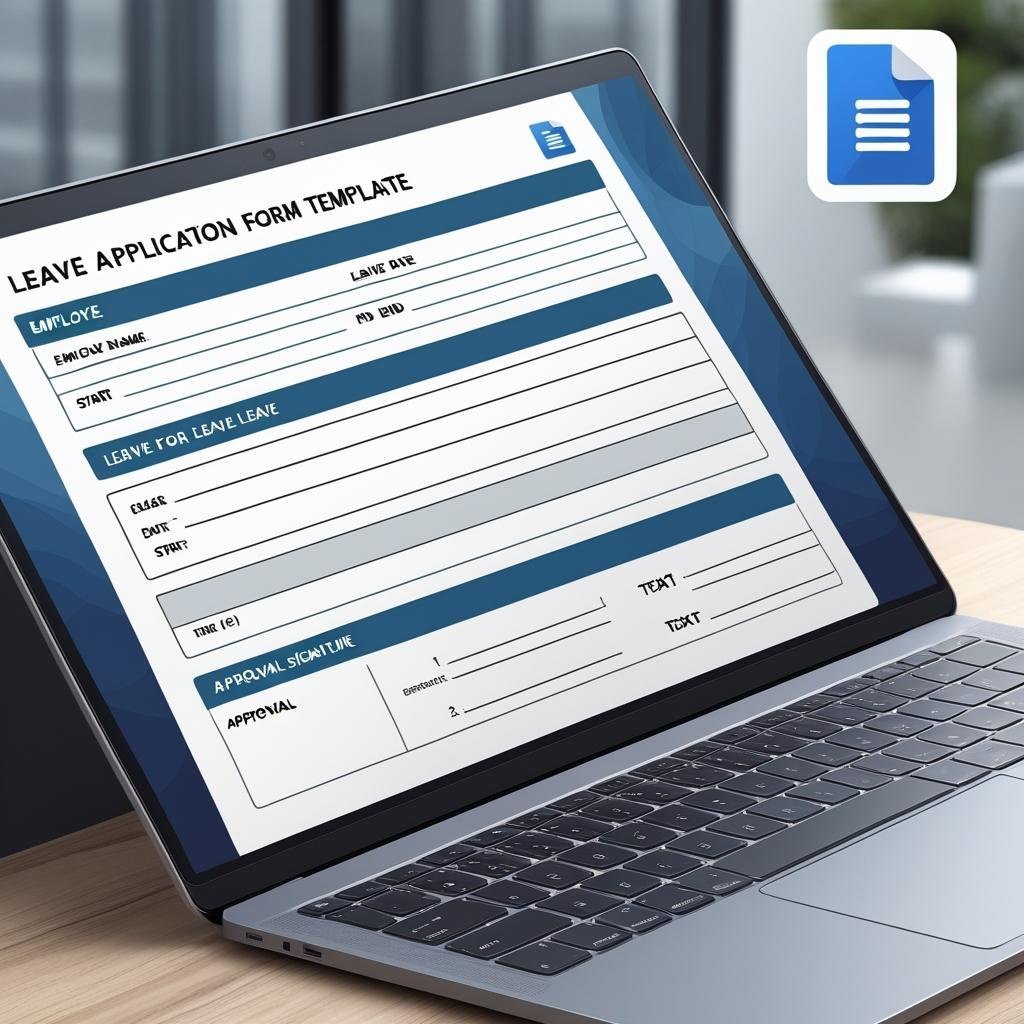
Every leave tracker needs a request behind it. This free form captures employee name, ID, department and designation, then the leave type, dates and total days, and the reason for leave. A work handover section names the person covering, and the form ends with a declaration and signature fields for the employee, the supervisor and HR. You edit it in Microsoft Word or Google Docs, and print it or use it online.
Best for: teams that want a signed paper trail before leave goes into the tracker. Free – download the free leave application form.
3. Employee Leave Tracker (Indzara)
A well-built free Excel leave tracker with five leave types by default (vacation, sick, unpaid, half day and other) that you can rename or extend. You set your own weekend days and company holidays, and a “day value” per leave type handles half and partial days. You enter leave as a date range, and employee start and end dates are respected when working days are counted. A monthly team calendar shows who is off, with a summary by leave type, and an annual attendance report lets you pick the starting month of your leave year. The dashboard shows 30 employees by default and can be extended.
Best for: teams with non-standard weekends or a leave year that does not start in January. Free – get Indzara’s employee leave tracker.
4. Annual Leave Tracker (CharlieHR) – best free balance tracker
The free tracker that best answers “how many days do I have left?”. A Team members tab holds each person’s name, department, allowance unit (days or hours) and holiday allowance. A Lookups tab lists the leave types and whether each one is deducted from the allowance. You record approved leave on the Time off tab by picking an employee and entering a start date, duration and leave type, and the remaining balance updates. A Calendar tab shows past and future leave month by month.
Best for: small companies that need allowances and balances, in Excel or Google Sheets. Free – get CharlieHR’s annual leave tracker.
5. Leave Tracker Template (Spreadsheet Daddy)
The simplest file on the list. It is a monthly calendar grid with day columns 1 to 31, with year, month and employee name in the header. You mark vacation, sick leave, personal days and holidays with a code or a colour. Because it comes as an Excel file, a Google Sheets copy and a printable PDF, it works for anyone who just wants a clean leave register to fill in or pin to a wall.
Best for: one person or a very small team that wants a printable leave tracker. Free – get the Spreadsheet Daddy leave tracker.
6. Vacation Schedule Template (Smartsheet)
Smartsheet’s free Excel vacation schedule is built around requests rather than totals. It has fields for vacation dates and approvals, and a status drop-down that marks each request as requested, approved or taken. It is designed to help managers coordinate coverage across departments, so nobody discovers in July that half the team is off the same week.
Best for: managers who approve vacation and need to see coverage. Free – get Smartsheet’s vacation schedule template (it is in their HR templates list; skip the trial pop-up to download the Excel file).
7. Employee Attendance Tracker Template (Smartsheet)
If you want leave and attendance in one place, this free Excel file tracks daily, weekly and monthly attendance, including shifts, sick leave, vacation days and personal time. It adds a point system for no-shows, late arrivals and early departures, which is useful if your attendance policy uses points.
Best for: shift-based teams that track leave and attendance together. Free – browse Smartsheet’s Excel attendance and leave trackers.
8. Attendance Dashboard Template (Smartsheet)
From the same Smartsheet page, this free Excel dashboard lists work shifts, vacation, personal and off days, and sick leave totals for multiple employees, then charts them. It is the only free file here with a visual summary, so it is a reasonable first look at leave patterns before you pay for a proper leave dashboard.
Best for: supervisors who want leave totals on a chart. Free – get Smartsheet’s attendance dashboard template.
Want the free leave application form by email?
Enter your email and we will send you our free Leave Application Form Template for Word and Google Docs (template #2 above). It has employee details, leave dates and total days, a handover section and three signature lines. No payment, no card, and you can unsubscribe at any time.
When does it pay to upgrade from a free leave tracker Excel file?
A free leave tracker is fine for a team of ten with one person keeping the file. The same five gaps push teams to a paid tool, usually when leave starts to affect payroll, coverage or headcount decisions:
- Requests live in email. Free trackers record leave after it is approved. The request, the approval and the reason sit in someone’s inbox, so there is no single record when a dispute comes up.
- Balances go wrong. Carry-over, half days, joiners mid-year and manual corrections quietly break a formula-only tracker. Without a log of who changed a balance and why, nobody trusts the number.
- One person edits at a time. An emailed leave tracker Excel file soon turns into five versions. Several managers need logins and roles, or a shared sheet.
- No cost view. Free files count days. They do not show what leave costs, which department has the most unplanned leave or how leave moves across the year. For the numbers worth watching, see our guide to absenteeism and attendance metrics.
- Leave is cut off from attendance and payroll. Unpaid leave has to reach payroll as loss-of-pay days. Retyping it from one file into another is where errors creep in.
If two or more of these apply, the hours spent patching a free sheet cost more than a one-time template. The 8 upgrades below map onto those gaps.
8 paid leave tracker upgrades for when free stops working
1. Leave Application Management System V1.0 – best overall upgrade
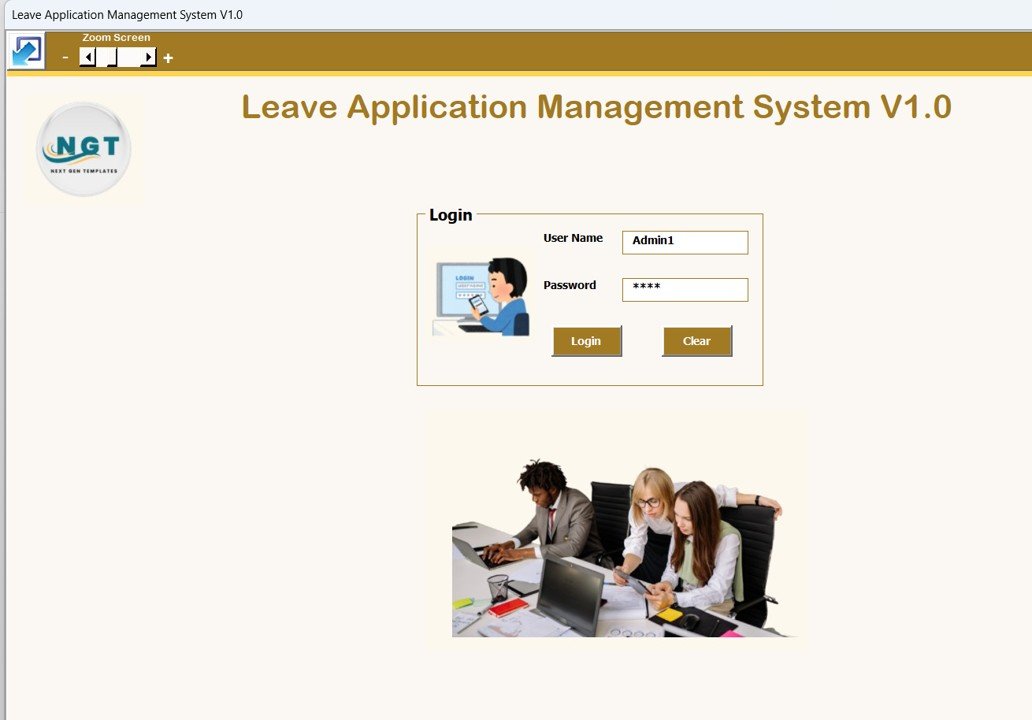
The direct fix for “requests live in email”. This Excel VBA system opens with a secure login and role-based user access, then gives you an employee master, a leave master, leave applications and automatic leave balance tracking in one workbook. Reports come out of Excel straight away, and nothing needs installing beyond Microsoft Excel on the desktop.
What it adds over free: a real leave application workflow with users and balances, without a monthly HR software fee.
Best for: HR teams at small and mid-sized firms that run on Excel. $19.99 – view the Leave Application Management System.
2. Annual Leave Tracker with Daily Monthly View in Excel – best value
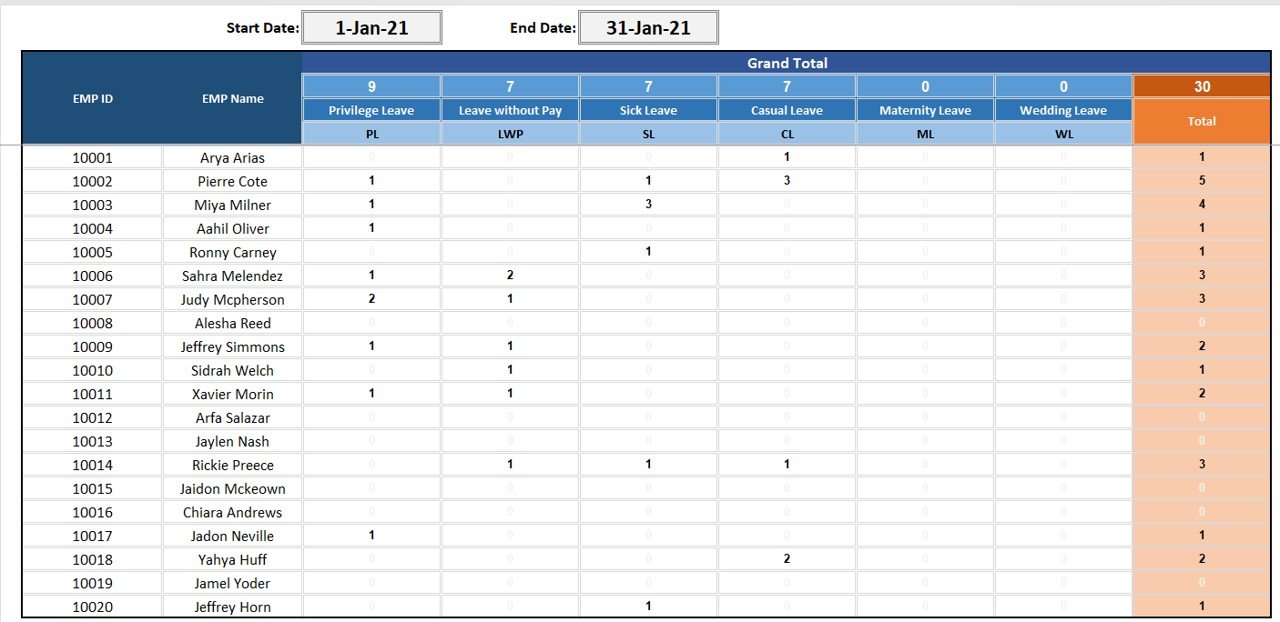
The step up from Vertex42’s free file for a few dollars. A summary sheet totals every leave category for any start and end date you pick, using codes such as PL, SL, CL, ML and WL that you define on the settings sheet. A monthly summary shows a day-by-day grid of who was on leave, switched by drop-down, and a leave marking screen fills in employee details for you. A colour-coded calendar shows leave at a glance. It is also the NextGenTemplates product people find most when they search for an annual leave tracker in Excel.
What it adds over free: date-range totals and your own leave codes, for the price of a coffee.
Best for: HR admins and office managers. $6.99 – view the Annual Leave Tracker in Excel.
3. Leave Management System (Excel VBA)

This one speeds up data entry. A VBA user form lets you pick an employee, a leave type and a duration, and mark several leave dates in one click. It supports half-day leave and editable leave categories, and shows daily and monthly views with colour-coded leave types, so you can see who is available on any given day.
What it adds over free: fast form-based entry and a daily availability view.
Best for: supervisors entering leave for a team every week. $6.99 – view the Leave Management System.
4. Leave Balance Adjustment Management System V1.0
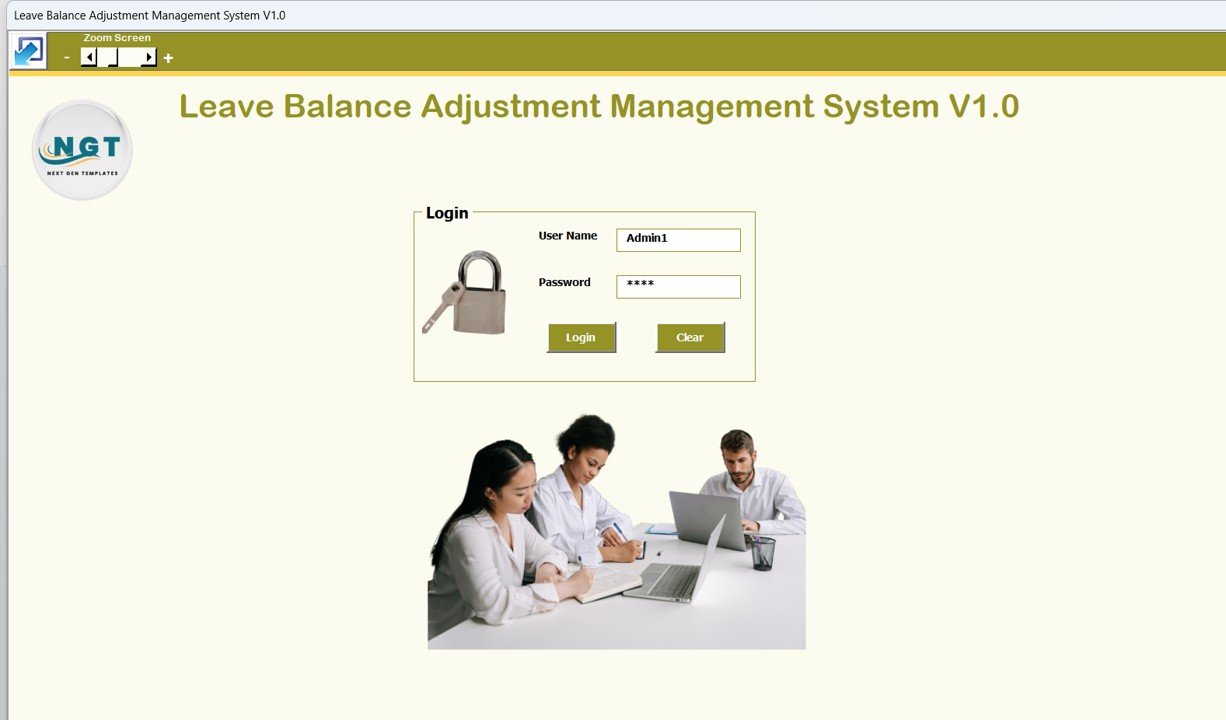
Built for the “balances go wrong” problem. Every correction to a leave balance (carry-over, encashment, a mistake fixed) is recorded through a structured form behind a user ID and password login, with admin and user access levels. A central list shows all adjustment records for review, and reports export for audit. It works alongside any leave tracker you already use.
What it adds over free: an auditable record of every balance change.
Best for: HR teams, clinics and service firms with year-end carry-over. $19.99 – view the Leave Balance Adjustment System.
5. Employee Leave Dashboard in Excel
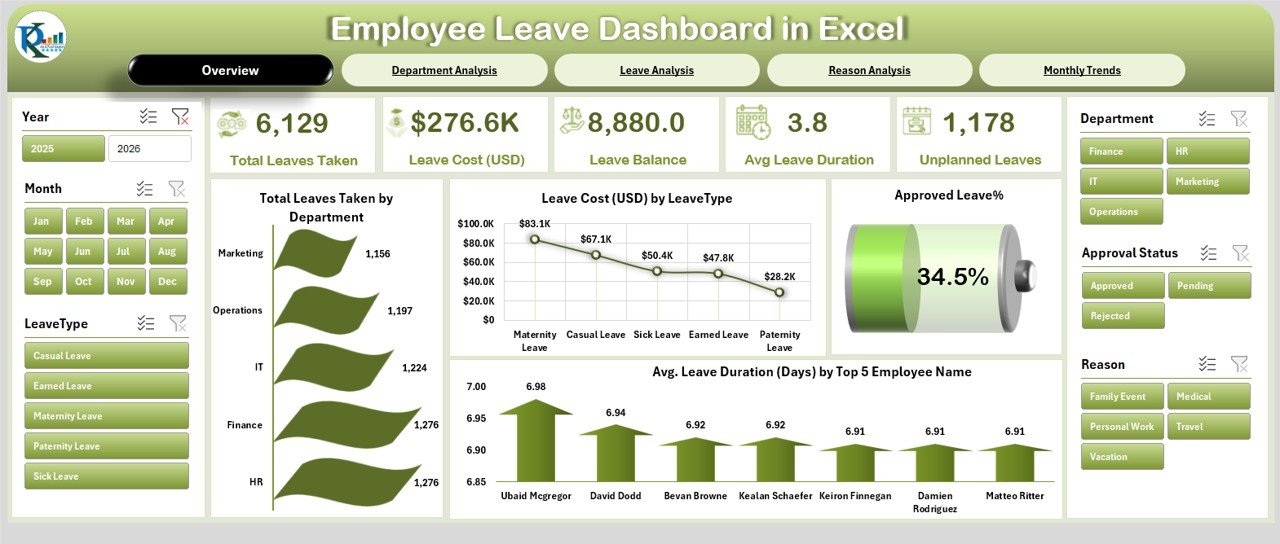
Turns leave records into management information. Five pages (Overview, Department, Leave, Reason and Monthly Trends) show total leaves, leave cost, approvals and average duration. You can spot unplanned leave by department and see why people take leave. Data goes into one clean entry sheet with drop-downs, so inputs stay consistent.
What it adds over free: the cost of leave and the pattern behind it, which no free tracker shows.
Best for: HR managers who report to leadership. $17.99 – view the Employee Leave Dashboard in Excel.
6. Employee Leave Dashboard in Google Sheets
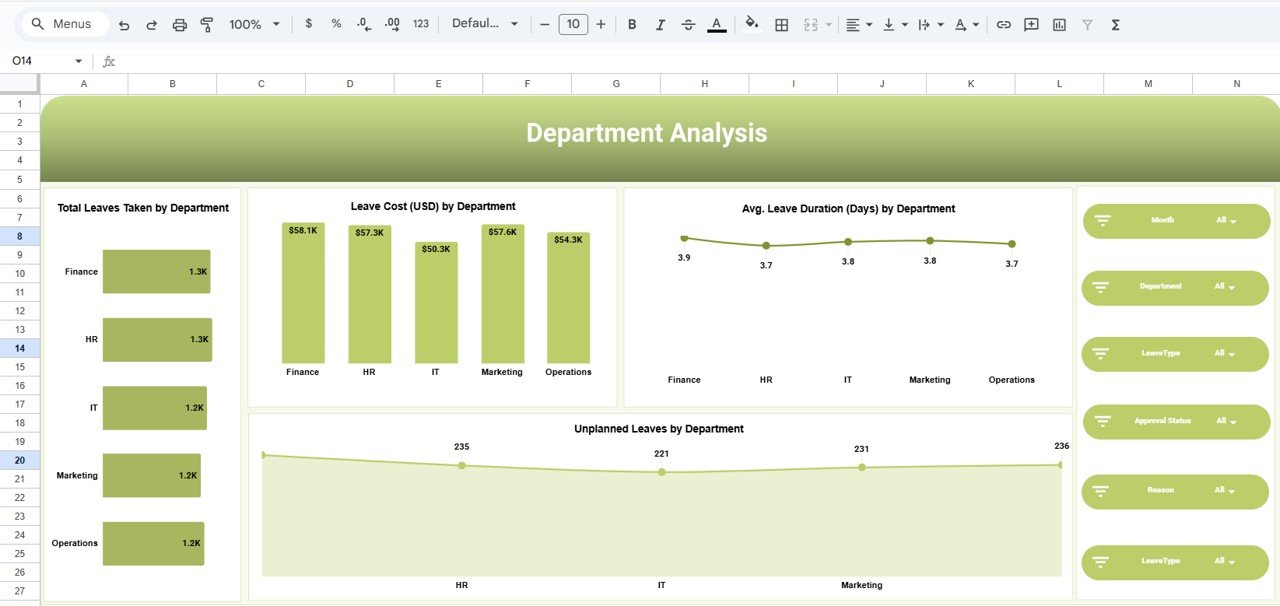
The same idea in the cloud. It analyses leave by department and leave type, shows leave cost and balances, tracks unplanned leave trends and monthly patterns, and filters with slicers. Because it lives in Google Sheets, managers see the same live numbers without anyone emailing a file.
What it adds over free: a shared leave dashboard for $6.99.
Best for: remote teams on Google Workspace. $6.99 – view the Google Sheets leave dashboard.
7. Employee Leave Dashboard in Power BI
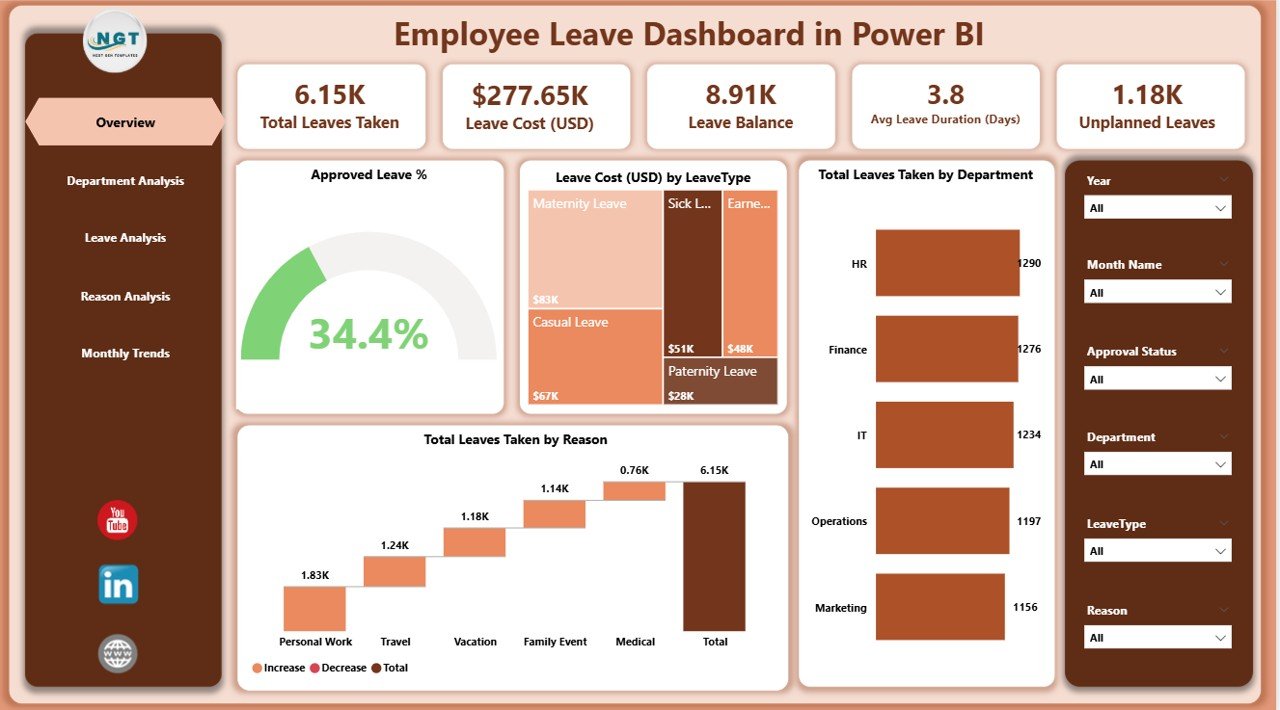
For companies that report in Power BI. An overview page carries the headline leave KPIs, then pages break leave down by department, leave type (including duration, pending and unplanned leave), reason and month, with leave cost in USD by type and department. Slicers filter by department, type and month, and the report refreshes when the data changes.
What it adds over free: refreshable leave reporting for HR, finance and executives.
Best for: mid-sized firms with a Power BI habit. $17.99 – view the Power BI leave dashboard.
8. HR Employee Management System Web App
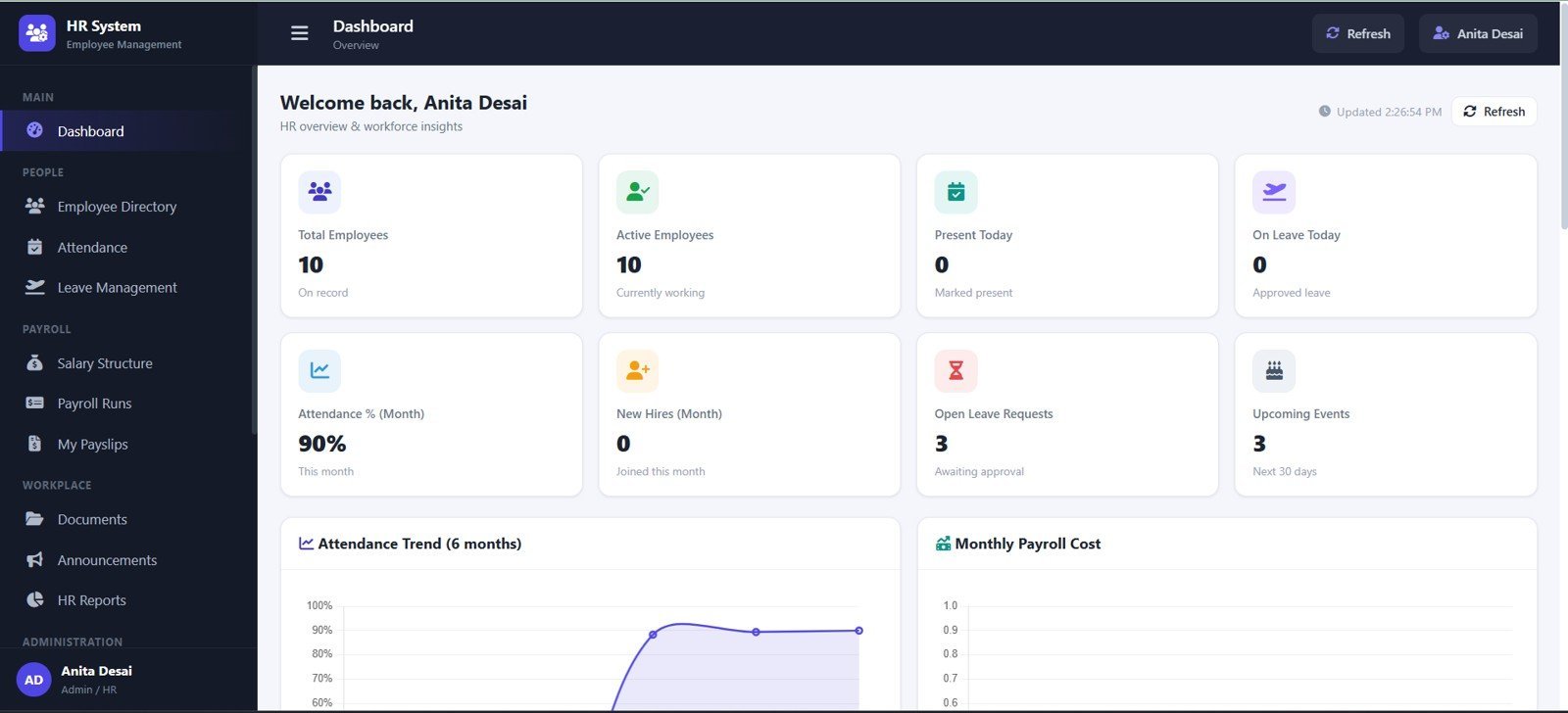
The biggest jump on this list: a 16-page HR web app with login, dashboard, employee directory, attendance, leave, payroll, documents, settings, archive and audit log. The leave module tracks balances, requests, date ranges, days, approval status and actions. In admin setup you define leave types and holidays, and payroll runs and payslips sit in the same system, so unpaid leave does not have to be retyped.
What it adds over free: leave, attendance and payroll in one connected system with logins, for a one-time price. For SaaS comparisons, see our BambooHR alternatives guide.
Best for: small businesses, schools and branch offices. $39.99 – view the HR Employee Management System.
Also worth a look: the Annual Leave Calendar in Excel and its Google Sheets version ($4.99 each) if you only need a year-at-a-glance leave calendar, the Leave and Vacation Tracker Calendar in Excel ($4.99) with annual, monthly and daily views, and the Holiday & Comp-Off Management System ($19.99) if staff earn days off for working holidays. The HR and Payroll Template Bundle is the best-value bundle at $14.99 for 10 Excel HR tools, including an attendance and leave tracker.
How to choose between a free and a paid leave tracker
| Your situation | Pick | Cost |
|---|---|---|
| Leave by type for up to 30 people, monthly and yearly | Vertex42 Employee Leave Tracker (free #1) | Free |
| Allowances and remaining balance per person | CharlieHR Annual Leave Tracker (free #4) | Free |
| A signed request before leave is approved | NextGenTemplates Leave Application Form (free #2) | Free |
| Leave totals by code for any date range | Annual Leave Tracker with Daily Monthly View in Excel | $6.99 |
| Applications, approvals and balances with logins | Leave Application Management System V1.0 | $19.99 |
| Leadership wants leave cost and unplanned leave by team | Employee Leave Dashboard (Excel, Google Sheets or Power BI) | $6.99 – $17.99 |
| Leave, attendance and payroll in one system | HR Employee Management System Web App | $39.99 |
A simple rule: if the tracker only answers “who is off and how many days have they used?”, stay free. If it has to answer “who approved it?”, “what is the correct balance?” or “what is leave costing us?”, a template built for that question pays for itself in the first month.
Leave tracker Excel formulas that matter
Most leave tracker errors come from date maths. If you build or edit your own leave tracker in Excel or Google Sheets, these five formulas cover almost every case:
- Working days of leave between two dates: =NETWORKDAYS(B2,C2,Holidays) counts weekdays from start date B2 to end date C2 and skips a named range of public holidays.
- Non-standard weekends: =NETWORKDAYS.INTL(B2,C2,7,Holidays) treats Friday and Saturday as the weekend. Change the 7 to match your week.
- Days of one leave type in a month row: =COUNTIF(D5:AH5,”V”)+0.5*COUNTIF(D5:AH5,”HV”) counts full vacation days plus half days.
- Remaining balance: =Allowance+CarryOver-SUMIFS(Days,Employee,A2,Type,”Vacation”) gives what is left for one person.
- Monthly accrual with a cap: =MIN(Cap,MonthsWorked*Rate) stops a balance growing past your policy maximum.
Every paid leave tracker Excel template above already has this logic built in. Want to see leave formulas in action? Our YouTube channel has Excel walk-throughs: youtube.com/@NextGenTemplates.
When a leave tracker Excel template is NOT the right answer
- You need FMLA-grade records. In the US, the Family and Medical Leave Act gives eligible employees of employers with 50 or more staff up to 12 workweeks of unpaid, job-protected leave in a 12-month period (see the US Department of Labor FMLA page). If you administer protected leave at scale, a spreadsheet anyone can edit is weak evidence. Use an HR system with an audit trail.
- Your leave policy is a legal promise. Federal law does not require paid vacation, sick leave or holidays; the Department of Labor calls them a matter of agreement between employer and employee. Many states and cities do mandate paid sick leave, and an accrual rule written in a spreadsheet is easy to get wrong. Check your local rules before relying on a formula.
- You have hundreds of staff across sites. At that scale, self-service leave requests on a phone, approval chains and payroll integration are worth a subscription. Spreadsheets work best for teams up to about 50.
- You only need to know who turned up today. Then a leave tracker is more than you need. Our roundup of attendance tracker templates is simpler, and for rosters see our Deputy alternatives guide.
Frequently asked questions
Where can I download a free leave tracker for Excel?
Vertex42’s Employee Leave Tracker is the most complete free Excel file, with 12 monthly sheets and a yearly summary. Indzara, CharlieHR and Spreadsheet Daddy also give away free leave trackers, and Smartsheet has free Excel vacation schedule and attendance trackers. NextGenTemplates gives away a free Leave Application Form. None needs a card.
Is there a free leave tracker for Google Sheets?
Yes. CharlieHR’s Annual Leave Tracker comes in Google Sheets as well as Excel and tracks allowances and balances. Spreadsheet Daddy offers a Google Sheets copy of its monthly leave grid, and Indzara has a separate Google Sheets version. For a shared leave dashboard with charts, NextGenTemplates’ Google Sheets version costs $6.99.
How do I make a leave tracker in Excel?
List employees in rows and days in columns for each month, then use a drop-down of leave codes (V, S, P, HV) in each cell. Count each code with COUNTIF, add half days at 0.5, and total the twelve months on a summary sheet. NETWORKDAYS converts a start and end date into working days of leave.
Can I use these as a PTO tracker in Excel?
Yes, if PTO is counted in days. CharlieHR’s tracker lets you set allowances in days or hours, which suits hourly PTO. If PTO accrues each pay period, you need an accrual column such as =MIN(Cap,MonthsWorked*Rate). Vertex42’s accrual template does this but is paid, at $19.95.
How do I calculate remaining leave balance in Excel?
Add the yearly allowance and any carry-over, then subtract the leave taken: =Allowance+CarryOver-SUMIFS(Days,Employee,A2,Type,”Vacation”). Keep one row per employee and one SUMIFS per leave type. If balances are adjusted by hand, log each change with a reason so the number can be audited later.
How do I count half-day leave in an Excel leave tracker?
Use a separate code for half days, such as HV, and count it at half weight: =COUNTIF(range,”V”)+0.5*COUNTIF(range,”HV”). Vertex42’s free tracker uses exactly this approach, and Indzara’s lets you set a day value per leave type, so a half-day type counts as 0.5.
What is the difference between a leave tracker and an attendance tracker?
A leave tracker records planned and approved absence by type, such as vacation, sick or unpaid leave, and usually tracks balances. An attendance tracker records who was present, absent or late each day. Many teams need both, and Smartsheet’s free attendance tracker includes leave days alongside attendance.
Are Vertex42 leave tracker templates free for business use?
Vertex42 offers its Employee Leave Tracker free under a private-use licence. You can use and edit it inside your company, but you may not distribute or resell it. Its Vacation Accrual template is a paid file at $19.95. Check the licence line on each download page before sharing a file outside your organisation.
Is an Excel leave tracker good enough for FMLA?
It can record FMLA leave days, but it is not a compliance system. FMLA gives eligible employees up to 12 workweeks of unpaid, job-protected leave in a 12-month period, and employers must track that window correctly. Larger employers with frequent protected leave should use HR software with an audit trail.
When should I upgrade from a free leave tracker?
Upgrade when leave requests need logins and approvals, when balances need an audit trail, when several managers edit the same file, or when leadership asks what leave costs by department. Paid NextGenTemplates leave tools cost $6.99 to $39.99, paid once with no subscription.
Get your leave tracker Excel template
Start free with Vertex42’s Employee Leave Tracker or our free Leave Application Form Template. When leave has to run through approvals and balances, the Leave Application Management System is our top upgrade at $19.99, the Annual Leave Tracker with Daily Monthly View in Excel is the best value at $6.99, and the Employee Leave Dashboard in Excel shows what leave is costing you for $17.99.
Building out a full HR toolkit? See our HR templates for directors, the HR KPIs to track in 2026, our list of free Excel dashboard templates, and our guide to free payslip templates for the pay run itself.