



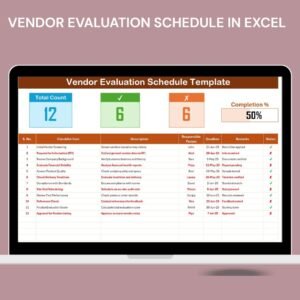
The Vendor Evaluation Schedule in Excel is a streamlined, easy-to-use tool designed to help businesses and procurement teams evaluate and track the performance of their vendors. This Excel-based schedule ensures that the vendor evaluation process is organized, efficient, and consistently aligned with business goals. Whether you’re assessing a new vendor or reviewing an existing supplier’s performance, this template enables you to monitor important metrics and make data-driven decisions about your vendor relationships.
With this vendor evaluation tool, you can manage key aspects of vendor assessment such as delivery times, product quality, compliance, cost-effectiveness, and overall service levels. This tool simplifies the vendor review process, ensures that you maintain high standards for supplier performance, and fosters better vendor management practices.
Key Features of the Vendor Evaluation Schedule in Excel
📅 Evaluation Schedule Management
Set clear dates for vendor evaluations, ensuring that each vendor is reviewed regularly and consistently. Organize the schedule based on your business’s needs, whether it’s monthly, quarterly, or yearly evaluations.
📊 Performance Metrics Tracking
Track critical performance indicators such as product quality, on-time delivery, compliance with agreements, and customer service. Evaluate your vendor’s performance across these key areas to make informed decisions.
📈 Vendor Comparison
Easily compare multiple vendors on various metrics, allowing you to make better purchasing decisions. This feature helps you identify high-performing vendors and prioritize the best options for your business.
🔍 Customizable Evaluation Criteria
Tailor the evaluation schedule to suit your specific business needs by adjusting the performance metrics, scoring systems, and review categories. Track the aspects most important to your procurement strategy.
📉 Tracking & Reporting
Monitor vendor performance over time and generate reports to assess trends and improvements. Use this data to provide constructive feedback to vendors, ensuring continuous growth and better service.
⚙️ Clear Vendor Overview
Access all necessary information regarding each vendor’s performance, including evaluation history, contact details, and notes from previous evaluations. Stay organized and up to date on each vendor’s status.
Why You’ll Love the Vendor Evaluation Schedule in Excel

✅ Efficient Vendor Management
Manage and track all vendor evaluations in one place, ensuring that no vendor is overlooked and that performance is consistently monitored.
✅ Data-Driven Decisions
Use objective data to make decisions about vendor selection and retention. Leverage the insights gained to optimize your procurement process and reduce risks.
✅ Customizable & Flexible
Tailor the schedule to fit the unique needs of your business. Modify evaluation criteria and tracking systems to match your business objectives and vendor relationships.
✅ Improved Vendor Relationships
Consistently monitor and evaluate vendor performance, providing valuable feedback and fostering strong, mutually beneficial relationships with your suppliers.
✅ User-Friendly & Organized
Designed with ease of use in mind, the Excel template is straightforward to navigate, ensuring that procurement teams can quickly and efficiently track vendor performance.
What’s Inside the Vendor Evaluation Schedule in Excel?
Evaluation Schedule Management: Set dates for regular vendor evaluations.
Performance Metrics Tracking: Monitor key metrics such as product quality and on-time delivery.
Vendor Comparison: Compare multiple vendors on various criteria.
Customizable Evaluation Criteria: Tailor the evaluation schedule to your needs.
Tracking & Reporting: Monitor vendor performance over time and generate reports.
Vendor Overview: Access all vendor-related data in one place.
How to Use the Vendor Evaluation Schedule in Excel
1️⃣ Download the Template: Instantly access the Vendor Evaluation Schedule in Excel.
2️⃣ Set Evaluation Dates & Criteria: Input your vendor information, evaluation dates, and key metrics.
3️⃣ Track Vendor Performance: Monitor and update vendor performance data throughout the evaluation period.
4️⃣ Compare Vendors: Compare multiple vendors based on performance metrics and make data-driven decisions.
5️⃣ Generate Reports & Insights: Analyze vendor performance over time and use the reports to inform your procurement strategy.
Who Can Benefit from the Vendor Evaluation Schedule in Excel?
🔹 Procurement Teams & Managers
🔹 Supply Chain & Operations Teams
🔹 Small & Medium Enterprises (SMBs)
🔹 Large Corporations with Vendor Management Needs
🔹 Business Owners & Executives
🔹 Contract Managers & Purchasing Teams
Streamline your vendor evaluation process with the Vendor Evaluation Schedule in Excel. Track, compare, and optimize vendor performance to make smarter procurement decisions and build stronger vendor relationships.
Click here to read the Detailed blog post
Visit our YouTube channel to learn step-by-step video tutorials
Youtube.com/@PKAnExcelExpert




























Reviews
There are no reviews yet.