



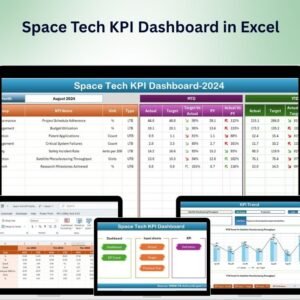
The Space Tech KPI Dashboard in Excel is an innovative tool designed for space technology companies, engineers, project managers, and scientists to track and analyze key performance indicators (KPIs) related to space exploration, satellite operations, and space research projects. Whether you are involved in satellite launches, research & development, or space station operations, this Excel-based dashboard helps you monitor and optimize your projects by tracking mission progress, financial performance, resource utilization, and technological advancements.
With real-time tracking and interactive features, this dashboard allows you to assess the performance of your space projects, manage resources efficiently, and ensure timely delivery of critical space technology milestones.
Key Features of the Space Tech KPI Dashboard in Excel:
🚀 Mission Progress and Timeline Tracking
Track the progress of space missions from planning to launch, including key milestones, timelines, and delays to ensure successful and timely mission completion.
💰 Budget and Financial Performance
Monitor the financial performance of space projects, including budget allocations, expenses, and cost management to ensure the efficient use of funds.
📡 Satellite and Equipment Performance
Track the performance of satellites, space vehicles, and other space technology equipment to ensure optimal functionality and readiness for missions.
📈 Resource Allocation and Utilization
Monitor the utilization of resources such as fuel, manpower, and materials to ensure that space missions are well-supported and that no resources are underutilized.
🌍 Research and Development (R&D) Metrics
Track R&D progress, such as the development of new technologies, testing phases, and innovation milestones in the space tech sector.
🚀 Why You’ll Love the Space Tech KPI Dashboard in Excel:
✅ Track Mission Progress – Monitor mission timelines, key milestones, and delays to ensure your space missions are progressing smoothly and on time.
✅ Optimize Financial Performance – Track budgets, expenses, and financial performance of space projects to ensure cost efficiency and accountability.
✅ Ensure Equipment Performance – Track satellite and equipment performance metrics to ensure optimal functionality and minimize operational disruptions.
✅ Manage Resources Effectively – Track the utilization of resources like fuel, manpower, and materials to optimize space mission planning and reduce costs.
✅ Evaluate R&D Performance – Track research and development progress, ensuring the development of innovative space technologies and keeping your projects on the cutting edge.
✅ Fully Customizable and Interactive – Tailor the dashboard to meet the specific needs of your space tech projects, with interactive features for real-time tracking and decision-making.
What’s Inside the Space Tech KPI Dashboard in Excel:
Mission Progress Tracking: Monitor the timeline of space missions from launch to completion, ensuring that critical milestones are met on schedule.
Financial Performance Monitoring: Track budget allocation, expenses, and overall project costs to ensure that space missions stay within financial parameters.
Satellite and Equipment Performance: Track performance data for satellites, space vehicles, and other critical space tech, ensuring operational efficiency and avoiding disruptions.
Resource Utilization Monitoring: Track resource allocation such as fuel, equipment, and human resources to optimize usage and prevent inefficiencies.
R&D Progress: Monitor progress on research projects, technological developments, and innovations within the space tech sector.
Custom Reports: Generate custom reports summarizing key performance metrics such as mission status, equipment performance, financial health, and resource allocation for detailed analysis.
How to Use the Space Tech KPI Dashboard in Excel:
1️⃣ Download the Template – Instantly access your Excel file upon purchase.
2️⃣ Input Project Data – Enter mission details, financials, equipment performance, and resource usage to begin tracking your KPIs.
3️⃣ Monitor Key Metrics – Use the dashboard to track mission timelines, satellite performance, budgets, and resource allocation in real-time.
4️⃣ Evaluate Financials – Track the financial status of space tech projects, including budgets and expenses, to ensure cost-effective project management.
5️⃣ Generate Reports – Create custom reports summarizing mission progress, financial performance, and equipment status to inform your space tech strategies.
Who Can Benefit from the Space Tech KPI Dashboard in Excel:
Space Tech Companies and Startups
Aerospace Engineers
Project Managers in Space Missions
Satellite Operators
Research & Development Teams in Space Technology
Financial Analysts in Space Technology
Space Exploration Agencies
Space Stations and Operations Teams
Scientists and Researchers in Space Tech
Space Mission Planners
The Space Tech KPI Dashboard in Excel is a critical tool for managing complex space projects, optimizing financial performance, and ensuring the smooth operation of satellite and space missions. By tracking mission progress, financials, resources, and R&D efforts, this dashboard helps ensure that space tech projects meet their milestones and are completed on time and within budget.
Click here to read the Detailed blog post
https://www.pk-anexcelexpert.com/space-tech-kpi-dashboard-in-excel/
Visit our YouTube channel to learn step-by-step video tutorials
Youtube.com/@PKAnExcelExpert






























Reviews
There are no reviews yet.