


The shipbuilding industry operates at some of the highest levels of complexity in the world. Every vessel—whether a cargo ship, naval vessel, tanker, cruise ship, or offshore structure—involves thousands of activities, multiple shipyards, engineering teams, safety departments, procurement units, and financial checkpoints. As operations grow, the data becomes scattered across emails, spreadsheets, and manual reports. This leads to delayed decisions, rising costs, miscommunication, and lack of clarity.
The Shipbuilding Dashboard in Excel solves this problem by bringing every important KPI—risk rating, delays, planned cost, actual cost, project count, segment performance, and monthly trends—into one clean, interactive, and ready-to-use dashboard. It helps project managers, shipyard heads, engineering teams, planning teams, and senior management monitor end-to-end performance without navigating multiple files.
📌 What Is a Shipbuilding Dashboard in Excel?
A Shipbuilding Dashboard in Excel is a structured reporting tool that tracks shipbuilding performance across:
Shipyards
Vessel types
Segments
Regions
Monthly KPIs
Using simple Excel formulas, slicers, PivotTables, and navigation buttons, it gives a clear view of:
Planned vs actual cost
Actual hours vs planned hours
Delayed project percentage
Risk rating analysis
Vessel performance
Shipyard output
Monthly production and cost trends
Since all visuals update based on slicers, the dashboard delivers insights instantly—without complex tools or learning curves.
🎯 Why Shipbuilding Companies Need This Dashboard
Shipbuilding involves engineering, procurement, planning, labor management, material management, financial tracking, and risk monitoring. Without a central tool:
Data becomes scattered
Cost overruns go unnoticed
Delays increase
Teams work with outdated information
Leadership lacks clarity
This dashboard centralizes information so every team aligns on performance.
Teams use it to:
Track shipyard performance
Control rising project costs
Identify delays early
Compare planned vs actual metrics
Monitor region-wise and vessel-wise KPIs
Improve accountability
Manage resources effectively
Because it runs in Excel, every team member can use it immediately.
📊 Key Features of the Shipbuilding Dashboard
The dashboard includes five analytical pages and a support sheet, all designed with a left-side navigation menu for easy movement.
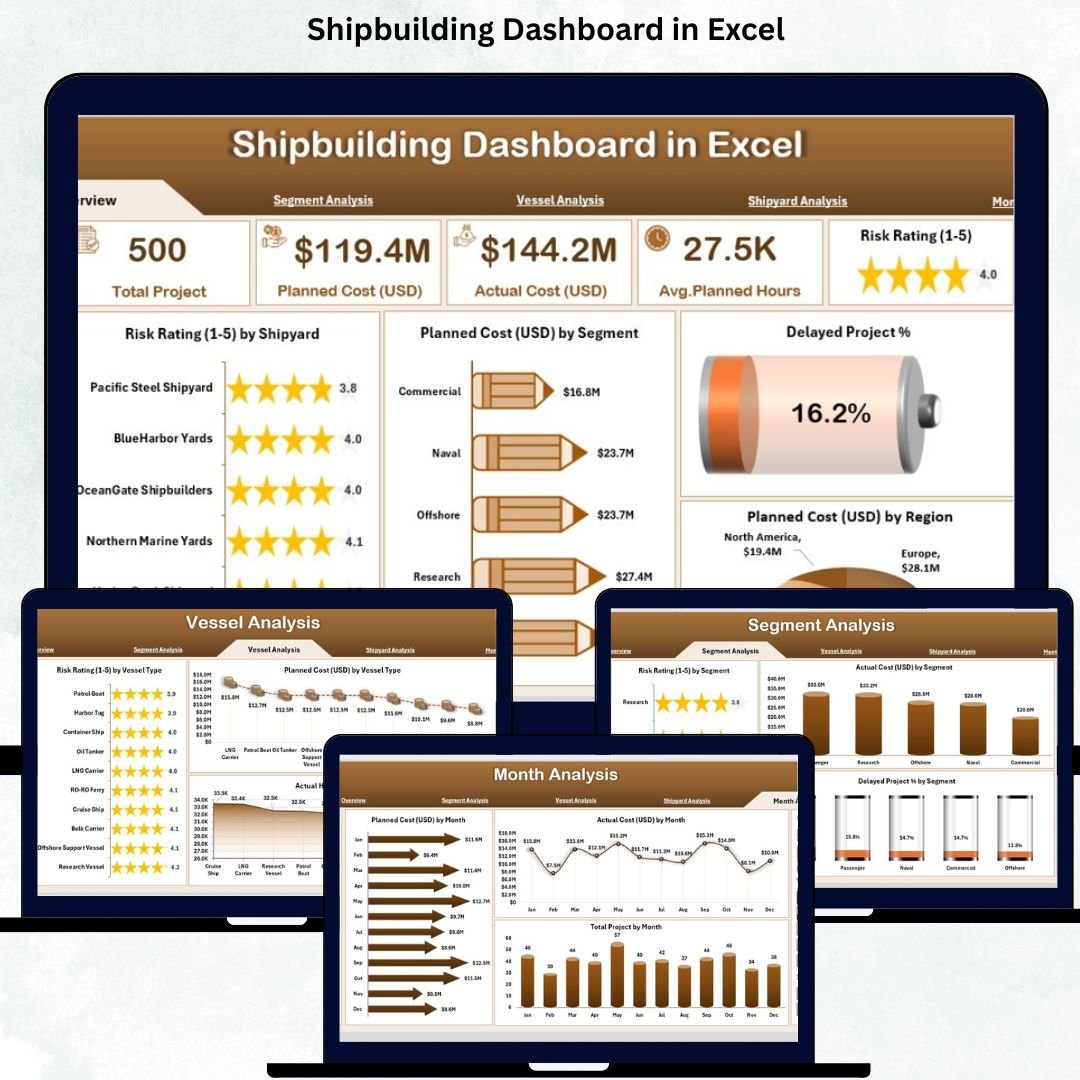
🟦 1. Overview Page – High-Level Shipbuilding Summary
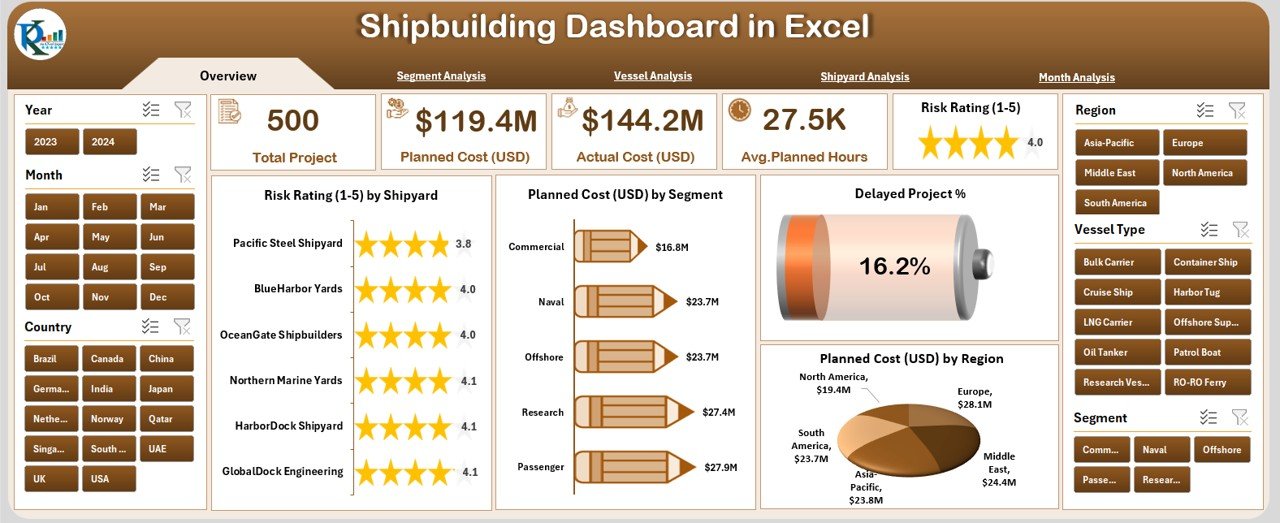
The Overview Page provides instant visibility into company-wide KPIs.
⭐ Right-Side Slicer Panel
Users can filter by:
Year
Segment
Shipyard
Vessel Type
Region
⭐ KPI Cards
Five essential cards display:
Total Projects
Total Planned Cost
Total Actual Cost
Delayed Project %
Total Actual Hours
These help leaders assess overall performance instantly.
⭐ Overview Page Charts
Risk Rating by Shipyard
Planned Cost (USD) by Segment
Delayed Project %
Planned Cost (USD) by Region
These visuals highlight risks, high-cost segments, delay percentages, and region-based performance gaps.
🟧 2. Segment Analysis Page – Understand Segment-Wise Performance
Shipbuilding companies work across multiple segments such as:
Commercial vessels
Naval vessels
Offshore structures
Special-purpose vessels
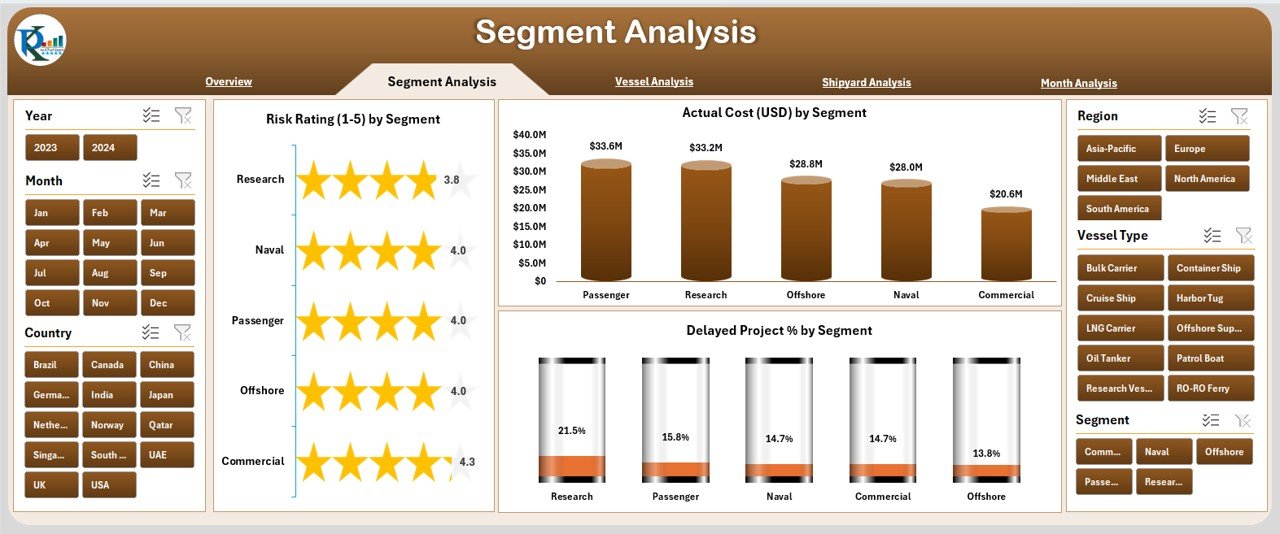
This page shows segment-specific performance through:
⭐ Slicers for Year, Segment & Region
⭐ Charts:
Risk Rating by Segment
Delayed Project % by Segment
Actual Cost (USD) by Segment
This allows managers to identify high-risk segments, cost-heavy segments, and segments causing repeated delays.
🟩 3. Vessel Analysis Page – Track Vessel-Type Behavior
Each vessel category has different complexity, cost, labor effort, and risks.
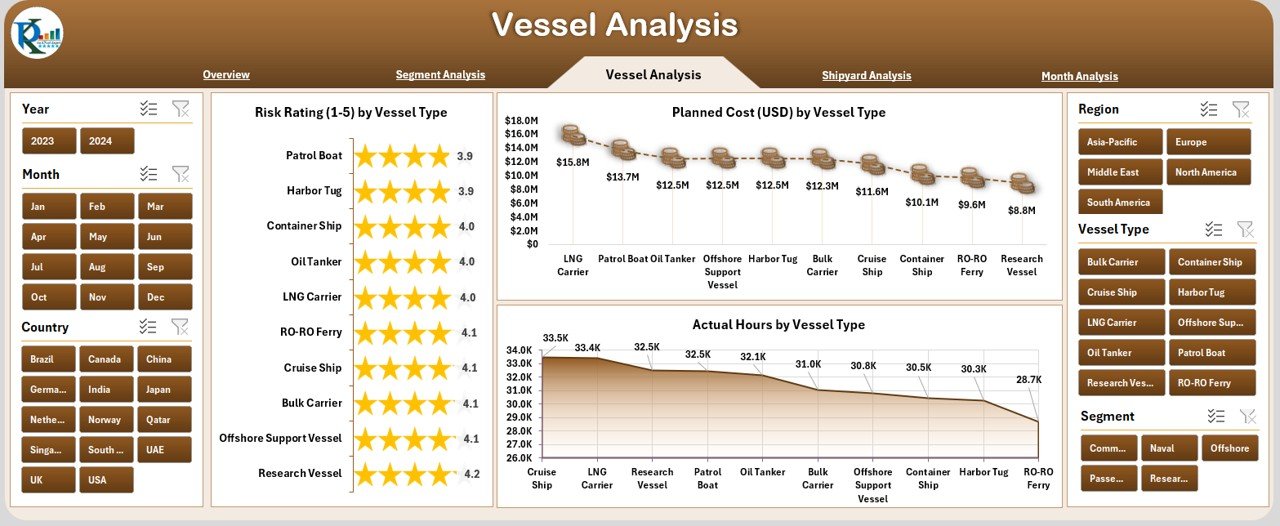
This page includes:
⭐ Right-Side Filters
⭐ Charts:
Risk Rating by Vessel Type
Planned Cost (USD) by Vessel Type
Actual Hours by Vessel Type
These insights help optimize planning, labor allocation, and project timelines.
🟪 4. Shipyard Analysis Page – Compare Performance Across Shipyards
Performance varies across shipyards due to:
Workforce skill levels
Location
Material availability
Machinery capacity
Supplier networks
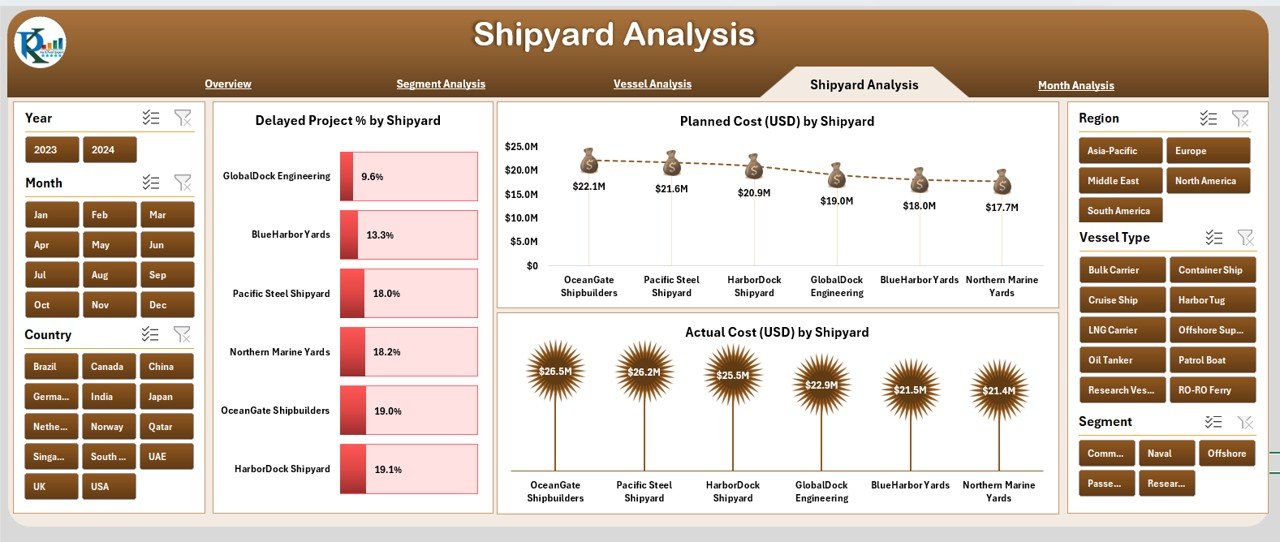
This page shows:
⭐ Charts:
Delayed Project % by Shipyard
Planned Cost (USD) by Shipyard
Actual Hours by Shipyard
With these visuals, leadership identifies underperforming shipyards and takes corrective action.
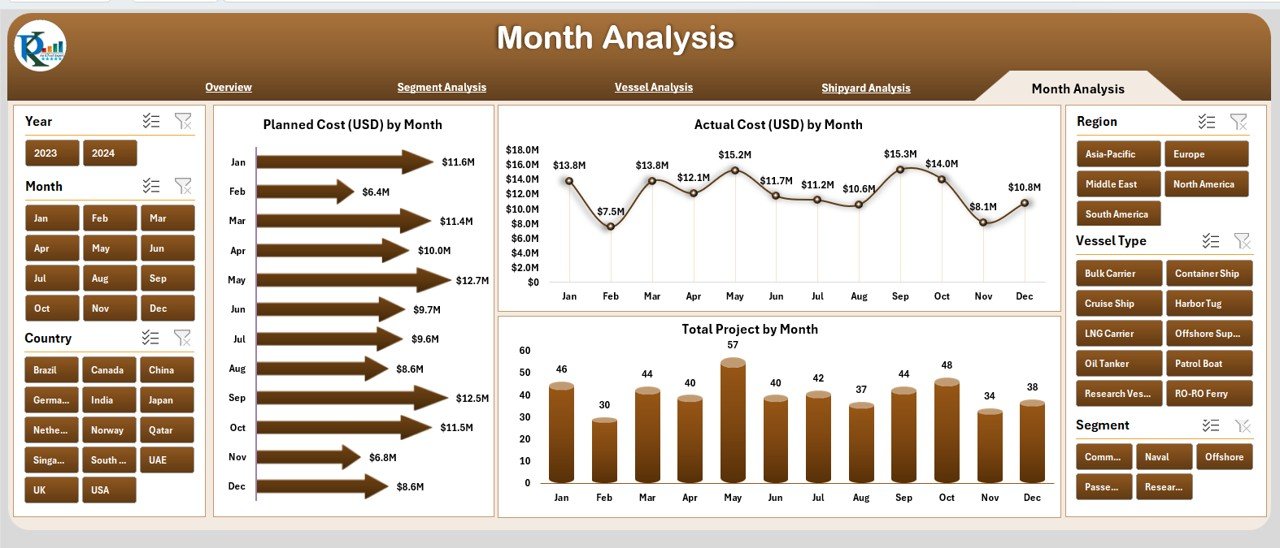
🟫 5. Monthly Analysis Page – Track Monthly Patterns & Trends
Shipbuilding projects run for several months or years. This page helps track long-term patterns.
⭐ Charts:
Planned Cost (USD) by Month
Actual Cost (USD) by Month
Total Projects by Month
Teams understand seasonal patterns, workload peaks, downtime periods, and cost fluctuations.
🛠 Support Sheets
✔ Data Sheet
Stores raw data: cost, hours, segment, vessel type, shipyard, region, delays, risk levels.
✔ Support Sheet
Stores dropdown lists, mappings, categories, and backend data references.
🌟 Advantages of the Shipbuilding Dashboard in Excel
⭐ 1. Real-Time Monitoring
Charts and KPIs update instantly based on slicers.
⭐ 2. Reduce Project Delays
The dashboard highlights high-risk areas early.
⭐ 3. Control Cost Overruns
Clear comparison of planned vs actual spending.
⭐ 4. Enhance Workforce Efficiency
Actual hours vs vessel type and shipyard show labor utilization.
⭐ 5. Improve Productivity
Simple structure makes analysis easy for everyone.
⭐ 6. Support Fast Decision-Making
Clean visuals highlight the exact areas requiring attention.
🧠 Best Practices for Using the Dashboard
Update data weekly
Maintain clean and consistent data
Use slicers for detailed comparisons
Track monthly trends regularly
Monitor risk ratings frequently
Review planned vs actual metrics
Keep backup copies of the file
🏁 Conclusion
The Shipbuilding Dashboard in Excel is a powerful, easy-to-use decision-making tool for shipbuilding companies. It simplifies complex engineering data, improves cost control, increases transparency, and enhances operational performance. With pages for segment analysis, vessel analysis, shipyard performance, and monthly tracking, this dashboard gives complete clarity on production health and project efficiency.
Visit our YouTube channel to learn step-by-step video tutorials
🔗 Click here to read the Detailed blog
Watch the step-by-step video tutorial:
Compatibility and Requirements
- Works in Microsoft Excel desktop (Excel 2016 or later, or Microsoft 365).
- The Overview, Segment Analysis, Vessel Analysis and Shipyard Analysis pages use slicers to filter the charts. Microsoft explains them in Use slicers to filter data.
Frequently Asked Questions
Which pages does the dashboard have?
Five analysis pages: Overview, Segment Analysis, Vessel Analysis, Shipyard Analysis and Monthly Analysis. A Data sheet and a Support sheet sit behind them, with a navigation menu on the left.
Which KPIs are shown on the Overview page?
Five cards: Total Projects, Total Planned Cost, Total Actual Cost, Delayed Project % and Total Actual Hours.
How do I filter the dashboard?
Use the slicers on the right side of the page. The Overview page filters by Year, Segment, Shipyard, Vessel Type and Region, and all charts update when you pick a value.
Where do I enter my own data?
Add your project records to the Data sheet: cost, hours, segment, vessel type, shipyard, region, delays and risk levels. The Support sheet holds the dropdown lists and category mappings.
Is there a Power BI version?
Yes. See the Shipbuilding Dashboard in Power BI.
Related Shipbuilding and Dashboard Templates
- Shipbuilding KPI Dashboard in Excel: a KPI-focused view for shipyards
- Shipbuilding Dashboard in Power BI: the same topic in Power BI
- Shipbuilding KPI Dashboard in Power BI: shipyard KPIs in Power BI
- Manufacturing Dashboard in Excel: production and cost tracking for plants
- Procurement Dashboard in Excel: supplier and purchasing tracking
Browse all Excel dashboards.
































Reviews
There are no reviews yet.