



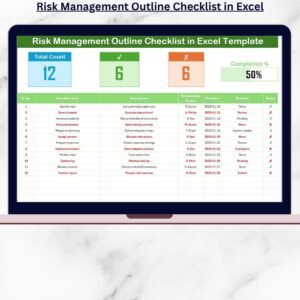
The Risk Management Documentation Checklist in Excel is a comprehensive and easy-to-use tool designed to help organizations track, manage, and document their risk management processes effectively. This Excel-based checklist helps businesses systematically identify, evaluate, and mitigate potential risks to ensure compliance and safeguard business operations.
Whether you’re managing project risks, financial risks, or operational risks, this tracker provides a structured way to ensure that all critical risk management tasks are completed in an organized manner. The tool is perfect for risk managers, compliance officers, and project managers looking to streamline their risk documentation and improve the overall risk management process.
Key Features of the Risk Management Documentation Checklist in Excel
📋 Risk Identification & Documentation
Identify and document potential risks in different areas such as operations, finance, and compliance. Ensure that every risk is clearly defined, categorized, and tracked.
📝 Risk Evaluation & Assessment
Evaluate each identified risk based on its probability and impact. Assign severity levels to prioritize high-risk areas that require immediate attention.
⚠️ Risk Mitigation & Action Plan
Create a detailed action plan to mitigate identified risks. Track the status of each mitigation step, ensuring that risks are properly addressed and resolved.
📅 Time-Based Monitoring & Tracking
Monitor risk management tasks and deadlines. Ensure timely completion of mitigation steps and assess the effectiveness of each action.
📈 Comprehensive Reporting & Analytics
Generate reports to analyze risk trends, track risk mitigation progress, and evaluate the effectiveness of risk management strategies. Use this data to make informed decisions and improve overall business safety.
⚙️ Customizable Checklist
Tailor the checklist to meet your specific risk management needs. Add custom fields for additional risk categories or adjust severity levels according to your organization’s requirements.
Why You’ll Love the Risk Management Documentation Checklist in Excel

✅ Centralized Risk Documentation
Keep all risk-related information in one organized location. Easily document, track, and update risks as they are identified and mitigated.
✅ Efficient Risk Mitigation Tracking
Track the status of each risk mitigation step to ensure that all actions are completed on time and effectively reduce risk.
✅ Streamlined Compliance & Reporting
Ensure compliance with internal and external risk management standards by keeping all documentation up to date. Generate reports to showcase risk mitigation progress.
✅ Improve Risk Decision Making
Use the checklist to evaluate risks based on their severity and impact, enabling you to make well-informed decisions that protect your business.
✅ Customizable & Scalable
This checklist is fully customizable, so it can be adapted to suit any organization or industry. Scale it as needed for small projects or large corporate risk management systems.
What’s Inside the Risk Management Documentation Checklist in Excel?
Risk Identification & Documentation: Document and track potential risks in your organization.
Risk Evaluation & Assessment: Evaluate risks by their likelihood and impact.
Risk Mitigation & Action Plan: Develop action plans to reduce or eliminate risks.
Time-Based Tracking: Monitor risk mitigation deadlines and progress.
Comprehensive Reporting & Analytics: Generate risk reports and analyze trends.
Customizable Layout: Adapt the checklist to meet your organization’s specific needs.
How to Use the Risk Management Documentation Checklist in Excel
1️⃣ Download the Template: Access the Risk Management Documentation Checklist in Excel instantly.
2️⃣ Document Risks: Identify and document potential risks across various business areas.
3️⃣ Evaluate & Prioritize Risks: Assess risks based on their severity and potential impact.
4️⃣ Create Mitigation Plans: Develop and track action plans for mitigating identified risks.
5️⃣ Monitor Progress & Effectiveness: Use time-based tracking to ensure timely risk mitigation and assess the effectiveness of actions taken.
Who Can Benefit from the Risk Management Documentation Checklist in Excel?
🔹 Risk Managers & Compliance Officers
🔹 Project Managers & Team Leaders
🔹 Financial & Operational Risk Managers
🔹 Small & Medium Enterprises (SMBs)
🔹 Large Corporations & Enterprises
🔹 Business Owners & Executives
Ensure your organization is protected and compliant with the Risk Management Documentation Checklist in Excel. Track, assess, and mitigate risks effectively, ensuring the continued success of your business operations.
Click here to read the Detailed blog post
Visit our YouTube channel to learn step-by-step video tutorials
Youtube.com/@PKAnExcelExpert
Compatibility and Requirements
- Works in Microsoft Excel desktop (Excel 2016 or later, or Microsoft 365).
- The checklist is a plain Excel file. Microsoft’s guide Excel for Windows training covers the basics if you are new to Excel.
Frequently Asked Questions
What can I document in this checklist?
You can document risks in areas such as operations, finance and compliance. Each risk is defined, categorized and tracked in one place.
How does the checklist evaluate risks?
Each risk is assessed by its probability and impact, and you assign a severity level. This shows which risks need attention first.
Can I track mitigation steps and deadlines?
Yes. You build an action plan for each risk and track the status of every mitigation step. Time-based tracking shows deadlines and whether the actions were completed.
Can I change the checklist for my organization?
Yes. You can add custom fields for extra risk categories and adjust the severity levels to fit your requirements.
Is there a dashboard version for risk management?
Yes. See the Risk Management Dashboard in Excel and the Risk Management Dashboard in Google Sheets.
Related Risk Management Templates
- Risk Assessment Checklist Template in Excel: a checklist for assessing risks
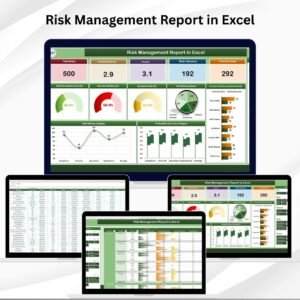
- Risk Management Report in Excel: a report view of your risks
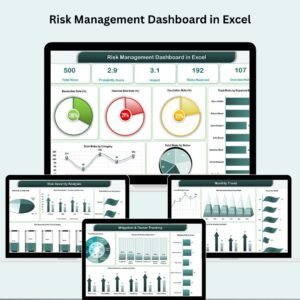
- Risk Management Dashboard in Excel: a dashboard to monitor risks
- Risk Assessment Checklist in Google Sheets: the Google Sheets edition
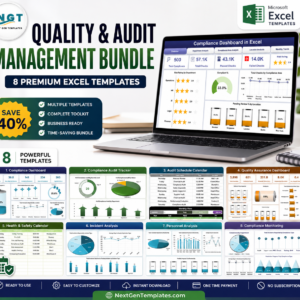
- Quality & Audit Management Bundle: 8 Excel templates for audit and quality work
Browse all Excel checklists.
























Reviews
There are no reviews yet.