



The Productivity Tracker KPI Dashboard in Excel is a ready-made, customizable template for tracking and improving productivity across tasks, projects and goals. It is built for individuals, team managers and small business owners who want one place to monitor key performance indicators (KPIs). You can follow task completion, goal progress and deadlines, then use clear visuals and trend analytics to make data-driven improvements.
This easy-to-use productivity tracker Excel template lets you track progress toward goals, measure productivity and analyze trends in your performance. With built-in KPI visuals, task tracking and progress monitoring, it helps you stay organized and motivated to reach your targets.
Key Features of the Productivity Tracker KPI Dashboard in Excel
Comprehensive KPI Tracking
Track multiple KPIs related to productivity, including task completion, goal progress, deadlines and more. Get a detailed overview of your performance and quickly spot the areas that need improvement.
Visual KPI Dashboard
Monitor your productivity on an interactive dashboard. Visual indicators such as progress bars, charts and performance summaries give you a quick and complete picture of your work without digging through rows of data.
Customizable for Your Needs
Adapt the dashboard to your personal or team productivity goals. Whether you track daily tasks, weekly goals or long-term projects, you can customize the template to fit the way you work.
Task and Goal Tracking
Set tasks and goals with clear deadlines and follow your progress toward them. Task and goal tracking in one view makes it easy to see which goals are on track and which need more attention.
Progress Monitoring and Analytics
Use the analytics to identify trends in your productivity, measure performance over time and make data-driven adjustments to stay on target.
User-Friendly Interface
The simple, intuitive design makes it easy to update tasks, track KPIs and visualize performance, giving you a smooth experience from day one.
Why You’ll Love This Productivity Tracker
- Track your progress toward goals: Set, track and analyze your productivity goals so you know you are on the right path.
- Monitor up-to-date performance: Get a current view of your productivity and identify areas for improvement with performance analytics.
- Customizable for any project or team: Whether you track personal productivity or team performance, the dashboard is fully customizable to suit your goals.
- Make data-driven decisions: Use performance data and analytics to make informed decisions and optimize your workflow.
- Stay organized and focused: Keep on top of tasks, deadlines and performance so you stay focused on your objectives.
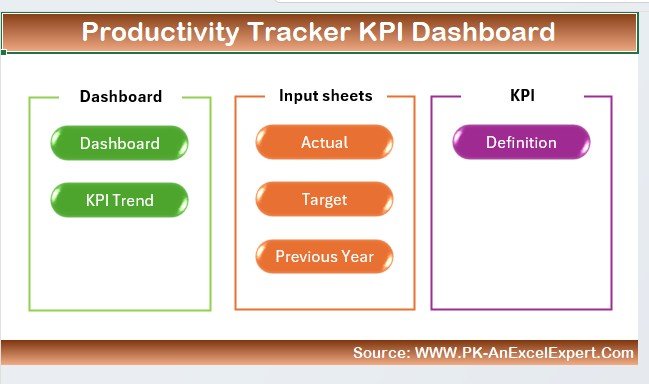
What’s Inside the Productivity Tracker KPI Dashboard in Excel?
| Component | What it does |
|---|---|
| KPI Tracking | Monitors key productivity metrics, including task completion rates, goal progress and performance trends. |
| Task & Goal Management | Tracks daily tasks, long-term goals and deadlines to keep you on schedule. |
| Performance Dashboard | A visual summary of your progress with charts and graphs for your key KPIs. |
| Progress Analytics | Measures productivity trends so you can adjust strategies and optimize performance. |
| Customizable Sections | Lets you modify the dashboard to reflect your own productivity metrics and goals. |
Who Is This KPI Dashboard For?
- Individuals looking to improve personal productivity
- Teams and managers who need team performance tracking
- Entrepreneurs and small business owners managing many tasks and goals
- Professionals who need to stay focused on goals and deadlines
- Anyone looking to optimize their workflow and efficiency
How to Use the Productivity Tracker KPI Dashboard
- Download the template: Get instant access to your productivity tracker KPI dashboard and open it in Excel.
- Customize your KPIs and goals: Add your specific productivity metrics, tasks and goals.
- Track tasks and monitor performance: Enter your tasks, track deadlines and review performance on the visual dashboard.
- Analyze data and optimize: Use the analytics and performance data to adjust and improve your productivity strategies.
Want a full walkthrough? Click here to read the Detailed blog post
Visit our YouTube channel for step-by-step video tutorials: Youtube.com/@PKAnExcelExpert
Frequently Asked Questions
What does the Productivity Tracker KPI Dashboard in Excel track?
It tracks productivity KPIs such as task completion, task completion rates, goal progress, deadlines and performance trends, and presents them with progress bars, charts and performance summaries.
Can I use it for personal productivity as well as for a team?
Yes. The template is designed for both personal productivity and team performance tracking, so individuals, managers and small business owners can all use it.
Can I customize the KPIs and goals?
Yes. The dashboard includes customizable sections, so you can add your own productivity metrics, tasks and goals, whether you track daily tasks, weekly goals or long-term projects.
Does it help with deadlines?
Yes. You can set tasks and goals with clear deadlines and see at a glance which goals are on track and which need more attention.
Is it hard to update?
No. The productivity tracker Excel template has a simple, user-friendly interface that makes updating tasks and tracking KPIs straightforward.
Where can I learn how to use it step by step?
Read the detailed blog post linked above or watch the video tutorials on the PK: An Excel Expert YouTube channel.
Last updated: October 2026
Compatibility and Requirements
- Works in Microsoft Excel desktop (Excel 2016 or later, or Microsoft 365).
- The dashboard shows progress bars, charts and performance summaries. Microsoft explains how charts work in Create a chart from start to finish.
Related Productivity Templates
- Productivity Tracker KPI Dashboard in Power BI: the same productivity tracker as a Power BI dashboard
- Employee Productivity Tracking KPI Dashboard in Excel: productivity KPIs for employees in Excel
- Employee Productivity Dashboard in Excel: another Excel view of team productivity
- Employee Productivity Tracking KPI Dashboard in Google Sheets: a Google Sheets option
- KPI Dashboard Library (Excel): 15 KPI dashboard templates in one download
Browse all Excel KPI dashboards.


























Reviews
There are no reviews yet.