

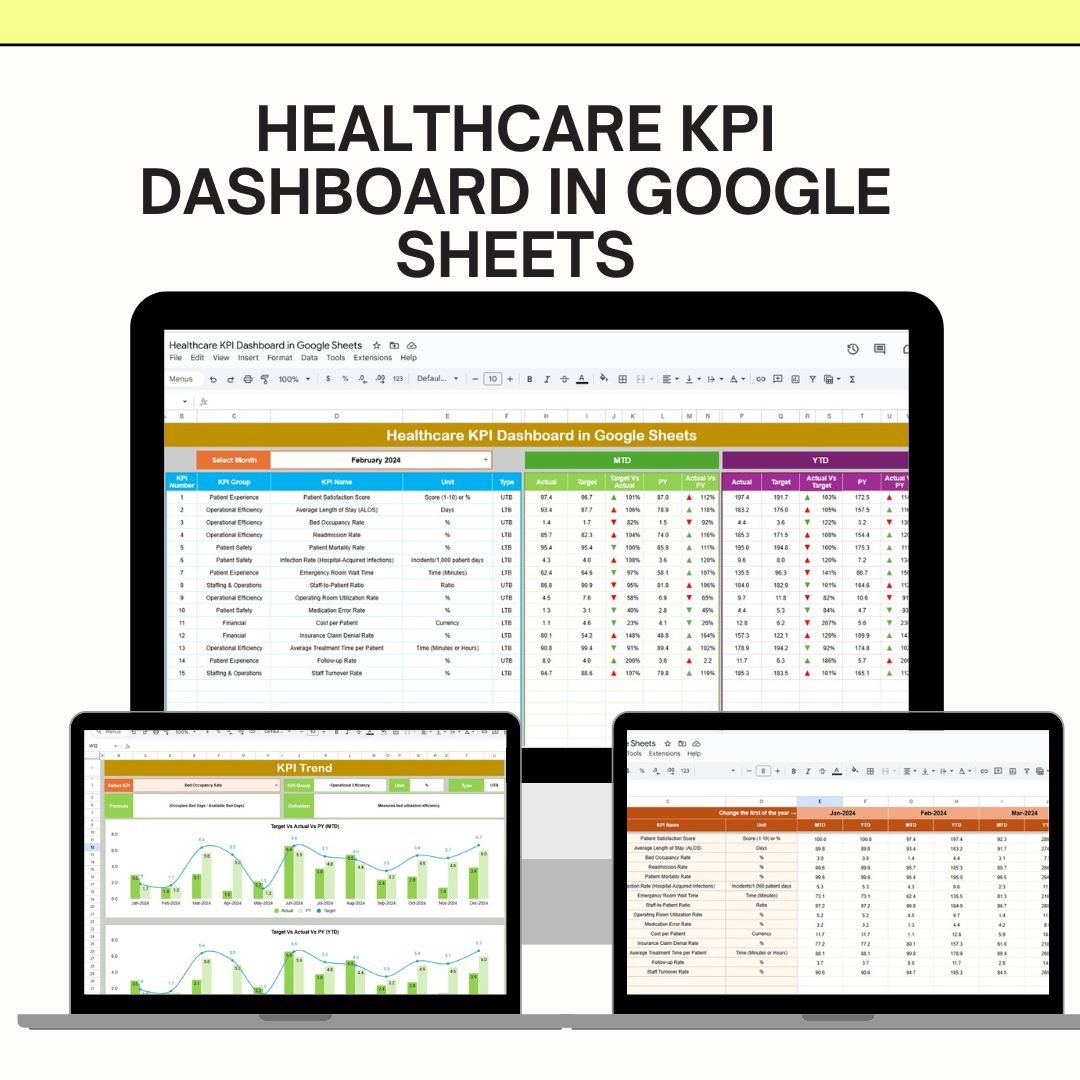
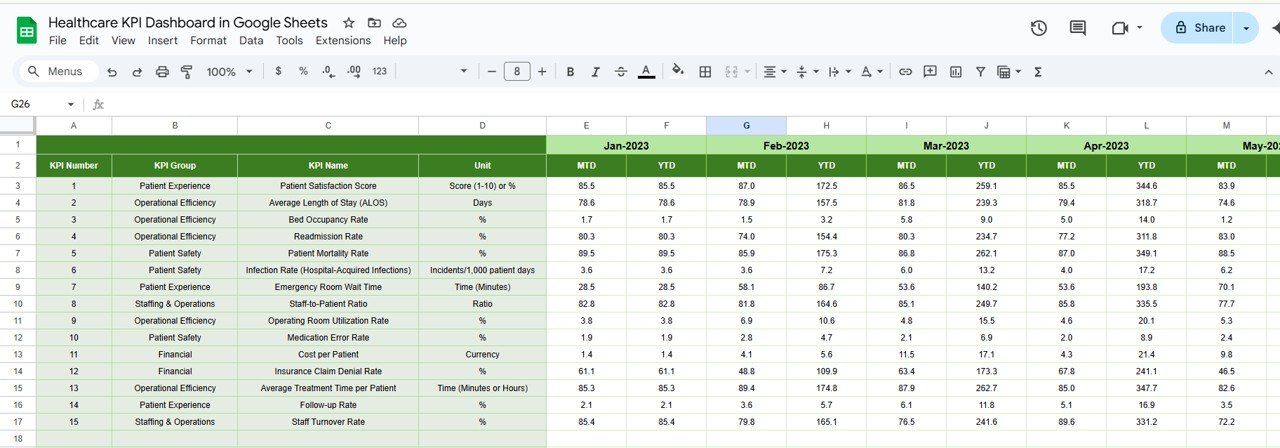

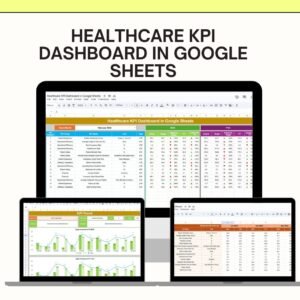
The Healthcare KPI Dashboard Template in Google Sheets is an essential tool for healthcare organizations looking to track, analyze, and optimize their key performance indicators (KPIs). Whether you’re managing a hospital, clinic, or healthcare facility, this template is designed to streamline the process of performance tracking and help teams make informed decisions based on real-time data.
This Google Sheets-based dashboard is easy to use, fully customizable, and designed to capture critical healthcare metrics. By using this template, you can gain clear insights into operational performance, identify areas needing attention, and drive continuous improvement in patient care, hospital efficiency, and overall healthcare service quality.
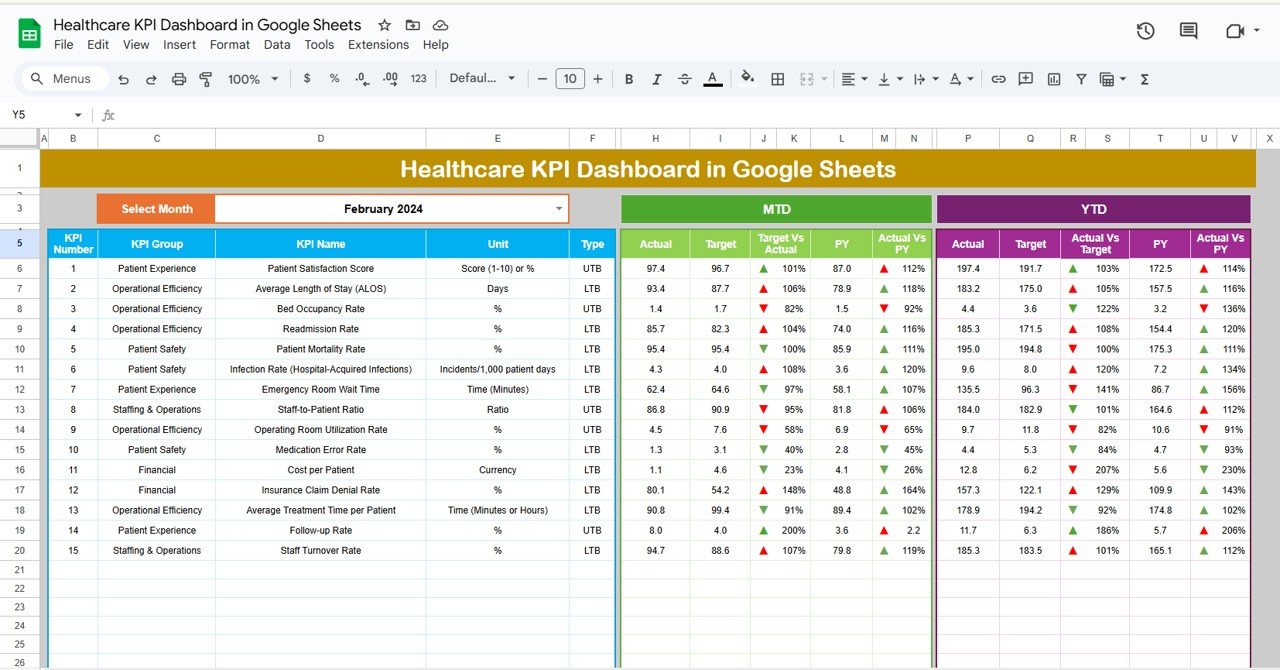
Key Features of the Healthcare KPI Dashboard Template:
📊 Comprehensive KPI Tracking
Monitor vital healthcare metrics that impact both patient care and operational performance. Track key indicators such as:
Patient Satisfaction Rates – Gauge the quality of care by tracking patient feedback and satisfaction.
Average Length of Stay – Evaluate the average time patients spend in the hospital and assess efficiency.
Emergency Room Wait Times – Monitor ER wait times and identify bottlenecks for improved service.
Bed Occupancy Rates – Keep an eye on how efficiently your facility is utilizing its available space.
Readmission Rates – Track patient readmissions to identify areas for improvement in care quality.
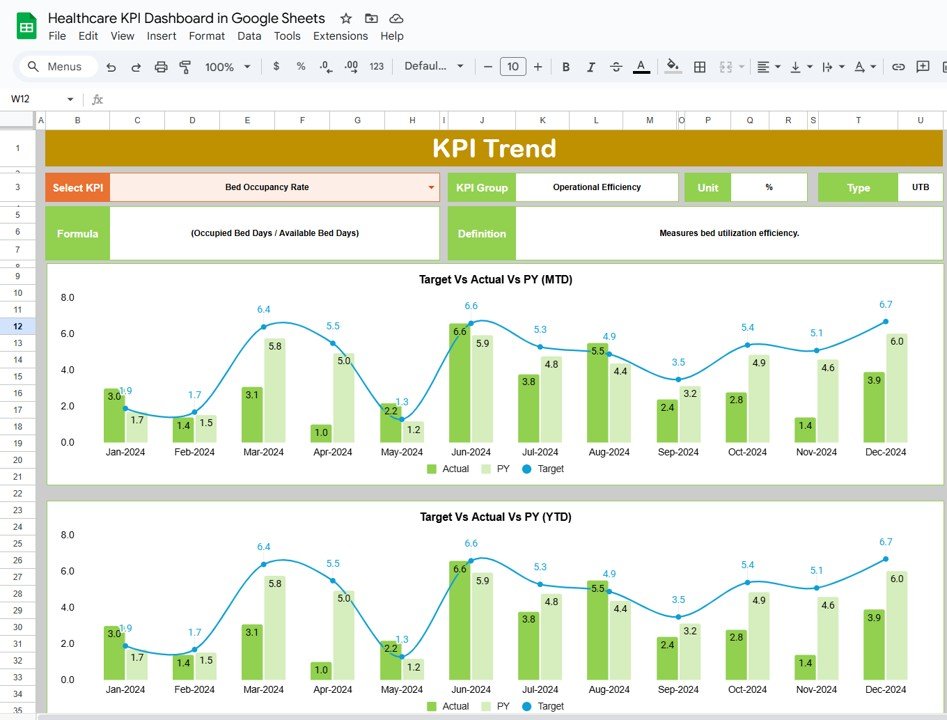
📈 Dynamic Data Visualization
Leverage interactive charts and graphs to visualize performance trends over time. The dashboard includes:
Trend Analysis – Use line graphs or bar charts to track changes in KPIs across different time periods (monthly, quarterly, or yearly).
Real-Time Updates – The template updates automatically as you enter data, providing you with live insights into your healthcare operations.
Customizable Views – Adjust the dashboard to fit your needs by modifying the data fields and KPIs according to your specific objectives.
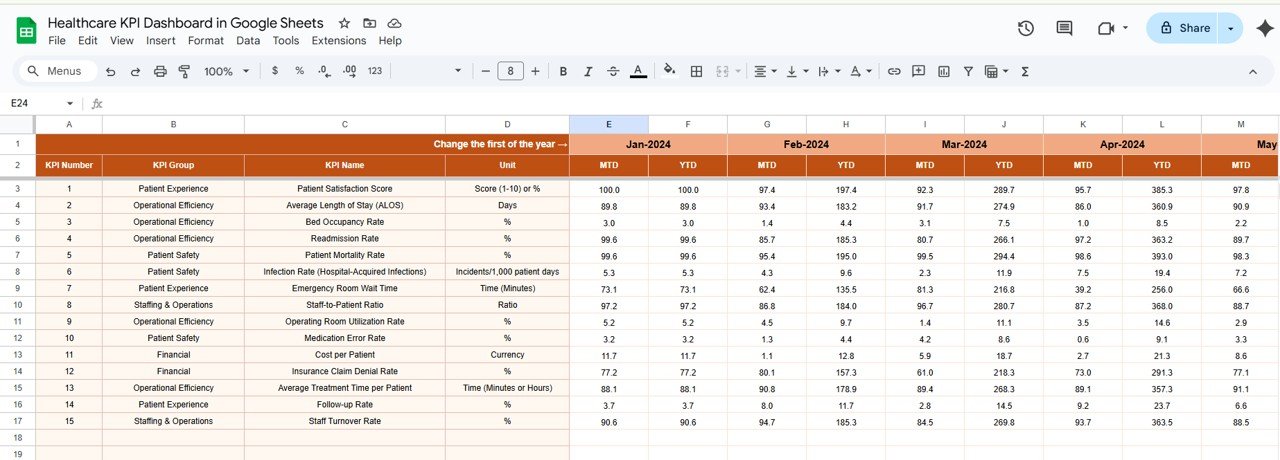
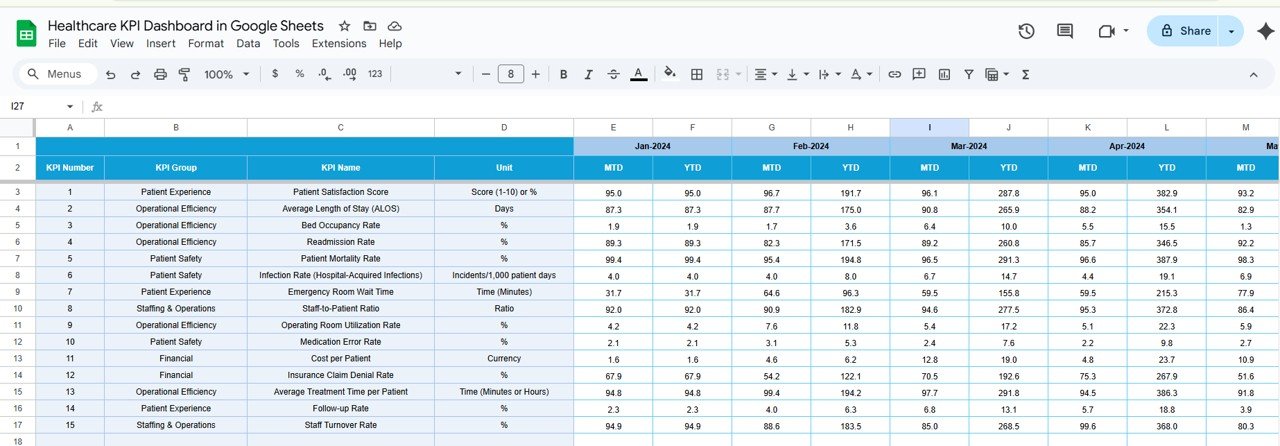
📅 Monthly and Cumulative Data Views
Assess performance over both short-term and long-term periods to get a comprehensive view of your healthcare facility’s progress:
Monthly Overview – Quickly review performance on a monthly basis to ensure that immediate goals are being met.
Cumulative Data – Track year-to-date progress and see how your healthcare facility is performing relative to annual targets.
💡 Why You’ll Love This Healthcare KPI Dashboard Template:
Streamlined Performance Management – Track all essential healthcare metrics in one place, saving time and ensuring accurate reporting.
Improved Patient Care – By consistently monitoring key metrics such as patient satisfaction and readmission rates, healthcare teams can improve care delivery.
Data-Driven Decisions – Make informed, actionable decisions based on up-to-date data that supports your facility’s strategic goals.
Operational Efficiency – Analyze and optimize processes, identify inefficiencies, and reduce operational costs.
Customizable to Your Needs – Tailor the dashboard to your facility’s specific KPIs and reporting requirements.
What’s Included in the Healthcare KPI Dashboard Template:
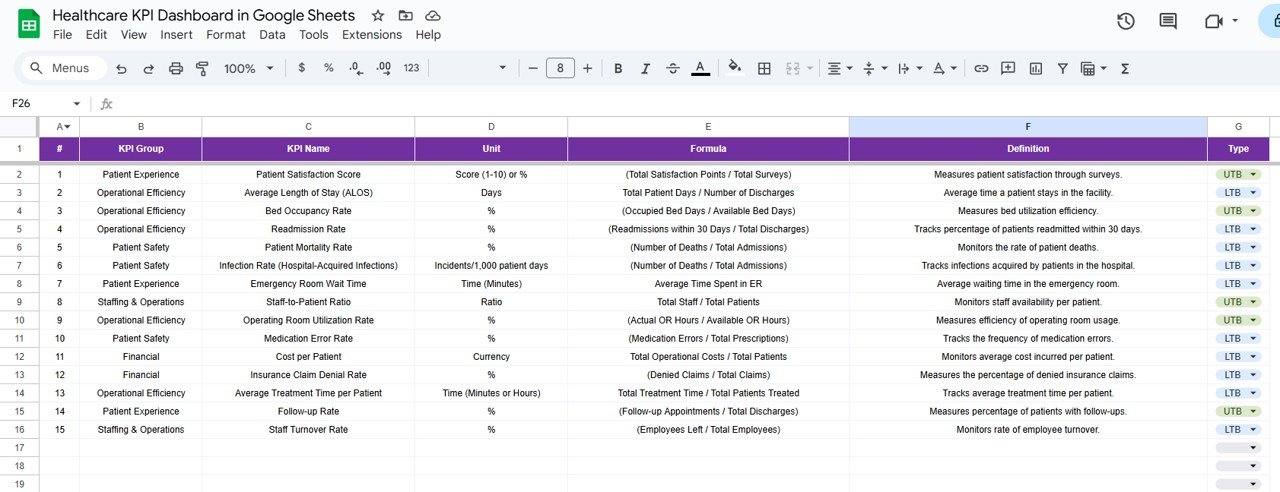
KPI Definitions – Clear and concise definitions for each tracked KPI, helping all team members understand what is being measured and why.
Data Entry Fields – Easily input actual data and compare it to your targets to assess how well your facility is performing.
Trend Analysis Section – Visualize how your KPIs have changed over time and gain insights into areas of growth and improvement.
Customizable Layout – Adjust the template’s layout and design to match your reporting needs and preferences.
How to Use the Healthcare KPI Dashboard Template:
1️⃣ Download the Template – Get started by downloading the Google Sheets template directly to your Google Drive.
2️⃣ Customize KPIs – Personalize the dashboard to track the metrics most relevant to your healthcare facility.
3️⃣ Input Data – Enter your healthcare data into the pre-defined fields and let the dashboard update in real time.
4️⃣ Track Performance – Use the dynamic charts and graphs to monitor key KPIs and make data-driven decisions.
5️⃣ Optimize Operations – Use the insights provided by the dashboard to identify improvement areas and implement strategies for better healthcare delivery.
Who Will Benefit from This Healthcare KPI Dashboard Template?
Healthcare Administrators – Get a bird’s-eye view of hospital or clinic performance to make informed decisions.
Clinical Managers – Focus on patient care metrics to ensure that quality standards are being met.
Quality Improvement Teams – Use the template to identify areas where care processes can be improved.
Healthcare Data Analysts – Analyze operational data and provide insights that can shape strategic planning.
Hospital or Clinic Managers – Monitor hospital operations and drive improvements in space utilization, patient care, and overall efficiency.
By using the Healthcare KPI Dashboard Template, you can efficiently track and improve the performance of your healthcare facility. This simple yet powerful tool helps ensure high-quality patient care, optimize operations, and drive continuous performance improvements.
Click here to read the detailed blog post:
https://neotechnavigators.com/healthcare-kpi-dashboard-in-google-sheets/
Visit our YouTube channel for step-by-step video tutorials:
YouTube.com/@PKAnExcelExpert
Watch the step-by-step video Demo:
Compatibility and Requirements
- Works in Google Sheets with a free Google account and a web browser.
- The dashboard updates as you enter data, so there is nothing to install.
- New to charts in Google Sheets? See Add & edit a chart or graph.
Frequently Asked Questions
Which healthcare KPIs does it track?
Patient satisfaction rates, average length of stay, emergency room wait times, bed occupancy rates and readmission rates.
Can I see monthly and year-to-date results?
Yes. There is a monthly overview and a cumulative view that tracks year-to-date progress against annual targets.
Can I compare actuals with targets?
Yes. You enter actual data in the data entry fields and compare it with your targets.
Is there an Excel or Power BI version?
Yes. See the Healthcare KPI Dashboard in Excel and the Power BI edition.
Related Healthcare Templates
- Healthcare KPI Dashboard in Excel: the same KPIs in Excel
- Healthcare KPI Dashboard in Power BI: for Power BI reporting
- Healthcare KPI Scorecard in Google Sheets: a scorecard view in Google Sheets
- Hospital Patient Flow Dashboard in Google Sheets: admissions and patient flow
- Healthcare & Hospital Management Bundle: 8 healthcare templates in one download
Browse all Google Sheets KPI dashboards or the Excel health and safety templates.


























Reviews
There are no reviews yet.