



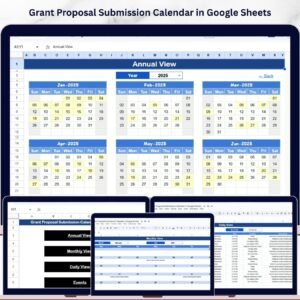
The Grant Proposal Submission Calendar in Excel is a ready-made template for non-profits, grant writers, organizations and individuals who need to manage several grant applications at once. It keeps every submission deadline, funder requirement and follow-up date in one place. Whether you are applying for government funding, corporate grants or philanthropic opportunities, it helps you submit on time and stay organized.
This user-friendly Excel template lets you organize grant opportunities, track submission deadlines and set reminders for upcoming proposals. With visual tracking, a grant progress dashboard and an easy-to-navigate interface, it supports simple, efficient grant management from first draft to approval.

Key Features of the Grant Proposal Submission Calendar in Excel
- Comprehensive grant management: Track all your grant proposals in one place. Organize deadlines, submission requirements and related tasks for each grant opportunity.
- Real-time tracking and reminders: Stay on top of important dates with automatic reminders for submission deadlines, follow-up dates and other critical tasks that need to be completed.
- Customizable calendar view: Add grant opportunities, deadlines and other important dates, and adjust the calendar to fit your organization’s specific needs.
- Grant progress dashboard: Visualize the status of each grant proposal, from submission to approval, with an interactive dashboard that tracks your progress.
- Detailed proposal tracking: Record key details about each proposal, including the funder’s requirements, contact information and submission status, so nothing is missed.
- User-friendly interface: A clean, intuitive design makes the template easy to navigate and keeps grant management simple.
Why You’ll Love This Grant Proposal Submission Calendar in Excel
- Streamline grant management: Efficiently track and manage all your grant applications, keeping submissions organized and on schedule.
- Stay on top of deadlines: Track important submission deadlines and set up reminders so you meet every deadline on time.
- Customizable for your needs: Adapt the calendar to your organization’s grant application process, adding and removing proposal opportunities as needed.
- Improve proposal success: By staying organized and ahead of deadlines, you increase the chances of your proposals being submitted on time and meeting all grant requirements.
- Visualize your grant progress: Use the dashboard for a quick overview of proposal statuses and to confirm that all critical tasks are completed.
What’s Inside the Template
| Component | What it does |
|---|---|
| Grant Calendar Overview | A clear view of all upcoming grant deadlines, submission dates and follow-up tasks. |
| Grant Proposal Tracker | Tracks detailed information about each grant, including deadlines, contact info and task status. |
| Real-Time Reminders & Notifications | Automatic alerts that help you stay ahead of submission deadlines and tasks. |
| Grant Progress Dashboard | A visual summary of your grant application progress and upcoming deadlines. |
| Customizable Calendar | Easily adjusted to meet the specific needs of your grant process. |
Who Is It For?
The Grant Proposal Submission Calendar in Excel is built for anyone who juggles multiple funding applications and cannot afford to miss a date:
- Non-profit organizations
- Grant writers and fundraisers
- Business owners seeking grants
- Project managers
- Educational institutions
- Government agencies
If you work on government, corporate or philanthropic funding, this Excel calendar makes managing grant applications easier and more efficient.
How to Use the Grant Proposal Submission Calendar
- Download the template: Access your Excel calendar instantly after purchase.
- Add grant opportunities: Enter details for each grant proposal, including submission deadlines and requirements.
- Track progress: Use the dashboard and reminders to monitor progress and ensure timely submissions.
- Stay on track: Set and adjust deadlines, reminders and key tasks as you move through the grant application process.
Click here to read the Detailed blog post
Visit our YouTube channel to learn with step-by-step video tutorials: Youtube.com/@PKAnExcelExpert
Frequently Asked Questions
What is the Grant Proposal Submission Calendar in Excel?
It is a customizable Excel template that organizes grant opportunities, submission deadlines, requirements and follow-up tasks, with a grant proposal tracker, reminders and a grant progress dashboard.
Who should use this grant calendar?
It suits non-profit organizations, grant writers and fundraisers, business owners seeking grants, project managers, educational institutions and government agencies.
Can I track multiple grant applications at once?
Yes. The template is designed to help you manage multiple applications at once, with each proposal’s deadlines, contact information, funder requirements and submission status kept in one place.
Does it remind me about upcoming submission deadlines?
Yes. It includes real-time reminders and notifications for submission deadlines, follow-up dates and other critical tasks.
Can I customize the calendar?
Yes. You can add or remove proposal opportunities, deadlines and important dates, and adjust the calendar to match your organization’s grant application process.
How do I get started?
Download the template after purchase, add your grant opportunities, then use the dashboard and reminders to track progress. The linked blog post and YouTube tutorials offer further guidance.
Last updated: October 2026
Compatibility and Requirements
- Works in Microsoft Excel desktop (Excel 2016 or later, or Microsoft 365).
- New to Excel? Microsoft’s Excel for Windows training covers the basics.
Related Grant and Nonprofit Templates
- Grant Proposal Submission Calendar in Google Sheets: the same calendar in Google Sheets
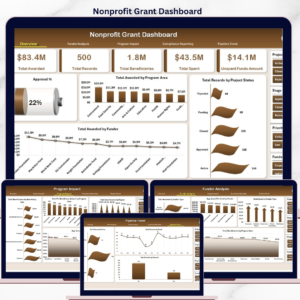
- Nonprofit Grant Dashboard in Excel: report on grants won and spent
- Grant Management KPI Dashboard in Excel: grant KPIs against targets
- Nonprofit Grant Dashboard in Google Sheets: grant reporting in Google Sheets
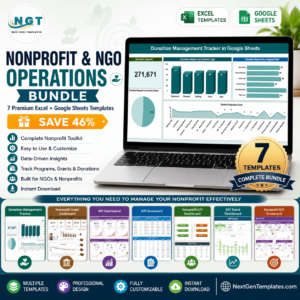
- Nonprofit & NGO Operations Bundle: 7 nonprofit templates in one download
Browse all Excel calendars or the template bundles.






Reviews
There are no reviews yet.