



Key Features of Genetic Testing Labs KPI Dashboard
Unlock the power of data-driven decision-making with our Genetic Testing Labs KPI Dashboard, a comprehensive digital tool designed specifically for genetic testing laboratories. This dashboard offers an intuitive and interactive platform to monitor, analyze, and optimize your lab’s key performance indicators (KPIs) with precision and ease.
Featuring 7 dedicated worksheets, this dashboard streamlines your performance tracking process:
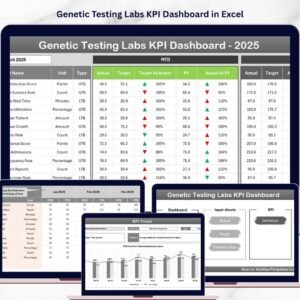
- 🏠 Home Sheet: An index page with six easy navigation buttons, allowing quick access to all key sections. Its clean layout ensures effortless movement across sheets.
- 📊 Dashboard Sheet: The main control panel where you select the month via a drop-down (cell D3) and instantly view all KPIs updated for that period. Compare Month-To-Date (MTD) and Year-To-Date (YTD) actuals, targets, and previous year data with dynamic conditional formatting that highlights performance trends using up/down arrows.
- 📈 KPI Trend Sheet: Choose any KPI from the drop-down (cell C3) to see detailed information including KPI group, unit, type (whether lower or higher values are better), formula, and definition. Visualize MTD and YTD trends through intuitive charts comparing actuals, targets, and previous year numbers.
- ✍️ Actual Numbers Input Sheet: Input your real-time MTD and YTD data effortlessly. Easily adjust the starting month of the year in cell E1 to align with your fiscal calendar.
- 🎯 Target Number Input Sheet: Enter your monthly MTD and YTD targets for each KPI, enabling precise goal tracking and performance comparison.
- 📅 Previous Year Number Sheet: Record last year’s performance figures to benchmark current progress and identify growth or decline areas.
- 📚 KPI Definition Sheet: Define each KPI clearly by entering its name, group, unit, formula, and detailed description. Specify whether the KPI is ‘Lower the Better’ (LTB) or ‘Upper the Better’ (UTB) for accurate performance interpretation.
What’s Inside the Genetic Testing Labs KPI Dashboard
This all-in-one digital product delivers a powerful Excel-based dashboard crafted for genetic testing labs, including:
- 📁 Seven interactive worksheets designed for seamless navigation and data management.
- 🔢 Dynamic KPI tracking with monthly and yearly views.
- 📉 Conditional formatting and visual arrows indicating performance trends.
- 📊 Comprehensive trend charts to visualize KPI progress over time.
- 📝 Easy data entry sheets for actuals, targets, and previous year figures.
- 🧬 Detailed KPI definitions and formulas tailored for genetic testing industry standards.
- ⚙️ User-friendly drop-down menus for quick selections and adjustments.
- 📆 Customizable fiscal year start month for personalized reporting alignment.
How to Use the Genetic Testing Labs KPI Dashboard
Getting started with the Genetic Testing Labs KPI Dashboard is straightforward and requires no advanced technical skills:
- 🔍 Begin at the Home Sheet to familiarize yourself with the dashboard’s structure and navigate to desired sections.
- 📅 Select the relevant month on the Dashboard Sheet to instantly update all KPIs with current data.
- 📈 Use the KPI Trend Sheet to analyze performance trends for specific KPIs, helping to identify areas for improvement or celebrate successes.
- ✍️ Regularly input your Actual Numbers and Target Numbers in their respective sheets to keep the dashboard up-to-date.
- 🔄 Update Previous Year Numbers annually to maintain accurate benchmarking and trend analysis.
- 📚 Refer to the KPI Definition Sheet to understand each KPI’s purpose and calculation method, ensuring clarity across your team.
- 📊 Use the dashboard insights to make informed operational decisions, optimize lab performance, and drive growth.
Who Can Benefit from This Genetic Testing Labs KPI Dashboard
This dashboard is an essential tool for a broad range of professionals within the genetic testing field, including:
- 🧪 Lab Managers: Gain real-time insights into lab productivity and efficiency.
- 📊 Data Analysts: Easily track and interpret KPI data to support strategic planning.
- 👩🔬 Quality Control Teams: Monitor performance against targets to uphold lab standards.
- 📈 Executives & Stakeholders: Access clear, concise KPI summaries for high-level decision-making.
- 🧬 Genetic Testing Specialists: Understand operational metrics that impact test accuracy and turnaround time.
- 🎯 Project Managers: Track progress and align team goals with measurable outcomes.
Whether you’re a small lab or a large facility, this KPI Dashboard empowers you to harness your data effectively and boost overall performance.
Click here to read the Detailed blog post.
Visit our YouTube channel to learn step-by-step video tutorials.

Compatibility and Requirements
- Works in Microsoft Excel desktop (Excel 2016 or later, or Microsoft 365).
- The month selector (cell D3) and the KPI picker (cell C3) are drop-down lists. Microsoft’s guide to creating a drop-down list explains how these lists work.
Frequently Asked Questions
What sheets are in the Genetic Testing Labs KPI Dashboard?
Seven sheets: Home, Dashboard, KPI Trend, Actual Numbers Input, Target Number Input, Previous Year Number and KPI Definition.
Can I match the dashboard to our fiscal year?
Yes. Set the starting month of the year in cell E1 of the Actual Numbers Input sheet.
How do I view one KPI over time?
Choose the KPI from the drop-down in cell C3 of the KPI Trend sheet. Charts show MTD and YTD actuals against targets and last year.
Can I define our own lab KPIs?
Yes. Enter each KPI’s name, group, unit, formula and definition in the KPI Definition sheet, and mark it as Lower the Better or Upper the Better.
Related Lab and Life Sciences Templates
- Laboratory Instruments KPI Dashboard in Excel: KPIs for lab equipment.
- Biotechnology KPI Dashboard in Excel: KPI tracking for biotech teams.
- Medical Research KPI Dashboard in Excel: KPIs for medical research work.
- Clinical Trials Management KPI Dashboard in Excel: KPIs for running clinical trials.
- Healthcare & Hospital Management Bundle: 8 healthcare templates in one bundle.
Browse all Excel KPI dashboards.




























Reviews
There are no reviews yet.