



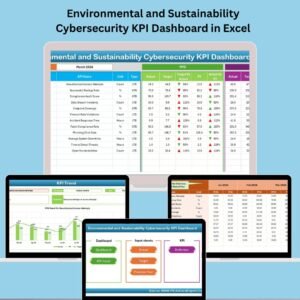
In today’s fast-evolving digital landscape, protecting environmental and sustainability data against cyber threats is more crucial than ever. That’s why we created the Environmental and Sustainability Cybersecurity KPI Dashboard in Excel — your all-in-one Excel-based solution to track, measure, and analyze cybersecurity performance tailored for sustainability-focused organizations. 🌍📊
Whether you’re monitoring threat mitigation efficiency or response time to incidents, this powerful KPI dashboard helps you stay in control — all within the simplicity of Excel. Let’s explore what makes this dashboard an essential tool for your cybersecurity team.
🛠️ Key Features of Environmental and Sustainability Cybersecurity KPI Dashboard
🏠 Home Sheet – Easy Navigation

📍 Interactive buttons to instantly jump to:
Dashboard
KPI Trend
Actual Numbers
Target Data
Previous Year Data
KPI Definition
🔄 Organized structure ensures smooth user experience
📊 Dashboard Sheet – Real-Time Insights
📅 Select Month from dropdown (cell D3)
📈 View KPI data for MTD (Month-To-Date) & YTD (Year-To-Date)
📉 Compare Actual vs. Target and Actual vs. Previous Year
📌 Up/Down Arrows with conditional formatting for visual performance feedback
All charts and values auto-update based on the selected month
📈 KPI Trend Sheet – Analyze KPI Trends Over Time
🔽 Select KPI from dropdown (C3)
📌 View complete details: KPI Group, Unit, Type (LTB or UTB), Formula, and Definition
📊 MTD and YTD trend charts show Actual, Target, and Previous Year for better forecasting
✍️ Actual Numbers Input Sheet
📅 Set base month (E1), then enter monthly actuals for each KPI
🧮 Input fields for both MTD and YTD metrics
📌 Easy-to-update structure for regular data tracking
🎯 Target Sheet
Input MTD and YTD targets per KPI
Structured month-by-month columns
Serves as benchmark data to assess performance
📆 Previous Year Number Sheet
Enter past year’s KPI values
Provides context for year-over-year analysis
Mirrors the format of current year’s actuals for accurate comparison
📘 KPI Definition Sheet
Define each KPI clearly with these fields:
KPI Name
KPI Group
Unit
Formula
Type (LTB/UTB)
Full KPI Definition
Ensures transparency and documentation of performance measures
📂 What’s Inside the Dashboard File?
✅ 7 Interactive Worksheets
✅ Month selector to view dynamic results
✅ Auto-calculating performance comparisons
✅ MTD and YTD trend visualization
✅ Easy data input for Actuals, Targets, and PY
✅ Conditional formatting for instant status view
✅ Editable KPI Definition table
✅ Built-in documentation and structure
Whether you’re reporting to senior management or refining internal strategies, this dashboard is your go-to cybersecurity KPI solution for sustainability-focused organizations.
🧑💻 How to Use the Cybersecurity KPI Dashboard in Excel
🧾 Open the Home Sheet and navigate using the buttons
📥 Go to Actual Numbers Input and enter monthly MTD/YTD data
🎯 Update Target Sheet with monthly goals per KPI
📆 Fill in Previous Year Numbers for baseline comparison
📊 Head to the Dashboard and select the month for dynamic insights
📈 Use the KPI Trend Sheet to analyze performance over time
📘 Maintain your KPI Definition sheet for clarity and team alignment
No complex setup. Just open Excel, enter your numbers, and gain insights instantly!
🎯 Who Can Benefit from This Dashboard?
🛡️ Cybersecurity Teams – Monitor threat resolution, incident response, and control failures
🌱 Sustainability Managers – Secure your environmental data systems
🏢 Compliance Officers – Ensure KPIs are aligned with regulatory standards
📈 Data Analysts – Get visual insights and export-ready reports
🌍 Green-Tech Startups & Enterprises – Merge sustainability and security reporting
🧑💼 Executive Leadership – Get a snapshot of cybersecurity posture at a glance
Whether you’re tracking 10 KPIs or 50 — this dashboard is scalable, accurate, and highly customizable.
🔗 Click here to read the Detailed blog post
🔗 Visit our YouTube channel to learn step-by-step video tutorials
Watch the step-by-step video tutorial:
Compatibility and Requirements
- Works in Microsoft Excel desktop (Excel 2016 or later, or Microsoft 365).
- Up and down arrows use conditional formatting. Microsoft explains it in Use conditional formatting to highlight information.
Frequently Asked Questions
Which sheets does the file include?
Seven sheets: Home, Dashboard, KPI Trend, Actual Numbers Input, Target, Previous Year Number and KPI Definition.
How do I pick the month to review?
Select the month from the dropdown on the Dashboard sheet. MTD and YTD values, comparisons and charts update for that month.
What comparisons does it show?
Actual against target and actual against the previous year, for both MTD and YTD, with up and down arrows for status.
What do LTB and UTB mean?
They are KPI types on the KPI Definition sheet: lower the better and upper the better.
Can I add my own KPIs?
Yes. The KPI Definition table is editable, and you enter actuals, targets and previous year values for each KPI.
Related Sustainability and Security KPI Templates
- Environmental and Sustainability Compliance KPI Dashboard in Excel: compliance KPIs in the same series
- Environmental and Sustainability Operations KPI Dashboard in Excel: operations KPIs in the same series
- Cybersecurity KPI Dashboard in Excel: general cybersecurity KPIs
- Environmental, Social, and Governance (ESG) Dashboard in Excel: wider ESG analysis
- Energy & ESG Sustainability Bundle: 8 sustainability templates in one download
Browse all Excel KPI dashboards or the IT templates.






























Reviews
There are no reviews yet.